Official development blog
[ Latest Cogmind Release Notes: Feb 2026, "Unchained More" ]

Year 2 of the Cogmind

Cogmind has been in mostly full-time development for 2.47* years now, and things got especially interesting this year with alpha opening up. Again it’s time to recap the past year’s highlights and make, um, “educated guesses” as to what the future holds ;).

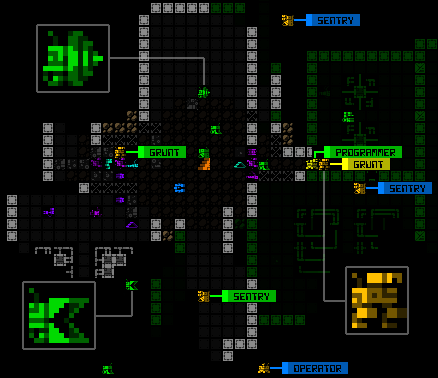
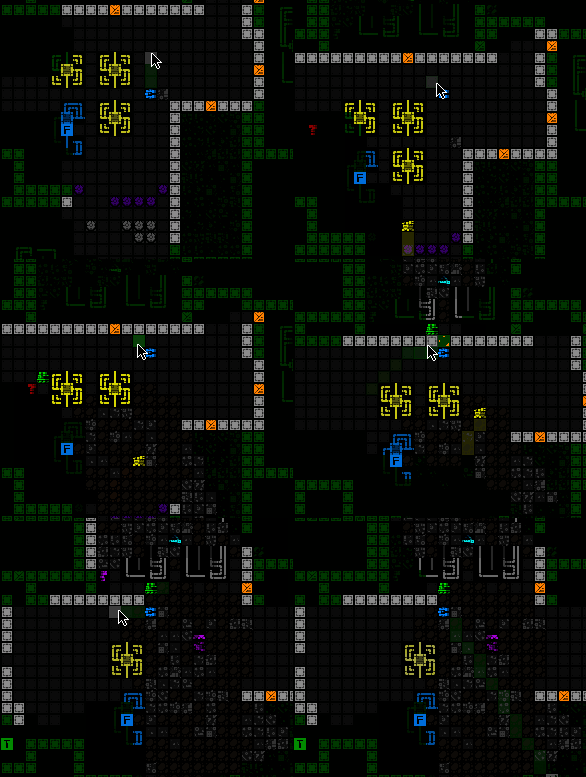
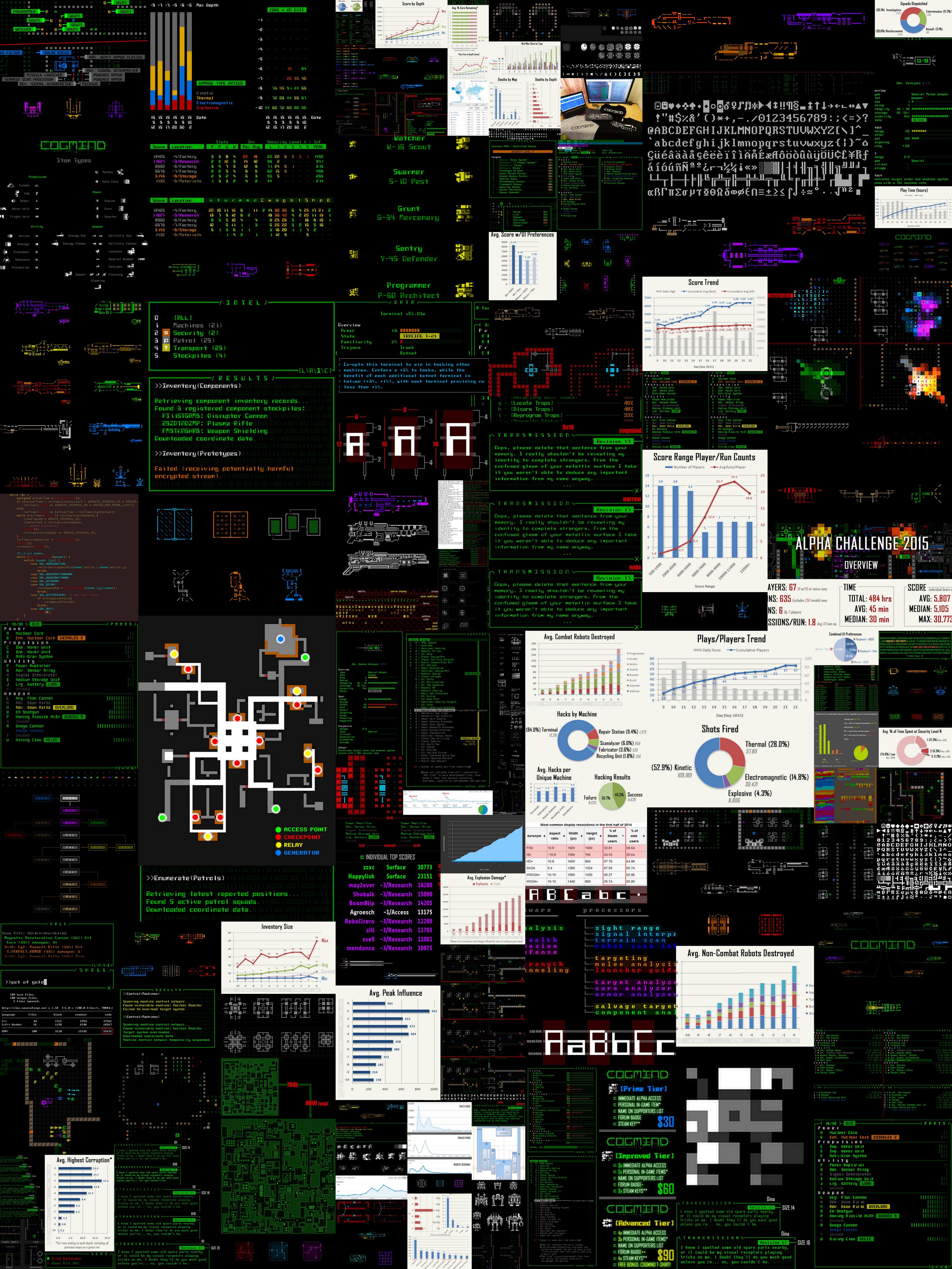
Like last time, let’s first check out a collage of development images from the past year:

cogmind_development_year_2

Images from the past year of Cogmind development as shown on this blog (click for mega size).

I’ve been showing a heck of a lot of gifs instead of static images, so that doesn’t really do the past year justice, but it’s still pretty to look at :D.

Development Timeline

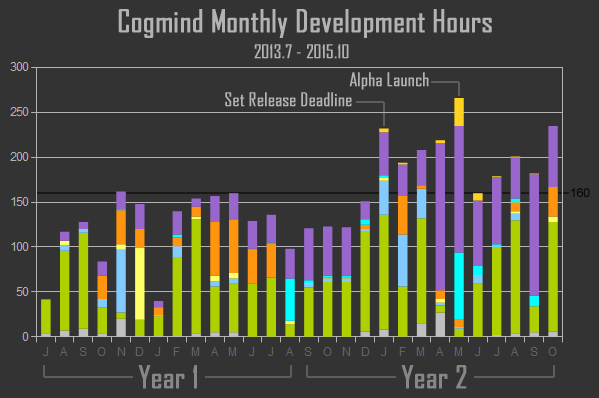
In the period since full-time development began, I’ve invested 4,339 hours of work into all things Cogmind. Below is a summary of how work was distributed over that period:

cogmind_monthly_development_hours_201307-201510

Cogmind Monthly Development Hours, 2013.7-2015.10 (click for crisper full-size version). (The color coding is for different aspects of development tackled each month, which I’ll be covering in detail in a future article along with many other interesting charts when we have even more data :D)

Comparing year 1 and year 2 (note that for discussion purposes each of these “years” was more like 14 months), it’s obvious the average input varied between the two: 115 average hours per month in Y1 vs. 195 in Y2.

During the first year I wasn’t yet certain how long Cogmind might take to develop, or that it would be able to support itself when the time came, so I was occasionally taking on short freelance jobs to supplement the huge chunk of preexisting savings I was drawing on for development.

Then at the start of this year I decided there was no way about it--I needed to be 110% in, not 75% in, to make 1.0 a reality without spending several more years on it. I made a four-month release plan and set a deadline in April. I ended up getting pretty sick in April and postponed the release until May, but as you can see, the deadline and focus vastly increased the amount of work put into the game beginning in January.

One of the pre-release development highlights focused on early this year was the addition of a tileset pixeled by the great Kacper Woźniak. Like ASCII, the tiles emphasize recognizable shapes and readability over flair. Detailed yet not detailed. Simple and beautiful. He agonized over every pixel, I assure you ;).

Unfortunately his greatest works remain under wraps because 1) those parts of the game have not yet been added, and/or 2) spoilers. Still, we can admire this sample:

cogmind_tileset_sample

Tileset sample, with some closeups.

This year we also got our new website. For the first year Cogmind’s home page was little more than one of those curiosity-inspiring black pages with a logo and basic description of things to come.

Then on May 19th, 2015, Cogmind Alpha was released into the wild.

The launch was a great success for an indie alpha game in an obscure niche. (Or maybe it was successful because it’s an innovative new game in an obscure niche--but still, alpha!) You can read about the release process and first month of sales data in my in-depth postmortem here.

Since sales began in May, I haven’t broken even on development costs, nor do I expect to before 1.0, but just yesterday the 1,700th player purchased Cogmind, and revenue is impressive for a game still in alpha and not sold through any major platform. Thank you everyone for your strong support!

I’d spent a few weeks before release putting together the launch trailer, and it was time well spent as it does a fairly good job of summarizing the game in 80 seconds. To date it’s had more than 36,000 views, a majority of which watch through to the end. I wrote about the trailer production and results in a postmortem for that, too.

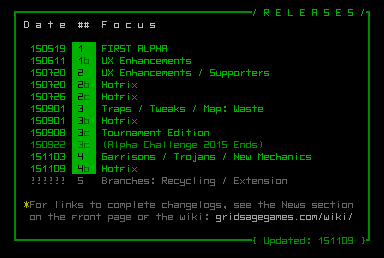
We’ve had three major releases since the first, so far aimed mostly at adding yet more features rather than jumping right into the long-term roadmap as originally planned:

cogmind_releases_151109

Cogmind Releases through November 9, 2015.

One major drag on development itself, but helpful in its own way and a community reward for early supporters, was the Alpha Challenge event held in September. Fun, prizes, and DATA! In this year’s collage you’ll see quite a lot of graphs, and this is where they came from.

Other developments:

  • Over the summer I did an interview with Roguelike Radio--a podcast dedicated to our favorite genre--in which you can hear me talk about the past, present, and future of my projects (mostly Cogmind, of course :P).
  • Quite recently I’ve started doing a bit of streaming, which is kinda weird but fun, and I need to do some real playing for playtesting purposes anyway, so I might as well share it. I stream the weekly seed runs when I have time.
  • As the year comes to a close, IndieDB is once again voting for Indie of the Year, and it would be nice for Cogmind to make the Top 100 as in 2014 (before Cogmind was even released, heh :P). I’d appreciate any votes here! Woohoo, made the top 100! If you see this, you can still help vote for the top 10 here (much more difficult to take on the more mainstream games, but it’s worth a shot).

2016

The decision to ride the wave of amazing initial support and allocate more effort into expanding Cogmind’s feature set rather than immediately heading straight for 1.0 has pushed back the potential completion date, though there is a high chance that will still happen in 2016.

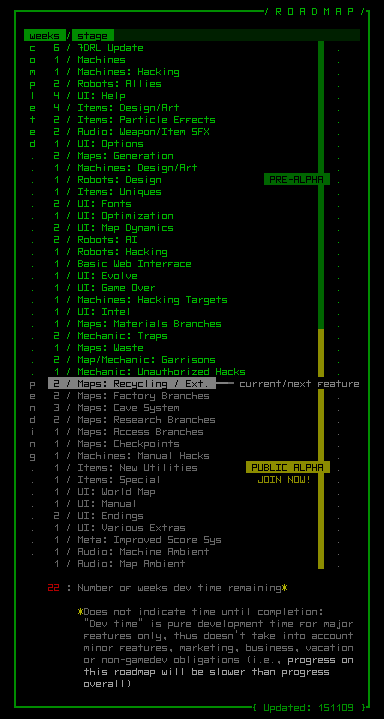
The next release, Alpha 5 (coming soon!), is starting to put us back on track with the original roadmap as we fill in the world’s many more maps and story-related elements.

cogmind_roadmap_151109

Cogmind Development Roadmap as of November 9, 2015.

As you can see: maps maps maps maps maps maps maps…

Not that there aren’t a number of non-map features to work on--a couple of the newly-acknowledged major ones aren’t even listed yet because I’m not yet sure if or how they’ll be implemented. (Note the FAQ always has the latest version of the roadmap, which is updated at least once per release. The next update will involve more significant adjustments.)

I’d like everything to be in perfect shape by the time we hit Steam, but if funding starts running low and I think it will work I may have to cut some optional pre-1.0 features and join Steam earlier. (Don’t worry, I’m not referring to anything you see listed there, and we can consider “these other features” again after 1.0, which is actually a good thing since it gives a suitable source of post-launch updates.) That’s not a near-term thing--I’m talking like more than 6-8 months away.

This year GOG also approached me some time ago, asking if I’d be willing to put Cogmind on their platform. That was kinda nice, and a likely possibility as well.

For now I’m perfectly happy not giving a huge chunk of the revenue to a middleman. It all goes straight into Cogmind where it belongs :D.


*For the record Cogmind is technically 3.77 years old counting from the first prototype. Interestingly this is the same age as my son--too bad they can’t play together :P

Posted in Annual Review | Tagged , , , | 3 Responses

Unauthorized Hacks

Hacking has been around since early pre-alpha 2013, and while the early Alpha releases have dozens of commands you can use to achieve various effects, I’ve always considered the system a work in progress. There are more things that can be hacked, a few tweaks and changes to expect, and furthermore there are three major categories of hacks, and before Alpha 4 we’d only seen the first!

  1. Common hacks. Most of these are commands native to the system itself, functions and data that Operators and other robots need access to for their work. There are currently 54 of these.
  2. Unauthorized hacks. The topic of this post. Alpha 4 contains 11 of these.
  3. Unique hacks. NPCs will under special circumstances, or for plot purposes, give codes that can be used to achieve unique effects. These would of course always be entered manually. (There are actually a number of these coded in the game--originally added to test the implementation and ensure it works--but no way for players to discover them yet =p)

These three categories run the spectrum from common to obscure, in that order. So with Alpha 4 we’ve begun exploring the second category. Don’t worry, there are still more improvements and features to come in category 1.

The concept of “unauthorized hacks” was first introduced in relation to Garrison Access systems. These are hacks that attack the system itself or abuse it in some way, decidedly not what you’re supposed to be doing there. They are always entered manually--you’ll never see these listed like the others.

SPOILER WARNING: Beyond this point I’ll be revealing how to do each hack and how they work, even though you’re meant to learn all this via in-game lore! However, right now the necessary lore only exists for one of these hacks--respective lore for the others cannot be added until I create the part of the world where much of it will be found. Reading this will allow you to get around that temporary roadblock and check out this new content, but doing so doesn’t make it any less spoilery! Your choice :)

Unauthorized hacks can be divided into two sub-categories…

Trojans

With Trojans you install a program that runs on the target system to provide delayed or continuous long-term benefits. You’ll want to make sure the machine itself isn’t disabled, since that will of course render the Trojan useless. Once planted Trojans will continue to operate even if you are traced, however.

There are eight Trojans so far, affecting either Terminals or Garrison Access systems.

Terminal Trojans:

  • Trojan(Track): Reports to you the current location of all robots within a square zone around the terminal, as if you were standing there with sensors and an Adv. Signal Interpreter. The area of effect is determined by the security level of the Terminal--higher tier systems have a greater range.
  • Trojan(Assimilate): An Operator attempting to use this Terminal will instead be permanently converted to an ally (to join your personal hacker network :D).
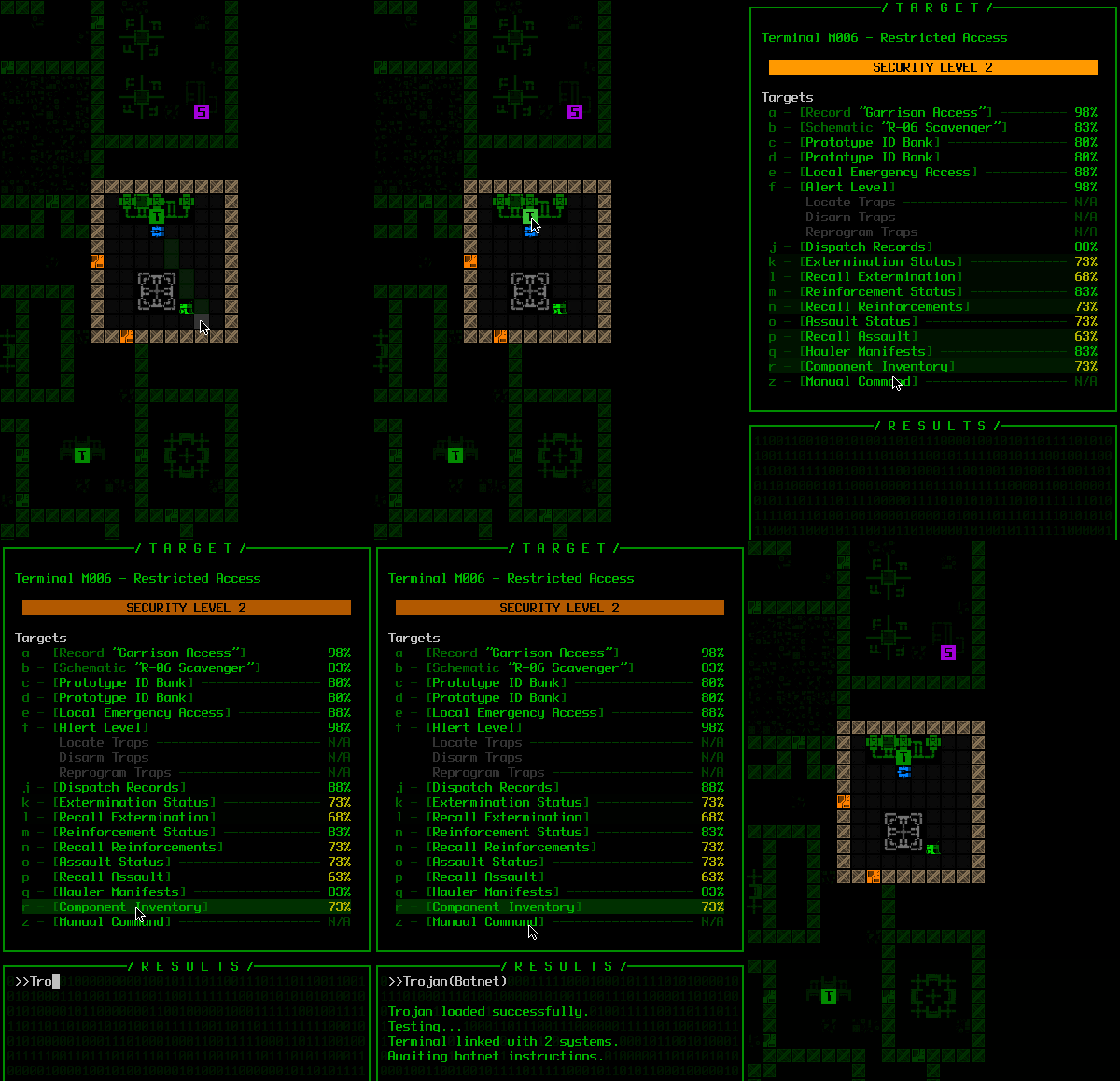
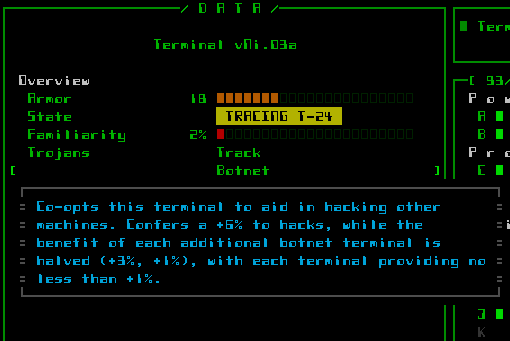
  • Trojan(Botnet): As long as this terminal is active, it provides a bonus to both direct and indirect hacks at any other machine on the same floor. This effect stacks across multiple infected Terminals (with diminishing returns, in the same way multiple allied Operators stack). Build your own network!
cogmind_trojan_botnet

Installing a Botnet Trojan at a terminal.

cogmind_trojan_list_botnet

Machine info lists the currently active Trojans, and allows you to call up context help for each.

  • Trojan(Detonate): Sets all explosive machines within the Terminal’s zone of influence to explode immediately when your enemies pass by. Create your own oversized minefield!
cogmind_trojan_detonate_effect

Oops, Mr. Programmer, looks like you should’ve taken a left at the Subcomponent Replicator. (Nuclear Reactors previously infected by the Detonate Trojan--they glow yellow so you know/remember which ones they are).

Garrison Access Trojans:

  • Trojan(Broadcast): Any squad dispatched from this garrison will have its type and composition reported to you immediately, and their location added to your intel database for reference.
  • Trojan(Decoy): The next squad dispatched from this garrison will have its intended target switched to somewhere/something else at the last moment.
  • Trojan(Redirect): All squads dispatched from this garrison have their target altered (more difficult than a one-off decoy).
  • Trojan(Reprogram): The entire next squad to emerge will be converted to loyal followers!

Brute Force

A “brute force” hack completely disregards stealth and overwhelms the target system to achieve some effect, rendering it useless in the process (permanently locked). While brute forcing a system is guaranteed to attract attention, it’s quite easy to do and allows for some more extreme benefits.

Three different machines are currently susceptible to brute force attacks.

  • Force(Extract): At any Scanalyzer, extract from the system’s memory a number of schematics for parts previously scanned by other robots. You can’t control the results, but if lucky it can be fairly useful.
  • Force(Jam): Use this to prevent a Garrison Access system from opening the door for any squads trying to exit into the local area. This is the easiest way to cut off access from a garrison, but is also the most meddling from the enemy’s point of view, a third-rate option behind the much more difficult Seal hack, or simply blasting the Garrison Access system.
  • Force(Overload): For those of you who don’t have much need of Fabricators, how about turning them into engines of destruction? :D This very unauthorized hack causes the machine’s EM imprinting system to go haywire, randomly zapping passing robots with corrupting beams of energy. Use only with intent to cause maximum chaos. And you’d better get out of the way! (This is the one which has already been added to the lore, so I didn’t really have to mention it here, but may as well for completeness sake--plus it’s the most fun =p)

There’s plenty of room for more unauthorized hacks in the future. This first batch was just a medium-sized “side project” alongside Garrison Access, to enable some additional strategic options for that machine.

Posted in Mechanics | Tagged , , , , , , | 8 Responses

Garrisons

Last time we looked at what happens when you use the Unlock hack on a Garrison Access machine. Now about that rabbit hole…

SPOILER WARNING: This post is going to be absolutely full of spoilers. There are so many details to the implementation of this feature that tip-toeing around them would be annoying and not much of a discussion, plus they’re interesting to look at for design purposes. So I’m going to go all out and discuss them here.

Technically there is information provided herein that (as of Alpha 4) might take a while to figure out, or even require dumb luck and close observation to learn. This will change later, because all garrison secrets will be revealed via in-game lore, but most of that lore comes in a later section not yet added.

Clearly presenting this information here in advance does help you get the most out of garrisons, though, so if you don’t mind being spoon fed mechanics and “secrets,” then by all means read on! (I will avoid a few details that aren’t required for a thorough overview.)

So what is on the other side of that entrance? Yes, it’s exactly what you might expect--an area in which the enemy garrisons its forces. You’d have to be crazy to want to go there, right? Well, that depends on what you’re out to do…

Garrisons and the World

First of all, I consider garrisons to be “maps between maps,” which is a better angle from which to understand their design. They can also appear at any depth, further distinguishing them from all other map types.

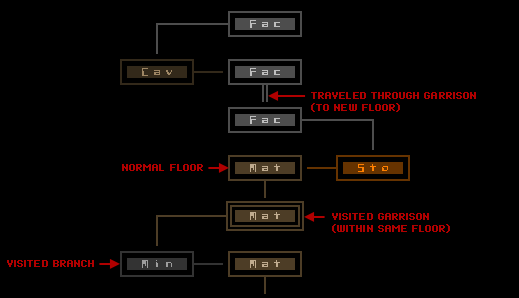
When you pass through a garrison, it will either connect you back to another section of the same floor at the same depth that you came from, or to one of any other maps/areas that were originally connected from your map of origin. To demonstrate, see this modified subset of our hypothetical world map:

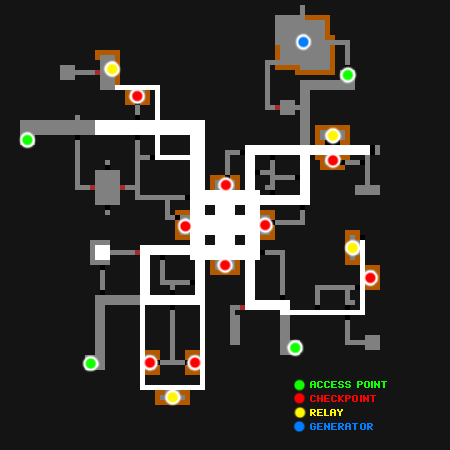
cogmind_world_map_with_garrisons

World map mockup showing special garrison links.

You can’t know in advance whether a garrison will take you to a new map or depth, so that’s not likely to be a primary purpose behind choosing to enter a garrison. (More on that later.)

Garrisons as their own map were not in the original design doc, but as soon as I added the Garrison Access for Alpha 4 it seemed like a logical extension which addresses the whole “why can’t I go in there if I want to?” issue. Why create a glaring artificial roadblock to exploration where there are opportunities to present the player with interesting options?

Garrisons also conveniently coincide with another idea that did appear in the design doc for probable implementation, but still hadn’t been added at this point: “Conduits.” The idea behind those was that you could seek out well-hidden protected exits that would take you to further away maps, even up multiple depths. Having garrisons doesn’t exclude the possibility of conduits, but the two are very similar in nature, and garrisons honestly do a much better job fitting into the structure of the world by being tightly connected to several of its other mechanics.

Map Layout

As a unique type of map in which I wanted much greater control over certain aspects of the experience, for garrisons I decided against using any of the existing map generators, instead opting for a completely prefab-based approach.

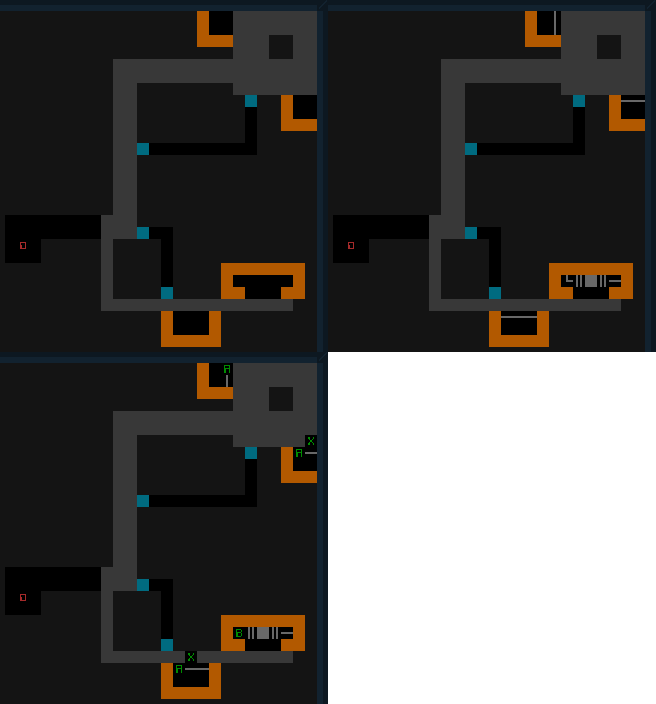
The map area is divided into quarters, each one randomly choosing a prefab map piece and rotating it as necessary to fit that quarter. I’ve discussed how I create prefabs before, but here’s an example of one of the more simple quarter layouts used in actual garrisons:

cogmind_garrison_quarter_prefab_simple

One of the simplest garrison quarter prefab layouts, showing also the machine layer and script reference layer.

With a large enough pool of prefabs, combined with rotation, there is plenty enough randomness to prevent the overall map from becoming repetitive or predictable, aside from the parts that I want to be fairly predictable. While there is a lot of room for variation, each quarter generally holds true to a set of rules self-imposed while designing the individual prefabs themselves:

Some of the more basic rules:

  • Each quarter contains a primary “arm” connecting a larger central hub to outlying access points (the ‘0’), one per quarter.
  • The widest corridors almost always connect the hub directly to the access point, making them quite easy to find. Navigating a garrison is therefore no problem unless you leave the main path, in which case it’s obvious that’s what you’re doing, and even then it’s not easy to get lost because paths will more often than not be dead ends. Those blue marks in the prefab are impassable phase walls, a new mechanic discussed further below.
  • Most quarters contain one Garrison Relay, generally guarded by a checkpoint. Also more on these below.

The final result when you combine a selection of different quarters can look like this:

cogmind_garrison_layout

Sample garrison layout.

Certainly we could code an algorithm capable of producing a truly limitless variety of garrisons. Having a list of rules and some mockups is a good first step in that process, and a couple times I did briefly consider doing just that. However, it would’ve been a lot more work, when creating dozens of prefabs gets the job done quite well in a fairly short amount of time (it took about a day to create several dozen variations).

Taking the non-fully-procedural route also has the advantage of being able to more closely control the difficulty, matching potential rewards with corresponding challenges within a single quarter, and influencing map composition overall by adjusting the weighted chance of using each quarter type. The more interesting and/or rewarding quarters are naturally more rare.

Some players will eventually learn to recognize some areas, one of the drawbacks of relying on a limited number of prefabs, but that’s the price paid for control. It’s not a heavy price, however, since even within a given static prefab there are variables that influence how the map plays out:

  • Part caches with variable contents.
  • Checkpoints. These run parallel to corridor sections, and are automatically detected by the game then populated based on a weighted algorithm. Every move in close proximity to a checkpoint has a chance to be detected and trigger the door, releasing whatever guards contained within. You may see or remember a checkpoint location, but you can never be sure what’s behind the door (no, not even with sensors :P).
  • And of course the biggest variable of all--Cogmind! What the player is equipped with and capable of adds a new realm of possibilities.

On the map-wide scale, the composition of randomly placed active patrols will also cause the same base layout to play differently.

There is also some thematic logic to having garrisons share similar layouts, which is part of the reason for using a more controlled map generation system in the first place. And from the player’s point of view, it’s obvious both from a visual and tactical perspective that you’re in a place very different from the other maps--and not just because of the red walls ;).

Much of the garrison content is found in areas off the main paths, either hidden or in the open. These optional routes usually contain some sort of reward or benefit for overcoming whatever challenges they might contain. If not well-prepared, an excursion into these areas could very well attract more attention than you can handle--it is a garrison, after all! But I don’t imagine anyone would dare enter a garrison unprepared, right? :)

Inhabitants

Garrisons are the first part of the game in which you will see no non-combat robots! That means… no Recyclers! Also no bots to fix up the walls and clear out debris. Yep, the battlefield will remain just as pockmarked and littered with scrap as your strategy demands.

Garrisons are home solely to combat robots; quite a few of them, in fact. You’ll find they’re not always active, however. In addition to the checkpoints and patrols mentioned earlier, you may also come across robots in other states:

  • DORMANT: Robots temporarily resting in this mode are only a problem if they wake up, which may be triggered by alarm traps, being alerted by their nearby allies, or by hostiles hanging around in their field of vision.
  • UNPOWERED: Unpowered robots will never become active. There aren’t a whole lot of these--in terms of design they exist as fluff. (Though yeah they’re very much real and you can harvest them for parts if you’d like.)
  • DISABLED: Some robots have been temporarily disabled and put in garrison storage. Prime candidates for rewiring!

Phase Walls

Hidden doors in Cogmind have always served a very specific purpose: Give hostiles additional routes via which to reach targets more quickly, or ambush them :). Interestingly, players’ first “natural roguelike reaction” to “secret doors” is to assume these lead to good loot. Not true (though yes you can benefit--in other ways--from knowing where they are and using them).

That said, we now have a new type of hidden door, and these do sometimes lead to Good Loot. (Warning: They also sometimes lead to Mad Robots :P)

This new mechanic was developed early on during the garrison design process because it makes a lot of sense that the robots would use similar ambush tactics here, but our original hidden door design is insufficient. In case you haven’t played, a recap: While only combat robots normally use hidden doors, they open for any robot, even you, when simply moving past. This works fine the way that hidden doors are normally used in Complex 0b10--placed in back or side walls of rooms--since you’re unlikely to find them by accident (though it does happen). By comparison, most of your time in garrisons is spent in narrow corridors (there are almost no rooms at all), and if we connect regular hidden doors to corridors for use in ambushes or to hide important things, they’re not going to be so hidden because you’re quite likely to pass right by them!

Here they use a new type of technology: Phase Walls.

You cannot differentiate phase walls from normal walls, even with a Structural Scanner, and they will not open for you. In effect they’re walls that only hostiles can pass through.

cogmind_phase_wall

A phase wall (both tiles and ASCII versions), shown near a regular hidden door for comparison.

Your inability to use phase walls adds to the difficulty of garrisons, since the enemy can often take advantage of multiple looping routes, while you and your allies are trapped in the relatively limited scope of the main corridors. Of course, if you’re packing explosives, all bets are off--you can blow away phase walls just the same :D.

(There is one other cool mechanic regarding a special use for phase walls, but that will remain a secret for now unless you can figure it out.)

While there is no way to visually detect a phase wall without seeing it open, they make a unique sound when dematerializing and materializing, giving you a clue that something’s going on nearby. You can also hear through them just fine, even when closed. This is especially interesting when combined with the new machines…

Important Machines

Unlike most other maps, you won’t find any interactive machines in garrisons. Instead there is a pair of other machines which have roles to play in the mechanics of the area. As first mentioned in the previous post, it’s quite possible you’ll want to blow these up.

As objects meant to be destroyed, both of them use the cyan color first seen with Storage Shells and the special Sealed Heavy Doors you find later in the game.

Both also emit ambient sound, enabling you to locate them even when hidden behind phase walls, using volume levels to guess where such walls might be even when you have no other means to do so. (Note that eventually all machines in the game will emit sound, but I’m waiting until later to add those sound effects. In this case it was important to add for gameplay purposes.)

The more common of the two is the Garrison Relay. You’ll usually find about four of these things in each garrison.

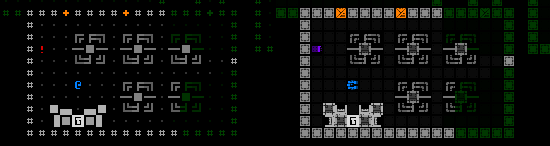
cogmind_garrison_relay

The primary type of Garrison Relay (tiles/ASCII).

Relays are responsible for transmitting orders to active robots, and also remotely protect those systems from hacking attempts. Take out a relay and you can expect to have a better chance to bend robot systems to your will. Take out more relays, and you could potentially have them all licking your robot boots. Doing this also makes them really mad (i.e. influences security level), but you get bonus points for doing it :)

This effect is strongest within the confines of the garrison itself, but it continues to take effect in the next map you visit, where relays from all linked garrisons are collectively responsible for squads (mechanically, you get half the bonus to robot hacking attempts). Travel further away from the disabled relay (two maps or more) and there is no more benefit.

Phase Generators are the other type of garrison-specific machine, though only about one of these is accessible per garrison.

cogmind_phase_generator

Phase Generator (tiles/ASCII).

These are responsible for those annoying phase walls. Take out a generator and all the walls come down with it. (Again, they won’t be too happy that you’ve done this.)

The Phase Generator doesn’t just turn to scrap metal, either. It’s actually one of my more spectacular explosions--very satisfying to see, and hear! Make sure there are enemies standing in the room for maximum MWUHAHA effect. Do try to get out of the way.

Destroying one of these things also puts a stop to their secondary use, a special effect I haven’t mentioned yet: sensor scrambling. On entering a garrison you’ll notice pretty quickly that your Sensor Arrays don’t work as expected. I added this mechanic because garrison ambushes are otherwise kinda pointless, and sensors also give away too much about the level layout and potential secret areas. Yes, you can still use Terrain Scanners, but they’re not quite as effective since they don’t reveal threats.

More interestingly, sensor scrambling only takes effect if there’s something in your detection radius, meaning you can continue to use your sensors to some extent and will know something is nearby, just not what or where, which can be scary =p. (Have you ever imagined a behemoth walking through a wall to open fire in your face? Just kidding, I’m not that mean. Or am I…)

Strategy

Being an entirely optional area accessible from almost anywhere in the game, it’s relatively easy to find your way into a garrison. But whether or not to do so is not that easy a decision to make.

First, for some background check out this labeled version of the layout shown earlier.

cogmind_garrison_layout_labeled

Sample garrison layout (labeled).

As you can see, there are four access points, one of which you’ll enter from and therefore cannot exit from, leaving three possible exits. All you absolutely must deal with are whatever random patrols there might be wandering around (not shown), and whatever is standing guard in the central hub checkpoints. (Note that if careful you can avoid simultaneously triggering multiple central checkpoints, and even avoid some entirely. I can’t imagine you’d want to trigger that many checkpoints unless… you’re carrying a nuke or something ;).)

About the exits, though, you may not be able to leave from the first one you find! Exits have a chance to be remotely locked when you try to use them, in an attempt to confine you to the garrison. Destroying relays increases the chances you’ll be able to make it out when you try, and if you’ve tried all but one exit, the last will always work.

In summary, here are some beneficial reasons to visit a garrison:

  • Gain allies, possibly raise and maintain a little army of your own.
  • Engage in robot hacking in the subsequent area.
  • Impair defensive capabilities in the following area. Didn’t mention this one yet :D. Having created a distraction by mounting a direct attack on a garrison, the enemy will be forced to recall some combat robots, thereby shrinking the average squad size by 1. This only applies if you end up back on the same map you left, not when advancing to a new area, but it’s pretty significant!
  • Obtain better parts, if you’re lucky…
  • Have a chance to advance to another depth/area without searching for a normal exit in the main complex where floors might be sprawling and dangerous.
  • No Programmer dispatches, though you’ll still have to deal with additional assault Carriers if you’re causing enough trouble.
  • Earn bonus points for wreaking havoc.

And the top reasons to avoid garrisons:

  • Possibly very dangerous unless well-prepared! Again, this is to be expected; you’re in a place where freaking everyone is packing guns, cannons, and other nasty things, quite extreme compared to most other areas of the world. It’s also not exactly a huge space. There’s less leeway for retreating and tactical positioning, limited sensor support, and a high probability of being ambushed.
  • Instead of gradually going down over time like in other floors, your security level goes up for as long as you stay inside a garrison! (Every time you see the “ALERT: Garrison interior compromised” announcement, your influence just rose again.) Leaving a garrison also does not drop your influence rating as much as leaving other floors does.
  • If you’re running a speed/stealth build, my guess is you’ll be heading into a death trap (I’m also guessing someone will attempt to prove me wrong here…). While maps are rather small and you might think you can fly your way past everything, one wrong or unlucky move and you could start feeling the pain. Did I mention there are quite a few stasis traps?

All said and done, garrisons are a flavorful addition to the world that come with a number of unique mechanics, benefits, and drawbacks. They’re your chance to take the battle to the enemy--think of it as you entering that building lobby in The Matrix :D

Next time we’ll be looking at unauthorized hacks, AKA the mischievous things you can now do with machines.

Update 220718: Garrisons have since been significantly expanded with embedded encounters, events, and other new features, covered in my article… Garrisons 2.0!

Posted in Mechanics | Tagged , , , , , | Leave a comment

Garrison Access

Nearly two years ago, five machines were added to the game, forming the core interactive environmental feature in the world of Cogmind. Since then we’ve seen the addition of a few more environment-based elements in the form of non-interactive machines and traps, but no more hackable installations.

Introducing: the Garrison Access point!

Background

Locating exits to other floors (and reaching them) is your ultimate goal in Cogmind. While there are plenty of other optional activities, everything you do ultimately revolves around escaping. Without XP to grind, engaging hostiles is rarely necessary and you can theoretically sneak your way around everything except when you feel confrontations are necessary to better prepare for unexpected encounters by harvesting new parts. Thus in terms of design, these exits (“access points”) cannot be made too easy to find, as their frequency and locations essentially control the overall difficulty of the game.

There are many ways to discover where exits are, from the traditional-but-dangerous “wander around until you find one,” to mechanics-oriented hacking-assisted searches, to meta-solutions including learning the types of surroundings in which an exit might be found and looking for those, or learning the general layouts of each type of floor.

More recently players have figured out an inexpensive and foolproof method for navigating to exits on large floors. Notice that other robots use the same access points that Cogmind does when they enter or exit a map (yes, they do this!). So all you need to do is know when a particular robot has entered the map, and retrace its steps (or at least head in the direction it came from) to find the access point they used!

Programmers happen to be the perfect candidate for this tactic, since they are dispatched directly to your position and that dispatch is accompanied by a global announcement/alert, meaning you know when they’re coming and that it’s from a location you can use to escape.

While preparing the design doc I was aware of this possibility, but there wasn’t enough time to implement the intended solution before releasing Alpha 1, so I decided to wait to see how long it took players to discover this and start abusing it… My hand has been forced, and with Alpha 4 we welcomed a new type of access point meant purely for use by hostiles =p

Garrison Access the Machine

cogmind_garrison_access_examples

Example of a Garrison Access in the wild.

A Garrison Access is white (lighter gray), appears denser than most other machines (these things are armored!), and are of course represented by the letter ‘G’.

So why a “machine”? Aren’t access points normally just your average ‘>’ stairs? While that would be easy--saving weeks of work, in fact--it would also be kinda boring compared to the potential for depth and related features here. Making them a machine also means they’re conveniently compatible with the familiar intel system. You can hack garrison locations from any terminal and they’ll be marked on your map. (Also, there is a ‘>’, but we’ll get to that later :D)

Responses

What exactly does a Garrison Access do?

As implied earlier, dispatched combat squads may now instead come from a garrison instead of a regular access point, especially if located closer to the target area. So for those of you being bad robots (all of you!), you’ll notice enemy response times have gone down. Also, unlike normal access points where the game has been nice about not allowing hostiles to enter through them when you’re nearby, hostiles can emerge from a garrison even if you’re sitting right next to it! No loitering, please. But wait, there’s more…

Combat robots being attacked in the vicinity of a garrison may call for backup. Knowing this you probably don’t want to engage targets stationed at or passing by one these places. Unless of course… you’re carrying a Signal Jammer ;).

Even unarmed non-hostile robots might report you and call a nearby garrison for rescue if you shoot them (and they survive =p) while close enough. If you can leave the area quickly enough that won’t be a problem, though, since the garrison squad will only head to and monitor the area around the reported disturbance.

Of course, garrisons can’t spit out hostiles indefinitely. There is a delay before a given garrison will respond to another event, and even some types of responses don’t come all at once--a single response might be spread out over time, another reason to not hang around, unless your plan is to attack it :D

Attacking

Like any other machine you can also physically destroy/disabled a Garrison Access, only in this case it’s especially meaningful in that hostiles will no longer be able to use it as a point of entry/exit. Doing this will of course piss them off, but leaving them with a close-proximity source of reinforcements is both annoying and dangerous.

However, if you attack and fail to destroy it pretty quickly, there’s a good chance you’ll be in for some company. It’s perfectly understandable if you want to just leave these things alone and give them a wide berth. (Actually, you’d also want to leave them intact if you’ve installed a Trojan, but… we haven’t talked about those yet =p.)

That said, there is another advantage to destroying them: For each Garrison Access taken out of commission, Programmer dispatch frequency is further reduced. Plus if you’re really intent on the old Programmer tracing strategy, each garrison destroyed eliminates another distraction in the search for normal access points.

Hacking

Ah, another benefit of Garrison Access being a machine--we can hack it!

Like everything Cogmind, there are always multiple strategic aspects to a feature, and hacking helps add more dimensions to this reinforcement mechanic, or as you’ll eventually discover, even turn it on the enemy! This is where things really get interesting…

First we have two regular hacking targets:

  • Seal: This locks the access point permanently (or at least for the while you’ll be on that floor), originally meant as a native command to enable containment of a threat on one side or the other. It is difficult to pull off, but is the preferred way to effectively disabled one of these access points, since it won’t attract any attention. (Unlike opening fire on it =p)
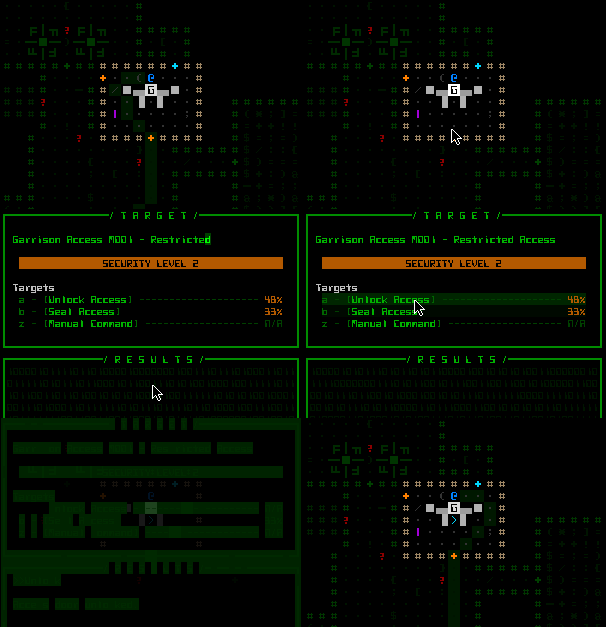
  • Unlock: If you really, really (really) want to, you can unlock the door yourself! Now why would someone go and do that?
cogmind_unlocking_garrison_access

Where does the rabbit hole lead? Do you really want to find out? (Update 151110: Answer now available in next post.)

Note that the Garrison Access hacking system is no different from any other interactive machine, tracing and all. That means you’ll probably want to avoid being traced at a garrison, since the response will come from right there! Normally you have ample time to leave an area after being traced; not so when you’re standing on the source of the squad sent to investigate.

With the advent of Garrison Access machines, we also have two new categories of so-called “unauthorized hacks.” Trojans and Brute Force Hacks will be covered two posts from now--five of them are applicable to garrisons (update: published). How would you like to tell all squads emerging from a given access point to go somewhere else instead? Better yet, how about you instruct the garrison system to reprogram them to believe you’re their new leader ;).

Machine Info

In the past, destruction of machines has mostly been a case of collateral damage, not something you set out to do (triggering explosive machines being an occasional exception). That has changed with the addition of garrisons, which you will at some point or another probably want to take out. (This also applies to Garrison Relays and Phase Generators, but those are two machines new to Alpha 4 that I haven’t yet introduced--next post! That post is up!)

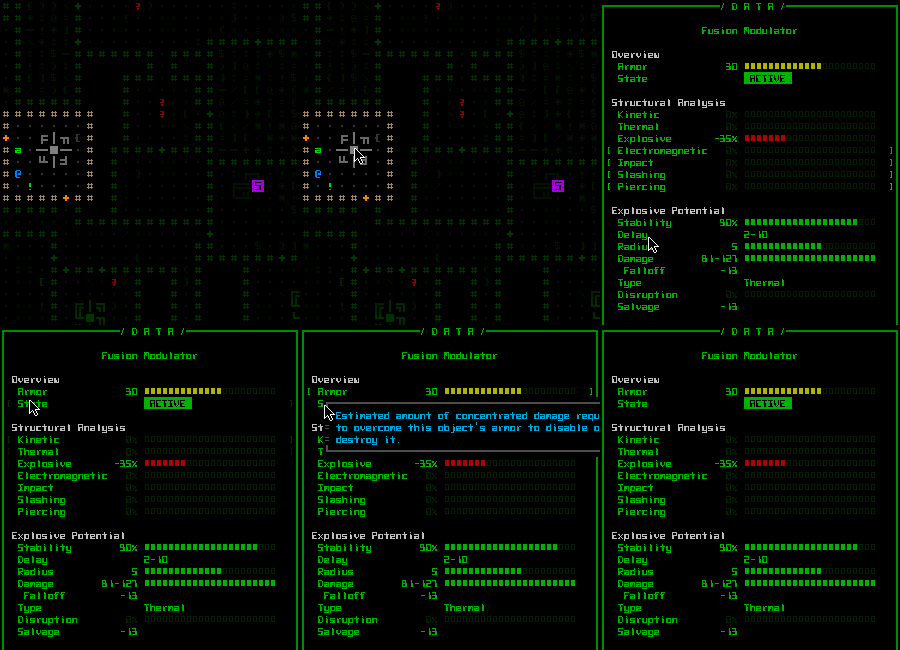
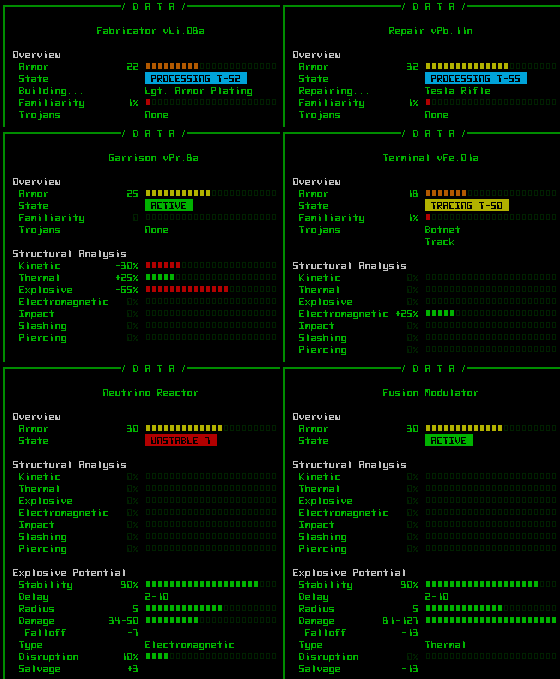
So at this point you’ll appreciate access to essential stats, stats that the window info is now capable of providing. You can access this information in the same manner as other objects, either by right-clicking on it or using keyboard examine/look mode.

cogmind_machine_info

Opening the info for a Fusion Modulator. Oooh, explosions…

Aside from letting you know the armor value of any given machine, the info window’s most useful feature is its State identifier. Especially informative for interactive machines, that value can display:

  • System trace reset times and locked status
  • Fabricator processing part and time to completion
  • Repair Station processing part and time to completion
  • Other special machine states including UNSTABLE, DETONATE, OVERLOAD, COMPROMISED, TRANSMITTING, REDEPLOYING (all but the first are new to Alpha 4)
cogmind_machine_info_composite

A collection of info for various types of machine systems in different states.

Notice that you also get a convenient list of installed Trojans currently active on the system in question :)

Information about resistances and explosive potential is only available while using a Structural Scanner.

Next time I’ll be introducing where that unlocked Garrison Access actually leads (or you can explore it for yourself in Alpha 4).

Posted in Design | Tagged , , , , , , | 2 Responses

Morgue Files

Death is fairly frequent in roguelikes, but the fun doesn’t stop there! We usually still have access to post-game “content” in the form of text files detailing how a particular run played out.

The typical traditional roguelike player tends to love statistics describing their performance, and detailed morgue files are a good way to satisfy that desire, while at the same time enabling players to show off achievements, get opinions from other players, and review an experience to perhaps learn more from it. Looking back through an overview of their game, a player might discover something they hadn’t noticed before, or the file may directly reveal unknowns like the fully identified contents of one’s inventory. (I had a potion of what?!)

Other Roguelikes

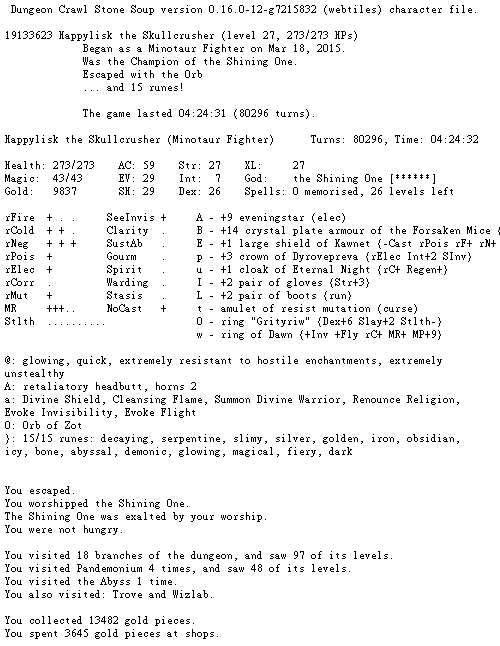
A lot of the major roguelikes have been modernizing their community services with extensive public databases that allow for searching, sorting, and all manner of additional features. (References: DCSS Online Players and Scoring Overview; ToME4 Characters Vault; Angband Ladder; Nethack High Scores) I’ve written a little bit about Web Support in Single-Player Roguelikes before, while here we’ll just be focusing on a survey of text info data referring to a specific run/character.

morgue_file_DCSS

DCSS morgue file header (complete file).

DCSS begins with a summary of vital information, followed by:

  • basic character stats and status
  • detailed descriptions of each inventory item
  • dungeon locations visited and features discovered
  • message log and map immediately before the run ended
  • complete list of kills
  • long list of important chronological notes from throughout the run
  • chart containing a breakdown of all major actions taken

I really like the density of information at the top, probably the best example of a character file where so many details are available without scrolling--even equipped items are summarized right there. The actions chart found at the end is an interesting tool for reviewing general strategy and comparing it to other runs.

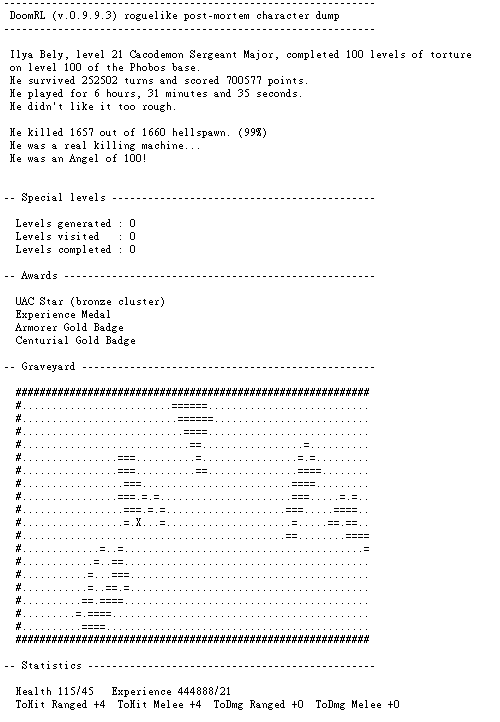
morgue_file_DoomRL

DoomRL morgue file header (complete file).

DoomRL also begins with an overall summary, though subsequent sections come in a somewhat unexpected order, seemingly aimed at front-loading information reflecting final results:

  • special levels
  • awards earned
  • snapshot of the map/surroundings where the run ended
  • basic character stats
  • equipment and inventory items
  • complete list of kills
  • history of important events
  • message log immediately before the run ended
  • meta information comparing previous runs

My favorite part of this one is the history, which in describing only important events in a condensed format does a better job of telling the story of the run than a full message log can. I’d like to incorporate something similar into Cogmind, later when story elements are in place and such a feature would be a lot more meaningful.

Meta info tracking the player’s progress from other runs is a nice addition, too, though here it’s quite limited.

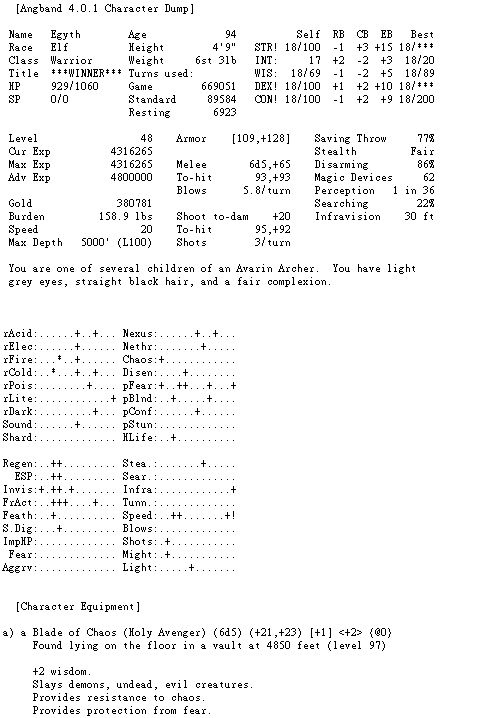
morgue_file_Angband

Angband morgue file header (complete file).

Angband’s file opens with a very dense block of character stats, then:

  • detailed equipment list
  • carried inventory items
  • home inventory items
  • history of important events and when/where they occurred
  • UI/game options

As with DCSS, I like the density up front, the one drawback being that it is more complicated to parse when writing code to scrape the data. The best way to handle this is of course to store the information in a separate format meant to be parsed, then it can be output in any format necessary. Nethack, for example, does exactly this with its Xlogfile format, but it surprisingly doesn’t have human-readable morgue files, at least nothing official. The online system linked earlier does record and display basic run information, however.

morgue_file_ADOM

ADOM morgue file header (complete file).

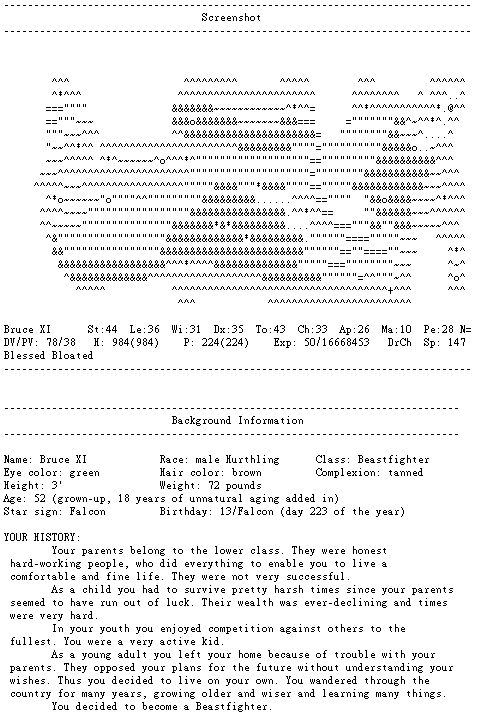
ADOM begins with a complete screenshot of the final game state, map, stats and all, followed by:

  • character background
  • equipped items list
  • backpack (inventory) contents
  • weapon skills
  • skill list
  • spell list
  • major achievements
  • artifacts generated
  • other player characteristics
  • monsters vanquished
  • meta data (play time, version)

The screenshot opening is a nice approach, as it provides a pretty effective summary, which honestly a good UI should be capable of in the first place--putting it directly into the log reflects that effectiveness. ADOM is capable of outputting the character log in both an abbreviated and verbose form (the latter is what’s shown above).

Format

All of the above games provide their morgue files in a simple text format, enabling players to easily share/paste them on forums or elsewhere. Of course an alternative is to just link directly to an online record, text or not, which is currently the only way to share complete character information in ToME4, for example. That does have the advantage of providing a more interactive experience for understanding the contents (ex: ability descriptions), though the information itself isn’t as easily posted elsewhere in a predefined format.

Terminology

There is no common term for referring to these files throughout the genre. In fact, there are almost as many terms as there are games…

  • Character File: The official term for DCSS morgue files, and the most generic of the bunch that doesn’t really have any additional connotations, except that it perhaps doesn’t imply that a run has ended. Technically this one’s generic enough that it could be confused for a save file.
  • Morgue File: Generally associated with DCSS as well, though not an official term. (It happens to be the one I’ve picked up on.) The name implies that a character is dead, and therefore may not feel all that appropriate for victories (although as we know death is more common). That said, your character will die eventually, right? :) (On that note, even when you win UMoria, it will indicate that you died of “ripe old age.”)
  • Character Dump: This term implies that the information might have been exported from a game still in progress, though Angband uses it even for completed games.
  • Post-mortem Character Dump: DoomRL adds a qualifier to indicate that the run has actually ended.
  • Character Log: The ADOM community uses this one (though it’s not written anywhere in the file itself); it’s pretty generic and applies well enough to this use, although there is that chance of confusion between a record of everything about a character and just the message log itself.
  • Character Record: Another generic term used by some games not discussed here.
  • YASD/YAVP: Colloquial abbreviations that can just as easily refer to the files themselves as they can the final outcome, adding a little extra meaning since we know both that the run ended and how.

Not that terminology is super important; I just thought it was interesting to note while doing this survey.

Cogmind Score Sheets

I’ve always called Cogmind’s morgue files by yet a different name (of course…): score sheets. When first created the intention was to essential just show a score breakdown and a handful of character stats, but even early on that changed rapidly and score was left as only a very small portion of the file contents…

History

Shortly after Cogmind’s birth for 7DRL2012 I decided to hold a player tournament for fun, but felt that basing it on score alone wouldn’t by very exciting, so the first update in preparation for that was to add to the score sheet a variety of other collected stats that described the player’s run. Not just the number of kills on enemy type X, but also some less obvious values like “number of tactical retreats,” “shots fired from each class of weapon,” “number of items of each type lost to attrition,” etc.

At the time there were 78 variables, along with a few separate lists of varying types. These served as the basis for a more interesting tournament while I was still working on improving the game by implementing feature requests.

Then of course as a little side project the game was put on permanent hiatus with no plans to revive it.

Then of course “no plans to revive it” turned into making it something really big, and throughout more than a year of pre-alpha development I kept adding more of those score sheet variables as new features were added (and I came up with more ideas).

Now we have 350 of them.

Score Sheet 0.10

After completing the above survey of morgue files in other games, I’m surprised that none of them go as far as to record numerous statistics describing events or highly specific actions that shed light on player behavior, or derive other meaningful stats from the game data. (The DCSS action chart is a notable exception, but still limited in scope.)

Perhaps it’s that Cogmind is much more a tactical game than a strategic one. Most roguelikes on the other hand have a strong emphasis on long-term character development and therefore recording and reporting information about the player characters themselves already tells you so much. That’s where a majority of the gameplay decisions are reflected, whereas in Cogmind there is almost no emphasis on character development at all; instead it’s a game about making minute-to-minute decisions without certainty that your condition or form will be even remotely similar on the next floor, or even around the next corner. As such, the focus of a score sheet should be more about actions, behavioral statistics, and factors external to the character.

To be more specific, here are some of the variables recorded for each run in Cogmind:
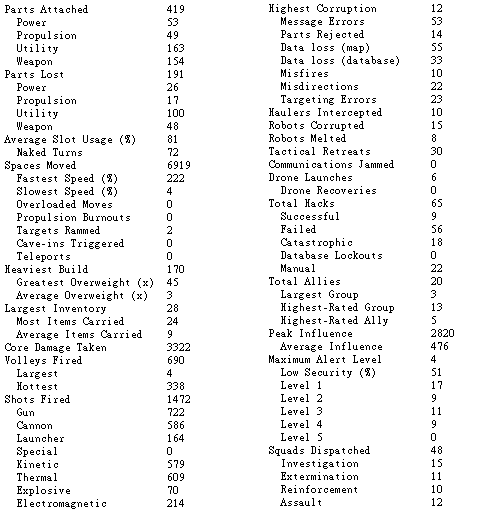
cogmind_morgue_file_stat_excerpt

Cogmind score sheet excerpt; data columns doubled up to save space / show more.

In any case, without additional variables like these Cogmind’s score sheet would be pretty barren. Having all the extra data also came in handy when the recent Alpha Challenge 2015 took a page from the 7DRL tournament playbook and added lots more achievements based on them. With data like this there are also the many useful graphs that come out of comparing runs or combining data from multiple players as shown in the previous post about player metrics.

As with the other games, let’s look at the header of a Cogmind score sheet then discuss the contents:

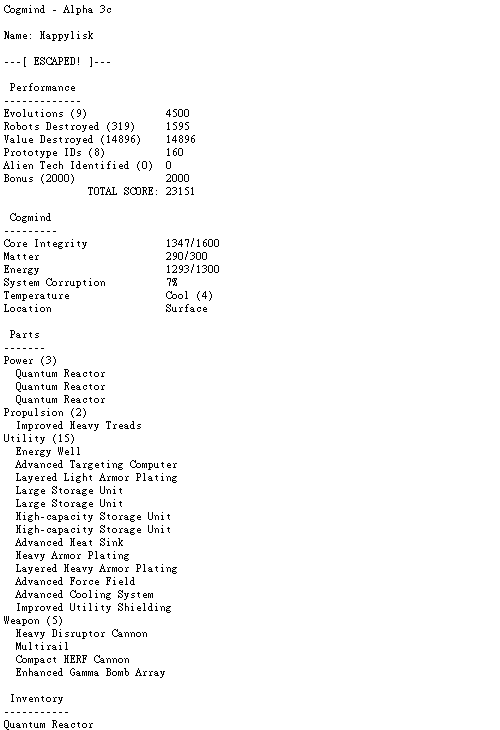
morgue_file_Cogmind

Cogmind morgue file header (complete file).

(The first thing you’ll notice is it doesn’t use horizontal space very well. More on that later.)

Cogmind begins with a complete score breakdown, then:

  • player stats
  • attached parts
  • inventory contents
  • peak state
  • favorite item of each type and subtype
  • many gameplay stats (e.g. the earlier variable lists)
  • list of identified prototype items
  • meta data (play time, UI preferences, etc.)

So-called “peak state” is very important, added because unlike characters in other roguelikes, most Cogminds die naked and alone. Sad, I know. We’d never know what a player’s equipment really looked like if only recording it at their point of death (unless they made it to the surface, as in the sheet shown above).  So the game also shows what a fallen Cogmind looked like at their best, defined as when the combined combined rating of all their attached parts is at its highest.
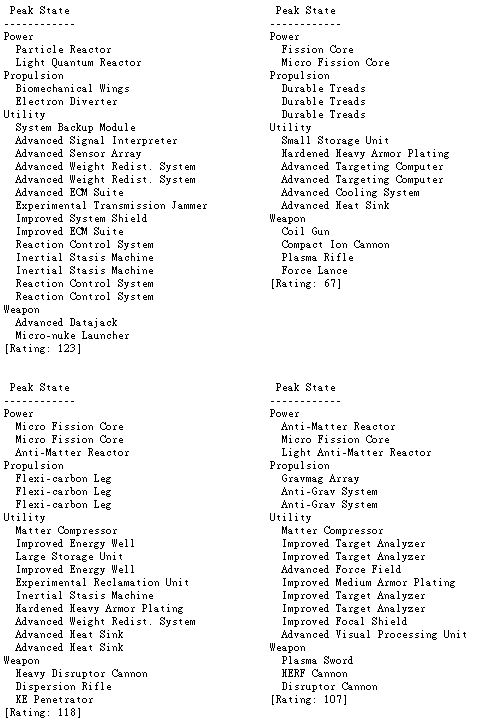
cogmind_morgue_file_peak_state_examples

Sample peak states, for fun :D.

Because Cogmind’s gameplay revolves tightly around the items you use, which may change significantly throughout a game (since there is no such thing as skill/class/race limitations that might lock you out of using anything in particular), simply looking at peak state is only informative about a relatively short duration of the run. To tell us more, there are lists of favorite items of each type, further divided into subtypes:
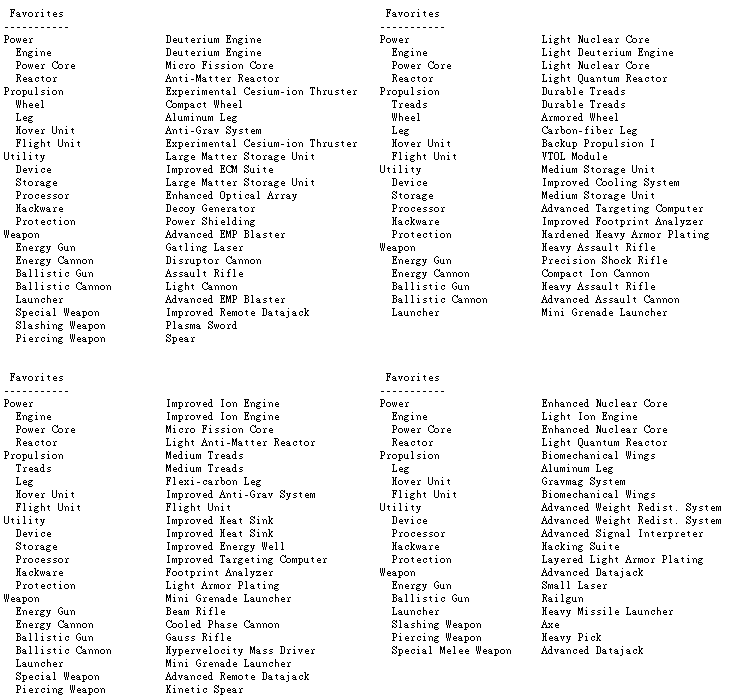
cogmind_morgue_file_favorites_examples

Sample favorite item lists, for double the fun.

Taking the bottom-left list as an example, while that player may have been a hovering hacker bot at their peak state, according to their favorites they spent most of the game as a treaded heavy weapons platform.

Format

Having become bloated by simply tacking on more and more variables, while the content is sufficient the score sheet’s overall format is far from perfect, with its combination of vertical lists and simple VARIABLE=VALUE format all the way down. All that horizontal white spice should be put to work as we see in the DCSS and Angband morgue files. Many variables could be expanded to show more details, reorganized into meaningful charts, and more…

I’d really like to redesign the entire file to better condense the information, though as mentioned earlier that’s a problem for parsing. Using two files, one machine-readable and one human-readable, isn’t the greatest solution since players tend to share human-readable files so there would be no way to easily import a file shared that way. However, seeing as the game directly uploads the score sheets now anyway, maybe that would be a route worth considering. Upload a non-human-readable version of the data which is easy to parse, while separately outputting a local text file for the player’s own records.

Additional Post-Mortem Features

Like many other roguelikes, at the end of a run Cogmind shows a summary window. It contains a complete score breakdown (there aren’t all that many score components) as well as select stats, serving as an abbreviated version of the score sheet.
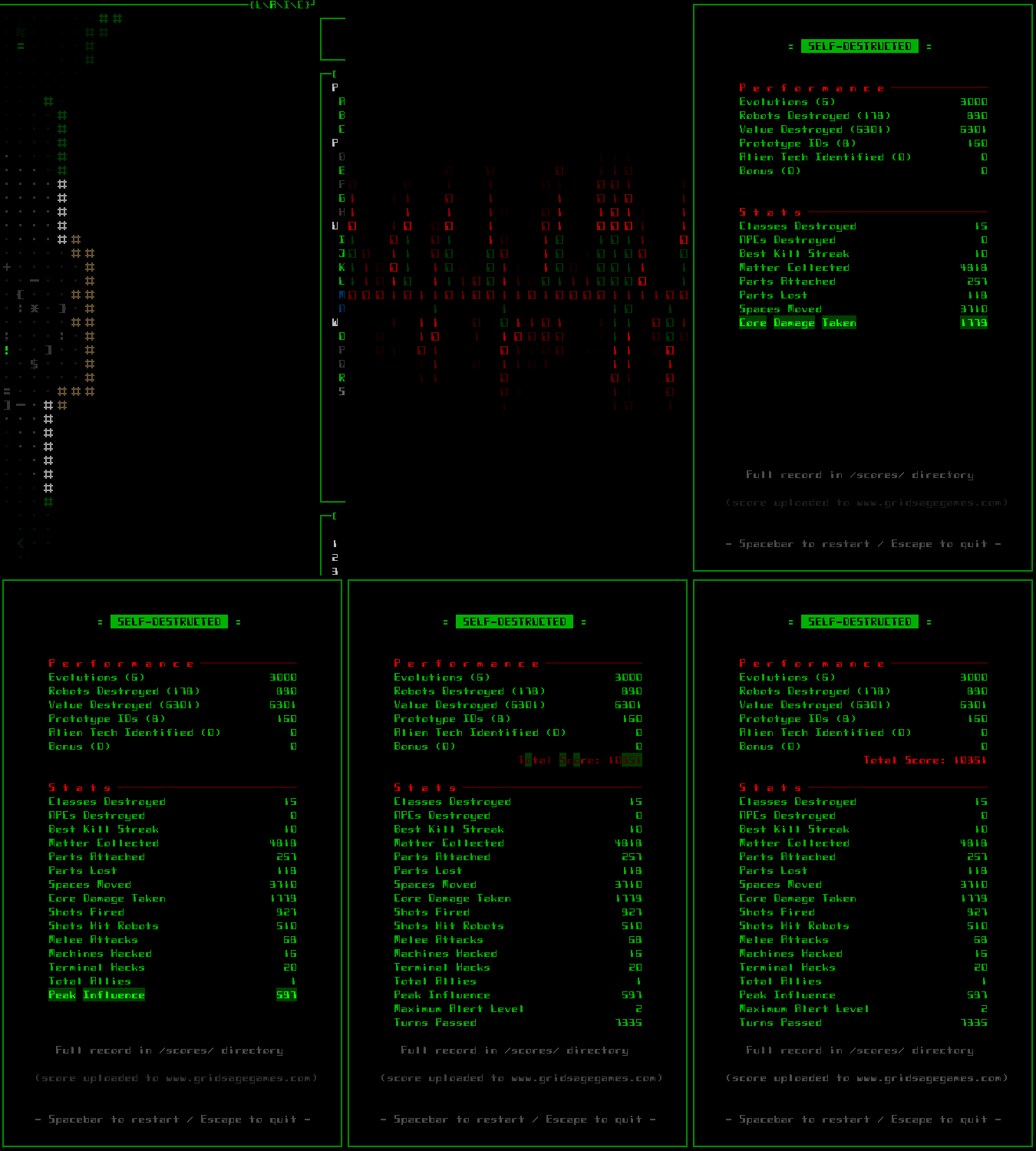
cogmind_gameover_screen

Cogmind gameover screen.

Because a full message log is too verbose to include in the score sheet itself and there is no short version yet, that is not included. Instead, in the options menu the player can choose to not save it (the default) or output it to either a text or html file. The latter has the advantage of being able to use the same colors as the in-game log, making it easier to parse.
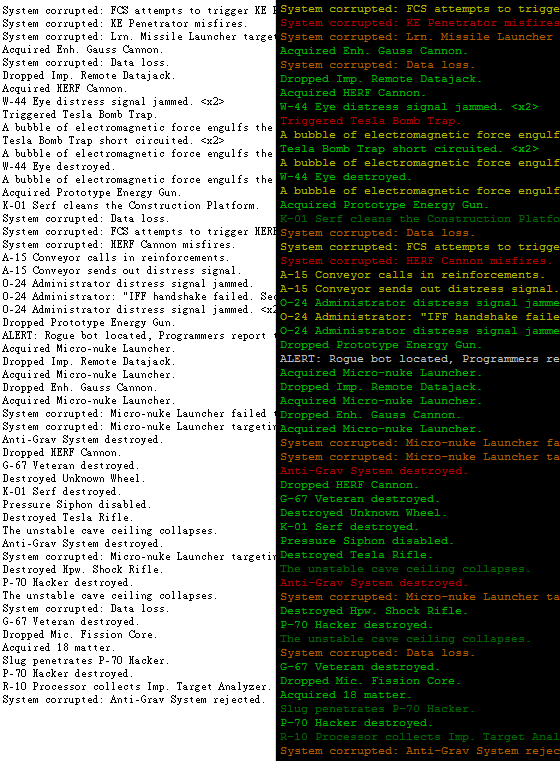
cogmind_message_log_output

Sample message log output, the same segment in txt (left) and html (right).

I thought this would be enough, but players have since requested even greater detail in the output logs to better follow progress of the game when re-reading it for learning purposes.

The Possibilities!

Outside the existing score sheet and log files, there is the potential for quite a few other related features that serve similar purposes, or present the same information in a different form. Keep in mind that none of what I mention below is 100% certain to happen, but with unlimited time (haha) I’d love to be able to at least test, if not implement, many of these features:

Dumps

Mid-game character dumps are useful for sharing progress and getting feedback online, so it would be nice to have a dedicated way to do that.

Image sharing is so common on the web now I’m not sure how many players would bother to use a text-based dump option if available. The latter is less readable due to lack of color information, and any time someone pastes/views it without a monospace font it would look terrible, but I put together a mockup anyway:
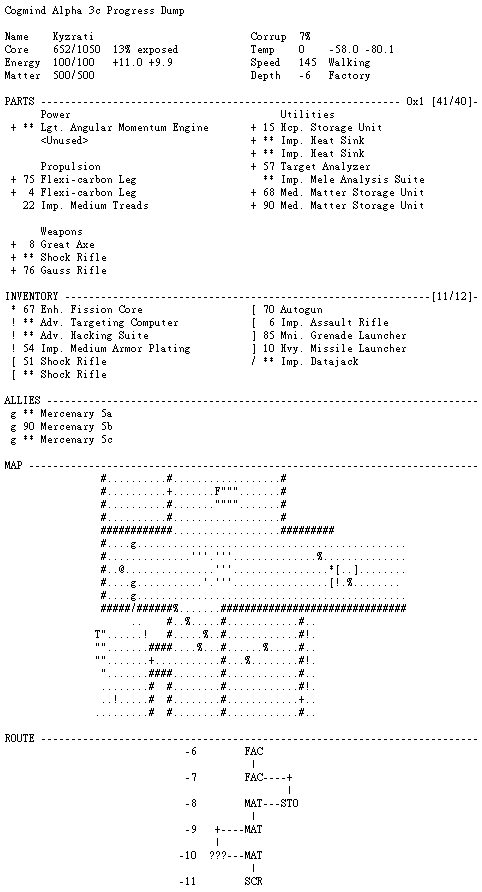
cogmind_progress_dump_sample_text

Progress dump mockup (text version).

The current stand-in method for character dumps--a simple screenshot of the HUD--already works pretty well (and is what players have been using) since it shows nearly everything you’d want to know. Its primary drawback is an inability to show more than 12 inventory items at once, an issue for some combat builds. Screenshots are also exceptionally wide for those players using high resolutions since it uses their font settings, making them harder to view on smaller screens.

By rearranging some of the existing windows I put together a mockup of a somewhat more condensed “image-style progress dump,” though this one doesn’t look so great, and is too wide.
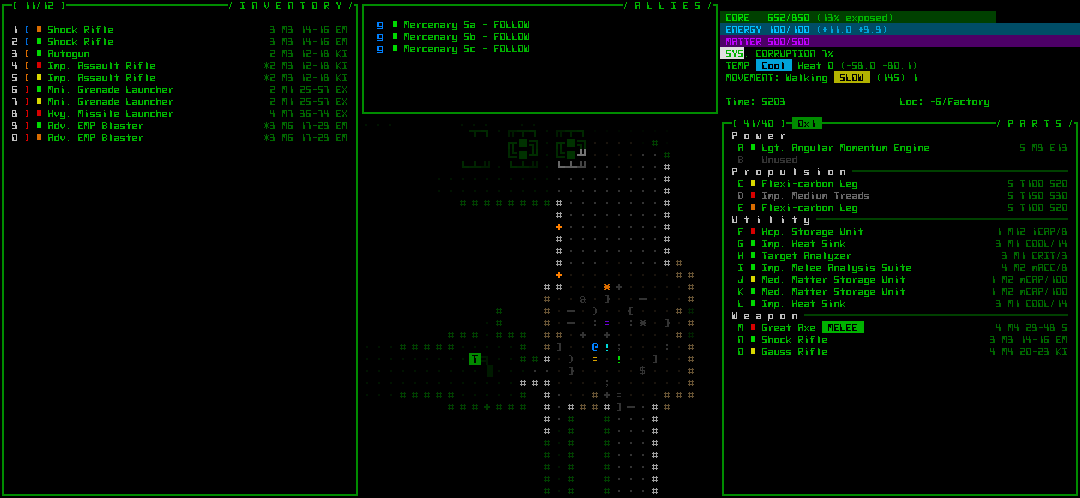
cogmind_progress_dump_sample1

Progress dump mockup (image version, style 1).

Instead here’s an alternative mockup of a truly condensed version without any secondary information--it’s nice and tight, and includes space for a lot more inventory items, but no map:
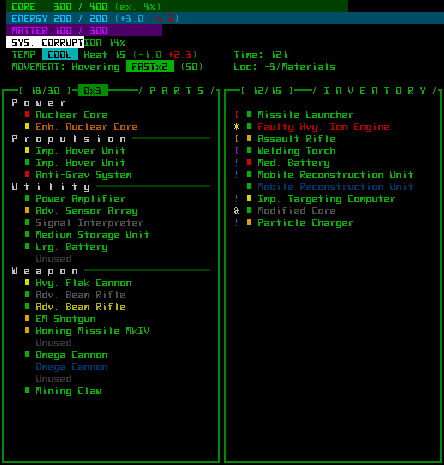
cogmind_progress_dump_sample2

Progress dump mockup (image version, style 2).

Even cooler would be a way to output your current build--or peak state from a run--using the game’s ASCII art to represent the items. Unfortunately at the high end you can have so many parts that the combined art wouldn’t fit within any reasonably sized image.

Score Sheet 1.0

By the time the score sheet is complete, it should include not only more stats, but also expand to contain a written summary of a run’s history, told like a story, as well as a world map showing the route taken through the world.
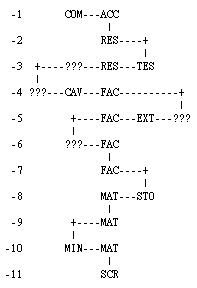
cogmind_world_route_text

World route mockup (text).

Along with the score sheet, there might also be an option to output an accompanying image of the entire last floor explored (not just the part viewable on the screen). This wouldn’t uncover unexplored areas (which would too easily reveal secrets), but players could at least learn something about map layouts without having to try to map it themselves (we’ll leave that practice in the 80s, or to games with smaller maps). The problem there being that maps can get quite huge, not to mention the data loss to corruption by this point:
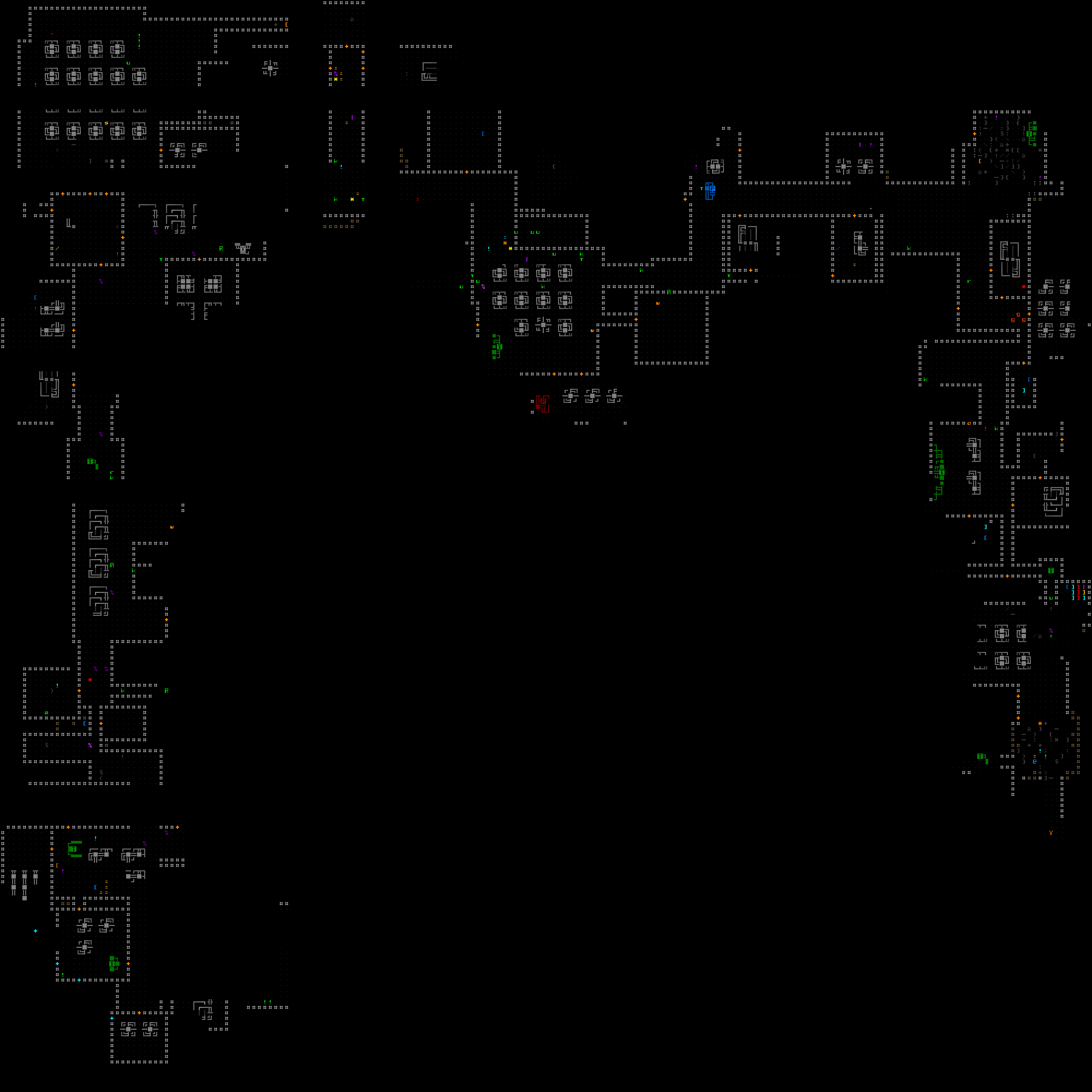
cogmind_map_route_output_sample

Explored map image (sample). (Click for full size.)

It would be a nice addition if the map also highlighted the specific path taken through the map.

Long-Term Performance

For those players who can’t or don’t want to upload score data, we could add a local history of personal high scores. Taking that a step further, we know that roguelike players appreciate more data, so why not track even more performance indicators over time.

Currently the results of each run are stored and viewed in complete isolation, except that each record shows the total number of runs that came before it, and a meta data file stores which items have been discovers and allows their art and usage counts to be viewed in the gallery.
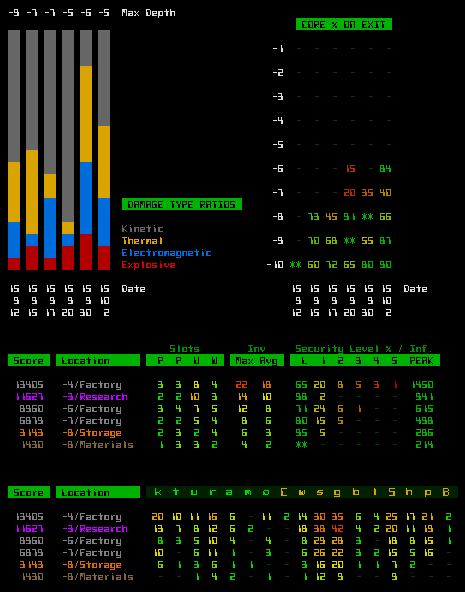
cogmind_performance_graphs_mockup

Some examples of performance graphs/charts that could be interesting (mockups).

I can see this being a huge development time sink for too little value if not limited to only a handful of the most useful data.

Another much simpler yet more granular approach to progress, is to have a place where players can review what discoveries they’ve made in the game so far. We already have this in the form of an “art gallery” that shows all the items collected throughout previous games, including their name, ASCII art, and how many times each was found and used (plus of course a name chosen by the item’s associated early supporter as a perk).
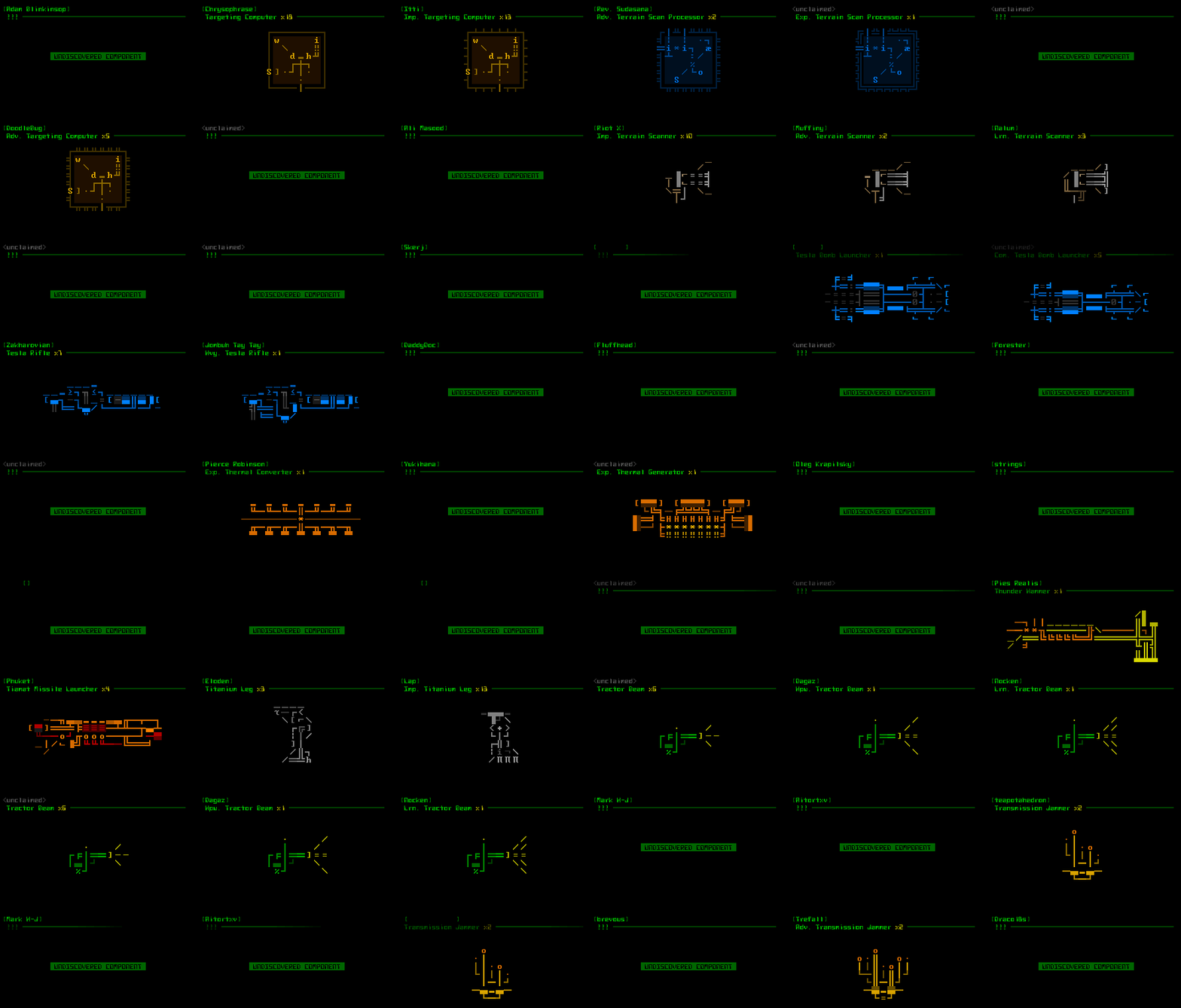
cogmind_art_gallery_alpha3

Cogmind’s in-game art gallery, with data and discovered/used items from my own runs (click for full size). DON’T OPEN THIS AND LOOK AT THE PLAYER NAMES if you are an alpha supporter and would like to discover your item for yourself!

This feature is a great incentive to keep players exploring, while showing just how much more there is to discover (a lot!). Recording the number of times each item has been used also gives this feature some statistical value for even those players who’ve discovered most of the items (discovering all of them is impossible at this point, since many of the best ones can’t yet be found).

It would be nice to expand this to include other parts of the game, such as types of maps and robots (however, I don’t believe I’d be drawing the latter).

Online Database

As mentioned before, it would be nice to have an online database with sortable tables and customizable graphs based on the data. Before we get to that point, I may further expand the current leaderboards by increasing the number of generated html pages to at least include some sortable charts that also link directly to individual records. I’m not rushing into that since I would want to make sure it’s somewhat future proof when it comes to new versions.

For the tournament I already wrote a data parser which scrapes a directory for all of its score sheets and compiles everything into a single CSV file. That formed the basis for the stats and analysis I shared earlier.
cogmind_AC2015_stats_csv

Complete CSV data from the tournament, 234,048 fields in all :D.


Update 190724: Since this original article I revisited Cogmind’s morgue files to greatly expand them even further, and wrote up a series of articles about what goes into “Building the Ultimate Roguelike Morgue File.” Cogmind’s leaderboards and online database have also since been revamped.
Posted in Meta | Tagged , , , , | 13 Responses