Official development blog
[ Latest Cogmind Release Notes: Feb 2026, "Unchained More" ]

Building the Ultimate Roguelike Morgue File, Part 4: History Logging

The final part of Cogmind’s new scoresheet that I added was the “history log,” referring to a list of important events and actions that took place throughout a run, and when (turn number) and where (depth/map) they occurred. Even without any other supporting info from the scoresheet, by covering the highlights of a run in chronological order it can essentially read like a story of that run.

For some background research I went back to my old Morgue Files article and checked out the samples I’d collected there to see which roguelikes have such a log, what they record, and how it’s all represented.

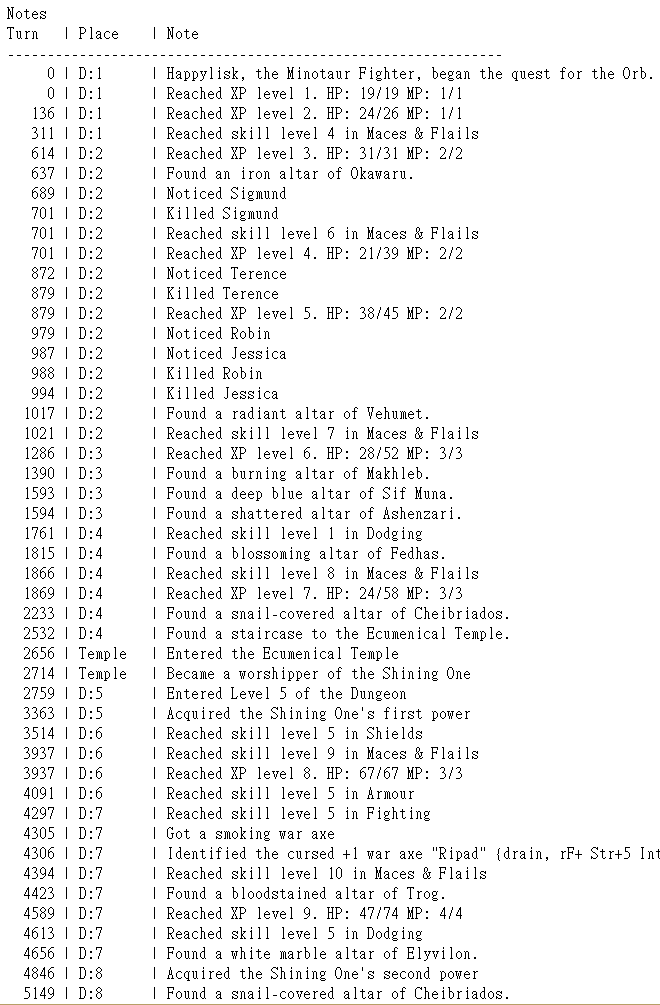
Here’s DCSS, for example, recording notable enemy encounters, kills, leveling, skills, altar discoveries, god powers, artifacts, and more. It’s pretty detailed.
roguelike_morgue_file_player_history_dcss

Sample “Notes” from a DCSS run.

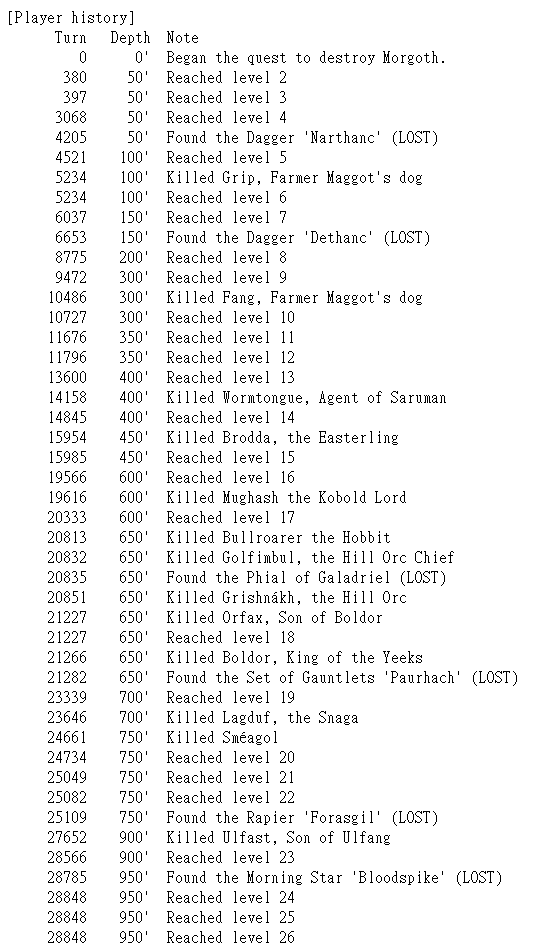
Angband is similar, although a little simpler, with notable enemy encounters, kills, leveling, and artifact discoveries.
roguelike_morgue_file_player_history_angband

Angband “Player History” sample.

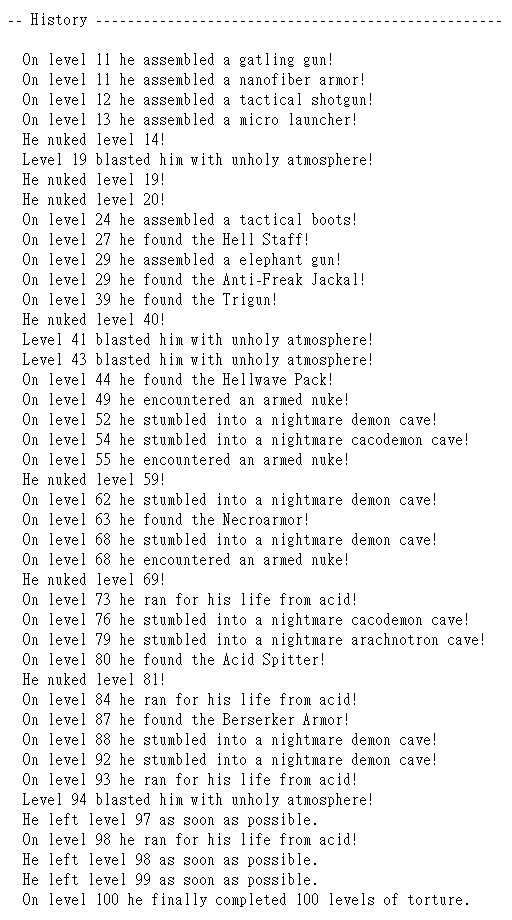
By comparison DoomRL is a little less informative (no turn counts) and doesn’t show much in the way of character progression besides assembled items, but has some other content like instead reporting locations and related major events, and also an exclamation! point! after! almost! everything! Exciting!
roguelike_morgue_file_player_history_doomrl

Sample “History” section from a DoomRL morgue file.

I like the format and level of detail in the DCSS “notes,” and decided something along those lines would be most appropriate for Cogmind.

Architecture

Architecturally speaking, on an individual message basis the history log is actually quite similar to the regular in-game message log. Both require:

  • Support for variables: Although a single message won’t really be needed beyond its own standard context, some of its content details may depend on the situation, for example having acquired a certain item would need to insert the item name as part of the message.
  • Per-message knowledge settings: Not all messages are always known, even if some event did technically occur. There could be different general conditions determining whether to actually include the message.

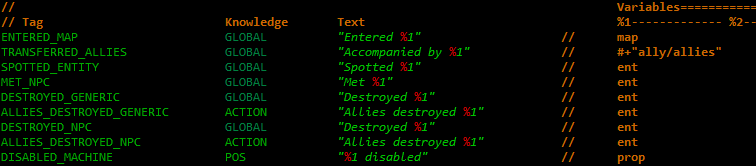
Here are some of the messages I defined first while testing the system, to demonstrate what I mean and how they’re designated in the data:
cogmind_history_message_definitions

Example history log message definitions.

GLOBAL indicates the message is always shown when triggered, not requiring any generic condition (other conditions can obviously be applied outside the message code itself, when determining whether or not to trigger it in the first place). ACTION indicates that the message will only be recorded if the actor who carried out said action is visible to the player at the time. POS means the location must be within the player’s field of view. Within the message itself, %1 is a variable, and some messages may use additional variables, e.g. %2, or none at all.

Considering the various potential sources of noteworthy events, I also needed to add more than one way to trigger a history message to be added to the log. Aside from hard coding some triggers in the source, especially where they tie into mechanics (or simply hard-coded content), a lot of the history messages would naturally be triggered by other related content, so the architecture needed to support triggering by dialogue, terminal entries, and event scripts, all of which are stored outside the source code. So each of these systems needed to be updated to understand new bits of formatting that would enable them to add history messages to the log when applicable, and even inject variables where required.
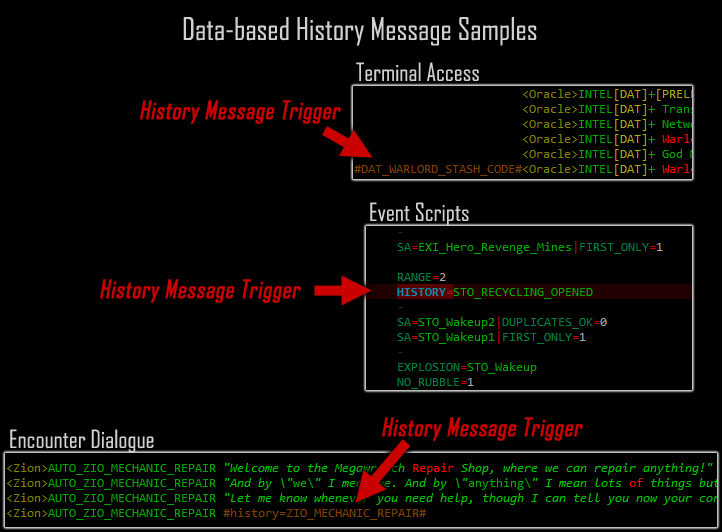
cogmind_history_message_trigger_samples

Demonstrating three data-based methods of triggering history log messages.

As for the internal message data organization--everything exists in a single file! I debated this approach with myself for a while before actually starting on the system, but after working on it for a while it became quite clear there’s no debate at all. With so many possible sources of history data, I need a quick and easy way to see what does and does not already have a message associated with it, all in one place; that and an easy way to check everything for grammatical consistency.

Even while working on the system and much of the history message content was relatively fresh in mind, I still often found myself going back and searching for existing messages for modification or to confirm certain aspects of them, and having them all in one place saved a great amount of time there. This means both more efficient work and higher-quality results. And imagine how inefficient a decentralized approach would be down the line during updates when all this stuff isn’t fresh!

Here’s the external file as it stands now (albeit not shared clearly because of course it’s full of spoilers :P):
cogmind_history_message_types_312

Over 300 history message definitions.

The largest individual source of history messages, event scripts, originally got syntax to automatically define new history messages in that file, creating them within the script itself without any additions to the code or by explicitly adding new history message definitions at all. This made it really easy to add new messages, but then they’d be “invisible” to the data and code, which could eventually be problematic for research and consistency analysis. At the start of this history log project I had originally defined about 60~70 messages that way before realizing this was a terrible idea. I’m glad I backtracked on it and moved all those definitions to the single file. Everything is together in one place now. Whew.

Message Types

The architecture is the easy part, after all it’s just storing a bunch of message definitions and spitting them out when called upon. But having worked on Cogmind for six years now, yeah there’s a ton of content to include in history messages, or at the very least considered for inclusion. This required going through a whole bunch of stuff, and ultimately became a huge project on its own that consumed as much time as much as all other parts of the scoresheet 2.0 update combined: two weeks!

That said, I don’t regret waiting until this year to do it. Honestly this is better because although it’s a lot of work, it also means the results can be even better because all of the needs of the system and various different message considerations can be taken into account at once, finding the best approach that works for everything, rather than making decisions without being sure of what might come in the future (and possibly having to redo old work).

The biggest question when starting out with content is the desired level of detail. There’s a clear spectrum in our sample roguelike files above, from maybe one message per floor, to a few, to even many. What kinds of events are important or notable enough to log and serve as a reference for what happened during that playthrough? What’s the threshold that will produce a fun and/or useful history log?

This of course also depends on the intent of the log. What’s it for in the first place? In my mind, there are a lot of possibilities here:

  • record notable achievements that might not appear elsewhere in the scoresheet
  • remind the player of their feats, and challenges faced
  • shed light on various otherwise “hidden” aspects of a run for other players reading the scoresheet, essentially those things that numbers and item lists won’t fully reflect
  • for experienced players, knowing events the player did (or did not!) interact with can help give an idea of the play style at work
  • showing the specific order in which everything played out within an individual map is also instructive with regard to style, or just trying to reconstruct the run for other purposes of understanding or analysis.

On this last note, aggregate scoresheet analysis will also become even more interesting, since we can get a much clearer picture of parts of the game players are interacting with that haven’t ever been recorded before--lots of encounters and environmental factors that we know and love from player discussion and anecdotes but that previously required proactive discussion to bring out will now be accessible in every scoresheet!

The history log should effectively be kinda like watching a recording, only much (much) faster, and not nearly that detailed since we don’t need to know all the common stuff that goes on--so more like a short story or concise summary. In any case, it certainly won’t be as verbose as the message log, and it won’t include anything insignificant, making it more worth reading or skimming through.

Note there will be some overlap between the history log and other parts of the scoresheet. For example both include ways to see how the player’s build evolved over the course of the run, but each is a different way to examine the same information--in number form it’s good for analysis, and extremely condensed, whereas in the history log it’s spread out in chronological order among the other events.

But that’s also the kind of information that gives other history messages more context, and the history log should also serve as a standalone representation of the run, not requiring any of the other data to supplement or be cross-referenced against it.

So what kinds of message types are we looking at here? Well, there are quite a few categories! Here’s an overview:

  • Exploration: Evolving and entering a new map
  • Plot-related stuff: This is a category that other roguelikes don’t really have, but is clearly a centerpiece of the history log, knowing what major events and NPCs the player interacted with (in the past this function has been partially served by the “bonus points” scoring breakdown, which was the impetus behind expanding that part of the scoresheet over the years, but a dedicated history log will do a much better job)
  • Encounters: Non-plot special encounters are also an important part of the experience since most still have a mechanical/tactical/strategic impact on a run, so they should be included as well (and there are a lot of these…)
  • Enemies: Spotting dangerous foes and taking them down is worthy of the record
  • Items: Finding and using very special items definitely needs to be in there
  • Environment interaction: Destroying special machines or otherwise doing something that affects the environment

The screenshot below was taken from my notes that I referenced as I did the work, listing all the game data I had to parse for content and mechanics worthy of inclusion. Note it includes some SPOILERS if you look closely enough, though most of the low-level details are probably pretty cryptic with all the abbreviations anyway. The notes also mention some things which were not actually implemented, being rough notes and all…
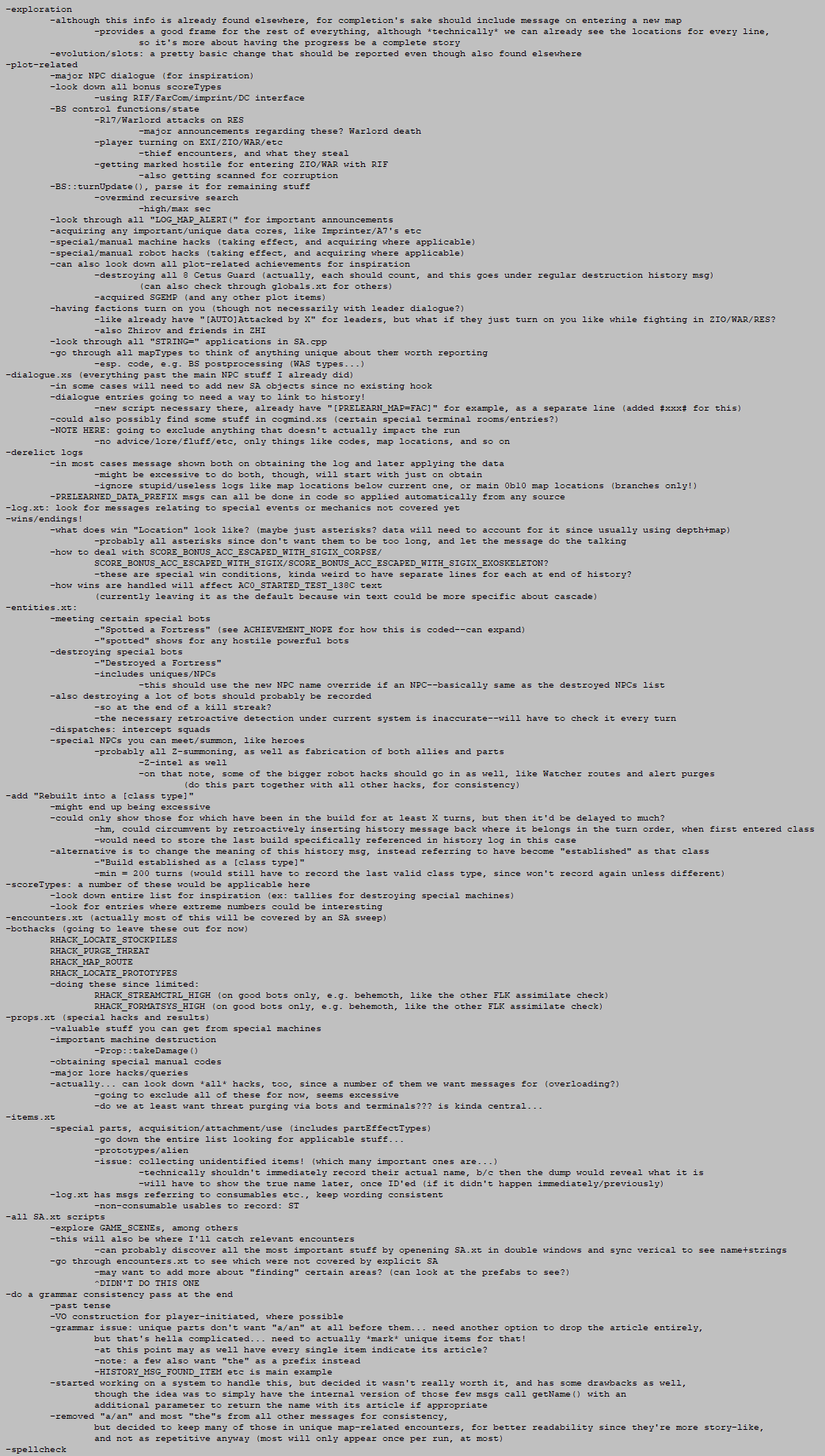
cogmind_history_message_type_notes

Implementation notes for history message types.

After a couple weeks of work Cogmind reached its current total of 312 history message types! I’ve been making some adjustments as patrons and myself do prerelease runs with this system and examine the history logs, but overall I’m pleased with the results.

Examples

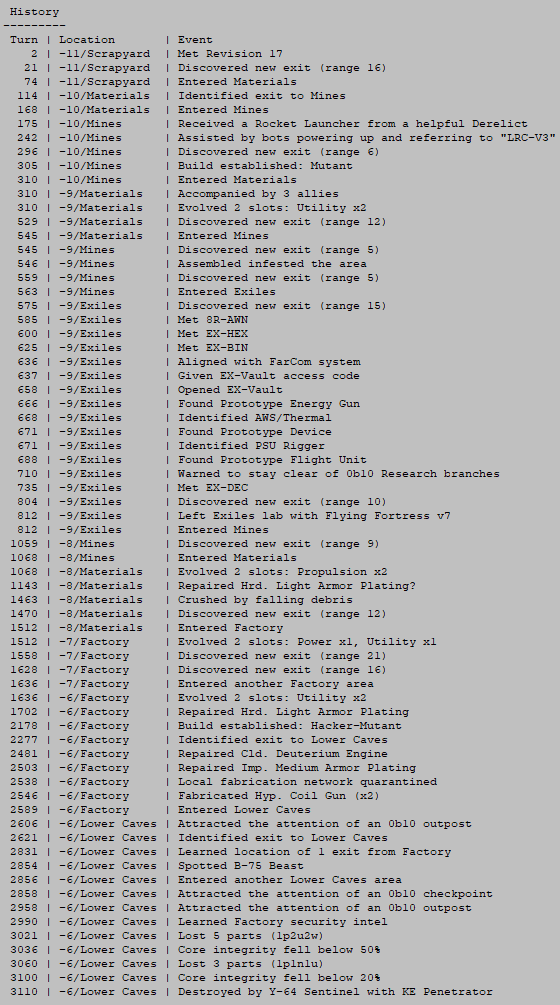
See the History Log in action with these recent recent Beta 9 runs:
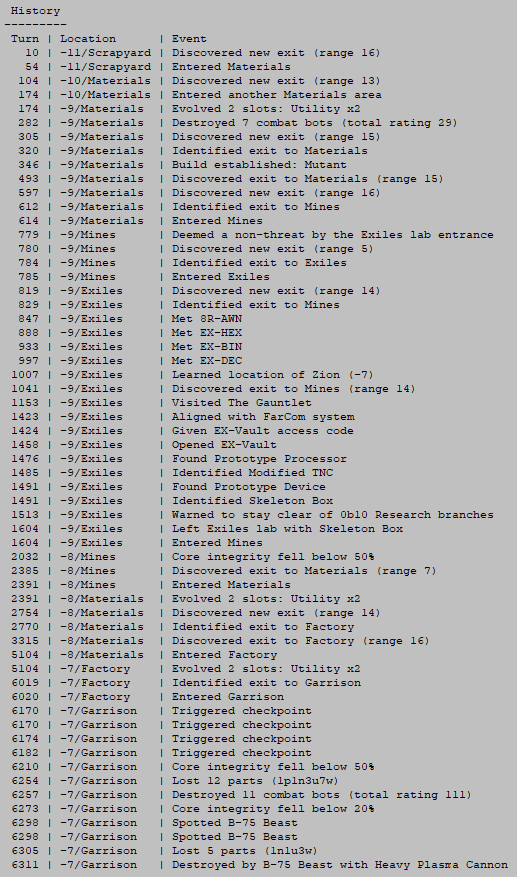
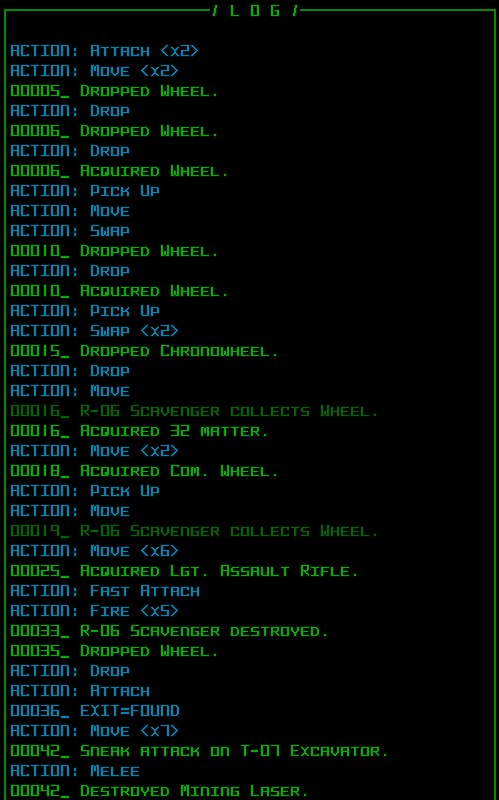
cogmind_scoresheet2_history_log_sample1

Splatting relatively early on. I’m sure we’ll see a higher ratio of Garrison deaths in Beta 9 considering the new system accessible within.
 

cogmind_scoresheet2_history_log_sample2

Another relatively short run, escaping the Assembled, visiting the Exiles, then zipping through the caves and attracting a bit too much attention!

Branches and anything plot-related will tend to have more of the unique messages, as will late-game content like finding and using cool parts, so a lot of the longer runs also make for more interesting reads.

For some additional expansive examples, you can check out the history logs from these prerelease runs by CptWinky:

A Note on Grammar

At the end of the message writing and coding process, I went back over it all and did the usual spell check and parsing for grammatical consistency, then decided to remove most articles.

I had most of a system in place for handling a/an/the/[nothing] before variables like item names, but 1) it wouldn’t be perfect in all cases without a lot more hard-coded data (which would take a while) and 2) it wouldn’t be consistent with the game text itself, which intentionally avoids that sort of thing in message logs (keeping it more dry/robotic/clinical).

I did kinda like the fact that it reads more like standard English with articles in there, appropriate for the somewhat “story-like” history log, but then for the same reason it also kinda wasted space, adding characters unnecessary for understanding the text and therefore potentially slowing down visual parsing.

Non-variable-based messages, however, retained some of their articles, especially “the” in a number of cases such as special encounters and plot-related events.
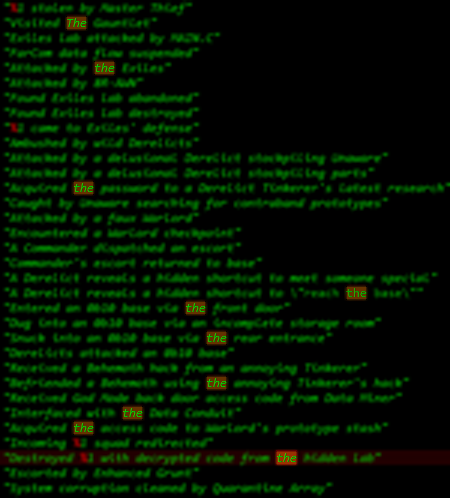
cogmind_history_log_grammar_pass_articles_the

Highlighting every “the” for a grammar pass on the history message type definitions.

Extended Feature?

Another interesting idea related to history logs is allowing players to manually type notes to be added to the log as well--just enter a note and it’ll be appended to the list at that time, recording the turn and location. It sounds fun, but I’m not sure about allowing players to insert data into scoresheets like that :P

Or perhaps only include these personal notes in the local version of the scoresheet, just not in the official uploaded versions?

This is the fourth article in a four-part Building the Ultimate Roguelike Morgue File series:

Posted in Dev Series: Ultimate Morgue File | Tagged , , , | 2 Responses

Building the Ultimate Roguelike Morgue File, Part 3: Mid-run Stat Dumps

In the first part of this series I described how I didn’t want to get into fundamental changes to the stat system while in the middle of development, leading me to completely avoid modifying the underlying architecture despite greatly expanding the number of stats recorded. Among other limitations, this is also why we’ve gone for years now without a way to examine stats in the middle of a run. But that ends now!

Clearly “mid-run stat dumps” (AKA character dumps) are a really useful feature in a roguelike of decent length, and even more so in a roguelike with an active community that enjoys discussing strategy. Some reasons to support dumps:

  • Share with others the full details of runs still in progress
  • Check the current scoring breakdown and other stats
  • Help track progress towards in-run achievements or other goals (this would be nice to have in game, but Cogmind has hundreds of achievements and it would be a ton of work to implement a way to review this progress in game, so I’m not sure if that will exist)
  • Make the system easier for me to debug, and work with in general (I have been loving the ability to output stats at will since this feature was completed! Previously having to self-destruct and reload all the time was a pretty annoying and repetitive sequence compared to just a single command…)

I’m sure there are more, or more variations on what I have above, but the point is: they’re useful!

Form and Architecture

Years ago when thinking of this kind of feature, I envisioned a mid-run stat dump as an alternative short summary of the run’s progress and (most importantly) current situation, different from scoresheets. But other than the advantage of keeping it concise, that doesn’t really make sense when we already have a great source of comprehensive info to draw on--the scoresheet itself. Stats for the scoresheet are maintained throughout the run and (mostly) ready to be output at any time, so why not just create an “in-progress scoresheet” on request?

So that’s the form we’re aiming for here, basically just a scoresheet-on-demand :)

This did, however, require a fair bit of work.

The original code for stats in Cogmind was quite simple: Have a class storing all the data in a few simple arrays, and when the run ends mix it in with whatever other player/run data is necessary, rework it all into a printabble format, and write it to a file.

The problem is all of this was done in a single function--there was essentially no division of responsibilities, although clearly we can’t use an identical process for mid-run stat dumps because there can no longer be an assumption that the run is ending! For example the original code would even change game data as part of its work without worrying about negative repercussions, since the run was ending anyway :P

And as you’ve seen in the samples before, Cogmind’s scoresheets contain quite a lot of data, so there was a lot to go through…

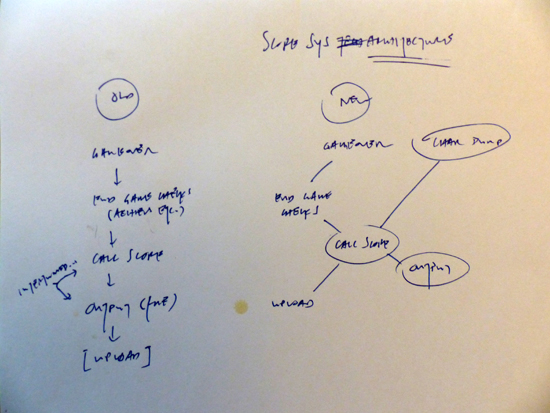
cogmind_score_system_architecture_notes

The scoresheet architecture diagram that’s been sitting on my desk for months now, from when I first sketched out the difference between what we had and what we needed.

In terms of architecture, the main goal would be to migrate everything from a linear system to a properly compartmentalized one which could handle three separate possible outputs independently of each other: scoresheets, mid-run stat dumps, and uploading of online stat/leaderboard data.

The most important part here was separating out all the necessary data into a new intermediate format, basically a new data structure outside the game data that contained everything necessary for any of these purposes without relying on the game. Technically as described before I already had such a separate structure outside the main internal game data, but it still relied on a lot of support from the game data itself because that was what was easiest at the time :P. Now the code has been restructured around a whole new intermediate data structure that purely contains all the raw data necessary for any desired final form.

Although I haven’t done it yet (though it will come soonish), this is also a stop on the road towards having an online stat database, so the dump feature’s development comes at just the right time.

Content

What’s inside a mid-run stat dump? Well, it’s almost identical to a scorehseet, simply stopping at the current point, except for one main difference: there’s no Result to show in the header. I mean… of course there isn’t :P

That said, it’d still be nice to use the expected “Result” line in the header to indicate that the run is still in progress, and show something else interesting instead (rather than just “in-progress,” “stat dump” or something else mundane), so I came up with some new content for it.

I thought it would be neat to provide a short one-line summary of the run as it stands, which in cogmind basically boils down to two things: your build, and your status. Pretty simple, although each half of this would require a new system and take some time to realize.

Build Categorization

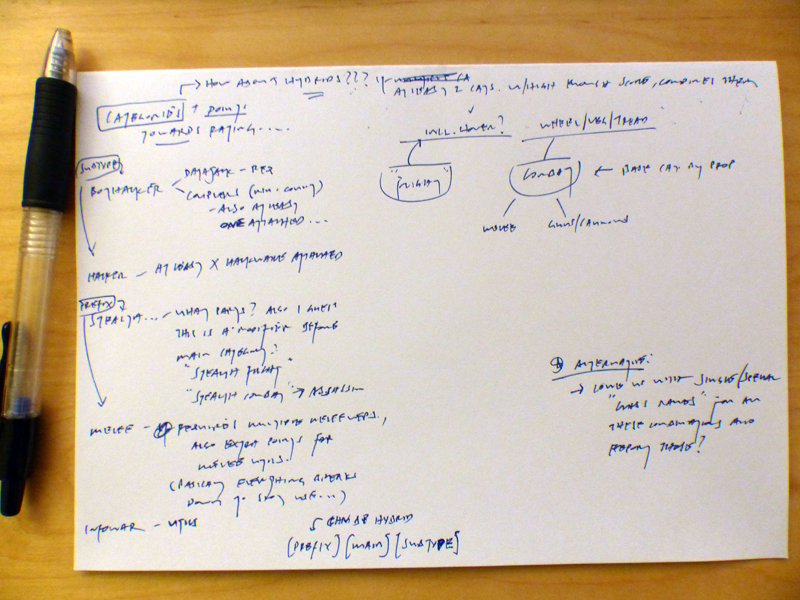
I started out thinking the first element would use terms along the lines of what we’ve come to be using in the community, e.g. “flight hacker,” “infowar combat,” and so on, sketching out some related notes on how to make that determination.

cogmind_build_classification_initial_notes

Initial incomplete build categorization notes.

At first it looked like it might be in the form of [prefix][main][subtype] (e.g. infowar combat hacker), with the possibility of other hybrids mixed in there and whatnot. It’s a practical approach, but also given the kind of options I saw it was kinda boring and probably overcomplicated. (During this process I drew on my character archetypes post about Cogmind from a while back on r/RoguelikeDev, which you might find interesting if you haven’t seen it before.)

So I thought what if we had it instead detect builds as something more akin to true classes? The focus would still be on clear, functional names rather than creating whole new ideas unique to Cogmind or anything crazy, but it would be more fun than the dry (and even more limited) terms we normally use.

Unlike many roguelikes/games where you select a class to play, as you know Cogmind is a dynamic, flowing experience and it’s interesting to explore classification of these builds as they happen.

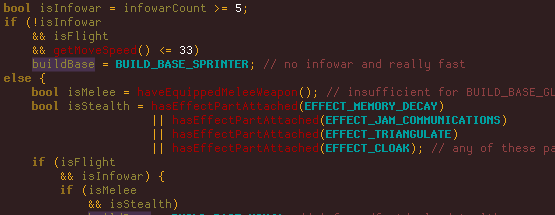
To this end I came up with a chart of characteristics and 13 names to go along with them. In the code, a long series of nested conditional statements determines which “class” most closely applies to the build.

cogmind_build_classification_base_source_sample

A sample from the beginning of the base class determination--it continues for a while after this, filtering further and further down through possible builds based on state summary variables. Lots of if-elsing :)

Then, since a single name would have been too limiting and many more creative combinations can be captured via a two-name system (kind of like multiclassing!), I came up with an additional 15 special designations that can more specifically describe some aspect of the current class.

Unlike the main designation, this one is determined via a point system. Your build earns points in each category based on its parts (and sometimes other factors), and whichever category accrues the most points is applied as a modifier to the class. If nothing applies very well, then only a single base class is used.

Cogmind is not constantly recalculating your class. That would waste a lot of time, and also be pretty inaccurate when you’re doing things like transitioning between builds, or lose a part or two for just a little while or are in the middle of swapping things in and out for whatever reason. What I did there is have it not only calculate only every so often, but also wait until there has been a decent stretch of turns without any actions that affect your loadout, like attaching, dropping, swapping, etc. Only when your build is considered “stable” will it take another sample for analysis.

In the end this automatically determined “build class” appears in the format [special modifier]-[base class], where the modifier is empty if nothing really applies. Everyone starts as a Mutant, the default base class, since that’s more or less what Cogmind is at heart, a non-specific machine attaching a random variety of parts while not really capable enough in any one area to be noteworthy.

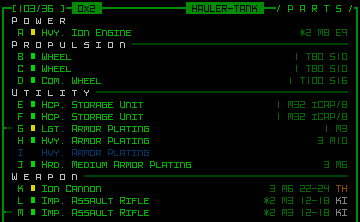
There are currently 195 multiclass combinations (plus the 13 pure base classes), some more specific and less likely to be discovered than others. Below are a few screenshots of my first test run in which I traveled and battled through five maps as I changed my loadout around and saw how the game classified it. For this purpose I put a nifty “class readout” right at the top of the parts list. (I wasn’t aiming for any particular builds, this is just what I ended up with, among others I didn’t screenshot.)

cogmind_build_classification_test1

Build: HAULER-TANK. Armor and firepower!

cogmind_build_classification_test2

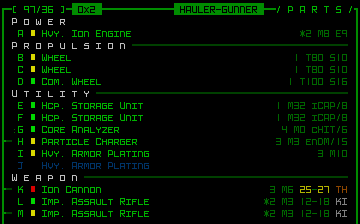
Build: HAULER-GUNNER. A more offense-oriented combat build.

cogmind_build_classification_test3

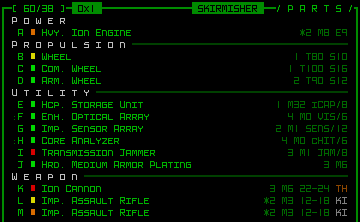
Build: SKIRMISHER. Combat bot supported by infowar utilities.

Although the class indicator seen on the HUD there was originally for testing purposes, I later decided to include that as an advanced player option as well. It’s kinda non-immersive so I don’t want it appearing there by default, but it’s a fun thing for veteran players to turn on.

In designing the above system, I realized it could be expanded into an interesting permanent part of the full scoresheet, as described in the first part under the Build section. Thus we get two new scoresheet sections:

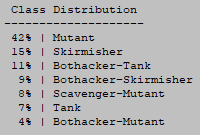
cogmind_scoresheet2_class_distribution

Sample scoresheet 2.0 excerpt: Class Distribution.

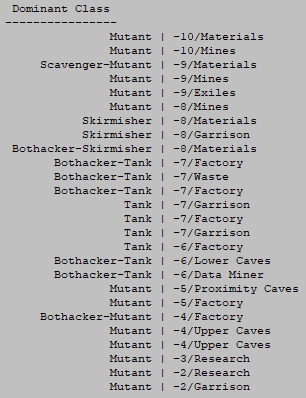
cogmind_scoresheet2_dominant_class

Sample scoresheet 2.0 excerpt: Dominant Class.

I’m happy to see that builds aren’t whipping all over the place, which would otherwise be likely if the classification system wasn’t stable enough. Having relatively broad definitions helps in that regard.

Builds also have a place in the History Log, to be described in Part 4 of the series.

But getting back to the idea of mid-run stat dumps and that Result line, this is where it all started, just to drop the class name in there like so:

cogmind_scoresheet2_dump_header

Sample mid-run stat dump header, with build classification and situation analysis.

There you can see we have the current build type, followed by a second piece of information we’ll get into in the next section.

Situation Analysis

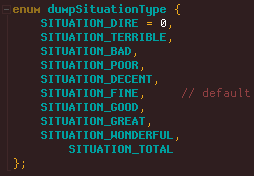
Since we can’t describe the final result of the run, I thought it would be interesting to try to summarize the current situation in one word. This is determined on a scale from dire to wonderful.

cogmind_scoresheet2_dump_situation_types

The full situation analysis scale for a run’s status.

The default is “fine,” and a number of factors are checked to simply raise and lower the scale to arrive at a final value. So having some negative factors mixed with some equally positive factors will still average out to a “fine” situation, but having extra factors in a given direction will start pushing the rating towards an extreme.

The calculations are all quite simple, just checking factors that we has Cogmind players tend to rely on when considering what’s truly important in terms of how we’re doing. Some of these are pretty common to roguelikes in general, like having low HP is not good, being surrounded by enemies is bad, and you don’t want to be completely defenseless.

Here’s a general list of factors used to analyze the situation:

  • Core integrity
  • Speed (can’t be ridiculously slow)
  • Essential parts (missing power or propulsion is dangerous)
  • Spare parts (this is never included as a negative factor, but it’s always a good thing to have spares of everything)
  • Part condition (empty slots count against this)
  • Matter levels
  • Armed enemies and allies nearby
  • Known exits

The entire thing is only 77 lines of code, but seems to work pretty well. Like build classifications I added a current situation analysis indicator to the HUD for testing purposes so I could see how it was changing throughout a run, but I don’t plan to make this even an optional feature for players.

cogmind_situation_analysis_debug_HUD_sample

Current situation analysis debug mode view (you can tell it’s not for release because clearly it shouldn’t be lowercase).

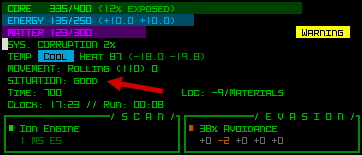
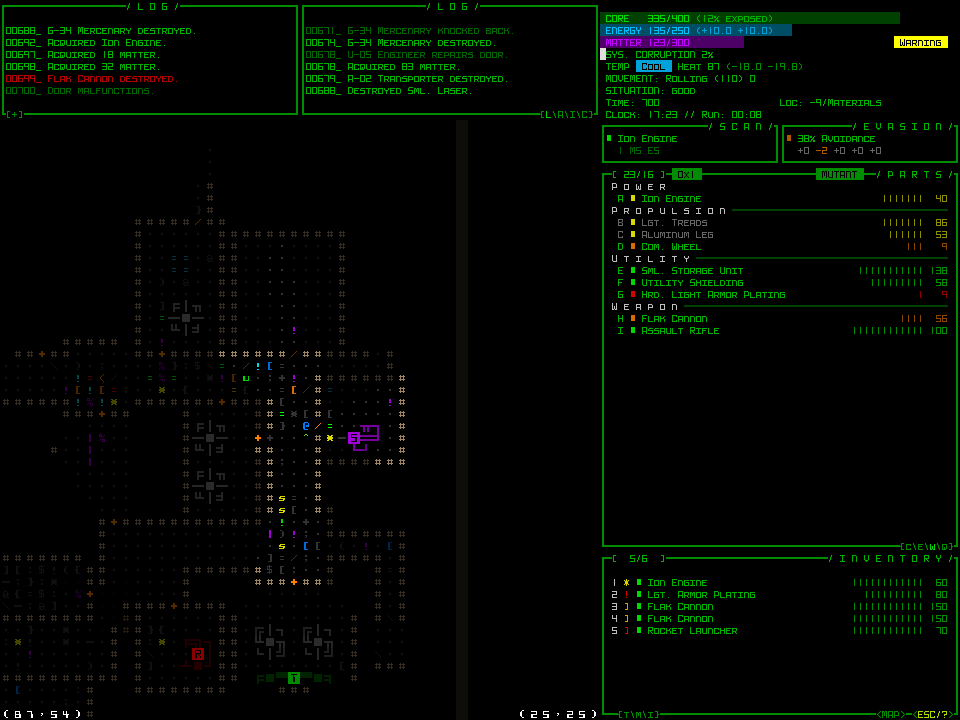
If you want to see that in action, I was using it in this Beta 9 preview stream where I ran the debug version of Cogmind. Actually for a simple example, here’s a debug shot in -9/Materials:

cogmind_situation_analysis_sample

Situation analysis: “good.”

UI

Scoresheets are normally produced at the end of a run, so how do players get a mid-run stat dump?

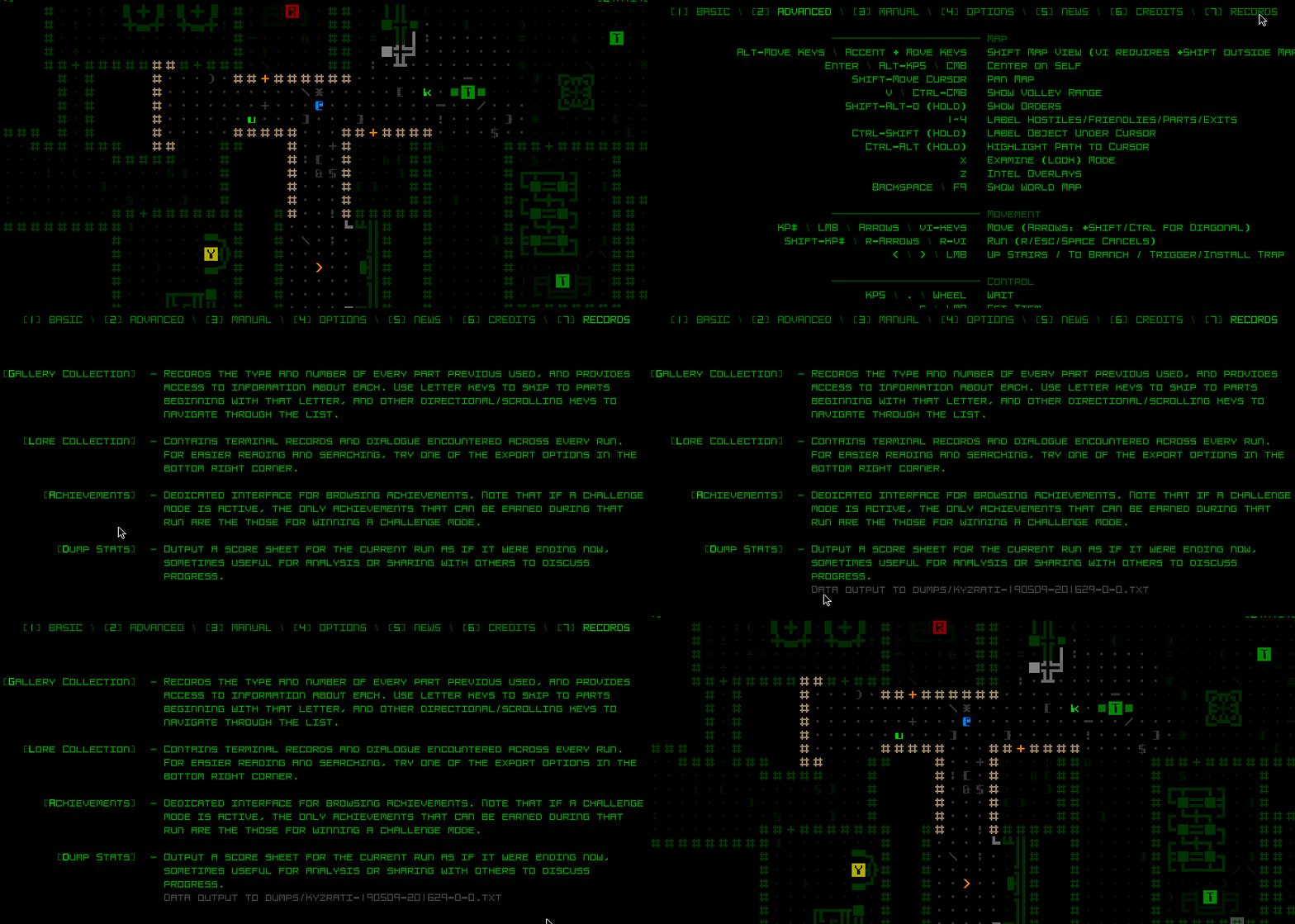
There is a new command that can be used on the main UI, Shift-Alt-s (for “stats”), which creates the file and puts it in a new separate directory in the Cogmind file structure, /dumps/.

Of course this also needs to be mouse accessible, so for that we conveniently have a logical place to put it: the Records menu.

cogmind_character_dump_ui_demo

Dump Stats button in the Records menu.

Even just in prerelease so far players have already been using the stat dumps, not to mention this feature has proven quite useful for my own needs whenever it comes to testing or debugging anything stat related.
This is the third article in a four-part Building the Ultimate Roguelike Morgue File series:

Posted in Dev Series: Ultimate Morgue File | Tagged , , , , , , | Leave a comment

Building the Ultimate Roguelike Morgue File, Part 2: ASCII Maps

Although there’s only so much information ASCII alone can hold without color or a supporting interface, it’s still worth it for morgue files to include a map of the area around the player at the end of the run for added context. For wins generally not so much, but such maps can definitely be useful for determining the tactical circumstances behind a loss. (That said, some wins while on the verge of death are only even made cooler with a final map showing a horde of hostiles on one’s tail!)

Last time I covered the general organization of Cogmind’s Scoresheet 2.0, but wanted to get into more detail with maps in particular since there’s a lot to say/show.

Other Roguelikes

Three out of four of the roguelikes I surveyed earlier for their morgue file content include an ASCII map within it.

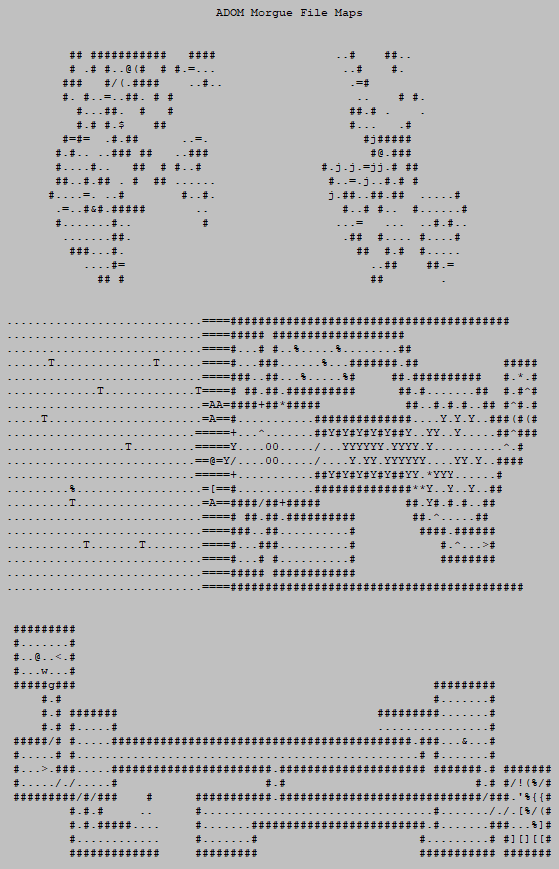
ADOM’s morgue file is topped by a console screenshot taken at the end of the run, so naturally includes the surrounding area. Here I’ve taken a few maps from different morgue files to give you an idea.

roguelike_moruge_file_ascii_map_adom

ADOM morgue file map samples.

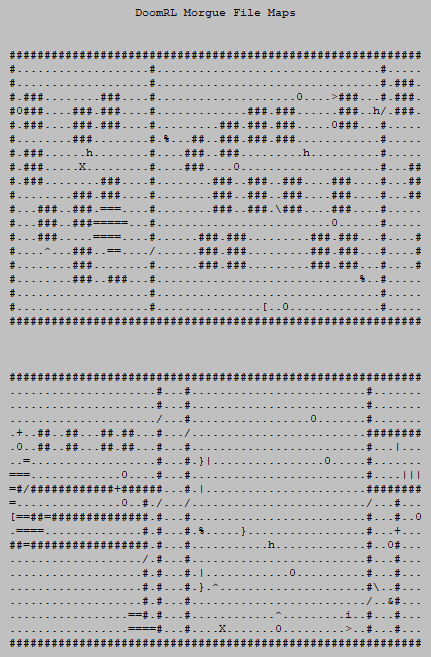
Unlike the others, DoomRL (DRL) reveals the entire map, regardless of whether it was explored or not:

roguelike_moruge_file_ascii_map_doomrl

DoomRL (DRM) morgue file map samples.

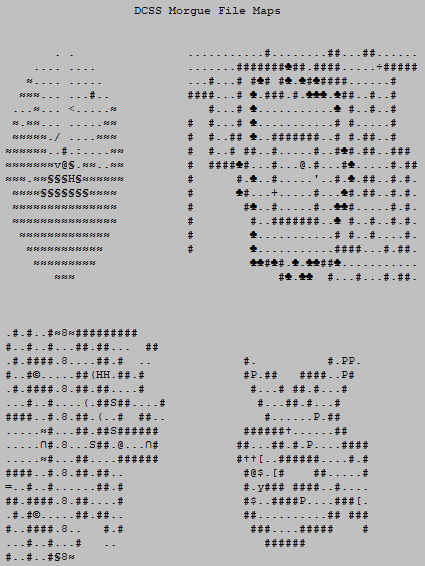
And DCSS morgue file maps show a relatively small area (interesting since it also has the largest maps of these three roguelikes), but are also the only ones to use Unicode characters--the other two are pure ASCII.

roguelike_moruge_file_ascii_map_dcss

DCSS morgue file map samples.

Cogmind Style

For Cogmind I decided to go with pure ASCII. One of the big limitations of exporting a text map this way is that it can’t show Cogmind’s machines properly. These are drawn with CP437 (extended ASCII), but I want the entire scoresheet to be widely compatible and not require any special encoding, which means we have to forgo Unicode. (Not to mention non-ASCII characters can look especially weird depending on the font, and because they’re narrow rather than square like in game, machines’ appearance is otherwise significantly distorted anyway.)

cogmind_scoresheet2_map_test1_fail

An example of what happens when character encoding can’t be interpreted correctly and requires manual/reader adjustment (not ideal!).

Well in most cases the type of machine is not terribly important, so I decided to draw all of them using a character not used elsewhere: the double quote. Interactive machines are certainly important, so their interactive piece is still represented by the appropriate capital letter, making it possible to distinguish that particular machine block from the rest. This is looking better:

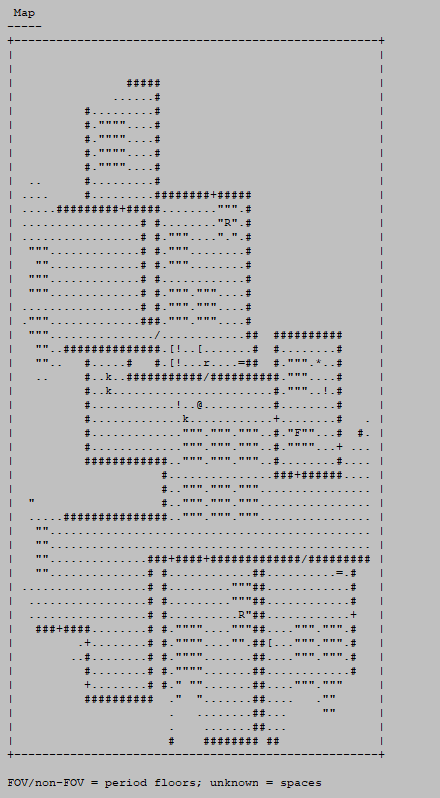
cogmind_scoresheet2_map_concept1_floor_periods

The initial concept for Cogmind’s scoresheet ASCII map style.

Here I’ve also added a border around the map view, which comes in handy when near map borders, or when the known map doesn’t fill the available area. I left empty buffer columns to the left and right of the map, but not the top and bottom; this is because as a text file it will generally be viewed using a non-square/tall font, so the spacing looks more even this way.

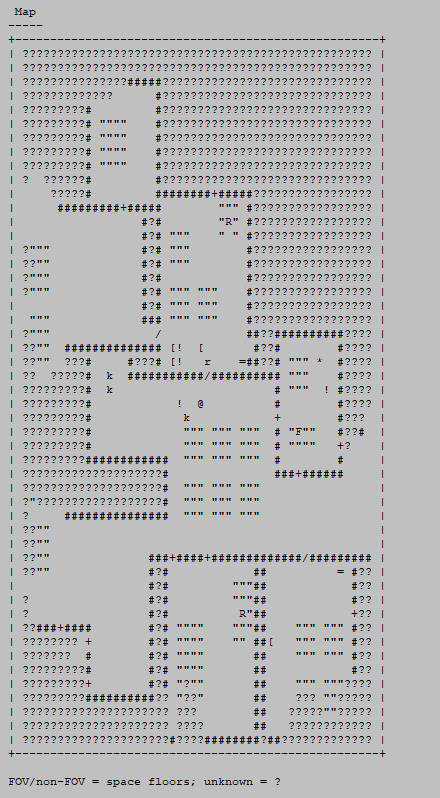
In terms of area, Cogmind shows all known terrain and objects within a 50×50 area (the smallest), where areas outside FOV are output as whatever the player remembers to be there.

You’ll also notice that debris is completely removed (anything that would just be noise and interfere with interpreting the map shouldn’t be there, especially since there’s no cellwise brightness we can use to emphasize/de-emphasize various elements). This was actually kinda hard to do for previously seen areas and required a bit of a hack to retroactively “erase” debris ASCII without misinterpreting actual item knowledge.

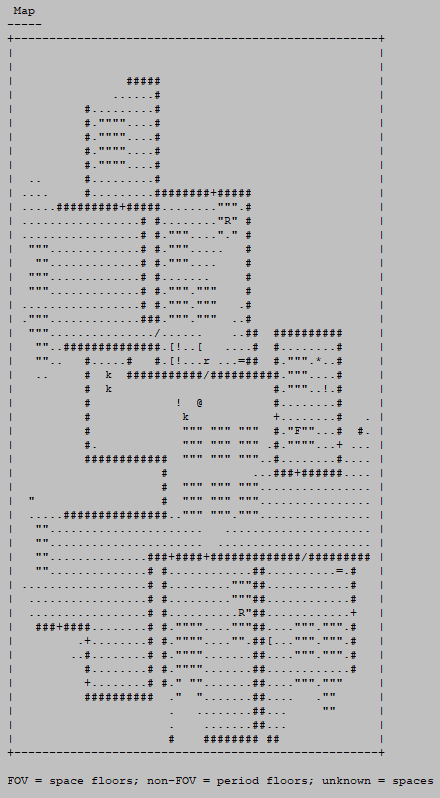
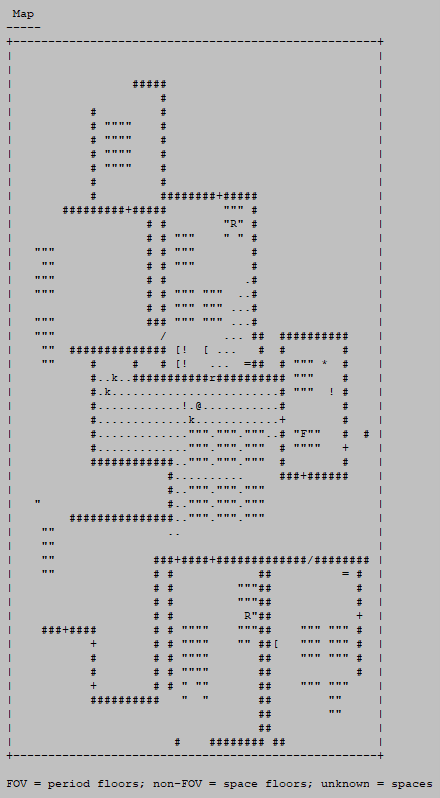
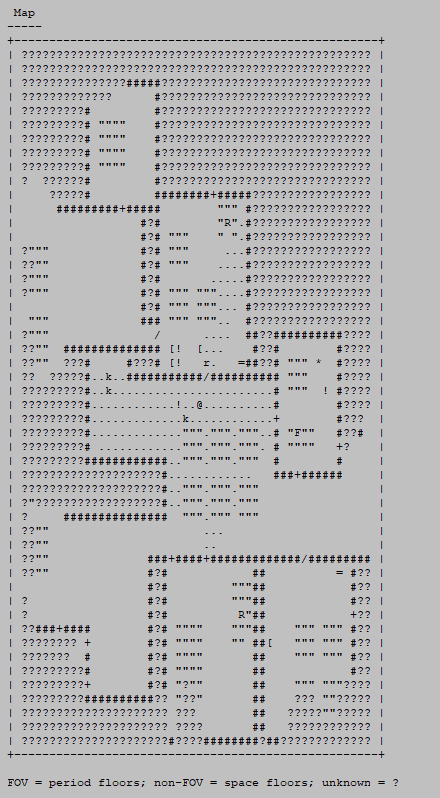
At this point I started testing out various different map styles. Do we want to be able to distinguish between FOV and non-FOV areas? How should unexplored areas be represented? I did tests of each to compare… (see legends)

cogmind_scoresheet2_map_concept2_nonFov_floor_periods

ASCII map style concept 2.

cogmind_scoresheet2_map_concept3_fov_floor_periods

ASCII map style concept 3.

cogmind_scoresheet2_map_concept4_fov_floor_periods_unknown_marked

ASCII map style concept 4.

cogmind_scoresheet2_map_concept5_floor_spaces_unknown_marked

ASCII map style concept 5.

I decided the last one is best, as it’s not too meaningful to distinguish FOV vs. non-FOV areas, especally when doing so has the drawback of making the map harder to read. Much more important are the objects present, specifically the letters (robots).

On that note, I wonder if it would end up being useful to have a description of major features on the map, such as the names of meaningful robots and parts that can’t necessarily be gleaned from the ASCII map alone (like technically an ‘s’ could represent a weak robot, or a very powerful one, although cases like this aren’t too prevalent, and some can be determined through other context clues).

Anyway, I worked out some kinks in the content and did some more tests. If you’ve played Beta 8, you’ll probably recognize this place :)

cogmind_scoresheet2_map_concept5_in_EXI

Cogmind ASCII map style in Exiles lab.

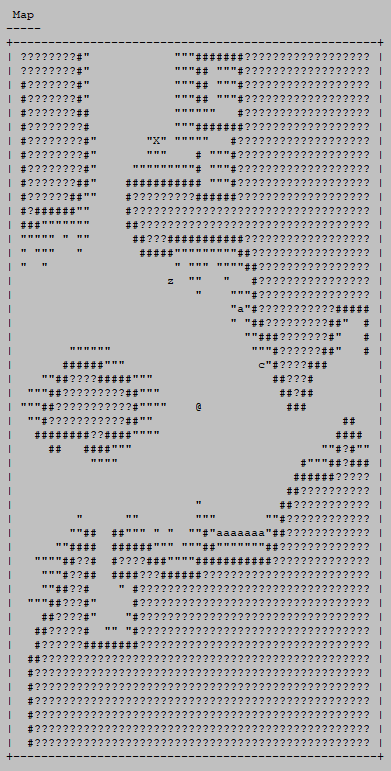
Here’s what the caves look like in this style:

cogmind_scoresheet2_map_concept5_in_LOW

Cogmind ASCII map style in caves.

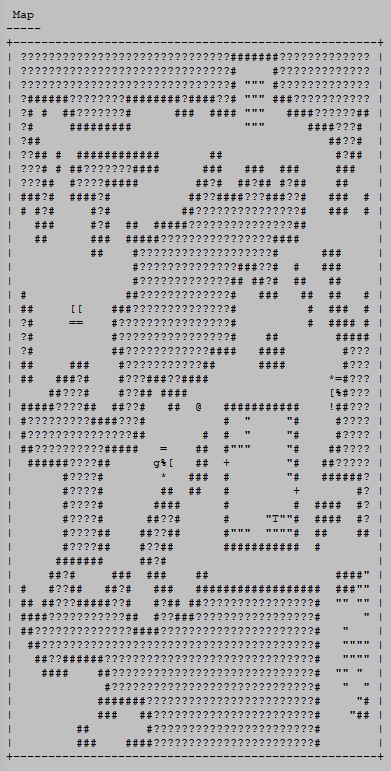
Then I went back and added a way to see the edges of the map (as with the advanced.cfg showMapBorders setting):

cogmind_scoresheet2_map_concept1_in_MAT_with_inner_borders

ASCII map style concept 1 with inner/map border.

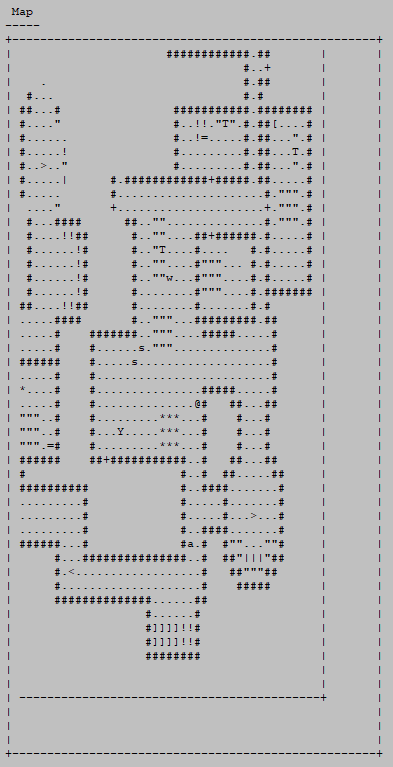
But after all that work realized such a feature is pointless if going with a style that marks unknown cells, which reveals the map border naturally xD

cogmind_scoresheet2_map_concept5_in_MAT_without_inner_borders

ASCII map style concept 5 without explicit inner/map border.

Duh.

Samples

ASCII maps aren’t even in the public release yet, but patrons have been trying out the system in recent weeks and I’m already really liking the results as I examine scoresheets. Here are some samples from real runs…

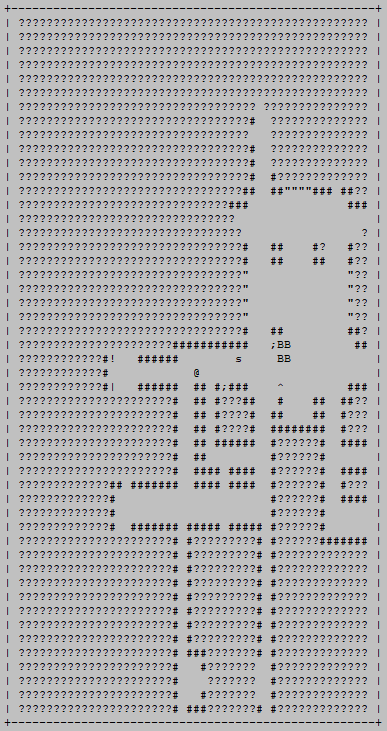
cogmind_scoresheet2_ascii_map_sample_mines_assembled_demolishers

The classic Assembled and Demolishers in the Mines. Killed by a grenade.

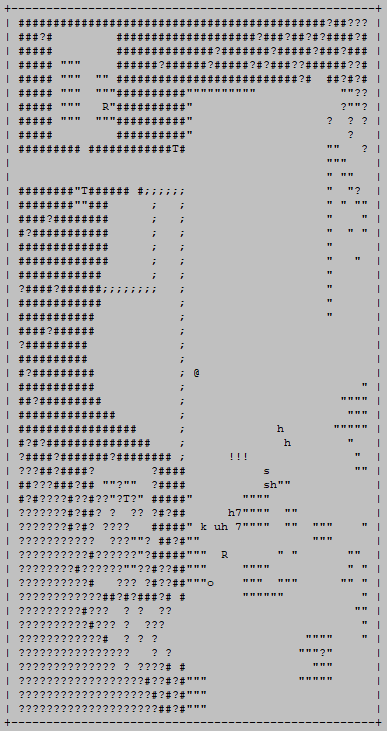
cogmind_scoresheet2_ascii_map_sample_mines

Another sample Mines death, albeit to more mundane causes (a Swarmer patrol).

cogmind_scoresheet2_ascii_map_sample_complex_late_game_branch_dogpile

Getting dogpiled in a late-game branch. Mistakes were made.

cogmind_scoresheet2_ascii_map_sample_garrison_behemoth

Beta 9 makes Garrisons very inviting. But this doesn’t make them any less dangerous!

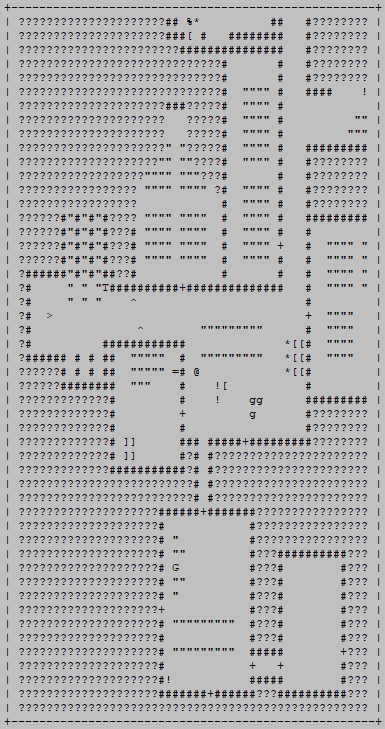
cogmind_scoresheet2_ascii_map_sample_exploded_area

Clearly there was some serious exploding going on here.

Fun

Not long after Cogmind’s map could be output in ASCII form for the scoresheet, I realized I could do something with them that I’d wanted to do for a while but didn’t have the means.

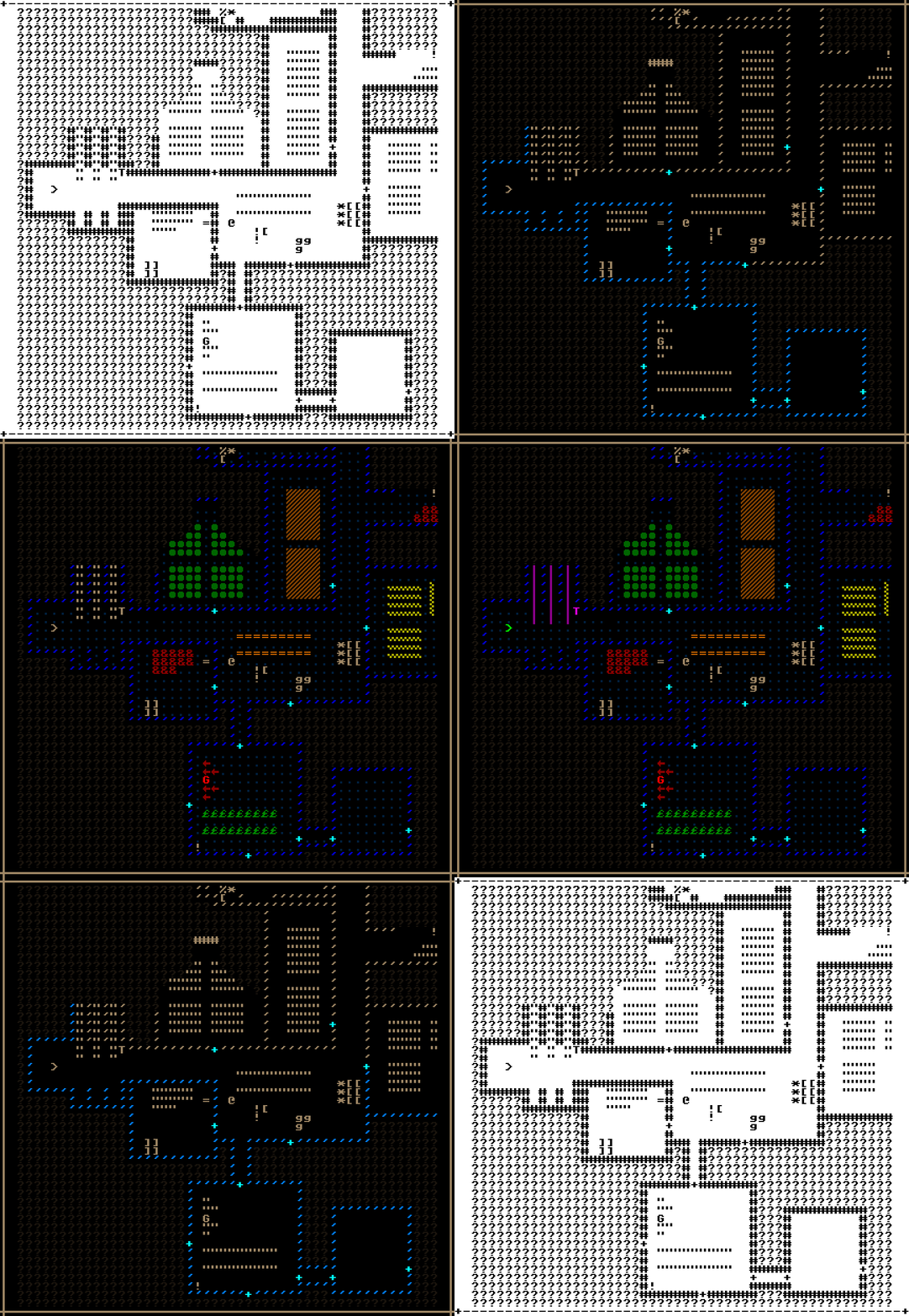
REXPaint has the ability to import text files (via the -txt2xp switch), so I could take map views from Cogmind and doctor them in the editor! I do a lot of map editing in REXPaint, but it’s mainly for prefabs, and of course it’s in the REXPaint->Cogmind direction. With the direction reversed, it’s easy to dynamically play with other font styles and colors using the editor’s features.

For fun I took a sample map and colored it in the original C64 font:

cogmind_rexpaint_c64_map

C64 Cogmind

cogmind_rexpaint_c64_map_original_ascii

The original ASCII text as it appeared in the scoresheet.

cogmind_rexpaint_c64_map_original_game

And a screenshot of the area in game.

I don’t have any practical applications for this right now, though I recall in Cogmind’s early years I did consider using something like this for testing purposes and/or to compile marketing materials.

Anyway, it’s a thing, but the main point is having maps improves yet another facet of scoresheets :D

This is the second article in a four-part Building the Ultimate Roguelike Morgue File series:

Posted in Dev Series: Ultimate Morgue File | Tagged , , , , , , | Leave a comment

Building the Ultimate Roguelike Morgue File, Part 1: Stats and Organization

In-game content is important, but for many roguelike players there’s a lot of fun to be had outside the game as well, be it reviewing records of one’s own runs, getting good insights into runs by other players, or relying on data to learn more about the game and engage in theorycrafting.

Back in 2015 I explored morgue files in various roguelikes and wrote about a potential future for Cogmind’s own so-called “scoresheets.” The original intent of these files, added for the 7DRL in 2012, was simply to report the player’s score for each run and give a few very basic stats. It was a 7DRL , after all, and there wasn’t a bunch of time for heavy record keeping.

cogmind_scoresheet_7DRL_2012

A sample Cogmind 7DRL scoresheet (2012!), very simple indeed.

In the days after 7DRL I wanted to run a tournament and thought it’d be fun to hand out achievements, but to do that we’d need more stats to base them on. Being outside the 7-day restriction I was free to spend some time on that and the “Stats” section got a few dozen more entries. You can see what the scoresheet became in those days in this example from Aoi, one of only two players known to have ever won the 7DRL version (the high scores, with links to scoresheets and tournament achievements, can be found here).

In the years since, aside from occasionally adding new sections to the file, the primary Stats section simply grew longer and longer as I tacked on entries for new mechanics and content, growing from 79 in the 7DRL (2012) to 328 in Alpha 1 (2015) to 818 in Beta 8 (2019)!

cogmind_scoresheet_sample_beta_8_Tone-190517-211751-0-172326_w6++

A Cogmind scoresheet from a sample Beta 8 run by Tone, which I’ve restructured horizontally because the full length is 24 pages! I’ve also shrunk the image down to avoid spoilers while retaining the general idea of its breadth, however if you don’t mind spoilers (this particular win spoils a lot!), you can check out this same run in its text form here. Note the full potential length of a scoresheet is technically even longer than this--many stats are not shown unless they’re relevant to the run, omitting them either to speed up parsing or to avoid spoilers, so this sheet for example is missing about 100 entries xD

As such a massive collection of stats, all in a single section, the format has really strained to do its job, badly in need of better structure to make it easier to both parse and understand. But despite the ballooning size, I intentionally avoided making any big changes to the scoresheet format for a number of reasons:

  1. The format was at least pretty simple, and if there any significant changes to its content I’d already have to put a bunch of time into rewriting the analysis code (used to produce the leaderboards and aggregate metrics), and that code was a mess and all going to be replaced one day for the final system anyway.
  2. Some players had built useful third-party applications based on the scoresheet format, so too many changes in the interim could break these unnecessarily.
  3. As usual, it’s best to wait on designing systems that touch a lot of other features until most all those potential features are in place, so that the supersystem’s design can take everything into account.

With Cogmind approaching 1.0 now, a lot of the content and systems are already in place, plus we have a lot more experience with run data and what people want to know about their/others’ runs, so it’s finally time to bite the bullet and build Scoresheet 2.0!

Preparation

To prepare for the transition to the new scoresheet, I finally exported all the existing score data parameters to an external text file. The original scoresheet data being as limited as it was, from 2012  it simply lived inside the code as a bunch of separate arrays. It was messy, and I never cleaned it all up  simply because I knew that one day it would all be replaced anyway, so may as well wait until that day in order to do it right the first time. This allowed me to merge quite a few arrays and multiple disparate bits of data storage into a single text file with contents represented by a single data structure.

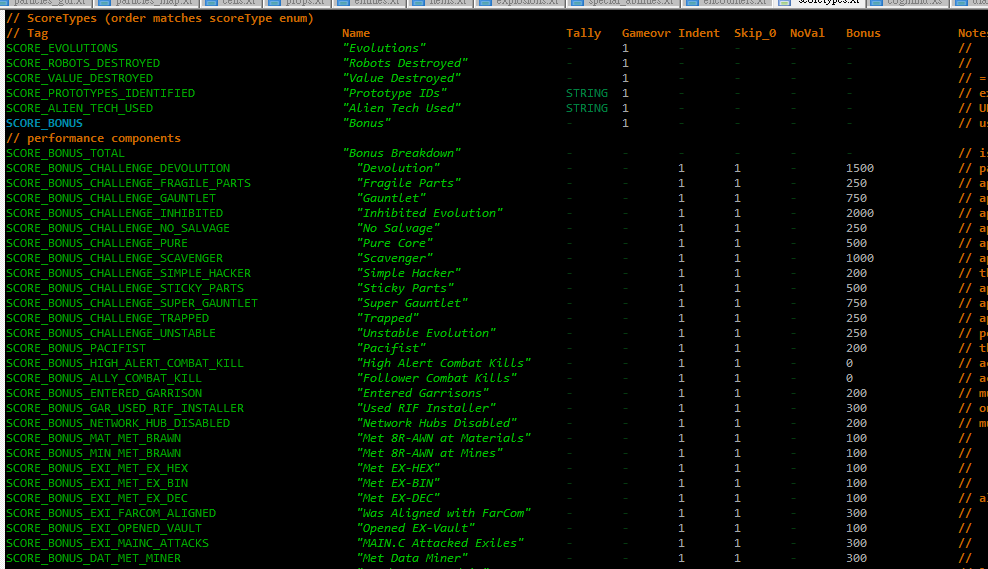
cogmind_scoretype_data

A snapshot of Cogmind’s scoreType data, a new 897-line file where all the score/stats entries and their behavior are controlled.

Even just this first step made the whole system feel sooooo much better. Moving data out of the code makes it much easier to maintain, and less prone to errors.

The next question was how the new data would be stored, but that couldn’t be answered without a clear idea of everything that would go into the new scoresheet…

Aside from organizational concerns, and new content, the most significant aspect of Scoresheet 2.0 would be its recording of stats on a per-map basis. Scoresheets historically just had a single value per entry*, and it was clear we wanted more values in order to paint a better picture of how a run progressed, but at first I wasn’t sure just how many values to store--once per depth for some values? Once per depth for all values? Once per map for… everything?!

(*There were just a few important stats already recorded once per depth--remaining core integrity, for example--but these would be rendered obsolete by an even more detailed per-map system.)

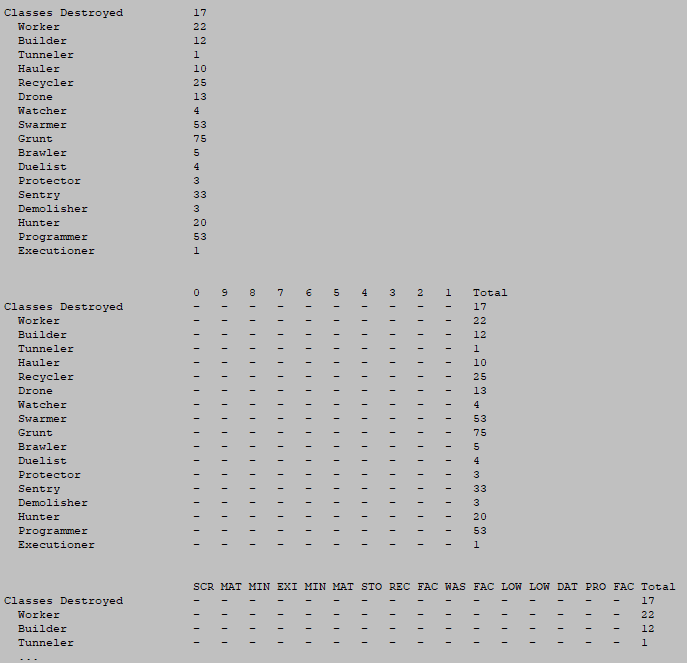
At this point I did a couple tests, the first a layout mockup to compare the aesthetics of per-depth and per-map values, just to get my head in that space.

cogmind_scoresheet_additional_data_concepts

General data layout concepts for multiple values.

As you’ll see later, I decided the total should remain at the beginning to ensure all those values line up (since they are the most commonly referenced, after all), a separator line was necessary between the total and per-map areas (for easier parsing), and along with the map abbreviations it would be important to indicate their depth as part of the headers as well.

I also calculated out the text file size for such a scoresheet, to ensure it would be within reason given the number of stats we’re talking about here. Upwards of 800 stats recorded across 30 maps, for example (a higher-end estimate for longer runs), is 24,000 entries! Not to mention the composite run-wise values and all the other data included in scoresheets (lists, logs, and more). The result is definitely larger compared to Beta 8 scoresheets (around 10~25KB each), but a majority of these newer scoresheets should still fall within 100KB. Based on real tests by players so far, this seems to generally hold true, although the longest runs visiting over 30 maps will fall between 100~150KB.

If necessary to keep the number of values down, I was considering having only a portion of the stats do per-map recording, but eventually decided to instead go for consistency and keep the full set, especially since I could envision times when almost any given value might want to be known on a per-map basis. There are just a few stats for which per-map values would make no sense and therefore be confusing, so those are excluded.

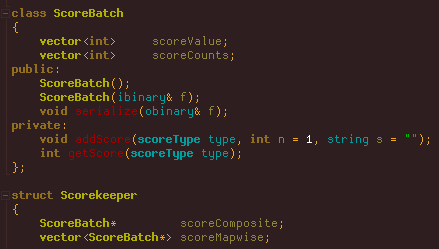
On the technical side, to make the transition easier I simply had the existing “Scorekeeper” class change its behavior on receiving a new score value. Whereas before it would just merge values with a single list as necessary, now it has multiple sets of score values (a “batch”): The composite batch is each stat’s value for the entire run, while the map-wise batches store a separate complete set of stats for each map. So for example when the player destroys a target, that event is recorded in both the composite batch and the batch for the current map.

cogmind_source_scorekeeper_scorebatch

ScoreBatch with the primary score manager class, Scorekeeper.

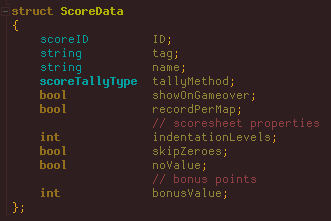
While we’re in the source, below is the data structure storing all static values defining each scoreType found in the external file mentioned earlier.

cogmind_source_scoredata

ScoreData struct for holding score type definitions.

There are six different tally methods to choose from, with the vast majority of scoreTypes belonging to the default “additive” category, though a few require special alternatives:
  • HIGHEST: Takes the highest between the stored and new value.
  • LOWEST: Takes the lowest between the stored and new value.
  • STRING: New value only included if a string provided with it is unique to this stat (for example only wanting to record once for each unique object).
  • AVERAGE: Takes the average of all values.
  • AVERAGE>0: As AVERAGE, but ignores any zeroes.

Mockup

There would be a lot of rearranging data to come, all amidst adding new entries, so to make sure I got it right the first time, I needed a clear and complete goal to work towards. Thus in addition to the large collection of related notes I’d already accumulated, I also took an old-format scoresheet and modified that to create the target format, in the process taking yet more notes as I thought through the requirements, feasibility, and repercussions of each change. That mockup would serve as the initial blueprint to simply implement top to bottom, step by step.
cogmind_scoresheet2_mockup_excerpt

Excerpt from the first Scoresheet 2.0 mockup.

You can download the full text mockup with annotations here. I used a winning run uploaded by Amphouse as the basis for this mockup because I wanted it to contain a wide variety of stats, though that also means it originally contained more spoilers--most of that stuff was edited out so I could share it here. Note that while the per-map data formatting gives you an idea of what it could look like, many of the numbers are either made up or outright missing.

Later there were also some small changes to the format as well as yet more sections/content I hadn’t foreseen to include in the mockup, but I saved that original version for posterity (it also includes some of my notes and reasoning about parts I hadn’t settled on yet). We’ll get into the final form next :)

Organization

For the remainder of this post I’ll be showing image excerpts from sample scoresheets to demonstrate various sections, but if you want to also follow along with the full text version of a complete Beta 9 scoresheet, you can download this recent run by Ape. There will likely be a few tweaks here and there before Beta 9 is officially released (it’s still in prerelease testing), but for the most part this is representative of the final format. (Remember a number of stats are not visible because they weren’t triggered for this particular run, so it’s technically not a complete set, nor is any individual run, for that matter.)

One of the obvious improvements over the original “endlessly expanding version” is that it’s now much better organized. Alongside the preexisting “non-stat” categories like Parts, Peak State, and Favorites, the core stats list itself has been broken down into 15 categories and reorganized as necessary to match them. We now have separate sections for Build, Resources, Kills, Combat, Alert, Stealth, Traps, Machines, Hacking, Bothacking, Allies, Intel, Exploration, Actions, and Best States! Categorization makes it easier to both find and understand relevant data. Plus it looks cooler :D

One thing I didn’t add to the scoresheet is a list of every part attached, or even every build at the end of each map. There’s just no great way to do these, and compared to the amount of space it would occupy this information would be difficult to parse, anyway. In hindsight I discovered the new automated class system will work nicely for that purpose, and that in itself also occupies two new sections in the scoresheet I’ll talk about later.

“Per-weapon damage” and other details discussed by the community before in the context of an expanded scoresheet is another of the few things that were left out for similar reasons. I thought of somehow combining it with the Favorites section, but alone this information doesn’t seem as valuable as it would be in comparison with all weapons used. We already have shots fired by weapon category, as well as damage tallied by type, both of which combine with per-map data to provide a clear yet concise picture of weapon use.

Sub-subcategories

Stats can now make use of a second level of indentation.

cogmind_scoresheet2_subsubcategories

Multilevel indentation example.

Previously scoresheets could only contain primary stats and sub-stats, but that led to a handful of problematic situations where (mainly because stat names are kept from being too long) some stats really needed to be indicated as a subcategory to an existing subcategory and were therefore prefixed with ‘^’, which is a bit esoteric :P. The new system fixes that by allowing more indentation. I’m not going overboard with it, but it is needed or advantageous in a few situations so I expanded the use of sub-sub-stats a bit.

Header

At the top of the scoresheet are a few lines serving as the general header where you’d naturally put the run’s vital info, even if that info appears elsewhere.

This includes the name of the game and its version, as well as whether it was a win or loss. If you look back to the 7DRL scoresheet example, you’ll see that the header remained relatively unchanged through the years (aside from adding a player name, which couldn’t be specified back in the 7DRL).

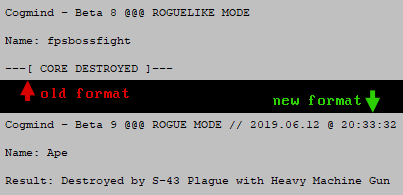
Scoresheet 2.0 adds extra detail, most importantly the cause of death!

cogmind_scoresheet2_header

Scoresheet 2.0 header format changes.

The result can of course show a win, in which case as usual it will state the type of win, but many roguelike runs end in a loss, and although it’s fairly common in roguelikes to record the cause of death, this isn’t something Cogmind was equipped to do before.

For six years now, internally the game only got as close as recording a general cause of death, for example “by cannon,” or “by cave-in,” and this was not really worth including in the scoresheet because it’s clearly an incomplete system that can’t account for all possibilities, and also needs more detail to be as meaningful as possible.

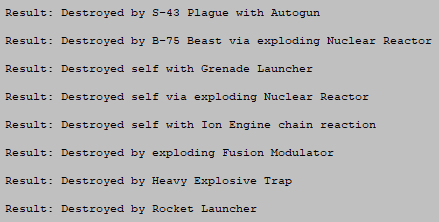
So while we’re vastly improving the scoresheet, it’s about time to include this information! (Also imagine the fun aggregate data we can collect :D) This took a fair bit of work to both identify all the possibilities and variations and store the necessary information when it’s available to provide it for the final conclusion. The sentence needs to take into account the relevant actor (Cogmind? enemies? no one?), kills via proxy, death to non-robot/attack causes… all sorts of stuff. Here are some more examples:

cogmind_scoresheet2_death_cause_tests

Scoresheet 2.0 run “Result” samples (cause of death).

Some players have indicated they’d like to be able to remain on the main UI after death to get a better idea of the situation, but this is at odds with Cogmind’s immersive approach so I decided not to. There are alternatives like examining a log export afterward, or now using the scoresheet to see the specific cause of death, and/or last log messages, and/or surrounding environment (these I’ll get to further below).

Going back to the header format changes, see how it also now includes the date and time of the run’s end, but without the more compressed YYMMHH-HHMMSS time format used in the filename.

Scoresheets for special modes or events will also be listed next to the primary difficulty mode, if applicable. Those always used to only be recorded elsewhere in the scoresheet, if at all.

The difficulty modes and their names are changing as well, but that’s a topic for a whole other article! Update 190917: Said article has now been published, Rebranding Difficulty Modes with an eye towards player psychology.

Performance

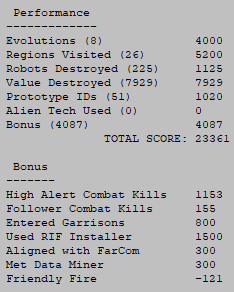
The score structure hasn’t changed much. Throughout alpha/beta I’ve been watching and waiting to see if an all-around better approach to scoring would suggest itself, but didn’t come up with anything, so the existing system will remain.

cogmind_scoresheet2_performance

Sample scoresheet 2.0 excerpt: Performance.

It has, however, been expanded slightly with the addition of Regions Visited. Rewarding exploration is a good way to encourage it, so a set amount of points are earned for reaching each new map. In the early years points for “Evolutions” served that purpose well enough, earned at each new depth, but back then the world was narrower, whereas players can now spend up to a half or even three quarters of a run inside branches, exploring horizontally. While it’s true there are also bonus points to earn in branches, not everyone may actually earn those anyway, and it’s worth recognizing that they still made the trip.

The bonus point system will continue to be an important source of points for most runs, but it’s flexible and can be adjusted/expanded more in the future as necessary. Notice that I moved that breakdown right up under the Performance section.

There were no changes to Parts, Peak State, or Favorites, which all still serve their purpose just fine.

Stats

There have been quite a few improvements and new entries added to the stats section (which, again, have been divided into 15 categories). I won’t cover all of them, but will talk about certain areas of particular interest…

Build

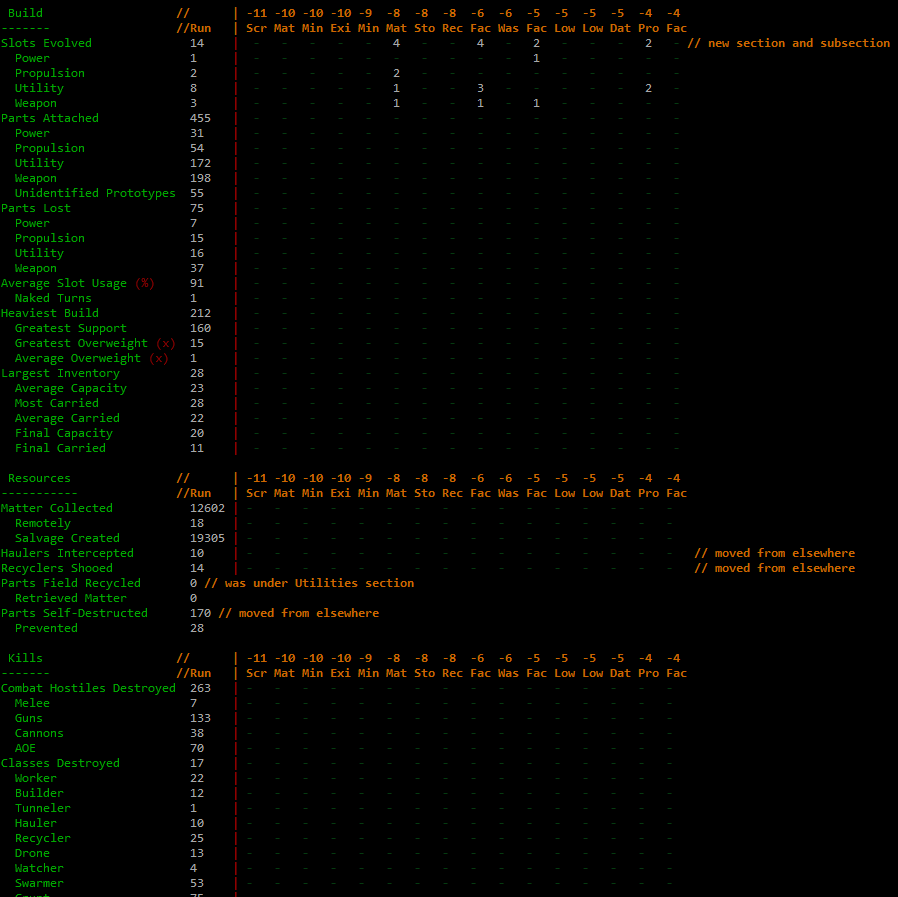
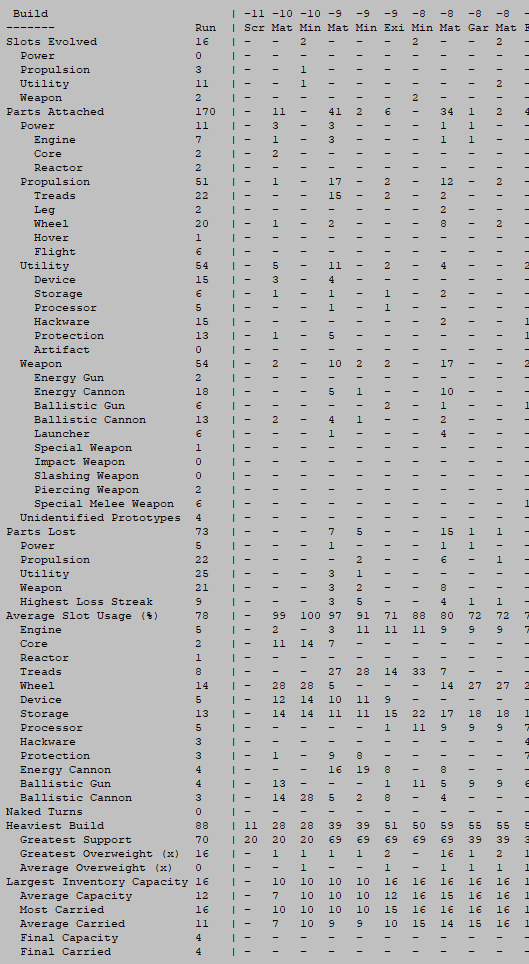
Much of this section is new, adding a breakdown of all slot evolutions, as well as info on subtypes for attached parts and slot usage. Combined with the per-map data, we’ll be able to have a pretty clear picture of how builds evolved across the run as a whole, in a much more condensed and readable format than if we had list after list of build loadouts or some other highly detailed approach.

cogmind_scoresheet2_build

Sample scoresheet 2.0 excerpt: Build.

Instead, after the detailed data we get a list of the most popular build classifications used throughout the run, ordered by usage. The list excludes any used for less than 4% of a run, as there could be many such transitionary states that aren’t really meaningful in the bigger picture.

cogmind_scoresheet2_class_distribution

Sample scoresheet 2.0 excerpt: Class Distribution.

Following the aggregate class distribution is a summary of the player’s dominant build classification for each map. Where multiple build classes were used, which is common, it picks the one that saw the longest period of use.

cogmind_scoresheet2_dominant_class

Sample scoresheet 2.0 excerpt: Dominant Class.

Automated build classifications are a new system I’ll be diving into later in a separate article in this series. It’ll be fun to run data analysis on the future scoresheets to learn what builds are more popular, a very new way to understand the player base.

Kills

With scoresheet 2.0 we finally get kill counts for more specific robot types! To simplify the code, this system had always relied on Cogmind’s internal robot class system, which is essentially what you saw appearing on this list before. The problem is, the game has grown so much since then and you can now eventually meet some rather special special variants that shouldn’t really be tallied along with the others--like not-your-everyday Grunts and Programmers, but there was no way for the system to distinguish them, meaning some of the most powerful hostiles in the game were being lumped with the average ones. No more! Now we’ll finally be able to see real kill counts for all of the special robots out there…

The “NPCs Destroyed” list also now includes all uniques (as well as where they were killed!), so yes that means we’ll also have a record of the nefarious exploits of those out there murdering bots who should otherwise be powerful allies ;). This list always included the major NPCs, but over the years Cogmind has gained a cast of minor named NPCs as well, so it’s finally time to start seeing them in the data.

Hacking

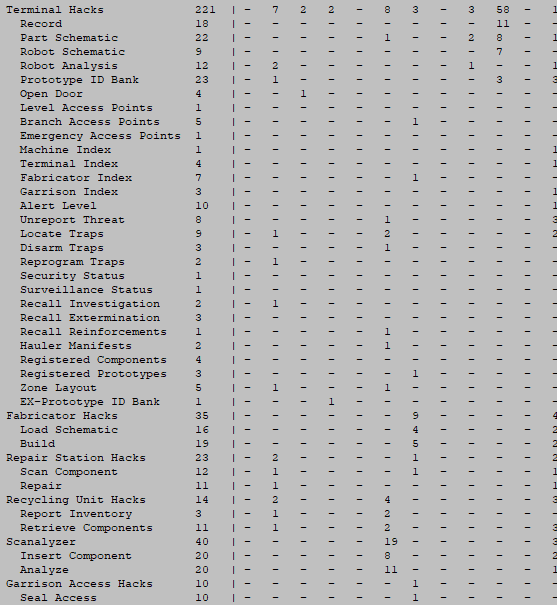
As of Beta 8 the scoresheet only records Terminal hacks, but that’s been greatly expanded to include every possible hack--all machines and even unauthorized hacks, too.

cogmind_scoresheet2_hacks

Sample scoresheet 2.0 excerpt: Hacks.

Remember here that a lot of entries don’t actually show unless they’re non-zero, so there are quite a few more possible data points than what you see in the sample run, hacking and otherwise.

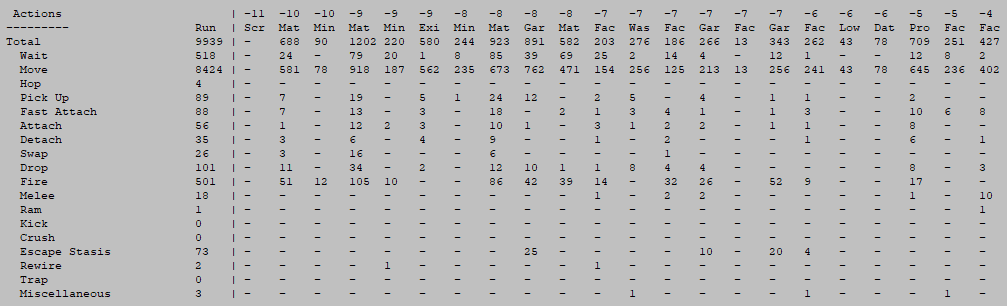
Actions

I can see some interesting analysis coming out of looking at a breakdown of actions across a run. It’s a pretty fundamental kind of data, but was actually rather challenging to implement because Cogmind didn’t originally need to distinguish between action types in such a granular way. Anyway, we have it now :D

cogmind_scoresheet2_actions

Sample scoresheet 2.0 excerpt: Actions.


cogmind_internal_action_logging_test

Debugging action type detection via the in-game message log.

History and Map

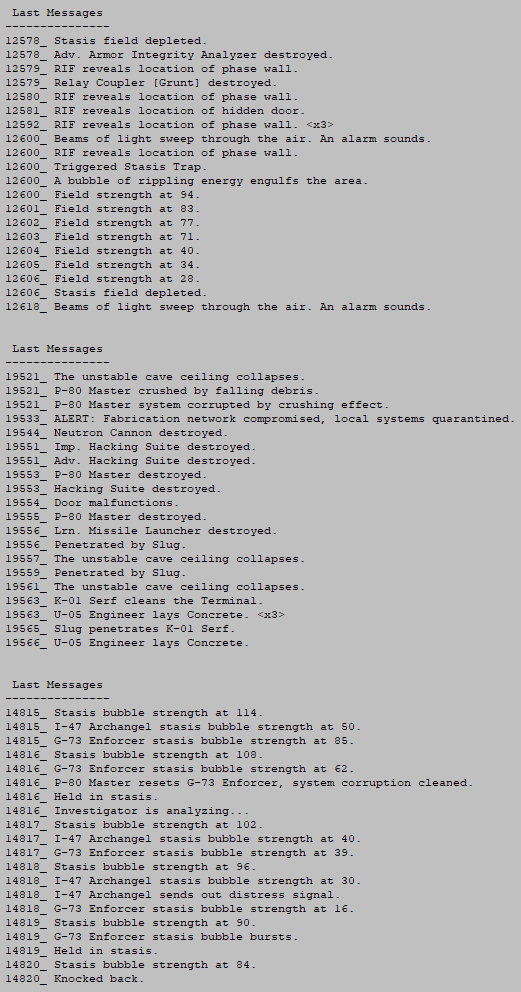
It’s common in roguelikes for a morgue file to include the last X messages from the message log, and while I don’t think this section will be quite as valuable or interesting in Cogmind as they are there (due to de-emphasis of the log in general), it won’t really hurt to add it and could at least in some cases help describe what was happening just before The End, especially in combination with the map.

cogmind_scoresheet2_last_messages

Sample scoresheet 2.0 excerpts: Last Messages from three separate runs. For Cogmind I’ve chosen to record the last 20 messages in the scoresheet.

However, the ASCII map and history log (different from the message log!) are quite valuable and I’ll be dedicating separate articles in this series to each of them.

Schematics and Fabrication

Since Alpha 9 the scoresheet has included a list of any parts fabricated during the run, and where they were built. But with literally every part of the scoresheet being revisited for 2.0, I discovered this one needed some improvements, too!

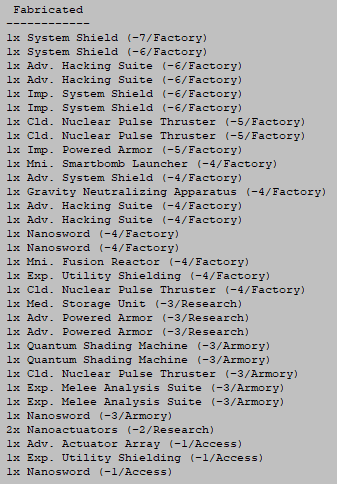
cogmind_scoresheet1_fabricated

Original format for Fabricated list as used for the past few years.

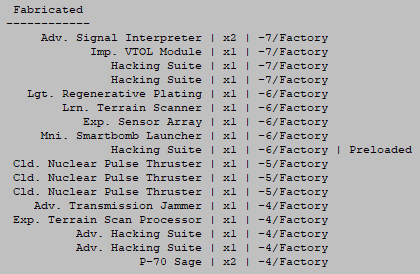
The content is mostly unchanged, but the same data can be presented in a much more easily readable fashion--alignment is important!

cogmind_scoresheet2_fabricated

Sample scoresheet 2.0 excerpt: Part Fabrication List.

Due to their varying lengths, it’s far easier to scan a list of columns than with all the data mixed together. Content-wise the only addition is the new “Preloaded” marker indicating that a particular fabrication was completed using a schematic not loaded by the player themselves.

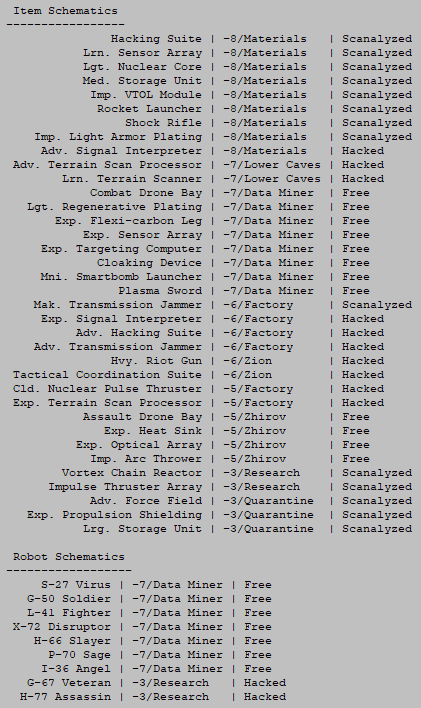
Item and robot schematics weren’t even recorded in the original scoresheet, but have been added for 2.0, also aligned in a pleasing and readable manner.

cogmind_scoresheet2_schematics

Sample scoresheet 2.0 excerpt: Item/Robot Schematics.

Often times players will obtain schematics but not actually use them, either due to lack of opportunity or deciding not to, but either way it’s interesting to see what schematics players are going after, and how they’re acquiring them since there are a number of different methods (including four more that don’t even appear in the above sample!).

Game and Options

Another area that got the formatting treatment are the last two meta sections, Game and Options.

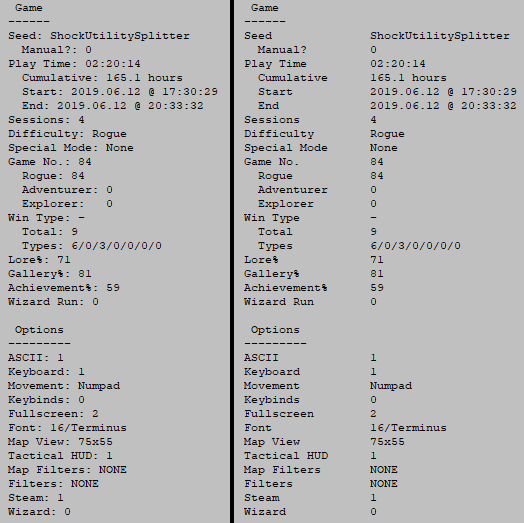
Years ago they were very short lists with just a few entries, and output using different code than regular stats, so they were never actually aligned and this didn’t seem too problematic early on. But now they collectively account for over two dozen entries and the difference between alignment and non-alignment is stark.

cogmind_scoresheet2_game_options_alignment_comparison

Sample scoresheet 2.0 excerpt: Game/Options (non-aligned vs. aligned).

As shown in the header earlier, the date format has changed, now also recording the start time in addition to when the run ended. Originally only the latter was included, but in my research I noticed other roguelikes recording both and this seems like a good idea.

Run play time and cumulative play time both have new formats as well. These were originally shown in minutes, whereas the latter now uses the gaming “standard” of hours to a single decimal point (127.3 hours is much easier to understand than something like “7636 min” :P) and run time is shown using the HH:MM:SS format. Now real-time speed runs can care about the seconds as well ;)

This is the first article in a four-part Building the Ultimate Roguelike Morgue File series:

Posted in Dev Series: Ultimate Morgue File | Tagged , , , , , | Leave a comment

Robot Hacking: Upgrades

Last year Cogmind got an expansive new robot hacking system with a lot of hacking options to use as either a primary or supplementary strategy. Overall it’s not as powerful as the simple placeholder version used in Cogmind’s early years, but it’s a lot more versatile.

That said, as it was designed bothacking does become less reliable in the late game since it can’t directly deal with prototype threats, plus it can become a bit too challenging to acquire enough Relay Couplers to continue hacking while also dealing with other threats. Dedicated robot hackers tend to fall behind the power curve.

Among the easier approaches to addressing this issue were a few additional minor passive RIF effects added in Beta 7.1, followed by Beta 7.2 increasing the value of Couplers higher in the complex, but these can only be so effective so we need other ways to prop up so-called late-game “summoner builds.”

In the context of Cogmind I call this build style a “bothacker,” but in general roguelike/gaming terminology the strategy resembles a summoner since when not hacking robots for information or to induce other side effects, the best hacks are often outright control over other bots and you might need to rely on allies to do your fighting for you.

In this light I could see several more abilities which would complement such a build nicely, but would clearly be too powerful to immediately give to all players who gain the ability to hack robots. The logical conclusion here is to add something fairly rare in Cogmind: permanent upgrades!

Progression

In a lore sense these technically aren’t physical upgrades, but instead additional knowledge about operation of the Relay Interface Framework that enables Cogmind to take advantage of it in different ways. Each time Cogmind connects to an additional RIF Installer beyond the first, another ability is gained.

Of course that means entering more Garrisons, but this is something bothackers tend to do anyway either as a way to gain more Relay Couplers or (interestingly) escape trouble. With the passive RIF abilities added in Beta 7.1, Garrisons clearly became a “home to bothackers”--no passive alert gain, collect more Couplers, or maybe add some allies, and adding new abilities into the mix solidifies that route for bothackers seeking to become more powerful in the long term.

There is a pool of possible abilities to learn, and the player does not choose one--RIF abilities are learned randomly, although the opportunity is never wasted by relearning the same ability again, for example. Learning abilities continues to shrink the pool until every ability has been learned (in theory, anyway--that’s a lot of Garrison visits!).

Some abilities can be learned more than once to increase their effect, while others cannot be learned until after one or more others are learned. In a gameplay sense this latter limitation keeps the clearly most powerful abilities from being obtained too early, although there’s enough variety to keep it from being a linear progression with every playthrough.

An interesting side effect of learning RIF abilities inside Garrisons is that it can force players to skip other benefits at a given depth, by losing access to branches and their respective benefits. This kind of sacrifice is common within Cogmind’s design, and important, here allowing RIF abilities to be relatively powerful since they’re balanced against other good strategies. (RIF already makes it impossible to establish two of the most effective alliances--technically they’re still possible if RIF is installed after they’re established, but by then there will also be less time to upgrade RIF abilities, so we’ll see how that balances out! Always interesting to add entire new systems that may or may not synergize with others and see how players react :D)

Note that although Garrisons become much more challenging later, as a RIF-capable build (with new abilities, no less!) players will have many more tools to deal with them, so I think it balances out.

RIF Abilities

So what abilities are there?

If you want to avoid spoiling them and would instead prefer discovering these abilities on your own, bail out now--this is as far as you should go!

Well first of all, all the existing passives added to RIF earlier are now considered “abilities,” just given for free all at once. Adding them as abilities serves as an explicit way to show and describe them for new players, as I’ll show later in the UI. And of course as abilities all these things need names :)

  • Alert Monitor: Know the ambient influence level while in 0b10-controlled areas.
  • Garrison Interface: Gain control over Garrison Access machines, making it easier to hack them, and easier to escape once inside. Also automatically detects Garrisons up to a range of 15.
  • Coupler Protocols: Use Relay Couplers to interface with their respective robots.

Here are the new abilities that can be learned (where those which can be improved by learning them multiple times are shown with their progression of values):

  • Coupler Efficiency: +4/10/20 effective code value to all Relay Couplers. Packing more punch into each Coupler eventually gets quite good. These values are equivalent to a 20%, 50% and 100% increase in the hacking potential of an average Coupler.
  • Robot Detection: Know positions of combat bots within a range of 24 while matching Coupler attached. Also distinguishes squad leaders (L).
cogmind_rif_ability_robot_detection

Inherent Robot Detection is essentially like a weaker version of FarCom--although it has a somewhat longer range, the types of robots it can detect is limited by Coupler type coverage.

  • Patrol Navigation: Know routes of patrol squads within a range of 24 while matching Coupler attached.
cogmind_rif_ability_patrol_navigation

Identifying the current route of a nearby active patrol.

  • Alert ID Control: Block the influence of kills by allied former 0b10 bots while matching Coupler attached. This is quite powerful in combination with an allied army, theoretically making it possible for a good hacker to snowball a pretty large force of allies that can do all the dirty work without the biggest associated drawback: rising alert and Demolisher dispatches.
  • Structural Interface: Reveal any hidden door or phasewall on sight, and pass through phasewalls normally.
cogmind_rif_ability_structural_interface

Finally a way to take advantage of phasewalls! (Not to mention the advantages of having a built-in partial Structural Scanner.)

  • Program Shield: Fully prevent Programmers from hacking allied former 0b10 combat bots while matching Coupler attached (no range or sight limitations). The biggest threat to allies are Programmers, and this offers a passive way to deal with them.
  • Autooverride: 20/40/60% chance to automatically trick target system into believing it is allied with Cogmind. After 10 turns the network will perform an automated quickboot to restore it to normal, a process which takes anywhere from 5 to 10 turns. Checked once per visible combat bot while matching Coupler attached, separately for each Coupler.
cogmind_rif_ability_autooverride

Autooverride is basically equivalent to an overwrite_iff hack, but automatic and free :). Turn squads against themselves, and each other.

  • Autoassimilate: 20/30% chance to automatically rewrite all target system data, permanently converting it into a fully controllable ally. Requires 6 turns to complete the process. Checked once per visible combat bot while matching Coupler attached, separately for each Coupler.
cogmind_rif_ability_autoassimilate

Autoassimilate in action--basically equivalent to a formatsys_high hack, but automatic and free. It still has the delayed effect drawback, however, so using your Remote Datajack to expedite the process might be a good under certain circumstances.

Notice that all of the above abilities are essentially passive! This limits their impact on the UI and controls, making them really easy to manage--everyone loves passive abilities :P

The only active element is that most of the new abilities also require having a matching Relay Coupler attached (e.g. a [Grunt] version for applying a given ability to Grunts). While this somewhat limits the scope of abilities, it also makes even low-value Couplers useful in many situations.

Still, you can imagine a high-level bothacker with all of these abilities being… um, very effective!

Interface

Naturally with a new range of abilities we’re going to need a way to actually see which ones we have.

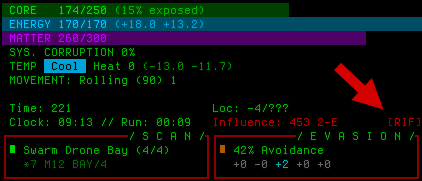
On the first time connecting to a RIF Installer, there’s a new tutorial message inviting the player to check out a new button in the top-right area of the HUD. Conveniently there was just enough room to add a [RIF] button right next to the RIF-based Influence readout.

cogmind_rif_ability_button

The new [RIF] button as it appears on the HUD.

The main annoyance of having the button there is its neighboring Evasion window, which expands whenever the cursor passes over it, and it’s highly likely the cursor will pass over it to reach the new [RIF] button xD. Part of the reason for designing the Evasion window that way was because the cursor would never need to be up in that corner anyway, but oh well it’s fine--not really much of a deal I don’t think.

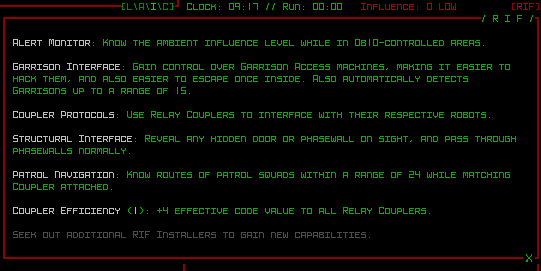
Keyboard access to the new RIF window is via Shift-Alt-f. That command technically had another feature associated with it (reswapping) which was removed as a result, but that was a very old 7DRL feature that I don’t think many players were using anyway, not to mention there are now multiple useful ways to swap parts, not even including the broader “reswapping” system coming with Beta 9--one could say it was perfect timing that this key combination got repurposed :)

cogmind_rif_ability_info

Sample RIF ability window.

The new RIF ability window lists all the abilities in the order in which they were learned, as well as their current level and a description of each effect.

At the bottom is a reminder for new players that more abilities are available and how to get them (otherwise there’s no way to know this…).

Overall I’m liking this direction for late-game bothacking, and look forward to seeing what people do with it!

Posted in Mechanics | Tagged , , , , , | Leave a comment