Official development blog
[ Latest Cogmind Release Notes: Feb 2026, "Unchained More" ]

Context Help

The casual player can get by for a while in Cogmind without paying too much attention to the details. Just strap on a power source, some legs, a weapon or two and you’re good to go. But a majority of players will no doubt be looking to tweak and optimize their build, and to do that you’ll need to have a better understanding of the game mechanics.

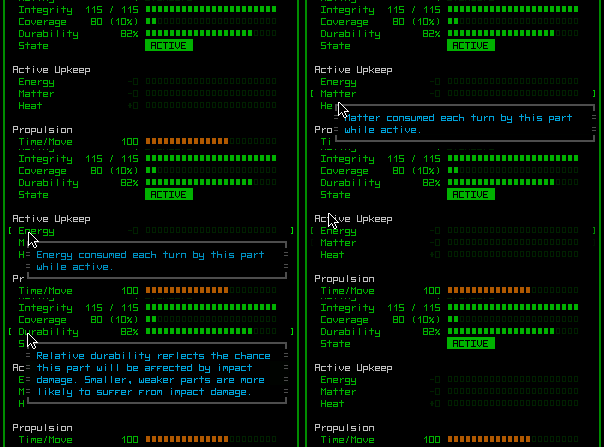
Hiding this information in a manual few players will bother to read is no good--may as well make it accessible when and where it’s most needed. So the info windows introduced last post now support context help popups.

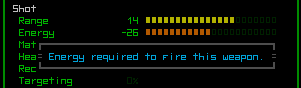
cogmind_help_1

There are the obvious…


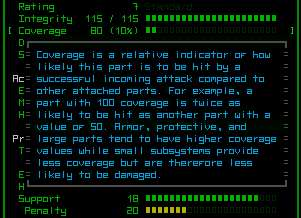
cogmind_help_2

…and not so obvious.


cogmind_help_open

As with all things Cogmind, context help must be accompanied by a quick animation and sound effects.

There will still be a manual containing even more details than provided through the context help, but it’s nice that players will be able to ease their way into the mechanics at their own pace, or satisfy their curiosity with the click of a button.

Speaking of buttons, the context help is also accessible via keyboard (sticking to the “every command is available to both keyboard and mouse” rule), you just use arrow keys to select the line you want more info about and press enter.

Posted in GUI | Tagged , , , | Leave a comment

Info, Animated

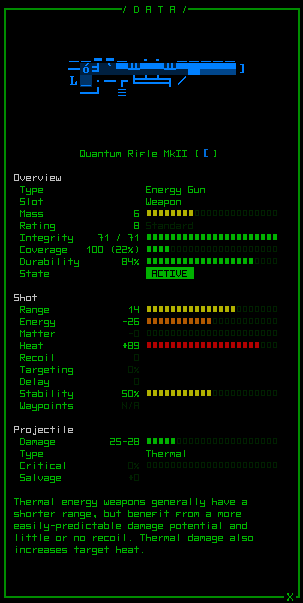
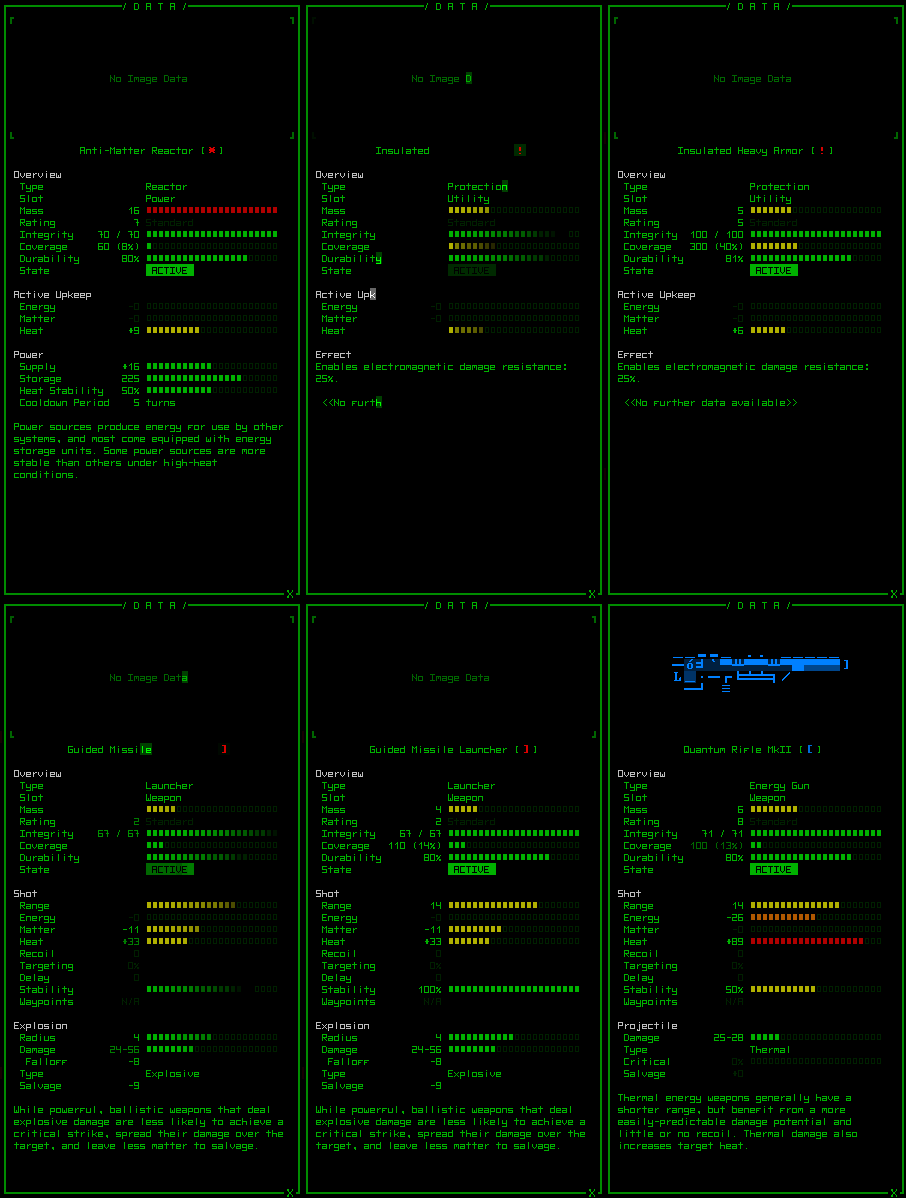
The info windows have been overhauled and are now even more informative than before, made possible by smaller fonts.

Before they were just walls of text and numbers, while now we have color-coded labels and bars to help quickly weigh the advantages and drawbacks of whatever you’re examining without being forced to interpret a bunch of numbers, though the numbers are there for cases where you want to know the specifics.

cogmind_weapon_info

Nice.

As you can see I added support for ASCII art, though it will be a daunting task to draw every item in the game. Also, since I’m working with old placeholder objects the descriptions have yet to be written, so in all screenshots the text seen at the bottom is just copied from elsewhere/old data.

Colors reflecting percentages have a uniform meaning throughout the interface, equally dividing green, yellow, orange, red into quarter percentiles. (This will be important later on with the hacking interface, as I’ve designed the concept mockup, anyway.) In cases where it makes sense, though, you’ll notice bar colors are reversed when high values are bad (e.g. heat).

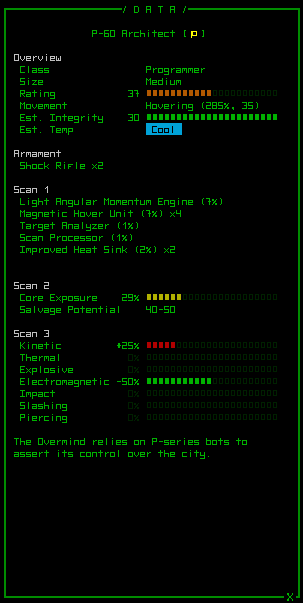
Info windows can be displayed for items, Cogmind, and other robots.

cogmind_robot_info

With an advanced scan processor you can discover important details about your enemies, like this programmer-class bot.

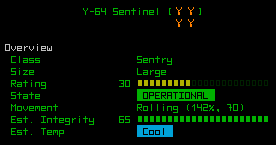
cogmind_robot_info_large

Multi-tile robots are indicated as such with their icon, so even in ASCII mode you’ll know it’s a single large robot and not a group of many smaller robots (though letters will never be reused like that).

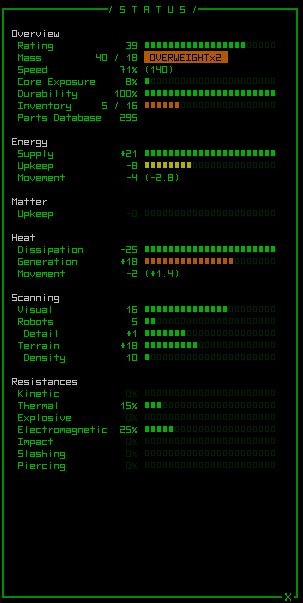
cogmind_status_info

Cogmind’s own detailed status window is still a bit too utilitarian, but it’s good enough for now.

All windows are, of course, animated:

cogmind_item_info_cycling

The gif doesn’t quite capture all the frames very well. There are also sound effects.

Next: Integrating the manual with the game through context help.

Posted in GUI | Tagged , , , | Leave a comment

Fog of War

“Unknowns” are an important part of roguelikes.

One could say they constitute the primary appeal of the genre, especially considering that it makes sense to define “fun” as a result of encountering the unexpected. Thus it’s no surprise that roguelikes are growing in popularity, seeing that they place a heavy emphasis on exploring the unknown.

As described in the article linked above, the best (must “fun”) kind of randomness is that which can be controlled to an extent (or even fully) and/or gives the player sufficient time to react to the results. Players should be able to take advantage of it with the right tools or knowledge, rather than feel frustrated by what seems like whims of the the RNG god (also known as Xom in some circles).

Randomizing as many aspects of a game as feasible is one way of creating unknowns, and another useful one is fog of war. I love this mainstay of the strategy genre, since one of the greatest unknowns is what the heck your opponents are up to.

So Cogmind has fog of war. Duh.

Fog of War

Gaining information about the map is quite important to the gameplay. This already manifested itself in the prototype with roaming groups of sentries that you’d do best to avoid lest they alert their nearby friends until you have an entire mob of robots on your tail, and the fact that the main purpose of each map was to find the “level access” (stairs) to escape.

Map knowledge will become even more important with the addition of machines and a more complex model for how enemies track you down (one you’ll be able to take advantage of).

Among the tools you have at your disposal are the traditional sensors for scanning robots and terrain at different ranges and accuracy, terminals will allow access to many kinds of map data, and now we even have allies who can spot for us (see previous post).

Implementation

While it will be quite useful to keep an eye on multiple parts of the map at once, adding allies that can share FOV information with you throws the prototype’s simple implementation out the window.

Now there are multiple points of origin to consider, so I figure I’d outline the process here for other devs who might be interested in a quick solution.

First of all, how is the FOV of a single unit calculated?

Cogmind uses a brute force Bresenham raycast model that shoots rays from the FOV origin to the edge of a bounding box that represents the farthest possible area visible, and each ray quits after either reaching the maximum sight range or as soon as it hits an opaque wall. Yes, there is lots of overlap, but it also ensures a more liberal result that catches everything that should be seen. It’s worth the extra cost, rather than having the occasional odd piece missing around a strangely shaped map feature. (And becomes absolutely necessary if you want to properly implement semi-transparent cells.)
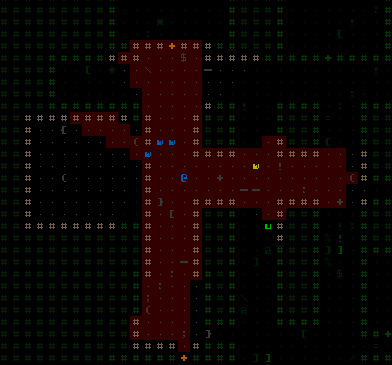
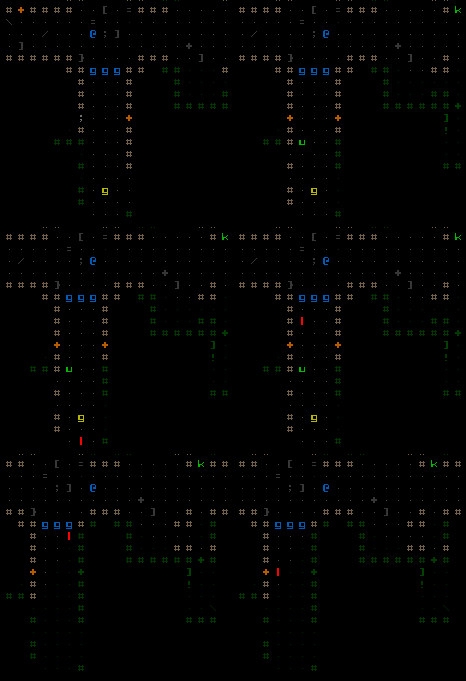
cogmind_fov

Here you can see Cogmind’s FOV highlighted.

FOV for each individual unit that needs it is calculated and stored separately as above.

Then, to speed up all the “I need to know if anyone in this faction can see this particular location” checks, a final composite FOV is stored. Unlike the individual FOV map, this one stores a total “count” of how many units can see a particular location. So it is initially filled with 0’s, then as faction member calculates their FOV they increment the count at each location they can see. The numbers are updated every time an individual FOV changes, so when a member moves, for example, they first subtract their own original FOV from the composite, then increment the new recalculated area. This way you not only know which map locations are visible (value > 0), you even know precisely how many units can see it.
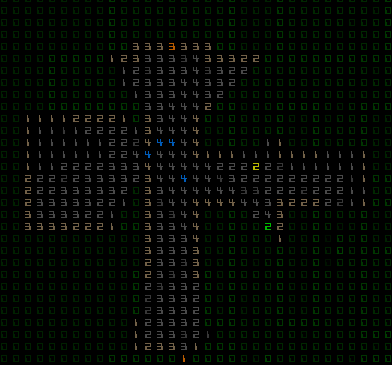
cogmind_fov_composite

0’s are not visible, while other values represent the total number of members that can see that cell.

There are two key optimizations that make this method much faster (on top of the very fast raycasting method that is Bresenham):

The first is to not clear an individual’s FOV map before it’s recalculated--this is a waste of time since the map isn’t changing size, only content. Instead, with each map you store an “FOV ID” which is essentially an integer that equates to the value identifying visible cells on the map. Example: The first time you use a map it is filled with zeros and your ID is set to ‘1’; the raycasting process sets all visible cells in the map to ‘1’; later when you want to know if a particular cell is visible, you just test whether it equals the current ID. Every time you recalculate the FOV, you first increment the ID (2, 3, 4…), so you never have to clear your map in memory. Saves a lot of time if you’re frequently updating numerous maps. (I also use a similar time-saving method with my Dijkstra and A* pathfinding implementations, and in many other areas.)

Another [perhaps no-brainer] enhancement is to only update individual FOVs if they actually see a change on the map. Many aspects of game programming are so much easier when you have a static map, but I’m a big fan of destructible terrain so we have to also deal with changes like wall destruction/creation and doors opening/closing. As long as updates don’t occur immediately (only after an event is completed), you can store a list of all cell locations with changed transparency values. When the event has completed, only update the FOV of any individuals that can actually see at least one of those cells.

In an older SRPG I coded I actually went so far as to divide each FOV into octants and only updated individual octants that contained changes. That’s probably overkill for Cogmind, since very few units will actually rely on FOV (only those that want to share info with Cogmind--the rest will be using faster methods like direct LOS checks etc.).
Posted in Mechanics | Tagged , , | 7 Responses

Allies & Factions

One of the major challenges playing the 7DRL prototype was a limited list of options for dealing with hordes of enemy robots that would alert each other and swarm you.

You could fight them in a bottleneck or narrow corridor, try to herd them into a group and use a powerful explosive, or better, simply avoid as many enemies as possible by relying on sensor utilities. Even then, you could still end up cornered and run out of resources before you could escape or defeat them. That and it’s not good design when most of your options rely on having certain parts that you may or may not have found, or requiring that you bring those parts along even if they don’t fit the build your trying to play.

Now there’s a much more versatile option.

Now you can have friends.

I spent some time running around the earlier levels with a few allied robots, and they provide an enormous benefit compared to the prototype in which all robots operated on the assumption that Cogmind was their only enemy.

cogmind_allies

Let me know when this corridor is clear. I’ll be back shortly.

(I should note here that while the game is in a playable state, it’s purely for testing new UI features and gameplay mechanics since it’s still running the old prototype game. After much of the initial work is done, the entire world will be rewritten from scratch.)

While there is currently no way to issue commands to your allies (that will come later), simply giving enemies a wider choice of targets greatly increases your survivability. So much so that it’s obvious this new feature will require some heavy-handed balancing. The solution is fairly obvious, too. The overall enemy response to your actions will be dependent on the threat you pose. Thus if you raise a robot army, expect to start a war. You could also just try to slip away in the ensuing chaos, but attracting too much attention in the first place can be at odds with the idea of “slipping away.”

In any case, the addition of allies will open up new strategic options. Going it alone will still be a viable option as well.

Types

Allies fall into one of two categories, defined essentially by how much information they share with you.

The first type acts as a spotter--you can always see and hear everything they do. This category consists mostly of Cogmind-launched reconnaissance drones you can send around corners, into rooms, or leave in a particular location to keep watch.

The second type are the more autonomous robots that can fight for you, but if they leave your field of view you may not know what they’re doing (unless you hear lots of gunfire :D ).

Where do these allies come from? The game doesn’t currently include any of the mechanics involved (that will come later with the world rewrite), but it’s likely that small drones could be manufactured by a utility part, and larger robots will be manufactured at fabricators. Still other allies could be robots that join you from other factions.

Factions

As part of the ally update, the game now supports more than two “sides” (factions). Thus a single map can contain more than one faction of robots which may or may not be friendly with each other. The main branch of the game will still be occupied almost solely by your primary enemy that built and controls the complex you’re exploring, but additional factions can be found in special side-branches. (More on the world in a future post.)

Posted in Mechanics | Tagged , , | 4 Responses

GUI Animation

The GUI is getting a makeover with new animations

While the 7DRL had animated window borders, text printing, and button hover highlighting, all were just simple features copied over from the original source at the time (X@COM). Nonetheless, it was definitely a feature that had players going “wow” from the start, so we need more of that.

I’ve done a comprehensive review of all previously static parts of the interface looking for new areas to animate, and updated old animations to fit with the new style. All sound effects were also replaced with better versions, with new ones added where appropriate

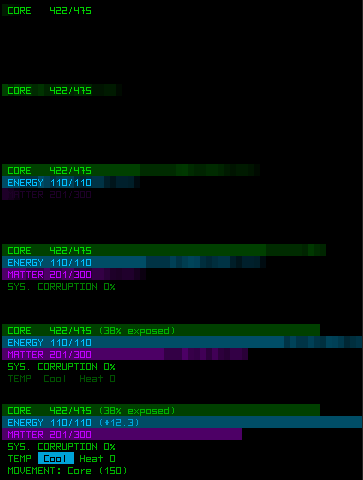
Probably the most static part of the interface that needed to show some appropriate activity during startup was the HUD’s upper-right status info:

cogmind_HUD_status

It doesn’t make the HUD any more useful, but it’s fun.

Special Effects

While the animations described above are merely eye candy, I took the opportunity to also add special effects for visual reinforcement of important Cogmind-related status events. These are both informative and aid immersion (remember, you are the Cogmind!).

When the core is low on integrity, all right HUD window borders will glow red, and if overheating to dangerous levels they glow orange. I’m not too happy with the appearance of the glow effect, but it’ll do for now.

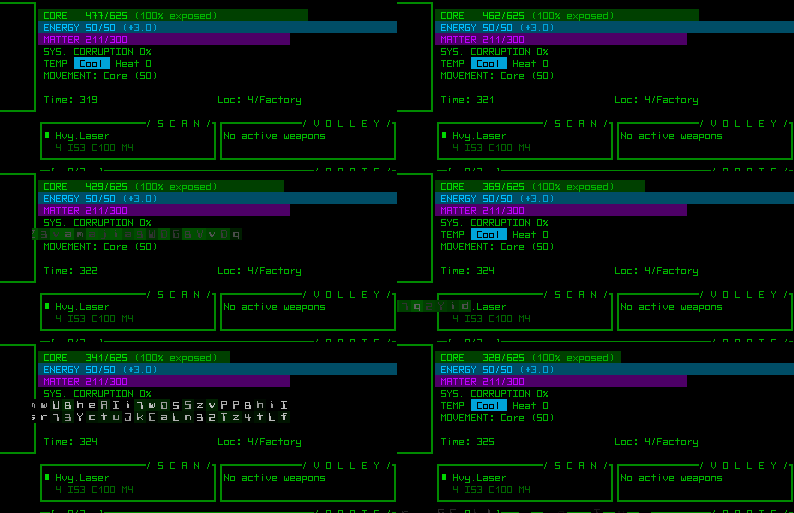
The other two effects are far more effective: Garbled data is displayed whenever the core takes a direct, where the greater the damage the larger the effect’s area; and system corruption intermittently causes glitches across the interface, with frequency and amount based on the current level of corruption. These effects aren’t annoying--just enough to tell/remind you what’s going on, but there will be an option to turn them off if you like.

cogmind_effect_corehit

Cogmind just sits around naked taking a beating so I can record the effects in one corner of the screen.

These help address one issue in the 7DRL whereby it could be easy to forget/overlook your dangerously low core integrity until it was too late, that and you could easily overheat without noticing (later 7DRL fixes added messages and the occasional alarm/warning sound, but it’s always nicer to communicate your condition in an another direct and obvious manner).

Showing when the core itself takes damage will also help draw attention to the amount of coverage your current build has.

There’s still plenty more to do with the GUI. The original status and info windows haven’t been touched because their content will be changing before they’re completely redesigned, and there will be several new windows coming to support new features, but it’s about time to get back to expanding the game logic itself.

Posted in GUI | Tagged , , | 8 Responses