Official development blog
[ Latest Cogmind Release Notes: Feb 2026, "Unchained More" ]

Options, Revisited

Cogmind’s game options were first covered in a post last year, but the selection has since expanded, and because their number has grown closer to what will be their final state, I went ahead and implemented the in-game interface which I’ll be introducing here.

My original intent was to add a new top-level options menu accessed from the primary game screen--there is no separate “main menu” as many games have, since Cogmind does away with as many immersion-breaking elements and presentation styles as possible.

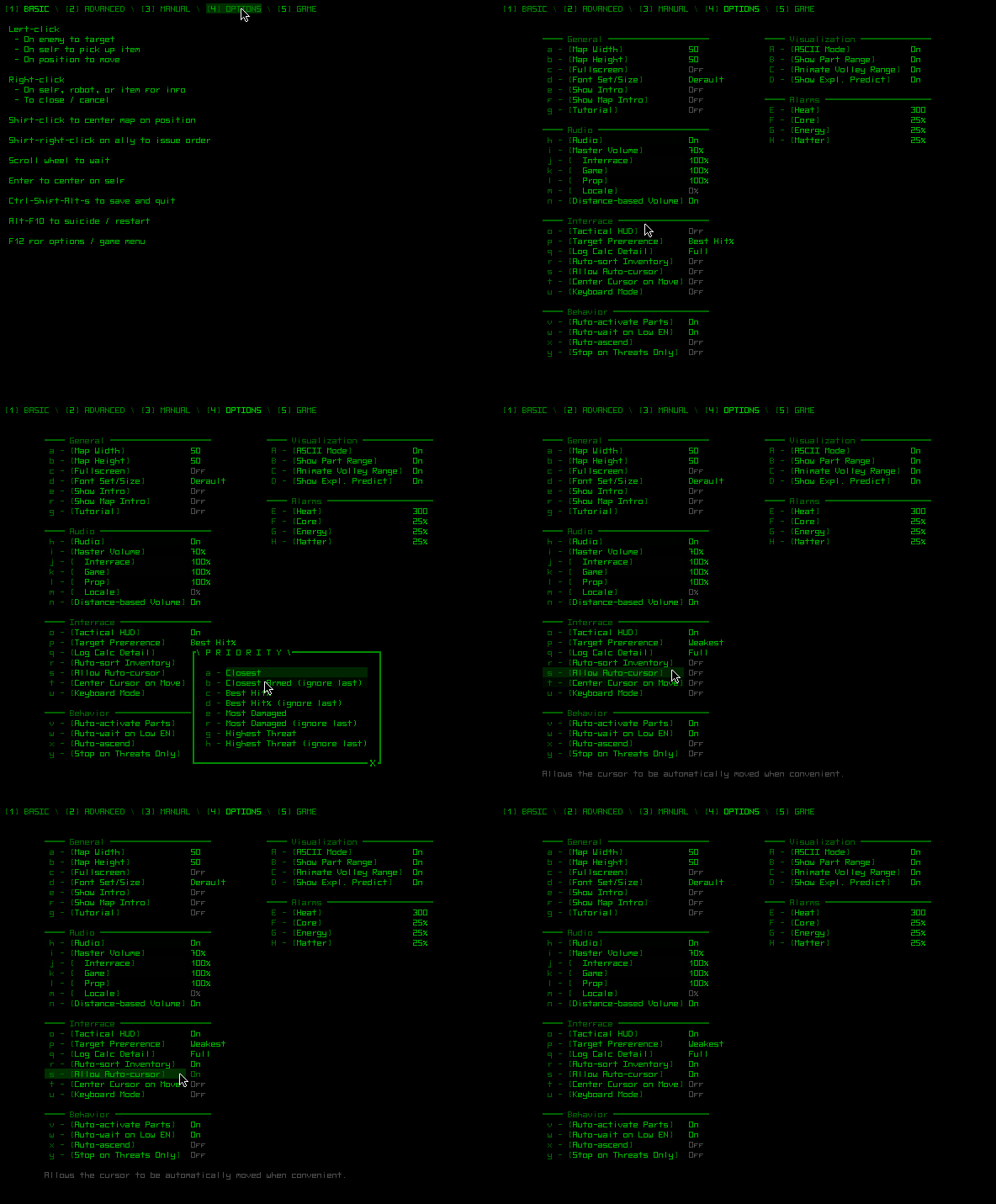
It was both easier and made more sense to add “options” as another page in the “help/manual” system. That system in general is accessed via F1, F12, ‘?’, or a button in the bottom-right corner of the screen. The fourth page is now animated and can easily be expanded with more options if necessary.

cogmind_options_menu

Switching from the basic commands/help page to the options page and choosing a few options. (Click to view in crisp native scale.)

Notice that as the cursor hovers over an option, a description of that option appears at the bottom. Surprisingly few games provide this information while changing options, a situation that frequently annoys me since option names alone are not always sufficient to describe how they affect the game or interface. Even for those options with obvious effects, this can be a good place to convey extra information in a context-relevant manner.

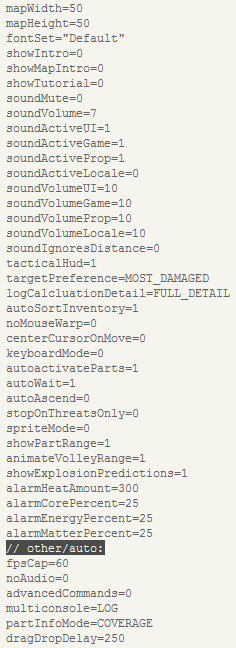
Any changes made are saved to a text file in case you want to copy that file elsewhere, or make changes directly to the file itself (there are a handful of rarely-modified options, like drag-drop detection delay, that don’t appear in the options menu). That same file also stores information regarding the state in which you last used the interface, e.g. which multi-console window was in use, the part info visualization mode, etc.

cogmind_cfg

The latest cogmind.cfg.

Restart / Quit

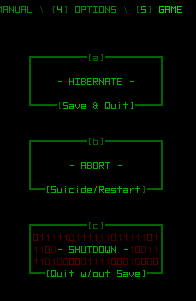
In case you ever want to stop playing (nooooooooo…), there is a new set of buttons accessed via another new page in the menu system. In addition to the options menu, these contain the remaining functions common to a traditional “main menu.”

cogmind_game_menu

Save & Quit, Restart, or Quit without Save. (The buttons are animated while hovering over them, hence the 0/1 background caught in this screenshot.)

Posted in GUI | Tagged , , | 8 Responses

Sound Design in Cogmind, a How-to

Previous coverage of the audio development process has taken a look at everything except working with individual sound samples. They are of course the building blocks of the entire system--if they aren’t appropriate and each working to enhance the overall experience, then the game is better off mute. That would save a lot of time, but we’re trying to create an immersive experience, and sound plays a big part in that.

Disclaimer: Before continuing, know that I am by no means a professional sound designer, though I have been playing with Audacity for many years and have a workflow that includes a good number of easy methods for getting results.

Sources

First of all, you may be disappointed to know that nothing I do is made from scratch, and therefore I won’t be showing how that’s done. For that you need the experience to use a digital audio workstation. Sounds created from scratch also don’t suffice when you need lots of realistic non-gamey sounds, which happen to make up a large portion of those in Cogmind because it helps make the world more believable.

Samples available from royalty-free sound effect websites are a great starting point. Years ago it used to be hard to get this stuff, but now there’s tons of it out there. When searching for the right sounds, it often helps to get creative. Even when something doesn’t seem available, other unexpected and common sounds can be substituted. Closeup recordings of automatic car windows are great for robot leg movement, for example. Often times a little modification may be necessary, using some of the methods described below.

Another option popular among indie devs who don’t mind (or on the contrary want) traditional “video game sfx” is to generate them with Bfxr. I first encountered this when it was the original Sfxr and thought it was cool then--the new one is so amazing and powerful it might just blow your mind.

Design

Royalty free sounds are great, but they weren’t made specifically for your game, and there’s a good chance they won’t fit your needs perfectly. Or maybe I’m just picky ;)

I almost always edit sounds in one or more ways. This is where the simplicity and power of Audacity comes in handy. There are plenty of features for the amateur sound engineer and even more available through plugins, though pretty much all you need comes standard with Audacity.

Pitch, Speed & Tempo

Sometimes a sound is just a little too fast, slow, high-pitched, or whatever. Increasing or decreasing pitch, speed, and/or tempo by a certain percentage is a simple way to fix that. These effects are easy to experiment with and can product interesting results (by the way, it’s more efficient to just make an adjustment, accept it and test immediately rather than use the slower “preview” feature--you can always ctrl-z undo the change if you don’t like it). Even significant adjustments of as much as 500% can be used to completely change a sound for a different purpose. Minor changes can also create useful multiple variations on a sound (as described in the previous post this is something that can be done with an audio engine, too…).

Cutting, Pasting & Mixing

Sometimes a short segment of a longer sound effect makes a good complete sound effect itself. Remember that especially shorter effects will sound much different when taken out of context, which can be to your advantage when you need something that is difficult to find on its own.

Combining multiple sound effects into one is another way to tailor them for a specific purpose. This can be done by adding them end-to-end, via partial overlap, or even completely overlapping more than one sound. The latter only works when sounds complement each other, not if they occupy a lot of the same sound space.
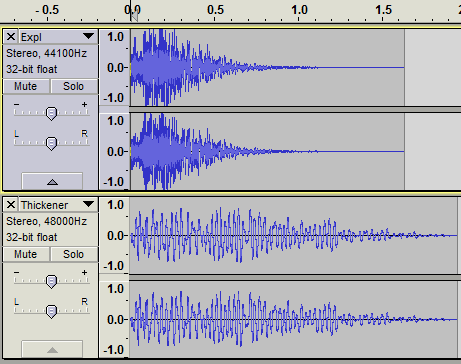
cogmind_sfx_explosions

A deep rumble (bottom) is added to “thicken” a brighter explosion.

Other examples of multi-layered sounds:
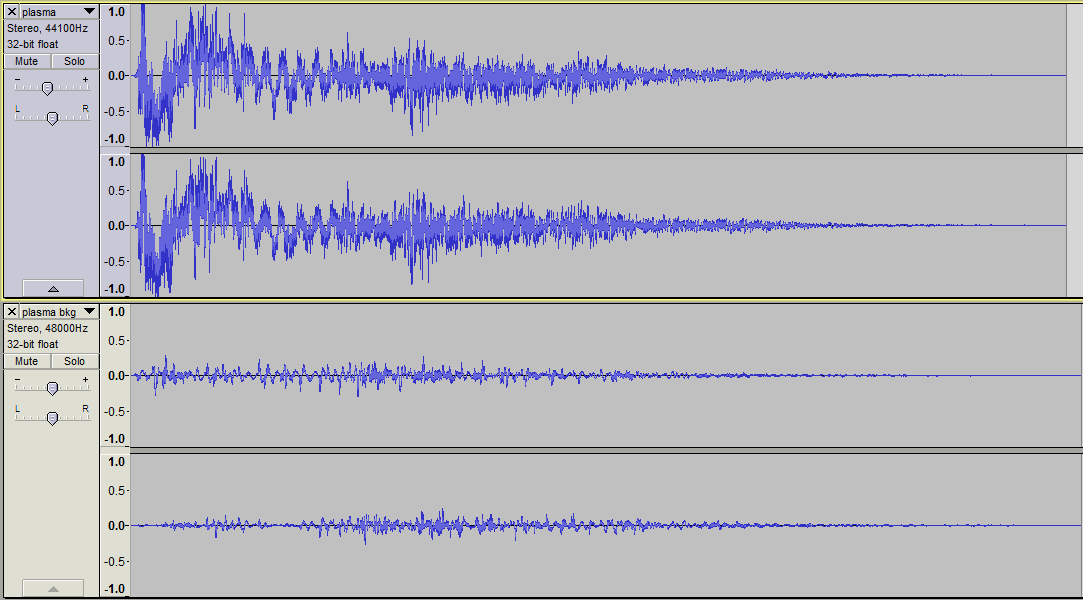
cogmind_sfx_plasma

A plasma shot with a slight warble in the background to give it more dynamic depth.
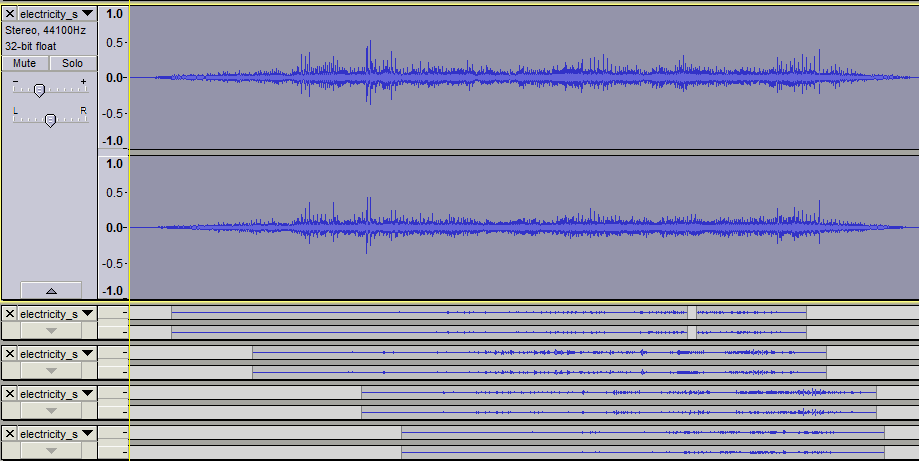
cogmind_sfx_emp_layered

An electromagnetic weapon that layers more and more static onto the background as the projectile progresses.

When testing multi-layered sounds, remember to mute each track in turn and play the full sound with and without it to see what it’s really adding to the overall effect. The difference you hear may suggest other possible  improvements.

Also remember that just like extracting segments of sound from a longer one is capable of creating something completely new, so does putting them in a new context.

If your audio engine supports it, layers can also be combined randomly at play time to increase the number of possibilities. A more powerful audio engine (discussed in the previous post) should be able to do this. I don’t use the technique very often because it’s even more time consuming to make sure all combinations will sound good, but it did come in handy for robot death sounds, which layer a random power down sound behind some static and sparks, sometimes along with an additional sound effect. The pool of sounds for each category differs for each robot size class.

Fade In/Out

I use fade effects a lot, though not in the normal sense you might expect (i.e. to very gradually increase/decrease volume). They are useful for repairing a composition, especially after a lot of cutting, pasting and mixing.

It is sometimes hard to avoid creating clicks/glitches at the ends of a cut action. These are easily removed by a 5-10ms fade unnoticeable to the listener.

Partially overlapping sounds mixed into the same sample should generally be cross-faded to help reduce dissonance (unless the sounds are meant to be distinct, like the charging of a weapon before it fires). Make sure volume levels are similar at the central point of overlap, otherwise the transition will be too noticeable:
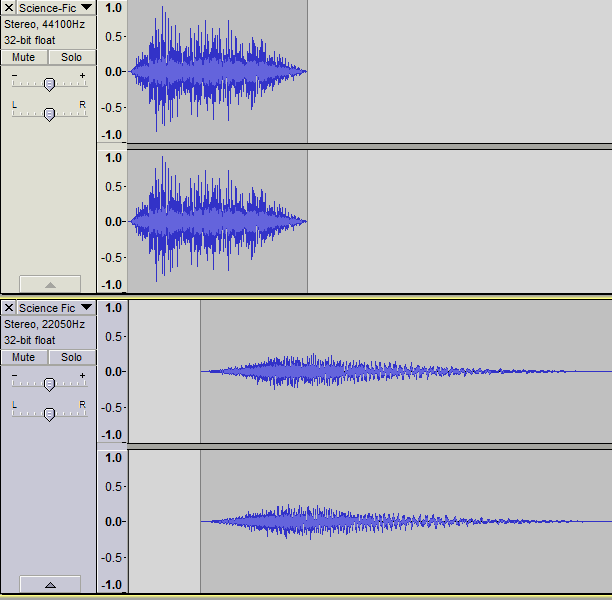
cogmind_sfx_crossfade

A blast that slightly changes its tone half-way through before fading out.

Real recordings, weapon effects in particular, are often accompanied by echoes that take a while to trail off. If these echoes don’t suit the game environment (and also just to keep sound effects relatively short) you’ll want to cut those off and fade the result. Just be careful that the end result doesn’t sound too abrupt and unnatural.

Volume

I haven’t yet mentioned volume, which doesn’t matter too much because the player can always adjust it, right? Nope. Relative volume of individual samples is incredibly important, since the player can only control the volume of groups of sounds. No amount of in-game adjustment can fix it when one weapon blasts your ears out while the others are relatively subdued by comparison.

For this reason you should always choose a “reference sample” when working on a new game. That’s a sound effect of average volume that you can always compare others to during the design process, ensuring the new sound is quiet enough, or loud enough. If all sounds are compared against the same reference, then you can expect the final results to be fairly normalized when they’re all in the same game.

Note that when changing volume levels of an individual sample in Audacity,  it is technically better to use that sample’s volume slider rather than applying an amplify effect. The latter can be a “destructive” process (loses audio data), and is also slower to carry out (if you’re an efficiency nut like me). Sometimes the amplify effect still comes in handy when working with a sample that may be copied multiple times, because Audacity will not copy the slider volume setting to the new track. In some cases I also use amplify anyway because I like to see the waveform at its actual volume level to make a visual comparison with other samples.

Testing Output

Just as a PC game will be played on a huge range of different systems, so the audio will be played through a variety of means. Not everyone will have an identical experience in that regard, so remember to test the audio on different speakers and headsets. Try to make them as close as possible. Among my test audio devices, I have one small headset that loses much of the bass, and another that blasts it out and achieves the same effect at half the volume of the other one.

To reduce the amount of testing necessary, I made a reference chart of the volume settings on all devices and software used during the sound creation process. I aim for in-game volume to default to 70%, and the same for as many audio devices as possible. It’s best to avoid reaching for the maximum volume of any audio system. Hardware doesn’t perform as well at extremes (how many people keep their OS audio at 100%?), and in software (the game) this gives the user some room for upwards adjustment.

Audio Formats

Files are generally saved in a lossless format like .wav, but final audio can safely be compressed using the Ogg Vorbis (.ogg) format to vastly reduce file size without sacrificing much quality at all. This is less important when a game only has a few sounds, but with dozens or hundreds it can mean the difference between a 20 MB download and 100 MB. Audio is often the largest portion of a game’s file size, more so when uncompressed.

Most sound work is done at a data rate of 44.1 kH/16, the digital standard for CD quality (16 is the bit depth). I have a lot of old sounds lying around and in the past many video games used a lower 22050 Hz rate, so I currently include release everything at that rate. It does lose some of the higher range sounds, but this doesn’t have a huge impact depending on the kind of sound effects in use. I may change it back to 44.1 if/when music is added (a topic for another post), though it’s nice to have the even smaller file sizes of a lower rate. Note that true sound designers would never recommend using 22050 these days.

This is the last of a four-part series on the subject of sound effects. The first gave an overview of sound effects in roguelikes and Cogmind, followed by a look at weapon sfx in particular and an overview of the game’s audio engine.

Note: By request the earlier combat recording has been re-recorded with UI sounds disabled. You can listen to it here.
Posted in Design, Dev Series: Sound Effects | Tagged , , , , , | Leave a comment

The Audio Engine

Any game that wants to play more than just a few sounds, or tie sounds to the game in an interesting way, needs some kind of audio engine. This can range from something as simple as an in-house sound manager with per-sample volume controls to the powerful fully dynamic sound engine that is FMOD. FMOD was recently made free for indie developers, but using it still takes someone familiar with true audio workstations and well-versed in sound design. So for the time being I will continue to use the basic audio engine I built on top of the ancient SDL_mixer. SDL_mixer is pretty bare bones, but it gets the job done.

cogmind_launcher_sfx

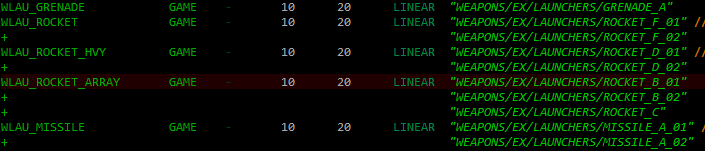
A subset of explosive launcher sounds.

Sounds are classified as one of four types for individual volume control and muting, enabling the player to disable only the UI sounds, for example. Notice the “GAME” designation in the image above--those are primary map-based/action-related sounds. The number range (10-20) and “LINEAR” are describing volume falloff as discussed in the earlier ambient sound post. (That post also covers terrain-based sound dampening.)

You can also see that a single “sound” (the name listed far left) may actually contain multiple possibilities (the samples listed on the right). Common sounds that you don’t want to sound too repetitive should have multiple variations to select from at play time. A Rocket Array fires a lot of rockets; it would be quite dull if they all sounded exactly the same. This is the kind of thing FMOD (and libraries like OpenAL) can do in the game itself, but I’m using the poor man’s solution: groups of similar sound samples pre-loaded and stored separately.

But it gets better!

After some testing I was dissatisfied with the general lack of variation when firing volleys. While there may be a huge number of different weapons, for at least some duration you’re firing a lot of the same ones again and again, and aside from those which absolutely must have more than one sound, most have only one. Thus you end up repeatedly hearing the same handful of sounds until you’re damn happy when the enemy finally blows off that gun that was already grating on your nerves.

A common solution in games is to randomly vary the pitch of sound effects by some amount. This is a staple feature of any decent audio engine, but unfortunately outside the scope of SDL_Mixer. Cogmind uses a memory-wasting workaround that’s better than nothing: Just copy the sound to a temporary buffer, modify the pitch, play it, then delete it… This feature was added after I took the screenshots above, so you don’t see the new data column which allows one to specify a maximum pitch deviation on a per-sound basis. Putting a value like “2” in that column would mean the sound is actually played at 98% to 102% of its original pitch. Note that pitch variation does not work for all sounds, nor is it desired in some cases--UI sounds should be static, for example.

If it’s still not good enough for you, or you prefer to blast your own music in the background anyway, the game can also run without any sound files at all (it just doesn’t play what it can’t find), making for a much slimmer download for those who will mute the audio anyway. Of course sound is still a highly recommended part of the experience.

Particle-SFX Interface

The highlight of Cogmind’s audio engine is the way many of the sounds are controlled: via particle scripts themselves.

cogmind_particle_sfx_interface

Quantum Rifle sound commands.

Any particle can give any number of commands to the audio engine, the most simple of which is seen above: “PLAY.” Triggers are checked on each particle whenever applicable, such as at the BIRTH of a particle, or a certain DELAY after that birth. The example above shows that a Quantum Rifle projectile/particle plays its charging sound when it is created, then waits 600ms before playing the firing sound (not shown: the particle delays its movement for 600ms as well, to wait for the charging animation and sound to finish). The sounds are template variables because there are multiple Quantum Rifle variants.

Other commands include the ability to stop sounds, as for making a rocket flight sound continue until the moment of impact, or exert finer control by playing sounds only on certain script-defined channel groups.

By necessity many of the game’s sound effects are played and controlled through this system--after all, most are related to particles. Some are of course played internally, such as UI sounds.

Others use a separate script-based system:

Material-based SFX

Any game that tries to maintain at least a semblance of realistic audio experience must consider that objects hitting other objects make unique sounds. Metal on wood, stone on stone, wood on dirt…

Cogmind imports the material-based sound system used in X@COM, where it is far more extensive given the greater variety of terrain in that game and usage for everything from projectile impacts to chairs falling from windows. Here it’s only used for melee attacks and dropping items, which should sound different if dropped on dirt, stone, or metal. While these could all be the same sound, making them unique certainly reinforces the fact that you’re standing in a recently-excavated earthen tunnel, cave network, or military complex.

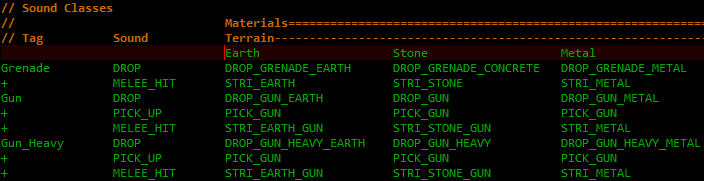
Every item specifies what “sound class” it belongs to, such as a “small device” or “heavy slashing melee weapon,” and whenever that item is dropped or used to hit a target, the sound system looks up the target’s material for that sound class and plays it.

cogmind_sound_classes_xt

This data set is actually from X@COM, because at the time of drafting this post sound class sounds had not been created--they’re all done now.


This is the third of a four-part series on the subject of sound effects. The first one gave an overview of sound effects in roguelikes and Cogmind, the next covered weapon sound effects, and the last looks more specifically at the details of sound design.

Posted in Dev Series: Sound Effects, Uncategorized | Tagged , , , , , , | 2 Responses

Weapon SFX

While there are many non-weapon sound effects to be heard in Cogmind, a majority still belong to gunfire, lasers, explosions, etc.

Like working with particle effects, before creating and assigning them to specific weapons the planned sounds were organized into subgroups according to their properties. Many of these properties were already taken into consideration during the particle assignment phase, but once again required a lot of cross-referencing, especially later when the same considerations would have to be revisited when actually making the sounds.

It’s always a good idea to make lists and set out exactly what you have to do before doing it. Even if it may change at some point along the way, the best way to avoid working into a dead end is to plan.

cogmind_thermal_sfx_subcats

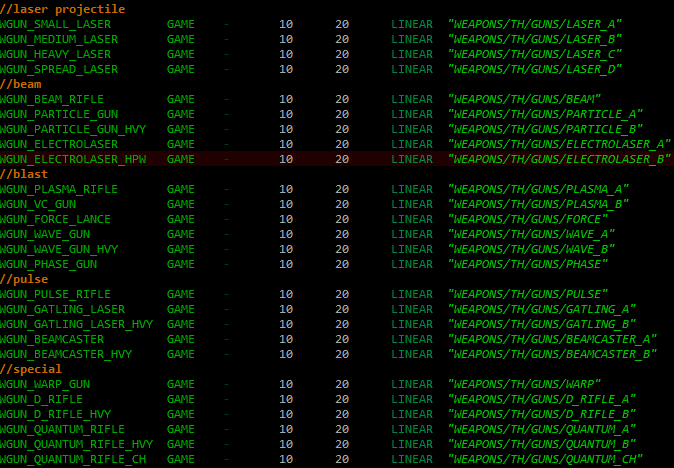
Facing the truth: Planning categories for thermal gun sounds. (It was somewhat disheartening to see the ridiculously long list of sounds needed to cover everything in an absolute minimal way.)

Similar to the item template creation process, designing/assigning specific sounds also required thinking first about what the biggest, baddest weapons would sound like, then filling in the range between those and weak zippy lasers. Everything should at least approximate a progression from “this isn’t bad” to “I want to fire this thing again and again!”

Of course chosen sounds also had to match their particle effects, both visually and timing-wise. You can’t very well have a fiery-looking particle effect making a zapping laser sound, or a fast rocket that sounds like it’s inching towards the enemy. Again, lots of cross-referencing and comparison.

There are several types of sound effects needed for weapons:

  • Shots: Firing guns and cannons (ballistic/thermal/electromagnetic), making up the bulk of the sound effects. Also includes launchers releasing their projectile (grenades, rockets, missiles, etc.).
  • Charges: What better way to reflect the power of superweapons than have them spend 500-1200 milliseconds charging up before firing. Usually accompanied by an animation.
  • Explosions: Ka-boom!
  • As mentioned in the previous post, projectile impact sound mechanics are implemented but won’t be in the final game.

Below is a recording of a battle against 20 robots in the open sandbox. Normal confrontations are much simpler, but this was an easy way to hear more sounds (though note that you still only hear a small subset of the hundreds of weapon-related sfx). You can also occasionally hear a few interface sounds while I’m switching weapons and targeting, but it’s mostly the large number of enemy robots tearing me to pieces. Also, for the recording I was cheating to take all the damage to my souped up core and leave my weapons unharmed, so there is an unusually large number of interface glitch sounds as my core takes damage. (Note: In-game sound effects as heard in this recording are currently played at 22050 Hz.)
You’ll notice that weapons may sound a good bit quieter in some cases. This is because their volume is distance based, and some are being fired from fairly far away. The effect makes more sense when you see it, and is also a good cue when you can’t see what’s going on (like a battle taking place somewhere nearby).

Update 5/15/14: By request I’ve re-recorded the combat with UI sounds disabled, which you can listen to here.

This is the second of a four-part series on the subject of sound effects. The first one gave an overview of sound effects in roguelikes and Cogmind, the next examines the game’s audio engine, and the last looks more specifically at the details of sound design.

Posted in Design, Dev Series: Sound Effects | Tagged , , , , | 7 Responses

Sound in Roguelikes

Sound effects are not something you see (hear) in many traditional roguelikes.

This makes sense from a developer perspective because there is often such a huge variety of content that it becomes a massive and difficult undertaking to provide sounds for everything. Adding sound effects is akin to adding high-resolution art assets--it detracts from gameplay/mechanics/content development and is an entire discipline in itself.

It’s also unfortunate because I believe sound effects can contribute greatly to the appreciation of any game, not least of all roguelikes.

Sound is especially vital for creating a truly immersive atmosphere. This isn’t something all roguelikes aspire to create, but there is a lot of potential when combined with the abstract nature of ASCII. Sound effects “spark” the imagination rather than take it over like detailed visuals do, thus they’re the perfect complement for traditional roguelikes.

On a more fundamental level, sound effects bring the advantage of better player feedback. Having both visual and audible confirmation of input and other events is always beneficial to the player experience.

The best experience divides the player’s attention as little as possible, which is something traditional roguelikes fail at by putting actors in one place (the map) and descriptions of the action in another (the message log). Many log messages can be either matched with or completely replaced by sound effects, keeping focus on the map. Warning alarms and other informational sound effects can make even the HUD less an attention grabber.

This is the approach taken by Cogmind. If a sound effect will make the game easier to play, it will be included.

(Note that a game with event sfx risks sounding chaotic if action animations are all instantaneous, as they are in many roguelikes. This leads to the same pacing dilemma I discussed in an earlier post, and is probably the most important reason many roguelikes have limited or no sound.)

SFX in Cogmind

There are many types of sound effects included in Cogmind.

  • UI: This most basic category is essential for player feedback, as mentioned above. They’re also just fun, and part of the immersion. The game is a glorified terminal interface; beeps and boops are a must! Even if there were no other sounds, these would definitely be included. The prototype even had a few of these. Cogmind will have about 80-100.
  • Combat: Weapon fire, explosions, melee attacks… These make up the bulk of the sound effects. There are already 400 and counting. The next post will examine this category in detail.
  • Destruction: Robot and terrain destruction are of course accompanied by sound, which is doubly informative if you can’t see the action because it’s around a corner.
  • Actions: There are actually very few unique actions in Cogmind, but picking up, dropping, attaching, and removing components should be audible.
  • Ambient Sound: One of the goals of Cogmind is player immersion, and this category is key to providing that. Discussed in more detail in an old post. None of these are in the game yet, because the game world doesn’t even exist!
  • Cut Scenes: These should naturally be audible, too. There’s only one in game so far, the intro.

One type of sound effect dropped from the game is projectile impacts. I really enjoy these in X@COM because they add a lot of immersion, but they don’t fit well in Cogmind because most projectiles are very fast and the impact would either go unheard or just add to a cacophony of sound. Only melee attacks have impact sounds, since they essentially hit their target instantly so the impact is the sound.

As an audio introduction to Cogmind, below is a recording of Cogmind’s start-up sequence included as part of the intro, the latter part including a related event. Blah, blah, blah, secrets, secrets… (next post will include a more eventful battle recording).

I don’t think it stands on its own very well without the accompanying visuals, but I’m interested to hear what readers have to say about the audio based on its own merits. (Note: In-game sound effects as heard in this recording are currently played at 22050 Hz.)

This is the first of a four-part series on the subject of sound effects. The next examines weapon sfx in particular, followed by an overview of the game’s audio engine and a closer look at the details of sound design.

Posted in Design, Dev Series: Sound Effects | Tagged , , , , , | 2 Responses