Official development blog
[ Latest Cogmind Release Notes: Feb 2026, "Unchained More" ]

UI Feedback: Map Dynamics 2.0

A while back I mentioned a design initiative based on the concept of “map dynamics,” aimed at increasing player focus on the map area as opposed to the message log or other windows. After the initial spate of related features and animations, this part of development was put on hold as the rest of the game took shape.

With much of the game complete, and development inching ever closer to needing a more polished-looking dynamic interface before reaching out to the average gamer, it was about time to revisit this topic since we could now identify all the necessary features and implement them in a consistent manner all at once.

Before now we didn’t have a dedicated system for handling the large number of UI animations that would layer over the map area, as it’s tough to design a system without knowing the full extent of what you need it to handle. The resulting implementation (i.e. code-wise) is less flexible than I’d like it to be, but on the outside it looks cool and the style is consistent throughout. (At this point I’m happy to sacrifice code quality if it’ll get results, but I’ll stop myself wherever it threatens to screw me over in the future).

Might as well pick up where we left off in February.

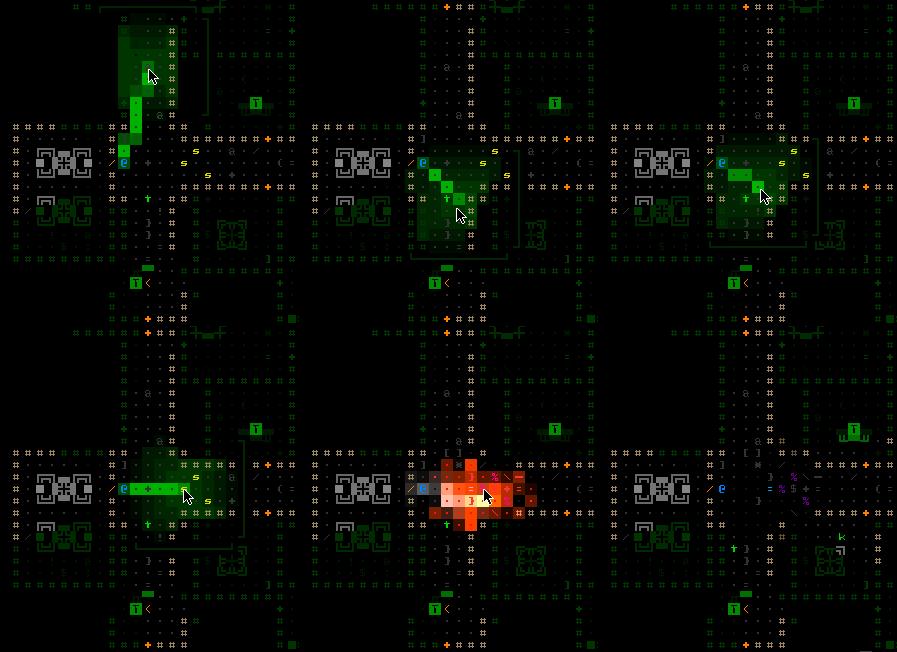
I went back to the “explosion prediction” feature and added brackets that show the explosion’s maximum theoretical area of effect, just for reference since you can already see the more important shades of color representing damage falloff and obstacle blocking.
cogmind_explosion_prediction2

Explosion Prediction System 2.0 (I predict… you’re all going to die. I was right!)

There was more pure “fluff” animation I wanted to add to the UI for missiles and explosions, but that was cut as a feature unnecessary for 1.0. Almost every other animation on the list was implemented, because they offer meaningful feedback or other information to the player.

Object Identification

No, I’m not talking about the “ID minigame” (subsystem) present in many roguelikes. More basic than that, the first step before you can take each action in a game is to identify what’s what in the environment around you. Although proponents of tile-based games might argue otherwise, this isn’t an issue unique to ASCII roguelikes. Sure objects are represented by letters instead of images, but the devil is in the details and you really need to know exactly what you’re up against (enemies) and what tools are available (items). Images don’t convey that information perfectly until you’ve learned what the game tells you they are, which is no different from an ASCII interface!

I remember holding the Alt key in Diablo 2 (sort of a roguelike, yeah?) to instantly see names for all items on the ground. That sure saves a lot of time and makes sense in any game where loot is plentiful (Diablo, Cogmind…)

Items

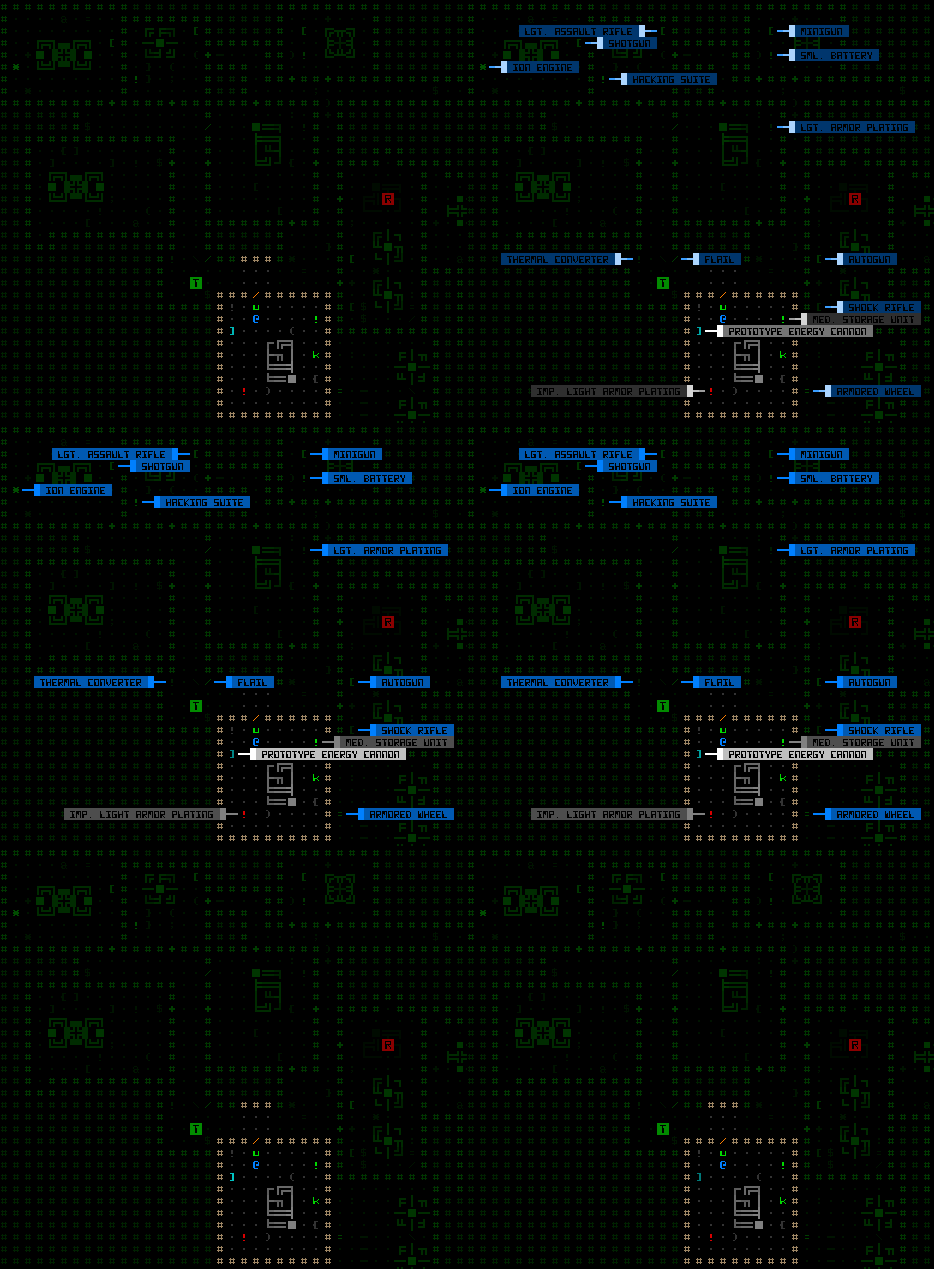
You can now call up labels for all items on the map, even those outside your field of vision in areas that you’ve visited before.
cogmind_labels_items

Item labels.

This is great for both surveying all items in view, and locating some item elsewhere on the map that you may not have cared for earlier but now really need and can’t recall where you saw it. Of course, depending on why this hypothetical item was there in the first place, it may be gone when you arrive! Remember that recyclers clean up after a battle, or if they find items strewn about where they’re not supposed to be (e.g. your stash).

In the 7DRL you would know this item was already gone, because (no one ever mentioned it, but) back then you could technically see doors being opened/closed, walls being destroyed/repaired, and items being dropped/picked up outside your field of vision as long as you had been to that area of the map before. It just wasn’t very noticeable under the green overlay; plus you probably wouldn’t expect the game to be so lenient in that regard. For the prototype I never had time to code a solution to properly record and conceal everything. As part of this latest update, explored areas of the map no longer automatically reflect changes since you’ve been there. They remain as you last saw them, including even labels for items that no longer exist.

With these and other labels below you can also see additional benefits from having a separate font for text and map (an idea I’ve discussed before): More label content fits in a smaller area, and the narrower font helps naturally distinguish label information from the rest of the map, an important necessity in ASCII roguelikes since the map consists of mostly alphanumeric glyphs as well. You’ll notice that to reinforce that difference I’ve opted to use a style which inverts foreground and background colors.

Robots

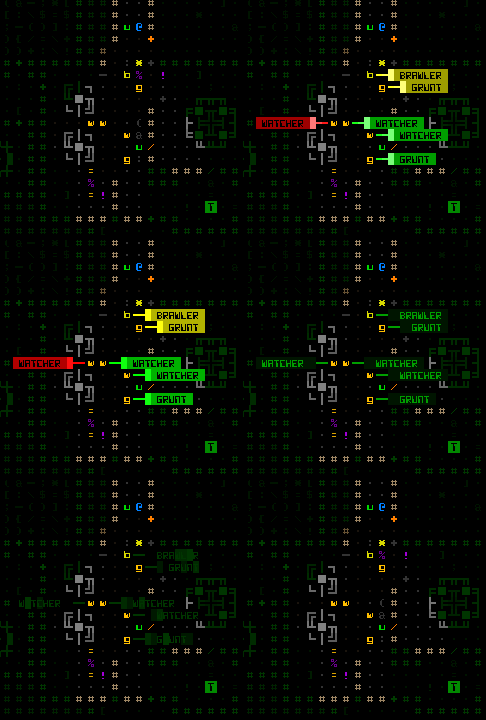
Labels on Demand™ are also available for the other most common map object: robots. Hostile and allied robot labels are activated separately. They display the robot class (not full name), and are color-coded by that robot’s remaining core integrity (from green to red).
cogmind_labels_robots

Robot labels (hostiles).

Disarmed combat robots will be labeled instead with gray, so you know they are no longer a threat.

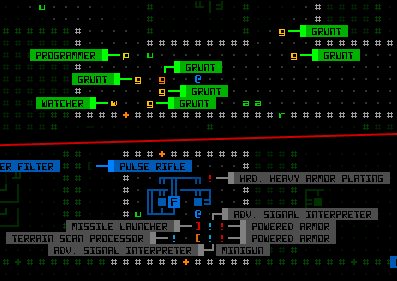
Notice that with all labels they automatically attempt to reorient themselves to avoid covering each other or important features (other similar objects):
cogmind_label_reorientation

Auto-orienting labels organizing themselves into the most visible arrangement possible.

Where there’s a really huge cluster of items/robots some overlap will be unavoidable, in which case there’s always the original scan window as a fallback for identifying objects. Plus that gives you more detailed information, anyway.

Exits

The whole point of the game is to move forward, so finding map exits is a very high priority. Finding the right exit is even more important since they don’t all lead to the same place and you won’t always want to immediately head through the first exit you find. Thus exit labels are fairly important and useful to have access to.

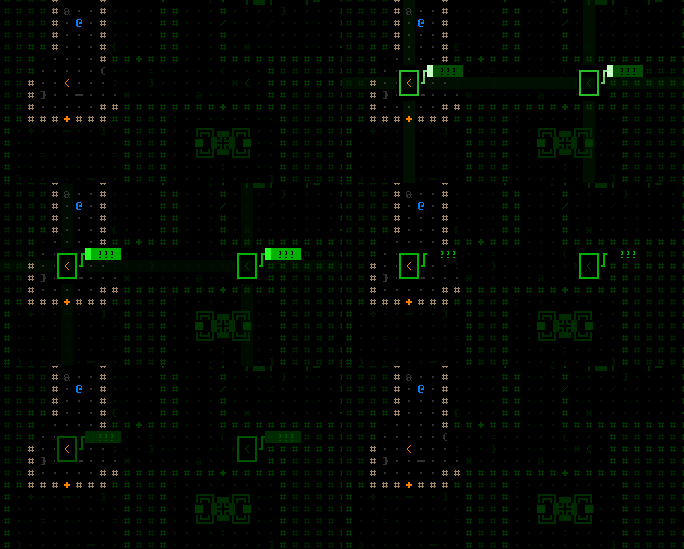
Calling up labels for exits will pinpoint their location as well as display the name of the destination, if known. Unknown exits appear labeled with question marks:
cogmind_labels_exits

Exit labels.

While there’s nothing stopping you from entering an unknown exit (except FEAR! =p), you will often want to do a bit of hacking to figure out where exits lead.

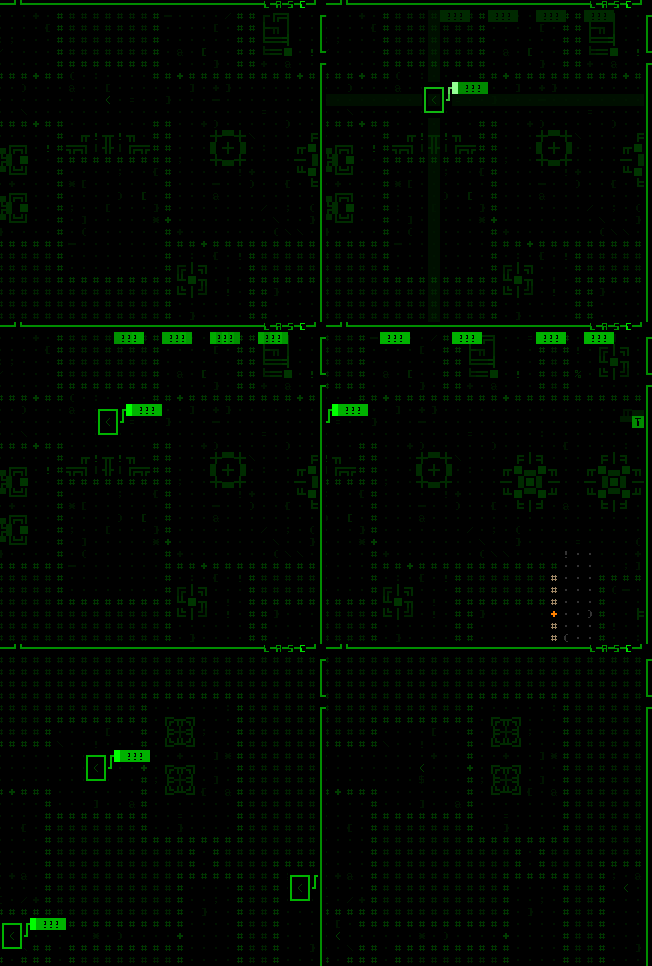
Because Cogmind maps are quite large compared to the average dungeon roguelike, it’s very likely that exits will be out of the map view area. Thus when you activate exit labels, they will identify even those previously discovered which are now off screen--if you can’t see a label it will show an alternate label (simply the name of the exit) at the edge of the view in the direction of that exit. These labels automatically reorient themselves along the map edge as you shift the view.
cogmind_labels_exits_offscreen

Shifting the map to seek off-screen exits.

Automation

We can take this system one step further by automating label displays where it makes sense.

Now when you spot a new hostile robot for the first time it will automatically be labeled directly on the map (with its full name rather than the class designation shown for manual labels).

All newly spotted items are labeled as well--it is AMAZING how useful this is compared to the 7DRL where you had to mouse over each item to identify it. Using look mode via the keyboard to tab between visible items was/is pretty fast, but “fast” can’t really compare to “instant” ;). Simply by walking into a new room you can tell if it contains anything you want.
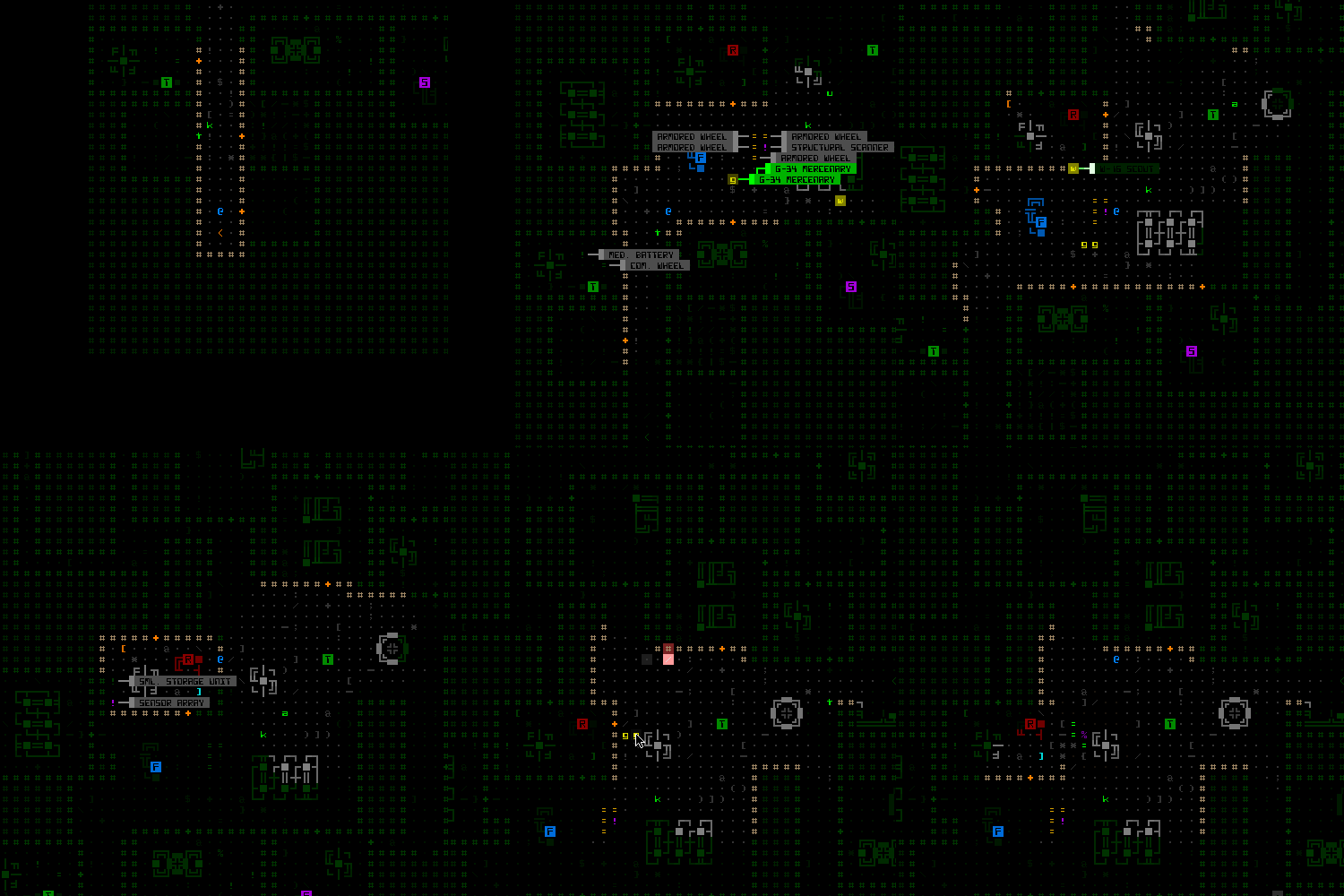
cogmind_labels_items_robots_auto

Auto-labeling items and robots. For the grand finale I blow them all to pieces.

Unlike manually accessed labels which only display one type of object at a time (either robot or item), as you move around automatic labels of either kind might appear, so you’ll notice they use a different color scheme to avoid confusion. While robots are labeled green to red by remaining integrity, common items are gray, prototypes are white, and anything outside your current field of vision is blue. (There’s a fourth classification with its own color, but that one’s a secret.)

Auto-labels for threats and items are individually toggleable in the options menu, if you don’t want them.

Auto-labeling of exits is accompanied by a recognizable beep that should stand out from the other interface noise, since exits are so important, though the larger label size will make it pretty apparent:
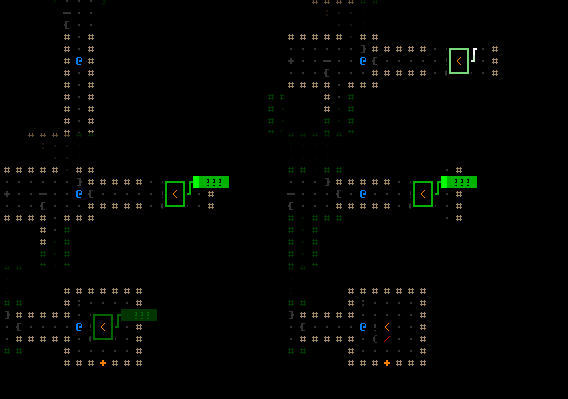
cogmind_labels_exit_auto

Finding and approaching an exit.

Input Scheme

We’re kinda running out of keys on the keyboard--how are we supposed to control manual labels?

First of all I freed up the numbers. They were originally used to access information about inventory objects, but that was actually a minor inconsistency in the input scheme I’ve been wanting to change anyway. Inventory item information is now Shift-#, which corresponds nicely to the Shift-a~z used for attached part information.

Press a number 1~4 to label hostiles, allies, items, or exits. Pressing the same number again, or Esc, will deactivate the labels immediately if you don’t want to wait two seconds for them to expire and disappear on their own.

We’re also running out of UI space, so a new solution was required for mouse support. Fortunately object label buttons fit nicely, both physically and conceptually, in the existing scan window. The buttons need not be always visible, so simply hovering the cursor over what is normally an informational scan window switches its contents to a list of buttons that can be clicked to call up labels (or cancel them if you click again).

cogmind_labels_buttons

Using the mouse to access labels.

Note that if there are no objects of the desired type to label, a message is shown to that effect at the top of the map view.

While keyboard look mode won’t be as useful anymore given that you can display map-wide labels instantly, it also auto-labels any object the cursor passes over. The name and details also appear in the scan window as usual, but it’s nice to not have to move your eyes away from the map.
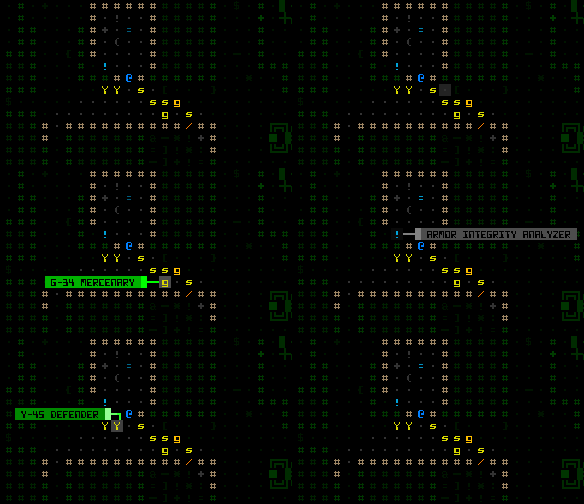
cogmind_labels_examine_auto

Object auto-labels in keyboard “examine mode.” At the end of the recording I’m using hotkeys to automatically cycle between robots/items rather than shifting the cursor via movement keys.

Side note: I wonder how many players will actually use pure keyboard mode? Or whether anyone besides myself used it to play the 7DRL?

Combat

The labels introduced above are all useful both in and out of combat. We also have a collection of new labels that provide combat-specific feedback.

After a certain (adjustable) delay on entering targeting mode, the map displays the chance to hit each hostile robot in FOV.
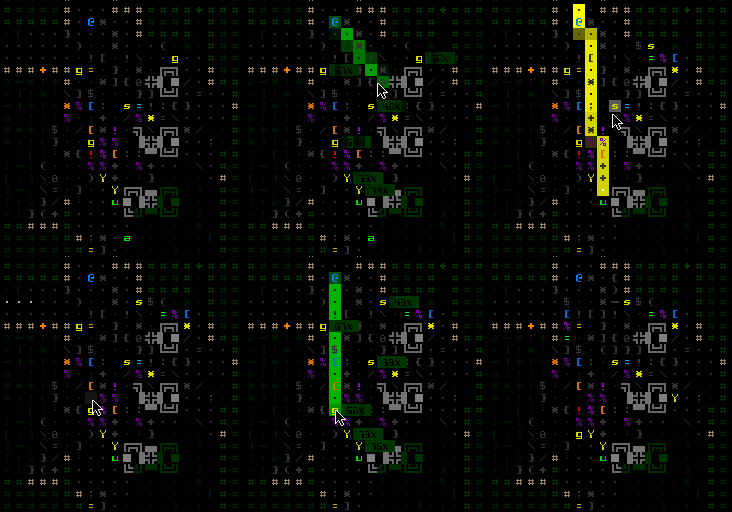
cogmind_labels_hit_chances

Automatic hit% labels in target mode.

Where combat is concerned, the results of an attack are the most important feedback element, one that wasn’t too obvious in the 7DRL. Back then I did add a “calculations” window in which you could see the values used in the attack formula along with precise results.
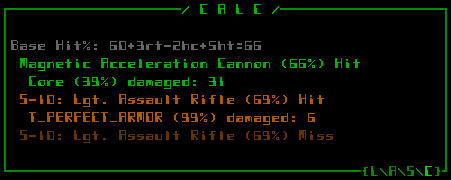
cogmind_calc_console

The calculations window showing more specific attack results. (That armor I happen to be using for testing so I don’t get hurt =p). The level of detail shown is adjustable in the options. Content is also scrollable just like other log/message windows.

That window still exists (above), but we can make the most important information much easier to obtain through more on-map auto-labels for attack effects. If an attack damages a target’s core (not a part), the map will flash that robot’s remaining core integrity (as a percent). Destroyed parts are also named, and there’s an indicator when a core is temporarily disabled (some electromagnetic attacks).
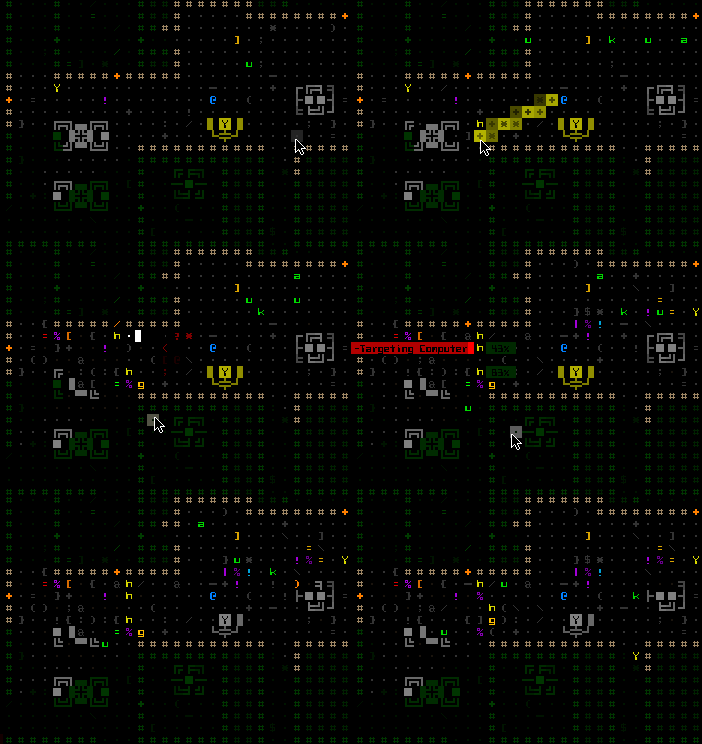
cogmind_labels_combat

Attack effect auto-labels, Cogmind’s version of the “floating numbers” you see in many games.

The system was originally also showing white numbers for EM-caused system corruption, but I decided to remove that for now since I think it works better as an unknown factor.

Combat labels are entirely optional because some players may consider them too intrusive. Attack effect descriptions do get in the way of enjoying the particle effects.

Being Spotted

Just because you can see another robot does not necessarily mean it has already seen you, but this information was never communicated in any way in the 7DRL. Now whenever you see a robot that has started tracking you, the space it occupies will glow for a bit.
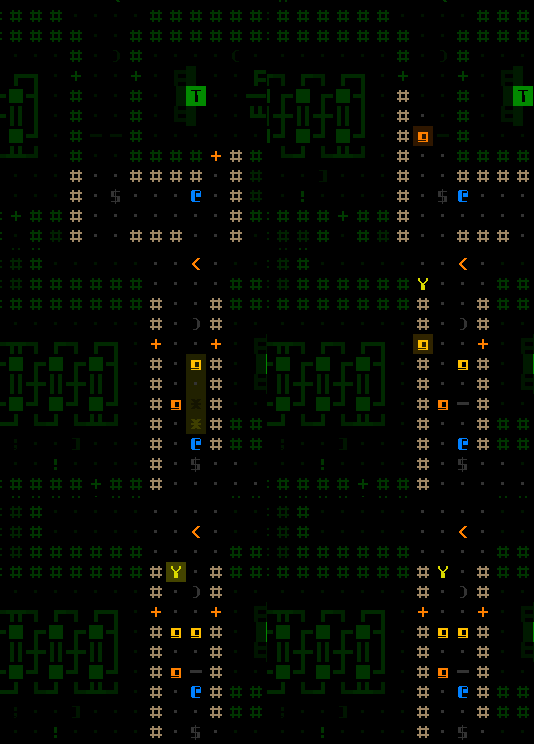
cogmind_feedback_spotted

Spotted by several hostiles on entering a corridor.

Technically a hostile robot may have started tracking you before you saw it, if it got your location from another robot or simply has a greater sight range, but it doesn’t glow until entering your FOV so you know it sees you. In case you missed the glow or aren’t sure, this information is now reflected in the scan window with a red ‘!’.
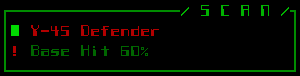
cogmind_scan_spotted

This robot has spotted and is currently tracking you.

Now that we have a more reliable way of knowing whether you’ve been spotted, I’d like to eventually add ECM mechanics that can temporarily prevent robots from noticing you even when you’re in their FOV. This would make melee approaches more interesting and provide another tool for the stealth-oriented build. There is already a set of ECM parts, but they only work to escape detection after being spotted and tracked rather than avoid detection in the first place. [New ECM mechanics are for much later, since we’re beyond the point of adding unplanned features until at least the first release.]

The next post will examine more feedback features (and UI animations!), especially as it relates to utility parts.
Posted in GUI | Tagged , , , , , , , , | 11 Responses

Anatomy of an ASCII Title Screen

The design philosophy behind Cogmind emphasizes maximum immersion wherever possible. For this reason I’d like to avoid game-y interface elements--those which are not part of the game world itself but instead remove your mind from that world and remind you that it’s a game. (A fact you’re obviously unlikely to forget, but anything that breaks the illusion is still bad.)

As discussed earlier, we tucked the options and game menus away with the help and manual interface using the same animated style as the rest of the game to make the transition to “non-game-world space” a little less jarring. An options menu accessible from anywhere, plus mandatory permadeath (and no save menu--games aren’t so long you might play multiple runs in parallel), mean we could almost do away with the title screen entirely.

I like how the the 7DRL has no title screen--immediately on opening the game you are dumped right into the action regardless of whether starting a new game or continuing an old one. So for a long while I’ve been operating under the assumption that the game may not even have a title screen, doing away with an unnecessary “gateway” into the game itself.

More recently I’ve reconsidered that direction, since even without any interactive functionality (we’ve now removed or relocated everything that would apply), a title screen does have other advantages. One of the most important is name recognition in various places the game may appear, e.g. screenshots, and more importantly YouTube LPs.

Plus it’s an opportunity to have a cool-looking title logo.

And that’s actually where the change in direction originated from. It started with a Twitter follower pointing out that the official Cogmind logo as seen on the new website doesn’t reflect the art style of the game. It “needs the ASCII treatment.”

Thus I began sketching an alternative design in REXPaint for whatever purpose:

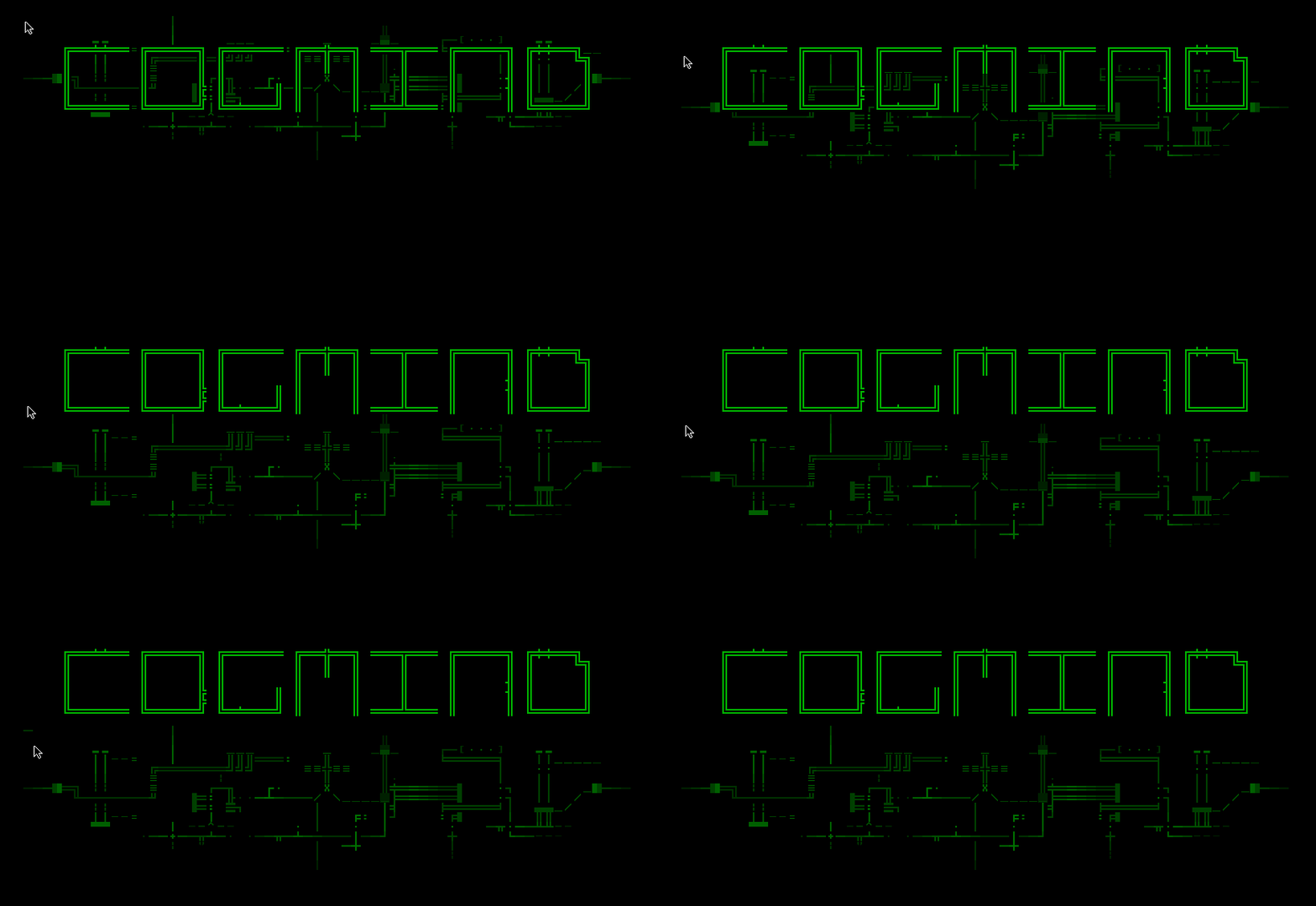
cogmind_title_concepts

First concept sketch evolution for an ASCII-fied Cogmind title logo. (Click for full size, as with all other images in this post.)

As it started to look promising, I imagined how fun it would be to animate it and put it in the game. So of course I had to try :)

Flow-wise we already had an intro that plays when starting a new game, so the title was inserted before that and leads directly into it--the two work pretty well together since they share the same animated ASCII style. Both the title and intro are skipped completely if continuing a previous game.

Title Art Composition

When the title is shown, the goal is to minimize its “intrusive nature” and make it look like it belongs in the game world. This isn’t too hard since everything uses the same ASCII animation engine, and in terms of composition you’ll notice the title also uses the same style of line art used for items. (I still have yet to do a dedicated post showing off the different types of art in their final form, but some examples were previously shown here.)

I already liked the concepts, though the last iteration seemed a bit overdone, so I aimed to use something like the second to last one. First I redid some of the ASCII “circuitry” to rebalance the overall shape and flow of the title.

cogmind_title_redone_ascii

Rebalanced “ASCII circuitry” and some slight color adjustments.

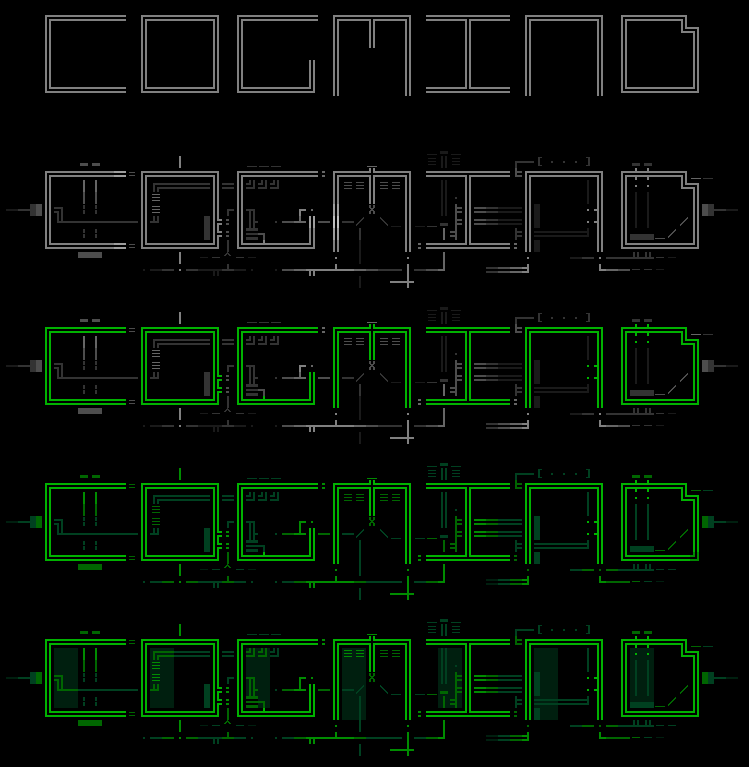
The animation plan was to actively draw the background circuitry, then have the word appear on top of that. This means we’ll also want to draw parts that are under the word itself, as they’ll be showing before the word appears. So I split the art into two layers, one for the word itself, and another for everything behind it:

cogmind_title_2layers

Title art separated into layers.

Minimalist is good, but I didn’t think this would be enough substance for a fully animated title which could really use at least a tiny bit of buildup. What better than even more circuitry! So I drew a third layer under both of those:

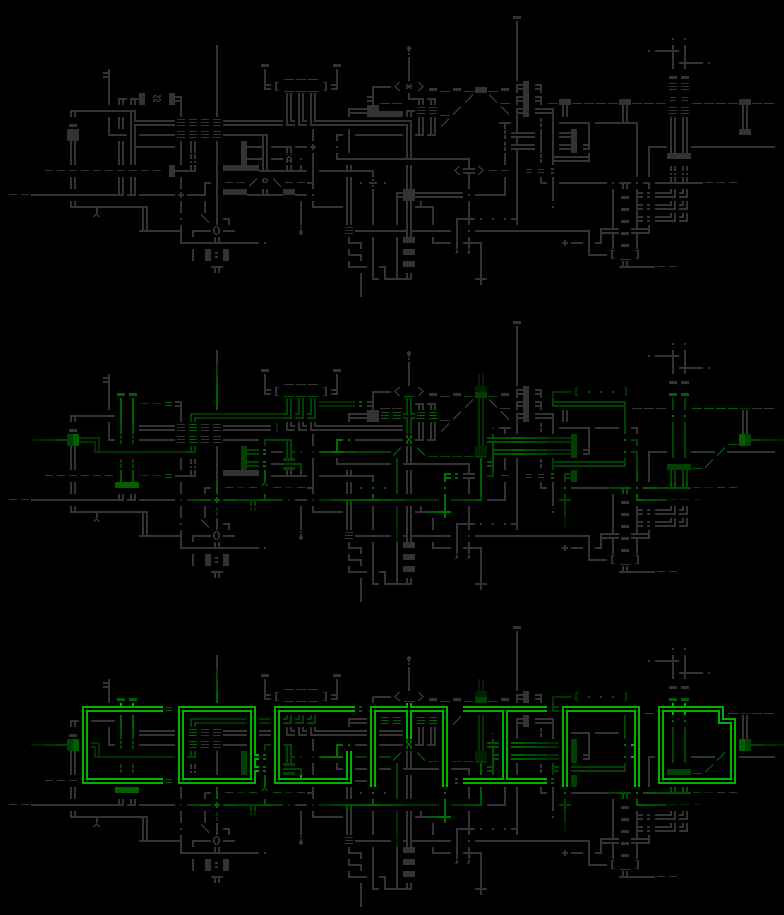
cogmind_title_3layers

Stacking three art layers. (The bottom layer is drawn in a single flat gray--no shading--because the shading will be applied during animation as necessary.)

This bottom layer should look good both by itself and when combined with either or both of the layers above it. This meant a lot of layer toggling during the editing process. The bottom layer is only used fleetingly, though, (and is not a part of the final appearance) so the attention to this kind of detail is mostly overkill.

The animation part was pretty easy, only requiring a handful of scripts. For the curious:

cogmind_title_scripts

Title screen animation scripts.

The second half of the above scripts are used to animate the title itself; the first half actually animates the “Grid Sage Games presents” text which appears before it. (Yes, might as well put that in there since we have a title now.)

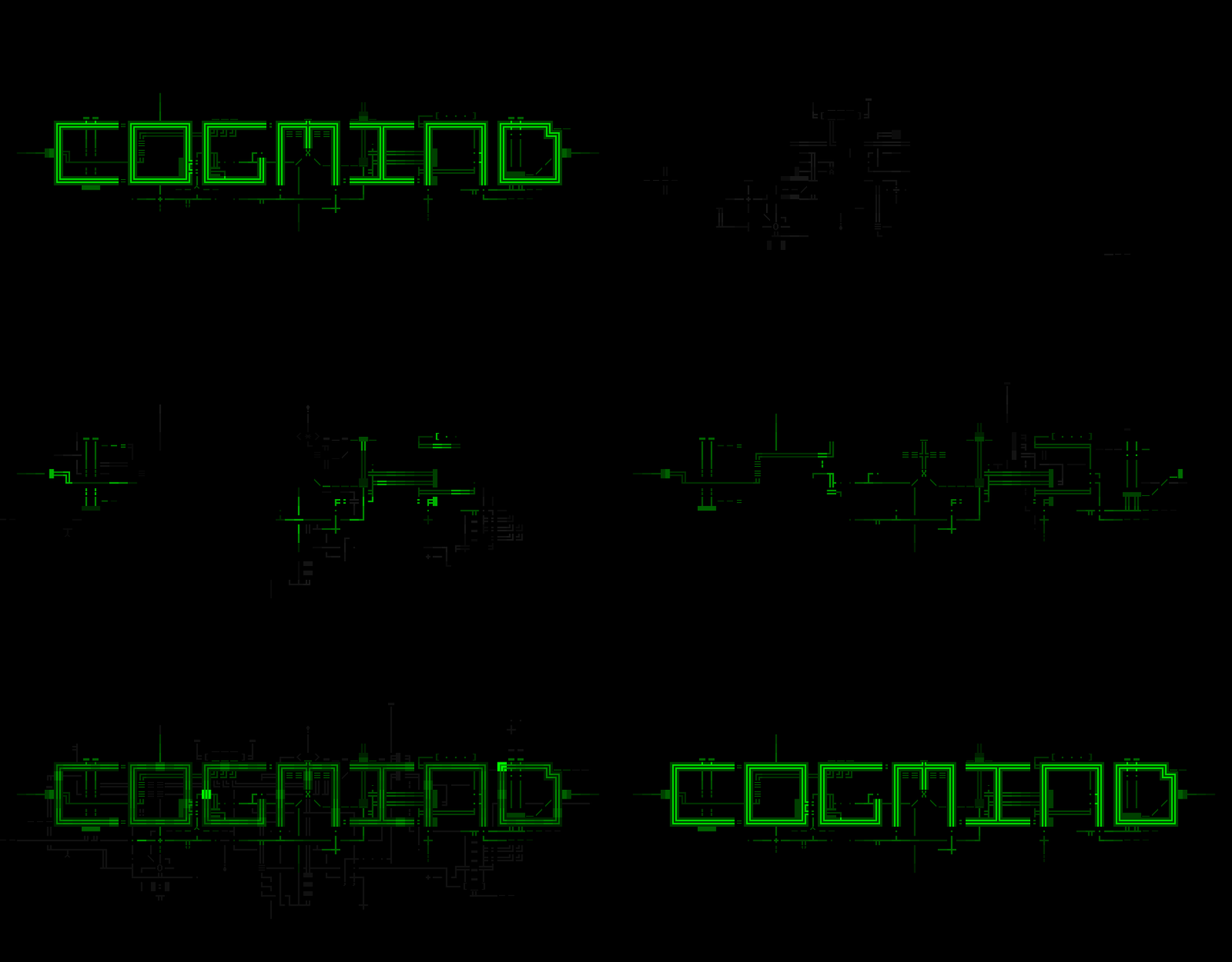
The bottom-most layer, and first to animate, is seeded with 20 randomly located emitters from which the ASCII lines are traced in gray along cardinal paths (i.e. no diagonal drawing). Half a second later 20 more emitters are created on the middle layer, which is traced in green (this one allows diagonal paths as well, to ensure quicker complete coverage). Another second layer the title flashes in with a special glitch effect, while at the same time the bottom layer flashes in its entirety for a moment before quickly fading out. See it below:

cogmind_title_animation

Cogmind title animation. (Click!)

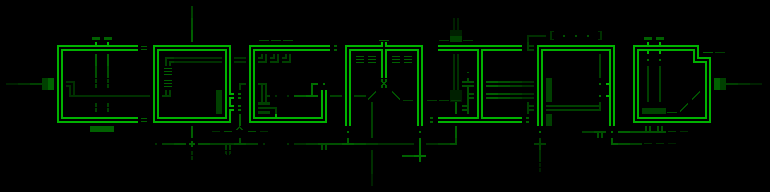
That’s it, three layers of ASCII art imported from a REXPaint .xp file. Notice one key difference between the result of the animation and the art itself: The “COGMIND” lines are brighter and have a background color to them. Turns out that when I borrowed an existing script to draw that part of the title, its design happens to leave the background color behind. I liked the fact that it stands out more and also melds the letters with the background circuitry via the few half-cell blocks scattered around the edges. So I kept it that way.

cogmind_title_final

A static shot of the final title appearance, in game.

There you have it, Cogmind’s new “title screen.” Conceptually it’s still an out-of-game element, but at least it doesn’t require interaction--the game automatically starts about two seconds after the animation is complete.

Update 4/21/2015: Surprisingly, because most everyone by this point was very familiar with the name of the game, no one mentioned that to first-time viewers the title logo looks a bit too much like “COGMINO.” It was only mentioned once, but months later as part of the trailer production the topic came up again and I thought to survey more people, finding that most were reading it that way! So, back in April 2015 shortly before launch we went back through all media and changed the logo design to the following in which the ‘C’ and ‘D’ are both curved and symmetrical:

cogmind_title_logo_updated

Updated logo to better differentiate the ‘D’ from the ‘O’.

Posted in Art | Tagged , , , , , | 6 Responses

New Cogmind Website

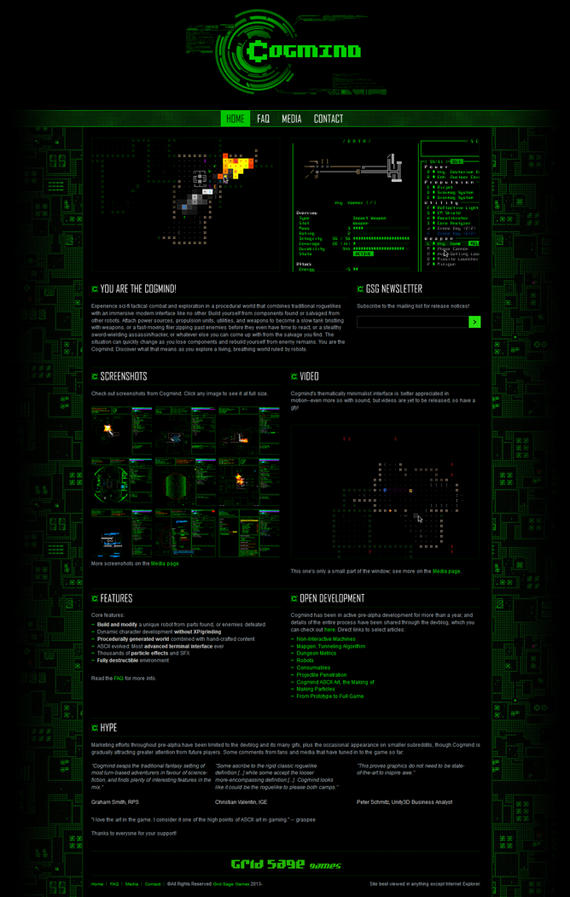
Cogmind development is finally far enough along that we have sufficient content for a proper website! If you noticed it at all, the original Cogmind “website” consisted of a bare-bones intro and FAQ. That placeholder has been replaced with a full site, so the game now has a go-to portal for information where you’ll find a better introduction and overview, including lots of screenshots and gifs.

cogmind_website

Cogmind’s new website--main page.

As part of the update I redesigned the logo:

cogmind_logo

The new Cogmind logo.

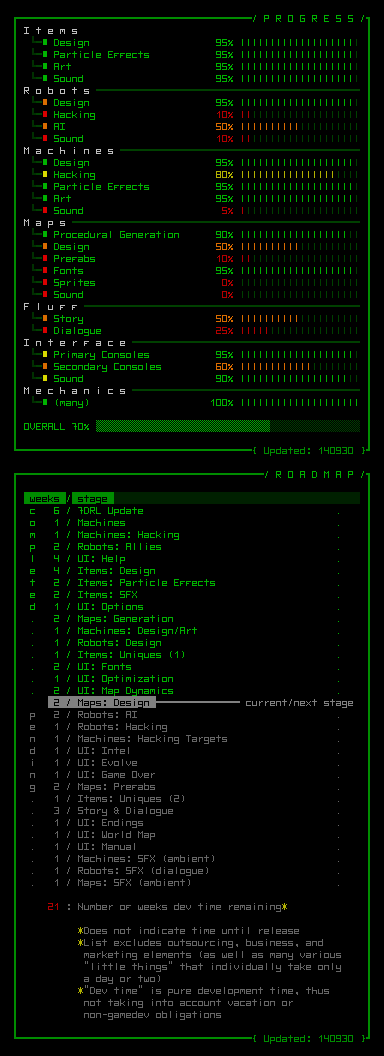
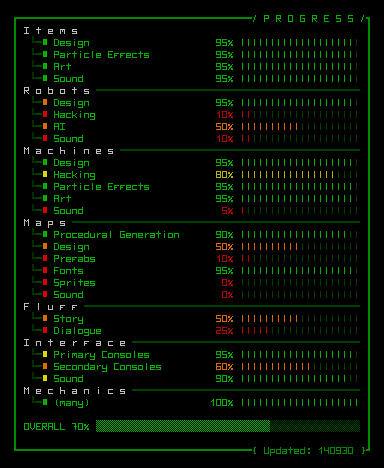
The extended FAQ also includes progress infographics, which will be updated as major features are completed.

progress_140930

Development progress update, now with roadmap.

I’ve occasionally shown the progress graph here on the blog before, but now we have a dedicated place where you can check for the latest state of the game. As you can see there’s also a new public roadmap that shows what features are still to be implemented, and approximately how long each might take.

Screenshots on the home and media pages show many of the game’s features, most of which have been previously covered on the development blog, though anyone just finding the game wouldn’t have an easy time browsing them across blog posts. Now they’re all conveniently located and captioned, including even one full-sized gif (gfycat mp4) of gameplay action.

There is a good amount of media to pore over, which while feature-wise is fairly up to date, was actually sourced from a relatively small slice of the game. World design is one of the major unfinished areas of development, so most of the images were captured from a few early game levels (albeit sometimes using out-of-depth mid-game weaponry). I guess that’s not too bad since I don’t want to spoil too much, anyway.

The site will also get a new forum shortly before the first playable version is released.

For the website location I decided to stick with a sub-directory of the Grid Sage Games site, as there isn’t any significant SEO advantage to having an additional/alternate site (and more importantly, someone already took “cogmind.com”, the domain with the highest name recognition). In any case, a Google search already lists my own site(s) as the top results for “cogmind”.

For those interested, a press kit will be added to the website later. It’s not essential just yet, and most of the same information is easily found on the new website, anyway.

Stages of Exposure

Since beginning Cogmind development in earnest last year, I’ve limited “marketing efforts” to what I consider the first stage of exposure.

Stage 1

This stage targets the core audience, in this case existing roguelike players. They’re fairly easy to find on the web since the community is small and concentrated. I haven’t made an effort to spam every potential location I know of, instead sticking to those where I already have a presence: select forums (Bay 12 Games, Rogue Temple/Rogue Basin) and subreddits (/r/roguelikes, /r/roguelikedev). A large percentage of these players are likely to appreciate, or at least understand, the game at an early stage, and may offer useful suggestions for mechanics or content. (This was especially helpful for improving the prototype/7DRL  back in 2012.)

Stage 1 also puts the game in front of other game developers (notable locations: TIGSource and /r/gamedev), who can see past the unpolished nature of an alpha game and offer feedback from a developer perspective that might aid development. (Incidentally, there’s a lot of overlap between game developers and roguelike players, certainly more so than with other genres.)

This stage offers the best chance of a stress-free opportunity to learn what players like most about the game, and what areas are best emphasized in later stages of exposure that will reach a broader audience. “Stress-free” is important, because unlike companies with their own PR staff, solo devs have to deal directly with the general public. When projects are a personal long-term investment of sweat and blood, it can be difficult to avoid taking non-constructive negative comments personally. Game development is hard enough already without anonymous trolls adding to the pressure.

Stage 2

Cogmind’s new website marks the transition from stage 1 to stage 2, in which we expand exposure beyond the core audience to indie game enthusiasts in general.

I was going to wait until releasing the first video before entering this phase, but at this point I need a little feedback from the “general non-roguelike crowd.” A Kickstarter campaign would’ve served as a good litmus test for much of what I want to know, but since that no longer seems logistically feasible I’ve decided put the game on Indie DB early instead. Although we don’t have a video yet, at least there’s a better supporting website and plenty of media showing off various features. Aside from general opinions, I’ll be looking specifically at the demand for sprites. First we need to let Cogmind attract some more attention over there, hopefully more than just the core audience.

Stage 3

The last stage is full exposure, to come once we have a trailer and the game provides a solid playable experience. (Before reaching this stage there might be a teaser trailer and pre-alpha releases, depending on the pace of development.) This is when Cogmind will find its way onto Steam Greenlight, and aim for greater reach through gaming media outlets.

Steam will pretty much be the ultimate test that makes or breaks the future of Grid Sage Games, so it must be done right, and we can only hope that there’s enough interest and support out there. (If we were a multimillion dollar corporation we could take a crappy game and generate that interest--but we’re not ;p. Plus that’s just wrong.) The fact that there at least wasn’t any significant negative reaction when one eager fan posted Cogmind to /r/gaming a while back is very promising. Of course roguelike fans are looking forward to another cool game to play, though how this game will be received outside our little community is unfortunately a lot more important, as it can only be continued as a commercial project.

Visitors

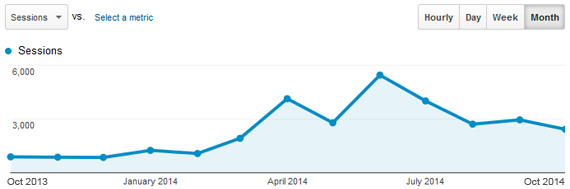
Might as well use this opportunity to take a look at our analytics history here at gridsagegames.com. The site has been active for about a year now, during which it’s received a little more than 50k total pageviews. I pay more attention to session counts rather than pageviews--the latter would technically be higher if I hid article content behind summaries, but I prefer to have the blog show many of the most recent articles at full length so there’s no need to do a lot of page clicking.

cogmind_blog_sessions_year_1_monthly

Monthly session count during first year online.

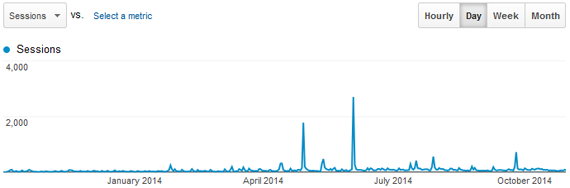
Overall the average number of sessions since the dev blog went live has more than tripled, rising from about 850/month to 2,700/month. This is all stage 1, so in that time I haven’t changed the outlets receiving updates. You’ll notice a few spikes though, where Cogmind was picked up by a major news outlet or Reddit, which definitely provided an influx of permanent followers aside from those we’re gathering from the usual outlets.

cogmind_blog_sessions_year_1_daily

Session spikes from RPS, Reddit, etc.

On the daily graph you can see how big some of those individual spikes were. The many little peaks along the way are me posting a new article.

Most of this data is the dev blog, since the rest of the site has been pretty minimal before now. Site activity should increase somewhat now that the new Cogmind site actually has some decent content that differentiates it from the blog.

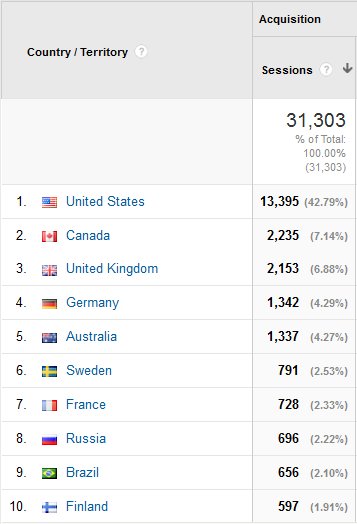
A little bonus chart, though not really a very surprising one:

cogmind_blog_visitor_countries

gridsagegames.com visitor countries.

The dev blog and Cogmind itself are in English, hence the readership country distribution.

Posted in Marketing | Tagged , , | 4 Responses

The Player is Always Right: An Existential Approach to Game AI

This post is not exactly as philosophical as the title might suggest, just a catchy way to paraphrase what I consider the best way to handle artificial intelligence in games.

In short, as long as there aren’t any glaring oddities in a mob’s behavior the player will tend to justify what’s going on by whatever logic makes sense to them. Thus we should all subscribe to the KISS principle when designing AI. Complex AI systems are not only difficult to create and maintain, they’re exponentially more likely to trip over themselves as the solution space expands outward. On the contrary, simple systems are capable of giving the illusion of intelligence, and half of that work can be done by players themselves!

An example from Cogmind:

  1. Player flees into a room with one other exit, turning to fight off pursuers before planning to escape if things get out of hand.
  2. Half-way through the battle a robot shows up at the other doorway, getting the player in a pincer.
  3. Player: “They’re moving to block my escape!?”
  4. AI: “No, my friend was blocking the other door so I found the only other entrance I could use to get to you.”

This is nothing more than everyday “go straight for the enemy” behavior at work.

Developers can rely on the fact that the player doesn’t know what’s going on behind the scenes. Implementing a realistic thought process isn’t necessary; all that matters is how the final behavior is interpreted by the player. The AI exists to challenge players, interact with them, thus for either tactical reasons or role-playing, players will attempt to rationalize any behavior that is not explicitly explained (i.e. anything a mob does without telling you why).

Of course for some types of games, notably those with many complex interactions, we’d need more capable AIs to deal with the variety of situations. At the tactical level roguelikes aren’t that complex since individual mobs only have a handful of possible actions, not to mention most roguelikes don’t even have any kind of AI for controlling the overall dungeon experience (a very unexplored design space--we’re going to change that with Cogmind). Any game that can should try to get away with the simplest AI possible and work up from there as necessary, just beyond whatever point at which the AI is apparently behaving stupidly.

Expert Systems

AI in games is often some kind of “expert system.” That is, it defines a set of specific behaviors based on the rules of the game, at the simplest level taking the form of if-then logic. At that level it’s pretty much all hard-coded and initially quick to put together, but difficult to maintain once it reaches a certain scope.

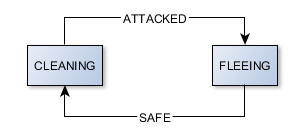
The most common type of expert system for games, albeit in an easier to maintain form, is a finite state machine (FSM). An AI essentially exists in a certain “state” and environmental factors can trigger it to switch to another state. While in a given state the AI engages in behavior associated with that state. Cogmind’s AI is sort of this, though most types of robots only have a few possible states.

For example, an unarmed worker bot is cleaning up debris (state: CLEANING) and gets attacked (trigger: ATTACKED), so it starts to run (state: FLEEING); after it hasn’t seen the attacker for a while (trigger: SAFE), it goes back to cleaning (state: CLEANING). The worker only has two states: while CLEANING it wanders around gathering any debris it finds, and while FLEEING it moves away from the attacker.

cogmind_ai_worker_fsm

Inside a worker bot’s brain. An FSM doesn’t get any simpler than this.

One of the most interesting types of game AI is goal-oriented action planning (GOAP), one form of goal-based planner that can calculate the optimal series of actions necessary to achieve a designated goal, and even change that plan on the fly as the situation changes. It’s great for games with numerous possible actions, and once the foundation is built it’s quite flexible. By chaining actions together this type of AI can do some really smart stuff, but it’s definitely overkill for most roguelikes, including Cogmind, in which each AI is only capable of a few actions anyway. I do hope to one day be able to use it in a project (maybe X@COM?).

Robot AI

For now Cogmind uses an FSM, one that was actually born several years ago before Cogmind even existed!

The year was 2011.

X@COM hadn’t been released yet but I was planning to put out a playable version for ARRP that year. The problem was before that point I had only been working on the interface and mechanics--the game still had no AI. So I spent half a day coding and integrating a simple state machine for the enemies. RUN and SHOOT. Very KISS.

In later versions I tacked on a few more states like FLEE, GUARD, and PATROL. Then 7DRL 2012 came around and it was time to write Cogmind, which reused most of the X@COM code, including the AI. The AI required just a few more states for unique robot behavior like CLEAN, RECYCLE, and BUILD, stuff other than fighting (for the non-combat robots). So yeah, the combat robots in Cogmind are still using the same AI as X-COM aliens ;)

After several years of accumulating states and triggers here and there, the Cogmind AI implementation has started to bother me. Imagine code conceived on one of those “I’ll just throw something together” days turning to spaghetti as the amount of behavior it has to account for balloons significantly, made scarier because it’s controlled purely via switch statements rather than an object-oriented solution (the latter would be more flexible). Triggers and states are threaded throughout a single method, and new states aren’t well supported without a sprinkle of special cases…

Okay, end of programming horror story in the making.

So I’m going to refactor it, yeah?

Nope. At least not now. For one, it works (though it’s only 80% complete now that there are new special robots it doesn’t have states for). Even player orders have already been integrated. It would be quite a bit of work to redesign, rewrite, and retest the whole system, so the current plan is to stick with what we have and continue tacking on missing pieces for a first release. In the future if it seems like the game would really benefit from a new AI then we’ll reconsider it.

Squads

In many roguelikes a large portion of enemies work as individuals, though you may end up fighting more than one at the same time due to their placement or poor maneuvering. In Cogmind almost all hostile robots work in groups.

As is these groups will not blow your mind with tactical genius--if they were really that intelligent they’d crush you due to their overwhelming numbers (required for gameplay balance). There’s something to be said for fighting off hordes of weaker enemies. That’s not to say they’re all weak (some you will definitely want to avoid if possible, in true roguelike fashion), nor are all groups composed of same-class robots as they were in the 7DRL. Special purpose squads might have a mixed composition of robots with abilities that complement each other. These are squads that may arrive on a map after you do, usually in response to your presence.

Yep, unlike many other roguelikes the number of enemies on the map is not static, and for that we need the Overmind.

Overmind

There’s nothing called the “Overmind” in game, it’s just a C++ class responsible for coordinating the general response to threats on maps where the primary robot faction has control. It has no direct control over individual AIs, only dispatching new squads as necessary.

This creates a more flexible enemy presence that makes different kinds of strategies equally viable yet hopefully equally challenging as well. Looking at both ends of the spectrum, as a stealthy hacker/assassin there won’t be too many threats to deal with but you’ll have to do so carefully--if you destroy more than necessary or are spotted too often you could eventually have no choice but to beef up your direct combat abilities; as a warmongering deathmobile you’ll be able to force your way through just about anywhere but attract a lot of attention (and therefore company) in the process--at some point it will no longer be worth the danger.

More on this topic in a future post.


Notice: Starting next week I’ll be out of town for a long family trip, so the next posts won’t come until the end of the month. When I get back there will be some great new content and a new website as we move towards launch! (No, it’s not quite that close, but the game is good enough to build a proper website around it. Prepare for a screenshot festival, or a gifalanche, or whatever you want to call it =p.)

Posted in Design | Tagged , | 10 Responses

From Prototype to Full Game

I often look back on the time it’s taken Cogmind to reach this stage and ask myself “why the #!@^# is it not done yet?!” (That’s actually me standing in a corridor between a Potion of Speed Coding and Trap of Feature Creep.) More recently I’ve also been wondering if the investment is worth it--think about it: I’ve already put in more than five times the amount of work that went into the 7DRL (including post-release updates) and the game still isn’t released. I’m perhaps not the best judge of my own work, but is the result really five times better? In any case, as a game the 7DRL was obviously a lot less than it could be. It lacked polish. And polish is what takes time.

While at some point the law of diminishing returns will inevitably kick in, Cogmind development still has yet to even cover all the core features, much less reach out into completely unnecessary territory. Since it’s about time for a general progress update anyway, here’s a quick look at Cogmind in the context of what it takes to turn a jam game into a polished product.

7DRL vs. Full Game

Seven-day roguelikes are great for prototyping, since the restrictive time limit ideally forces you to focus on a single core mechanic. Where commercial indie games are concerned, those most likely to be financially successful (defined as turning a profit…) will just stop there--polish a core mechanic and release.

For a (very) short time that was my intention, to simply polish up the Cogmind 7DRL and be done with it. That… would’ve been done by now ;)

But no.

Then I started thinking that a true roguelike also needs more. “This is already a fun, solid foundation to build on… what if we added X, Y, and Z?” More systems! More options! When properly combined in a procedural world these will multiply against each other to produce an exponentially deeper experience.

The thing about polish is that you obviously want the core game to have the highest quality possible, but that means every added feature or element must reach the same level of polish, otherwise a lack of consistency ruins the entire thing. Applying and maintaining consistent aesthetics and gameplay throughout a major project is a project in itself, manageable as a one-man independent operation only because roguelikes defer a good chunk of the experience to the player’s imagination (thereby reducing visual asset requirements).

Scope

So what exactly happened to explode the amount of work necessary to turn what was a pretty feature- and content-complete 7DRL into the expanded game described in the new design doc?

Let’s examine the new scope across three main areas:

World

The 7DRL was organized as a straight dungeon dive (although technically up, not down), passing through ten floors before completion. While the world retains that same central complex, there are now many alternate branching paths. You’ll still be able to go straight up to the surface, but that may not always be the best route depending on your situation.

cogmind_sample_world_map

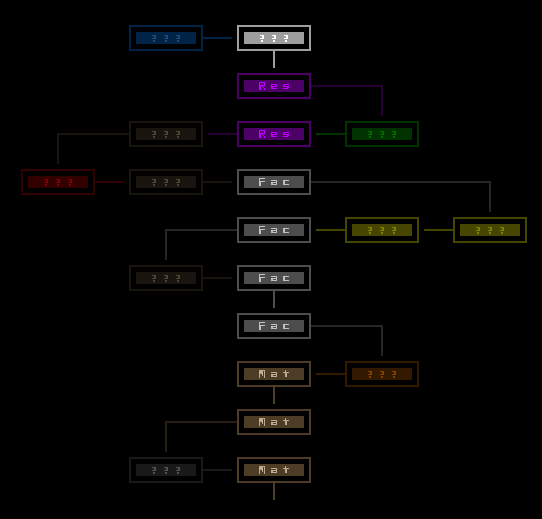
A sample path through the world of Cogmind, highlighting the central area organized similarly to the 7DRL while also showing potential outlying branches. Each rectangle represents a separate map. (There are more areas generated in a given world than shown here--this is just one possible path, since taking one path means you lose access to others.)

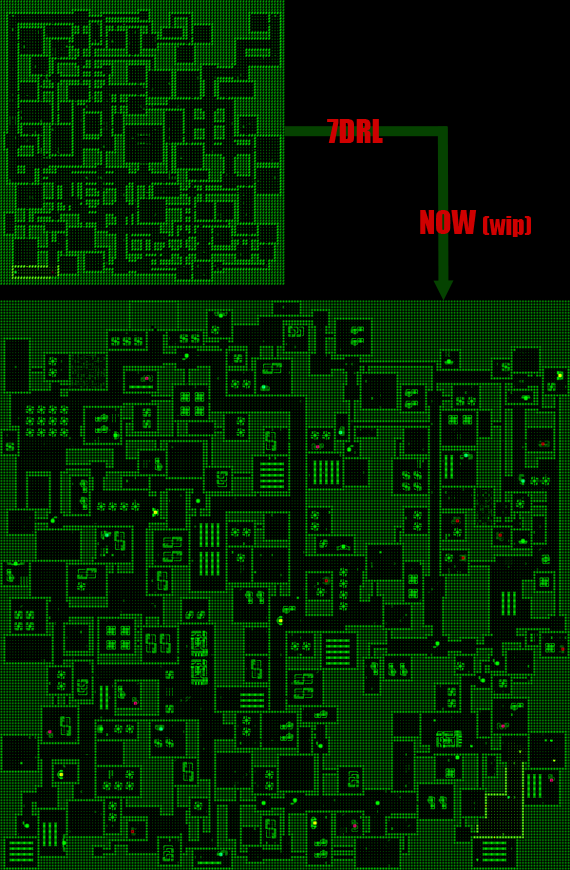
Individual map size is also increased. Those which were mostly 100×100 in the 7DRL now range from 100×100 to 200×200.

cogmind_factory_evolution

A sample mid-level factory map layout--see how the size has quadrupled since the 7DRL, naturally along with significant algorithm improvements (still more to add).

We need lots of new content to fill this extra space, so in addition to unique themes and gameplay purposes for the new maps, they’re also occupied with new robots and even factions. (Really it’s the other way around--the added space was required to fit all the planned content.)

There will be a more in-depth discussion of the world later on “when it’s ready,” in traditional roguelikedev fashion ;)

Mechanics

At the prototype level Cogmind already came with a variety of items, that being instrumental to the core mechanic of building and rebuilding yourself throughout the game. However, the 7DRL is very obviously just shoot/avoid enemies -> attach parts -> rinse and repeat. Sure there are plenty of possibilities and considerations given the large number of parts to choose from, but it all boils down to combat (or fleeing from combat).

The prototype is the core mechanic, where it would be quite easy to add just a few more systems for a result that is greater than the sum of its parts. “Easy” taken in the design sense, not implementation (which takes forever, hence this post). Hacking was a logical choice, adding a whole new dimension to the game that integrates well with all its elements from combat to intelligence gathering and story. Even a range of new combat features found their way into the game, like melee weapons. Then of course there’s the collection of parts related to these new mechanics. And on top of that each part needs its own art and sound, neither of which existed in the 7DRL. Now that took a huge chunk of time.

NPCs and allies are another big addition, fleshing out the story and gameplay though requiring support for dialogue and orders.

Interface

In terms of visuals the 7DRL may seem relatively polished, which can be attributed to importing the existing X@COM code base (which had already been in development for nine months at that point).

Now that we’ve doubled the available width of text windows we have plenty more room to work with, as well as many more windows and UI components related to the new mechanics. These in turn need their own behavior logic and animation scripts consistent with the rest of the interface.

Improving accessibility is a big part of turning a prototype into a full game, thus the entire interface had to be updated or redesigned to make every interaction possible via both mouse and keyboard, sometimes even through a variety of different methods. Heck, there’s even drag and drop. The latest enhancements in particular have focused on visual action feedback, something largely missing from the prototype. I’ll be posted about those soon. (As a side note, one major/common accessibility feature not supported is key remapping. The input system isn’t set up for it, something I hope to resolve one day.)

Progress Update

Despite the significant increase in scope beyond the prototype, this is not me succumbing to feature creep ;). The added mechanics and content are things I think the game needs to satisfy the player’s desire for variety, depth and, more importantly for a roguelike, longevity.

So where are we now?

cogmind_progress_140930

Cogmind Development Snapshot: Sep. 30, 2014

Put simply, the three main components remaining are

  • Robot AI. There is an AI, but it’s pretty simple and doesn’t know how to handle any of the new robot types requiring special behavior.
  • Hacking. Machine hacking is complete as a system but there is no content yet, and robot hacking has yet to be added at all.
  • Maps. Parameters for the core maps are more or less done, but we’re still missing basic event scripting, prefabs, and then designs for other maps.

According to the roadmap, the above list combined with various odd items here and there will require 21 weeks of dev time.

The good news is that all features have been on target in terms of planned development time. The bad news is I only have about eight weeks of pure dev time left this year. Family reasons will be keeping me away from my dev machine the rest of the time. I’m partially making up for it by heavily prioritizing anything that must be in a first release while resisting urges to do anything non-essential (these features would be candidates for post-release updates). Unfortunately no amount of shifting priorities will get the game to a state where I can run a Kickstarter campaign that can finish before the end of the year (a requirement to work with my U.S. partner). Too bad since it would definitely help raise more funds to make Cogmind a better game. Skipping that phase isn’t without its advantages, so we’ll just make the best of it!

An Empirical Look

Besides listing features, we can also measure progress in numbers. It’s been a while since we last looked at lines of code:

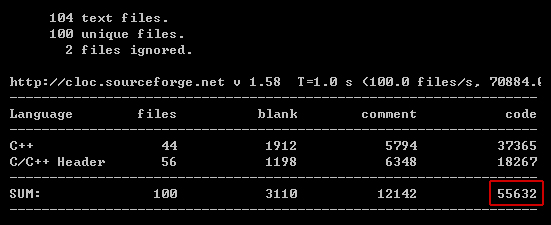
cogmind_LOC_140930

Cogmind LOC: 55,632.

As of September 30th Cogmind has 55,632 lines of code, compared to 20k in the 7DRL (remember that much of the code was reused from previous projects) and 35k in February earlier this year. In addition to this there’s about 6,000 lines of scripts that define game objects, animations and sound effect behavior.

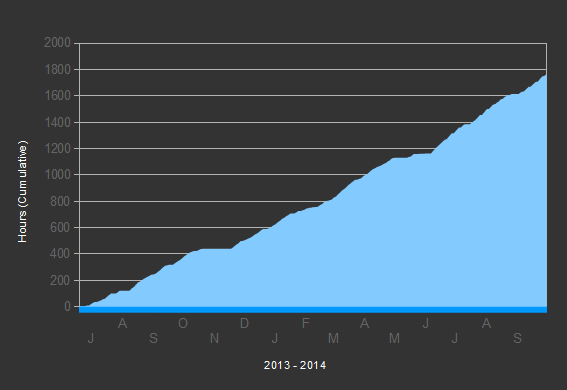
Time-wise progress has been pretty steady. Below you can see that aside from a few wider shelves where I was busy with something else, Cogmind is under regular development. In recent months you’ll see a lot of tiny ridges, created as I began concentrating development into weekdays and using weekends (the ridges) for other activities.

cogmind_cumulative_dev_hours

Cumulative development time from July 2013 to September 2014.

That’s certainly not all coding! There are many other aspects of development, all of which are included in the above graph: I divide my time records into Design, Code, Art, Audio, Content, Web, Community, and Business. We’ll wait until there’s more data to talk about that.

Instead, here’s Cogmind in numbers*:

  • 55,632 lines of code
  • 6,142 lines of script
  • 100 source files
  • 749 game files
  • 26 font bitmaps
  • 620 audio samples
  • 634 pieces of ASCII art
  • 636 items
  • 82 item special effects
  • 56 explosions
  • 116 robot definitions
  • 15 AI behavior modes
  • 10 NPCs
  • 23 map themes
  • 146 machines
  • 265 stats recorded for score/morgue file
  • 50 game options
  • 269 recognized input signatures
  • zero main menu (you’ve never seen one because Cogmind doesn’t have one)

*(set randomly chosen, numbers subject to change--the general trend being to revise them upward :D)

Posted in Gamedev | Tagged , , , | 6 Responses