Official development blog
[ Latest Cogmind Release Notes: Feb 2026, "Unchained More" ]

Cogmind the Roguelike

Probably one of the latest hot marketing terms to see rampant use in the indie scene is “roguelike,” regardless of whether it really suits the game in question.

No, I don’t plan to tackle that can of worms (the topic gets more than enough attention over on /r/roguelikes), but I would like to begin a series of posts aimed at clarifying “what makes Cogmind a roguelike,” and, more importantly, what perhaps unexpected features it adds to the mix.

We’ll start with the basics, those features which most players familiar with the genre have come to expect.

Procedural Generation

This is the element that has apparently become synonymous with “roguelike,” which is completely wrong--granted it’s an absolutely required core feature of roguelikes, but the genre is defined by so much more than PCG (procedural content generation).

For each new game Cogmind generates the world layout, individual maps, and procedurally* distributes what content you might encounter. *Note that “procedural” is not “random”--the process is driven by data and algorithms with a purpose.

However, overuse or misuse of PCG risks leading to a bland experience, thus most roguelikes don’t go so far as full procedural generation of enemies, items, etc. Neither does Cogmind. Players and the world itself can both benefit from a certain amount of static content to latch onto. In Cogmind we could easily generate robots from an assortment of parts (considering we have so many), but there’s a lot of value in keeping robots (and parts) hand-crafted as they are. Static content has two advantages, enabling 1) us to build the game’s lore around specific dependable content and 2) players to form a strategy around known factors in an otherwise ever-changing world.

In this area Cogmind is therefore pretty much what you expect from a roguelike: maps are generated, most everything else is defined beforehand and referenced by the generator when putting those maps together. The approach is sufficient to provide infinite replayability without putting too great a burden on the player to relearn everything with each new play.
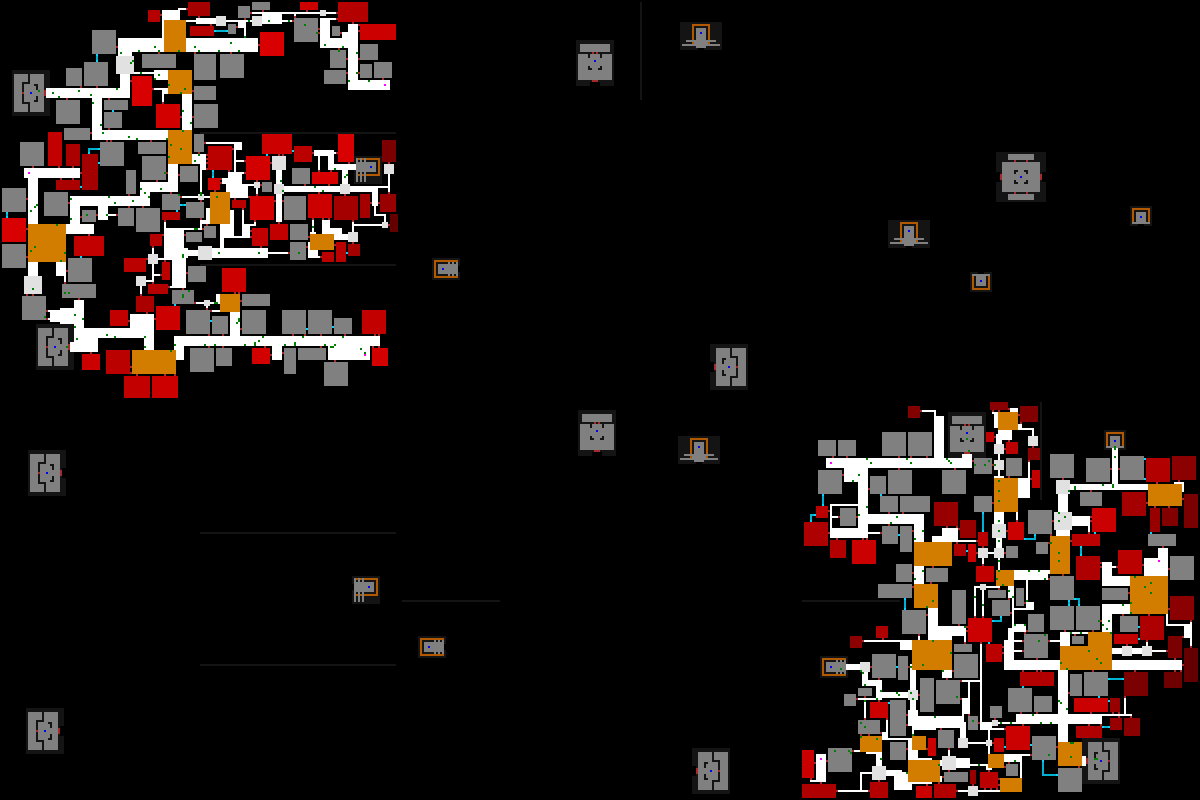
cogmind_mapgen_factory

Cogmind’s map generator building factory map layouts for a 200×200 space from a combination of algorithms and a few hand-made prefab pieces.

Permadeath

Another roguelike staple, permadeath goes hand-in-hand with procedural generation. In case you didn’t know, permadeath means no loading saved games aside from continuing your most recent game, and loss is permanent (unless you’re cheating!=p). It would be quite boring if a game forced you to restart from the beginning on failure without offering a new experience each time, hence the advantage of procedural maps here.
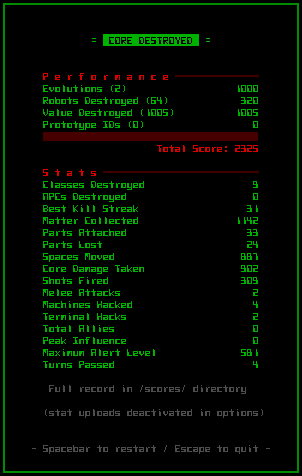
cogmind_GUI_score

You’ll be seeing a lot of this until you get the hang of it. (One of the performance indicators is obscured as it’s a minor spoiler. Also, the factors that contribute to your final score will likely be changing.)

Cogmind is actually more forgiving than many traditional roguelikes. In most roguelikes if you stand motionless and unresponsive next to an enemy, you’ll probably be dead in mere turns.

Not so with Cogmind. While I wouldn’t recommend letting enemies wail on you, the mechanics are such that sudden death is impossible. Even quick death is unlikely unless you’re intentionally avoiding the most basic defensive measures (or you’re exploring optional dangerous areas in the late-game).

You are pretty resilient and most likely to die from poor planning/decision-making, or attrition (this works because there is no normal way to heal/repair damage beyond reaching new areas!). The pre-alpha is currently not balanced enough to promise you won’t run into some very deadly situations, but the final goal is a fair game in which you can win a majority of runs once you’ve accumulated enough meta experience.

Despite the long-term attrition approach to success or failure, rarely are you forced into a “walking dead” scenario wherein you’re pretty much guaranteed to lose the game but just haven’t died yet.

For the experienced player, comebacks are commonplace. You can be reduced to a barely functioning mobile pile of scrap, only to several hundred turns later once again be an armored four-legged menace bristling with cannons (or maybe you decided to keep a low profile and stole some flight units and sensor gear instead).

And even for the new player, there’s always the opportunity to simply absorb the damage from attacks while fleeing (or even outrun pursuers) until you happen across an exit, which might be just around the next corner.

In short, there is always hope! On reaching a new area you’ll (usually) be safe from attack for a bit, giving you a chance to build up if necessary.

Turn-Based

This is a somewhat controversial factor of roguelikeness, more so in modern times where there’s a high degree of genre mixing going on in the indie segment. Roguelike gameplay traditionally takes place in both discrete time and space (the two are fairly complementary). Certainly all the classic roguelikes fall under this category.

Roguelikes are a test of problem solving skills rather than reflexes, thus we should have as much time as necessary to consider options and make decide on a course of action. Sure we’re all guilty of the “pressed the key too many times and died” experience, but we did have the opportunity to stop and think if we hadn’t gotten so complacent at the wrong time!

This puts pausable real-time games like FTL into a gray area I won’t address here, but I do think non-pausable real-time games, while they can certainly embrace the roguelike spirit, really belong to a different category (“roguelites”) because they test decision-making from a different angle by putting an emphasis on physical coordination.

Anyway, Cogmind is turn-based and grid-based, the latter part so ingrained in the UI that even the map tileset doesn’t use connected wall segments.

Regarding the turn-based mechanics, for those who haven’t played the prototype I should briefly introduce how it works. Cogmind uses a “time-energy” system as seen in a number of other roguelikes: Each game turn gives every actor (robot) 100 units of time, and performing an action reduces the available time by the cost (duration) of that action. Whichever robot has the greatest available “time” is the next to act. So performing actions with a greater time requirement will allow other robots to perform more actions before you can act again (unless they, too, perform time-consuming actions).

All of this happens under the hood, though you’ll get a feel for it as you play, plus some of the numbers are shown to you where important to help make comparisons and weigh decisions.

Most actions take about 100 time units, i.e. can be carried out once per turn. There are primarily two other actions that can vary greatly in how much time they require: movement and shooting.
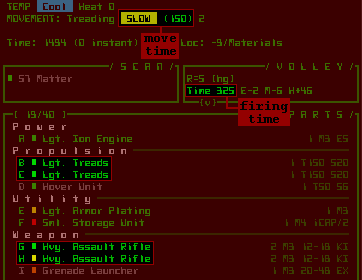
cogmind_HUD_time_values

Current speed in “time to move one space” as shown in the HUD. Also the amount of time required to fire the currently active volley of weapons.

One significant difference between Cogmind’s design and the average “time-energy” system (or other similar system) is that in other games the time differences between actions are intentionally fairly subtle, or at least don’t exceed a certain reasonable threshold. By comparison it’s possible in Cogmind to have extremely exaggerated time costs, so be careful of that! This would be a result of your own design, something you have to aim to balance while maintaining peak efficiency for the functionality you want.

In a worst case scenario assuming you’re a massive hulk of parts hopping along on one leg, you could move a single space and suddenly everyone within sight gets 2-3 shots at you, and again for every further step you take (in this case, if your goal is to escape, you may be forced to drop your stuff and run; or pull out that grenade launcher you’ve been hoarding and make a stand!).

The opposite is also true: you could fly so fast that enemies don’t even see you as you zip down the corridor and off into another room.

As you can see your speed value is incredibly important to how things play out.

Firing weapons can have a similarly exaggerated effect on relative time since you’re allowed to fire as many weapons as you want, but the total firing time could span multiple turns during which other robots can continue to act.

This makes large attacks front-loaded (since you are in effect spending a block of future time that you don’t have--time energy can be negative), but dangerous if used improperly. The benefit to larger volleys is that each additional weapon requires less additional time to fire, until it’s almost insignificant (because the more firing, the more that are able to do so simultaneously).

There is a lot of tactical decision-making involved in how many of what type of weapon to fire at what kind of target, but that will be for you to explore.

Combat

Ah, bumping into something until you kill it, the time-honored simplest method of conflict resolution in roguelikes.

It’s true that roguelikes don’t have to be combat-oriented, but aside from fun 7DRL experiments we see that the most popular roguelikes are all about causing death and destruction.

For all its guns, cannons, and missile launchers, Cogmind is actually kind of an anti-combat game. Unlike in other roguelikes, combat is not a way to improve yourself. Sure you can “re-appropriate” parts scrapped from a robot, but there are also plenty found elsewhere for the taking (and what you find elsewhere is better, no less).

This has the advantage of making the stealth approach a much more meaningful strategy, which the game has plenty of mechanics to support. You aren’t required to fight anything at all. That said, it’s likely that even the stealthiest Cogmind, and most players aiming to win (as opposed to just causing mayhem, which is lots of fun, too), will end up fighting the occasional battle in the interest of avoiding greater confrontations that are even more difficult to evade or control. (For example, if you encounter a lone patrol squad that might spot you and warn others, you have the choice to lure them to a suitable battleground and take them out, or take a detour and risk it.)

Most roguelikes are heavy on combat, and while the genre is now trending towards more interesting forms of interaction than bump-them-til-they-die, melee attacks remain a staple action. They take a back seat in Cogmind.

In fact, Cogmind’s original prototype had no melee weapons at all--they have since been added as a new option you probably won’t solely rely on, but that do come in handy in certain situations.
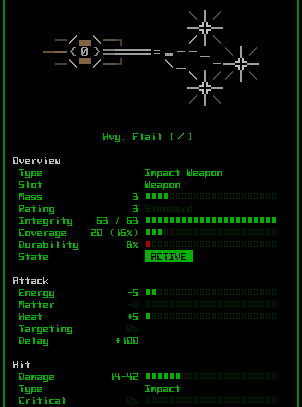
cogmind_info_heavy_flail

Handy indeed…

The vast majority of combat in Cogmind takes place at range, which changes the experience significantly. This is not you one-sidedly mowing down waves of short-range attackers approaching from a distance; encounters are all-out firefights in which almost every enemy you meet can pound you from range.

Not only that, but you can fire as many weapons as you can attach and power at once, none of those left hand, right hand limits :)
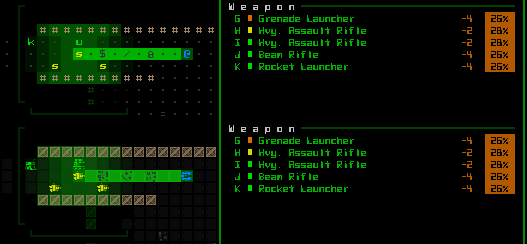
cogmind_HUD_multiweapon_volley

About to let loose (poor strategy--one grenade or rocket at a time would be enough for these guys). I made this into a gif so you could see the scene in both ASCII and tiles.

Inventory Management

Interaction is a key gameplay element in roguelikes. While items (and usually by extension an inventory) are by no means required for a roguelike, they do offer a useful medium for expanding the number of possible interactions.

I’ve already covered Cogmind’s unique inventory system and its impact on gameplay in great detail in a separate post.

ASCII & Tiles

While I don’t believe ASCII is an essential feature of roguelikes, it does embody the ideal roguelike interface: a simple easily readable representation designed to facilitate decision-making. For my take on the inherent benefits of ASCII as opposed to tiles, see this earlier post. No sense in rehashing that discussion here.

Most popular roguelikes these days offer both modes, and so does Cogmind. The use of ASCII is pretty well represented and documented throughout the blog and game website; the tileset and an analysis of its composition can be seen/read here.

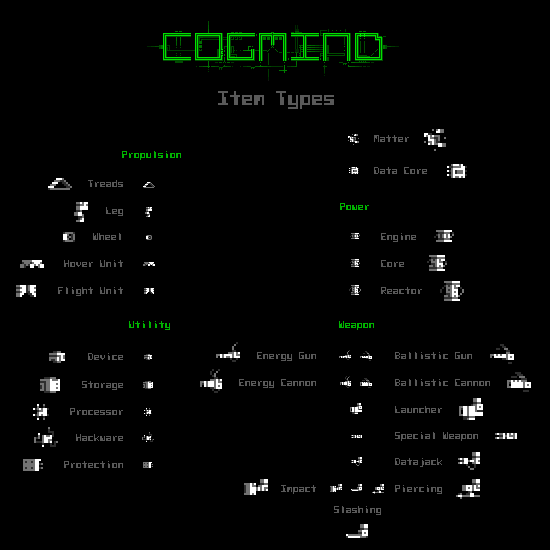
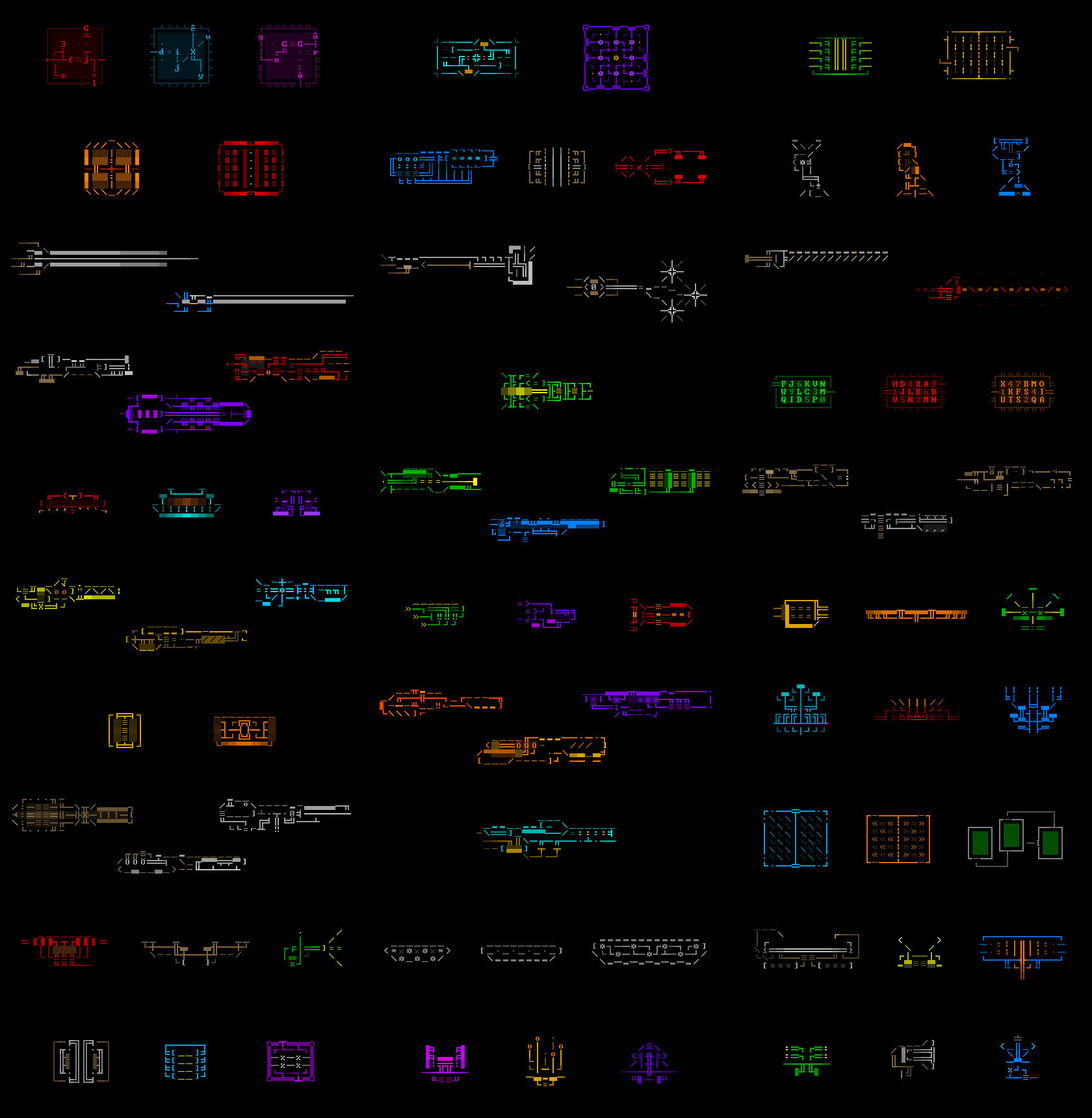
What most roguelikes don’t have is ASCII art. Drawing it all was a huge amount of work (one reason most RLs avoid it…), but in Cogmind every item has associated art that adds a lot of character (or “characters” depending on how you look at it =p).
cogmind_ascii_art_compilation

Compilation of ASCII art samples (click for full size, or check out the introduction to all these item categories in the Cogmind ASCII Art Gallery).

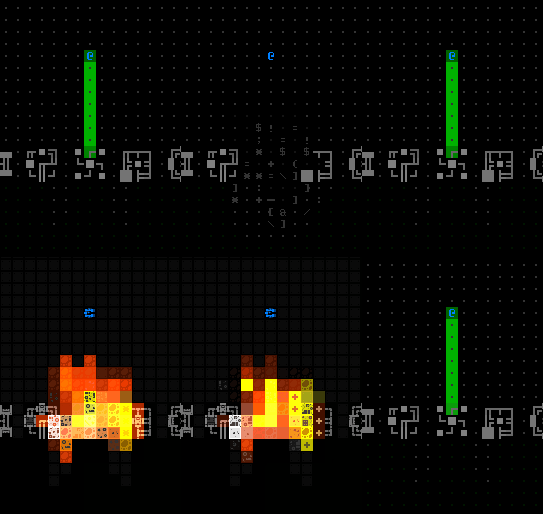
Cogmind’s ASCII particle effects are also a big draw seen elsewhere only in moderation, not least of all because they can cause a bit of a pacing issue with what are normally quick to play games. The negatives are mitigated by tying animation speed to the importance of the attack--weak weapons animate extremely quickly while big powerful weapons and explosions can afford a little extra time for their animation (like maybe 300-1500 milliseconds compared to 100-200ms).
cogmind_plasma_injector_explosion_composite

If I’m going to put the effort into making something blow up, may as well as give it some juicy particle goodness. (Composite image showing explosion reversal and switch to tiles mode for fun.)

Accessibility

Roguelikes are traditionally not very accessible. [/understatement]

However, modern roguelikes are trending towards broader accessibility, what with standard 2D visuals (no ASCII, even?!), proper mouse support, and other features mainstream audiences expect from a modern game. This is great for attracting new players to the genre, something we need in order to create bigger better roguelikes, while also aiding discoverability of those that already exist.

What I’ve done with Cogmind is apply most of these same modern UX design principles to a traditional ASCII interface, which surprisingly very few developers bother to do. And why not? We get to keep our minimalist ASCII and at the same time make the game accessible to players who won’t, for example, memorize 100 keyboard commands.

Simply put, Cogmind’s design adheres to a handful of guidelines that go a long way towards accommodating different types of players.

First and foremost, every action and command must be accessible via both mouse and keyboard. Sometimes there are even multiple keyboard commands for the same action (four different sets of movement commands are supported).

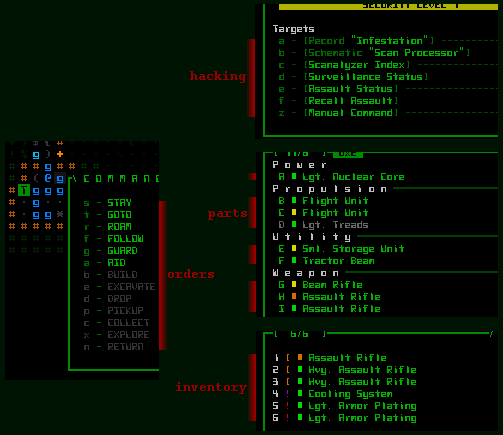
Furthermore, alphanumeric keyboard commands are embedded directly into the UI wherever they make sense and can look good, facilitating learning of hotkeys.
cogmind_gui_reference_alphanumerics

Embedded keyboard commands appear all over the place, and fit nicely with the style of the interface.

Here I must regretfully announce one of Cogmind’s only major failings in this area: there are no keyboard rebinds! It’s theoretically possible, but given the state of the program architecture would be a rather large project in itself. Everything is arranged on the keyboard as logically as possible, though this doesn’t help players with non-US keyboards. We’ll see what kind of issues we encounter once the game is released, but there’s always mouse input, or a mouse-keyboard hybrid, as alternatives. Update: Manual keybind support has been added since this post, albeit not directly within the game itself--using an external config file is required.

And we’ll see if we can get any of the really fringe players on board with drag-and-drop inventory manipulation! :)

Cogmind doesn’t yet have any explicit support for color blind players, though some solutions could be implemented based on needs as described in an earlier post. Update: Cogmind has since added a colorblind mode accessible directly from the Options menu!

One design feature that will hopefully mitigate the need for alternative color blind solutions, while at the same time improving the general player experience, is multi-channel feedback.

Wherever possible, Cogmind presents the same information through multiple means, usually a combination of colored words, symbols, sound effects, and animation.

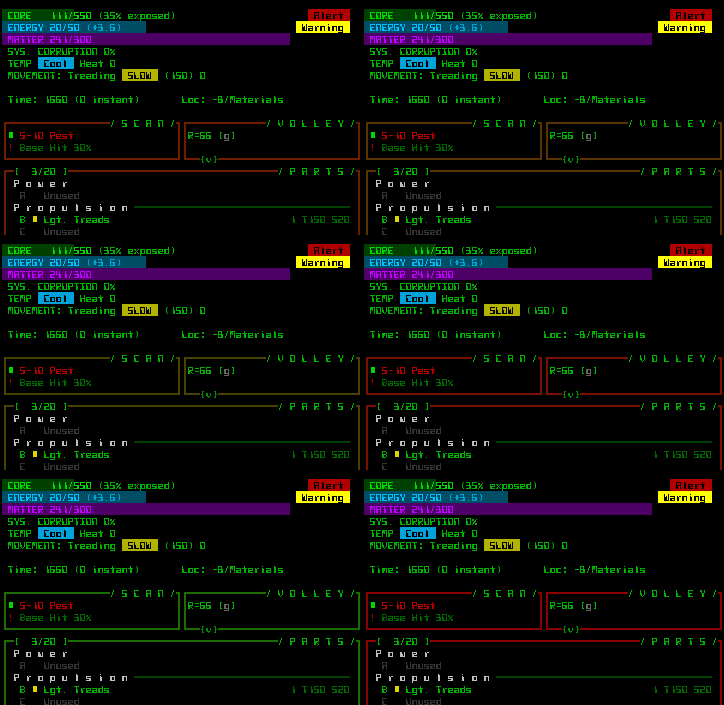
For example, when you are low on core integrity (health) a warning sound plays, a red “ALERT” text box appears next to integrity on the HUD, and all the interface window frames oscillate between their normal green color and red. It’s unlikely you’ll miss the news.
cogmind_HUD_low_integrity_indicators

Plenty of indicators and alarms warn you when things aren’t going so well.

An example of multiple ways to obtain the same information: The name of an enemy robot is automatically shown when you first see it, and can also be found by hovering the cursor over it (to show its name, whether it’s spotted you and other info in the HUD scan info area), pressing ‘1’ to label all robots, holding ctrl-shift and hovering the cursor to label that one robot, right-clicking on the robot to open its full data page, or pressing ‘x’ (look mode) then ‘tab’ to automatically shift the cursor to the enemy and label it (from where you can press ‘d’ for data to open its info if you want to know more than the scan window shows).

cogmind_GUI_robot_name_scan

Calling up a label for a nearby robot, basic data for which is also shown in the HUD scan window: red name for hostile, green rectangle for its current core integrity, red exclamation mark meaning it’s spotted you, and the base chance to hit it. (Same scene shown in both ASCII and tiles.)

Text-heavy games like roguelikes place a lot of importance on fonts, and with good reason because there’s a lot of reading to do. I’ve mentioned before that Cogmind’s design attempts to shift as much information as possible from the message log to the map itself, but you’ll still be reading plenty of words, phrases, and short sentences.

The earliest roguelikes, true terminal RLs, had no choice but to stick to a single font, but with more and more of today’s roguelikes making use of emulated terminals, we have more options and should use them to lighten the burden on the player. (For an in-depth discussion and lots of images from other roguelikes, see this post.) Wide/square fonts are difficult for reading text, while narrow/rectangular fonts create distorted maps. So why not use a mix of both? Naturally plenty of modern roguelikes that have moved away from the traditional grid-based environment already do this, but we can technically apply it to the grid as well.
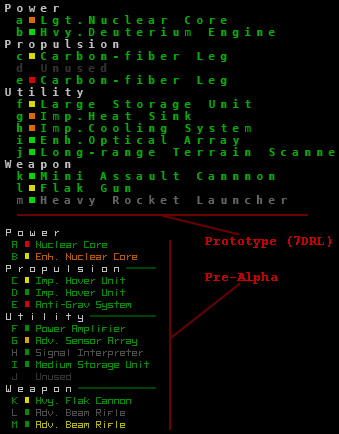
cogmind_text_width_comparison

For the 7DRL/prototype Cogmind chose to emphasize a square cell size for maps, which unfortunately meant that text like the list of parts was not very pleasant to read--this has been vastly improved by enabling mixed font dimensions in the current version.

Improved readability of the respective interface areas is Cogmind’s biggest single visual change from the 7DRL prototype, and something that sets it apart from almost every other ASCII roguelike. With multiple fonts we can get the best of both worlds. (More about Cogmind’s font design here, and many more fonts have been added over the years since this post.)

Audio feedback is an element of accessibility, but also contributes to the game’s environment, so it gets its own section:

Audio

One could say this feature is somewhat controversial with regard to roguelikes, because it is known that many traditional roguelike players will play a game silently or to alternative music/audio, even when the game provides its own. Certainly players we may be able to attract from adjacent genres are used to and interested in relying on a game’s own audio, and I think there is much room in traditional roguelikes for the suitable application of sound effects.

Audio feedback is to me one of Cogmind’s biggest leaps forward as far as roguelike evolution is concerned. Not many traditional roguelikes take advantage of the potential benefits of a robust sound system, and none do it to the same extent Cogmind does. I’ve already written an entire series of posts on the usage and development of sound effects in roguelikes and Cogmind.

While I wouldn’t say audio is absolutely necessary to play, it is without a doubt a huge part of both the experience and the accessibility of the interface. The interface is relatively dense and there can be a lot going on, making it sometimes difficult to notice everything of importance. Thus for every visual effect there is an accompanying sound (yes, that’s quite a lot of sounds), making it more likely you’ll be aware of important events and changes.

In its final state Cogmind will include even ambient sound effects to further develop the atmosphere, as described before (update: and since added!). The goal there, as with map-wide ambient music/sound, will be to implement them in a manner that doesn’t interfere with the existing sound system’s accessibility-enabling qualities.

More than a Dungeon

The average roguelike dungeon-diving experience can be described as a single player exploring corridors and rooms in which lurk individual or groups of unrelated monsters or humanoids. You aren’t expected to question why that dragon didn’t eat those orcs last time it got hungry.

Roguelikes with themed dungeon areas get around this oddity by at least limiting the local population to a variety of similar or related creatures, though rarely do we see any kind of larger ecosystem (the recently revived Incursion is a notable exception). This form does have its merits, successfully condensing as much interesting and unique material into as small a space as possible and thereby increasing the number of unexpected emergent situations to focus on the tactical decision-making aspect so central to roguelikes.

In this area Cogmind makes a rather large departure from most roguelikes with one of its more exciting aspects that I’ve been holding off discussing in any detail: A dynamic world with an overarching AI.

One reason for delaying its introduction was that it’s a final stage of pre-alpha development that has only taken shape in recent months, and of course even in introducing this feature I can only say so much without spoiling the game by revealing how it works.

In short, all robots have some purpose other than just attack the player (and many robots don’t/can’t attack at all), while many areas of the game are overseen by a larger AI that controls the population, a population which is at the same time capable of communicating within its own ranks.

This is actually a huge topic to be discussed in two separate upcoming posts, one about the world layout and traversing it, and another about the inhabitants of that world. Stay tuned for those. Linked.

Conclusion

The “list of features” approach is not always a valid way to identify “roguelikes,” a label that some players afford to games simply based on the gestalt experience offered by the totality of their moving parts. It is nonetheless a useful way to discuss this timeless argument. I mean topic.

Few will claim that Cogmind is not a roguelike, but at the same time there are many elements that set it apart from traditional roguelikes in both form and substance. I hope that it will appeal to both long-time players and those new to the genre. A truly modern roguelike. Rock, Paper, Shotgun really picked up on that when they named Cogmind one of the best upcoming PC games of 2015, writing “Cogmind is an impressive merging of old and new school game design.” :D
Posted in Design, Game Overview | Tagged , | 20 Responses

Alpha Release State

Cogmind’s first public alpha release, scheduled for May as announced earlier, will be both playable and fun, but by no means done. This post explains what will and will not be included in the first release, and where development will go from there.

What is ready?

First and most importantly, what exactly can you already do in the game?

Simply put, Cogmind is functionally complete. I wouldn’t want to launch anything that doesn’t already offer an enjoyable experience. Thus we have the entire core game and its wide array of mechanics:

Even once you know the mechanics inside and out, procedural maps combined with plenty of unique content mean the game already contains a huge amount of replayability. Content-wise there is currently plenty to discover and experience:

  • Many completely unique robot classes to interact with, or even control (though allies will not be as plentiful or easy to come by in the initial release as they will be in subsequent versions).
  • Many hundreds of unique items, each with their own ASCII art.
  • Explore 10 depths to the end game (the largest maps cover 20,000~30,000 spaces).
  • Start learning about the world’s story and lore via hacking.
  • A zillion sound effects (or somewhere around that number) for weapons, destruction, and more.
  • An equally zillion ASCII particle effects with the potential to blow minds (effect tripled when combined with sound effects).
  • The most powerful ASCII UI in history (simply too much to link here--so many more features…).
  • Both fully operational ASCII and tiles modes.

If you’ve played the prototype from 2012, and many of you did and had great things to say, it’s like that only x100.

And by the time we’re done it’s going to be x200, or so :)

What are we missing?

While it’s likely we’ll be adding a few new mechanics later on, that part of the game already offers a complete experience. What we’re missing from the must-have category of features is a rather large chunk of the world and related content that guides the overall experience.

Essentially we have a lot of core content as described above, but need to add much of the complementary content that makes up the world, as well as a few features that glue it all together. That’s an abstract way of explaining that we’re missing:

  • Different Maps: While you can currently traverse the main complex straight to the end of the game, the intention is that you’ll sometimes want to take a few detours into other areas for various purposes. As is, beginning in the mid/late-game areas you’ll find a fair number of blocked exits because many of these branches are incomplete and therefore closed off. There are about 7 map styles out of a planned 25-30. For the final stretch of pre-alpha development, just completed, we did add initial versions of the two primary early-game branches.
  • Map Content: Aside from their robot inhabitants, and machines, maps lack additional unique character that will later be provided by encounters and more hand-made content. There is still plenty to enjoy, however. It’s not that you’ll be bored, but more that the game is missing a fair bit of “extra stuff.”
  • Story: The interactive parts of the story have not been added, as almost all of it takes place outside the main complex in branches that aren’t prepared. For now you’ll be able to read background information scattered throughout the complex, and thereby learn about the story indirectly.
  • NPCs: The only unique NPC you’ll see is Revision 17, who briefly greets you as part of the introduction. Other NPCs will be gradually added as their respective maps become accessible. Some of the new branches already contain non-unique NPC encounters, mostly as a demonstration of things to come.
  • Ambient sound, both emitted from machines and the environment in general. I’ll include a placeholder door sound effect because hearing those is rather important, as well as a couple machine sounds just to demonstrate how they work.

As you can see, most everything “missing” can be considered fluff as far as traditional roguelikes are concerned. There is already a fun and mechanically deep game to play, but it will grow to be an increasingly compelling experience as development continues towards 1.0.

Another point worth making is that balance will be rough at first. This is intentional, because planned content will be used to counterbalance some of what is already there. Currently, unless you really know what you’re doing, you stand a good chance of getting roflstomped around the half-way mark (I still want to do a bit more balancing before release, so it’s possible it’ll get a little easier, but my goal here is not to make an easy roguelike--if there even is such a thing).

Alpha and Beyond

The purpose of releasing the alpha version in its current state, shortly after the conclusion of what I consider pre-alpha development, is to demonstrate the game’s solid foundation and make any necessary adjustments before building an entire world on top of it.

That latter stage will be relatively quick since all the building blocks are in place, but we may want to tweak some of those building blocks beforehand, and large scale feedback has the greatest chance of suggesting meaningful changes. And not just subjective player opinions, either--a wide array of optional metrics will let me know how players are interacting with the game and help guide development in the intended direction. This is something I can’t do myself or with just a handful of playtesters.

The remaining path towards 1.0 is 90% decided by the design doc, but the other 10% is fairly flexible, with additional features beyond the full release also possible.

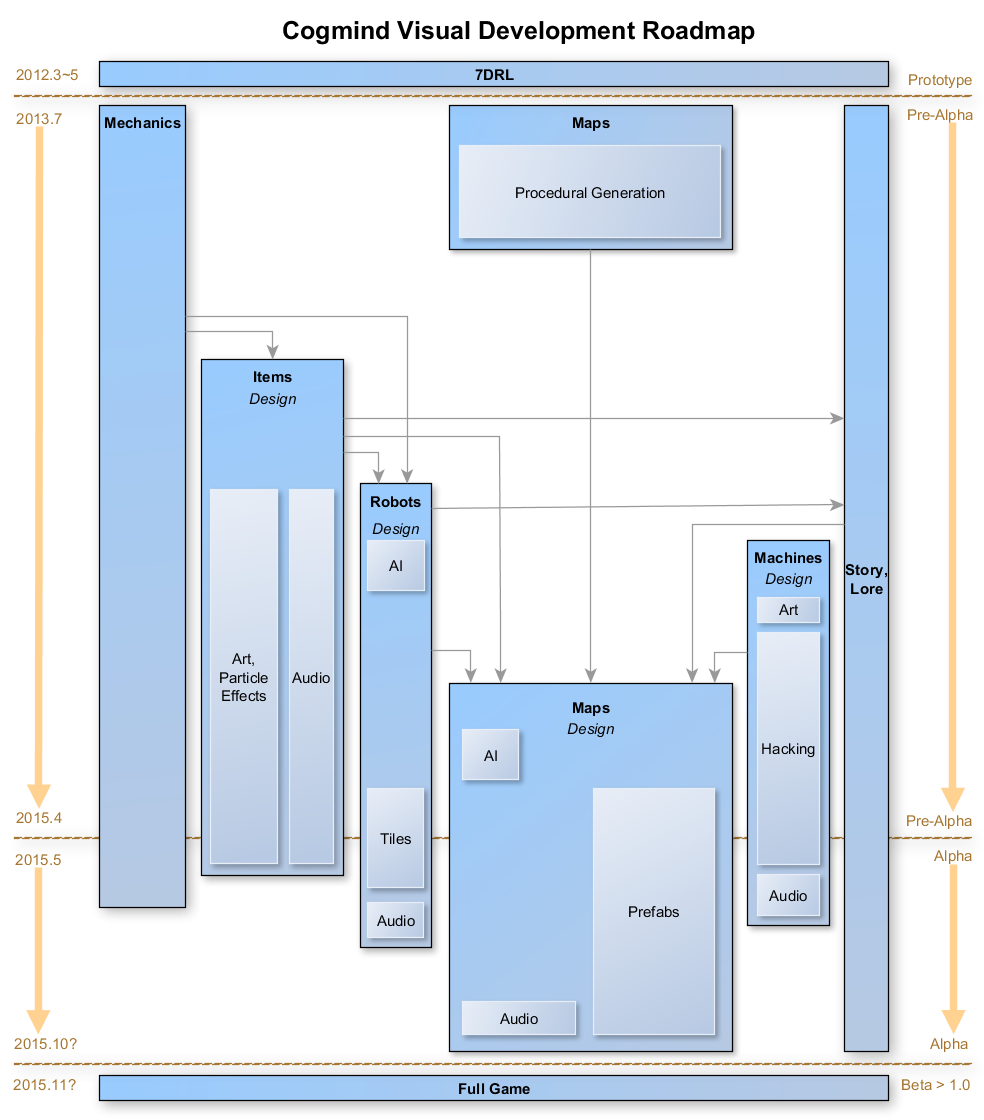
See the diagram below for a visualization of the game’s current state and future direction:

cogmind_visual_development_roadmap

Cogmind Visual Development Roadmap (click for full size). Update 150615: Due to Cogmind’s unexpectedly strong alpha launch in May, an expanded budget and feature set mean that the full game is more likely to be completed by mid-2016 rather than the end of 2015.

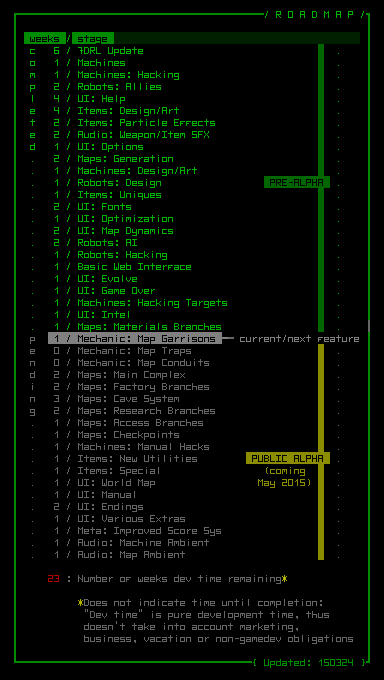
As you can see, the vast majority of work to do is world building, which aside from a few little things here and there is mostly about adding maps and whatever other unfinished content they might need. For a more specific breakdown of features to come, see the new roadmap maintained on the website FAQ:

cogmind_roadmap_150324

Cogmind Development Roadmap (March 24, 2015).

It’s difficult to predict the long-term time frame with any certainty, because much will depend on how the game is received. There is a minimal “I must do all these things for Cogmind to be what it should” list, and a separate “if Cogmind is popular enough I’ll be happy to run with it and add more” list. The final game probably lies somewhere in the middle, but I can’t be sure which of those features will be added and when, so the indicated times are only rough estimates.

One thing is certain: During the alpha-beta period updates will come frequently. With all the game’s internal moving parts in place, creating the rest of the experience will be a smooth process.

Posted in Release | Tagged , , | 6 Responses

Cogmind Release Schedule

When Cogmind was rebooted in mid-2013, the intent was that it would be a relatively quick production that would take “about a year” to finish. As we approach the two-year mark, it’s looking like an accurate forecast would have been more than twice that.

Of course, the original plan was to simply make “a polished version of the 7DRL, with some new mechanics.” And that would’ve taken about a year. But it turns out the project had so much potential that it seemed like a wasted opportunity to not expand it further. Thus we end up with a huge number of assets, significantly expanded mechanics, and a bigger world and story to go with it.

Not to offer these up as excuses--I wouldn’t have it any other way! As one follower mentioned earlier this year: “I’m away from Twitter for half a year and you turn Cogmind from something amazing into something I can’t describe!” Drawbacks of having an indescribable game aside, that’s a good summary of exactly why it’s been worth the additional investment =p.

Alpha Access

Development could go on for much longer, but the desire to steer clear of feature creep gets stronger with every passing month. So it’s about time to release this thing into the wild.

Cogmind Alpha Access is essentially a paid early access program scheduled to launch in May.

Setting that deadline has also had the positive side-effect of accelerating development beyond full time (we’re deep in overtime territory now). At the beginning of January I drafted a three-month development plan leading up to the alpha launch, and that plan remained right on schedule except when we ventured outside my familiar territory and into tileset land, mostly due to handling the strong response from pixel artists looking to join the project.

For three months I’ve worked day and night to make the intended April launch despite all the additional tileset-related work, and while we could theoretically still be ready to release by late April, I should probably stop developing at breakneck speed to avoid a complete burnout.

The release is still too far away to set a specific date, which probably won’t be announced until shortly before launch. Regardless, now that there’s a feature freeze in place it’s only a matter of (finite) time before we launch. Much of what’s left to do is peripheral business and marketing nonsense rather than actual game development.

Release State

Just because there’s a feature freeze doesn’t mean the game is complete--the freeze is temporary so we can get this thing out the door in a tested, playable state.

As an alpha launch the game is naturally still a ways from its intended final state. That said, the core experience is there and it’s plenty fun, so you’ll without a doubt be getting something you can enjoy immediately.

All the core mechanics are complete, and you can salvage parts, engage in combat (or avoid it) with help from hundreds of unique components, hack multiple types of machines, and interact with dozens of robots while exploring the “main areas” of the world and a couple of the early branches.

Still to add are environmental sound/music, many more “branch” maps, bosses, more story elements, fluff, and NPCs, plus a few other features that aren’t required but will improve balance and/or the overall experience.

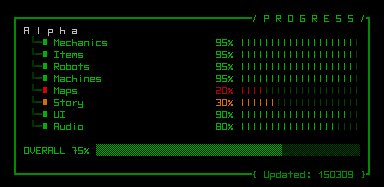
Progress has been reported intermittently throughout the development process, on the website FAQ. The pre-alpha progress chart and roadmap have been replaced by new ones which will continue to receive updates as development continues, as before.

cogmind_progress_150309

Cogmind’s state for alpha release.

A follow-up post after this one will go into even more detail regarding the state of the game and how it will evolve in future months. (Edit: Post is now up.)

Supporter Benefits

Back to Alpha Access: The obvious primary benefit is access to all alpha release builds of the game, including everything up to 1.0 and beyond, forever. While enjoying the game you can also join us in the forums (not open yet) to help improve and shape its future.

Assuming Cogmind eventually finds its way on to Steam, as currently planned, you’ll also be the first to have access to the game on that platform (via private beta testing before it goes public). In that case, everyone in Alpha Access will receive a Steam key.

Your name (or a name of your choosing) will also appear in the game, but not just anywhere…

Item/Art Collecting

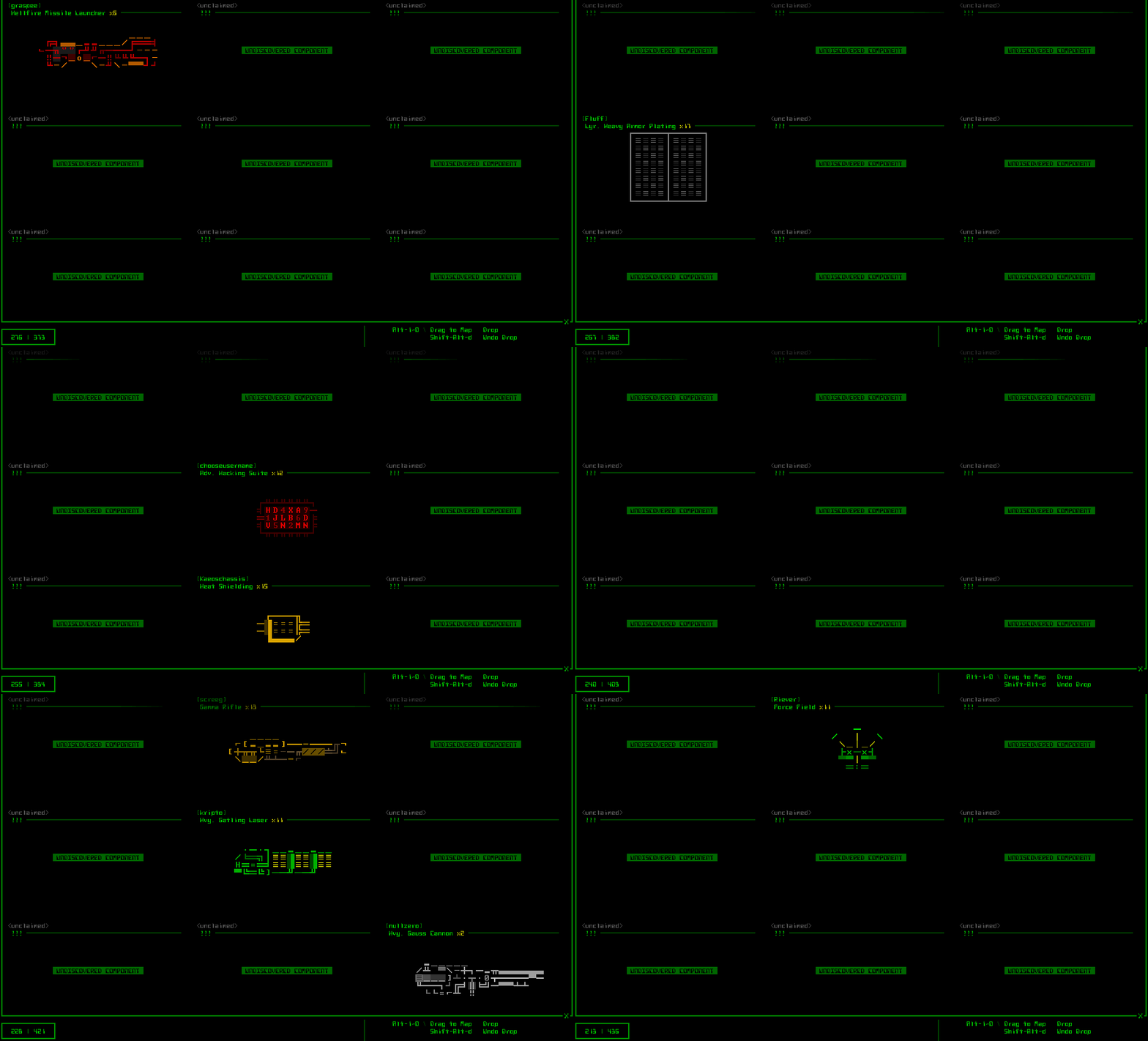
Introducing the ASCII Art Gallery and Item Compendium! The game menu Credits page now includes access to a new area where you can browse the many hundreds of pieces of ASCII art from the game. But, you can only view art for those items you’ve discovered so far. Art and names for items never seen before are listed as “unknown.”

The art gallery also keeps track of an interesting piece of meta info: the total number of times you’ve attached an individual part across all your plays combined. So there’s a reason to open it other than just to look at art.

Where do supporters come in?

Everyone* who joins the Alpha Access program is randomly assigned their own unique personal item from among Cogmind’s huge selection. One supporter per item. Your name (or a name of your choosing) is then forever listed with that item in the gallery (you can of course opt out of this if you prefer). Consider this “adopt a component drive” a chance to be immortalized in roguelike history :D.

I wonder who will get Matter, the most basic and common item in the game, or any of the many rare items that could take a while to discover. Some of you may embark on a “personal quest” to find your item ;). Or perhaps you could enlist help from others…

cogmind_art_gallery

ASCII Art Gallery and item discovery records (click for full size). As an example I added in names left by some of the blog’s more frequent commenters :D. Unshown is some descriptive text telling you which item is yours (unless you haven’t found it yet) and an indicator of the total percentage of the game’s items you’ve discovered so far.

*Personal items are assigned randomly on a first come first serve basis. If all available items are taken by previous supporters, your name will be added to a waiting list and assigned in order as new items are added to the game, though there is no guarantee that new supporters will have a chance for assignment beyond the existing set of items. If we really have so many supporters that becomes an issue (there are a lot of items), I’ll add a separate scrollable list of every supporter. (I may add that anyway, but it’s not in there yet.)

T-Shirts

Alpha supporters who, like me, really want a Cogmind T-shirt also have that option by adding the cost of the shirt and shipping (I’m not looking to make money on the shirts).

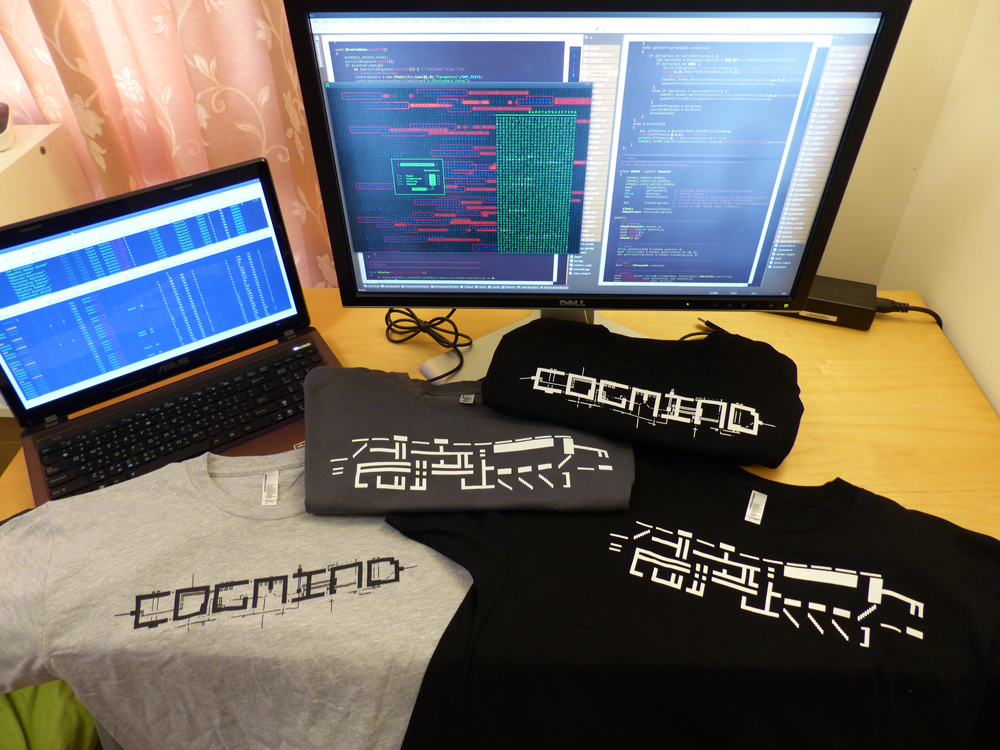
I went through a lot of potential design concepts, and most of what represents Cogmind doesn’t work too well on a shirt. In the end I settled on two main designs, the title logo and a (previously unshown) Heavy Battle Rifle in ASCII. I ordered a few samples to make sure the ASCII details would come out alright. They sure did:

cogmind_tshirts

Cogmind T-shirt Samples! (click for full size)

Aw yeah, I finally got me a Cogmind shirt--so official :D

Now that I know how this company’s process works and the quality of what they can produce, I may add another design or two later on. (And no, I didn’t try green because high-contrast saturated green doesn’t work so well with ink printing.)

Price and Distribution

The Alpha Access price is set at $30. With a T-shirt (mentioned in the benefits section above) it’s $60, which includes the cost of the shirt, printing, handling fees, and international shipping anywhere. It’s not the absolute cheapest shirt available, but I figure that if much of the fee is the base cost for printing anyway, adding a little extra for better quality is worth it.

Alpha Access sales will only be processed through the Cogmind website. This is better since I can receive a much bigger cut than going through a value-added distributor like Steam. It also helps us ease into sales and gradually scale up, rather than jumping in the deep end with more chances to screw something up on the business side of things.

The price of the final game will be lower, but you’ll have to wait, and will miss out on the other benefits. There is no set time limit on Alpha Access availability--it depends on reception and the pace of subsequent development. The details are also subject to change since I haven’t yet set up the business side of things. Final details will be announced on launch. Feel free to share your thoughts in the comments.

Money Matters

In a perfect world we could all sit around and make and play games all day :D. In the real world (or my world at least), making Cogmind a reality has required that it be my full time job for more than a year now. Otherwise it would simply never see completion (unless 2030 is soon enough to be considered outside the figurative realm of “never”). To clarify, I’m not a young carefree kid anymore--I have a family to care for, lots of bills to pay, and nearly zero free time outside work and other responsibilities. Not to put down any carefree devs out there spending their copious spare time making free games! I did that for a decade myself, and my advice to them is to do their best to take advantage of that opportunity!

I felt that it’s worth it at this transitionary period in my life to take a shot at making something grand, with the hope that the investment could be recovered and possibly fund “other grand schemes” ;). Even if it doesn’t turn out that way, we still get a grand game out of the deal, eh? :D

Cogmind in particular has cost over US$ 25,000 to develop, and I expect total costs could reach $45k or more by the time it’s complete. For those of you unfamiliar with expense budgets behind indie games similar in scope to Cogmind, this is actually a very modest amount. (There will be a detailed budget breakdown at or after we reach 1.0, when such data will be more meaningful.) Based on sales potential, recovering that investment is quite possible. Many will agree Cogmind is a unique quality game and has a good chance at being fairly popular. In any case, with enough support during Alpha Access we can continue to make this game better, and hopefully lead to more like it in the future!

Post-Alpha

We should probably reach 1.0 some time this year, though the pace of development will depend on Alpha Access reception and feedback.

I may put Cogmind on Steam Greenlight around or shortly after the Alpha Access launch, just to begin some community interaction over there and get the voting started. And because by then we’ll also have our first trailer :D.

Posted in Release | Tagged , , | 26 Responses

Tileset 1.0

Cogmind now comes equipped with an official tileset!

Originally we were aiming for two tilesets, one symbolic and the other realistic, but despite the promising concepts provided for the symbolic set, the artist unfortunately turned out not quite suitable for the position. With that we are down to a single tileset, though one with which I’m extremely satisfied.

Kacper has done an incredible job on the realistic set, going above and beyond simply following the specifications by coming up with a number of great ideas and suggestions that have improved tile mode’s overall visual quality while keeping within our limits. It’s been a pleasure working with someone who’s as into the game as I am :)

cogmind_credits_kacper

Position filled, credits page updated :D

Symbolism vs. Realism

We showed pre-development tileset concepts in a number of different places, and a majority of responses were in support of the more abstract “symbolic” tileset, essentially taking the essence of ASCII and putting it into tileset form.

It’s too bad we won’t see that tileset come to fruition (at least not for now), though there is some consolation to be found in various other factors for consideration:

  • More than one of the prospective artists I consulted with during the hiring process made a valid observation, stating that “some of the symbolic sprites don’t clearly represent anything.” Ignoring the fact that this is in some ways the very definition of symbolic, it’s true that in an unfamiliar fictional world it is sometimes necessary to create unfamiliar new symbols that the player then associates with new objects. In a complex enough world and at small enough sizes, these symbols can begin to seem arbitrary and opaque, making interpreting them somewhat difficult for the same category of player that has trouble with the highly symbolic nature of ASCII in the first place.
  • The question as to which tileset concept is superior was directed mostly at audiences already familiar with ASCII and traditional roguelikes. Players at the edge of or outside that circle generally preferred one of the non-symbolic concepts.
  • All early feedback was also based on rough concepts created by artists with minimal guidance. Any of the concepts could become much more than their original form, as you’ll see below.
  • A portion of the players preferring a more efficient symbolic approach to the map can simply use ASCII (as many will). I’m confident that Cogmind is, after all, the most accessible ASCII game ever with a vast array of UI features to aid usability, among them auto-labeling. Objects are also represented using very uncomplicated symbol conventions and a relatively small number of glyphs--common objects use only 9 punctuation marks and 24 letter glyphs (counting upper and lower case as separate glyphs).

Against this background it would seem that the ideal tileset should be as different from ASCII as possible--non-symbolic, detailed, realistic.

For me as the designer, however, this exaggerates a problem I’ve been dealing with every time I think about Cogmind having a tileset: any pixel art representation runs counter to the intended look and feel of the game. As regular readers know, Cogmind’s entire aesthetic and theme embraces the ASCII rather than using it as a makeshift crutch. You are the Cogmind, and that’s how you see and experience the world. Many of the map and UI special effects rely heavily on ASCII, and the intro, inter-level animations (still WIP) and ending (WIP) are rendered entirely in ASCII as well.

Sure it’s a game, but as part of the design philosophy I’ve made an effort to avoid anything that overtly gamifies the experience. I didn’t even want the game to have a title screen--as it turns out there’s still no start menu (nor will there ever be one), but I did finally cave on the title screen part…

I know, the game has both ASCII and tiles mode, so why fret? I’m sure it’s a bigger issue to myself than anyone reading this blog, because as players most of you see Cogmind as a game. To me it’s art. I have a vision for this piece of art, and feel like I’m sacrificing part of that vision to expand the appeal of the underlying game.

Of course a number of players out there also subscribe to the game-as-art-form mentality, especially in the indie world, and the appreciation of art is always a very personal thing once it’s released into the world, anyway. By providing a tileset I suppose I’m simply giving the audience another tool with which to appreciate it, even if it does significantly affect the intended expression.

While in the future this dilemma will always exist whenever I have to decide how to prefer to present Cogmind, I can at least say that after some days playtesting with this new tileset, it’s awesome, and certainly doesn’t reduce the game component’s awesomeness :D

Style

The non-symbolic representation of map objects should have both meaningful detail and a consistent look, and given the limitations this tileset does a wonderful job of both.

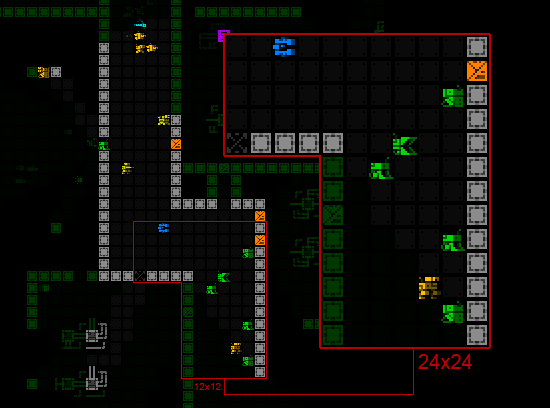
cogmind_tiles_general_scene_with_zoom

A sample scene showing the tileset at its smallest (12×12 cells) and largest (24×24 cells).

Kacper has squeezed an amazing amount of detail into a tiny area. Robot compositions highlight their primary features and functionality; item forms reflect their categories and subtypes while remaining distinguishable from one another when necessary. How does he do it?

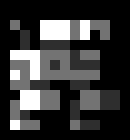
Before getting into analysis of specific object types further below, the short answer is by focusing on a simple shading scheme. At the small sizes required, softening tiles with excessive shading costs too much space that can otherwise be used to define details (an even more significant limitation without multicolored tiles). By contrast, this tileset uses a mere three shades:

cogmind_tiles_grayscale_ramp

Grayscale ramp from Cogmind’s tileset. The detail!

As you’ll see with the robots and items, these shades aren’t used to create any kind of gradient, instead being assigned as a primary color vs. detail color. The result is extremely sharp sprites that pack a lot information into a small area, and also mesh well with the sharpness of the UI.

One drawback we’ve discovered to relying on such a simple monochrome color ramp is that while on the perfect hardware the darker two colors are nicely distinct from one another, they appear much closer on lower-quality LCDs, causing sprites to lose some of their internal contrast. Correcting for this on one setup results in less than ideal viewing conditions on another. The current ramp is best displayed on high-contrast monitors with true blacks. Hm, as I write this I’ve begun imagining some kind of adjustable gamma option that changes the actual ramp itself, allowing the player to set relative brightness of each spritesheet component to whatever looks good on their particular monitor…

Machines

Machines were outside the scope of the original tileset specifications. As mentioned before, I’d be okay with mixing ASCII machines with a minimalist tileset, though Kacper decided to tackle the issue, anyway. The result is quite promising, and does a good job of pixelizing the machines such that they fit well alongside our other map sprites.

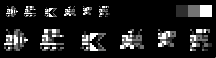
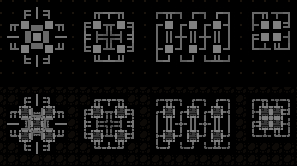
cogmind_tileset_machines

A comparison of non-interactive machine ASCII originals vs. their pixel version created using one-to-one glyph substitution.

The effect works well enough with non-interactive machines (the gray ones, seen above and as described earlier).

However, because interactive machines are often both smaller and use more outward-oriented designs than non-interactive machines (whose designs are larger and inward-oriented), that subcategory doesn’t look nearly as good. This is cause for some hesitation in making this change permanent as is. A redesign of the base ASCII glyph arrangement would resolve the issue, but also might result in a less effective ASCII version.

Either way, the spritesheet has already been expanded to allow for an alternate set of ASCII line glyphs specifically for machines (the original set was still needed for UI elements that use the map font). For anyone who would like to use tiles but prefers the basic ASCII machines (not yet sure if that type of hybrid player even exists!), the config file does contain that option.

Terrain

More work went into the terrain than I initially expected. At first I was thinking “okay, we’ll just replace the hashes with one of a handful of wall tiles and that’s it.” It’s not quite that simple, though keep in mind we’re still not doing linked and oriented walls--they don’t really add anything for Cogmind, in which terrain is incredibly simple and the focus is on tactical layout (plus oriented walls can unfairly give you too much information).

The first unplanned change is the removal of ASCII dot/period floors. They are replaced with a faint gray rectangle representing the floor section, and do a good job of reducing visual clutter when the general noise level has already been increased by pixel art.

I hadn’t considered the possibility, and even imagined it might be incompatible with the particle effect animations, but Kacper dropped it into the tileset so I figured I may as well try it out. I like it. Tests show that it is not only perfectly compatible the hundreds of existing particle effects, it even enhances some of them.

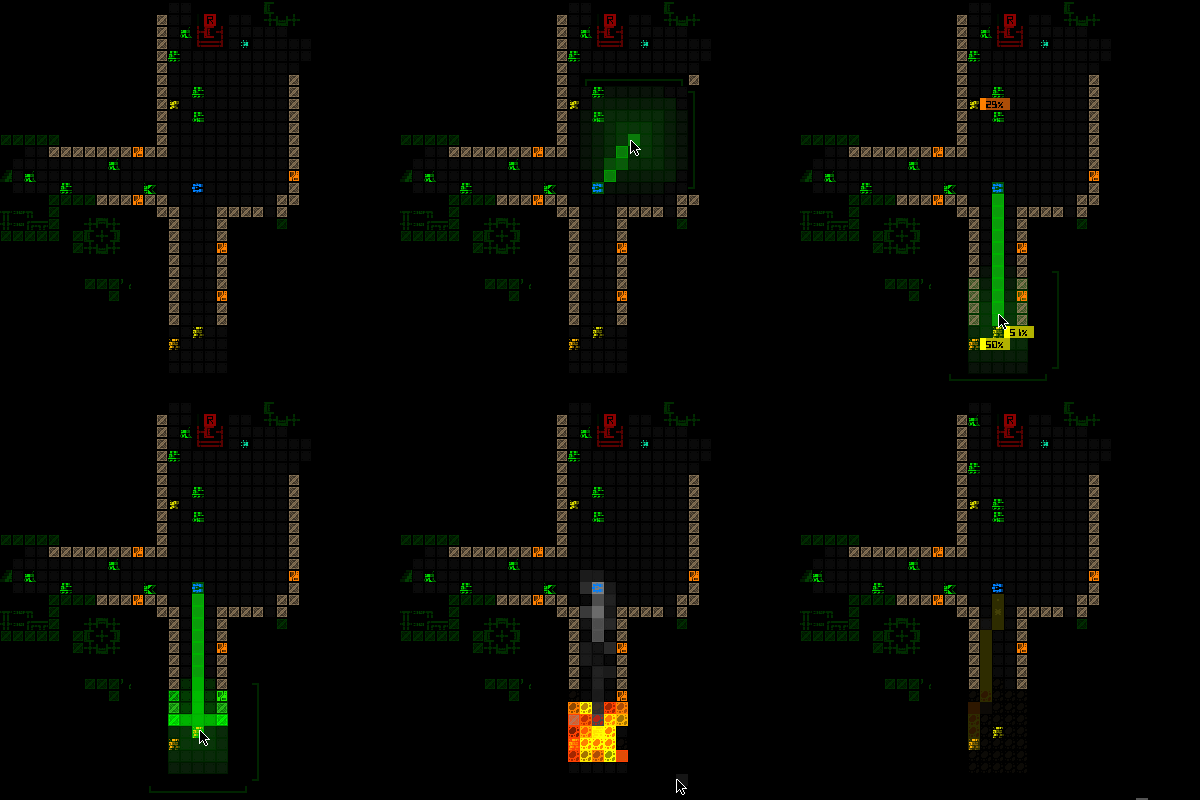
cogmind_tiles_floor_highlighting

See the floor tiles highlighted by these UI animations, the red volley rangefinder and the green launcher AOE scan.

Strewn about on lower levels, and blown off robots and machines to slide across the floor, you’ll often see mechanical debris:

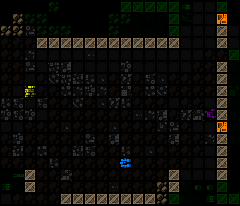
cogmind_tiles_debris

A roomful of mechanic debris in the aftermath of my reckless rocket rampage. Oh look, here comes another to join the scrapheap…

The tileset contains 16 debris tiles in all, one for each of the possible gray background ASCII debris symbols. Both the tiles and ASCII debris punctuation are organized by their pixel density so that areas of debris created by a noise function will look a little more natural.

cogmind_tiles_grayscale_debris

Tileset debris, with corresponding ASCII for comparison. (A couple of the ASCII may seem out of density order, because that order is based on a multi-font average.)

The most prominent terrain feature, walls, required the most tweaking of any tile type despite their relative simplicity. Adjusting them also required making the tileset’s only deviation from the standard color ramp described earlier.

The issue stems from the tileset coloring system, which draws directly from the colors and levels assigned to the ASCII, all fully saturated colors with a specific brightness level (usually fairly bright).

Wall ASCII universally use the hash (‘#’) symbol, which naturally has a lower pixel count than any wall tile. Thus using the same color for ASCII and tile walls means the latter will require a lower brightness to avoid overpowering everything else on the map, especially since wall tiles are almost always the most numerous visible object. As explained in the original tileset specifications, this is easily achieved in the spritesheet by using a non-white color. So the original grayscale ramp (which uses pure white as its brightest color) needs to change a bit for that. (For the record, Kacper didn’t like the idea of deviating from the ramp, but was a good sport and understood that it had to be done for the greater good =p)

The brightest wall color was therefore lowered from gray 255 to 225, so from 100% brightness to 88.2% brightness. But that doesn’t go far enough to produce the best wall effect for the map as a whole (Kacper cringes). Honestly I really like the walls at their original sharpness, but that detail is at the same time distracting when it’s repeated across the map. We needed to reduce the contrast on those details to help other objects stand out more. So I progressively raised the brightness of all the darker colors to tighten up the color ramp and make it easier to focus on objects other than walls.

You can see the testing process below, taking the factory walls as an example:

cogmind_tiles_wall_ramp_adjustment

Tweaking the grayscale ramp for walls.

If the change seems subtle to you, it’s more meaningful when trying to play on a full-sized map with other objects mixed in that you’d prefer to be focusing on. This effect is even more pronounced at larger tile sizes.

As for unique walls, currently there are only six types--wall variety is a good bit less than the number of map types, because some maps simply use recolors (e.g. for the same general area and theme but still different in some way). Not unlike other traditional roguelikes, Cogmind is not about terrain--it’s about interacting with the occupants and objects found among that terrain. There are (and will be many more) interesting environments, but they are created primarily from machines. Walls are merely barriers to influence tactical positioning, and tentative ones, at that, since you can always blast your way through them to forge new pathways :D. (Note: Always consider what may be on the other side!)

Compared to walls, doors were left completely unchanged from their original ramp, since we want those to stand out--they even use a bright pure orange to achieve that purpose. So we get to keep their juicy crisp details (Kacper sighs in relief). Same with stairs and branch access points.

cogmind_tiles_finding_stairs

Heading through a door to find an exit. You are going to be really happy to see one of these in game, because finding them is your primary objective, but not always that easy.

Robots

When I first saw Kacper’s robot concepts I thought to myself, this could be Cogmind! It wasn’t the same feeling I had with the other tileset concepts, which could at best be classified as “okay, this could possibly become Cogmind with some work.”

Some viewers might claim the robots are too intricate, with pixel-sized details too small to clearly make out, and this is certainly a valid point (as valid as any opinion about works of art--some of us can make out the details when we stop to inspect them for fun :D).

Most importantly, the tileset is designed such that you don’t have to focus on the details to distinguish robots from one another. Each robot highlights its important features to define an overall shape that is usually unique to that robot. This is not especially difficult with Cogmind’s robots in particular, because each robot must be unique in its loadout and behavior in order to exist in the first place. There are no “this robot is just like that one but with a different gun” situations.

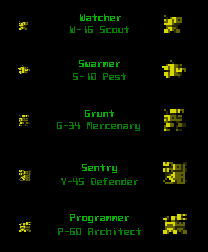
See the cast of early-game combat robot classes that haven’t changed since the 7DRL prototype:

cogmind_tiles_combat_robots

The prototype’s combat robots have all grown up and got sprited!

The many new additions have even more unique appearances. And of course the non-combat robots with their especially unique behaviors look completely unlike anything that you fight. Plus they’re all green. Regarding other colors, combat robots appear in yellow, orange, or red depending on the threat level of that particular variant; NPCs are pink so they really stand out; and there are also gray and brown robots, but those belong to a category you’ll have to discover in the game.

In any case, the robots above are fairly easy to distinguish, even more so when you see them in action because they are both labeled directly on the map and have their own unique weaponry or other behavioral differences--for example Swarmers always travel in big groups, Sentries always work alone, Watchers zip around sending out alerts without shooting anything at all, etc.

Notice I’m not showing the Behemoth here, because it’s now four times as large as any of these… nope, not going to mistake that for anything else!

What I like most about these and the many other sprites is that they accurately depict a cold mechanical world of robots, and at such a small size! The sprites even properly reflect a given bot’s size and loadout (mostly regarding propulsion and tools/weaponry, though sometimes even extending to additional components).

How do they do it?

First of all, the three-shade limit mentioned before is a very useful restriction here, as fewer shades enables sharper images, which means greater detail.

On top of that the robot sprites use a 3/4 oblique right-facing perspective, which is the best way to increase the variety of recognizable features that can be depicted. Forward-facing sprites leave a lot less room for variation, and work better with multi-hued tiles (which we don’t have in Cogmind).

Each visible side uses one primary shade plus a secondary shade for detail (with each side sharing a shade, for a total of 3):

cogmind_tiles_grayscale_grunt_closeup

The tri-shade Grunt as it appears in the spritesheet, x10.

Of course at the smaller tile sizes the detail only helps if you want to examine individual units up close, when during normal play all you care about is what is where. So at the same time we tried to give each robot a fairly distinct shape to aid at-a-glance recognition, as explained earlier.

Most interestingly, while you might expect that we’d leave some room in between robot tiles to keep them separate on the map, we didn’t! Robots are allowed to utilize the full width and height of their cell, so 12×12 in the base tileset, and the understanding is that the perspective shading helps you visually identify where one robot ends and another begins. The extra column and/or row of pixels to use for the robot itself gives more room in which to clearly define a unique shape, with a wider stretch of shaded edge where useful.

cogmind_tiles_robot_clusters

Robots’ perspective shading aids visual separation on the map. Here I’ve let myself get surrounded for screenshot purposes--don’t try this at home, kids. During combat you can safely ignore anything that’s green, and this particular scene simultaneously contains all four types of combat unit seen in the introductory levels of the game: To the north a pair of incoming grunts along with three surveillance bots happening by (quite rare, actually), and to the south a group of Swarmers flying around a Sentry.

Sure you can end up with dense, broad clusters of objects requiring a little extra time to thoroughly parse, but this is an issue even with ASCII. The point is it’s not incredibly difficult once you’re at least familiar with the individual objects. We’ve playtested it and are satisfied that it works just fine.

(I’ll also add here that if you really are staring down a massive group of enemies in Cogmind, you’re not going to care so much about its composition--you’ll instead do one of two things: run, or point your guided nuke in that general direction and kiss them goodbye… after which you will then probably run anyway because firing a guided nuke tends to piss everyone else off =p)

That’s it for the robots--there are quite a few more cool ones in there, but I’ll leave those for you to discover!

Items

Considering how tiny the items are, Kacper did a great job making them individually recognizable while ensuring that related subtypes share certain qualities. Because there is only one category of items that you won’t find almost immediately in the game, these I’m mostly free to show you now without spoiling anything big.

cogmind_tiles_grayscale_item_types

(Most of) Cogmind’s item types in their uncolored spritesheet form, both at 12×12 and 24×24.

  • Matter and Data Cores are unique items that you’ll be seeing frequently.
  • Propulsion: These are quite distinctive, and each does a good job of resembling its type, for the most part also taking the same form in which they’re used on the robot sprites.
  • Utility: “Devices” is a pretty vague all-encompassing category, so it gets an equally vague sprite. Storage is quite specific by comparison, and appears appropriately box-ish. Processors and hackware are essentially two varieties of the same thing (small chip-like components), so they look similar but not quite the same because the player may or may not be interested in hackware at all. A large portion of protection utilities are armor, hence that riveted piece of metal.
  • Power: The sprites here reflect power source progression itself in that these subtypes are simply increasingly powerful versions of the same general thing.
  • Weapons: Cannons are larger, and energy vs. ballistic each have their own unifying characteristics. The launcher is a monster of a weapon in a size of its own, giving it that extra HELL YEAH feel when you find one (they are quite nice to have). Special weapons are usually tools and whatnot, so they look a bit more functional. Melee weapons (including the datajack), share a basic form but all remain distinctive.

Unlike robots, item sprites are actually colored differently from their ASCII counterparts. ASCII uses glyphs to represent a category and further distinguishes the subtypes within each category by color. This is more efficient for interpreting ASCII map data, enabling the player to quickly locate all items of a particular category (say, all the ‘=’ are types of propulsion) rather than differentiating everything equally at the subtype level; there are also not enough punctuation marks for 27 item subtypes, but plenty of extra if we do it this way. It’s the least confusing way to take advantage of the ASCII representation.

Because item sprites each have their own unique form, we are free to use color however we need to. Thus items are instead colored by their effectiveness rating. Each item is manually rated by how effective it is on a scale from 1~10, and colored appropriately on a sliding color ramp from cyan to purple to crimson. These colors have the advantage of being different from those used for any robots, so you can pretty easily tell the difference between an item and robot sprite even before examining their shapes.

cogmind_tiles_treads

All the treads in the game as they appear on the map, from the lowest-rated Light Treads to ???.

Using multiple colors for these may not be worth the added visual clutter, and to reduce confusion I’d consider changing all items in tiles mode to cyan or purple based on player feedback. (After all, this extra information is not available in ASCII mode, and it’s not a problem there.) I’m not particularly bothered by it, but it’s something I’d like others to weigh in on once they have their hands on the game.

(Color scheme exceptions: The common matter item is always purple, with a brightness based on how much matter is located there; data cores are always green.)

Besides their color and generally smaller size, item sprites are further differentiated from robots by their facing/shading. Notice that items are left-oriented, another good idea by Kacper.

Summary

Using the tileset certainly changes the feel of the game, which is somewhat hard for me to get over, but I do love it for what it is, think it handles itself well despite the limitations, and after playing with it for a while I must say it’s starting to grow on me.

cogmind_tiles_playtest_rocket_launcher

Some (true) playtesting with 12×12 tiles. I just found me a ROCKET LAUNCHER. Splash damage be damned, you’re all going down.

Currently this tileset has only been developed at the base size, 12×12 cells, while other sizes will be extrapolated all the way up to 24×24, the 1440p dimension, without additional detail. Thus the relatively tiny size you see above actually applies only to those of you using a 1366×768 desktop (720p). Greater resolutions will be using larger versions of the tileset and have a slightly low-res appearance, working in the same way as previously shown scaled fonts.

A comparison of the two extremes, showing the same scene from Cogmind as it would appear in 720p vs. 1440p:

cogmind_tiles_fullscreen_12x12

Cogmind tileset in 720p. (Screenshot taken in a 4:3 window, so the interface is not set to its true 720p aspect ratio--demonstration for tile size only.) Click for full size.


cogmind_tiles_fullscreen_24x24

Cogmind tileset in 1440p. (Screenshot taken in a 4:3 window, so the interface is not set to its true 1440p aspect ratio--demonstration for tile size only.) Click for full size.

Regarding even smaller resolutions (e.g. 800×600), the game also supports those, but as this particular tileset can’t properly be scaled down they are currently ASCII only.

So you’ve finally reached the bottom of my 4,000-word Great Wall of Text intro to the tileset… What do you think?

Posted in Art | Tagged , , , | 39 Responses

Map Intel: Information Warfare, Revisited

We’ve covered information warfare on the blog before, in terms of the wide array of components and UI options available to Cogmind. Those features are centered around information about robots and other objects visible, seen before, or detected via sensors.

There is a separate category of useful information, and its source and presentation were the final front-end mechanics to be implemented before Cogmind’s first release. This category has been dubbed “Map Intel,” referring to information about the environment obtained through hacking.

Some of these features were added a while back along with terminal hacking, though before now there was no system for translating them into useful map information. Now that system is fully operational, and useful it is.

Hacking for Intel Markers

In short, you can now hack terminals to obtain position data for different kinds of objects. After a successful hack of a given type, the associated “intel” is displayed directly on the map as ASCII glyph markers at those positions.

Off-screen intel markers are shown at the edge of the map view in the direction towards that object, dynamically repositioning themselves as you shift the view. (This system works like the labels for off-screen exits demonstrated earlier.)

cogmind_intel_marker_shifting

Various types of intel markers repositioned as the map shifts.

There are a number of different intel marker categories.

Machine Locations

If you’re looking for a particular type of interactive machine, you can hack for a list of their coordinates.

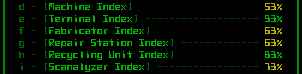
cogmind_hacking_targets_machine_indexes

The full list of hacking commands for retrieving machine coordinates. (The generic “machines” command simultaneously hacks the locations of all machines--difficulties are not set/balanced yet, and here I have some hackware equipped which modifies the chances.)

As marked on your map, these are represented by capital letters with a background that glows in the color associated with that machine:

cogmind_intel_markers_machines

Intel markers for two Terminals, two Recycling Units, and a Repair Station, all to the north.

The machine intel system works slightly different from the others. Intel marker data is usually deleted once that marker enters your FOV (i.e. once you’ve explored that area , or otherwise seen it again since last hacking for that intel). This is because most intel is aimed at moving objects, so the information becomes outdated and useless before long, anyway. Re-hacking for the same type of intel will also replace and update all old intel of that type.

As static inanimate objects, however, machines are not removed from your intel on seeing them. Even after leaving sight of a machine, the intel remains. Moreover, those machines you simply see (not hack) to discover are also added to your intel database. Thus all previously seen machines can be conveniently indicated along the map edge. Sure, even without this option you can always still shift the view and see them in previously revealed map areas, but having directional markers is a useful reminder of which direction to look.

Tasked Squads

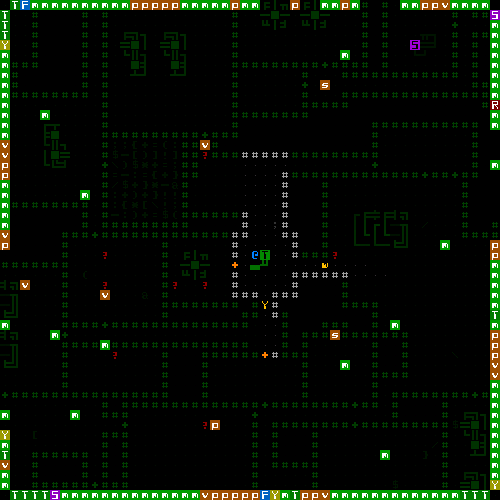
Groups of robots with a permanent task or one-off mission are marked with lower case letters, placed at their most recent reported location. The marker background color indicates how much you should worry about a given squad: green or yellow for non/low-danger, orange for common threats, and red for major threats.

cogmind_intel_markers_squads

Registered robots passing through a previously explored area--one surveillance unit (v), two patrols (p), and three maintenance bots (m).

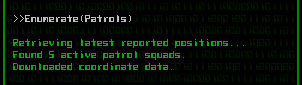
Here is an example of the hacking shell’s output on obtaining the latest coordinates of all patrols on the map:

cogmind_hacking_result_enumerate_patrols

Results of a successful patrol status hack.

While the fact that almost all squads are mobile reduces the usefulness of revealing positions of distant squads (except for those likely coming to track you down), it does at least show the overall types and composition of potential enemies out there and where their strengths and weaknesses are generally concentrated at a given point in time. More useful is the ability to discover what squads are nearby, and in this way squad intel is an alternative to the usual sensor combos, providing temporary information but at a much greater range.

There are currently nine different types of squad, but I’ll leave the details for you to discover in game. I will mention that hacking positions for security squads is one of the most difficult, as those squads are stationary and knowing their positions across the entire map is incredibly valuable. That’s the kind of information generally only available to dedicated hackers.

Stockpile Inventories

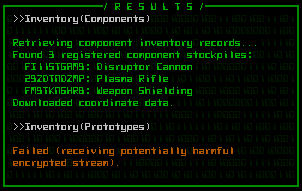
Component stockpiles are marked with their usual punctuation glyph based on item type, also coloring their background based on that type. (Stockpiles containing prototypes are further differentiated by their glowing foreground.)

However, know that stockpiles often contain more than one type of item, as well as multiples of each. To keep it simple (both for the UI, you, and I =p) the system records stockpiles based on their most abundant component, or if there are any prototypes those will become the primary stockpile identifier. So while you can’t know the precise full contents of a stockpile, you can know what it’s mostly comprised of.

cogmind_hacking_result_stockpiles

A list of common (non-prototype) stockpiles stored on the map, followed by a failed attempt to retrieve the same for prototypes.

This intel can be very useful for determining whether you simply want to leave a map, or stick around to get that stockpile you just learned about in some nearby room. Especially if you see a stash of unguarded prototypes for the taking!

Intel Filters

So what happens if you really like hacking and turn your map edges into a completely unreadable mess of letters and symbols?

cogmind_intel_markers_excessive

This.

I don’t imagine you’ll want to keep a large amount of intel visible at once, instead activating only those that are relevant and current.

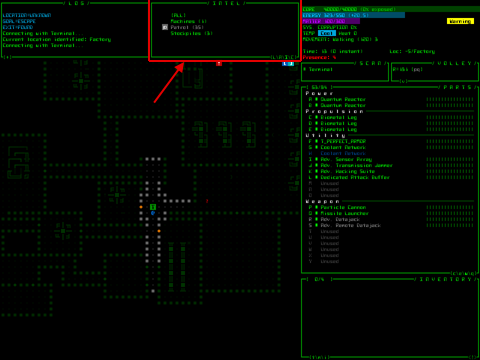
For that the intel system has a new filter manager, implemented as the last multi-console mode. If you recall, the top-center portion of the UI is dedicated to the so-called “multi-console,” which has multiple modes for optional features you may activate depending on what you need at the time. There are four modes: extended log space, combat calculations, the ally status and order system, and now intel management.

cogmind_multiconsole_position

The multi-console area.

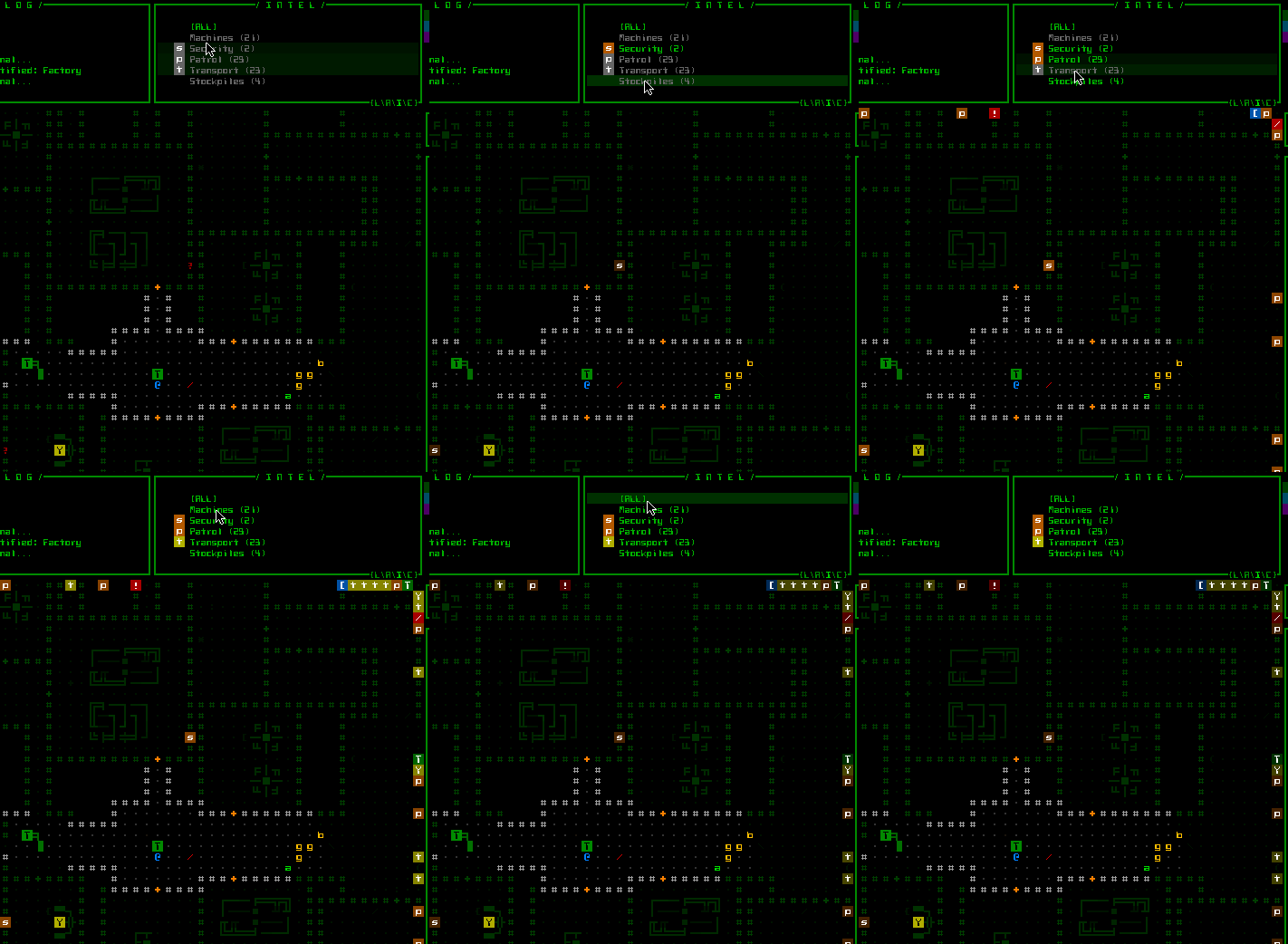
This scrollable console lists all the types of intel you possess for the current map (it always contains a listing for machine intel, since that can be obtained without hacking). Each type of intel can be toggled individually, or all at once via the “ALL” button.

cogmind_intel_filters

Toggling intel data types for display on the map.

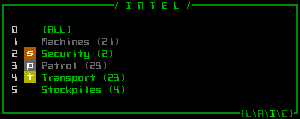
As with the ally management interface (and every other part of the interface), these filters are accessible via keyboard: Just press ‘z’ to enter intel mode, then the number corresponding to the type of intel to toggle.

cogmind_intel_filters_keyboard

“Intel mode” for keyboard input.

As an added convenience, newly hacked intel for a given type of object is automatically activated so you don’t have to worry about remembering what intel you acquired after a hacking session.

Style Considerations

For intel markers we obviously need a compact and distinct style easy to distinguish from other map objects since they’ll be persistent (while active) and placed directly on the map.

Fitting each marker into a single cell is naturally the best method of indicating something at that position, so the choice is simplified to one of which ASCII and how to color it. The initial concept was to go with a black character on a colored background, which if you’ve noticed is how the interactive piece of machines is normally represented on the map. So further differentiation is achieved via slow oscillation in background brightness. This helps them stand out from the rest of the (static) map more than anything.

Due to a variable typo in the initial test, the black characters appeared white the first time I saw them. After testing both methods it turns out the white look is better =p. White results in easier to read glyphs, being consistent with the light-on-dark look of the rest of the map, while having no negative impact on the markers’ differentiation from other cells (since we have the glow-highlight effect).

Trivia

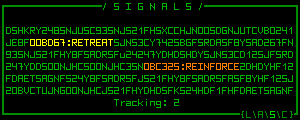
For the past year or so the concept for the final multi-console mode was actually called “signals,” and looked like this:

cogmind_multiconsole_signals_concept

“Signals” multi-console concept (mockup).

The idea is the console is normally filled with junk data representing encoded transmissions Cogmind is picking up from the environment, and you could attach components capable of deciphering what other robots in your vicinity are thinking/planning, as well as whatever other information can be intercepted, including the number of enemies currently tracking you.

While fun, intel filter management offers a much broader range of possibilities, and serves as a bridge between the terminal hacking system and map overlays (which could even be further expanded in the future). The signals idea could technically still be added, though it might end up being too complicated a mechanic (?).

For now we’ll relegate it to the list of many (though fewer than there probably should be) cut features.

More Terminal Hacks

Along with the intel update we’ve also got a new batch of useful terminal hacks.

Local Map Layout

Like hacking for squad positions, this option is an alternative to relying on sensor data (in this case terrain sensors and interpreters). When successful, this hack reveals the map layout for the zone in which the terminal is located.

I also coded a hacking command that reveals the entire map layout rather than a single zone, but it’s far too powerful and will only be available under special circumstances (once I decide what those circumstances are…).

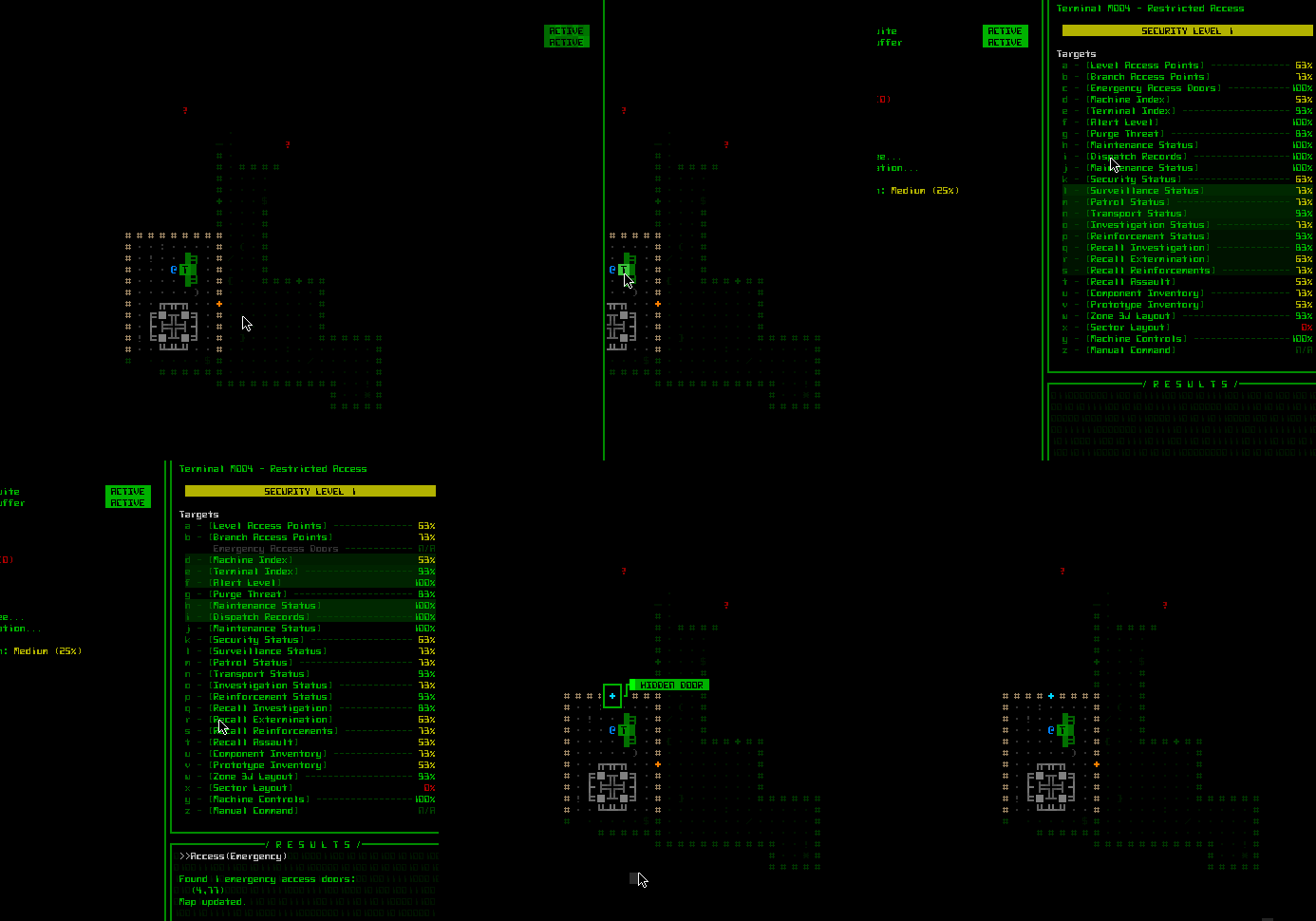
Hacking the map layout does not, however, reveal secret tunnels and doors. As protected information those are available only via another specific hack.

Exits and hidden doors are not part of the intel management system, since they have their own labeling system described earlier. But as part of the intel hacking update, newly discovered exits and hidden doors are auto-labeled as soon as you close the hacking interface:

cogmind_hacking_hidden_doors

While testing the new hacking system via a test terminal, I happen to discover a hidden door right next to me ;).

Alert Level

I still haven’t covered this game mechanic yet because it ties into the world as a whole, but for now know that the global alert level affects how the enemy reacts to you.

You won’t generally know this alert level, but 1) you can guess when it’s on the rise because the enemy will start taking you more seriously and 2) at a terminal you can also hack to learn the current level.

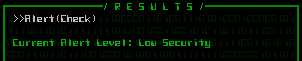
cogmind_hacking_result_alert_check

Retrieving the current alert level, which can range from “low security” to 1 to 5.

On the more useful side, if you’re a good hacker you can proactively lower the system’s alert level by falsely reporting that a threat has been dealt with, reducing the likelihood of more combat-enabled robots arriving in the map on various threat-related missions.

Squad Recalls

Beyond simply retrieving squad dispatch records and hacking for their latest position data, you can attempt to issue a recall order to any combat squad only temporarily in the map for a given mission. Call off investigations, strike teams, and even larger assault forces if you’re good enough (and reach a terminal in time).

Sabotage

You can’t recall squads which are permanently stationed on the current floor, but there is a new alternative for influencing them: Sabotage. With this hack you search the machine control network for vulnerable explosive machines, and overload them remotely. The former machine’s location is marked on your map via the intel system, and the enemy will redirect a permanent patrol or security force to that location.

cogmind_hacking_result_sabotage

Detonating a nuclear reactor remotely (top), then later surveying the intel marker’s position (bottom). There was obviously more than one reactor housed in this area--the massive explosion cleared out several rooms worth of space. Would have been fun if it were in the room next door (okay, maybe two doors down…) so I could hear them go off :D. It obviously took out some combat robot, as there’s still a weapon lying on the ground nearby.

This is a fairly easy hack because you cannot completely control the effects--the vulnerable machine is chosen randomly from among those which may explode, the system itself decides what squad to relocate, and the overload may even fail to destroy the machine despite successfully hacking its system. To improve the strategic value of this hack I later went back and gave the system a much higher chance to relocate the squad nearest your terminal, so theoretically it becomes an effective option for clearing out dangerous areas without any fighting. In any case, sabotage is certainly a fun option--blowing up a reactor somewhere else on the map and later happening across the debris and a crater in the floor (if it hasn’t already been cleaned up by then). Chain reactions are common and the resulting explosions can easily catch enemy robots passing by ;)

Warning: Going on an unchecked sabotage spree will most certainly raise the alert level and summon a whole lot of new friends to play with… or maybe that’s what you want? :D

Posted in Design | Tagged , , , | 8 Responses