Official development blog
[ Latest Cogmind Release Notes: Feb 2026, "Unchained More" ]

The Making of Cogmind’s Alpha Trailer

A game’s trailer is extremely important, so rather than release some mediocre video recordings during pre-alpha development I decided to let gifs show off the animation while keeping the audio side of things to myself, waiting for the game to reach a more complete state when I could then invest a lot of time into producing a proper video.

My previous experience with ASCII videos taught me that they’re difficult to do well,  so I knew it would take a while to find a satisfactory process for Cogmind.

In the end Cogmind’s 90-second trailer required nearly three weeks of full-time effort from inception to final production. At first I considered hiring someone else to do it (a professional), but I like creating things myself, and finding, hiring, and bringing another person up to speed on the project would take a while, not to mention one of the most time-consuming parts--collecting clips for a trailer--is something I’d still have to do myself, anyway.

In all I spent several days researching and testing various recording, editing, and encoding methods, a day or so scripting animations, several days per iteration recording various game content, a couple days about half-way through thinking of solutions for various issues, a couple days collecting and analyzing feedback, and another couple days producing and encoding the final version.

The easiest way to talk about all the aspects of trailer production is to simply follow the process from beginning to end.

Research

I’d read a bit about trailer production before and saved the best bits, so I started by refreshing myself with some useful reference articles, the two best sources of information for me being Kert Gartner’s blog and an article by Indiegames.com.

The most important general tips can be summarized with a few bullet points:

  • Keep it short, 60-90 seconds.
  • You don’t have to showcase every mechanic, just give an idea of how it plays.
  • Zoom in on details the viewer should be paying attention to, if confined to a smaller area than the entire screen/UI.
  • Follow dramatic structure for the best effect (setup > build > climax > conclusion).
  • Leave the viewer wanting more.

On the technical side I found surprisingly little reliable information about techniques for creating high-quality pixel art trailers, so I would have to figure that out on my own. That’s also part of the reason I’m sharing my findings here :)

Content

The obvious first step is to figure out what to show in the trailer.

A couple times over previous months I’d made a list of features and trailer format sketches, but when it came time to write the final version, rather than taking the “list of features” approach common among game trailers I decided on a slightly more story-like method that also reflects how you play the game. It begins with your boot-up sequence, then quickly progresses through each element of the experience: explore, learn, evolve, rebuild, evade, destroy. Obviously “destroy” is our high-action climax.

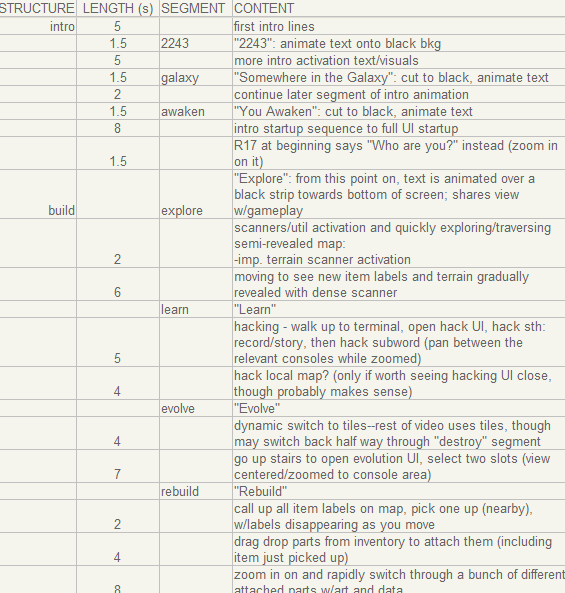
Each segment was added to a spreadsheet-based outline to have an idea of whether the content would fit within a reasonable time frame, and provide an organized reference during recording:
cogmind_trailer_outline_rough

Part of the first draft trailer content outline (unedited!). The format aims to condense Cogmind into a series of segments that can be represented by one or more clips from the game. Most segments of the trailer were changed in some way or another between the first and final versions.

The outline was fairly accurate, and showed that the trailer would be on the long side at nearly two minutes. But no sense fretting about that right away; it would be easier to edit it down after seeing it in action to analyze which portions work and which don’t.

As expected, the first pass felt too slow, so much of the same content was recut into a quick trailer only half as long (60s), with a faster intro in a more instantly gripping cinematic trailer style. But that second approach felt too fast for a game like Cogmind, not to mention it didn’t clearly say as much about the game itself. You can see a rough concept for the alternate intro here.

While a cinematic trailer would be more fun to watch, it might also misrepresent the game or attract the wrong audience, players that could be disappointed with the game for not being what they expected. Certainly a key part of marketing is getting everyone and anyone to watch your trailer, even if doing so takes a trailer that doesn’t specifically say much about your game and how it plays. I’ve seen trailers that are fun, but say almost nothing about the game in question. What a waste of my time. I’d rather steer away from deceptive tactics in favor of using the opportunity to show off as much of what the game is really like as possible.

The trailer should be something I can point to and say “this is Cogmind in a nutshell.”

Another reason for dropping the second intro concept is that its aesthetics look very out of place compared to the rest of the trailer, which is composed entirely of the blocky terminal UI, glyphs, and pixel art. I think the intro we did use, cut directly from the intro of the current alpha version itself, does a good job setting the atmosphere and tone using the same aesthetic style you see in the game.

For the rest of the trailer content, clearly something in between the long and short versions was necessary. So I revisited the first version and shortened each segment by cutting out any static shots and less meaningful content, even managing to throw in some extra clips and still come out a full 30 seconds shorter than the original length.

At 90 seconds Cogmind’s trailer comes in at the longer end of the “acceptable length” spectrum, mostly due to the slow intro. Perhaps not the best way to hook average players, but I think it will work for anyone who might be interested in the genre/style that Cogmind represents… Terminal console! Retro sci-fi! Roguelike!?

I felt the necessity to show a few more scenes than usual because Cogmind’s otherwise minimalist presentation might give the impression that it’s a simple game. I think the final pacing works okay, though, and there’s a pretty natural progression from one element to the next. The trailer clearly follows dramatic structure from the thematic intro through a gradual build to the climax, and is well-supported by music the entire way.

Recording

Recording video clips is (for me) by far the most time-consuming part of trailer production. After deciding the desired recording conditions, there’s looking for and/or setting up those conditions for recording, then redoing a scene again and again until it turns out just right. I keep save game files for each situation in case I needed to revisit them to re-record (I did end up revisiting them all for the final version, as the first time was a quicker rough pass).
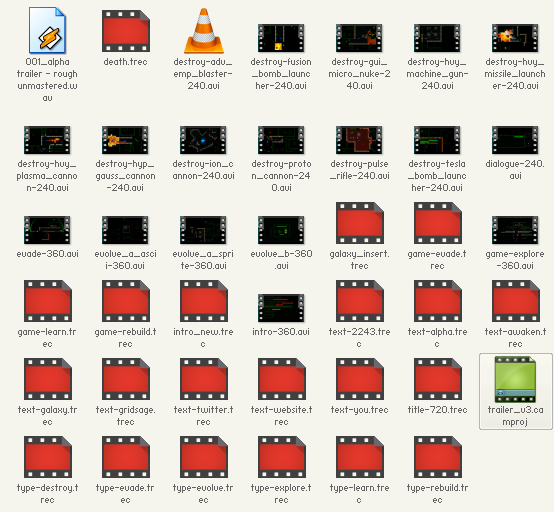
cogmind_trailer_clips

The alpha trailer’s video content. About three times as many clips were recorded in all, but these are all that went into the final version.

Software

It took a while to figure out what software was best suited for the task.

My options were more limited than most games because Cogmind doesn’t explicitly use the video card, eliminating the possibility of recording software supplied by various GPU manufacturers that reads the card directly, or third-party applications such as FRAPS which function in the same manner.

I’d heard good things about OBS, and rather liked how easy it was to record with, so that was my first choice. However, multiple attempts later I couldn’t get it to record Cogmind without any loss of color accuracy, even with supposedly lossless settings. Naturally the final trailer will end up being compressed before it reaches the viewer, but if the clips I record for production purposes already start out looking bad, the final product will suffer for it.
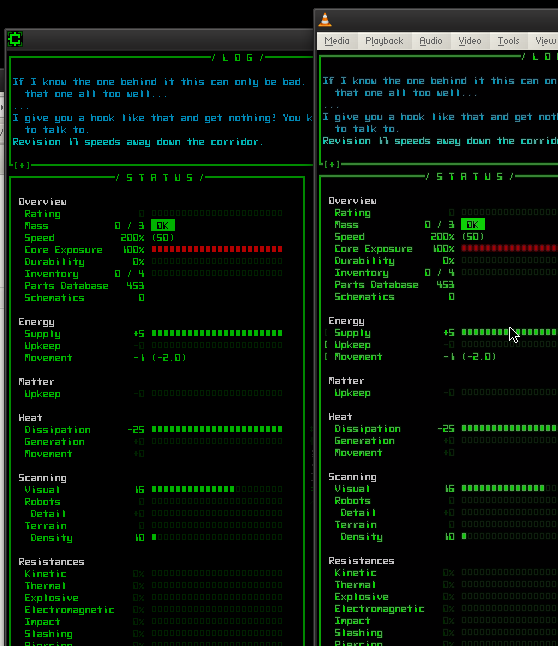
cogmind_recording_game_vs_OBS

The game itself on the left, and an OBS playback of the same scene on the right.

OBS obviously works for some people, but not me. I’m sure it didn’t help that OBS couldn’t rely on my video card and had to record the desktop directly.

So for recording I fell back on my old standby, Camtasia Recorder, which I had used years before and was surprised that it had improved significantly since then (finally…). The good thing is it’s made to record the desktop, and does a great job of it with perfect color and pixel accuracy, all with small output file sizes. I did encounter a couple issues:

  • System audio must be set to output 44.1k, otherwise audio recordings will be distorted. Mine was 48k and it took a while to figure that out.
  • Windows 7 caps desktop recording at 30 fps while Aero is active. Camtasia can be set to temporarily deactivate Aero every time you record a new clip, but it’s a somewhat slow process that would make quickly re-recording clips tedious. I could have also just turned Aero off manually for the duration of recording work, but I figured 30 fps is good enough for Cogmind and YouTube doesn’t usually use 60 fps anyway.

Other than that it’s a pretty nice recorder, and you can specify the exact area to record for cases where it’s smaller than the entire window/screen.

Dimensions

The biggest problem facing ASCII/pixel art recordings is the huge hit on final quality caused by YouTube compression. Compression works okay on “normal” videos in the way it smears/blends pixels, but the effect is hell on detailed 1px-width ASCII surrounded by blackness.
xcomrl_video_capture_720p

A capture from an old X@COM video I recorded looks like this even in 720p HD. High definition!?

The first method of dealing with this is to give YouTube the highest resolution possible so it has more data to refer to in the compression, and also offers viewers with the bandwidth a way to view an outright better quality video. Thus the goal with Cogmind was to upload the trailer in 1440p.

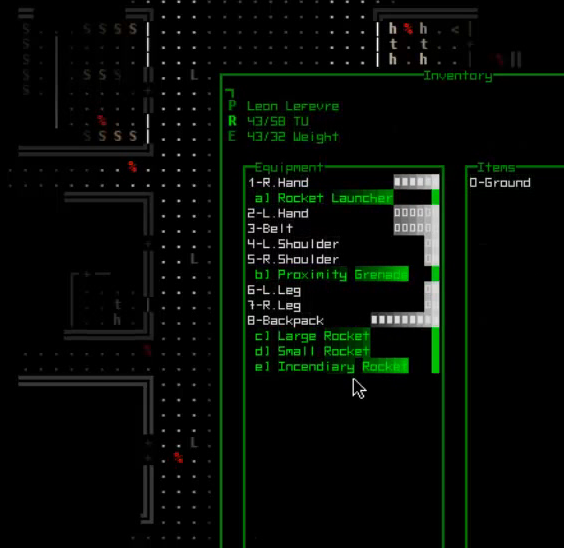
As I only have a 1920×1200 monitor I considered buying a 1440p specifically for recording the trailer, but I was worried my poor laptop wouldn’t be able to handle both running the game at that size and recording it. Not to mention files would be much larger and slower to edit. The alternative was to record the game at 720p to save on processing power (and therefore production time), then upscale the final trailer. Cogmind’s default/native resolution is 720p, so it made sense to record at that size and upscale (more on that in the editing section).

A second even more effective method for recording pixel art is to zoom wherever possible. Zooming increases pixel size so the art is less susceptible to the effects of compression, at the same time helping focus on the action which is probably only occurring on a subset of the full screen anyway. This is especially useful with Cogmind since the full interface can be pretty overwhelming, though you don’t need to be paying attention to the entire thing at once.

Rather than zooming to an arbitrary size, nearly every zoomed shot in the trailer is recorded at either 636×360 or 424×240. These dimensions are precisely divisible into 1272×720, the size of Cogmind’s full 720p window, a factor that will come in handy later on. (Note “720p” actually has a width of 1280, but Cogmind only scales in multiples of its grid dimensions, so a full 720p window leaves 4px black bars on either side--it’s not noticeable, but they’re in the trailer, too.)

Editing

Early on I decided I could speed up production and keep the visuals consistent by using the game engine itself to create as much of the animation and text as possible, rather than relying heavily on post-processing software for transitions and special effects. It did take a little while to both write these scripts and add a place in the game where I could test and record them, but overall it was less of an investment than it would be to learn new software and techniques--obviously I’m already quite familiar with my own engine, so I may as well leverage what I’m good at.

cogmind_trailer_galaxy_text

One of three styles of text animation seen in the trailer.

Minimal editing requirements also meant I could stick to simple software with which I was already familiar: Camtasia Studio. It does have a couple annoying limitations, namely lack of support for relative directory structures within projects, and only one project may be open at once. Aside from these it’s plenty easy to stitch media together, layer and adjust video and audio, and dynamically zoom or pan to different areas.

That said, except where dynamic zooming/panning in a single scene was required (only one instance), I actually avoided using Camtasia to zoom because there’s no way to control the quality. Not that the quality is horrible, but with pixel art the idea is to retain as much clarity as possible at every stage of the recording and editing process.

Every time you convert or resize a video the quality could degrade, so I needed a method to create a very high-quality upscale without side effects like those that ruin ASCII videos due to compression. For this I used nearest neighbor scaling. I found only two programs capable of this, Movavi and Adobe After Effects. Testing showed that the latter produced smoother animations, but the required file sizes were huge and Camtasia chokes on large files. Theoretically I could have produced a higher quality trailer with a faster computer, but not on my dev laptop with this many clips:
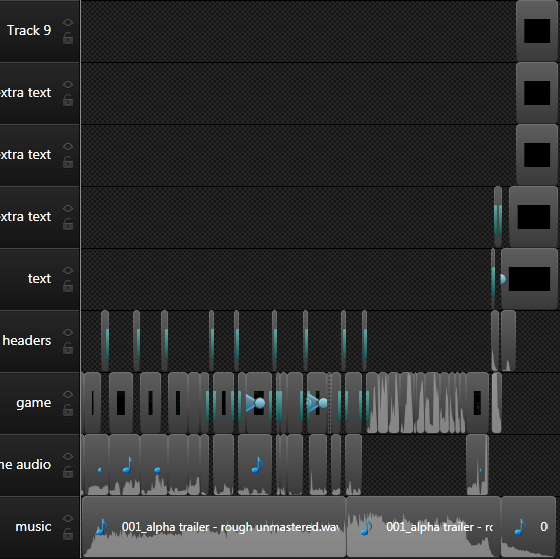
cogmind_trailer_camtasia_timeline

The timeline for Cogmind’s alpha trailer as it neared completion.

So I went with the cheap lightweight solution, Movavi, which can be set to rescale a video in “draft” mode (in video speak this is the equivalent of nearest neighbor scaling).
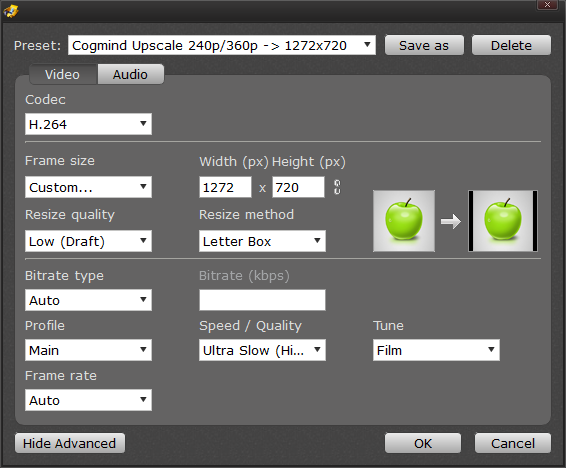
cogmind_alpha_trailer_movavi_scale_settings

My Movavi nearest neighbor upscale settings. Note that audio set to “Auto” outputs AAC, which is not compatible with Camtasia Studio, so I had to change that to PCM.

As mentioned earlier, zoomed scenes were recorded at 360p and 240p, so upscaling them to match the full-size 720p trailer gives pixel-perfect results without any distortion! Never in my life have I been happier that 1272 (Cogmind’s native width) is evenly divisible by 636 and 424. It was convenient to produce both the close-ups used throughout the middle of the trailer, and the really tight shots seen at the end.
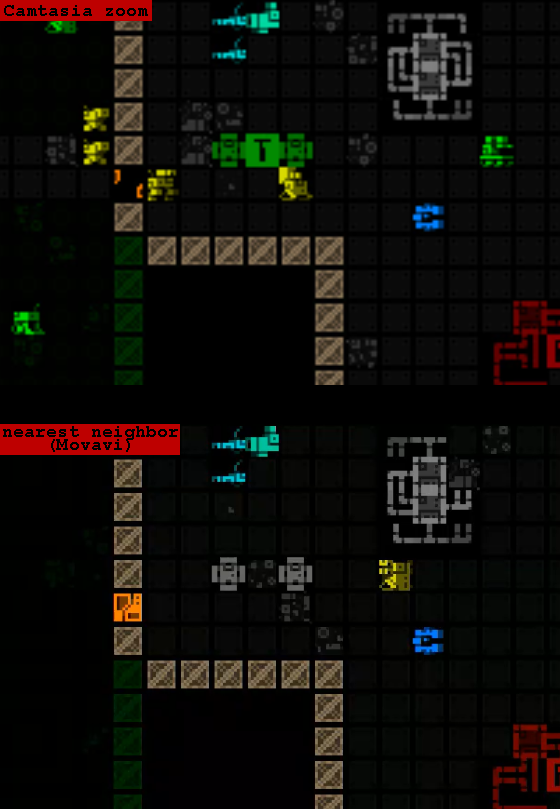
cogmind_trailer_zoom_software_comparison

Look at that beautifully crisp pixel scaling compared to the fuzzy mess of a regular zoom.

Music

As soon as the first pass rough edit was complete I shared it with our trailer composer Alex Yoder to give him some material to work from and get an idea of what direction he planned for the music (before that I’d already provided him with a copy of the game and documents outlining the world and story).

The music is an absolutely essential part of the trailer that really glues it all together, and helps set the mood as much as the visuals. With his initial concept in place, it was just a matter of waiting until the trailer reached its final iteration before he could time the music to match a few crucial points.

Feedback

Early feedback played an important role in shaping the trailer during the editing process. Here I’d like to thank Ben Porter, 0x0961h, Highsight, Matt Chelen, and of course Alex Yoder (composer) and Kacper Woźniak (artist), for watching the trailer in a few iterations and providing constructive feedback that led to real improvements in the final product. Getting feedback from more than one source was great for the different insights and perspectives, while any areas of overlapping criticism were in definite need of change.

Probably the hardest part of getting feedback on a trailer I didn’t want to make available to the general public is that I didn’t have easy access to the most valuable opinions: those from outside the circle of people already quite familiar with Cogmind (which is pretty much everyone who knows me…). I’m sure the trailer could be improved further by gathering reactions from a broader audience, but my marketing department is not quite equipped for that :).

One interesting side effect of the trailer feedback that came from respondents’ girlfriends and wives (including my own) was a change to the title logo shown at the end. Apparently all this time the font reads more like “COGMINO” to the uninitiated, something I’d only heard once before and didn’t really take into consideration until suddenly more and more people brought it up. So half-way through trailer production I redesigned the logo to make the “D” more D-like and even modified the “C” for some symmetry.

cogmind_10x10_animated

A smaller version of the Cogmind title logo, animated.

This required changing the logo throughout the game, blog, websites, and forums… Still, better before launch than after!

Encoding

The first step to finalizing the trailer was to output a lossless AVI from Camtasia (that gave a 7.5 GB file for 90 seconds of video…). But before upscaling to our 1440p target resolution, here I ended up using After Effects for something after all.

Because the colors recorded from the game (especially the intro) were somewhat dark, and that characteristic would be further exaggerated by compression, the entire trailer needed a bit of brightening, something that Camtasia can’t do--it’s pretty bare bones in terms of video enhancement features. After Effects is of course the perfect choice, and fortunately its one-month trial is plenty of time to handle something like this, so I didn’t actually have to own it. I had AE add a global +30 to brightness, then render the same lossless AVI.

The final step was to use Movavi to both upscale the trailer to 1440p (draft/nearest neighbor!) and convert it to a high-quality MP4, which came out to 155 MB. The MP4 file size produced by Movavi was both smaller than its high-quality AVI output and appeared to give the same results when both were uploaded to YouTube, so I stuck with MP4 since it’s a more widely compatible format. (As I discovered when I tried sharing them with others, AVI containers require the right codecs to play so it’s not a great format to rely on.)

I also created a 48 MB 720p MP4 to provide as a smaller option for direct download. (Some people like to download trailers, so I made both HD versions available on the website.)

Finished

And the final trailer (mp4 downloads available here if interested):

Post Mortem

In all it took 135 hours (!) to complete the trailer, totaling an approximate $2k USD investment for audio and production time.* The costs were steep (even more so considering that was time during which I wasn’t working on the game itself), but I think it was well worth it. Producing a mediocre trailer to cap two years of development would be very disappointing to say the least!

(*To be clear, the primary costs were my own time spent on the trailer, and the fact that I hired a professional composer (Alex Yoder) to create a track that fit the mood of the game and timing of the trailer content, rather than tacking on some less than ideal royalty free music found online. I strongly believe that game audio is an incredibly important part of the experience, both in a trailer and within the game itself. You can produce a trailer for much less, and much more quickly, but it depends on the type of game and trailer you want.)

Even after the trailer was complete (production stretched from April 7~27), I still watched it multiple times nearly every day up until launch. It felt so good to see the experience of the game summed up in 90 seconds like that.

On launch day I was happy to finally show everyone the full extent of what I’d been working on as a whole, rather than piecemeal in the form of snapshot blog posts. Public reception was great, and I very much enjoyed reading the feedback. One comment was particularly memorable: “Watched the trailer and immediately said ‘Oh….oh no.’ My wife asked what was wrong. I showed her the trailer and halfway through she said ‘Well you need THAT, it looks like.’ She’s right. I do. Buying post-workday.” —Double_Atari

Below are viewer stats showing the May 19th launch through the end of the month:
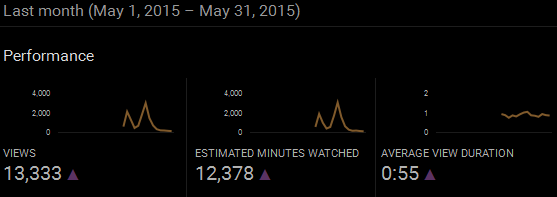
cogmind_alpha_trailer_views_201505

Cogmind alpha trailer view stats (May 2015).

The first spike is launch day, and the second is from a later announcement on RPS. Viewing hours totaled 206 in May alone, so that at least tops what I put into producing the trailer =p.

Relative audience retention was for the most part above average for YouTube videos of similar length:
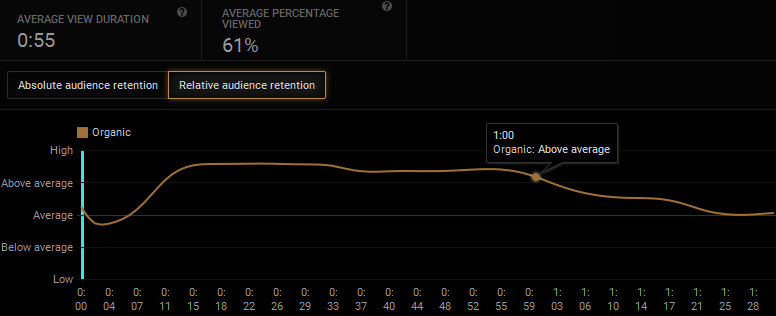
cogmind_alpha_trailer_relative_retention_201505

Cogmind alpha trailer relative audience retention (May 2015).

And by the absolute audience retention graph you can see that even at the one-minute mark we’ve kept approximately two-thirds of viewers watching which is quite good:
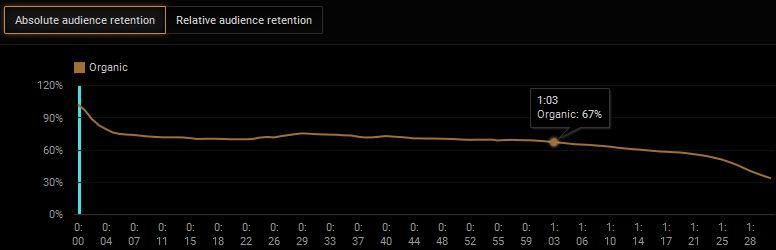
cogmind_alpha_trailer_absolute_retention_201505

Cogmind alpha trailer absolute audience retention (May 2015).

As for the future, I don’t look forward to making another trailer simply because it’s 1) a ton of work, 2) keeps me from working on the game, and 3) the alpha trailer already reflects much of the final experience while also showing as much of the game as I’d ever want to in a video, in order to avoid spoiler content.

It would seem like a better alternative to a future trailer would be shorter and even flashier, and show less gameplay, though as stated I don’t really like that approach, as “sensible” as it is from a marketing standpoint.
Posted in Marketing | Tagged , , , , | 5 Responses

Cogmind Alpha Access LAUNCHED!

Cogmind is here!

Pre-Alpha development has officially come to an end with the release of our first Alpha version over on the website. Thank you for your patience and support through the nearly two years that this blog has been sharing progress updates on the game. It’s been a long journey, and we’re not done yet, but Cogmind has finally reached a state worthy of release as we work towards 1.0 in the open.

Welcome to Alpha!

To introduce you to the awesomeness inside, we’ve put together an epic trailer that you’re going to want to fullscreen and watch in HD for maximum roguelike (wouldn’t hurt to turn up the volume, either =p):

Trailer music by Alex Yoder.

Please help spread the word by sharing the trailer and/or Cogmind site with anyone who might be interested, be they friends and family or online communities. The more support we can rally at this stage, the better the final game will be! Thank you!

Future of the Dev Blog

For those of you who have enjoyed reading about the implementation of Cogmind’s features and roguelike development in general, know that the dev blog will continue to serve that function. Game news updates and release announcements, on the other hand, will be concentrated on the appropriate forum board.

Posted in Release | Tagged , | 23 Responses

Map Composition

Much of the “living dungeon” concept described previously applies to the main complex, and some branches. Roguelikes of significant scope tend to use a combination of map generation techniques, necessary to fill the game world with unique maps appropriate for their respective areas. Different map types are also likely to require different algorithms to populate them with content including inhabitants, objects, events, etc. Thus Cogmind utilizes a network of systems to produce the wide range of maps needed for the world.

cogmind_map_type_composition

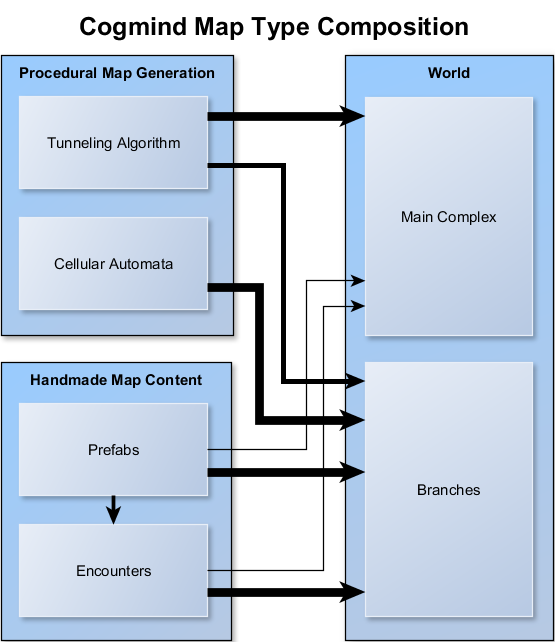
Cogmind map type composition, where thicker arrows represent a heavier relative emphasis on a given system as an input.

In total there are about two dozen types of maps (six of which will be included in the first alpha version). Those belonging to the main complex are generated by the tunneling algorithm, which may draw on a small amount of handmade content in the form of prefabs and encounters. A number of branches are created in the same manner, but a second category of branches, those described earlier as being outside the central AI’s area of direct influence, use an alternative method. As you can see in the diagram above, branches require more work (more inputs).

An explanation of usage scenarios for each of the four primary sources of map generation will help demonstrate how each plays a role in creating individual maps.

Tunneling Algorithm

This is Cogmind’s primary map generator, which I introduced in an in-depth post back before it was complete.

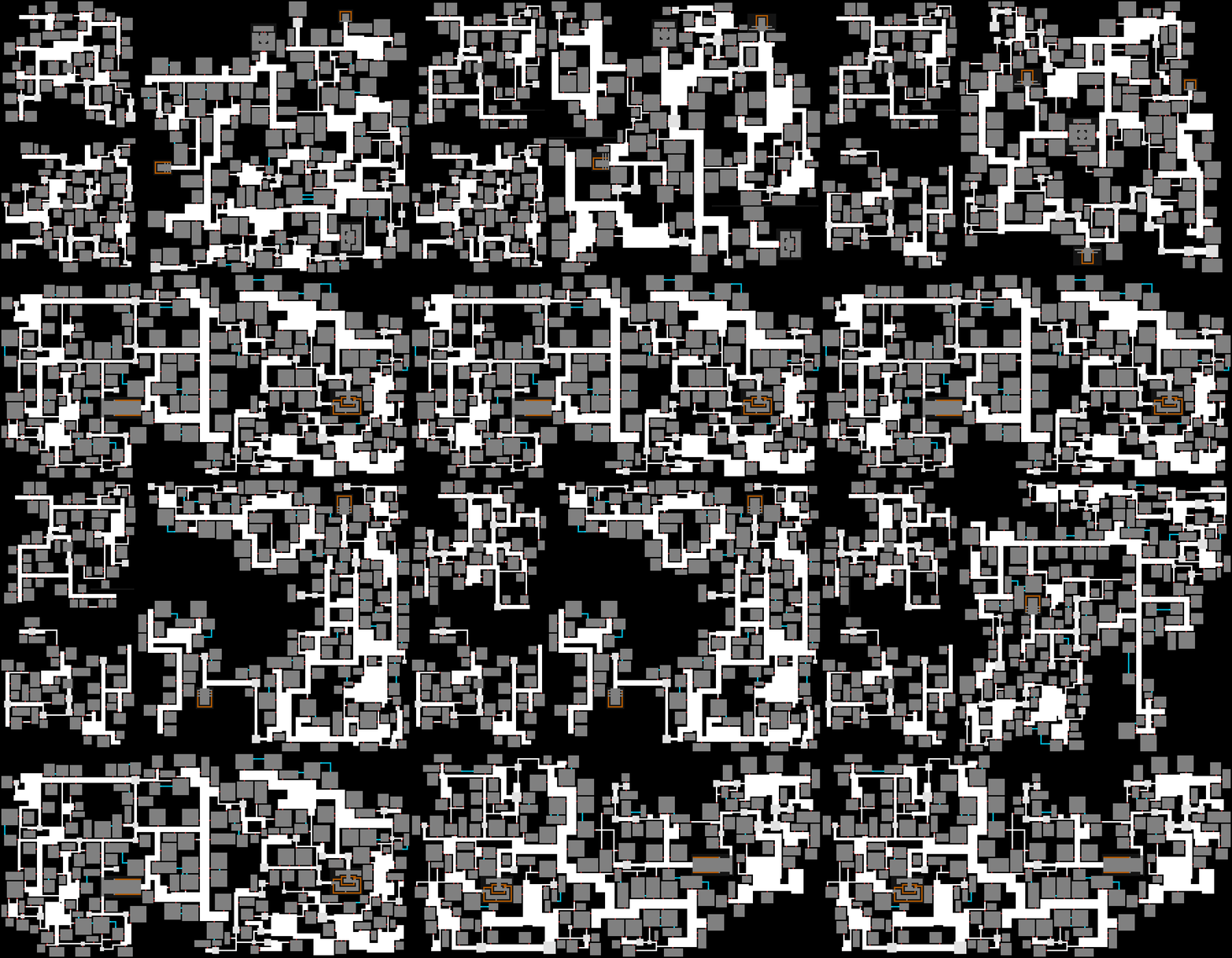
A single algorithm is capable of producing a broad range of unique layouts by adjusting dozens of parameters.

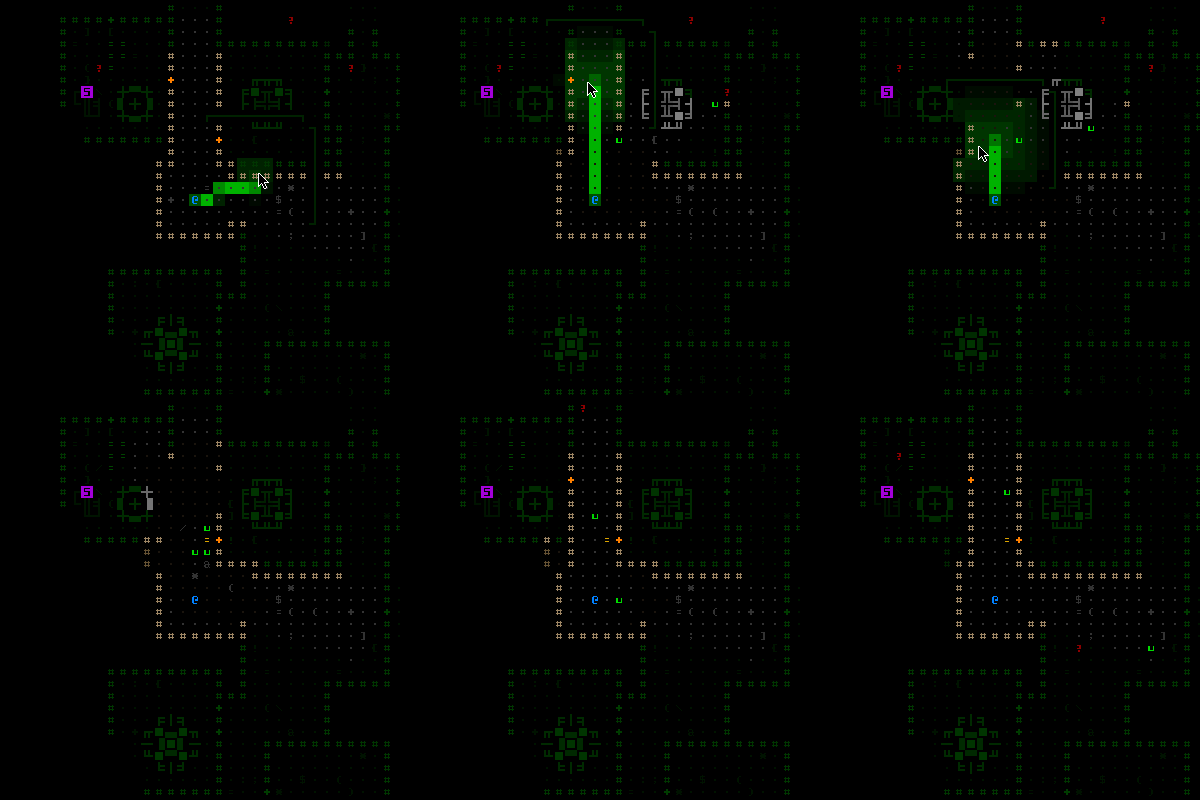
cogmind_mapgen_variety

Some example maps generated for main complex areas (click for full size).

In some cases the differences are subtle when viewed like this, but in play will lead to different experiences (even when we overlook the fact that content will vary between the maps as well). In general it would be out of theme to use wildly different parameters since after all these maps are a part of the same complex.

Shown above is the first stage of map creation, the basic layout as passed from the procedural map generator to the game for content insertion. During the first-stage mapgen process, data about every junction, door, room, and open area is recorded for reference, along with analysis results like a relative seclusion heatmap (see the dungeon metrics post for some related images and explanations). The first stage map generator also comes with a range of visualization tools to examine different aspects of a map’s layout for parameter tweaking--changes can be made to a text file, then press a key and immediately regenerate a map based on new parameters. It takes a while to reach a preferable style, but is still much more efficient than try to tweak in the game itself, where there is a lot more to map generation than just the layout!

Tunneler-generated maps are furnished and populated in game based on a system that weighs random content according to depth and/or map type. This applies to machines and stockpiles (see here and here for methods and diagrams), as well as robots.

These maps make up the bulk of the game world, and are the ones in which the living dungeon really shines.

Cellular Automata

A portion of the branches require a layout very different from what a corridor-and-room tunneling algorithm can provide. For that purpose we also have a modified cellular automata algorithm (see the algorithm’s in-depth introduction for more info and images). Like the tunneling algorithm, it is driven by a variety of parameters capable of producing maps in different styles, though for now there is only one usage found in game: the mines.

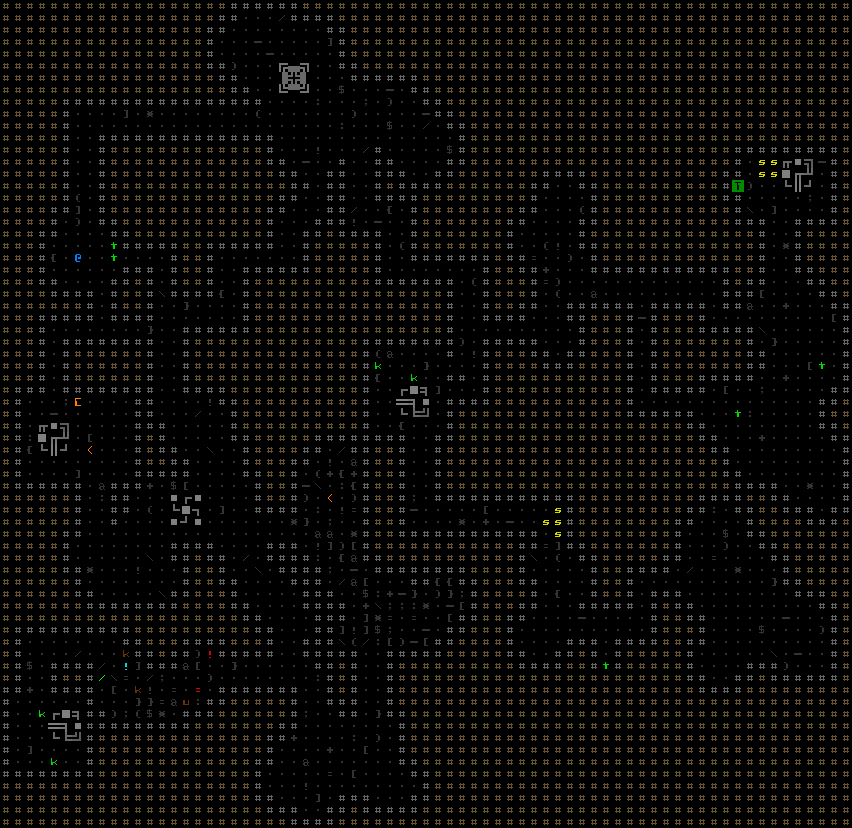
cogmind_mapgen_mine

A fully revealed mine (click for full size).

Because these maps have a fairly different structure compared to tunneler-generated maps (more linear, less branching and looping), they cannot feasibly use the same content distribution system. They are instead populated entirely by so-called “encounters,” which are described in more detail below.

Encounters

Encounters are an additional mechanism through which to add content to tunneler-generated maps, and the only way to add content to automata-generated maps. A single “encounter” can be as simple as a local patrol or stockpile of parts, or something more complex like a story event.

Regardless of map type, the most useful feature of encounters is the ease with which they can be used to add handmade content. Encounters can make use of both pre-drawn map pieces and the powerful scripting system originally developed for X@COM. Thus there are now practically unlimited possibilities for unique map content.

However, taking full advantage of this “anything is possible” scope in the main complex is both unnecessary and would interfere with the living dungeon mechanics, while also making much of the game unpredictable and therefore unreasonably difficult. Instead, the more interesting/unusual encounters are concentrated in branch maps, making those optional areas of the game a playground for the most experienced, curious, or lost players ;).

Encounters have their own weighted distribution scheme, with the option to randomize their content (within parameter bounds) for additional variation. To aid in tweaking encounter frequency values, the system comes with a debugging visualization tool that shows where encounters are placed on a given map in game.

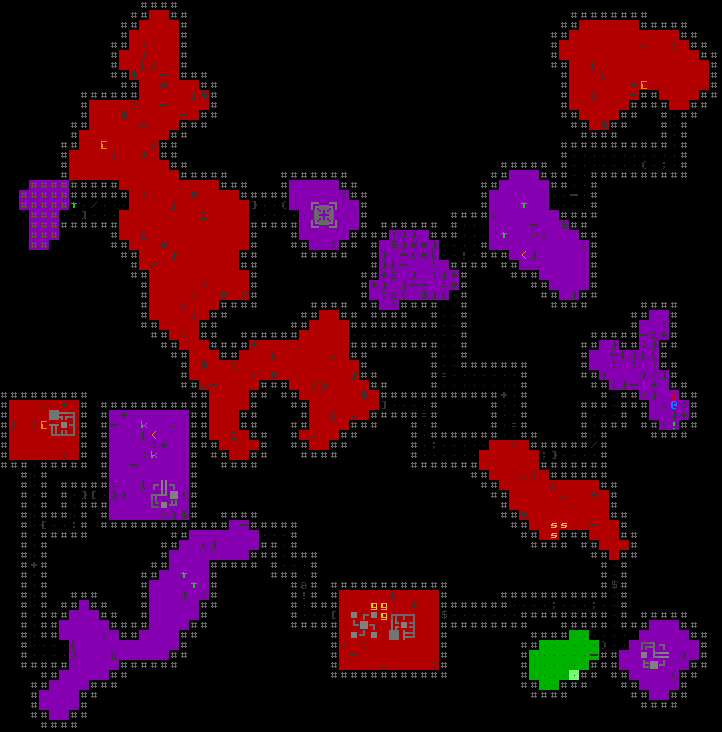
cogmind_mapgen_mine_encounters

A mine with distributed encounter types marked with their associated category color (click for full size).

Encounters are divided into four categories to help visualize how a map could play out:

  • Fluff: Provide atmosphere rather than a mechanical effect on gameplay. A common example would be an area filled with debris.
  • Rewards: Unprotected “free” rewards that can take many forms, components or allies being the most common.
  • Risk vs. Reward: Like rewards, only you’ll probably have to overcome some obstacle to gain that reward.
  • Danger: Outright dangerous encounter with no explicitly defined rewards (though you could theoretically still benefit from salvage). Most often these are simply hostile robots, but the power of encounters can create other interesting situations…

The way in which some of the encounters are implemented might break the otherwise consistent realism that defines the living dungeon, for example a robot could suddenly “emerge from the shadows” in a dark area, though I believe this is a worthwhile sacrifice to enable more interesting and unexpected encounters. Said encounters may be found in some branches to liven up the experience--you won’t see this behavior in the main complex, again reinforcing the idea that the core world areas offer a more traditional roguelike experience while outlying regions contain experimental and less predictable content.

Though not required for content that can dynamically fit any space, encounters may also specify a “prefab” when applicable.

Prefabs

Last year I described how handmade map pieces are drawn in REXPaint and integrated into the map generation process. That was back when the prefab system was first developed, and not yet put to use in game. Those prefabs are now used for two things: encounters and special entrances/exits. The latter are integrated directly into both map generation algorithms, while encounter prefabs can be dropped into an existing room or “cave” (a single room-area in an automata-generated map).

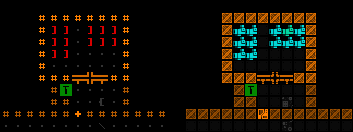
cogmind_mapgen_storage_prefab

One of many storage area layouts (shown in both ASCII and tiles versions). Now that is a room you want access to! (Then you’ll want to figure out a way to simultaneously equip 12 grenade launchers =p)

Like encounters, prefabs can randomly change their orientation and shift their position (it’s often even necessary to face and link to a door!).

As you can see, all sources of map data are procedural in nature, or support randomization in terms of where and what is injected into the maps. Every run is sure to be unique.

Update 3/16/2016: I’ve since written Generating and Populating Caves, demonstrating how prefabs are integrated with cave maps as part of the post-generation process.

Update 1/11/2017: And the newer Map Prefabs, in Depth covers prefab integration in room-and-corridor style maps, as well as the elements that go into constructing an individual prefab itself.

Posted in Design | Tagged , , , , , , , | 6 Responses

The Living Dungeon

Having introduced the world of Cogmind from a macro perspective, we now zoom in on the anatomy of individual floors.

In a majority of roguelikes, the content of a given dungeon map is unchanging, and individual encounters on that map play out in relative isolation. When you arrive there are X number of enemies in the area, you encounter an enemy and fight, then another somewhere else, or maybe flee and end up fighting two different enemies together. The overall dungeon experience can be described as a series of encounters where the frequency of enemies (or loot) determines the pacing, and in-between periods are used for resting up or dispatching minor “filler” enemies. Moreover, these enemies might simply wait around for the player to arrive, or perhaps wander around with no particular goal. This is a pretty lifeless world, but is perhaps an apt description of what we could call “pure roguelikes,” which reduce the roguelike formula to its tactical decision-making core. It’s little surprise that pure roguelikes have no need for story elements, as the role-playing emerges entirely from events that play out as a result of player decisions on exploration, leveling, and combat. Yet the consequences of your actions don’t last beyond the effects on your character or equipment.

Why not make dungeons a bit more dynamic? What if the contents of a map could change depending on your actions there? What if your actions there could lead to changes on other maps? Doing these things leads to deeper gameplay without sacrificing anything that defines a roguelike.

Cogmind does these things.

It’s Alive!

As suggested before, Cogmind’s world is composed of areas which are “more than just a dungeon” (see bottom of this post for some background). Cogmind is not a sandbox game by any measure, but it does handle map content very differently from other non-sandbox roguelikes. Instead of random enemies just sitting/wandering around waiting for the player to come fight them, each robot has a place in a simplified but meaningful ecosystem.

They are actually dynamic parts of a larger community in which each each individual has their own purpose and job. Not only does seeing them carrying out their tasks make the world feel more alive, you can even “become a part of their job” in many ways. Obviously combat robots will attack you when you’re deemed a threat, but you’ll also be sharing the corridors with many robots that aren’t out to do you harm, instead reacting to your actions indirectly as per their routine.

cogmind_noncombat_engineers

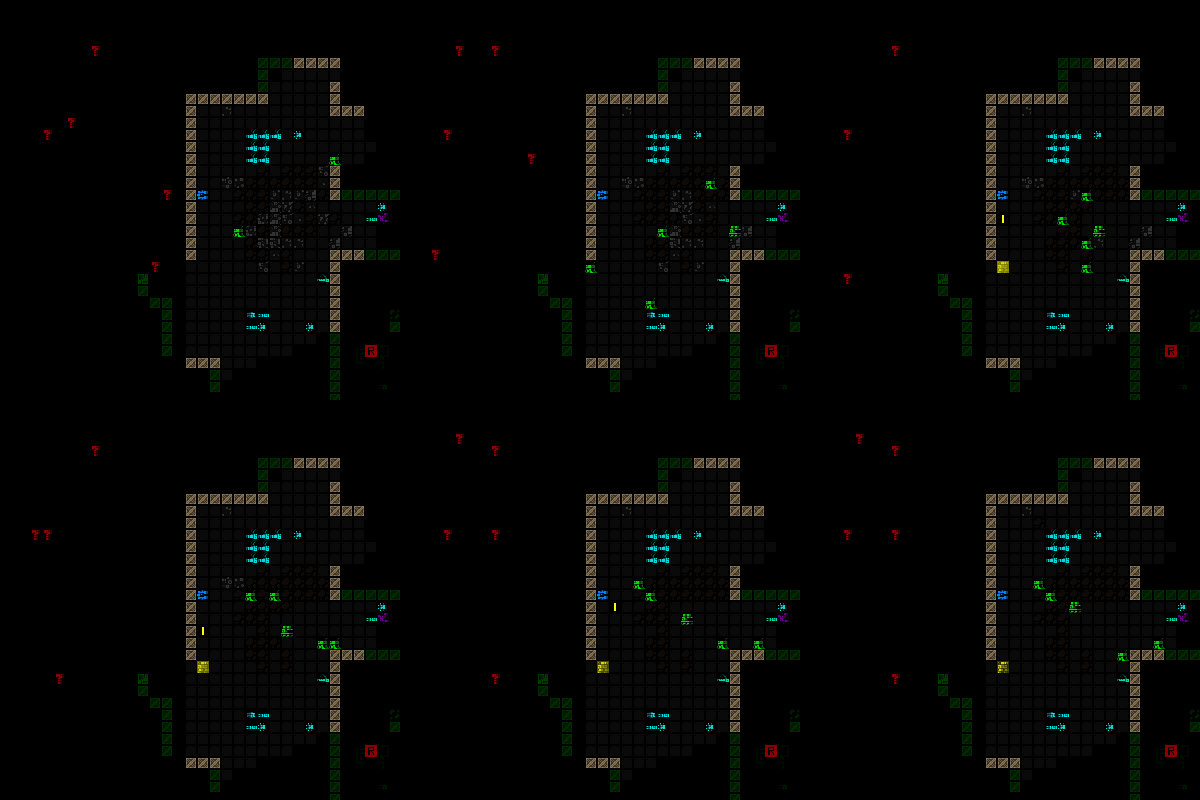
Engineers rebuild floors, walls and doors destroyed by yourself or other robots.


cogmind_noncombat_workers

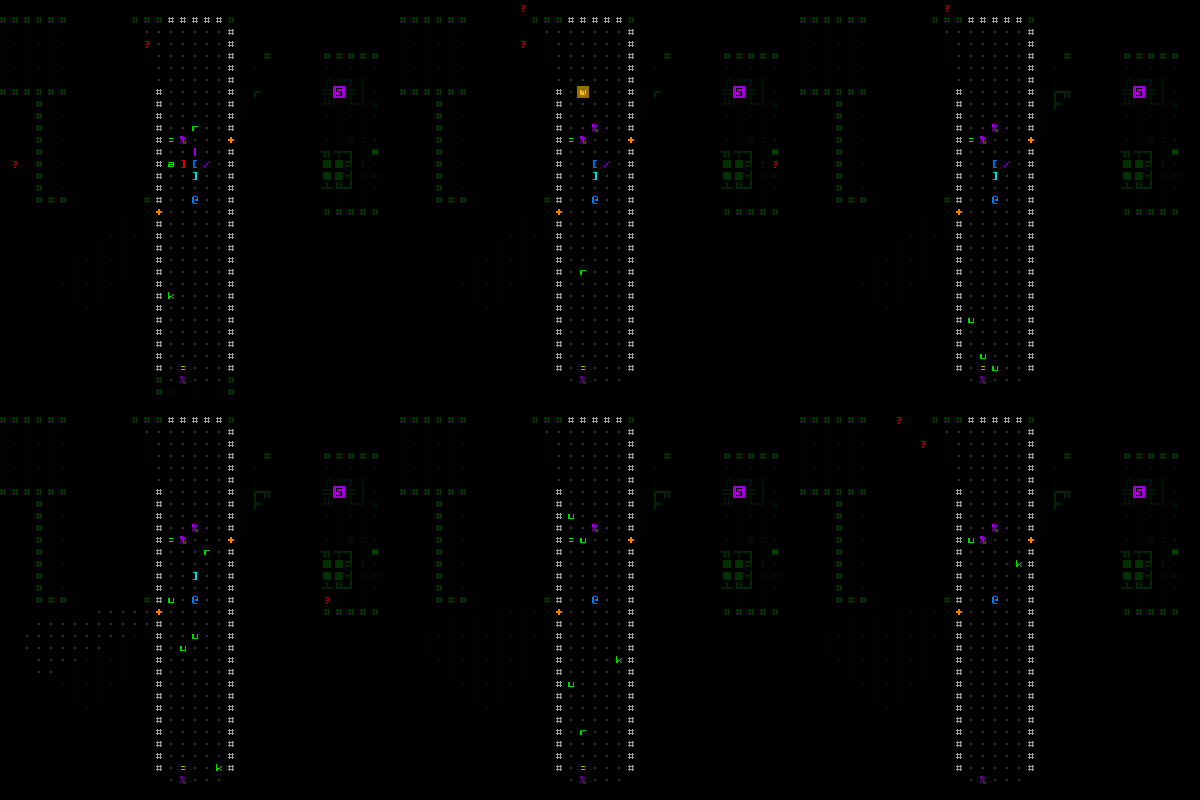
Workers clean up debris, here from a destroyed machine.


cogmind_noncombat_recyclers

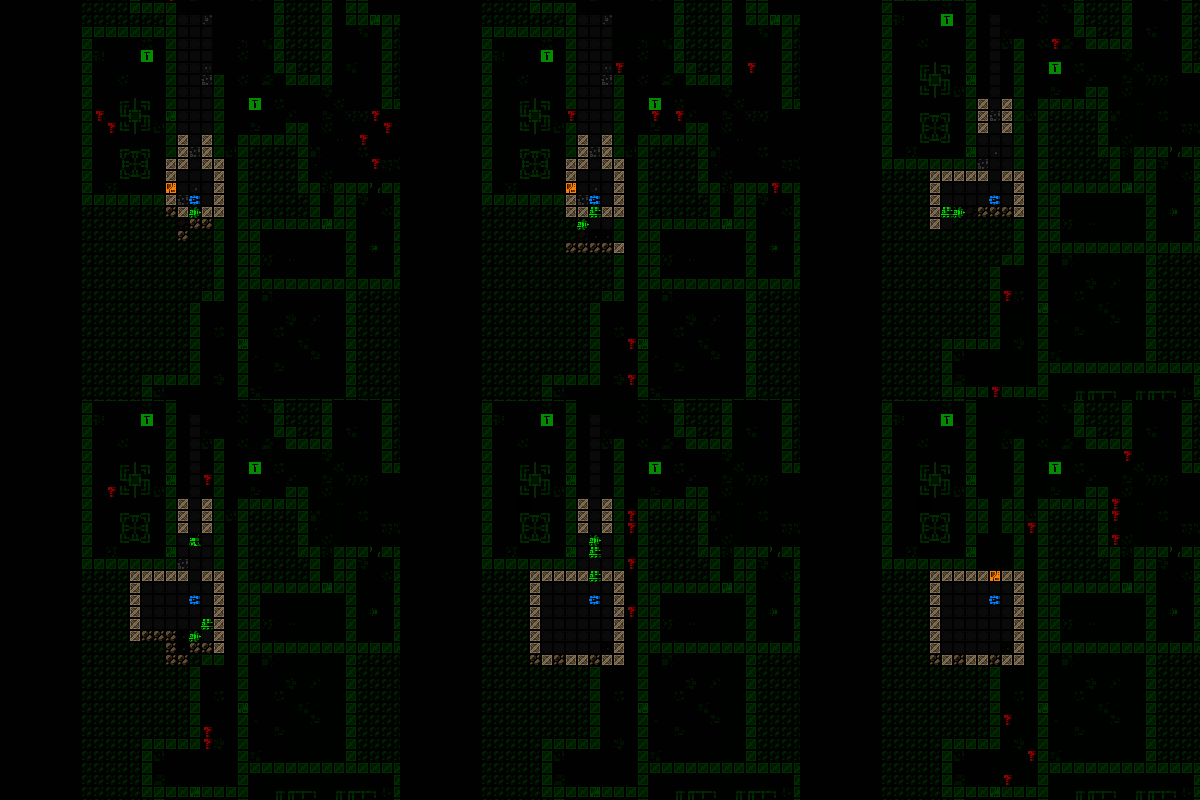
Recyclers collect damaged and surplus components for breakdown.


cogmind_noncombat_tunnelers

Tunneler digging out a new room, and engineers adding walls, floors, and a door on the way out. (They apparently decided not to finish a bit of the south wall…)

This is one of the more immediately obvious unique aspects of Cogmind maps, seeing lots of these green robots going about their business. Some might annoy you, but a resourceful Cogmind will find multiple ways that these non-combat robots can be of use under the right circumstances!

There are additional types of non-combat robots in the game--those listed above happen to be some examples which were already introduced in the public prototype (though all have since undergone some behavioral and capability upgrades). You can discover the rest in game.

Reverse Dungeon Keeper

Cogmind is kind of like Dungeon Keeper in reverse. That almost makes it sound like a normal roguelike, but there’s more to the analogy than that.

We have both the “robot ecosystem” outlined above, as well as an actual overarching AI controlling the community’s reaction to your presence and actions on a larger scale. You not only have to think about your interactions (combat or otherwise) on an individual robot-to-robot level, but in many cases must also consider the repercussions of your decisions further down the road.

Depending on the circumstances, your unauthorized or hostile actions will be reported, and you will be hunted, or cause enough mayhem and invite a robot army to converge on your position. Thus a particular map’s inhabitants are not entirely static. Robots will come and go, and you can even hijack this system via hacking to instruct certain robots to leave the map, or perhaps ask for a shipment of goodies to your location :D.

Completionists might be annoyed that “clearing” a map is next to impossible. The central AI will continue to dispatch units for various purposes, be they maintenance bots necessary to keep the zone running within parameters, or combat-capable bots to deal with troublemakers.

That said, there are areas outside the central AI’s sphere of influence, which is the difference between the main complex and some of the branches as distinguished in the previous post about the world layout. We’ll talk about the gameplay implications further down.

Rules Access

An important question with regard to these “hidden mechanics” is how the player learns about them. Cogmind is not a black box, which would make for poor roguelike design given that the average player cares about details and having enough knowledge necessary to make informed decisions. There are secrets, for sure, but those belong to the realm of content rather than mechanics.

Basic mechanics are explained via the in-game manual and context help, but there is no such direct system for learning about the central AI. That is accomplished as part of a separate learning process for which there are multiple channels to obtain information contributing to an overall understanding of how it works.

At the simplest level there are a handful of intercepted log messages (global “alerts”) that indicate when the central AI is doing something significant.

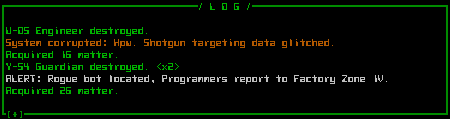
cogmind_log_alert_programmers

Probably the most dreaded message you’d see in your log while playing the prototype. There are now worse messages, so stay on your toes ;).

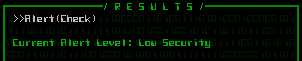
Learning about the AI also ties into information warfare (also here) in several ways, as sensors will enable you to observe enemy movements from afar, and terminals can be hacked for a large amount of relevant information or even control over the system. The most important terminal hack for figuring out the state of the central AI would be “Alert(Check),” which retrieves the current alert level for the local area.

cogmind_hacking_result_alert_check

Retrieving the current alert level, which can range from “low security” to 1 to 5.

If the alert level is on the rise, you might want to think twice before starting a firefight around a large array of explosive reactors--those chain reactions can really piss them off!

For those hidden mechanics difficult to figure out purely through observation, non-immersion-breaking NPCs found in certain areas will provide hints or direct advice. (Those areas have not yet been added to the game.) (Update: In the years since this original article, numerous maps, factions, NPCs, and plotlines have been added to the world.)

Posted in Design, Game Overview | Tagged , , | 6 Responses

A World of Robots

In the previous post we discussed many of the traditional vs. unique characteristics of Cogmind, but one area was just too big to not cover on its own: the makeup of the world itself. For over a year on this blog we’ve demonstrated individual mechanics and features, along with how those fit into a bigger picture. Here for the first time I’d like to look at the biggest picture possible with an introduction to the world of Cogmind from a macro perspective.

Setting

If you played and remember the Cogmind prototype (7DRL), you probably don’t remember the story.

We can’t fault your memory, because there wasn’t much of a story to remember--a single sentence in your message log towards the beginning indicates you’ve “escaped from the scrapyard,” and from there it’s just fleeing and shooting robots. If you manage to beat the prototype there is a tiny bit more text, but other than that no greater setting or actors are provided to flesh out the backstory. The website and manual offered slightly more in the form of a paragraph of generic sci-fi material, which still falls into the “excuse to throw some mechanics together” category occupied by many story-light roguelikes.

Things are very different now.

The final version will contain a complete world with NPCs to meet, lore to discover, and secrets to uncover, all while enabling you to become a part of unfolding events and help shape their outcome (if you wish to). A future post will be dedicated to exploring the story of aspect of the game, which in the alpha version initially only exists as in-game lore--the semi-interactive parts will be coming later.

This post focuses on the world in which that story takes place, though only in a general sense because gradually learning the details through play is part of the fun.

For now I’ll say the story of Cogmind takes place in our galaxy (though not on Earth), a couple centuries in the future. Your part of the story is played out underground on a single planet, but the whos, whats, and whys are for you to figure out.

Update 161110: More than a year later, Cogmind’s story elements are nearing completion, and I’ve put together a series of articles beginning here that cover the value, characteristics, and methods for incorporating story into a procedural game. No spoilers, but lots of observations and principles :)

Layout

As in the prototype, you start at the bottom of a subterranean complex and are attempting to reach the surface. However, we now have multiple crisscrossing routes leading to that destination.

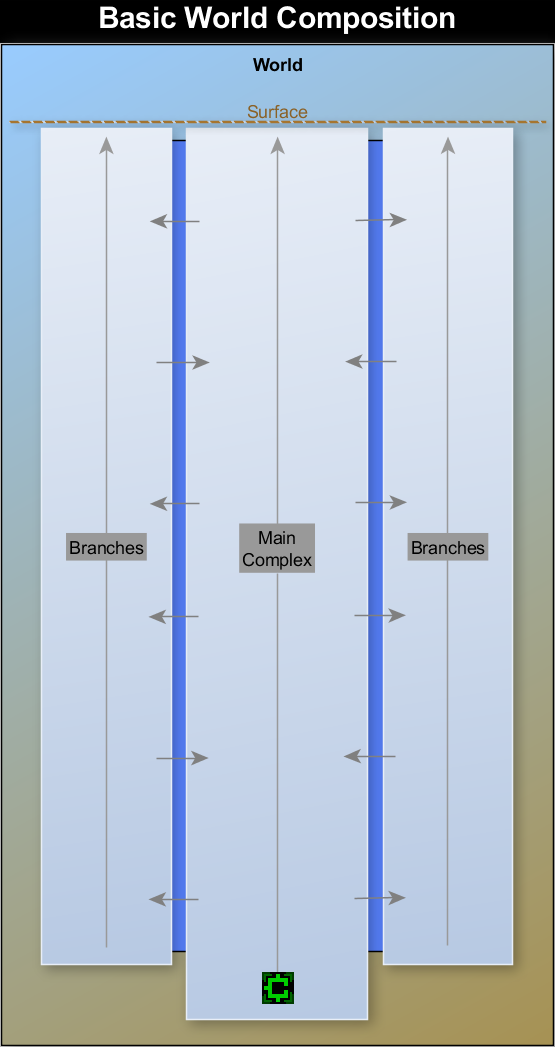
In terms of both content and play experience, the world can be divided into two distinct types of areas: main zones and branches. The main zones link together to form a straight shot from start to finish, while it’s also possible to move between those and outlying branches wherever you find the right access points.

cogmind_world_composition

A simplified breakdown of Cogmind’s subterranean world. (Note: The first alpha version includes the entire main complex and two early branches; the many remaining branches are still under construction, to be added over the next 5-6 months. Thus it currently includes much of the “core game,” while the planned additional content will turn it into the epic adventure prescribed by the design doc.)

So why bother taking branches if you can go straight to the end? After all, Cogmind has no XP system so the need to seek out additional areas in which to grind, a common impetus for travel and exploration in RPGs, does not apply.

The route you take will actually depend on a rather large number of factors.

You can in fact take the direct path straight to the end--the straight run is a perfectly valid way to win, and usually the fastest. For an experienced player, the biggest advantage there is a more predictable environment, an idea you’ll better understand with the next two posts introducing the central AI and examining the anatomy of individual floors.

While branches are completely optional, there are numerous reasons you may end up visiting them, primarily to:

  • Escape pursuit
  • Explore the story
  • Acquire better/special components and allies
  • Challenge yourself

By design, there is a somewhat greater chance that you’ll discover exits leading to branches before those that enable you to ascend to the next depth. Thus you may sometimes decide (or be forced) to take these exits first in order to evade dangerous pursuers, possible because pursuers will not chase you to other areas--there is an implied “you made it into inter-zone tunnel networks and lost them.”

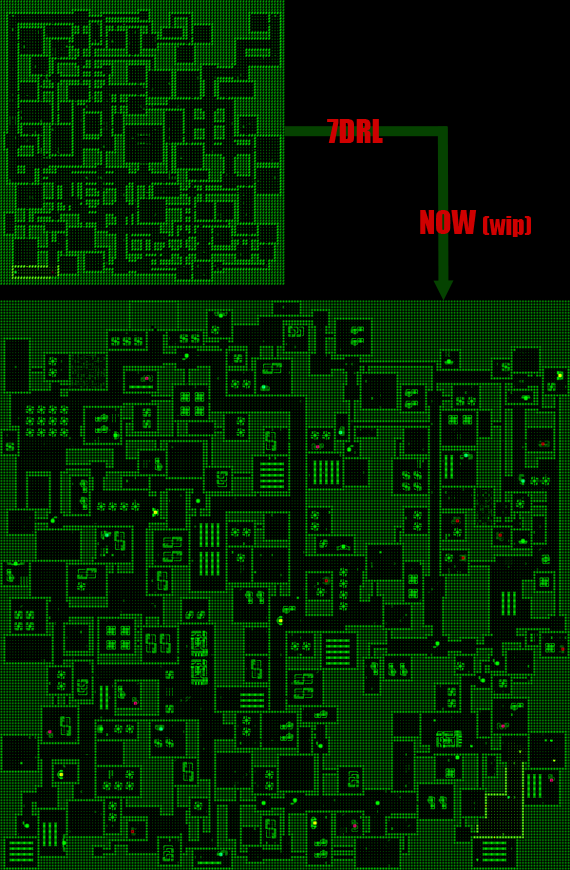
In turning the prototype into a full game, to provide more room for content I expanded the world horizontally rather than vertically. This is seen with both the addition of branches, and the fact that many main complex maps are much larger than before. Last year I showed an image which appropriately demonstrates the evolution:

cogmind_factory_evolution

A sample main complex factory floor, 2012 vs. 2014.

The significant increase in scale means it is now more difficult to reach or happen across normal map exits (though there are now additional means of getting your bearings via hacking etc.), and therefore a greater chance that due to poor choices (or just bad luck), you may at various points find yourself in a bind and end up taking advantage of alternative routes offered by branches.

Branches are useful as more than simple escape routes though, especially if you discover their entrances early enough to warrant intentionally taking a detour. From a mechanical standpoint, some branches give access to special parts not found elsewhere--all the best components in the game are only available via branches. In the same way, some branches might also be a source of allies, help of the kind you’ll rarely encounter in the main complex.

In both cases it will take practice and experience to figure out what’s out there, how to get it, and whether it’s worth going out of your way to get. I can say that some of the additional branches will provide helpful means for tackling the late game, most importantly the alternate endings.

Said alternate endings themselves are in fact only accessible outside the main complex, and in this we see another important aspect of the branches: story elements. Pretty much all of the story, aside from lore you can access via terminals, is told throughout the branches. While you’ll be able to learn about what’s going on during your travels through the main complex, that area is more similar to the traditional mechanics-focused roguelike experience. The vast majority of opportunities to engage and affect the story exist off the main path.

As such, branch areas are built differently than the main complex, designed with a possibility for interesting semi-random (and therefore less predictable) events. I’ll talk more about this in the next post.

Regardless of part-, ally- or story-related benefits, visiting more branches is also an optional way to challenge yourself, and will help achieve a higher final score.

As you can see, branches have a lot to offer. That said, you won’t be able to completely avoid the main complex. Branches will eventually force you back into the main complex at some point, and you’ll have to find another branch exit to leave again.

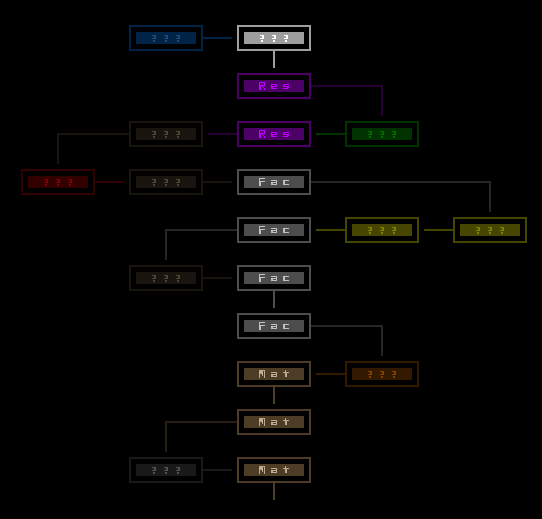
For a demonstration of a rather long path through the world, see the image below:

cogmind_sample_world_map

A sample path through the world of Cogmind (remember, you start from the bottom and move upward).

Note that this is just a mockup--the world map is one of the final remaining UI elements to implement, so there’s no way to access it in game yet. It will look something like that, and include animation. (Update: You can see the world map in action here, and a sample world layout in this later article.)

The map is only revealed gradually as you traverse it, with question marks standing in for names of areas you haven’t officially identified. You as a player will learn to rely on meta knowledge to know where you are, but in game the names of local and neighboring regions are only discovered via hacking. For the mockup above I’ve made the three main complex areas known, “Materials,” “Factory,” and “Research,” as these are unchanged from the prototype.

Have fun discovering the other maps! There are plenty more not shown, though again the alpha will initially only include two early-game branch types. This is both to demonstrate what branches will be like, and to ensure there is enough interesting early-game content for those of you who, um, spend a lot of time in the early game ;). Other maps are coming, though you’ll have your hands full with the existing large mid/late-game main complex maps since for now they’re balanced on the hard side until we get more alternative routes in there.

Access Points

Access to different maps/areas is via one of two types of exits: “stair exits” take you up to the next depth (and by extension the next main complex map), while “door exits” lead to branches. Collectively these are simply called “access points.”

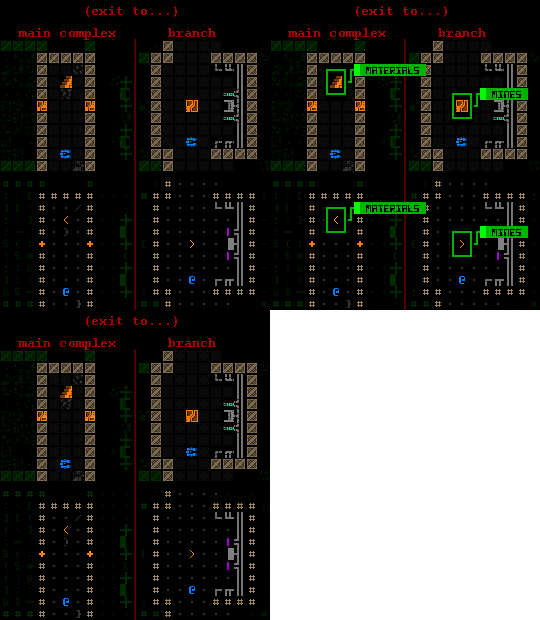
In ASCII, exits to main complex areas are depicted using the traditional ‘<‘, while exits to branches use ‘>’. In tiles mode, the two are represented by stairs and a special door, respectively.

cogmind_exit_types

Cogmind map exit type representations (known).

The destination of a given exit, as demonstrated above with their labels showing, is only shown if you’ve already used hacking to discover where they lead, otherwise both types appear as stair exits and you can’t differentiate the two (labels will simply read “???”). So taking an unidentified exit could lead you on an unintended detour, a risk you can either accept or avoid by hacking terminals to figure out which direction is which.

There are sometimes other clues that enable experienced players to discern where an exit leads without hacking. Certain branch exits may appear with a unique recognizable layout.

cogmind_mine_entrance

You can’t fool me with those stairs, it’s all too obvious this leads to the mines.

Progression

A key design element I’ve yet to explain here, one without which might leave you confused, is that there is no backtracking in Cogmind. You can’t simply step back through a door and return to the previous area--advancing to a new map is a permanent move.

You are technically being pursued through hostile territory, and by the time you leave an area your presence there has been noted and retracing your steps would be too dangerous. That and the idea is you’ve covered quite some ground between leaving the previous map and entering the new one, which is why you’re suddenly a good bit safer after coming out the other side of an exit.

Earlier I mentioned the game’s emphasis of horizontal over vertical depth. Regarding layout, we can see that the quickest path through the game traverses only ten maps, while taking branches could easily lengthen the game to twice that or more. Combine this with the lack of backtracking and you’ll find that it’s impossible to visit every location in a single play. This provides us with greater replayability, though that is not the purpose here--we get plenty of replayability via procedurally generated content! Instead it forces an experienced player to make decisions that give up one potential benefit for another, sort of like choosing which of many parts to carry along, only on a much larger scale.

Another reason worth designing away excess vertical progression is that we assume each new depth should provide us with increasingly powerful components and robots to avoid seeming too repetitive. While the game does in fact use this kind of progression, the level range is small enough that each can introduce truly unique content rather than an endless supply of rehashed items with modifiers (+1, +2, +5, +10, +25, +50…+1000…). Cogmind focuses on mechanical differences and only a mild power curve--it’s linear and by the numbers indicates that the average late-game components are in a lot of cases only three to four times as effective as those found at the beginning. With a little luck an early-game robot could even fairly quickly take down a mid-game robot.

The design does not migrate completely away from vertical progression (of item stats) because there is something to be said for that “I found another cool, better thing!” feeling, though as a compromise said progression is often combined with some extra meaningful benefit.

So we’ve established that you will likely end up taking some branches to either side of the main complex, either by choice or by force, but at the same time the game does a lot to push you upward. This is accomplished by the strictest limitation of all: Cogmind’s core integrity. Damage to the core cannot be repaired, and is only restored each time you evolve when moving closer to the surface. (The reason for this is part of the story.) Some players didn’t like that about the 7DRL version and insisted on a way to repair yourself, but this is really a core feature of the game, without which much of the design falls apart. Depending on strategy and performance, in some cases you won’t have the endurance or loadout to travel through branches at a given depth before you have to ascend towards the surface in order to evolve (very important when the alternative is permadeath!). For the same reason, you also can’t spend too much time on a single map since you’ll lose the war of attrition against a relentless enemy war machine. Read more about this and Cogmind’s other “food clock”-like mechanics here.

Evolution

In Cogmind you don’t have a lot of your own stats to increase over time, nor do you need many. There is no character generation process through which the player can say “this is my character.” Most capabilities are instead bestowed directly by the components you choose to attach, and personal (if temporary) differentiation happens at play time.

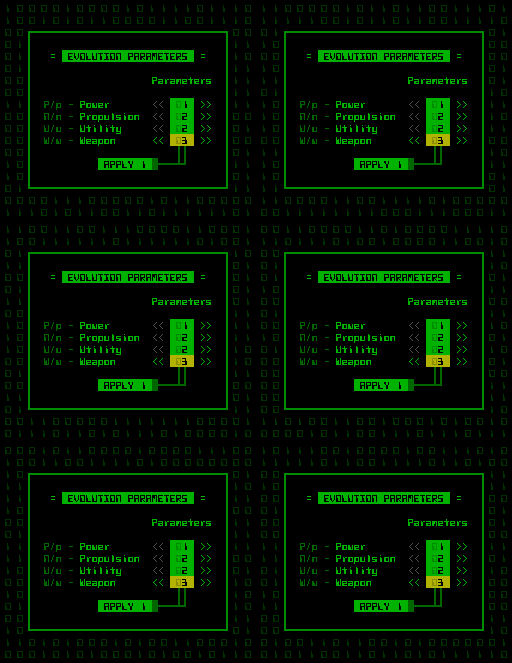
Those few base stats you do possess increase automatically each time you evolve on ascending to a new depth, and they do so at the same rate each game (i.e. they are not randomized). Core integrity and heat dissipation rise in small amounts, while the only other, and certainly most important, “stat” is the number of slots of each type to add during evolution.

Thus even if you take an unidentified stairway out of an area, it will be obvious if you are actually ascending to another depth (and therefore a main complex map), since it will allow you to select your new slots instead of going straight into a new area (branch).

cogmind_evolve_slot_select

Slot type selection interface during inter-depth evolution.

Combat Optional

Overall the route you take each game will largely be a factor of chance and strategy, both at the macro level (is the ultimate goal a high score? a certain ending? a specific achievement?) and the micro level (i.e. your preferred build and what components you find or manage to steal).

Without a need to grind to advance, you really are just looking for the exit(s) on each floor. As you’d assume the best way to achieve this is to be as sneaky as possible (except when you can’t :D).

Personally I believe Cogmind’s mechanics offer the best roguelike integration of stealth into a game that can just as well be about all-out open combat. This is important because the most successful strategies will likely be a stealth-combat hybrid, which in turn affects your route through the world. For example, after failure to avoid being spotted in a particularly dangerous area, you may decide that that fighting your way through an approaching army to get to a better exit is not worth the risk compared to taking a less desirable but unguarded exit you passed earlier.

It can also take a little while to acquire proper stealth gear (and is easier to lose it to intense firefights), so runs will often fluctuate between death-mobile and ninja-bot, simply by necessity and circumstance.

Posted in Design, Game Overview | Tagged , | 11 Responses