Official development blog
[ Latest Cogmind Release Notes: Feb 2026, "Unchained More" ]

Multi-tile Robots

One thing you don’t see in a lot of traditional grid-based roguelikes is multi-tile units. Most such games are designed on the “one space, one entity” principle (though X@COM has had multi-tile units for a couple years).

This makes things simpler from both a tactical and implementation perspective, but somewhat reduces realism when your fighter ‘@’ is up against a dragon ‘D’ that should be many times your size, but isn’t and can squeeze through any corridor you can. Or in the case of Cogmind, you’re fighting (or more likely running from) a Behemoth class robot which, aside from being a capital letter ‘B’, is still not all that huge compared to a little Swarmer class ‘s’.

For the 7DRL prototype, multi-tile units were removed from the engine to avoid complications from a feature that wouldn’t see much use given limited development time.

Now I’ve added them back because they’ll be fun and further improve variety.

This of course re-introduces level design issues that uniform unit sizes manage to avoid, but large units will be fairly rare so it isn’t a problem, and the rarity serves to further enhance their “wow-factor.”

In ASCII mode large units simply repeat their symbol across their area:
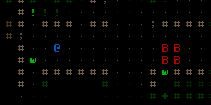
Cogmind Multi-tile Robot

Right now you’re not thinking “wow”, but you will when you know what that thing is armed with as you consider the nearest path down which it can’t follow you!
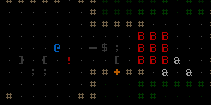
Cogmind Multi-tile Robot (3x3)

Larger than 2×2 is possible, but robots that big would need their own special area to make sure they didn’t have to smash through walls to get where they’re going.

Large units are also compatible with sprite mode:
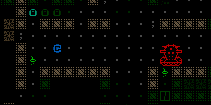
Cogmind Multi-tile Robot (sprite)

Wanted: Pixel artist.

So the days of tiny Behemoths is over. Another candidate for largification is the optional end boss. (I say “optional” because Cogmind should technically be winnable by stealthily avoiding as many enemies as possible, including the end boss.)

Next: Time to spruce up the environment with some “furnishings” appropriate for a world of robots.

Update 200407: Since this post I’ve written a lengthy article describing technical and design issues associated with having creatures that occupy multiple cells in the grid-based world of a roguelike, with solutions.
Posted in Mechanics | Tagged , , | 4 Responses

Options

If a game has more than one player, there will always be more than one play style and set of needs. In game development it’s generally good practice to make features customizable if possible [without breaking or ruining something], and to add optional features that aid usability for those that need or want them.

I enjoy making players happy, so I enjoy implementing options.

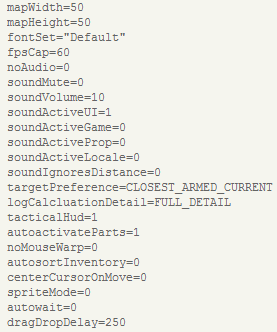
A lot of the options found in the 7DRL prototype were added by player request, and now all those options can be seen in a text-based config file.

Cogmind Config

Cogmind.cfg: All these can be changed via in-game commands, except for map view dimensions. Still  to implement: In-game options menu with descriptions.

An important new option on the list is one of the best yet: Adjustable map dimensions--you can now increase the viewable map area instead of using the static 80×60 console!

The minimum map size is still the default 50×50, but if you have a large monitor or use a smaller font size and want to see more of the map at once without scrolling around, just increase the width and/or height (the map view doesn’t have to be square).

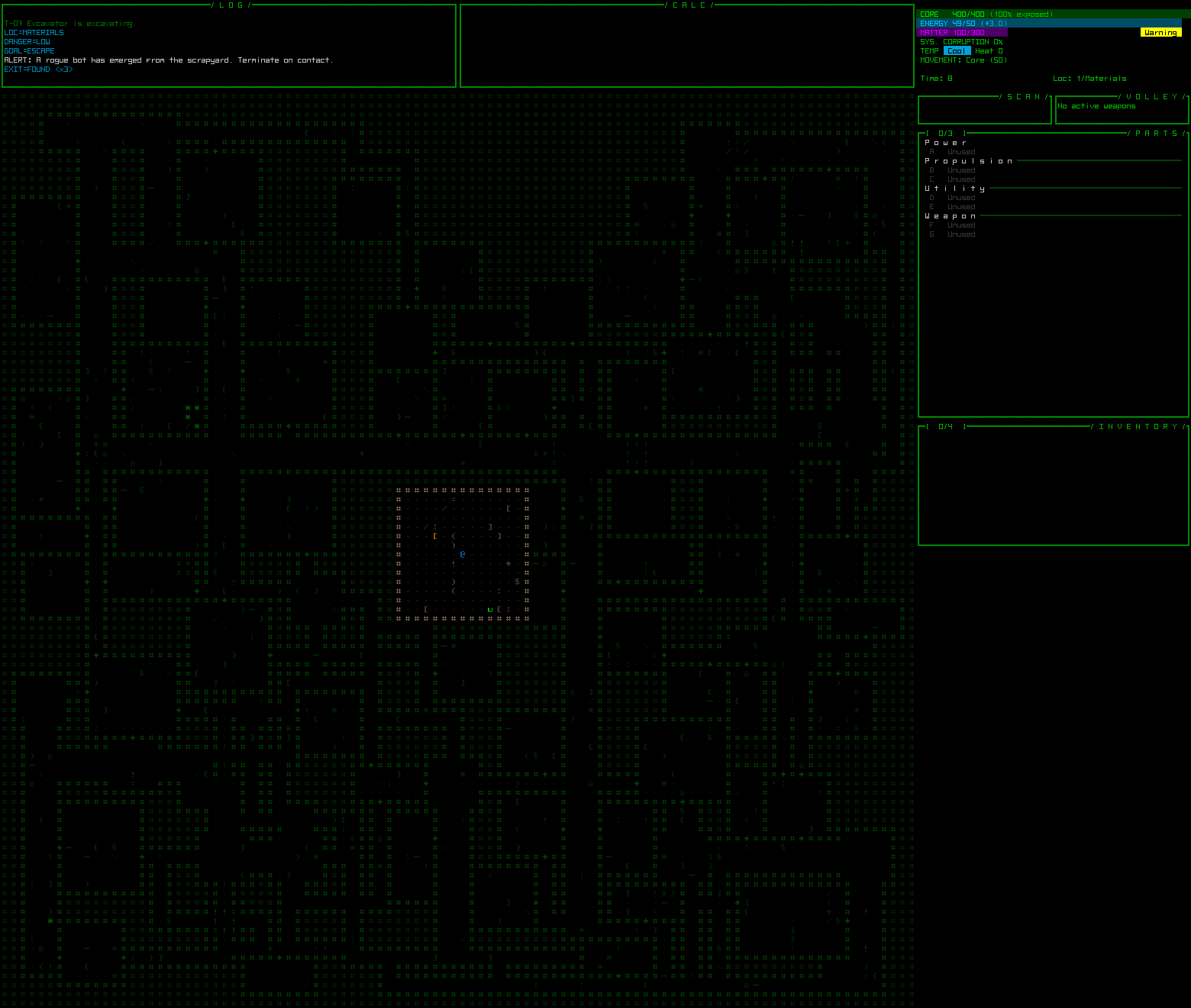
Cogmind Map View Expanded

Log windows expand with the map, while extended area below the right-side HUD remains empty for now.

In the test run above I’ve expanded the view to show an entire 100×100 map, which creates a window even taller than my desktop. Even if you have massive screen real estate, the new Cogmind is going to double the maximum map size to 200×200 (quadruple the area!), which would require a screen resolution of 2300×2100 using the smallest possible 10×10 font… Really though, the default 50×50 view is plenty to work with, since sight and targeting ranges will never extend beyond the edge of the viewable area. Note: Procedural map generation is also in the process of being completely rewritten, so layouts won’t look quite the same as what you see above.

Also note that map size is not the same thing as changing the font set to make the entire interface larger or smaller by using characters of different sizes. The final game will include character sets ranging from at least 10×10 to 16×16 (and perhaps larger), so you can play on both large widescreen monitors or small laptops.

One option unfortunately made somewhat difficult to include by the nature of the keyboard-heavy input and how it’s implemented is key remapping. So it’s not yet possible to do that. However, all commands are mouse-accessible, which alleviates this problem for everyone besides those willing to brave the more efficient full keyboard mode. Converting the engine to SDL2 would likely make the solution easier, but is non-trivial at this point.

Next: We need bigger robots.

Update 5/25/14: The options menu has been implemented in game--see it in action here.

Posted in Internal | Tagged , , , | Leave a comment

Building a Better UI

Most of the post-7DRL weeks of development were spent improving usability rather than tweaking the gameplay itself (which was already pretty solid). Usability, as well as availability and presentation of information, are vital to ensuring the best user experience after all (duh).

There is still plenty of room for improvement, though, and much of it is made possible by this first update:

Non-square Fonts

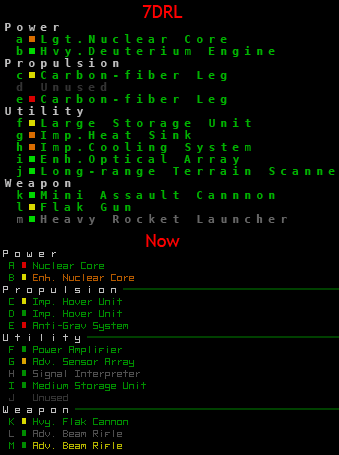
Text composed of square fonts is a pain to read. See a comparison between a parts list from the 7DRL, and the new list after switching to a narrower font:

Cogmind 7DRL Font Comparison

A later unreleased version of the 7DRL prototype did implement narrow monowidth fonts like this, but the interface wasn’t going to take full advantage of the altered layout, so it was scrapped.

The new font dimensions will apply to all areas of readable text, the only exception being the map, which will continue to use square cells.

It’s not just more readable, it also gives us 50% more horizontal space to work with! Look at all that empty area off to the right just waiting to display more useful information. Condensed text will allow the entire HUD to become a lot more informative than it already is.

Layout

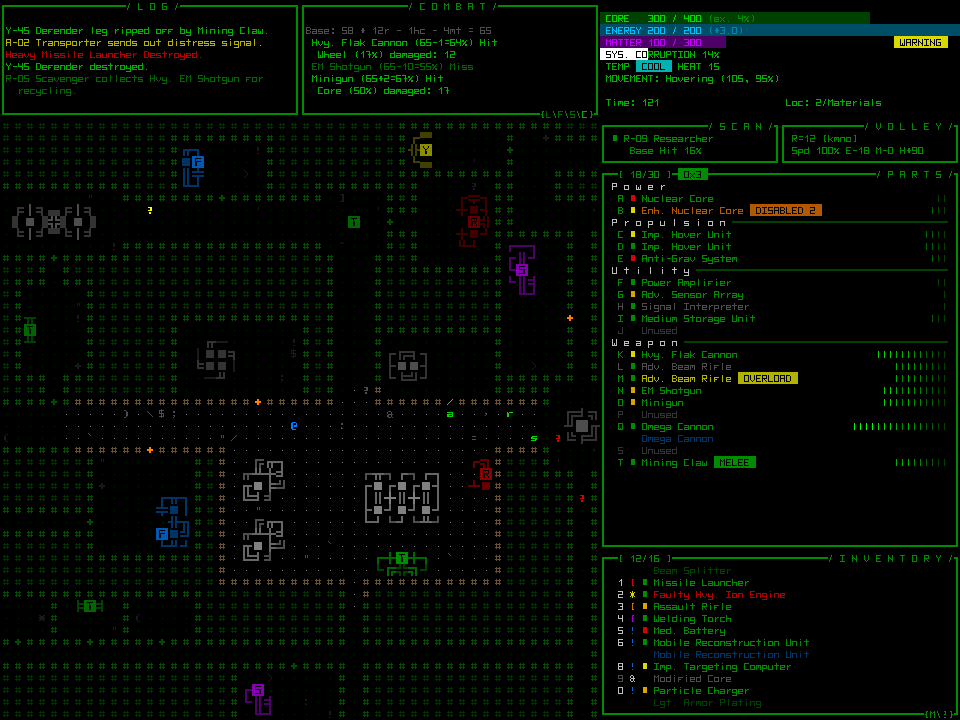
Let’s look at that working mockup again and examine each component:

Cogmind Mockup

MOCKUP

The message log, seen top left, used to span the entire top side of the map, but once cut in half there is room for another multi-function window next to it. In the mockup it’s showing combat calculation details which when activated used to be interspersed in the log itself and could clutter it up. That same window will be able change modes depending on what you want available; other options will probably include a more detailed status summary, information about nearby friendlies, or an extended log.

The top-right corner is more or less unchanged, still showing basic stats.

Below that the scan window was halved, enabling the volley window to be moved up next to it.

Then the parts list was shifted up, but not narrowed because the right side will be perfect for showing extra information about parts. Aside from new status labels that may appear next to certain items, the rest of the reclaimed space will show optional additional information depending on user-chosen settings. The mockup currently shows an approximation of relative coverage for each part, an important but less obvious stat from the 7DRL which lends itself great to visualization. Other options would be integrity visualizations and numeric stat summaries.

By shifting up the parts list four lines, the original six-slot inventory view is expanded to ten slots. This is great for browsing larger inventories, and fits perfectly into the command scheme since keyboard players access the inventory via number keys, of which there are ten, not six. Also, like the parts list there is now room for extra information.

Style

The overall style will not change, since the high-tech interface already fits the theme. Window titles do have a new look, along with some other tweaks to make the interface more stylish and readable.

Animated effects will be implemented across the GUI to reflect Cogmind’s state, adding visual reinforcement for conditions like taking damage, system corruption, and overheating. This both contributes to the immersion and provides useful feedback.

The ubiquitous printing sound for text animations will be a lot softer and more background-ish,and plenty of new sounds will be introduced for more specific uses.

Content

The interface can easily seem overwhelming at first. Naturally some will hate the detail, others will enjoy it. For those on the fence, and to help new players figure things out quickly, there will be an optional tutorial as well as context-sensitive help pop-ups to explain things. These will even go so far as to explain essential game mechanics where appropriate.

I still don’t like the idea of the player having to take their eyes off the map to get more detailed combat-related feedback, so there still needs to be more of this information shown directly over the map itself near the action. Something along the lines of an option to float numbers over damaged units would be a minimum way to alleviate this issue.

Posted in GUI | Tagged , | Leave a comment

Guided Weapons, Salvos & Overloading

First, a recap. Weapons in the 7DRL prototype were divided into four categories:

  • Guns: Encompass a wide variety of beam and projectile weapons.
  • Cannons: More powerful than guns, but with heavy resource costs.
  • Launchers: Fire explosives including rockets, bombs, etc.
  • Special: A small category of tools that could potentially be used as weapons, like mining lasers and welding torches.

While categories can also be subdivided by their damage type, there is plenty of room for additional tweaks to further expand on weapon variety and increase the tactical options.

Guided Weapons

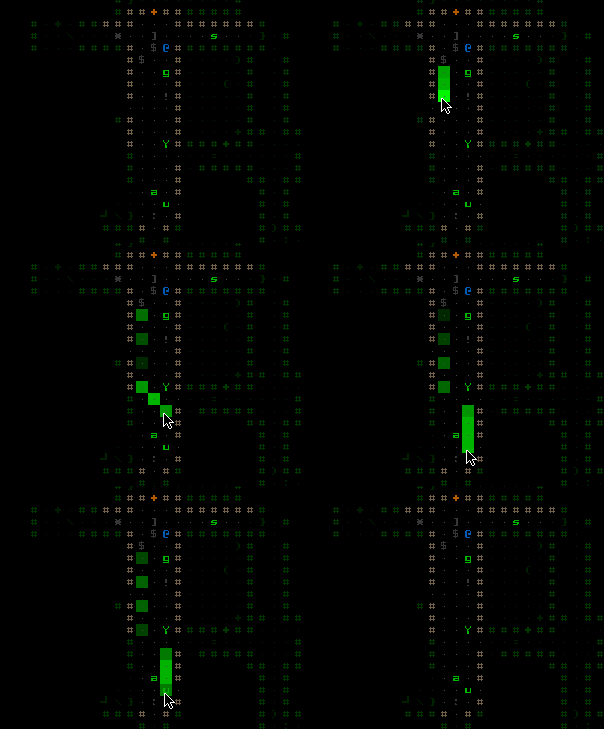
One feature left sitting in the 7DRL engine code because there wasn’t enough time to balance it in is guided weapons. Enabling it was a simple matter of adding it to the UI, so now you can set waypoints for a guided weapon and shoot around robots or obstacles to hit a specific target.

Guided Weapon Waypoints

Here you see a completely unnecessary number of waypoints being set, just as a demonstration.

Combined with a spotter or scanning system that can penetrate walls, guided weapons will be quite an asset. Because they never miss and can be incredibly useful, guided weapons will be fairly rare, and costly to use. (Another reason it made sense to leave them out of the 7DRL prototype--they’re fun but not an essential common feature.)

Guided Missile Turning

Whatever that was, it is no more.

Guided weapons override normal volley rules of firing all active weapons at once: Regardless of other weapon states, if a guided weapon is active it will be the only one to fire since it uses a non-direct targeting system. If multiple guided weapons are active, only the first will fire (you can change their order, or deactivate all but one, to control which will fire in this case). If an active guided weapon will be overriding the next volley, a label appears next to it in the parts list:

Guided Weapon Label

The number shown is the maximum number of waypoints allowed for that weapon.

Salvos

The 7DRL prototype always followed the “one weapon, one projectile” rule, which just isn’t good enough for some weapons. For example, a “Rocket Array” is far more impressive if it actually launches a barrage of rockets every time you fire it. So the game now supports weapons that fire multiple projectiles.

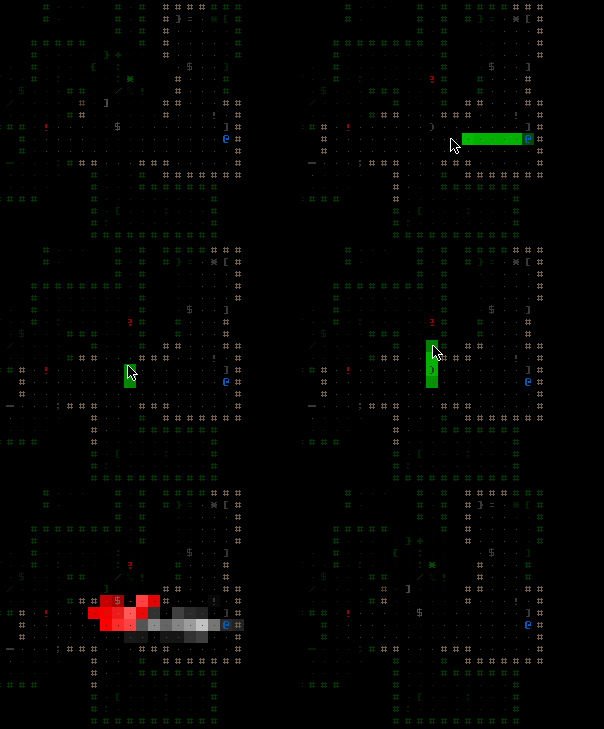
Rocket Salvo

This salvo is… excessive.

Overload

Some energy weapons can now be set to “overload.” In this state the weapon does double damage for double the energy cost while producing triple the base heat.

Each such weapon also has a stability rating that determines how likely it is to malfunction if fired while overloaded. The chance is generally not high, but if it does happen the weapon could drain your energy reserves, cause a massive surge of heat, short circuit other parts, or even meltdown. Nonetheless, even with the drawbacks it’s another viable tactical option for increasing your damage potential when otherwise low on firepower, or to do a significant amount of damage in a short time to avoid being overwhelmed.

The overload state is cycled on via the normal activation procedure (clicking on the weapon, or pressing its corresponding letter), so there are no extra commands to remember, and you will quickly learn which weapons can be overloaded without even looking at their stats.

Overload Weapon Label

Overloaded weapons appear in a different color, and are labeled in the parts list.

Next we’ll start looking at some of the overall UI improvements underway.

Posted in Mechanics | Tagged , | Leave a comment

Straight to the Source

Last year I said if I ever decided to take Cogmind beyond the 7DRL stage I’d rewrite the entire thing from scratch. Note that “from scratch” is not to be taken in the absolute literal sense, since my intention was to simply do what I did for the 7DRL: Strip down a copy of X@COM, then proceed from there to create Cogmind.

That’s not happening.

Development actually started that way, but after a couple days I had to trash the results due to the sheer amount of modifications necessary. Last year the X@COM code base wasn’t all that huge after less than a year of work on it, but since then it’s ballooned into a huge number of complex features, many of which would have to be removed with surgical precision since Cogmind doesn’t want them.

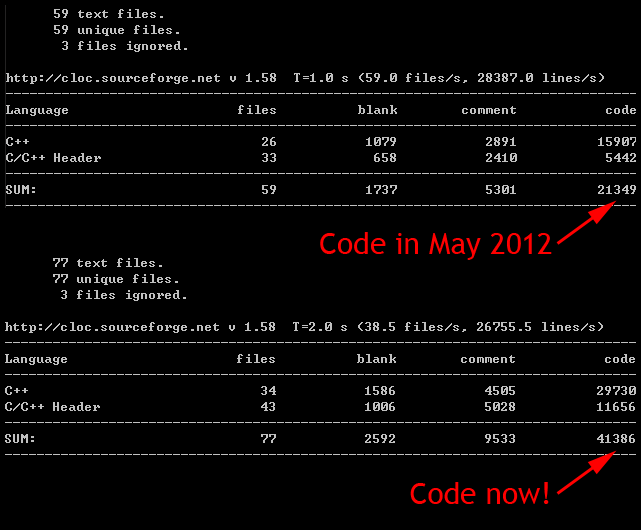
X@COM Source Comparison 2012-13

Nope.

Of course I also wasn’t looking forward to the prospect of having to re-implement a bunch of the same Cogmind code that, combined with post-7DRL updates, originally took a couple months to write.

In any case, any way to speed up this project is welcome. One of the most important lessons you can learn in game development is that the ultimate goal is the most important one--you have to finish or you lose*, that and the longer the process drags on, the less likely it is to succeed. (*Unless you’re just doing it for fun or experience, but those shouldn’t be primary goals if you intend to sell the game.)

The main thing that annoyed me with the 7DRL code was a few nasty bug reports that I couldn’t replicate, but those aren’t so scary now that the engine has a better built-in solution for debugging post mortem call stack traces, which always gave me a headache before. Now… NO BUG IS SAFE!!! (If you’re using C/C++, for a nice little Windows-only solution w/source see here.)

Another reason to rewrite would be to change certain architectural considerations born of rapid development constraints inherent in a game jam game, but fixing those piecemeal as necessary will still take less time than a complete re-write, so…

Cogmind has gotten a significant jump start by beginning with the old 7DRL code base. This also means feature testing can happen immediately since the game is already playable--what a bonus! Seriously, being able to do iterative testing on individual new features helps push development along quickly. With the chopped up source code I was thinking of working from, proper testing would have been impossible until a large portion of the code was in place, which would then devolve into a debugging nightmare. I’m all for skipping nightmares and going straight to the party.

Speaking of parties, next post we should talk about something more fun, like new weapon modes.

Posted in Internal | Tagged , , , | Leave a comment