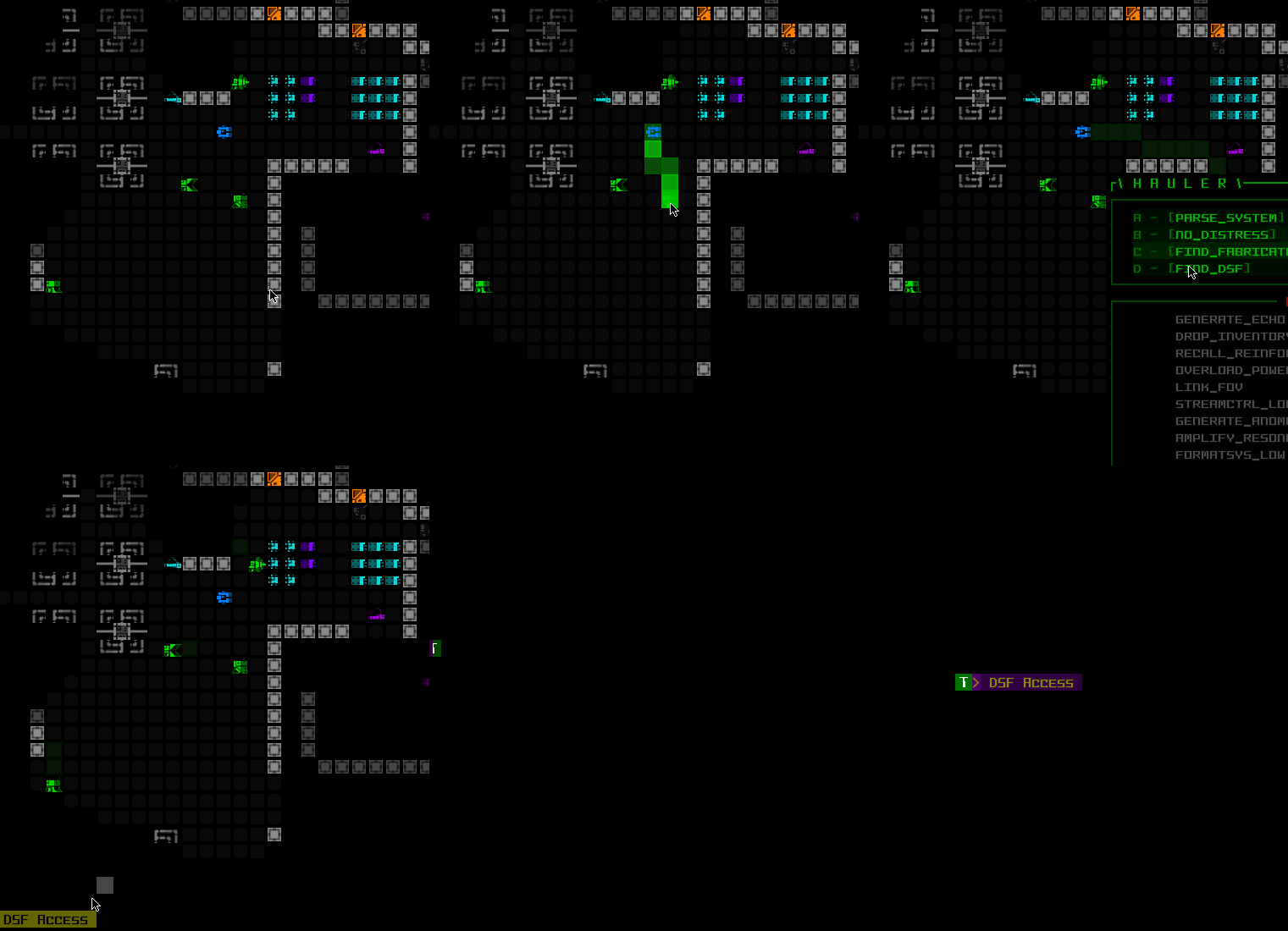
Official development blog
[ Latest Cogmind Release Notes: Feb 2026, "Unchained More" ]

Garrisons 2.0

Garrisons were originally added to Cogmind in the months after the first Alpha release in 2015 (see an overview here) as an optional location for players to visit, adding a unique extra dimension to the world to answer the question “what if I infiltrate these things where many enemy squads come from?” (More recently here on the blog I covered that category of Cogmind maps, the “maps between maps,” since a third such map type was added this year.)

In the time since Garrisons were added, however, a combination of relevant changes to the game started putting pressure on their original design:

  • Many more full branch maps were added, along with factions, each with their own enticing reasons to visit them compared to the weaker incentives for entering a Garrison.
  • Eventually Garrisons themselves became a sort of faction home as well, in the form of RIF-using bothackers, which in turn meant that some styles of play encouraged visiting many Garrisons.

As a result, for a while now I’ve wanted to revisit and update Garrison design to better merge it with what the rest of the world had become.

This always felt like a kind of side project though, one which could be small (doesn’t live up to the potential?) or large (hard to fit the work in?), so it simply floated around on my lengthy todo list forever. For Beta 12 I decided to include it on the patron feature voting list, and… it won. Cue several weeks of work which has definitely been worth it!

The amount of content variety offered by the original Garrison design was more suited to a lower visitation rate, not the “I’m going to play almost my entire run inside these things” which it had become for some people. RIF garrison diving became increasingly common, because it’s a fun style, but we could totally make it even more fun with greater variety!

So the goals for Garrisons 2.0 are to increase variety in the form of encounters, events, and new layouts, while also reworking the clock and giving even non-RIF players good reasons to enter.

Let’s get started!

1.0 Garrisons

As a quick reminder of their fundamental structure, unlike most maps which use more involved generation methods, Garrisons are built entirely from large prefabs, four of them to be precise, fitting and rotating randomly selected quadrants to create a larger square map.
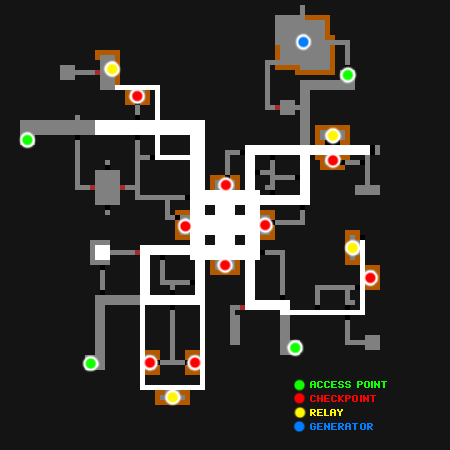
Cogmind Garrison Layout (labeled, circa 2015)

Sample Garrison interior layout (major features labeled), under the old system first introduced in 2015.

So each quarter of the above map is a separate prefab rotated such that their corners form the central room. With 44 variants in all, many with somewhat variable content of their own (random items, traps, maybe potential allies instead of hostiles, etc.), this results in quite a few possible permutations, but seeing as each map is composed of only four of these prefabs, when players start exploring upwards of ten of this same type of map in a single run, some of these corridors start looking all too familiar, especially betraying hidden areas that might otherwise be surprising! (and by design there are quite a few of these inside Garrisons)
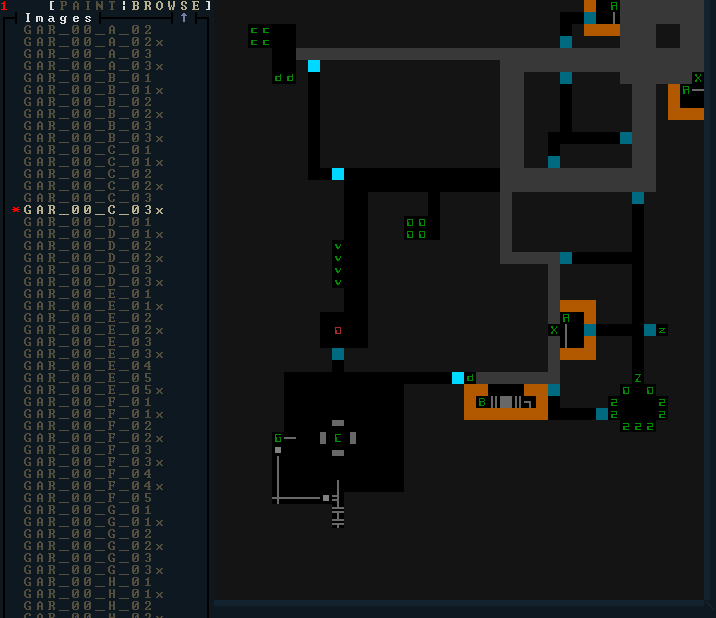
Cogmind Garrison Prefab Quadrant (REXPaint)

One of many Garrison prefab quadrants as seen in REXPaint.

We’re going to need to inject more layout randomness in here to liven things up over the long term…

Before getting started with that, I first built a little tool to get an idea of the complete contents of a random set of Garrisons. This might help spot areas I wanted to adjust, or at least offer a clearer picture of the total challenges and rewards possible in a given map as of Beta 11. For Garrisons the complete list is also more relevant than elsewhere, since “full clearing” a Garrison is a lot more common than in many other maps.

The tool would load up the game, visit a Garrison at every depth, and tally its contents, adding the results to a file, doing this for however many seeds are specified. I could save the data to revisit it later, after adjustments are made.
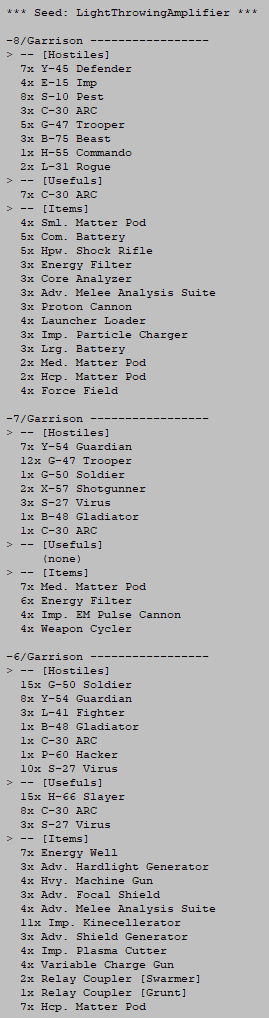
Cogmind Garrison Content List (pre-Beta 12)

Sample Garrison content list from Beta 11.

Relay Couplers are not reflected in this list, since there are almost no free-standing couplers in Beta 11--they’re acquired separately from Relay machines, and I already have a good idea of their distribution since it’s more directly controlled anyway. Here I’m more interested in the non-RIF-related rewards.

One very noticeable issue is that for some Garrisons there was little to nothing under the “usefuls” or “items” categories, making the entire map almost purely of benefit to RIF players (since there are always Relay Couplers to be found, plus the RIF Installer for abilities).

Sometimes other players would Garrison dive for fun/something different to do, and sometimes come out with nice rewards/out-of-depth gear, but unlike the alternative (going for branch rewards instead) that was definitely not guaranteed, so not really a reliable long-term strategy to play around. It’d sure be nice to resolve that!

Adding extra content could have the dual benefit of both spicing up Garrisons and making them valuable to more than one type of player. I’m reminded of Beta 11’s spicing up the main complex with Heavies and Cargo Convoys, though in this case it’s not just adding one or two new mechanics but instead about turning Garrisons into proper branch maps in terms of content distribution…

Encounter Architecture

If you’ve read some of my earlier map generation articles (specifically here, and here for caves), you might be familiar with how I make use of an “encounter system” to procedurally distribute and insert map content, generally via prefabs.

The question was how to apply this approach to Garrisons.

Embedded prefab encounters in other tunneler-generated maps have a defined set of empty rooms to work with, but Garrisons don’t have any empty rooms at all, themselves being composed purely of prefab quadrants where every space is hand-crafted with purpose.

I considered a lot of options here, going as far as thinking of building a new generator from scratch (one that would make encounters much easier to implement), but I liked the established and consistent core theme of existing Garrisons and didn’t want to mess with that. Instead I came up with a way to integrate Garrisons into the room-based encounter system: If we don’t have any empty rooms to place encounters, we’ll just have to dig some!

And I mean dig manually…
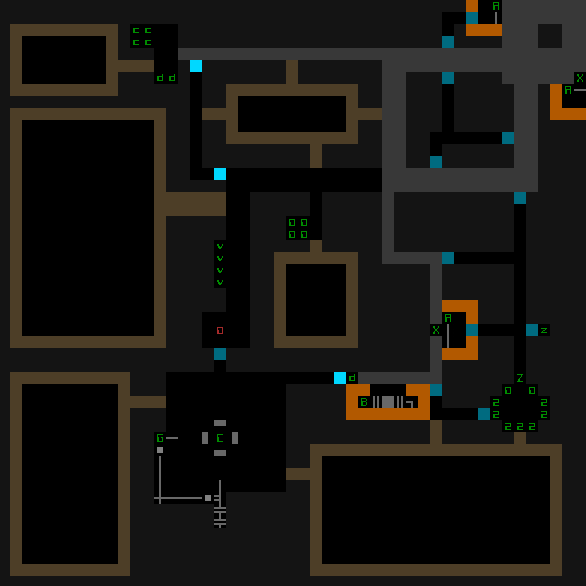
Cogmind Garrison Prefab Quadrant, w/Encounter Room Placeholders (REXPaint)

Remember that prefab quadrant from before? Now it’s got more rooms!

I went back through each prefab and outlined areas as essentially “optional placeholder rooms” which the generator could use to insert prefabs, but any of these areas not used for an encounter would actually not appear in the final map.

While a more algorithmic approach could also be used to do this, I prefer the handcrafted touches this allows for, like what nearby prefab sections the encounter at a given position is allowed to connect to, and how wide to make the links (which also determines which types of encounters can appear there).

Also we could’ve done something like choose an encounter then build a suitable space for it, but I was trying to take advantage of as much prior work as possible here, and that meant simply handing the encounter system a list of existing empty rooms to work with.

How the encounters link up with the map is a little different than usual, too. As drawn, some areas have multiple connections to main Garrison corridors or rooms, but only one connection is chosen at random to be used. This enables yet more variation in layouts.

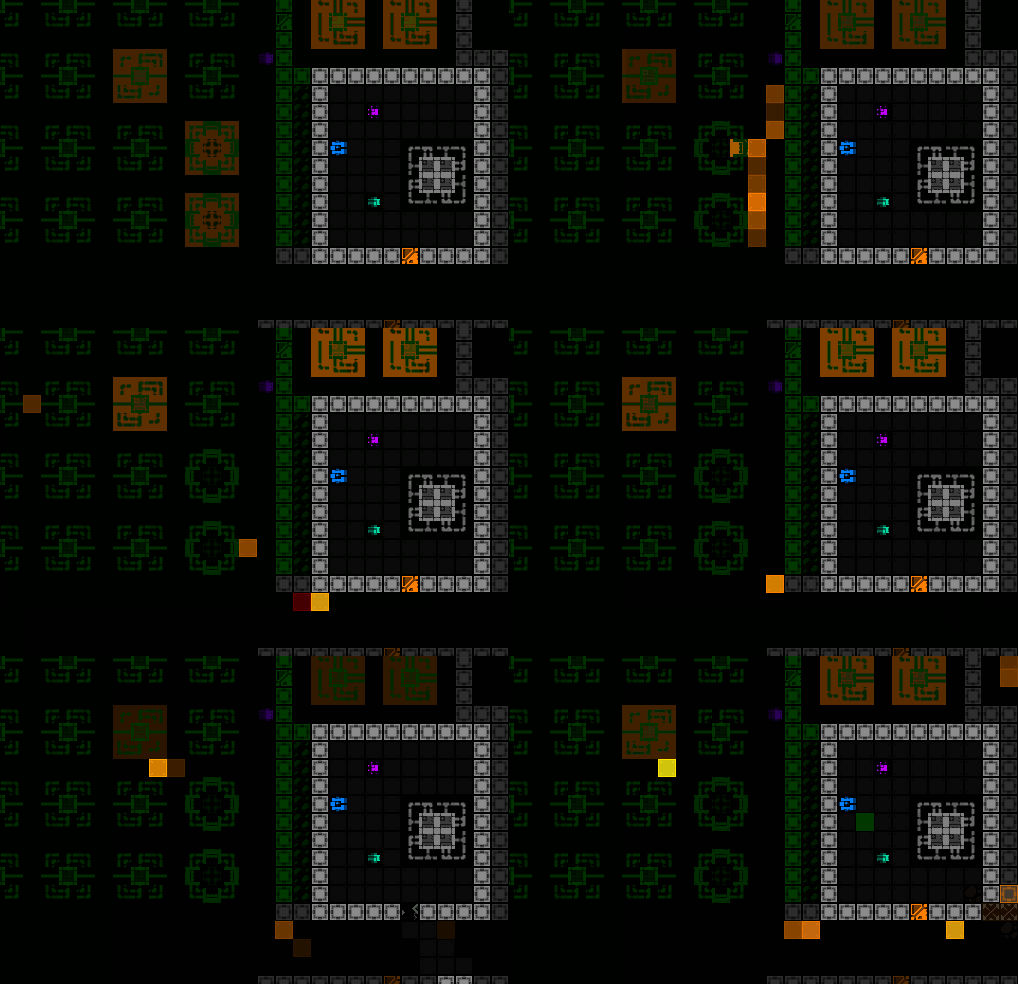
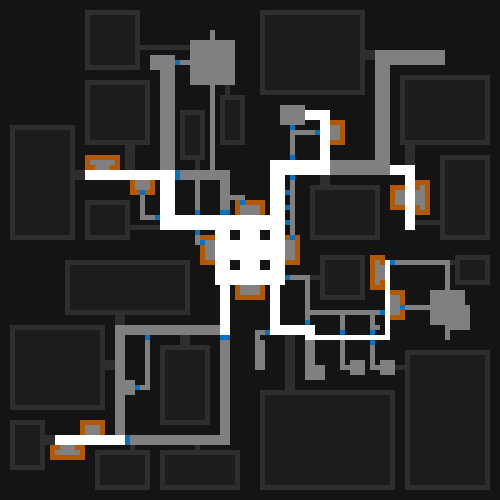
Check out some full-sized Garrisons in the map generator before the game gets hold of them to actually insert the encounters, shown here with potential encounter areas in dark gray:
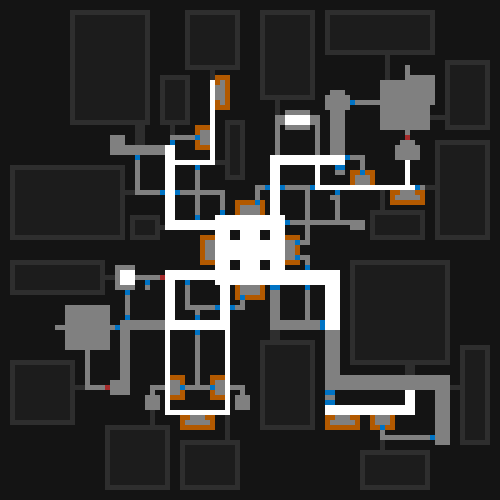
Cogmind Garrison Map Generator w/Possible Encounter Areas (Sample 1)


Cogmind Garrison Map Generator w/Possible Encounter Areas (Sample 2)


Cogmind Garrison Map Generator w/Possible Encounter Areas (Sample 3)

Here it’s important to remember: Encounter rooms aren’t nearly that large (usually), outlined is just the available space within which to place them, space which is then shrunk down to match the necessary size. Let’s see the steps as I shared for the embedded prefabs in other maps!
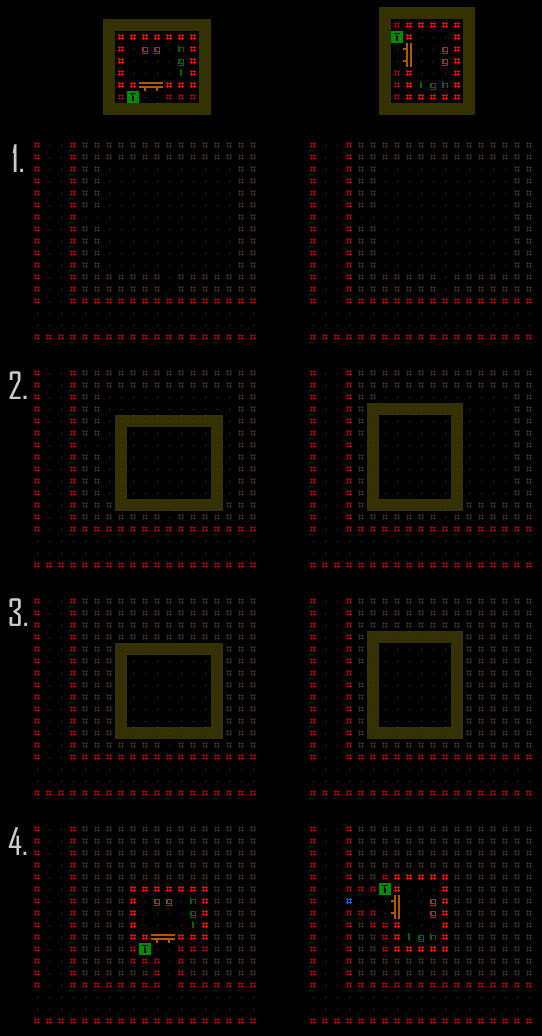
Cogmind Garrison Prefab Embedding Process

Steps to embed a Garrison prefab in an optional placement area.

  1. Find an optional placeholder room large enough to hold the desired encounter/prefab. The one above has two possible connections with the Garrison, one to the south and another to the west.
  2. The southern link is chosen and the target prefab area is shifted against the southern edge of the room. The horizontal offset is selected randomly but still allowing access to the prefab interior in cases where the prefab itself contains objects that would otherwise block the path.
  3. Areas of the room unused by the prefab are filled in with earth.
  4. The prefab’s contents are placed on the map, and any walls still needed are created adjacent to open space (most prefabs don’t specify their own outer walls, but this one in particular does because it wants to surround an interior section with reinforced walls).

The right column shows an example where prefab contents are rotated and shifted to use the western link instead.

Also notice the blue phase wall at the entrance to the western-facing prefab, instead of a door. This is another key difference with Garrison encounters, that they specify the form of their outer connection with the Garrison, be it an open space, hidden door, or phase wall. Some encounters force a certain type of connection, while others uses weighted possibilities, whatever is suitable for the design.

Unlike 0b10 encounter rooms, these cannot actually expand or move doors, and use a tunnel-like connection rather than sharing a wall with an outer corridor. As with 0b10 encounters though, random horizontal flipping is allowed for further variation.

For now encounters only connect directly with main Garrison prefab areas as per the drawn suggestions, so only one entrance/exit each. I considered introducing the possibility of dynamically generating more loops via hidden paths between some encounters, though there are already a fair number of hand-crafted loops built into Garrison quadrants anyway, and players can always try to create their own additional connections given the circumstances and layout. Rampant terrain destruction is awesome, by the way ;)

Generating more paths would likely make Garrisons easier in some regards (unnecessary!), and not be compatible with many of the encounters anyway, since knowing which direction the player will enter from is often an important part of their design.

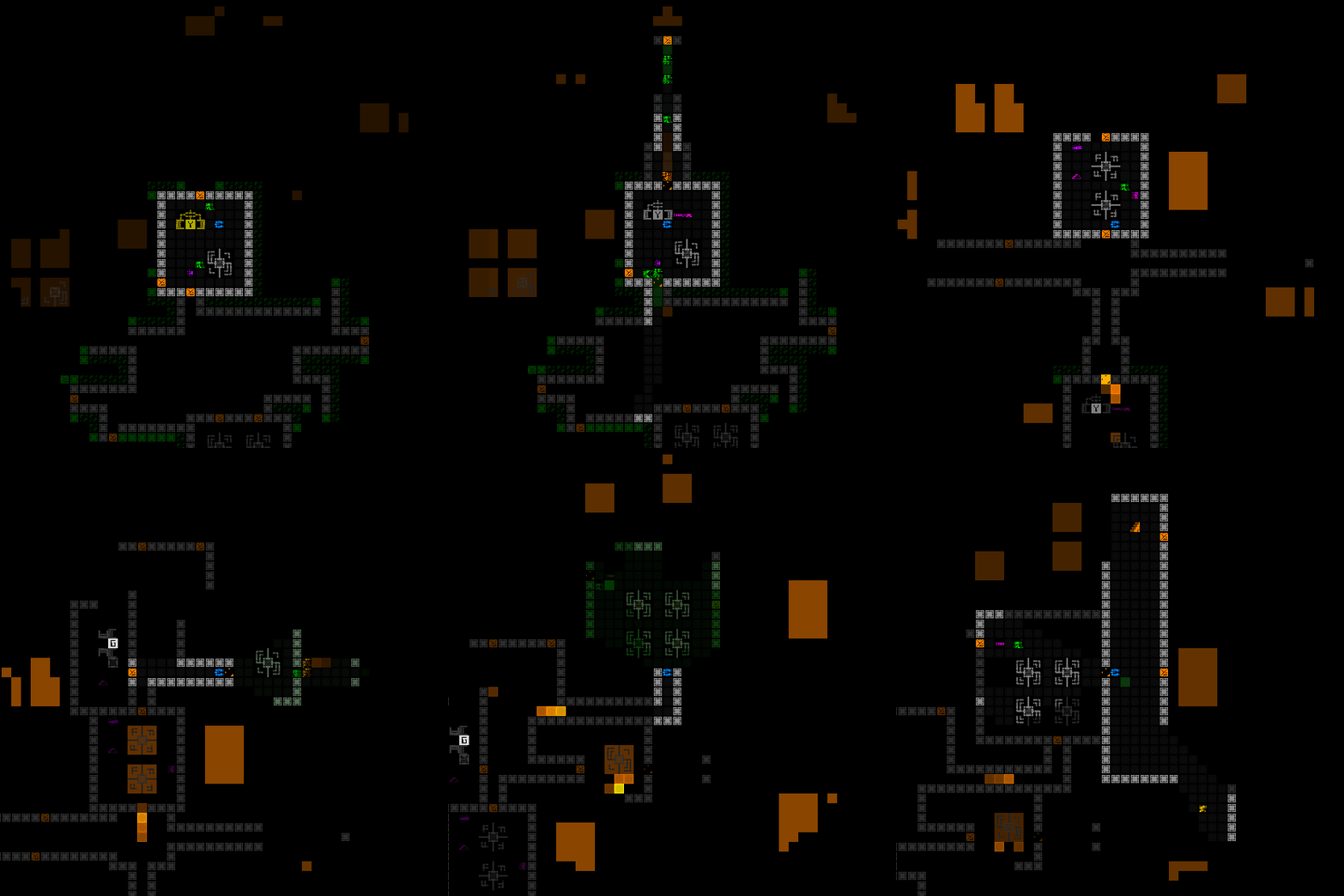
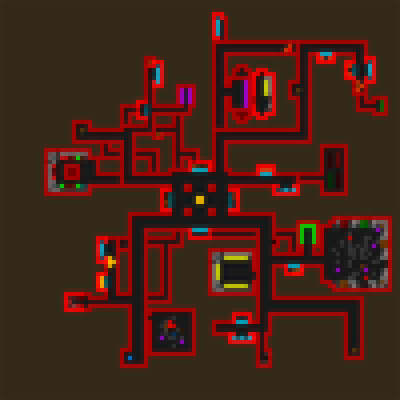
Below is a collection of images showing the full layout of several Garrisons after the complete generation process, including encounter placement:
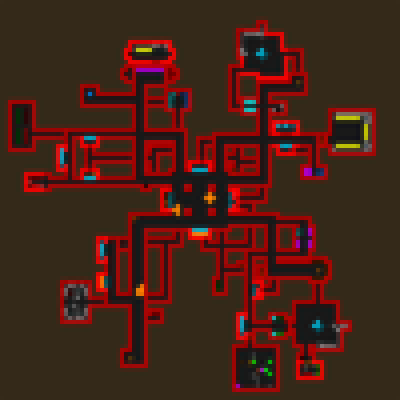
Cogmind Garrison Layout Sample 1 (includes encounters)


Cogmind Garrison Layout Sample 2 (includes encounters)


Cogmind Garrison Layout Sample 3 (includes encounters)

New Garrison Quadrants

With a new encounter system in place, another thing I did was go back and create two new sets of Garrison quadrants, adding 12 more variants on top of the original 44. Each “set” of quadrants follows certain rules for their layout, and in this case one of the rules was to take into account the fact that encounter rooms may be embedded into the quadrant, something none of the earlier sets expected when they were created.
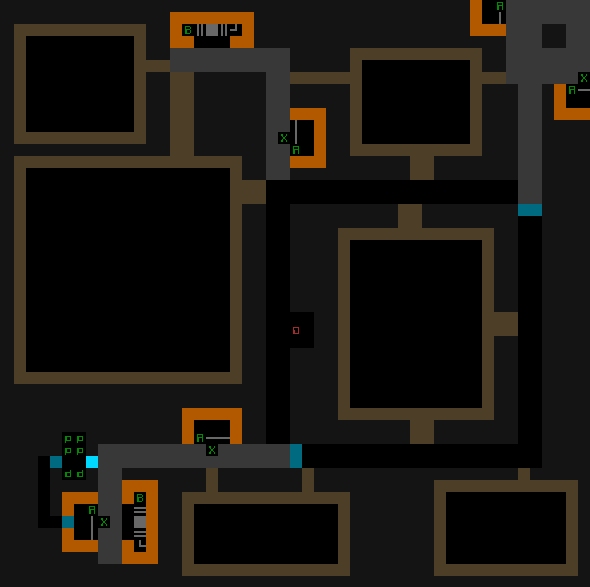
Cogmind Garrison Prefab Quadrant, w/Encounter Room Placeholders (REXPaint)

One of the new Garrison quadrant prefabs which follows a different style than earlier sets, including consideration for encounter insertion.

The new quadrant above moves some of its “standard contents” to beyond the entrance/exit (represented by the red ‘0’) when pathing from the Garrison center (top-right here), and includes some especially large prefab areas with wide entrances, even leaving room for some within its main structure rather than the more typical outer edge locations.

Of course simply having a larger pool of quadrants for the map generator to pull from further expands the potential number of unique Garrisons as well, which was the first thing I was hoping to do with this update before even thinking about encounters at all.

Encounter Types

In my previous related articles I wrote about dividing encounters into four categories: Fluff, Reward, Risk-Reward, and Danger.

When Cogmind was pretty much done in 2017, a survey of encounters throughout the entire game recorded 25% of them to be fluff, 46% reward, 15% risk-reward, and 14% danger. By comparison, a breakdown of encounters in our newly expanded Garrisons shows 3% fluff, 40% reward, 55% risk-reward, and 3% danger.

Garrisons are already fairly dangerous given their concentration of hostiles, so I really wanted to focus on the risk-reward aspect--go the extra mile with these mostly optional side encounters, face even more dangerous situations, and likely be handsomely rewarded. In playtesting so far this (among other benefits we’ll get to later) is already clearly tempting players who would otherwise always prefer regular branches over infiltrating a Garrison.
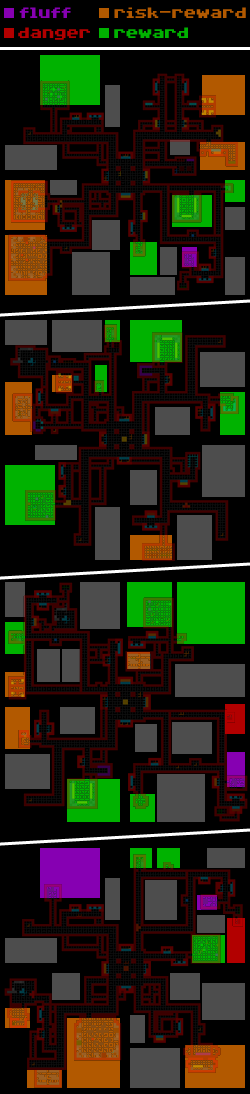
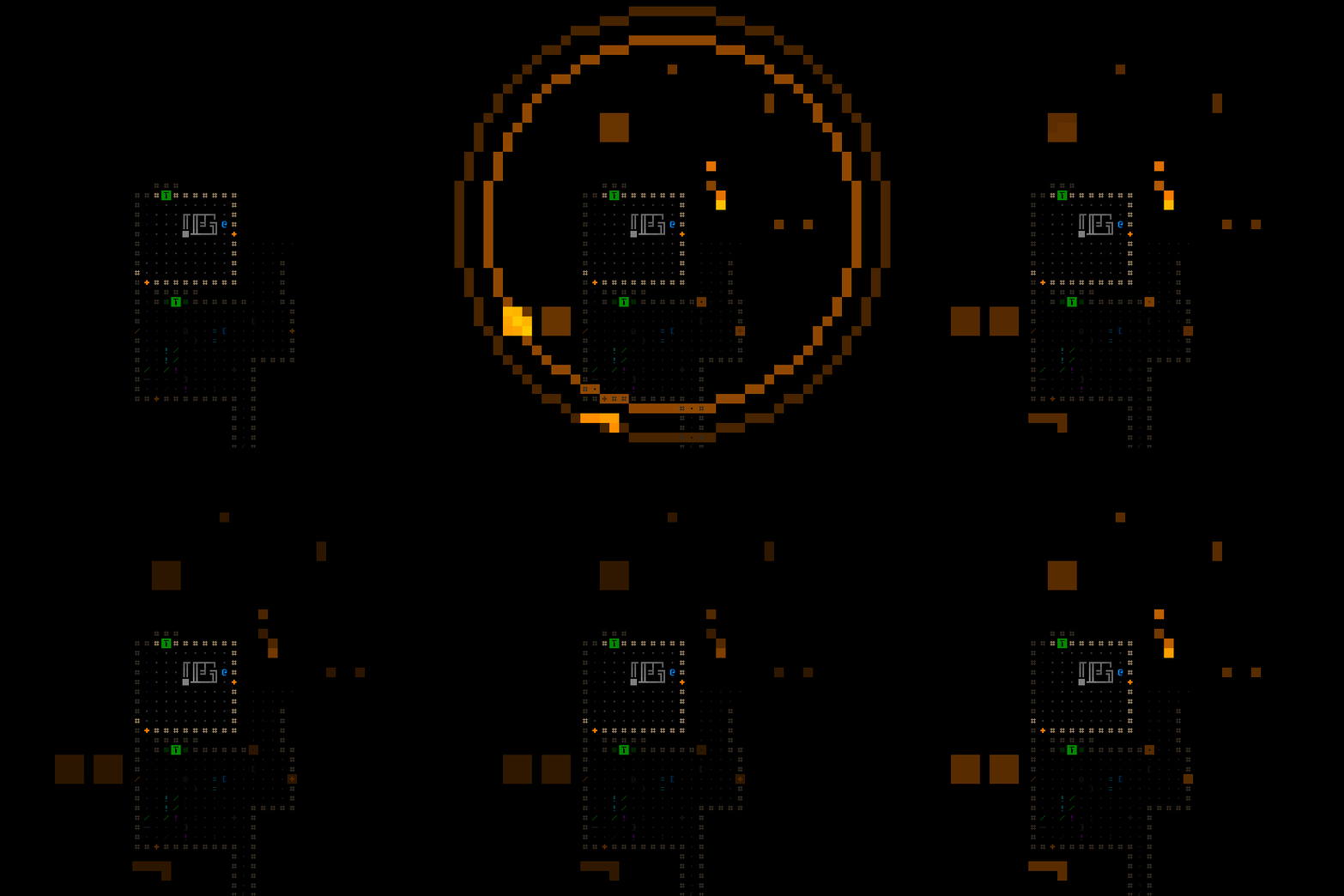
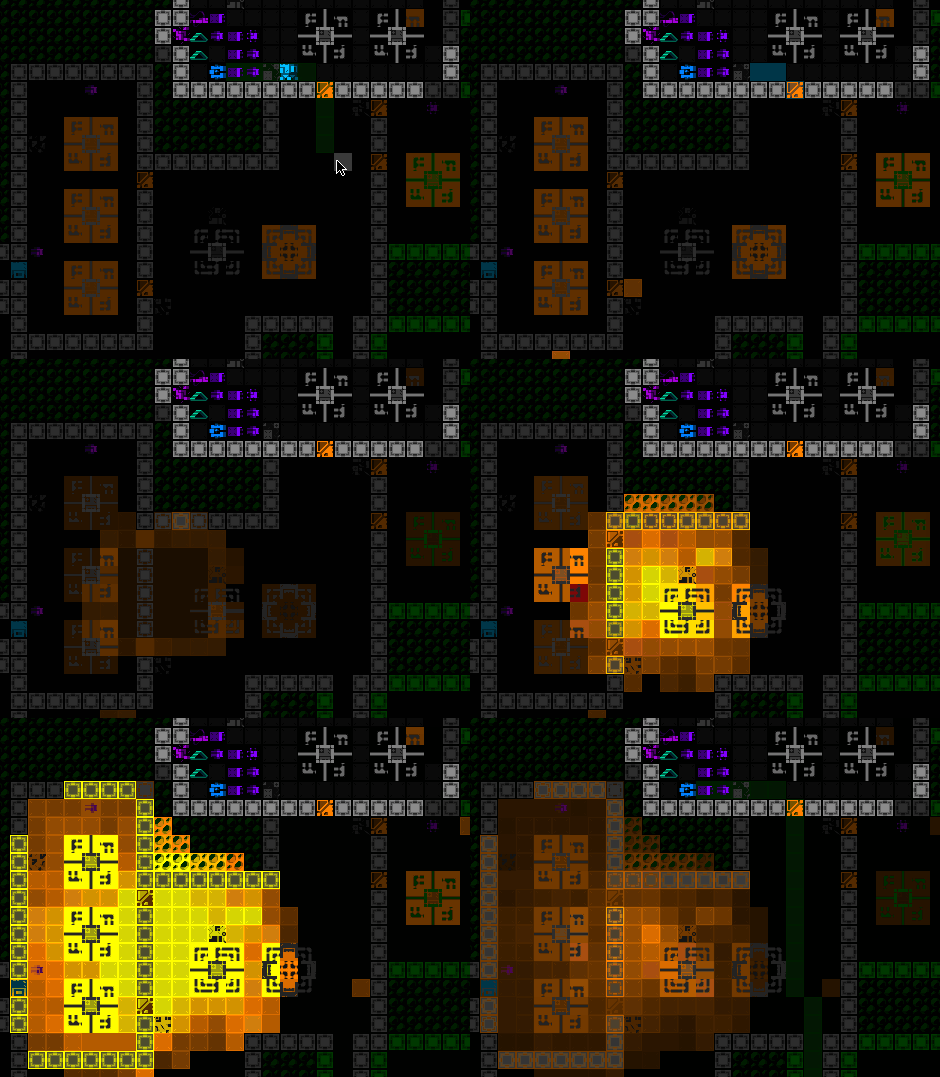
Cogmind Garrison Encounter Category Distribution Samples

Garrison encounter distribution samples, color-coded by category.

The above samples show encounters added to a variety of Garrison layouts, highlighted with a dev visualization overlay. Those sections of the map would have otherwise remained filled with solid earth.

Notice that encounters do not generally fill the space available to them, with some even occupying only a tiny portion of it, so the sizes of rectangles here can be deceiving in terms of determining the prevalence of encounters. We’re mainly looking at respective counts, color, and placement.

Grey rectangles in the visualization show areas not chosen for encounter placement. As with other maps, during generation there are X number of available encounter rooms, and different map types set their own percentage of those to attempt to fill, so it’s easy to adjust overall density.

For Garrisons I’ve started with a 50% usage rate. If that turns out to be too overwhelming it can be lowered, or if we want even more encounters for some reason it can be increased (that said, I don’t think the number of available encounters I’ve created so far is enough to support a higher prevalence while maintaining each Garrison’s unique feel).

Some Cogmind maps have a 100% usage rate, though the circumstances are different in those cases, for example caves being populated by a much higher number of fluff encounters to add to their character. Others have very low rates like Access (10%), being a huge map with wide corridors and large machines, designed for lots of open space and more predictable content.

RIF Installers

Back when I added a proper bothacking system to Cogmind, creating RIF Installers and inserting them in Garrisons for both lore reasons and in a bid to increase the map’s relevance, they were always placed adjacent to a random entrance/exit, since by design the Garrison prefabs always left some open space in those areas.

Having introduced encounters, this method was no longer reliable as these locations might now be occupied by other rooms in some or theoretically even all cases. Certainly one option would be to reserve the necessary area in advance, but that wasn’t very compatible with the existing architecture, and there was an even more enticing and natural idea in this case anyway: put RIF Installers into the encounter system, too!

RIF Installers were already a prefab to begin with, one which (without precedent anywhere else in the game) were actually inserted via a separate hard-coded method, so let’s add it as an encounter instead. Of course this change comes with significant balance repercussions, which we’ll cover when we get to discussing that topic further below.
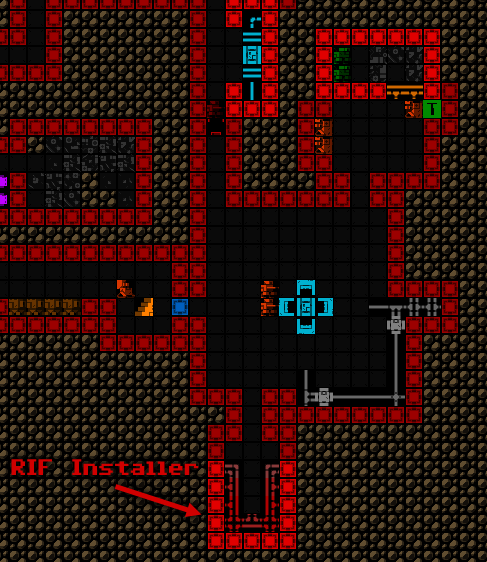
Cogmind Garrison RIF Installer Location Example

RIF Installer locations just potentially got a lot more interesting…

After implementing all the encounters, I went back and added them to my original Garrison content summary tool, primarily looking to ensure that RIF Installers were indeed being included everywhere as expected, though notice that even this earliest Garrison is quite stacked compared to before (again, excludes standard content like the normal Relays and their Coupler contents):
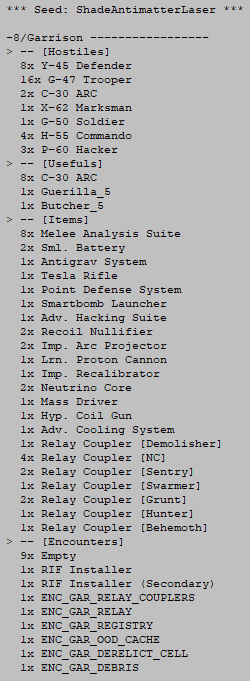
Cogmind Garrison Content List (-8, Beta 12)

Sample Garrison content list from Beta 12.

Clocks

From early on I always wanted to make sure Cogmind had sufficient food clocks, although as the world expanded in the time since, I’ve added a few areas in which there is no clock for whatever reason. For a while I’ve planned to eventually address these as opportunities present themselves.

That’s not to say we need incredibly tight clocks--Cogmind clocks are lenient enough to offer plenty of flexibility to allow for different play styles, but assigning some explicit value to time by giving it a mechanical impact is good for balance in a goal-oriented roguelike like Cogmind (as opposed to a sandbox), otherwise any number of weird player strategies might start to emerge as they take advantage the inevitable design cracks in a complex web of systems that can start to break down when you have unlimited time to poke at them in a single run. While some players enjoy puzzling out creative ways to get ahead, at the extreme end it eventually devolves into optimal tedium which is overall harmful to the experience. I wrote about this factor in my recent article on game design philosophy.

Garrisons originally had their own clock whereby the alert level gradually rises over time (as opposed to the usual decay or at least remaining neutral), thus overstaying in a single Garrison could have a negative impact on the following map.

As one of its perks, RIF-aligned builds were not affected by this type of ambient alert increase, which made Garrisons a lot safer for those players. But RIF has since gotten a lot more powerful in its own right, with even more benefits to come in Beta 12, so we really do need to consider a clock that applies to everyone, and seeing as we’re building Garrisons 2.0 here, of course it makes sense to do that now as part of the new design!

At the same time, the original alert increases for non-RIF builds were a bit too punishing for players to seriously consider these maps as part of their route, so I didn’t want to simply say “okay RIF isn’t immune anymore.”

Initially I approached this as an opportunity to come up with some new type of clock. Over the years I’ve been adding more unique clocks as part of different kinds of challenges in Cogmind, so maybe there was something suitable for Garrisons as well? Some concepts:

  • More enemies could show up? Okay so that’s not a new concept, and kinda used generally throughout Cogmind for both clock and non-clock responses, so nothing special there and even kinda repetitive, not to mention it invites farming anyway.
  • Sterilization is another option, the floorwide response to farming on some other maps, slowly raising the ambient temperature to eventually melt anything that doesn’t evacuate. I’ve already reused a slightly altered version of this in the new DSF maps, and balance-wise don’t find it suitable for Garrisons anyway.
  • Probably the most interesting and unique possibility I considered is eventually permanently sealing each of the Garrison exits one by one, until eventually there is absolutely no way out and you are trapped and lose the run! This is less harsh than it might sound at first, since the closing escape window would be clearly telegraphed to the player along with sufficient time to leave, and unlike other floors the exit locations are not exactly hard to find (they’re all in predictable locations with mostly predictable paths to reach them). That said, if someone were to actually lose that way for some reason it would feel kinda bad, plus (unless the mechanics get even more complicated than that) it’s a very hard cap on time, whereas flexible clocks are generally more desirable than brick walls where possible!

So, uh, what’s a flexible mechanic that ties into a bunch of other mechanics already? …alert level xD

Yeah we’ll just do that, only this time we’ll tweak it differently!

Alert still increases naturally over time while inside a Garrison, but it will be much more lenient for a while, then eventually the rate begins to quickly ramp up, before plateauing. Mind you, the rate of increase plateaus, not the alert, so you generally don’t want to hang around too long once it starts ramping up, but the option is there if you need a little more time, depending on what is acceptable given the circumstances.
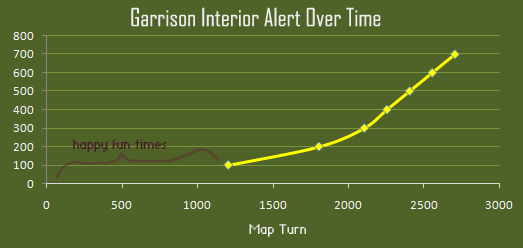
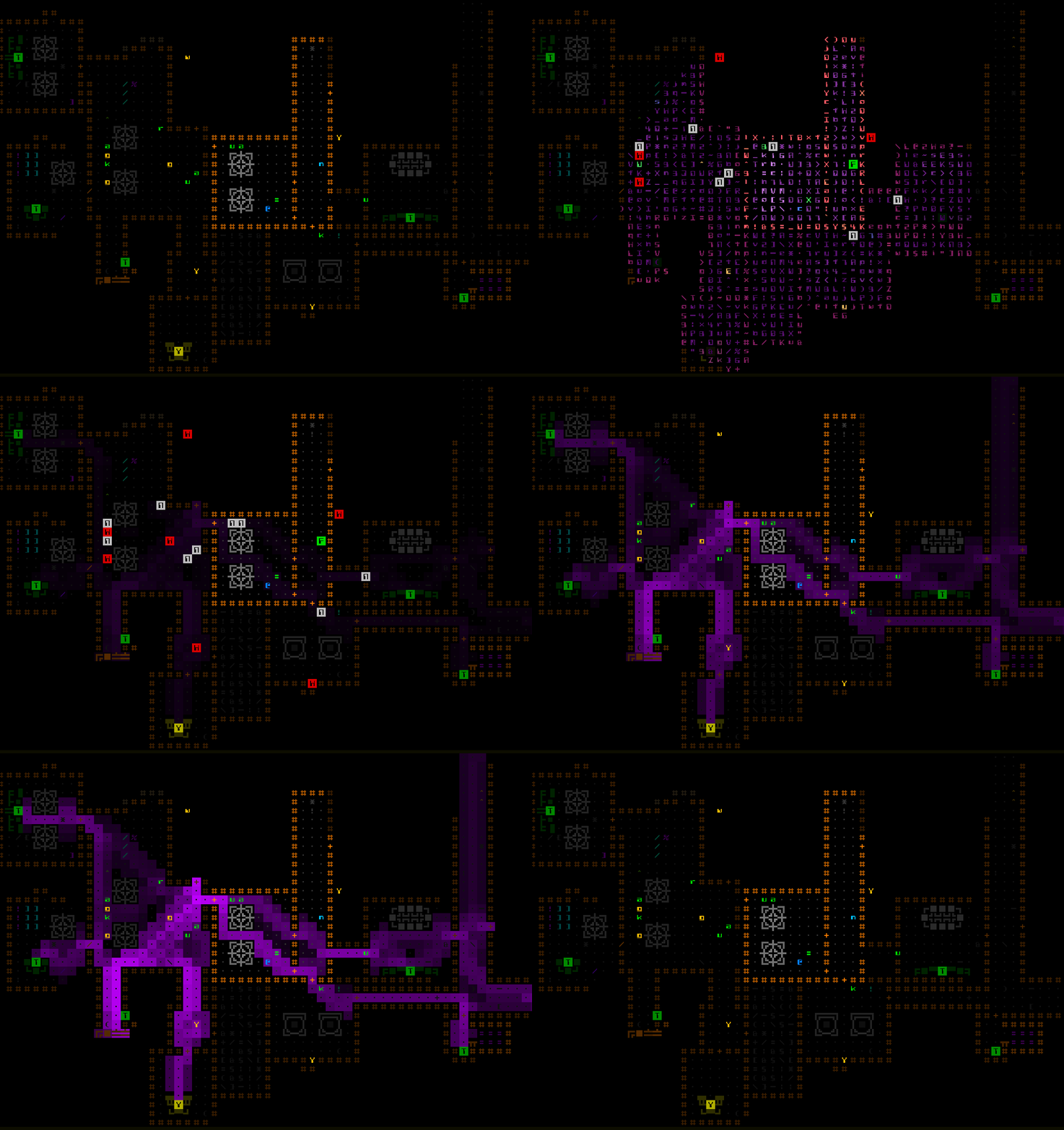
Cogmind Garrison Interior Alert Over Time

Ambient alert accumulation inside a Garrison begins from turn 1200, though remember the alert depicted here is purely from being inside the Garrison, excluding any other alert resulting from actions within, like… blasting everything :)

The numbers used are based on a wealth of player run stats, in combination with the desired balance for these new Garrisons. The time required to full clear will generally push alert quite high, but is technically still achievable and not unreasonable if that’s something the player wants to do, while the option to bail early is always available.

Note that while RIF builds no longer immediately benefit from simply being RIF builds in this scenario, by design that play style comes with more tools for controlling alert, so at least retains some indirect benefit.

Balance

With all these new encounters, the average content density inside Garrisons just shot up. However, I don’t think higher density itself has a significant impact on difficulty, which would be the main concern. Garrison map flow remains unchanged from before, with all exits directly accessible from the center via four spokes, and encounter rooms are either further out towards the edges, or at least off the beaten path, meaning they can usually be avoided if desired, serving mostly as optional areas for the player to investigate based on their own risk-reward tolerance.

The added variety no doubt makes Garrisons more interesting and fun to explore, but also introduces new design challenges. Encounters now make up at least half of their content, including many of the potential benefits (even the holy grail itself, the RIF Installer!), but many of these extra rooms are hidden behind one or maybe even two layers of phase walls which not all players are equipped to detect. This can make exploring a Garrison very problematic, even unfun. In theory it could be optimal to destroy all the walls in a search for hidden paths (especially with Beta 11 when there was no clock adding at least some time pressure), assuming one is willing to pay the alert cost for the collateral damage.

To help alleviate this I added a guaranteed Terminal embedded in the wall of a random main corridor, a Terminal that lists the “Access(Emergency)” hack which reveals all hidden doors and phase walls across the entire map (expanded behavior beyond its normal effect).
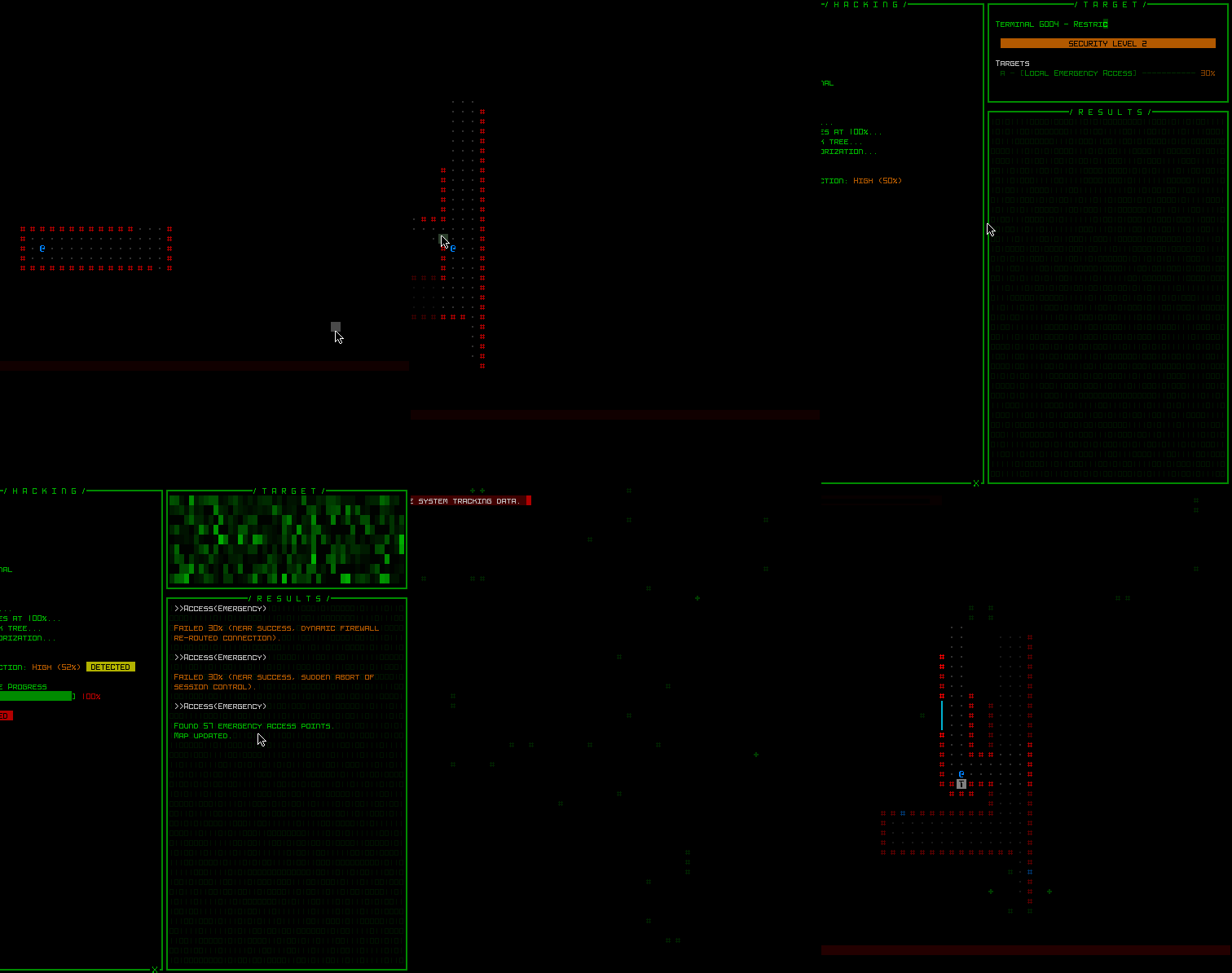
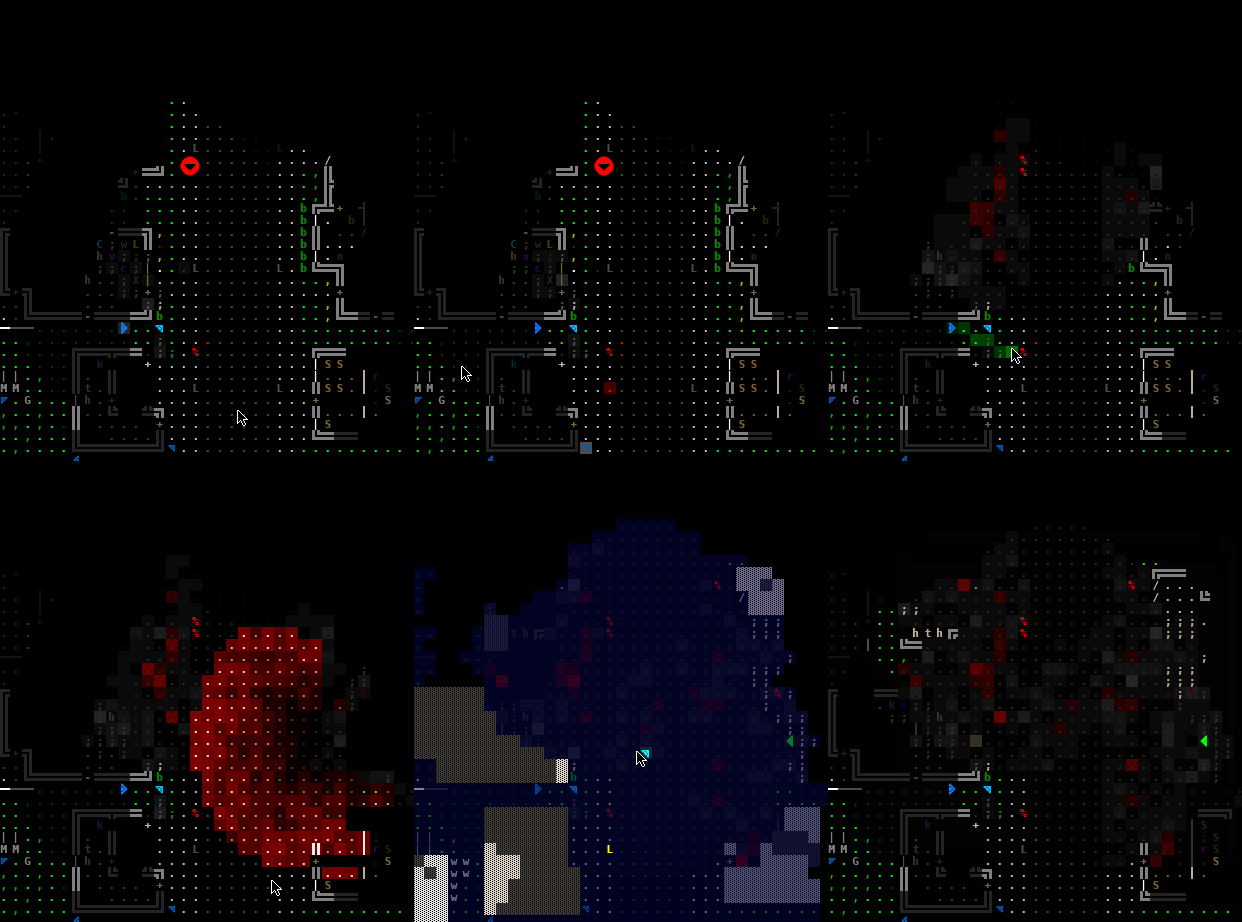
Cogmind Garrison Access(Emergency) Hack Demo

Access(Emergency) inside a Garrison is quite revealing…

So simply exploring the main areas of the Garrison will eventually lead to discovering this Terminal, which offers a pretty good chance of marking all the hidden paths, but first you have to find it.

Failing that (gets blasted in a fight? hacking attempts unsuccessful?), one of the potential “encounters” is another Terminal nook containing a new “Download(Registry)” hack with an even more extreme effect, revealing all terrain, security locations, and even item caches.
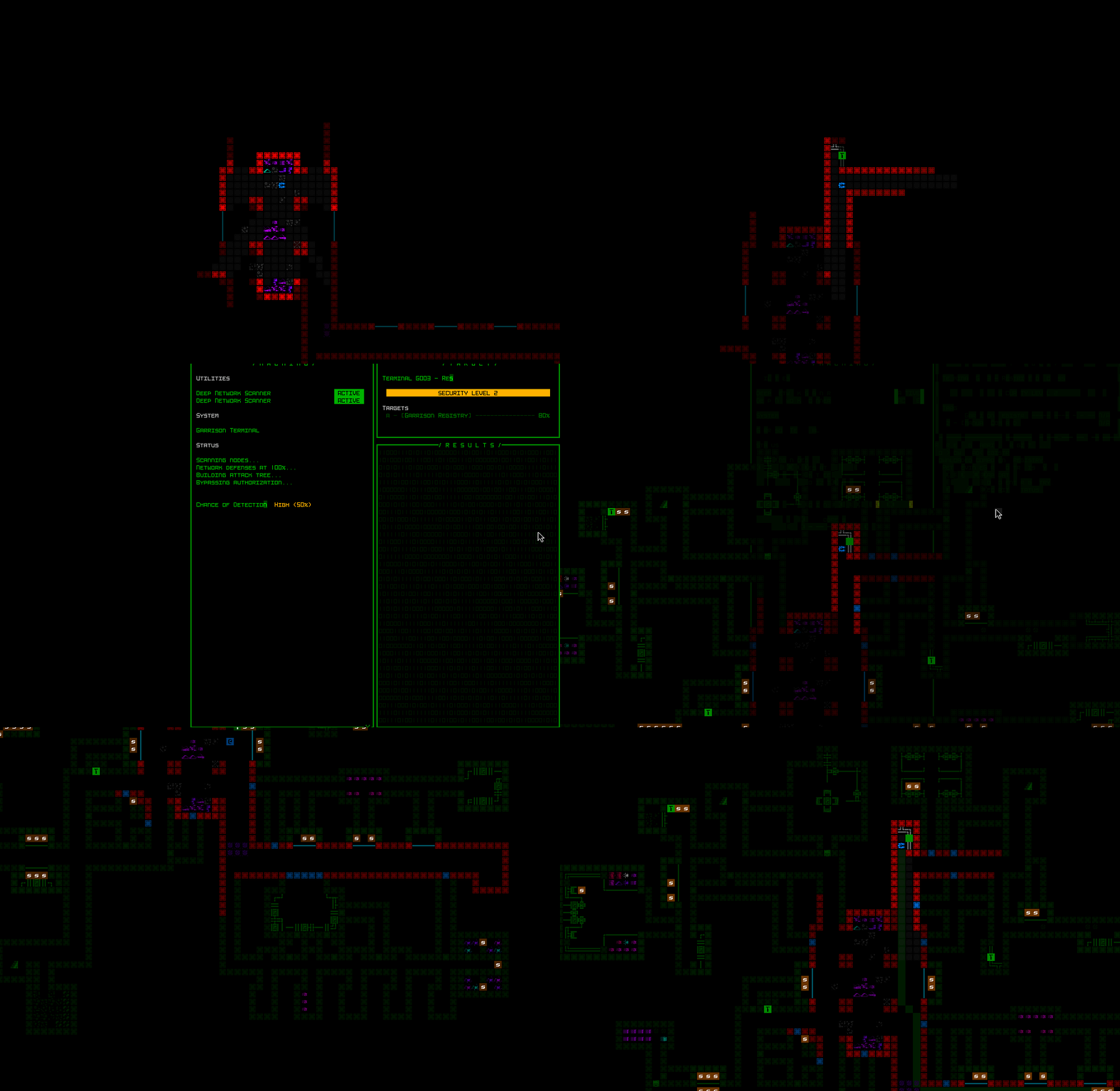
Cogmind Garrison Download(Registry) Hack Demo

Download(Registry) is even more revealing! If available, that is.

But it’s not a guaranteed find, and being an encounter itself there is a chance it’s not easily accessible, either (it has no door of its own, but the area selected for it may otherwise not be directly linked to a main corridor).

So that’s just one possible option. The reason these options are more important inside Garrisons is because a number of typical sensor types are blocked, which is where the costly backup approach comes in: Destroying the Phase Generator eliminates the blocking (at the cost of raising alert further), and also opens all the phase walls, making it easier to explore freely. There’s usually (but not always) at least one Phase Generator in a Garrison, and it can often be found through natural exploration since it’s designed to be heard through phase walls that lead to it.

RIF Installers (again!)

Any RIF build visiting a Garrison is itching to find this thing ASAP. More abilities? Yes, please! (In fact, I even added a new ability for Beta 12 so we’re up to 16 now, 7 of which have multiple levels.)

It used to be fairly easy to find--if it’s not adjacent to your starting position, follow the spokes to each of the three exits and it’ll be at one of those, but now that Installer placement has been merged with the encounter system it could be anywhere! Including of course outlying hidden areas (see the image from earlier for one such example). That’s a problem.

Forcing some players to repeatedly full clear Garrisons to ensure they find these is excessive, so I added a new mechanic to help out: Once a player has installed the RIF system, getting anywhere near other Installers will automatically ping them, revealing their precise location.
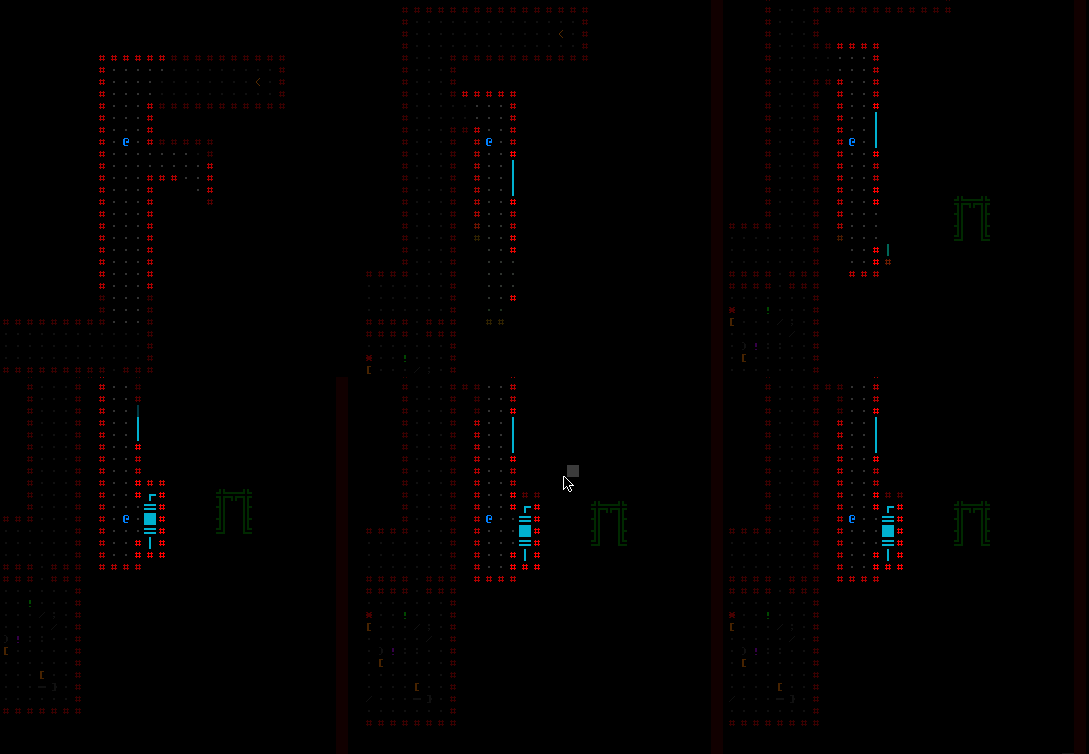
Cogmind Garrison - Pinging RIF Installer

There it is! Now to find the entrance…

There is precedent for this behavior, since RIF-capable builds already similarly ping nearby Garrison Access points elsewhere in Complex 0b10, and adding this feature elegantly solves the “where the hell is the Installer?!” issue. In fact, it could even be considered more interesting than the predictable locations used before, since the new randomized locations might require a bit more exploration to uncover, as well as figuring out how to reach the Installer once discovered. That while making sure it’s not damaged in the process, since who knows what else is lurking around…

Incidentally damaged RIF Installers (:O) will no doubt be more common in Beta 12, though there are balance factors at play here, too:

  • A single Garrison may contain more than one RIF Installer. That’s pretty exciting news for RIF users, though it’s worth being cautious since the second potential installer may be trapped or defended!
  • Looping back to a main floor through one other particular new encounter for a shot at another Garrison (and its Installer(s)) at the same depth is a possibility. This is different from normal exits in that it always loops, regardless of where the other exits lead.

Overall the average total ability count across an entire run will likely be higher than before among players who want to optimize for it.
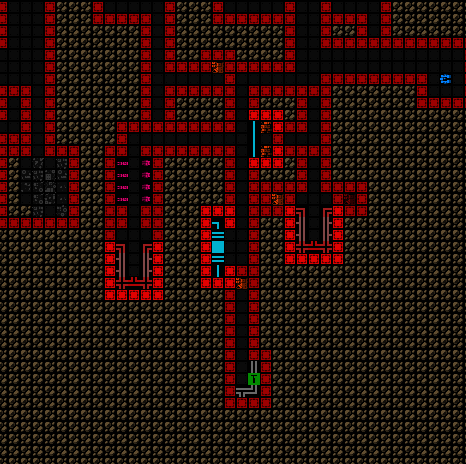
Cogmind Garrison w/Multiple RIF Installers

Installer-rich environment detected!

Non-RIF Builds

RIF this, RIF that… but as I stated at the beginning, one of the goals here is to give more non-RIF builds good reasons to visit Garrisons as well!

I think the update manages to deliver on this point, and we’ll see other builds Garrison diving at least some of the time, as a part of existing strategies or even entirely new ones. Advantages include:

  • Out-of-depth parts, often significantly so.
  • Other situationally useful rewards such as large numbers of traps or Authchips. Also allies, sometimes pretty effective ones.
  • Unique intel. Among the new Terminals added to Garrisons, we also have new hacks enabling the download of patrol navigation and security data for the next map, intel which can be quite useful given its scope.
  • Then there’s the really big one, an entirely new meta mechanic spanning many areas of the game with significant strategic impacts outside Garrisons and even into extended, but requiring Garrison visits to trigger and… nurture. Almost sounds like RIF, but by design the two are actually mutually exclusive options, so I look forward to seeing who uses it, and when and how. Writing about this new feature could be a whole new article topic on its own, but given that it’s steeped in lore and is one of those things meant for people to uncover naturally, I won’t go into any details here. Let’s just say it’s neat, and it’s useful. I’ll almost certainly be streaming it at some point though, so that would be one way to learn about it from me, aside from the usual places in the community.

These advantages exist on top of the original beneficial side effect of passing through a Garrison, whereby looping back to the same depth reduces the size of all patrols (while you have your chance to harvest more resources? find an elusive branch?).
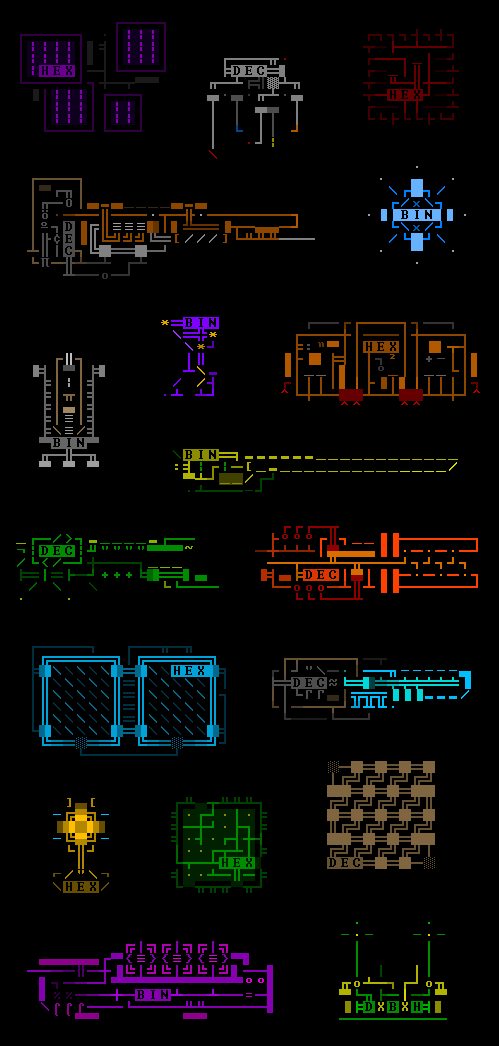
Cogmind Ascii Art (ECA)

Hm, what’s this?

Events

While encounters help flesh out the general Garrison experience, there is another potential layer on top of that to further shake things up: Events.

Events are not all that frequent, but when they do occur have a map-wide impact. These are various faction-level activities that might be beneficial for the player, or add some new danger, or something in between.

For spoiler reasons I won’t say more about these, other than to point out that from a design perspective it’s nice to have this extra layer so that once players are familiar with the individual encounters possible in a Garrison, and come up with localized strategies for those, there’s always the chance for something to come along and change the strategic equation in a bigger way.

In other words, events contribute to avoiding the “flat” experience of simply moving from point A to B, dealing with whatever challenges lie at the destination, then the next one beyond that.

Technically we have encounters that when close enough to one another might bleed into each other due to an alarm trap, untimely patrol, call for reinforcements, Terminal trace investigation, or… accidental retreat in the wrong direction? :P

And this approach is reflected throughout Cogmind’s other maps as patrol routes change, units carry out unique duties across different areas, and yet others are dispatched to react to something far away (dungeon environments can be about as dynamic as an open world!), but Garrisons are smaller maps with fewer macro systems at play, so it helps to add that extra layer of potential content to mix it up. For the same reason, DSFs (even smaller and simpler than Garrisons) also have the occasional event.

This sort of mutlilayered approach is also really useful for emphasizing the lore, taking advantage of another dimension to bring the world to life. It’s not just “Cogmind vs. the world,” it’s “Cogmind happens to occupy this world alongside many other actors with their own goals, friends, and enemies.”

Again these events are uncommon, since we still want most Garrisons to be focused around their encounter content and balance, as opposed to events which generally take over the entire floor and make it into something quite different. As I have it set now, there is a 60% chance of having a single event across a full run that visits a Garrison at every single depth, and a 10% chance of having two. 30% of seeds have no Garrison event at all, regardless of how many are visited. Events are special!
Posted in Design | Tagged , , , , , | Leave a comment

Kyzrati’s Game Design Philosophy

Recently a player asked me a question regarding my game balance philosophy, and while I can often respond to queries by pointing to some previous article, despite all my writing and no doubt occasionally touching on related topics, I had yet to explicitly do any sort of summary of the philosophy behind my gamedev work.

Now I’m sure this won’t be a comprehensive summary, mainly since it’s harder for me to quickly step back and reflect enough on the bigger picture to think of every meaningful element in the time it takes to write this article. Normally I’d collect notes for an article like this over a longer period, then eventually get around to writing it out one day, but since this topic comes on shorter notice and I just want to get it out there, let’s just go with what I can come up with for now.

Note this article refers to design of a game itself, rather than the complete gamedev process, which is a pretty different topic altogether. (I sorta covered high-level process before, albeit more in a technical sense than a philosophical one, in an early article on Cogmind’s alpha release cycle. Note that since that time Cogmind development has entered a couple different cycles, so while I once used that approach, the process has since evolved to fit different circumstances.)

And of course the context (plus any examples) for this discussion will obviously lean heavily on Cogmind, since that’s currently my main project, although as a fairly general philosophy the same factors could be applied to many games.

Let’s just dive right in, dissecting my gamedev philosophy as it pertains to a range of topics…

Vision

I’m a strong believer in starting out by crafting a clear vision for what kind of game and world you want to build, and sticking to that vision throughout development. A well-developed vision serves as both a driving force on the way to a complete game, as well as an anchor that limits expansion in tangential directions that could otherwise jeopardize cohesiveness of the experience.

In its earliest form, Cogmind’s premise as a 7DRL was pretty simple: You’re a robot building yourself from scratch using parts found and taken from other robots, with rampant item destruction so you’re forced to rebuild pretty often. That’s just the core mechanic, and about the smallest vision you can have (which is actually what I recommend when starting to build a roguelike), though even then my vision included an immersive interface and using sensor data to help navigate a living world occupied by both hostile and non-hostile robots.

Cogmind 7DRL screenshot

Cogmind 7DRL! (2012)

The potential scope for a 7DRL naturally has its limitations, and while my vision for the commercial version of Cogmind didn’t make any significant changes to the original, it was however greatly expanded as evidenced by the 7DRL’s one-page design doc ballooning into a hefty doc describing a world of more varied locations, interactive machines, NPCs and “robot life.”

And yet amidst all of this the player is not the center of attention--sure there’s a lot going on in the world, but in most cases you can even simply try to be a spectator. That I keep revisiting this aspect whenever I add new content shows that it is indeed an ingrained part of the vision. For example, DSFs are a new type of map added in Beta 11, and as with most other locations you can happen across unexpected events which have nothing to do with you at all, just inhabitants of the world driven by their respective history, relations, and goals.

Cogmind DSF Layout and Features, Annotated

So this is along the lines of what one would expect to find inside a little DSF, but the player isn’t the only one who might find their way inside…

Many times throughout development, sticking to a vision also means having to resist the urge to add certain features/content that might seem cool, either to yourself or players. There’s never a shortage of tempting ideas and feature requests out there!

Sometimes you might be able to edge an unlikely one into the game, maybe there’s some creative way to do it, or preserve the concept in some other way, but never at the expense of compromising on vision (or really many other parts of the philosophy we’ll be covering here!).

Difficulty

I want my games to be challenging but fair. Challenging in that it takes a decent enough understanding of the game’s mechanics and content in order to build the necessary grasp on effective strategy and tactics to sometimes win; fair in that a player with an excellent understanding of those aspects should pretty much always win, as long as they’re not intentionally attempting something dangerous or even more challenging.

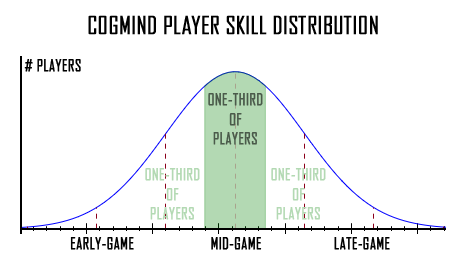
In a mature player base, the natural result of this approach is more or less a bell curve.

Cogmind Player Skill Distribution Curve

I posted this curve back in my difficulty article, saying that it’s just an illustration, but the actual curve based on player score data actually looks more or less like this.

Of course not everyone has the time or inclination to develop the skills necessary to improve or explore at their preferred rate, so although I always design Cogmind around the intended challenge level, the “Rogue” difficulty, I eventually added two other difficulty settings, one a little easier for those who want to retain most but not all of the challenge (“Adventurer”), and another which is much easier and literally dubbed “Explorer” for those mostly just wanting to explore the world rather than seeking tough challenges.

This is one area that reflects an evolution in my design philosophy, since based on my personal preference the idea was originally to have only one way to play, as with all classic roguelikes. It certainly makes some sense that in a genre known for its challenges, everyone should ideally be playing the “same game” to maintain matching expectations and reference points during community discussion/sharing/bragging :P

But as described here on the blog when I first introduced difficulty modes (see there for much more discussion), in the modern age of roguelikes, including some of the most popular ones, we do now see examples of adjustable difficulty.

In my experience (and I’m very active within the community), accommodating more players like this hasn’t really had any major negative side effects. (Well I do recall there was that one negative Steam reviewer who went off the rails about how roguelikes should not have difficulty levels because how are you supposed to know which it was designed and balanced for, but they apparently didn’t read the one-line description of the Rogue difficulty on the selection screen, which literally says it’s the mode the game was designed for xD)

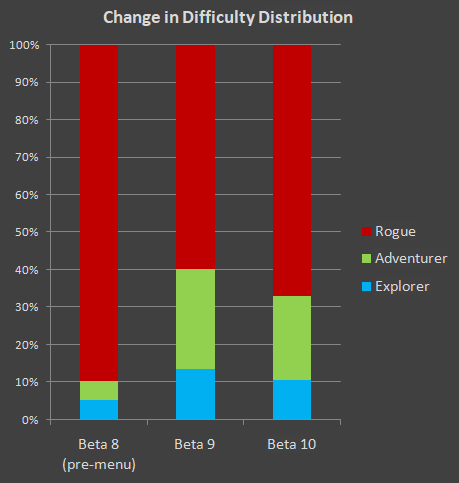
The majority of players do still play the mode Cogmind is designed around (in some cases later switching to it after gaining experience in other modes first).

Cogmind Change in Player Difficulty Distribution (Beta 8~10)

More players have been using easier difficulty settings since the pre-game menu was added, but still appear to make up a minority of the player base.

Cogmind’s easier modes are also more than just number changes--there are extra mechanics and features aimed at tweaking the experience for players via tangible strategic and tactical benefits, for example highlighting the positions of hostiles that have become aware of your position.

Cogmind Alerted Enemy Markers (Adventurer/Explorer feature)

This feature was originally added for everyone, but is really too advantageous for the player in normal play and therefore removed from Rogue mode in particular.

Back to the idea of fairness, it’s worth highlighting some of the important elements that contribute to maintaining it, especially in a RNG-heavy genre like roguelikes.

One of the most important is the need to telegraph or signpost major challenges so the player can make a semi-informed choice about the dangers of something even on first encountering it. With individual enemies this is often easier, since you can at least always examine their details to see how powerful they are, but it’s also important on a macro level, like what parts of a map might be more dangerous (bigger doors to access it?) or what maps are more dangerous in the first place (special defenses around the entrance? or just a menacing or suggestive name :P).

These signposts can range from subtle to explicit, depending on the danger level and, more importantly, how unexpected the results might be given a general understanding of the world order.

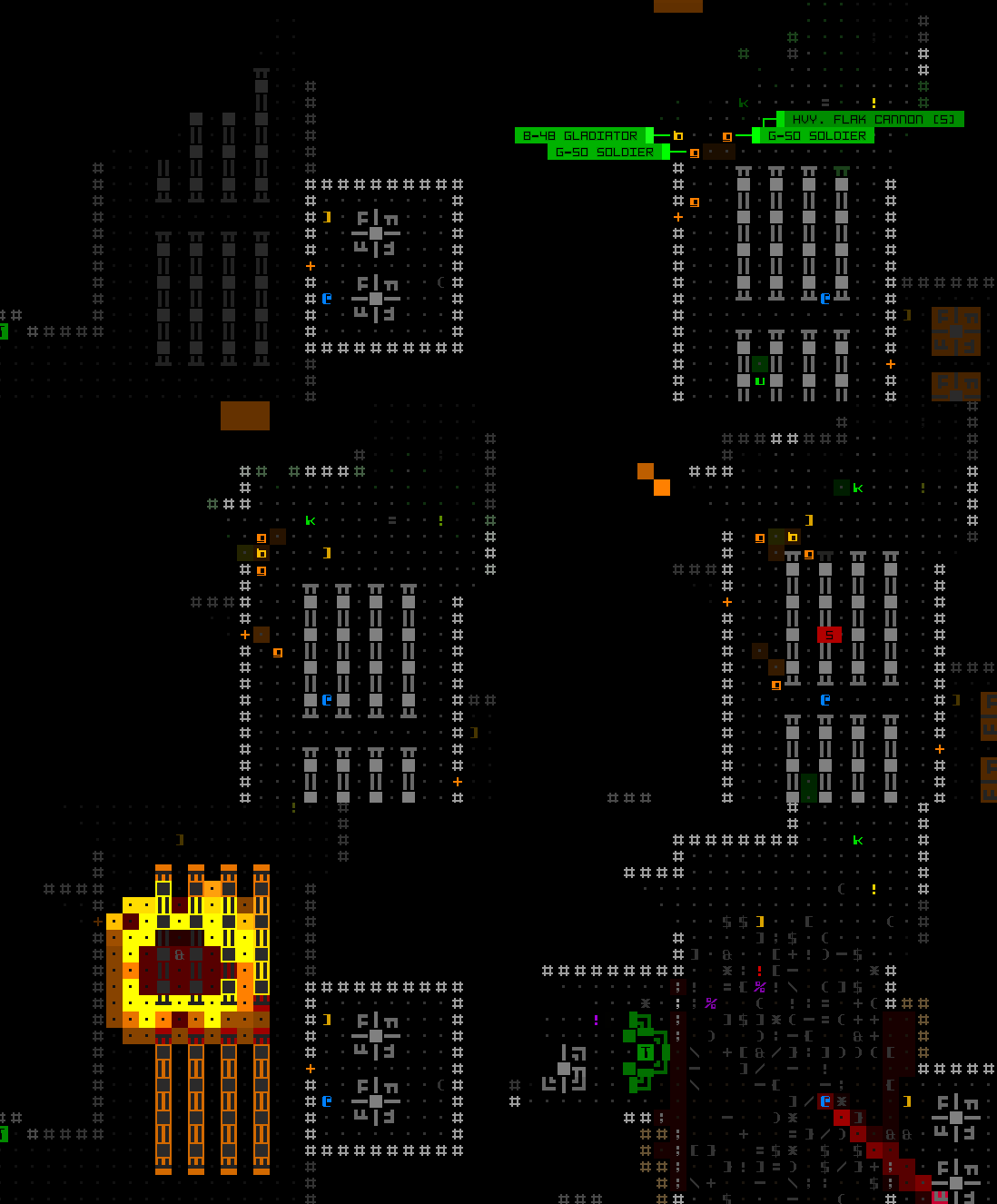
Cogmind Heavy Class Active Sensor AOE Warning Animation

The new Heavy class added in Beta 11 makes quite a point of signposting itself because of their extreme effects on the local area.

For example, integrating with the Exiles’ FarCom system gives some pretty nice benefits in most areas of the world, but when you do so there is a huge drawback they warn you about, and the consequences are so harsh (but sometimes forgotten by the time they might come into play) that in Beta 11 a second reminder was added lest forgetting that little detail simply end the run.

“Instadeaths” are an unfortunate possibility not always easy to avoid in many roguelike designs, though interestingly in Cogmind’s case the player has so much “HP” that death is naturally a protracted affair rather than a potentially sudden or even quick chain of events. While on some levels this can be a frustrating experience, the chance for comebacks is also very high, especially among skilled players, and pulling one off feels very rewarding.

It’s important to give the player tools to recover from mistakes or unexpected events, a role most roguelikes fill with consumables or escape abilities. Beyond being able to swap in more and more parts to block hits and deal with (or avoid) threats, Cogmind uses a fairly unique approach by being able to 1) take a huge beating, and 2) outrun most enemies once reduced to a naked core.

Cogmind Purge and Flee

Instantly “purging” all attached components and making a run for it, to survive and rebuild another day.

Players new to Cogmind tend to have trouble quickly realizing the implications of such mechanics in order to take maximum advantage of them, but it’s fun watching new players think they’re pretty much dead, then get lucky after being reduced to scrap and end up rebuilding right back up again. Eventually with enough experience the luck component of rebuilding can be significantly reduced (in fact, last year one of Cogmind’s top players streamed a run in which they intentionally nuked their own build to repeatedly rebuild from scratch on every new floor, and still made it to the final floor regardless).

Giving players ways to control their own difficulty during the run is also useful for contributing to its fairness, as well as making it feel more fair, too, in the sense of “well it was my choice to take on that more challenging area…” For this purpose many roguelikes have optional areas, be they branches with a different risk-reward profile, or an “extended game.” Cogmind has both of these, as well as numerous win types with varying conditions.

On a similarly macro level, branching paths with multiple segments also include intermittent ways to return to the main areas of the world (to recover health and return to what are generally easier/safer locations) rather than continuing onward, allowing players the option to back out early after reevaluating their situation and goals rather than feeling trapped.

Cogmind World Map Structure (created in yEd, partially complete, with branches distorted)

Cogmind’s world map as seen in my yEd graph (initially shared in my Cogmind dev tools article), albeit with branches distorted and some locations completely removed to keep the spoiler level low. You can still see how there are paths from individual branch maps that cut out early to return to the main areas.

Not surprisingly, the base difficulty of Cogmind has fluctuated over the years as more and more content is added, sometimes leaning to the harder side, other times easier, so there is always a need to revisit and adjust the overall balance to keep it within my target range. Most recently, Beta 11 swung it back towards higher difficulty, after quite a number of releases that originally pulled it in the opposite direction. (Update: More recently in 2025 I wrote another article on Designing for Mastery which covers a lot of relevant topics as well.)

Balance

Good balance is of course another important contributing factor of fairness. Not all games (especially single player games) have to strive for balance, but for me it’s absolutely vital. Among the many other benefits of balance, it provides a clearer frame of reference when designing new features, and players in turn have an easier time establishing their own frame of reference for putting together builds and strategies.

Numerical balance is a good place to start, as I did way back with Cogmind 7DRL and wrote about here on the blog before, and more recently with the full Beta 11 rebalance. But a game’s balance also needs to aim for the right feel, regardless of the numbers. It doesn’t matter if some mechanic is technically balanced if it doesn’t also feel balanced to players.

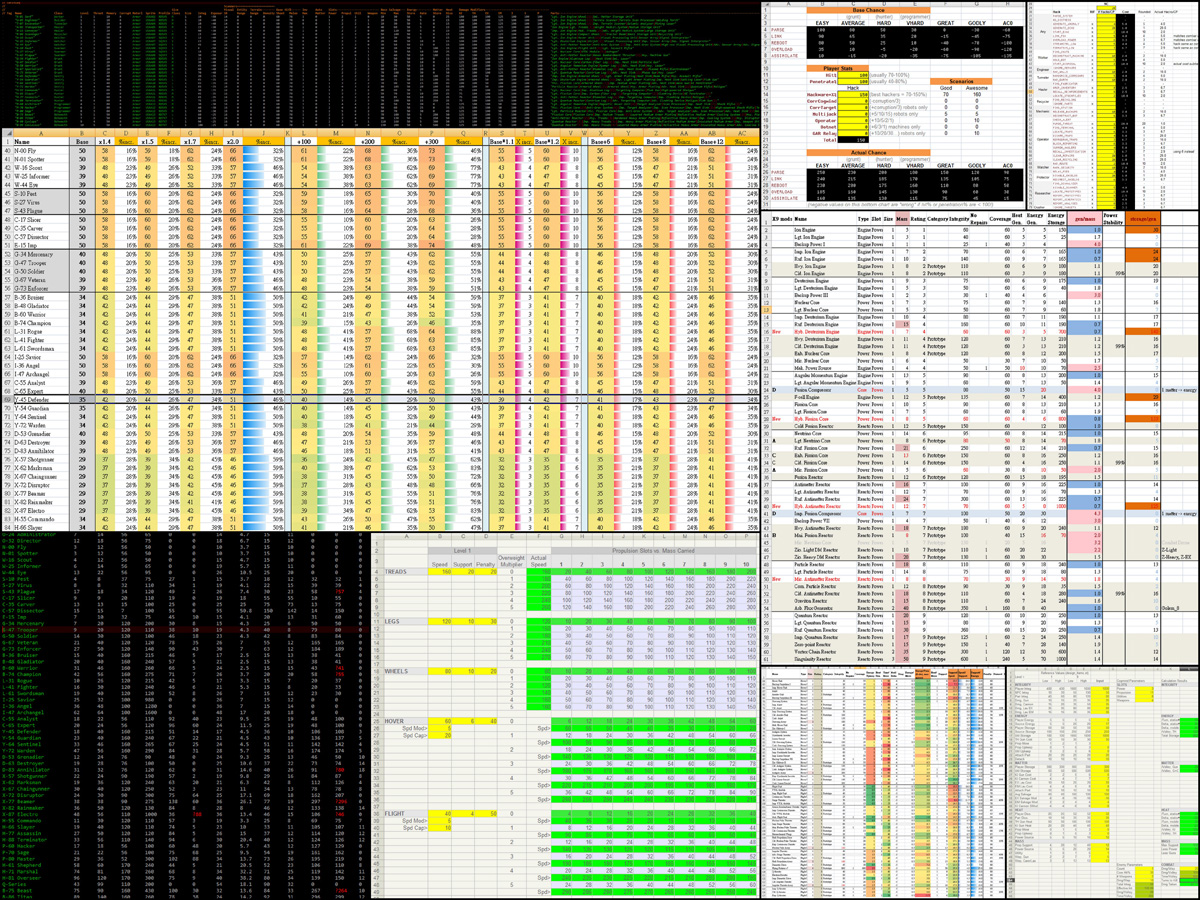
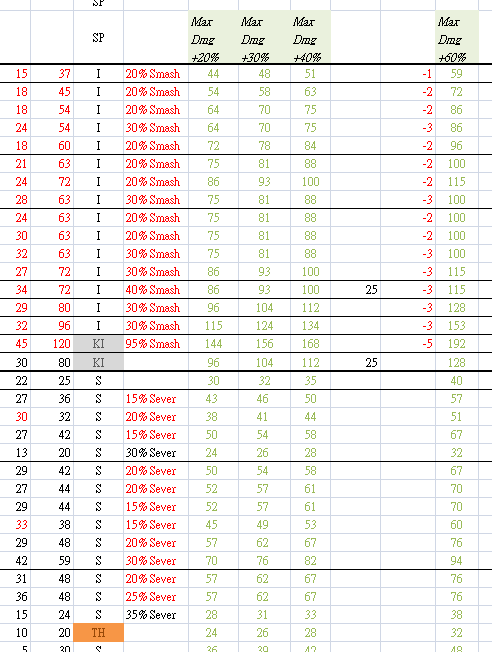
Cogmind Design Spreadsheet Collage

Any balanced game of sufficient complexity is going to be backed by lots of spresheets!

This can be an especially thorny issue with roguelikes (or any RNG-reliant game, really) in which percentages are often known but results don’t necessarily align with individual player expectations, even if statistically correct.

This reminds me of the machine hacking results which caught a lot of flak from players over the years (and always seemed odd to me as well, to be honest), enough so that I eventually gave it a different kind of custom-built PRNG, and complaints have since stopped. Amazing! (The results aren’t as randomly distributed now, but it’s random enough and feels better, and that’s what’s important.)

When we’re dealing with something as arbitrary as “game feel,” listening to player feedback is going to be important, though even more important here is the indirect feedback, i.e. simply reading about player experiences and preferences (or watching them, in the case of streams).

I take a lot of this into account while working on updates and designing future features, and it’s especially relevant for all the times individuals might claim item/mechanic X is terrible or useless. Many players pass judgement based on their own limited experiences and/or personal preferences and biases, but as long as we can see that item/mechanic X is useful to and/or enjoyed by some other types of players, then it’s likely serving its purpose.

So numbers aside, we also have to take play style into account with regard to balance, and content and mechanics that spark debate between players is a good thing. Usually it’s just enough to watch players hash these things out themselves, although sometimes I’ll want to explicitly join in on or bring up some topic for discussion (this was a big part of the final Beta 11 rebalancing, which I also streamed in order to discuss with everyone--videos in that article).

Now “balance” doesn’t have to mean everything is directly comparable to everything else on an equal playing field. Context is important. There are many ways to balance an item/mechanic, including even methods completely outside the object itself! (Okay from here on when I write “item” it means “item/mechanic,” because they’re often interchangeable given that most of Cogmind’s mechanics are based around items :P)

Obviously we have our core set of items which are numerically balanced, essentially directly comparable and found all over the place. Then there are those which are tweaked to emphasize one characteristic over another, for example extra power at a greater resource cost. To keep things interesting while remaining balanced we essentially apply more and more significant tradeoffs--bigger benefits for bigger drawbacks, all the way up to the crazy level if we want to. This is the space that Cogmind is exploring more and more of as time goes on with a stable and balanced foundation already serving as the core.

Cogmind Active Sensor Suite Activation Animation

The Active Sensor Suite added in Beta 11, occupies a whole three slots on its own, more than any other sensor, but also also has multiple powerful functions, but also eventually alerts enemies to your position.

To give us more leeway in terms of making interesting items, external balancing factors are the most interesting, but also the most demanding in a development sense. Some items can be outright better with few to no tradeoffs if, for example, they are simply more rare, or difficult to acquire. There are some items which are insanely powerful, but can also be very difficult to acquire. The “difficult to acquire” part is what adds development pressure, since it’s no longer purely about the item’s own design and implies the need to also design and build whatever is making it hard to reach in the first place.

At the same time, it’s also pretty cool that due to Cogmind’s built-in “ultimate balancing factor”--the fact that most items are destroyed eventually, we have a somewhat easier time balancing (and therefore including in the first place!) what would otherwise be a lot of overpowered items. The heavy reliance on this factor becomes incredibly obvious in the RPGLIKE special mode, which all but removes attrition and is much easier as a result, especially once you acquire powerful unique items which then carry you :P

While Cogmind includes several item repair mechanics, by necessity these types of unique or powerful items generally cannot be repaired (though they can be better protected through various means!). As a new player it’s easy to initially be shocked at the amount of item attrition in Cogmind, but this very element makes possible a lot of Cogmind’s fun mechanics, and many players come to realize this and embrace it, as well as learn how to mitigate that attrition through a better understanding of the mechanics, and simply better tactics.

Technically if we were to teach players actual strategy in the game itself, it would certainly help retain those who can’t figure it out themselves, and I’ve considered this possibility since early development, but continue to feel that sort of information is better served by sources outside the game (community, guides, etc.) and doesn’t really belong inside a roguelike, especially an immersive one about discovery.

Criteria

Content isn’t added just for the heck of it, or even filtered purely based on balance considerations, as there are various other criteria to satisfy as well.

First of all there has to be enough design space to sufficiently flesh out a piece of content, and once fleshed out it can’t interfere with other features.

With Cogmind an unfortunate example of this is the much desired environmental-type effects found in some other roguelikes, like fire, gases, or anything other kind of temporary state which can occupy a cell or area. Even my original Cogmind 7DRL design docs listed this potential, but it’s not very compatible with the type of game that is Cogmind, especially in its since-expanded form.

One of the issues is simply a case of presentation. With only three components of information available in a given map cell--character, foreground color, and background color, we don’t have enough room to also comfortably display persistent effects like this. The most likely candidate for showing this sort of effect is of course background color, but we already use that for other sorts of temporary information, especially at the interface layer. Maybe environmental features could be included if they were an occasional thing that only affected a small area for a shorter time, but that goes against the principle of aiming for fleshed-out features.

Either way, having something like this also shifts the design away from its core focus on robots and items (and to a lesser extent, machines), while adding a lot of potential clutter to the UI, especially once taken to its natural conclusion of being a full feature complete with raging fires, billowing smoke, waves of radiation, and whatnot.

XCOMRL Blaster Bomb Destruction w/Fire+Smoke

I do really love me a good spreading fire and FOV-obscuring smoke, though… (Taken from X@COM, this particular old recording doesn’t really show off the environmental effects so well since it was intended to demonstrate blaster bombs instead of incendiaries, and doesn’t leave much to burn, but some effects are clearly apparent there :D)

Focus on as few core areas as possible, and do them well!
At the same time we ideally want any new content to hook into as many other existing elements as feasible (taking into account design, architecture, and development effort), lest they feel out of place. The more interconnected the world, the more natural it feels (and therefore less gamey and more immersive).

One of many examples here are Fabricators, which in a game sense exist most fundamentally to allow the player to build things, but these machines can also:

  • produce robots and items for the enemy, the former of which will head off to join the nearest Garrison, and the latter are scheduled to be picked up by a Hauler
  • have their own scheduled builds intercepted or modified by the player
  • be hacked for various other purposes (in one case even as an attack vector)

There are currently still some “feature stubs” present in Cogmind, very early pre-alpha experiments which were never removed, but also never expanded, perhaps in the hope they will one day become “a thing.”

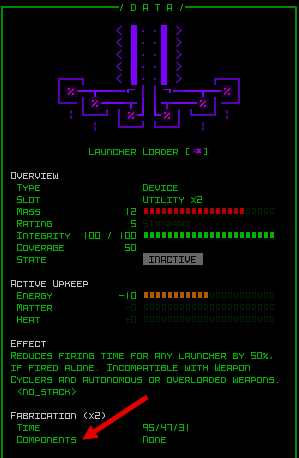
One of these is implemented and working despite never even having have any associated content: the ability to require components when building something at a Fabricator. Eventually I should decide whether and where to use this, but it’s the kind of thing where at this point if it were used, it likely would not be very fleshed out, and seem like an odd outlying sort of feature, so for that reason I’m not really eager to take advantage of it…

Currently I think this one in particular only has a reference in the gallery data exports and schematic Fabrication data readout, though technically should be hidden from there for now, too.

Cogmind Item Schematic Info w/Components

This entry simply indicates “None” for all schematics.

Another situation that falls under this category and should ideally be removed or modified (or expanded?) is the handful of items with “internal batteries” of limited use, which take effect when dropped on the ground. It feels like an outlier type of mechanic.

All in all, “non-part items,” as in items that cannot be attached as usable equipment, were a mostly experimental feature not present in the original design, so one day revisiting them to consolidate their behavior would make a lot of sense based on the way I normally approach feature design as described here.

But therein lies another principle: When considering changes, avoid quick reactive decisions and prefer to wait for a sort of “critical mass” before making a move. Quick decisions lead to mistakes, which in succession will compound on one another and just create a mess. So I keep a lot of notes about various topics and plans (a lot of notes), and revisit them for additional updates from time to time, waiting until I feel like I have a strong enough grasp of the potential consequences of such a change (or new feature, for that matter) in order to implement it with confidence that it’ll have the desired effects and is the best option available.

Specific to the non-part items, I can see that I’m still kind of shaping their role and breadth in the game, so doing anything with them too early would be a problem in that it’s still too hard to tell what exactly should be done with them, if anything. So yeah, this is basically a little ongoing experiment, which is okay in a game that’s still in constant development anyway :P

In the end, consistency is important, both in terms of world building but also just generally in terms of mechanics. Concepts that sound cool but also likely break implied rules or otherwise introduce inconsistencies are usually best avoided. Wiki-heavy “kitchen sink” games (and roguelikes in particular) are definitely a subgenre enjoyed by some, though that’s clearly not my style. Maintaining internal logic is important and useful for easier player understanding, while also meeting expectations.

In that sense, expectations are a powerful driver, and limiter, on development. I’m frequently asking myself what players will expect, or even hope, in a given situation, and factoring that into plans.

At a basic level, this implies the usefulness of rooting a game in realism, and that is without a doubt a good starting point since many players share that common ground and make assumptions based upon it. The better a job one does at world building, however, the more you can get away with features that otherwise break with that realism since they at least hopefully make sense in context.

As far as player “hopes” are concerned, we know that players exploring content will always be asking “can I do that? / what happens if I do this?”, and it’s really nice to be able to accommodate those possibilities when feasible (always with the “when feasible…” :P). As the developer, I should ideally have a better understanding, and also ultimately some control over, what kinds of questions players will be asking as they interact with the world. So if I feel that some feature will create too many questions without answers, or without good answers, that’s a clue that it might not be developed well enough to include in the game.

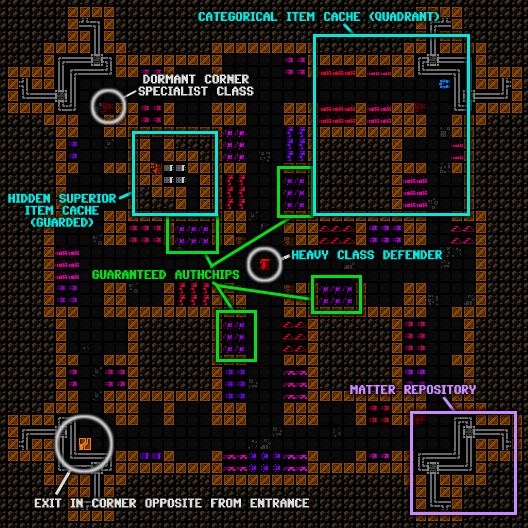
Cogmind Sample Garrison Layout, Annotated

The ability to enter Garrisons as a separate map was a direct result of me assuming players would want to be able to explore inside if possible, and it was only after that point that I even started coming up with what would actually be in there :P (eventually the interior continued expanding a couple times with new features, with another update due in Beta 12/the next release)

Long-term GaaS dev (which really defines most traditional roguelikes, including Cogmind, but without the monetization aspect--most of us just do it for free, or essentially at a huge discount xD) also means that you can spend a lot of time observing what players are actually talking about, and react to that through further tweaks, or take it into account for future features and direction. Again it’s usually better to observe this sort of thing via player discussions rather than pay quite as much attention to direct feedback, since the former tends to be more telling. You also get a greater sample size by seeing multiple people discuss a topic, which is important for an RNG-based procgen game with many different encounters and play styles.

Density

“Content density,” or essentially the amount of possibilities in a given area (usually defined as a map) doesn’t need to remain entirely consistent throughout the game. In fact it’s kinda nice to have some areas that are simpler, and therefore more predictable (good for planning!), and others which have a wide variety of possibilities (good for surprises!).

Because it’s much easier to develop “micro content” (like items and mechanics) than “macro content” (maps and factions), I’m always saving up a lot of ideas belonging to the former category to help populate the latter once they’re finally added over time. This will result in a better moderated experience than if I were to give in to the desire to completely pack the current areas with even more items. It also gives me a decent-sized pool from which to select concepts which will best work for a new area, rather than trying to come up with completely fresh ideas on the fly. I generally prefer to let concepts stew for a long while before actually using them (though on occasion I do suddenly add a pretty outlandish idea for fun--see Throwing Claymores :D).

With the next releases it’s finally time to start adding more involved new maps and factions, so I’ll be happy to draw from all these other mechanical possibilities. I’m sure the United Federation of Derelicts should and will have some unique offerings ;)

Lore

Lore is typically an overlooked potential component of roguelikes, but I really like telling stories and infusing that process throughout the experience, something which can definitely be done with the right approach (a topic already covered in the Weaving Narratives into Procedural Worlds series).

As it pertains to design philosophy, lore is more than just a story though, it’s the background which can be used to glue everything together. So like the earlier mention of creating connections between systems on a technical gameplay level, lore can have the same effect on a different level, explaining how and why certain things are the way they are, so that it all makes sense and is connected in yet more ways.

At first Cogmind’s lore was told purely through terminal entries, since that was the only medium available. (Note: I decided to forgo item descriptions for this purpose, since they would actually reduce the type of immersion I’m going for, and instead some item descriptions appear in terminal entries instead.) Later once branches, events, and NPCs were added, an increasing amount of the lore came from those sources, eventually overtaking terminals.

Rule #1 of lore: Never give players all the lore.

This helps create a sense of wonder by leaving room for interpretation and imagination. Exhaustively answering every single question, explaining every link and detail, is overkill, not to mention probably involves a ton of reading! We’re mostly playing a game, not reading a book, so I feel it’s more appropriate to offer little bits here and there, just the right amount of information on which to build a decent framework of the world and what’s happening there.
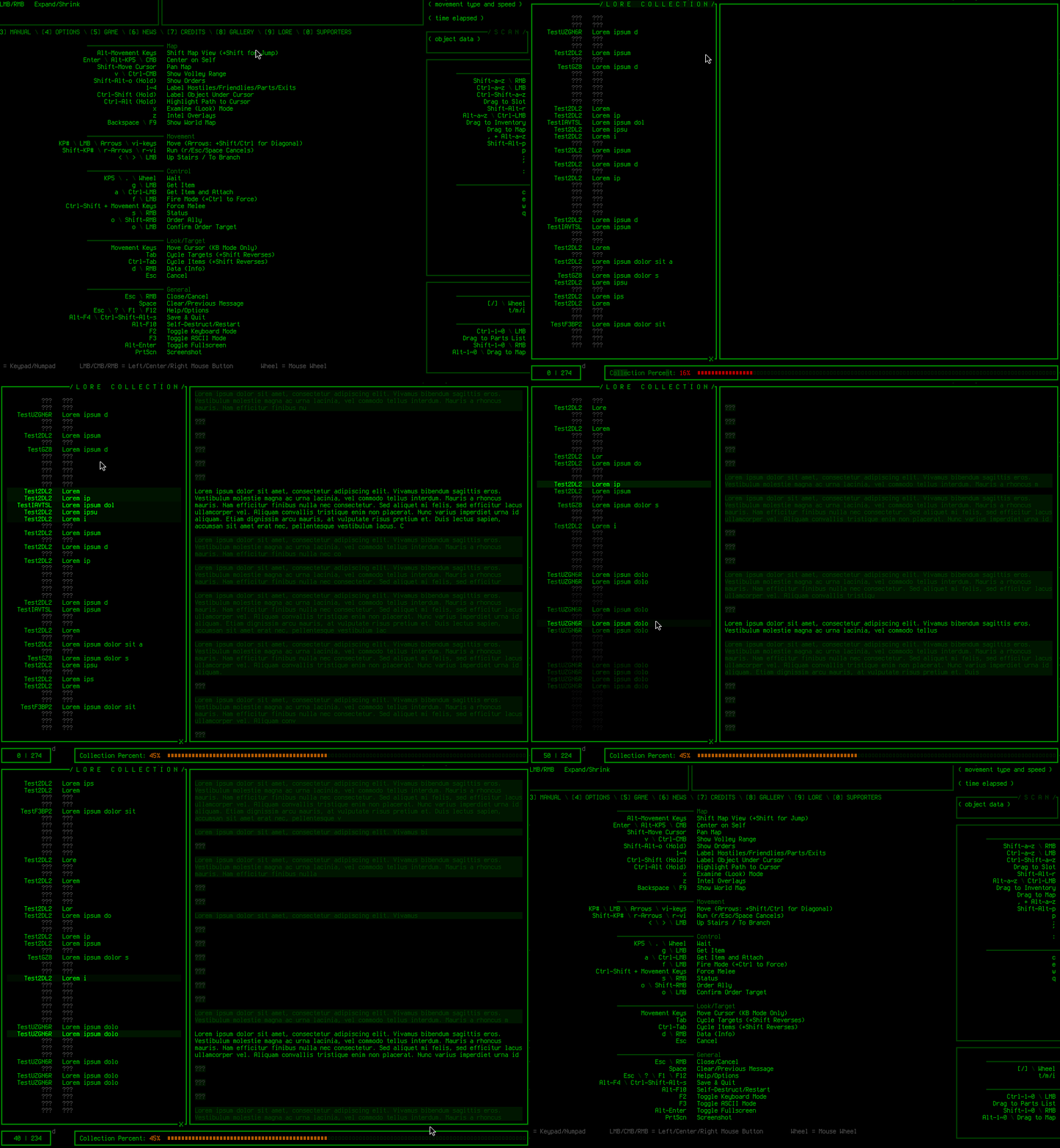
Cogmind Lore Collection UI (random test text)

Cogmind’s lore collection interface, for conveniently referencing all the important lore encountered across all runs, here in a recording made when it was under construction so that’s just a bunch of placeholder text.

Going about this correctly does involve writing more of the lore than is actually provided in game, then strategically selecting what to share from that, like at least most of the major parts, but players are really good at coming up with their own ideas to understand unexplained bits at the edges, or filling in cracks. Players also have fun sharing their fan theories, and I’ve had a lot of fun reading them, too--heck, some are cool enough to become canon if necessary at some point ;)

Leaving pieces of the world and its background vague or incomplete has another useful advantage: flexibility with regard to future content. Since not everything is clearly set in stone and more than one interpretation can apply, new content is less likely to be irreconcilable with old content, meaning less of a need for annoying retcons (which can be costly or even impossible in gamedev due to the potential cost of changing chunks of content or even how certain things work).

And that’s it, no more lore rules for today :P

Tedium

Tedium is bad. Must stamp out!

“Optimal tedium” is a common topic of discussion in roguelike communities, unsurprising as some top players attempt to eke every iota of advantage out of any mechanic that will allow them a 0.01% better chance to succeed. The issue is particularly acute in granular turn-based systems (e.g. most roguelikes), since reaction times don’t play a role and everything can be calculated out to give an idea of the relative chances involved. While I’m not really concerned with the 0.01% (or even 0.1%) categories, there is definitely a threshold beyond which tedium would become really noticeable with lots of people willing to do it, and a drag on enjoying the experience.

To be clear, by tedium I mean for example going out of one’s way to spend lots of time doing something that isn’t particularly fun or strategically interesting, or otherwise excessively repetitive boring actions.

I try hard to preemptively avoid designs that will result in tedium, and although as a player I’m not quite that sort of optimizer myself, I can usually spot areas certain others would try to take advantage of, especially after years of “training” watching the player base do their thing… Yay for long-term open development ;)

Of course I can’t always catch all these possibilities in advance, especially in a sufficiently complex game world with so many interconnected systems. Emergence is both a boon and curse! As usual the answer is to just keep an eye out for what players are doing, take notes, and be open to tweaking designs if necessary.

Minimizing optimal tedium is basically saving players from themselves, always a noble goal in my book.

Exploits

There’s saving players from themselves, and then there’s saving the design from players…

Players are incredibly creative, and there are a lot more of them than developers, so exploits are inevitable. But there’s a fuzzy line between an exploit and strategy… what really classifies as an exploit? My attempt at a definition: An exploit is an unintended interaction that circumvents one or more challenges in a very easy way and (probably the most important factor for me) is reliably repeatable.

Navigating a procedural world, “riding the RNG” to make the best of situations as they present themselves, is a great part of roguelikes (one that Cogmind happens to take to its extreme by also making your build and abilities more amorphous), while having a guaranteed or almost guaranteed way to significantly reduce the difficulty upsets the balanced experiences I want to craft. This is an especially big deal in a large game, where one piece becoming unbalanced can have more and more ripple effects in the long term as systems expand and more are added.

Note that preventing exploits is not meant to place heavy restrictions on strategies--there should already be plenty of those freely available and intended in the design itself; and it also doesn’t prohibit the possibility of the player gaining access to extremely effective means to accomplish some goal--becoming OP is fine as long as the design and balance takes it into account!

It’s also worth emphasizing here that again the line is somewhat fuzzy--some players assume I will “nerf” some tactic they think might be so effective it seems like an exploit, but then I don’t because I feel it falls enough on the strategy side of things. But usually players have a similar understanding as myself when it comes to exploits that need to be removed, and even request that I do something about them (because the players, too, are generally looking for fair challenges and hope to be saved from the temptation to play in an unfun but effective manner!).

Interestingly there’s also another category here, of tactics which aren’t all that tedious but do circumvent the design, the “true cheese,” which to me still harms the experience so I’ll remove that if and when I find out about it (though in some cases players might try to hide certain such strategies from me :P).

Some players are even helpful enough to take screenshots and/or produce and share diagrams to describe their specific strategies, which I can reference when considering changes :D

It can be hard to keep up, though, primarily because some of these are really hard to combat* and require an outsized amount of dev time to address, so I maintain a list of potential cheese to deal with, and just keep an eye on those which are otherwise hard to remove to see how frequent such a factor really comes into play across most runs, and how many people are trying to use it. Prevalent or obviously egregious cheese is removed pretty fast, but anything rarely used which would also require devoting a lot of time to work out sits on the TODO list and waits…

*The word “combat” above reflects an interesting dynamic when it comes to long-term gamedev, in that this facet of development really can be framed as player vs. dev, escalating with each new feature, update, or even sometimes new blood in the community.

It also really helps that I play a decent amount of my own game, which is important especially for solo devs to maintain a good direct feel for the true player end of the experience. I’ve found a few exploitable aspects that way, though mechanical tweaks are a more frequent result of my runs.

Interface

Now I’m not going to cover a whole bunch of interface-related concerns here, but there are a couple which are absolutely vital to my philosophy.

For one, gameplay features always take a back seat to UI/UX concerns. Feature X might sound awesome, but if including it requires the player to learn yet another new type of UI interaction, or anything too slow or complicated, then it’s very unlikely to happen. Ideally simple UI interactions are able to power numerous types of behavior, and can also be expanded to support more in the future (this is one reason radial context menus became more common in games, because they’re an easy way to achieve this goal).

As an example, Cogmind’s ability to toggle items between active/inactive states also included the ability to cycle to a third “overloaded” state for certain weapons and airborne propulsion in its first alpha release. Throughout future versions, that functionality was extended to other types of items in order to unlock secondary active states in which those items have different capabilities, all without creating some new interface for doing that.

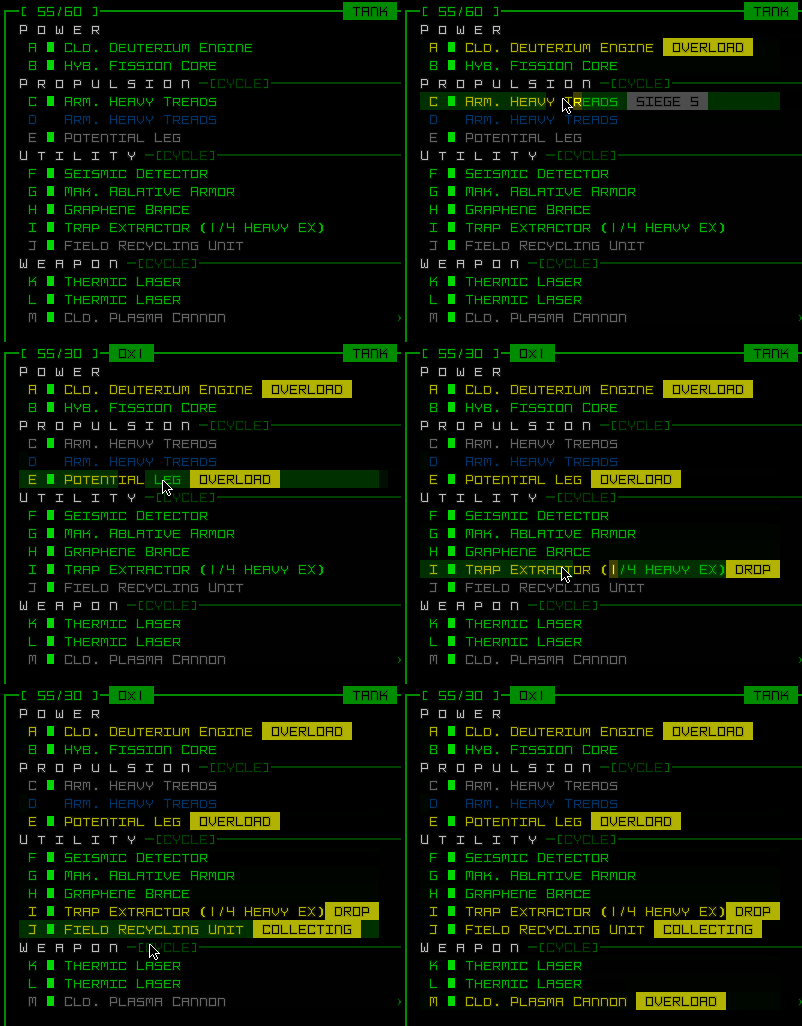
Cogmind Part State Cycling

Various parts reusing the state toggle cycling feature to enable different functionality.

Using all the same commands that normally toggle an item, it’s very easy to access these features, which can still be unique to each item, and they’re right there on the interface, as usual--no need to open new menus or windows, no need to press some other types of keys.

Imposing limitations like this naturally becomes a bit of an issue later on when you want to add new features, but to me the best approach is to focus on designing new features that fit within the current UI framework, rather than expanding the game with more interactions. Repeated expansion of the UI to serve new content leads to more and more edge cases and special exceptions, threatening to make the barrier to entry for a game that much harder. Sure all the older players who’ve been keeping up might be okay with it, especially if it enables cool new features, right? But we gotta also consider the many new players who may want to join, and there are still hopefully plenty of neat features that fit into the existing UI framework anyway, so build those!

New UI features might occasionally be called for if really worth it because they’re easy to learn and have wide potential applicability, but as with all things in development, there needs to be a serious analysis of cost (in player understanding and convenience) vs. benefit (cool stuff!!!).

Another Cogmind example of getting more use out of an existing UI function is the ‘<‘ key (equivalent to left-clicking on yourself). It was initially only used to leave a map while standing on an exit, then later expanded to include interacting with a trap at your position. Then even later, this became a new way to interact with certain items on the ground, either as a property of the item itself, or enabled by a piece of equipment.

Because only one object (exit OR trap OR item and so on) can occupy a location at a time and there is no ambiguity with regard to what this simple input is referring to, it’s an easy and consistent way to allow for more item interactions. In recent years I’ve used this to add features like releasing drones from a bay, turning engines into proximity mines, and setting timed charges. This approach plays into Cogmind’s item-centric UI paradigm very well.

Cogmind Sapper Charge Demo

Sapper Charges aren’t easy to come by, but they can be really effective.

With regard to interface development I’m also big on accessibility. The UI is the gateway to the experience, after all, so it better be good, and easily usable!

Full mouse and full keyboard control, difficulty modes, colorblind modes, all manner of audiovisual feedback/reinforcement, a huge and ever-growing number of config options, partial support for key rebinding… Cogmind has a long list of things I put a lot of effort into. It does really bother me that for architectural and design reasons I can’t fulfill all goals in this respect (like full rebind support on all foreign keyboards, or larger map cells), but it’s inevitable in development that some choices will preclude other options. (That’s also the main reason I wanted to make POLYBOT-7 :P)

Recap

All that sure is a lot to take in, so I thought I’d do a quick summary of all the bits that I was originally thinking of highlighting in the text itself.

Disclaimer: This is just my personal approach and not suitable for all games or developers; all of these points were covered with more context and detail above.

Kyzrati’s Game Design Philosophy (ordered by appearance in article, not relative importance):

  • Start with a clear vision, and stick to that vision throughout development.
  • Resist the urge to add features that seem cool but don’t align closely with the vision.
  • Aim for a challenging but fair experience, though accommodating players with differing skill levels and time on their hands is important where possible (even better if it can be done with actual feature changes rather than simply numerical adjustments).
  • Telegraph or signpost major challenges using a variety of means.
  • Give the player tools to recover from mistakes or unexpected events.
  • Integrate into the design multiple ways for players to control their own difficulty during the run.
  • Good balance is vital, and not only in a raw numerical sense, but also just the feeling of balance as well.
  • There must be enough design space to sufficiently flesh out a new feature, though once fleshed out it can’t interfere with other features.
  • New features should hook into as many other existing elements as feasible--the more interconnected the world, the more natural it feels.
  • When considering changes, avoid quick reactive decisions and prefer to wait for a sort of “critical mass” before making a move.
  • Consistency in all things is important, while maintaining internal logic is useful for easier player understanding and meeting expectations.
  • Player expectations are a powerful driver, and limiter, on development, suggesting the usefulness of rooting a game in realism.
  • If some feature will create too many questions without answers, or without good answers, that’s a clue that it might not be developed well enough to include in the game.
  • Varying content density is good, as is avoiding overpacking too many areas.
  • Lore is a great tool for explaining the world and creating more explicit connections between content.
  • Never give players all the lore.
  • Save players from themselves, stamp out optimal tedium wherever possible!
  • Removing exploits is important when building an experience, but not necessarily those which would require a huge amount of work while few to no players are using them for much benefit anyway.
  • Gameplay features always take a back seat to UI/UX concerns.
  • Accessibility is important, address it wherever possible.

In the end it’s important to remember that in any game of significant scope we can’t possibly fully achieve every goal here (hey this is the crazy challenge that is gamedev, after all!), but it’s always worth a try, and worth aiming for those lofty goals!

Posted in Design | Tagged , | Leave a comment

Rebalancing Cogmind

A decade of development into a huge project is almost unavoidably going to accumulate some amount of cruft. Mechanics that are never quite worth taking advantage of, items that haven’t lived up to their potential, or were later superseded by other options but remained unchanged, or even long-term experiments that were included at some point but never updated/expanded/removed.

Cogmind began its life as a 7DRL, and a portion of items designed back when the game was overall a very different environment didn’t evolve at the same pace. Now obviously the most egregious of these have been gradually addressed over time--we don’t want these sorts of things sticking out like sore thumbs, and it’s not like such issues have been completely ignored. That would be bad :P

But it’s all the tiny bits and pieces here and there which add up over the years, and across the breadth of the game, which do need to be examined and polished to fit into what the game has become. For the most part, elements that haven’t been addressed yet were relatively minor, out of the way enough that they could be safely ignored, though the pursuit of perfection necessitates a proper full pass to refine… well, anything that needs it. And if we want to find an explanation other than temporarily suppressed OCD, the current timing of this process is significant: Cogmind is well past “complete” status, especially ever since Beta 10 released in 2020 and finished off the last of the required features (ambient audio), so now is the time to do a more thorough job refining everything before embarking on new expansions.

Some roguelikes don’t strive for balance, but maintaining balance has always been important to me for Cogmind, since it fits better with my vision for this type of game, heavy on tough, complex, and consequential decision-making at multiple strategic and tactical levels. (You can read more about the underpinnings of Cogmind’s early low-level balance in my article from the pre-alpha days.)

Actually, beginning over five years ago there was a plan to one day do a sweeping review of Cogmind’s parts, especially utilities (as they represent the bulk of Cogmind items and offer the widest variety of unique effects), basically to ensure that everything was working together smoothly and had its proper place in some compelling Cogmind build or another (or at least for other robots!). The first part of this so-called “Great Utility Update” began during Alpha 12 with a few fundamental mechanical changes, but since then the project remained on the to-do list until 1) even more content was added to the game, and 2) we collected more info about what items people were and were not using, and why.

It made sense to wait as long as possible to carry out this process, but the wait is finally over! Beta 11 is finally tackling this project, and we’ve already seen it manifested across propulsion, weapon mechanics, storage units, fabrication and more, but the comprehensive item-by-item review has only come to pass as part of the conclusion to this dev cycle. I must say this has been an exciting time, having the opportunity to revisit everything to iron out as many kinks as possible, in many places adding new build possibilities or even whole new mechanics.

The scope of this rebalance is way too large to cover in its entirety, and while I don’t plan to write about every aspect, we’ll be looking at the broad strokes and pick out some representative examples here and there.

Categorical Approach

Before doing a full item-by-item review, I started with two special categories of unique build-defining items: aliens artifacts and Exiles prototypes. These are items relatively limited in availability, and only a small subset can be acquired in each run, though they’re also extremely powerful when used effectively. Due to these shared characteristics, while cutting across slot types, it makes sense to work on their design as a group--they’re balanced against one another as much as they are against other parts.

Alien Artifacts

I won’t get deep into the artifacts here, but there were a fair number of changes.

One in particular was removed because its effect was unfortunately impossible to balance (somewhat funny because almost no one used it for years until discovering its true potential)--the Stasis Generator was an example of an item with a mechanic added “purely because we could, not because we should.” Some early utilities got effects like this during pre-alpha development, before Cogmind was released, when no one had even played the game yet and I was experimenting with more extreme mechanical possibilities without a strong tactical basis for their design.

Beta 11 added six new artifacts though, with even cooler (but balanced :P) effects, so that makes up for it ;)

It’s important when rebalancing to try to make up for any losses in gameplay options by adding new ones.

Exiles Prototypes

The Exiles prototypes, accessible from the early game, are in most cases not meant to be incredibly OP gear to hoard for most of a run when it could give an edge in the late-game.

Even after updates this is still a reasonable goal and fine in some cases, and many of them started off intentionally incredibly powerful (for fun, right?), though having plenty of collective experience them it became pretty clear which could use a bit of a nerf, buff, or… [my favorite kind of change:] some other sort of unique twist ;)

Cogmind Exiles Prototypes ASCII Art

ASCII art for Exiles prototypes.

As an example, by far the most sought after prototype was Lightpack 2.0, the low-mass storage unit with huge inventory space. I originally liked that it could enable very different builds if you lucked into it, but being a storage unit it was generically amazing for everyone rather than leading to interesting options--an outright significant power boost, and one that would last an entire run, at that.

Now that I was allocating all this design time to rebalancing items, there was plenty of impetus to do something more complex with it. (Back when I was first adding the Exiles prototypes, there were already a few which individually required lots of special plumbing, several days worth in some cases, so when it came to add something as “mundane” as a storage unit it was nice to take a break and speed things along by drawing some art and slapping new stats on it.) So for Beta 11 I came up with a new mechanic which was definitely going to take some implementing…

The idea is that the Lightpack does indeed allow for any build to take advantage of low-mass storage, and I even vastly increased its storage capacity, though it achieves this miracle by utilizing unstable extradimensional space which sometimes swallows an item. It might return that item when next disturbed (e.g. storing another item), or might destroy it forever. The more items packed into it, the greater the instability.

Overall the mechanics are balanced such that it’s a boon for builds that care less about losing specific inventory items, but clearly not everyone is going to want to use something so unreliable. This aligns with the concept that although Exiles prototypes are meant to be very good, they’re also usually flawed in some way, such as eventually breaking down, blowing up in your face, or something in between :P

Slot-wise Approach

Next we can actually tackle the item-wise review, basically looking at them one slot type at a time, e.g. all power sources, propulsion, and so on.

The latter were technically covered as a group early on during Beta 11 development because it would underpin a lot of other potential changes throughout this rebalance--along with storage, propulsion is the most fundamental part of a build! As Beta 11 evolved I did revisit propulsion a bit later, though just for smaller tweaks rather than to the same extent as seen with other parts.

But power sources definitely called for a comprehensive review, so it was time to break out the spreadsheets!

If you’ve seen them here on the blog before, you may recall that my own tab-delimited Cogmind data files are similar to spreadsheets, and have their own syntax highlighting, but they’re not true spreadsheets. For the purpose of analyzing raw stats it can be nice to drop all the relevant data into a regular spreadsheet, since having the same data in a different format can reveal aspects that may be more difficult to observe in their normal environment.

This is definitely the right time to do just that, so I used Cogmind’s data exporting feature (which players have access to as well) to output CSV files, then prettified them to help with the review process.

Cogmind Beta 11 Item Data Spreadsheet: Power Sources

Power source data in Excel, formatted and including updates along with supporting formulas. New or modified values appear in red text.

Another advantage of spreadsheets we can use here is the ability to define formulas and tell us more about items beyond what’s shown directly by the stats alone. In particular with power sources the generation-mass ratio is especially important when comparing across types, and with that column I identified several that needed tweaking. Conditional formatting is also very useful here to help certain values stand out, an approach I’ll be making even heavier use of further below, but it’s already come in handy with power sources.

For the most part I was already satisfied with the progression of power sources, more easily balanced since they are the smallest (and technically least creative…) slot type, with pretty well-defined subcategories. Beta 11 does, however, move towards making power slots more attractive by increasing variety and potential benefits. Aside from the handful of stat tweaks, a new subcategory was added (“hybrid” power sources which are lighter and generate less energy per turn, but store a lot), Fusion Compressors and their matter-to-energy conversion mechanic was converted from a utility to a power source, and the only artifact-level energy generating part was also converted over from being a utility. I imagine more will be added in the future, but for now we have a seemingly balanced state to work from.

Cogmind Beta 11 Item Data Spreadsheet: Airborne Propulsion

As another example here’s an excerpt of airborne propulsion data in Excel, from when I revisited propulsion stats for the umpteenth time during Cogmind’s development, seen here with formula-based supporting data points and conditional formatting.

Weapons

Although the original intent years ago was to eventually focus on updating utilities, at this point weapons actually needed a lot of refining, number-wise even more so than any other slot type!

Again in a general sense there was nothing hugely out of whack that wasn’t addressed already as necessary, but Cogmind’s mechanics have expanded significantly since the early years when the templates on which the weapon designs were based made certain assumptions about the rest of the game at the time. Taking a fresh look at everything could allow for new perspectives and suggest even subtle changes that would result in an overall improved experience.

Probably the best example of a change that came about as a reflection of Cogmind’s mechanical evolution was actually applied to an entire subcategory of weapons rather than a single one: Almost all kinetic guns had their max range decreased by 4.

I didn’t originally expect to make such a categorical stat shift at this point, but it makes sense in context. One of the big goals of Beta 11 has been to ensure items are sufficiently differentiated, and while cannons and guns have been diverging over the years via several mechanical changes, for a while guns have had the upper hand in many tactical scenarios, especially since “gunslinging” was added. Kinetic cannons could use a little something extra, so they have retained their max range as one of those advantages. That said, average kinetic gun range still exceeds visual range in most cases anyway, so this change is only relevant to certain build types.

Another area I’m instead not so surprised to see sweeping changes is impact weapons. I keep experimenting with updates to those every year since they use a different hit location model than all other weapons, one that isn’t generally conducive to the most commonly desirable goal of combat (destroying targets), and Beta 11 is no different. So I reimagined them yet again, taking into account their unique targeting mechanics and what that means when fighting other bots.

The biggest change there was simply yet more significant damage buffs. They’ve always been pretty scary when used against Cogmind, and I’ll have to say they’ve technically become even scarier! But they also might be fairly more useful for Cogmind now. We’ll have to see if more changes are necessary (…nerfs???) since this was quite a buff for weapons which were technically already starting to get good in their own niche xD. As is the changes are too new and we’ll have to see what real playtesting turns up.

Fine tuning

The weapon balancing process didn’t result in that many blanket changes, though, it was more about adjusting individual items, usually at most just one or two stats wherever they had become unreasonable for one reason or another.

Cogmind’s items were originally designed and balanced based on a large set of desired data ranges and mostly linear progression from the lowest to highest ratings, though it’s been many many years since that time, and some items were later adjusted for various reasons, usually taking into account the original scale, but not always other important factors like all potentially related other existing items, leading in some cases to either undesirable deviations from the scales, or more annoyingly items that weren’t unique enough to justify their existence.

Of course the idea of scaling for balance here is referring primarily to commonly available items, not unique one-of-a-kind items or other special gear, which are where even more of the fun comes from. But we need a stable core set of items, and that’s where the strong desire for balance comes in, especially now in Beta 11, after which we will again be free to start adding new and interesting parts to the fringes :D

Even with a scale on which to base balancing decisions, its values can only be applied to a smaller number of core items, whereas there are many parts available at each rating, and each one should ideally be different somehow, while still potentially worth using in some build, if possible. (“If possible” because there’s always some cases where a part is intended primarily for the AI bots, though it’s nice when these can also be made useful to Cogmind as well; plus there’s always the times where Cogmind will take anything they can get in a pinch!)

So anyway it was finally time to look at every. single. weapon., hundreds of them, and take into account a wide variety of balancing factors while doing so. There are a number of checks and axes along which stats are compared:

  • Does each common weapon have suitable stats for its rating?
  • In a general sense [<-insert this phrase before all statements here :P], is it unique enough compared to other weapons equal to its rating [this one, too->] in the same category?
  • Is it better than weapons of the previous rating?
  • Are prototypes at a given rating better than non-prototypes at that rating?
  • Are prototypes somewhat equivalent to non-prototypes of the next higher rating? (though perhaps still have some unique quality that might make them better)
  • Do weapons using a given prefix have characteristics that accurately reflect that prefix?
  • Do weapons across different ratings that share the same tech/name also share similar characteristics?
  • …and probably some more concerns but those are the big ones

Note: Comparing between categories, e.g. thermal guns vs kinetic guns, is occasionally needed but not quite as important anymore since each category already has a pretty clearly defined set of characteristics that make all of its constituent weapons fairly different from those in other categories.

Balancing usually takes the form of simply adjusting numbers to meet our goals here, though it’s worth pointing out that one of the advantages to doing this now, as late as Beta 11, is that we have more levers than we did back when these parts were first created. New mechanics have been added over the years, giving us new benefits and drawbacks to consider, or even use to directly control the balance by assigning brand new values and moving some of these extra levers. The original weapon designs weren’t able to take advantage of stat-based mechanics like heat transfer, unique critical strikes, and EM spectrum, or as mentioned above even widely applicable new mechanics like gunslinging.

For example, neutron-based weapons were given spectrum effects (and disruption), the first non-EM weaponry to have them, as that effect didn’t exist back in 2014. Technically this was a flavor thing, however, since these weapons didn’t need to be more powerful or effective, but part of this process has also been ensuring that weapon characteristics fit the tech represented or implied by their name. More on naming later.

Below is the weapon spreadsheet I worked with, where new or modified values appear as red text, highlighting only those changes that were made as part of the comprehensive review during late-Beta 11 (thus excluding all new weapons and adjustments made earlier in Beta 11 development):

Cogmind Item Data Spreadsheet: Weapons (spoiler-free)

That’s a lot of weapon data. I’ve stripped about 50 spoiler entries and uniques, mostly at the high tiers, and you can also download the Excel file here. (The image excludes some of the launcher data values and a few other lesser-used columns off to the right.)

While examining the weapon data, some oddities that needed addressing were more likely to stand out in this spreadsheet format compared to my normal approach. For me it was also simply helpful to visually parse a ton of compact data using a small font :P

After I was done working through the spreadsheet on my own, I also streamed it to share the process with the community, if you’re interested in checking out more:

During the stream I covered many of the individual changes and logic behind them, and we even made a few more tweaks based on feedback.

Not… Cogmind?

One important thing to remember here is that item changes tend to affect bots that use those items! Cogmind isn’t the only one relying on these things to operate, and some robots were slightly redesigned here as a result, but for the most part changes are just accepted, for example some Hunter variants were indirectly nerfed due to the minimum damage reduction on their primary weapons. I’m sure they’ll still manage to fulfill their duty just fine, so that’s okay ;)

This is even more true with changes to power sources and propulsion, as those are more fundamental components supporting an entire build. So after a batch of changes is complete, I always have to go back and check over the robot builds to make sure they won’t… you know… melt, deplete their energy then sit around, fire a few times then run out of resources, and so on.

For that purpose I have a tool I can run which outputs a range of bot performance data that summarizes aspects we care about, like reporting their effective speed based on how much they’re carrying, and their ability to sustain combat, maintain proper heat levels, have sufficient energy under different scenarios, etc.

Cogmind Robot Variant Build Test Output (excerpt)

An excerpt of output from my build testing tool, which prefixes problem values with a ‘?’ that the syntax highlighting picks up on and colors red so I’ll notice it and address if necessary (some bots are intentionally designed with “problem values” outside normal parameters, but there aren’t many such cases).

Utilities

At last we’ve reached the final category, the one for which the Great Utility Update was originally named… despite ending up applying to a much broader range of parts :P

Before starting this item-wise review process, I was really wondering what would be the best way to collect additional useful feedback about what utilities we wanted to change and how/why. One approach I considered was making a public spreadsheet listing all the items and just let anyone contribute opinions there, but while maybe fun it also seemed pretty chaotic and inefficient. With the success of the first dev stream I did with the weapon spreadsheet, I realized that would also make a pretty good format for getting feedback on utilities.

Of course after literal years of waiting to do this I also had plenty of prior notes to work from in many cases, but it would still help to go line by line with some of Cogmind’s most frequent players and get updated opinions, especially from those who’d been playing the Beta 11 prerelease builds, which include quite a few changes and new features of their own (so already a rather different experience from the public release at that point).

So in addition to my notes, a number of utility adjustments came from discussions spanning a series of streams totaling ten hours in all:

The streams were mostly for discussion of areas to address rather than making actual changes or final decisions, parts of the process I’d go on to complete later, one reason being that, unlike weapons, utilities are less of a number-focused item type, revolving as much or more around their mechanics and functionality they enable. Since it’s more than just numbers it’d take more focus and broader consideration to finalize details after determining what they would entail both architecturally and design-wise, activities that are harder to do well while streaming.

Some of the tweaks were straightforward enough, while some utility redesigns even got their own spreadsheets to more accurately test their effects :P

Cogmind Rebalance Spreadsheet Data: Core Analyzer Mechanics Proposals

Examining multiple possible mathematical approaches to a more straightforward Core Analyzer effect.

I’ll pick a few examples to discuss below, and more can be seen in the videos (since we literally went down the entire list xD).

Overload Utilities

Cogmind has always had overloadable energy weapons (toggled for extra heat and energy costs but greater damage and a random chance of triggering a nasty side effect), and back during pre-alpha when trying to pack as many different mechanics in as possible into the utility set, I decided to add Overload Amplifiers and Overload Regulators to specifically buff this subcategory of weapons. So yes this was another of those early “purely because we could” things without any playtesting or strong design basis, and it eventually showed.

Overloadable weapons were already situationally decent even without support from utilities, and it didn’t really make sense for a build to bother with such utilities since there aren’t that many overloadable weapons, so possessing both this kind of weapon and a supporting utility geared only to it would be relatively rare, not to mention the side effects are generally undesirable vs. the predictability of regular weapons.

Following this realization, I decided something would eventually need to be done about it and simply made them much rarer until that could happen. Well… something was eventually done about it: Beta 11 removed them :P

Comgind ASCII Art: Overload Utilities

Overload utility art. Maybe we’ll see you again one day?

I rarely outright remove items from Cogmind. I prefer to try fixing whatever’s wrong with them (nerf/tweak/buff) so that they’re viable on some build (and reasonably acquirable for that build in the hands of an experienced player), or if that’s not possible then turn them into some other item with a new mechanic just to always keep the number of items and interesting options stable or expanding.

One thing that made these harder to work into a system like Cogmind’s is that they had such a niche use that you don’t want them to be all that common a find--most people would ignore them, but that also means they’re even harder to apply to situations where they might actually be useful. What I like to do is add parts to at least some robot build that players can then seek out and target for salvage, but overloading is not an appropriate mechanic for other common bots to be utilizing, so that strategy doesn’t really work here.

So they were removed, but having done so I also decided this would be the perfect time to revisit the overloading mechanic itself since overloadable weapons were now “merely” powerful rather than being buffable into a ridiculously powerful state anyway (which was technically possible before).

Removing the utilities allowed me to remove the most detrimental (and only permanent) side effect, meltdowns, while rebalancing the severity and weight of other random effects. Overall the changes are a net positive for the mechanic, since it’s usable in more situations now, but we no longer need to balance for the low-likelihood synergy between dedicated supporting utilities.

Aside: I don’t actually remove mechanics like this from the source code--they’re still in there in case they want to make a comeback some day for whatever reason, but the items were removed so it’s simply no longer possible to access this mechanic.

Trap Extractor

“Trapper builds” have never quite been a thing in Cogmind, or at least not a plannable serious build type one can work toward. For a long while we have indeed had a few non-guaranteed unique parts that greatly facilitated trapping strategies, but if they’re not guaranteed (and also not replacable…) that’s not a long-term build. Not to mention this strategy is pretty limiting as it places an outsized burden on inventory space, with each trap taking up one slot.

Beta 11 changes all that.

Trap Extractors, which remove friendly/hacked traps from the ground, have new functionality allowing them to store those traps in an internal storage space, up to a certain limit. For the first time ever in Cogmind, inventory items can store other items…

I’ve avoided going this route for a very long time because it could easily be taken too far and lead to all kinds of more complicated inventory management scenarios (and balance issues) that we don’t want, but for trapping in particular it could be worth it, and it turns out that the feature can be enabled entirely via existing part interaction functionality, a very important aspect when deciding what mechanics to implement.

By design, Cogmind doesn’t have a way to allow for more detailed/unique interactions with individual parts--everything must fit into the existing range of basic inputs. Fortunately it was possible to work out a suitable approach for trap storage and deployment through an item’s cycleable third state, usually used for overloading, or in more recent years other secondary control functions that were also used to improve some utilities (for example the Field Recycling Unit).

So the three states for Trap Extractors are now inactive, extract, and drop, the extraction working as before, and the new “drop” state dropping one contained trap per turn. Clearly for this to work right we also have to limit each extractor to holding only one type of trap at a time, which is fine. There’s also nothing stopping players from carrying multiple extractors, which is likely what a real trapper build will do now.

Cogmind Trap Extractor Inventory Demo

Trap Extractor demo.

This is a pretty good example of the heavy influence interface limitations can have on game design. Sometimes devs are tempted to add yet more esoteric or one-off interface features to support some interesting or otherwise desirable mechanic, but then it’s no longer a net positive for the game as a whole since it adds to confusion and the bad sort of complexity.

It’s better to build a flexible enough simple interface that can support a desired variety of interactions, and always create features that stay within those constraints, either redesigning those that seek to break constraints, or simply leave them out. If the interface was flexible enough to begin with, there’s always plenty of different features that will work!

The advent of trapper builds might require more balance tweaks to extractors down the line (in particular with regard to their internal storage space), but they are very new so we’ll have to wait for more playtesting. I look forward to trying these out myself!

During Beta 11 this new capability did already lead to a change with AOE EM damage triggering traps, since setting off a group of them (especially Dirty Bombs) was always very effective, but acquiring the means to do so has become much easier. Now the chance of chain reactions is reduced to compensate.

Overall there might not be too many changes, though, since there is still a bit of danger associated with trapping, and you still can’t produce traps on your own and are therefore more reliant on the environment.

Force Booster

Force Boosters were always kind of a weird utility, and due to those oddities generally underused… Prime balance target alert!

High resource costs necessitating precision toggling aside, their main purpose was to increase melee weapon damage, but they did so indirectly by boosting momentum. Even with damage modifier previews to help, conceptually it’s just not great to make that unnecessary leap, so they got a pretty significant redesign.

The new design directly increases maximum melee damage by a percentage (so technically increases the damage range, since the minimum remains unchanged), and also decreases accuracy. This is the first common utility to balance its own effect with a simultaneous negative effect as a tradeoff, which I think is a neat new approach that I’ll have to keep in mind.

Cogmind Force Booster Demo

Force boosting in action.

(This change from the old dynamic momentum-based model also loses the ability to automatically buff ramming/kicking damage, but that’s not very important.)

While designing the new Force Booster mechanics, I included extra calculations in my weapon spreadsheet to show what boosted damage values looked like for different melee weapons:

Cogmind Item Data Excerpt: Force Booster Calculations

Force Booster effect on melee weapon damage (partial excerpt, green values).

The 60% buff in the chart above would be the result of combining two of the best boosters since they have the <half_stack> tag, another new Beta 11 mechanic that was determined before the comprehensive review since it definitely informed a number of utility balancing decisions.

That sure is a lot of damage…

To Be Continued?

I’m quite pleased with the results of the balancing efforts, with so many improvements all over the place, although there were a few topics of discussion surrounding utility mechanics that involved some compelling ideas but were ultimately inconclusive.

For example there is contention around the ability to extract resources from containers on the ground and what it means for tactics, and there is some interesting potential in the direction of allowing drone bays to repair and build new drones by consuming their own integrity as a resource.

Those and more got tabled in my notes and maybe we’ll see the same discussions resurrected again one day (actually the resource thing has been hashed out at length multiple times before…), but there weren’t yet strong enough arguments on one side to drive change.

Naming Items

The last thing I did at the end of this process was another complete pass over the items looking instead at their names. I felt there were places where we could potentially reduce confusion and cognitive load, in particular where there might be too many different names for utilities that have the same type of effect.

In naming items there’s the eternal dilemma of flavor vs. function. Do we want naming schemes to lean more on the functional side, which tends to be drier and lack character (see POLYBOT-7, where I leaned heavily in that direction!), or more on the flavorful side, a route I decided to take with Cogmind 7DRL, and by extension the subsequent commercial version, but have gradually scaled back over time.

The 7DRL could benefit from flavorful names because it had fewer truly unique parts (being a 7DRL…), so the idea was that this was a quick way to add some flavor, by giving unique names to different-tiered parts with the same effect type (just differing in strength). But now after all these years we do have a lot more items that actually do something different, so having different names be more likely to actually have different effects is a less confusing approach.

As a particularly crazy example, ever since the 7DRL Cogmind has had a Weight Redistribution System, Gravity Neutralizing Apparatus, Inertial Stasis Machine, Quantum Shading Machine, and Dimensional Manipulator, all of which share the exact same effect type as a utility which draws energy to provide an amount of mass support xD. So now you probably have a better idea of what I’m talking about if you didn’t already.

Unifying the names of items with the same type of effect also reduces the raw amount of terminology to remember, important since Cogmind is technically a game of static items in which you are eventually intended to be familiar with them and not have to even examine stats in order to know whether something will be good for your current build/strategy, and can also better plan in advance for acquiring certain parts. Having too many different names just complicates that process (and we’re definitely going to want to keep opening the space for even more unique items down the line!).

Since I stopped doing crazy stuff like that later on as the item pool expanded, there’s a good reason to go back and reduce some instances where it went overboard.

In most cases I’ve stuck with tiered utilities all sharing the same root name with a separate prefix for each (the ubiquitous “Improved,” “Advanced,” “Experimental,” etc.) though I’ve sometimes allowed for two or three different names in other cases where it’s worth it because the items are extra special.

Taking the mass support example above, that was simplified as follows:

Cogmind Mass Support Utilities Renaming Scheme

There wasn’t really a better low-variety, prefix-based approach that could accommodate the same number of tiers we needed. Mass support is actually a somewhat unique utility in that it’s so commonly used by other bot designs to make them work, and we need a lot of tiers for flexibility.

On the simpler front, Maneuvering Thrusters and Reaction Control Systems were merged under the latter’s name, as were EM Shields and EM Dispersion Fields, and System Backup Modules and System Restoration Modules. This also opens up some of that terminology for future use in other new items, like Maneuvering Thrusters could be a whole different thing, if a suitable mechanic is desired at some point.

Renaming was primarily an issue with some of the utilities, but I did some renaming elsewhere, too, including one type of weapon which is worth a mention: Electrolasers were classified as thermal guns, but technically they should be doing electromagnetic damage based on, you know, real electrolasers :P

This was pointed out to me by a player, and Cogmind does lean on a lot of harder sci-fi concepts where possible (plenty of research went into the items!), so I’m all for changing something like this.

It was actually really hard to come up with a fitting replacement--I couldn’t switch the damage type or anything because that’s not how Cogmind design works, I needed a thermal gun with those stats and that rating. Coming up with an alternative name that also fit snugly between all the other names of weapons around that tier took hours. Eventually I settled on quite a neutral sounding “Field Laser” (non-existent and virtually meaningless? perfect xD), which was actually a decent fit considering the bots armed with it (front-line grunts). Throughout such a long process I’d listed out so many possible names that also started suggesting new ideas for weapons tech that could be applied elsewhere, one of which I even ended up implementing then and there, the Thermic Laser.

BREAKING: Renaming Leads to New Mechanics

During the naming review I decided it was time to consider removing the lowest tier of terrain scan processing utility, the only one dubbed a Seismic Analyzer in a world where all the other tiers were more obviously named… Terrain Scan Processor. No one uses it, after all, it’s really just there for flavor, as a part on one of the common non-combat bots (Excavator).

But I liked that flavor, and really wanted to somehow keep it in the game, so in a roundabout way I got to thinking back to new types of sensors I wanted to have, and that this might just be a good opportunity for one of those: a seismic sensor.

Now as a “sensor” item we’d have to convert it from a Processor to a Device, and I guess that means also renaming it to “Seismic Detector,” but… hey, we have yet another new sensor in the game! It’s cool. (Note Beta 11 already added multiple new sensor types, for example the Active Sensor Suite. In fact there are now six new types coming in this release.)

Even better is that this sensor can be acquired from a common bot, meaning that it’s yet another option frequently on the menu for anyone looking to salvage some infowar capabilities. So what does it do…

Well obviously it senses vibrations, meaning it provides a way to detect some robots, some machines, some weapons, cave-ins, basically a subset of objects and activities going on in the surrounding areas, any that cause a vibration, though without explicitly identifying what those distant readings represent--that’s on the player to figure out based on what it looks like or how it behaves, e.g. shape, intensity (because stronger readings are brighter!), movement…

Cogmind Seismic Detector Activation Animation

Like all sensors, there is an animation associated with its activation, one that also reflects the detection range.

The idea is that Seismic Detectors offer a unique new slice of data, one that cuts across numerous object categories, but is limited to a subset of each one. So while it’s a very interesting utility due to the wide variety of objects it can detect, like any sensor data the user must be aware of its shortcomings, since for example it won’t include non-mechanical machines, flying objects (airborne patrols!), or stationary objects (guards!).

Below are some examples of the Seismic Detector in action.

Cogmind Seismic Detector Exploration

Exploring with an active Seismic Detector.


Cogmind Seismic Detector Combat Readings

“Seeing” combat outside a room play out via precision seismic data. Kinetic projectiles also light up targets (including terrain) due to the impacts, and at the start of this battle you can see two mechanical machines fall silent after being disabled.


Cogmind Seismic Detector Explosion Readings

Major seismic readings from our destructive friend causing explosions outside on ambushing a patrol.


Cogmind Seismic Detector Effect - Dev Recording in Waste

Bonus dev image showing seismic data in a Waste area ;)

So yeah, this neat new item came about due to a name pass, and I guess it doubles as an example of prioritizing repurposing over removal, woohoo :D

And that concludes our very comprehensive comprehensive review… for now. Balancing never ends as long as there’s new content being added, and there’s definitely new content to add ;)

Posted in Design | Tagged , | Leave a comment

Special Commands Menu Design

For years now I’ve been planning to eventually create a menu for accessing Cogmind’s lesser-used “special commands,” features not only requiring the keyboard, but even all assigned to Shift-Alt key combos. So these rarely needed (but still sometimes useful) features were already pretty clearly grouped together as a unit by their annoying modifier, but ideally they should be easier to trigger, not to mention also more readily available to mouse users.

I waited quite a while to implement this menu, mainly because I wanted to design and build it for a more stable and complete set of special commands, one that we couldn’t really be sure about until later in development (and sure enough these features have been gradually expanding and fluctuating over time, coming to a head in the current Beta 11). In the meantime it wasn’t an especially pressing issue because, again, these aren’t exactly commonly needed features, so occasionally requiring a player to wrangle with awkward commands via Shift-Alt-[“some-letter-I-forgot-because-I-rarely-use-it”] wasn’t all that terrible. Even with the advent of a dedicated “Special Commands” interface, the Shift-Alt-[letter] approach is not going away--it’s still available for those who don’t mind, or even prefer it, but as you’ll see we also gain other benefits in the process.

All you need to do is press Spacebar and a new menu pops up with a range of options originally only covered by one of these Shift-Alt-modified keys, and the menu allows both button access via mouse or hitting the corresponding key to enter a given “special command” (basically a blanket term for less commonly used UI features).

There are lots of advantages here:

  • Allows mouse access to special commands
  • Players aren’t forced to use Shift-Alt for these commands (especially on non-Windows systems, where the use of Alt can be problematic), where Spacebar+[letter] will do
  • Feature discovery is greatly improved, since all relevant options are listed following a single keypress
  • No need to remember the letter associated with each command, since those are listed as well
  • Having an explicit menu visualized in the interface also offers an easy way to describe what each feature does

The menu appearance is animated in standard Cogmind style, but input is accepted as soon as Spacebar is pressed to keep it responsive for people who simply want to use this as an alternative way to enter keyboard commands they already know, for example Spacebar+s to dump stats, without the window annoyingly popping up in between the keys. In fact, for this purpose the window even has a slight 150-millisecond delay after pressing Spacebar before it appears, a delay that isn’t really noticeable for someone using the mouse, but plenty of time to enter a second key.

UI Mockups

Before actual implementation, as always I used REXPaint to design the general layout of this menu based on its intended functionality, and to inform later UI coding work. I streamed the process when getting started, in this video where I also covered REXPaint and glanced at other past UI designs:

It’s not exactly the most exciting piece of UI design, especially since for consistency sake it mostly draws on existing simple elements from prior window designs, though I’ll cover some of the design evolution here.

Cogmind Special Commands Window Mockup 1 (REXPaint)

The initial mockup drawn on stream in REXPaint.

The first iteration above aimed at simply getting all the likely elements into a box and work from there, so it uses a pretty typical title and border style (the missing notch in the bottom-right is for a potential close button, which in Cogmind uses a different double-width character so can’t be shown in this same REXPaint file), shows the full list of commands we’ll be including (11 in all), and includes two separate sections of gray text, one to point out that the commands can also be entered directly via Shift-Alt, and another to provide a description for each button/feature as the mouse hovers over it. As this is a mockup, the gray text is not actually written out in its final form (or even to make sense :P), just copied from elsewhere as I was moving things around to get an idea of layout. Real content comes later.

Having a vertical list of options is generally ideal as far as menus go (especially alphabetically-listed options), but the problem here is that, at least all other things equal, a tall-style window ends up limiting the amount of horizontal space available for command descriptions unless they potentially span numerous lines, which doesn’t make for good reading.

Something wider would be preferred, so let’s split the options into two columns…

Cogmind Special Commands Window Mockup 2 (REXPaint)

The second mockup continued improving the layout on multiple fronts.

Unequal column length aside, this will generally look a bit better insofar as giving us more horizontal space for descriptions. Also here I split up the two gray text areas by straddling the options, since keeping them apart seems to make sense given they have different purposes, one static and another dynamic.

Altogether it was looking better, but I didn’t really like the unequal amount of space afforded to the option rows, and decided to equalize that:

Cogmind Special Commands Window Mockup 3 (REXPaint)

Further refinements with a third mockup.

In this layout the UI looks less lopsided, which while not a necessity (either could work), I preferred this aesthetic, plus we even get a little extra room for the additional text.

Final Layout

Now there’s no way I’m doing my best work while streaming, certainly not alongside an unavoidable loss of focus due to chatting and whatnot, and streaming or not I tend to sit on things like this (any kind of design work) for a bit after an initial pass and revisit them for refinement anyway. Sure enough, later that afternoon after some hours away from it I took another look at the interface and immediately had a new take on it…

What started it was that I didn’t really like the idea of this being a relatively small floaty window out over the large map view. We don’t really have those in Cogmind--windows are usually either large or connected to some other associated object or UI element, but in this case it’s a general-purpose feature menu so doesn’t have a natural place in the interface to associate with.

I thought it’d be better to try to redesign it with an eye towards having it occupy more space, and in that vein came up with an aesthetic pretty different from what we had going before, but very much in line with other pieces of the UI which offer functionality not entirely unlike this one: Cogmind’s options menu and commands reference pages!

Cogmind Special Commands Window Mockup 4 (REXPaint) - Final

Fourth and final mockup, quite different from the others but I like it!

The above mockup assumes that the window appears over the map and extends out to either side of it in both directions. The button style already matched the options menu (as does the help text), and now the header and border does as well.

Other improvements in the final mockup:

  • Some commands were renamed, ideally so that their first letter matches the associated key.
  • We actually only need one section of gray text, rather than two, because we only need the descriptions available specifically when the mouse is hovering over a button, otherwise it can display the “default” message about Shift-Alt access.
  • The extra width allows for even longer descriptions without newlines, where instead each description will be written to keep it within the length seen in the mockup above (too long is also bad). This also allows the window layout to be more consistent since we don’t need to leave room for potential additional lines.

Here is the final implementation in action:

Cogmind Special Commands Window Demo

A demo of Cogmind’s new Special Commands window, here using it to activate the map ruler overlay.

Notice how the special commands menu is not vertically centered on the map. This is to leave some environmental context around Cogmind while it’s open, for reference. Not exactly a very important feature, but there’s room so why not :D

Notes

During the polish phase a few automations were added for convenience when it comes to mode switching and feature toggling. For example, Spacebar will automatically deactivate an active map ruler overlay since this will generally save time, particularly for mouse users who otherwise have to open the menu and click on the button again to toggle it off, and there’s seemingly no real reason one would need to keep the ruler on and then also access a second special command at the same time.

There are a few Shift-Alt commands not found in the menu, all three of which probably almost no one ever uses anyway, but they also require holding the key to take effect, so probably aren’t all that compatible with this menu approach anyway.

As for mouse access to the menu itself, I considered enabling that via middle mouse button, but that already has a somewhat more important use (plus again special commands aren’t that commonly needed…). Spacebar is also big and relatively easy to hit in these cases. I also considered having a clickable button on the main UI that could be used to open this interface for even better discoverability, and completely not needing the keyboard at all, but don’t really want to go that far just yet--it’s probably not all that needed compared to the extra clutter it would add for such low-use features.

Posted in GUI | Tagged , | Leave a comment

Maps Between Maps, and DSFs

I’ve described a few times (most recently when introducing Cargo Convoys) how Cogmind’s world is divided into two primary types of maps: main areas and branches. There is technically a third category serving special purposes, one that after many years is once again growing as part of Beta 11. This other category is what I call “maps between maps,” essentially much smaller maps forming optional bridges between the regular maps.

In its first year of Alpha builds Cogmind gained two such varieties of what we could call “intermaps,” in the form of Waste and Garrisons. Waste is reached via Chute Traps that suck robots down into a dangerous but potentially useful disposal area, looping back out to another area of the Factory at the same depth, and Garrisons are a primary source of combat bots that you can chose to proactively infiltrate for various reasons. Waste maps have not been explicitly covered on the blog before, but Garrison design was discussed at length. Today we’ll be covering a new type of intermap, the DSF.

cogmind_pixelwise_world_map_sample_intermap_highlights_no_redacted_spoilers

The sample world map I put together earlier this year, now with DSFs and specifically highlighting all intermaps (redacted-level spoilers have been edited out) (full size here).

Intermaps share a number of characteristics that differentiate them from most other maps:

  • Access from multiple depths: Intermaps of each type can always be found at more than one depth, so even if Cogmind doesn’t visit them at a given depth, there are more chances to encounter and/or take advantage of them later.
  • Numerous access points: Maps containing links to intermaps usually have multiple points from which to access them.
  • Unique access methods: Intermaps are not entered via the usual openly available stairs or doors, and instead each have their own special types of entrances.
  • Small interiors: The majority of regular Cogmind maps are fairly large, with main maps containing an average of 16,000 open cells, and branch maps around 4,000, but intermaps have only about 1,000 open cells.
  • Strong theme: Intermaps are tightly designed around their own unique mechanics and theme.
  • Optional: For the most part intermaps are entirely optional pathways (except being caught off guard by a chute, although some players opt to jump down known chutes as well).
  • Strategically meaningful: These special maps offer unique challenges for specific benefits, and choosing to visit them can be a part of short- or long-term plans. Intermaps are also the only way to loop back to another variant of the current main map, which sometimes factors into strategies as well.
cogmind_average_accessible_map_cell_count_samples

Comparing the total accessible area between main maps, select branch maps, and intermaps.

The closest common analogy for these maps to be found in other roguelikes is the concept of “vaults,” or small thematic areas often with some sort of risk-reward mechanic or otherwise challenge or cost for access, though in cases where these are presented as actual separate maps (rather than contiguously embedded within larger maps as I’ve discussed with prefabs), one important difference is that vaults would generally lead back to the same map and location from where they were entered, i.e. just going back out the door or some other portal. This is not something Cogmind’s intermaps can do because by design backtracking is not possible--leaving a map always pushes the player upwards or sideways on the world map to a completely new area, as seen in the sample world map connections above.

dcss_sewer_entrance_2016

DCSS contains “portal vaults” (aka mini-branches or sub-branches), like this sewer entrance. See portals on the DCSS wiki, and info about Treasure Troves; you can also browse many portal vault sample layouts and content in the source here.

Distributed Storage Facility

“DSF” have been in Cogmind lore since the very first release, and were actually one of the earliest pieces of background lore, just a bit of world building in that it describes an aspect of the Complex that was not otherwise represented in game.

cogmind_dsf_query_results

The latest iteration of the DSF lore entry hacked from a Terminal.

Worldbuilding generally calls for having a larger unrealized amount of content which is still at least referenced throughout the game, and Cogmind has always had a fair bit of that, though this sort of content also tends to be ripe with ideas for future features, or at least suggests where new playable content might want to emerge in a way that fits well with what already exists. So six years later, here we are with the real deal :)

In the past players had speculated that the Storage map might be an example of a DSF, which could indeed have been one explanation (no need to provide all the details when players can do a great--and better--job of filling these in on their own!), though the new official implementation aligns better with its stated intent, and Storage shall remain just a unique branch map by comparison. Storage and DSFs do, however, share a color theme.

Originally I wasn’t planning on adding DSFs in Beta 11 (or ever, necessarily), but the opportunity presented itself when I needed a way to offer some form of guaranteed access to Authchips as part of the fabrication overhaul. So this really was an example of taking advantage of the existing lore and bringing it to life, expanding upon it, in order to meet other design needs. Of course if that’s all it was for this might seem like overkill (adding a whole new map type?!), but I felt there was plenty of room to play with here for it to become an interesting strategic option, regardless of tie-ins to the fabrication system.

So let’s look at how you get into this place, and what you might find there.

DSF Access

All Factory and Research maps have a number of DSF entrances, special-purpose Terminals that control an adjacent access point, similar to how Garrisons work. These locations have a unique look to them, a simple Terminal adjacent to an open cell where the door appears once unlocked via the Terminal, and surrounded on three sides by reinforced walls.

cogmind_DSF_access_distribtion_factory

Sample Factory map layout highlighting all DSF Access locations, including an up-close look at the small prefab’s appearance. The space adjacent to the ‘T’ is where the door appears.

Although there are enough access points that the chance to eventually spot one at some point on each map is quite high (that they’re placed in corridors rather than inside rooms further increases this chance), the desired number here is mainly taking into account the fact that any which aren’t somewhat near the player’s entrance are unlikely to be accessible. The reason is due to a DSF-specific mechanic whereby all of the DSF entrances are permanently locked (as far as the player’s time on the map is concerned) as soon as any hostiles are spotted. So to actually get inside one, the player must do so without being spotted by anything on the lookout for enemies of the Complex.

Even though DSFs were added to the game as a guaranteed method of obtaining Authchips, as I emphasized again in the recent fabrication article Cogmind’s philosophy focuses more on adapting to what you find rather than having high control over predetermining your build, so although the Authchips themselves are guaranteed consistent rewards inside, the ability to access a DSF at all is the less consistent part of the equation :P

cogmind_DSF_access_open

Opening a DSF via its Terminal.

To facilitate locating the nearest DSF, among the other usual possibilities there is also a new non-RIF Hauler hack that anyone with a Datajack can perform: find_dsf. The result of the hack takes advantage of the new map comments system, adding an automated comment marketing that particular Terminal for what it is.

cogmind_robot_hack_find_dsf_automated_map_comment

Hacking a Hauler to find the nearest DSF. Here you can also see the difference in color scheme for a map comment added automatically as opposed to manually by the player.

There is a global message when anything hostile is discovered on the current map and DSF lockdown is engaged (technically this doesn’t have to be the player, but the player is the most likely to trigger it first), after which attempting to open any DSF will simply report that it’s in lockdown mode.

Layout and Defenses

DSF map generation is similar to Garrisons in that it is based on quadrant prefabs, albeit simpler overall since there are no variations--each quadrant is either present or it isn’t, and there must be at least two of them (one to hold the entrance and another for the exit).

cogmind_DSF_annotated

A full-sized four-quadrant DSF with its major features annotated.

There are quite a lot of good items to steal from a DSF, with four sections of Authchips around the center, two to four quadrants each with their own random theme (e.g. weapons, devices, traps…), and main corridors lined with random parts. Each quadrant also has a chance to include a hidden (but sometimes guarded) area behind its walls containing extremely good parts, and the Matter Repositories can also be damaged to recover a lot of Matter if necessary.

The primary defensive feature is the Heavy stationed at the center, around which the entire DSF layout was planned. Its sensor range covers almost the entire map (except the corners), and reaching the exit always requires passing through its visual range, so it’s necessary to have a way to deal with this bot. Each corner also has a chance to contain a dormant Specialist. As usual the Heavy can call in reinforcements, and an infiltrated DSF will eventually also be subject to additional patrols, thus limiting the amount of time available to freely loot the area.

Destroying enough robots within a DSF triggers another emergency defensive measure, “rapid sterilization,” or a quicker version of the sterilization system found in other parts of Complex 0b10 which gradually raises the ambient heat until no robots can survive. This offers another optional strategy to afford more time for looting since with enough cooling Cogmind can survive longer than other bots.

DSF are generally predictable as described above, and though the types of items found within can vary greatly (aside from the Authchips), there are so many of them that stashes will usually have at least something useful for most builds. But it’s always nice to throw in a little more extreme variety for fun, so there are a number of possible DSF events that occur more rarely (without removing the chance to loot).

Routing

In most cases leaving a DSF will exit to the next higher depth, although there is a small chance it instead leads directly into a Garrison, to throw a little wrench into the best laid plans, for fun and excitement.

cogmind_world_map_mockup_DSF_visit_and_progress

World map UI mockup reflecting intermap-related routes.

There are definitely more ideas that could later become new types of maps between maps (much longer-lived plans than the spontaneous DSF :P), and while I’m not sure how likely it is to happen, I’d also like to do experiments with small maps that can return the player to the same map that was left earlier. This would be a pretty complicated endeavor after so many years of building an architecture that assumes it’s not possible--plenty of room for bugs and design issues in there xD

Posted in Design | Tagged , , , , | 2 Responses