Official development blog
[ Latest Cogmind Release Notes: Feb 2026, "Unchained More" ]

Cogmind 2020 ARG Post-mortem

A few months ago as I was planning out the rest of the year, naturally it was about time to start asking myself what kinds of special events we might have for Cogmind. The major Beta 10 was released in September, so there was once again an opportunity to spend some time playing with different ideas, and players have certainly come to expect some kind of event around various holidays given Cogmind’s history (see: Launchers, Pay2Buy, Holiday Mode, Abominations, RPGLIKE, Player 2…).

The next upcoming holiday was Halloween, but none of the specifically Halloween-themed gameplay concepts I had were particularly compelling, then one day I suddenly came up with the idea to do an ARG. I’m not really sure where this thought came from--it just popped in there xD

ARG refers to “alternate reality game,” which as a genre has a growing variety of possible forms and definitions, but among the primary uniting factors is that ARGs are created by mixing multiple types of interactive media, ideally with social aspects. (Wikipedia has lots more background info on ARGs.)

So what exactly would something of this nature work with Cogmind, and how would I build it? Having never done anything like this before, I had a ton of questions--well that’s what every special event planning session starts with, but this time it was especially acute. It really shows in my early notes, several pages of ideas bouncing all over the place, some of which aren’t even close to what the event became.

Early on I was clearly wrestling with trying to get myself into the ARG spirit by steering the concept outside the game itself as much as possible, against the grain of what I’m used to designing. I started out with REXPaint UI mockups (most Cogmind special events come with a special interactive UI component that appears in the bottom left corner, serving both as a useful reference and tool, and also providing extra info for screenshots), but in this case it didn’t seem necessary, and kinda worked against the ARG idea by concentrating more of the event inside Cogmind. Instead it would make more sense to move the primary form of interaction with this event outside the game itself.

So I built a little website.

Forbidden Lore!
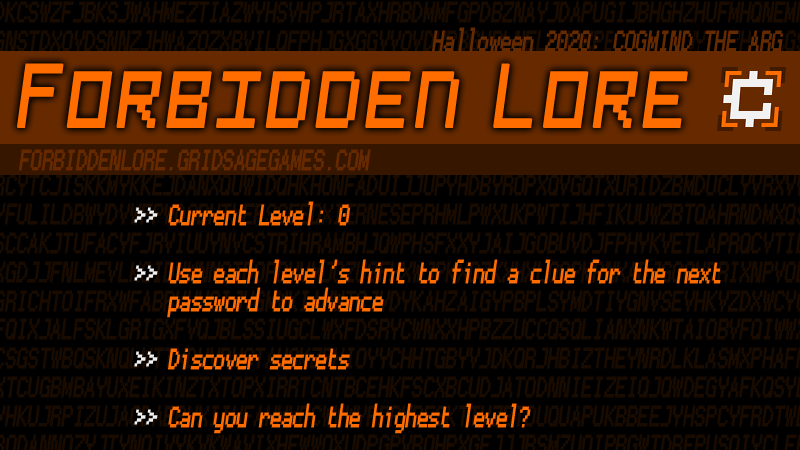
cogmind_beta10.2_forbidden_lore_logo

The event banner for Cogmind’s ARG, more or less a screenshot of the website home page.

Players start from that page, on which there’s a single link to reach the next page, or “level,” but doing so requires a password. Getting a password is a multistep process:

  1. Read a hint on the web page which suggests a place in the game world to visit, or action to perform. The hint is just that, a hint, so doesn’t constitute specific instructions, and figuring it out is to some degree a small puzzle in itself (though in most cases not usually that difficult for players relatively familiar with Cogmind).
  2. Find the associated password clue indicated by the hint, somewhere in game.
  3. Use the clue to obtain the actual password, which is somewhere on the internet. This is often the more challenging part of the puzzle, at least for a single individual, since the possibilities cover a broader range of domain knowledge, and the clues are more cryptic.

So the goal for each level is to solve a pair of puzzles to get the password to continue advancing to subsequent levels. (If you’re wondering about more details and examples, there will be plenty of those in the walkthrough I’ll be sharing later.)

Each new level provides not only the next hint, but also comes with a reward: lore! This perhaps makes the Cogmind ARG more unique than some, helping keep players interested by offering an explicit reward at every step, rather than making the solving of puzzles the only reward in itself, with maybe a single reward at the end.

A lot of Cogmind players enjoy the lore behind the game world, and there’s plenty of unwritten pieces to that lore worth introducing or expanding upon. Some pieces are already hinted at in the game’s current lore, while others are just my own additional concepts behind some of the content that the game doesn’t (or hasn’t yet!) directly addressed.

At first I had no idea at all even what theme to use for the ARG (it is “Halloween” in color only :P), but I’m glad I settled on lore since this was a fun opportunity to share more information about potential future expansions. In most cases they’re not guaranteed, but are at least fun to read and think about--I’ve reread all the entries many times myself, just thinking about the possibilities :D

Design Options

Even with a theme nailed down, there were still some important general questions to answer, like whether the event should focus on individual participation or be more of a community event.

I did want it to bring the community together in solving a set of puzzles which would be relatively difficult for any one person to complete on their own, even planning to explicitly dub it a “Community ARG,” but decided that wasn’t really necessary and it could simply be a suggestion included as part of the announcement.

I also considered offering cash prizes, but changed my mind at the last minute since that might work against the idea of encouraging general cooperation across the community. Plus time zones, the fact that this event wasn’t pre-announced at all (I wanted to surprise everyone :D) nor designed with hardcore competition in mind meant it would be hard for a cash reward to be fair to everyone. And of course there’s already lore rewards at every level, anyway!

Another big question was whether to allow for multiple paths through the ARG, completing puzzles out of order (this was especially relevant to how the website would be built). It turns out there really wouldn’t be so much content that such an approach might become very desirable, and designing for a more controlled, linear progression would make it more enjoyable overall. In the rare cases when players might discover an in-game clue before they need it, they could simply write it down for later reference.

Time to Solve

I targeted 1~2 weeks for a decent individual player working hard at it, or a month if relatively slow, but based on the amount of ARG content I figured that a group of players working together could probably do it in just a day or two.

Sure enough the first team to assemble as soon as the event started managed to reach the end in about 22 hours.

The puzzles are ordered mostly by depth, thus the first clues are found early on, and so on, making it easier to find multiple clues in the same run without having to start over. Of course with branching and a lack of backtracking in Cogmind exploration, it’d be impossible to solve the entire ARG in a single run. Theoretically one could acquire every single clue in a minimum of two runs if they happen to have the right branches spawn in the proper order and choose to do certain things in each, although it’s highly unlikely someone would both get that opportunity and make the choices required, in some cases because the choices could be more dangerous and jeopardize some other clue they were aiming for at the time. More realistically it would at least take about 4~5 runs to complete (not counting potential deaths along the way).

Participation

70.5% of ARG release version (Beta 10.2) players were playing in ARG mode.

Note that Cogmind stat uploading is opt-in, so data only includes a subset of the community, and this event in particular had a higher run requirement threshold than previous events, at 10 runs instead of 3. What that means is that the event only auto-activates once a player has logged at least 10 prior Cogmind runs. Events normally exclude beginners like this in order to avoid confusing them (alternative rulesets and content are basically being added for experienced players to try out, or at least those already somewhat familiar with the base game). Players who hadn’t yet met that threshold could still manually activate it, but according to the data only one player chose to do that.

This event in particular, with its deep lore rewards and requirement that one already be pretty familiar with the world in order to make good progress, was very much aimed at long-time players, and the median historical run count among participants was 40.

9.7% of players who met the threshold to automatically activate ARG mode decided not to and forced the mode off in order to play the regular game. (Some other players and runs were also excluded from the 10.2 ARG because they had manually activated some different past special event.)

The median number of ARG runs per participant was 3, which isn’t really enough to solve it to the end, although in some cases where people were working together they might only do one run for the team.

Honestly the overall data here is not incredibly useful because it doesn’t offer a way to know who was actively playing the mode with the intent to participate, because again it activates automatically for most players. Unlike how I’ve handled most previous events, I didn’t include any mode-specific scoresheet data for analysis this time around.

But! We do happen to have another metric which will be somewhat more accurate, and also include anonymous players who didn’t opt in to data uploading. It just so happens that anyone who gets the first hint and is on their way to completing the first level of the ARG has to visit a particular Pastebin paste, and that page has a unique hit counter. The paste itself is unlisted, so it’s mostly going to be visited by players who are participating. Looking there (and subtracting my own test visits to that page with various browsers :P) I can see that we’ve got 185 unique hits. Still not likely 100% accurate, but it’s a decent gauge of participation.

Apparently several dozen people also visited the account page I set up to make that post, from a special someone in the game ;)

Note the data for the above section was recorded a couple days before the end of the official ARG period (one month), so would be missing the last bit, plus some will still be playing past the end.

Architecture

The website part of the project is quite simple, a good thing because I ain’t no web dev.

Like the front page, the content of each additional page/level is simply an image containing the entire page’s text and graphics (so I can work where I’m more comfortable, in Photoshop :P), plus a hint linking to the next page.

Each new level is protected by htpasswd authentication, where as the first page indicates the user name for each level is simply “cogmind” (for simplicity), while the password is what players have to discover, as described above.

While building the site I tested all the content and links numerous times in multiple browsers to make sure there were absolutely no mistakes, since I didn’t have anyone else helping me with prerelease testing this time as I wanted the nature of the event to be a surprise for everyone (even patrons). I did another complete round of testing once again shortly before launch, just in case.

On the game side there were a few new things to build, all of it pretty simple, though.

Naturally there’s new content included with this release, basically messages in various forms, and those needed to be stored somewhere. My inclination with this sort of thing is to store all related data in a single external file, for ease of editing and organization. Doing this for an ARG, however, would make it quite easy to identify and hack, so I decided to avoid centralizing the data and instead spread it around within the executable itself.

Even there I didn’t want the text to be that easy to scrape, so I also added a new system to encrypt strings within the executable. Despite these precautions I’m sure a dedicated individual could still hack it in less than a day, but that’s fine, and could be a challenge in itself if anyone with the appropriate skills wanted to take that route to “solving” the ARG :)

The other main game-side work involved display methods for clues. This was fairly easy since sharing clues in most cases just piggybacked on the existing message systems, although in some cases it was necessary to make it a bit more obvious that something was a clue, for example the on-map alert/notice pop-up system got a new Halloween color theme option I could use for messages prefixed with “FORBIDDEN NOTICE:”. There’ll be plenty of examples of this in the later walkthrough.

Early in development I considered going the usual special event route with a dedicated interface for recording hints, listing clues and whatnot, but decided it wasn’t necessary, and would even get in the way given how the event ended up being designed.
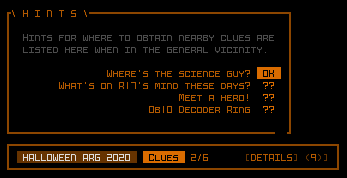
cogmind_arg2020_interface_mockup_unused

Mockup for an unused hint and clue interface.
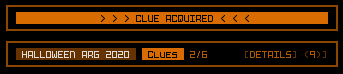
cogmind_arg2020_interface_mockup_unused_popup

Like raising levels during the RPGLIKE event in 2019, the mockup suggested there would a flashing popup whenever a clue was obtained, to make it extra obvious.

Puzzle Ideas

To come up with ideas for the puzzles, I first came up with two lists: one representing potential sources of clues within Cogmind, and another suggesting where I might want to hide passwords outside the game.

Most of the in-game options ended up being used, since an event like this should aim for maximum variety:

  • NPC dialogue, for example on meeting them, or when they’re destroyed
  • Hacking to parse an NPC (reading their mind)
  • Scene text on witnessing an event
  • ALERT-style global announcement
  • Terminal query
  • Some special cases used other more unique channels, as indicated in the walkthrough

For possible password locations I chose mostly bits of the internet over which I have some or complete control, in order to ensure the event would go according to plan, and also even continue to be accessible after the official event ended:

Not all of the above were actually used. Also note that some clues would likely require using a search engine like Google to find information relevant to uncovering a password. Passwords might also be directly provided within the game instead of via the internet, where that approach would be fun or made more sense.

As for the puzzle content itself, aside from being basically familiar with the world of Cogmind, much of it is tech-oriented. Obtaining passwords is easiest with some knowledge of very basic web page analysis, binary text, CPU hardware, a certain movie, multiple other roguelikes, specific Cogmind lore, and Cogmind achievements. Being good at using a search engine in general would definitely help a lot, and could mitigate much of the need to have these skills or knowledge prior to the event.

By the way, the terminology I’ve been using throughout this article, and that I stuck with throughout development to keep things organized, defines a “hint” as the piece of info given on the website for where the player can get more info to progress, and a “clue” being the info found in game that leads to the final answer/password which is usually found online, outside the game.

Results and Observations

Reception was pretty good. Some players had never even heard of an ARG, others said they’d done a few before and loved them, and yet others said they didn’t really like them in general. Regardless of what kind of event is held not everyone is as open to a larger departure from a game’s normal format, but some players were really excited about it and enjoyed the process.

Not everyone was interested in the same part of the event, either--some were big on the puzzle solving, but didn’t necessarily want to go through and do the in-game clue-collecting part. Even some who did want to do the collecting themselves had trouble targeting a specific location in the game during their run, since that’s not normally how they would play (and it’s overall a more challenging way to play Cogmind). And some players simply had fun watching others do the ARG to share the lore afterward.

It definitely turned out to be a community event that helped give a singleplayer game more of a multiplayer feel, because even if not in a team, often times players would need additional hints from others to fill gaps in their knowledge, or because they maybe overlooked a clue.

I had fun listening to players in the voice channel on Discord working together to advance through the ARG.

I hung out in that channel for six hours, mostly as a silent observer, as 5~8 players at a time solved level after level. The group had some of its better players responsible for quickly playing to the relevant in-game areas, while others were thinking through puzzles or alternative approaches. Puzzles that would eventually stump a lone individual for a while, or even permanently without extra hints, were no match for a group of players working together bouncing ideas off one another, and that first group was the only known one to finish in a day.

One interesting thing about hosting an ARG partially inside the game is that people pay a lot more attention to the game’s details, to the point that players were asking others “wow, was this here before?” and “is this new?” or “did you know that???,” where in every case it was something common that had been a part of the game for years--some player just hadn’t noticed that particular detail before :P

So in that sense, ARGs are apparently a good way to force players to really notice details! (relevant or not…) Of course this effect also had players trying to find lots of meaning even where there is none, both inside and [especially] outside the game, leading to a variety of wild goose chases when searching for clues. One particular clue I’ll get to later in the walkthrough was especially funny because one of the websites players needed to visit (not mine) also had its own cryptic ARG-style content embedded in the page itself, unrelated to the Cogmind ARG :P

Most of the Cogmind community plays with the default Rogue difficulty setting, but several switched to easier difficulty modes specifically to collect clues more quickly and reliably.
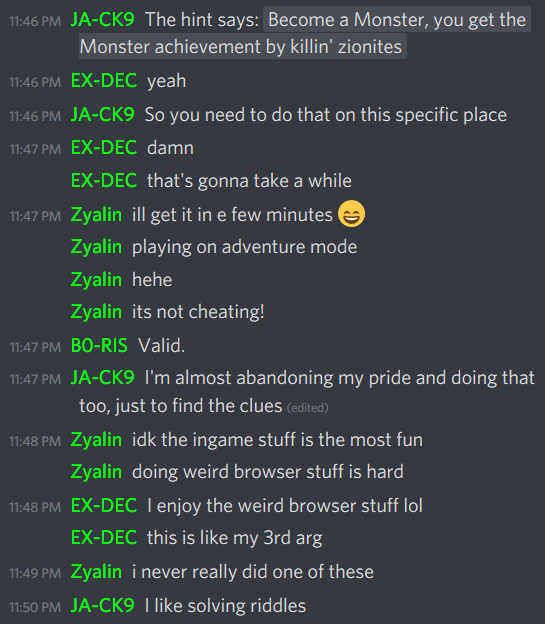
cogmind_arg2020_chat_difficulty_mode

Early chat about different player approaches to, and opinions on, the ARG.

Starting from the second day a dedicated chat channel was set up for the ARG (day 1 would’ve been best, but at the time most participants were hanging out in the voice channel for faster communication at the start anyway). Technically the default ARG period was for the entire month of November (and some will likely continue playing beyond that), so it’s been there and receiving a trickle of new comers as time goes on, more so because I keep pointing people there when they ask related questions on other forums or elsewhere.
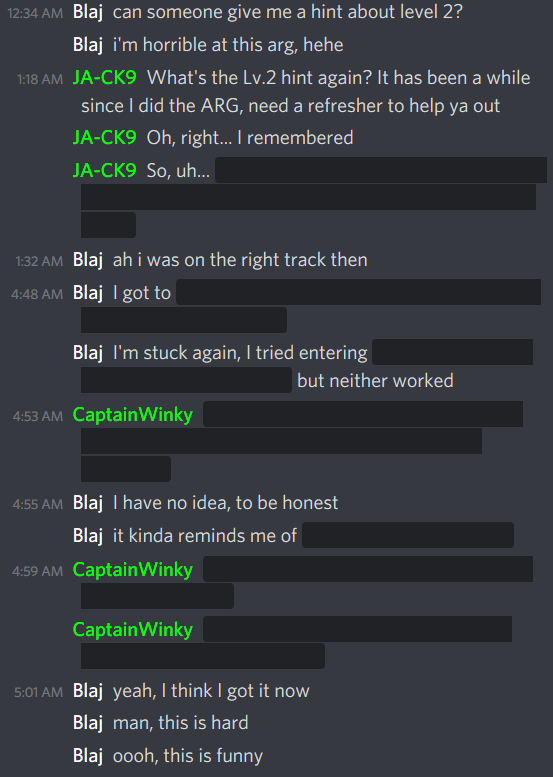
cogmind_arg2020_chat_chanel_spoiler_tags

The ARG channel is naturally filled with spoiler tags :P

As far as organization goes, and seeing how players advanced through the event, in the end I still think a linear design was the best approach, though I feel it would’ve been nice to have even more “side quests,” additional ARG content to discover along the way but that wasn’t required in order to progress to the end. There were a few such secrets, but not many--two of them were discovered, and to my knowledge the third has yet to be found.

So that’s it for the background and meta discussion. In my next article I’ll be sharing a walkthrough for the ARG puzzles with lots of juicy details and commentary.
Posted in Post-Mortem | Tagged , , | Leave a comment

Year 7 of the Cogmind

And another year of development whooshes by! Okay, so no surprise there, Cogmind has now been in continuous development for over seven years, and it’s once again time for the usual end-of-year annual review.

Building Cogmind is still very much my full-time job at the moment, though as we’ll see in the review, this year saw a slight reallocation of time to other roguelike-related endeavors.

First, the annual image collage, version 2020:

cogmind_development_year_7_small

Selection of images from the past year of Cogmind-related development as posted on this blog, forums, and Twitter (full mega size here).

Development Time

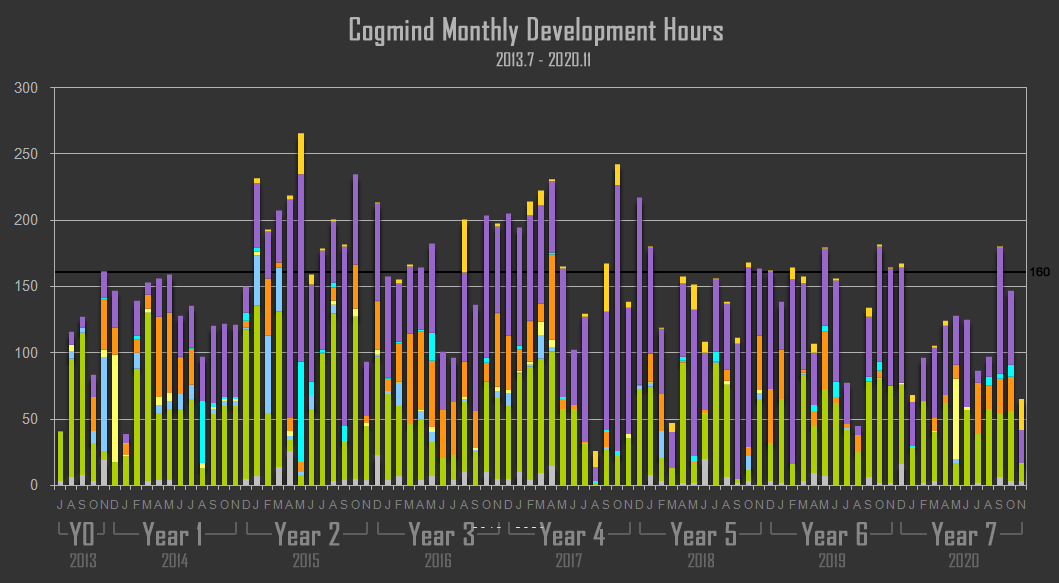
As always, I’m recording daily development stats in order to maintain a collection of pretty graphs over here. The main graph has been extended by another 12 months to include 2020

cogmind_monthly_development_hours_201307-202011

Cogmind Monthly Development Hours, 2013.7-2020.11 (click for crisper full-size version).

Every time I look at this thing it brings back memories of the summer of 2013, starting on Cogmind’s design doc and background story, and how I had absolutely no idea this would lead to a new long-term job, and what we have today :P

The cumulative hour count is now 13,221, having added 1,400 hours this year. January hours are especially low since I was out of the country for a few weeks at the time, and November low because I had been putting off a lot of personal stuff for a while that I could finally address last month with releases out of the way, then I unexpectedly also had to get a new laptop (setting one up takes forever…).

2020’s hour count was 16.5% less than last year, for a number of reasons:

  • With fewer general topics to expand upon outside the usual release announcements and Patreon posts, I ended up writing fewer articles on the blog this year--those are always major time sinks (though we have a new pair of big ones coming very soon :D).
  • I also took a decent chunk of time out to build and release updates to my free dev/art tool REXPaint, one of which was responsible for an explosion of ASCII art for CDDA (example). The last release was back in 2018, so it was about time to do more of that, and it now supports bitmap fonts with more than 256 characters :D
  • Also this year a lot of my Cogmind streaming time (technically work!) was reallocated to trying out other roguelikes, which by contrast are not tallied as work even though I stream them during work hours (my boss can’t fire me for doing this, so it’s all cool). In all I spent 73 hours streaming 7DRLs by dev request, top 2020 7DRLs, Armoured Commander II, Approaching Infinity and Prospector (writeup for those two). Over the next year I plan to stream a lot of other roguelikes, too (but mixed in with more Cogmind runs, of course!).

I’m happy to report that my average number of work hours in recent years is definitely much more sustainable than in the early years of development, which could get quite unhealthy!

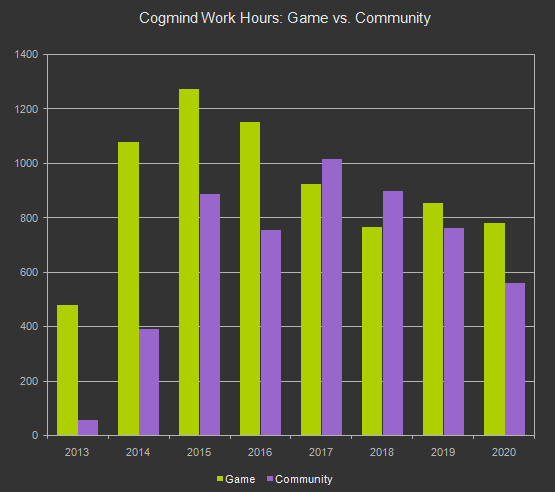
Like last year, we can see that I maintained the new trend of putting more time into the game itself rather than community-related work:

cogmind_dev_hours_game_vs_community_2013-2020

Comparing the amount of hours directly spent working on Cogmind vs. community-related work (excludes hours that belong to neither category).

This would be a natural side effect of less writing and less Cogmind streaming but certainly not wanting to work less on the game :). Honestly I would prefer to be working on the game much more than I currently do--it’s so tempting, but at this point it’s probably a good idea to do a better job balancing life for the long term.

Releases

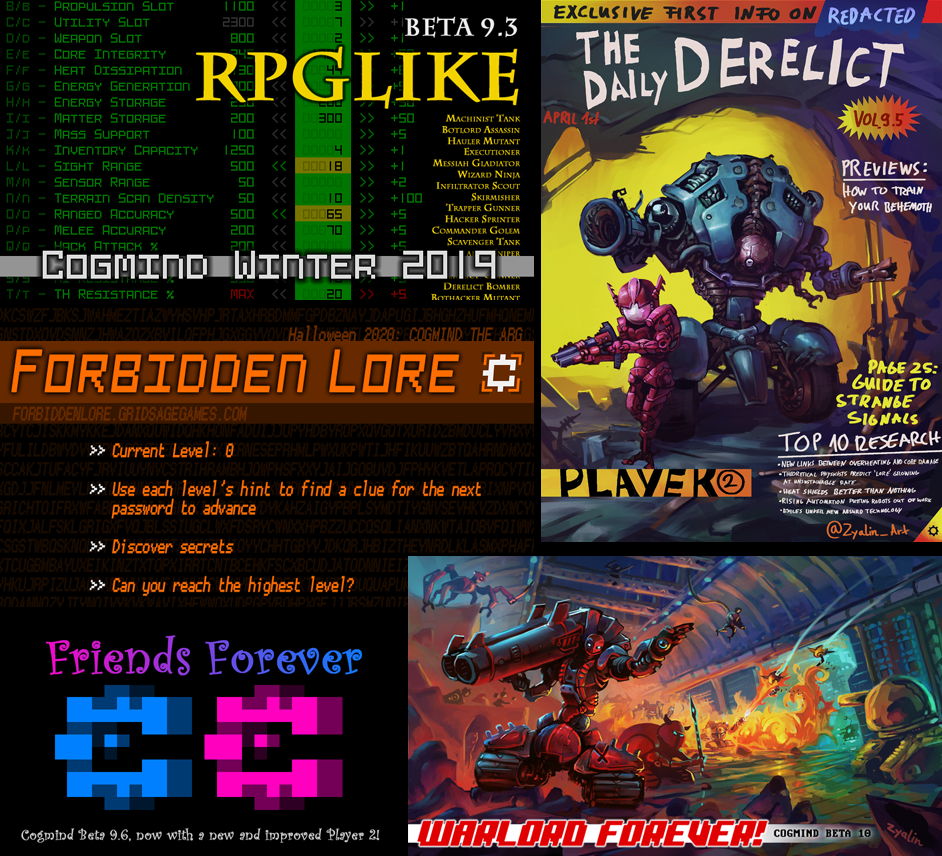
This year’s release lineup was another odd one with more events than regular releases, and featured by far the longest string of expansions on a single major version--Beta 9 went all the way to 9.6 xD.

cogmind_2020_releases_logo_collage

Cogmind release cover images from year 7.

This year’s events included:

  • The well-received RPGLIKE mode created for the winter holiday season gave Cogmind more typical RPG-ish mechanics and character progression by adding healing, raising levels, and XP to buy upgrades. (I wrote about its design here.)
  • Our traditional April fools joke-turned-real made Cogmind “multiplayer” in the sense of giving you a permanent ally, Player 2, who shares your ability to attach any parts they find or salvage. They’re also rather talkative ;) (This event was born out of AI work originally built for a Battle Royale mode, but that idea didn’t pan out and a playable test version was only released to patrons instead; I wrote about its design here.)
  • Most recently I put together an ARG dubbed “Forbidden Lore” that challenges players to use hints about in-game content to hunt for clues that help solve puzzles on the internet to unlock special lore on the event website. (Articles about this event will be available soon, including a complete walkthrough for those who want some extra help, or to just read through the puzzles :P) (Update 201222: These are now up--check out both the event post-mortem and walkthrough.)

But the flagship release was of course Beta 10 “Warlord Forever,” adding not only two new endings but also completing Cogmind’s entire ambient soundscape! I wrote about that process in detail, as well as related audio accessibility features. So glad to have that behind us now, as it was the only required pre-1.0 feature left on the roadmap, which now basically consists of “YAY FUN STUFF!!!”

cogmind_rif_ability_command_fork_overload_power_streamctrl_high

Beta 10 comes with a ton of stuff, including a new set of RIF abilities, like Command Fork, seen here as applied to overload_power and streamctrl_high.

Community Support

Many thanks to all you players for leaving reviews, helping spread the word about Cogmind, and generally just being a friendly bunch.

And additional thanks goes out to all you supporters on Patreon, where we’re even finally closing in on the next fundraising milestone. There are currently a few references to The Unchained, but no details, although their origins have finally been revealed in one of the new Forbidden Lore ARG entries.

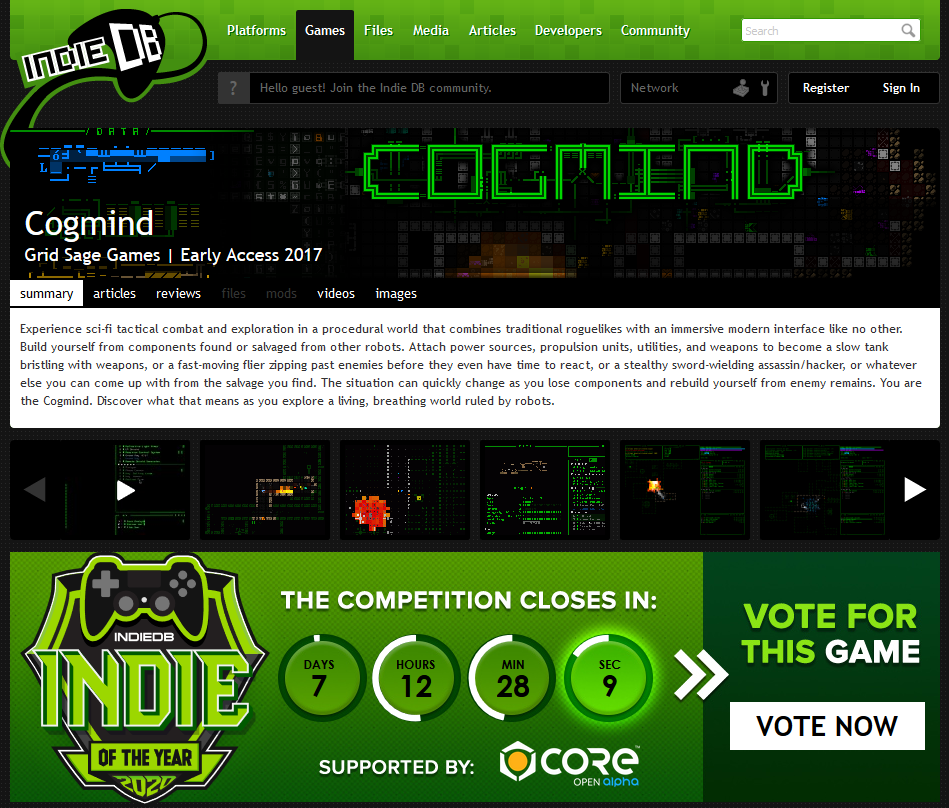
Also something you can do now real quick to help out: It’s that time of year again when IndieDB does its Game of the Year voting, and although Cogmind is too niche to pull the numbers necessary to compete against mainstream titles for the Top 10 in the second round, for the past six years in a row we’ve made it through the first round of voting to take a spot in the Top 100 list, which is pretty neat and could help more people to find the game.

So if you have a chance give us a vote there, along with all your other favorite roguelikes/indie games that have a page on the site. (Registration isn’t required, but if you do have an IndieDB account you can maybe win a key for one of many different games if interested.)

Update: 12/11: We made it into the Top 100 again, thanks all :D

2021

One thing I hope 2021 will be known for (aside from less death and disease) is fewer Cogmind events. Next year I’ll mostly be focusing on the base game, because even though it’s “done,” there sure are still a lot of other things I want to do with it. I do have one really cool event I want to hold, yet again very much unlike anything we’ve done before, and something that I think long-time players will love, but it’s likely more than a year out.

Instead, the upcoming Beta 11 is going to be 1) huge, and 2) full of content adjustments (especially parts), and Beta 12 after that is looking like it might even feasibly be time to implement the next review milestone project if it’s reached by then! The faction in question is actually one of those described in the Forbidden Lore ARG ;)

(As a reminder: The Merchants Guild is definitely happening, but more likely as a free post-1.0 expansion--that’s a much bigger project.)

While we technically have a roadmap on the FAQ, for a while now it has been much less of a true roadmap and more of a record of what’s been completed and when, seeing as I keep inserting new items as appropriate with each new release cycle. Beta 10, however, was when I finally set the Progress meter to 100% (it sat around 95-98% for years :P), because while updates will continue, the beta plans are complete.

cogmind_dev_roadmap_201030

The current state of the development roadmap from the FAQ (snapshot from 201030).

This is where most games would exit Early Access and release 1.0 (well okay, probably long before this :P), but I’m not planning to do that yet. One day it will happen, but today is not that day, and 2021 is not the year :)

Posted in Annual Review | Tagged , , , | Leave a comment

Exploring the Concept of a Terminal Roguelike “Overmap”

Lots of games have “minimaps” allowing you to view a greater area than normally visible in the game screen, although (except in maybe a few rare instances) these usually aren’t games with displays limited to a strict terminal grid like we have with Cogmind. After all, you can only “zoom” so much given the restrictions of such a grid.

That said, it has certainly been requested multiple times before, so I first explored an alternative possibility last year, what I’ve been calling an “overmap,” just to kinda work through what an implementation might entail, and what benefits it could provide us with.

At the time it didn’t get very far since it was a spur-of-the-moment type of little side project and I got too busy with other features later, though the rudimentary code and interface have actually been in the game all this time and some weeks ago I picked it back up again to play with the idea some more.

Method

So what’s the best option here--how much more information can we really show using an alternative display method that obeys the grid?

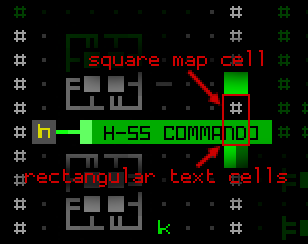
Fortunately for us Cogmind does technically have a narrower grid than that used by the map: the grid on which text is displayed, and which represents the actual base terminal grid underlying the program. Map cells each occupy the same amount of space as two of these text cells combined. Purely by taking advantage of that fact, we could use text cells to represent map cells in order to narrow the map into half as much space horizontally.

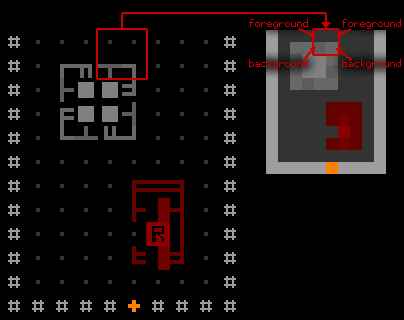
Then we can get even more creative and use a CP437 character, the half block, placed in every single overmap “text” cell to divide it in half yet again, this time vertically. Then the foreground color of a cell, that coloring the block itself, is used to represent one map cell and background color represents another. Altogether this allows us to compress four map cells into a quarter of the space!

cogmind_overmap_development_text_vs_map_cells

Comparing text and map cells in Cogmind. Notice how the square ‘#’ cell (an ASCII mode wall) occupies the same amount of space as two letters (“nd”) below it.


cogmind_overmap_development_four_cells_in_one

Representing four map cells in two text cells using purely foreground and background colors, also showing how the wider room looks when converted to the colored block method.

Using this method, a 200×200 map like Factory could be displayed in a 100×100 area (one quarter of its normal size in pixel terms as well), 35% of which would fit in the usual map display area, and 48% of which could appear if we expand the “overmap” to fill the entire Cogmind window! In other words, using this method we can squeeze an entire Factory map into approximately two screens worth of visual data.

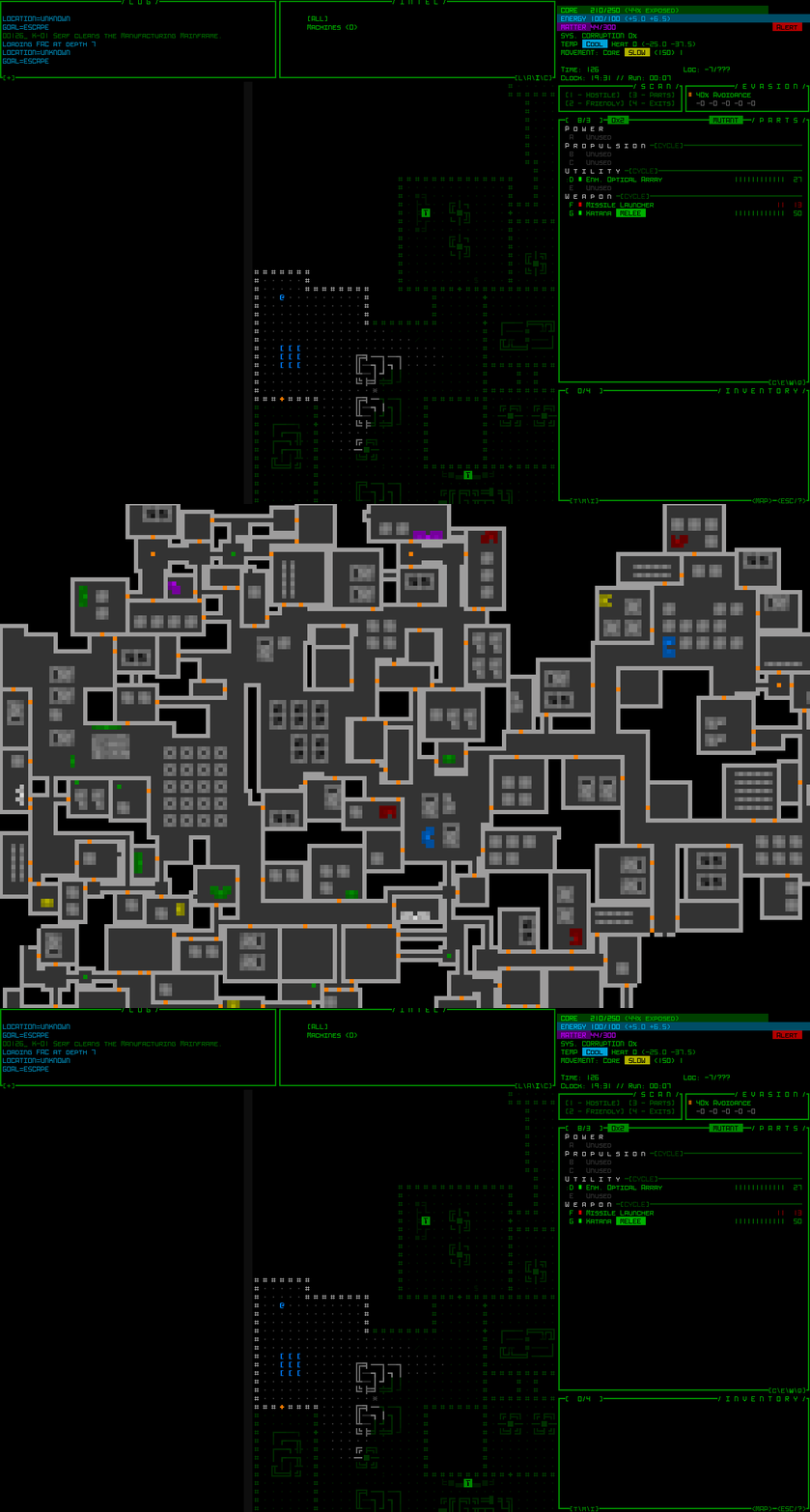
cogmind_overmap_wip1

A quick demo of opening a Factory map in its basic overmap form.

Some Pros and Cons

As you can see it loses a lot of detail, but I mean it’s essentially just a “huge minimap” so that’s inevitable :P. In that sense I’ve always been skeptical of how useful it really is considering you can already 1) see such a large area at once on Cogmind maps due to the relatively small grid (by default containing more cells at once than almost any other roguelike) and 2) easily pan around the map at full detail and get all the normal features and benefits of doing so.

I can see it coming in handy to more quickly skip the map view focus to a specific distant point on the map, at least via mouse (this aspect would perhaps be somewhat less useful for keyboard users in that regard?).

Certainly more worrisome from a development perspective is that there wouldn’t be a whole lot of interaction possibilities due to the fact that half-cells cannot normally be distinguished and interacted with separately in Cogmind’s engine, although technically I guess it might be feasible to get the engine to make an exception here (basically have the overmap ask it for extra info when necessary--this could lead to a fair number of unforeseen complications or restrictions though, hard to tell without further testing). But obviously players want polished features in their roguelikes, so it’s not all that desirable to release a feature that either can’t be polished due to limitations, or isn’t worth putting in a huge amount of effort to polish for limited returns. Features like this are usually best avoided because they’re more likely to lead to unhappy players. These are some of the primary concerns that have been keeping me from doing much with the overmap all this time.

That aside, what other benefits could we potentially get out of something like this? Naturally based on its greater range of visibility we can assume many of its features would be associated with the idea “exploration.” Cogmind’s main map view already has a good bit of this in the form of intel and labels for off-screen objects, but perhaps a dedicated display would lend itself to additional uses instead of simply highlighting known stairs, for example.

One interesting idea I had while working on the foundation for this feature was to have an optional highlight for areas that haven’t been fully explored yet. Combined with player “map sense” this could perhaps help realize that an exit may have been passed somewhere, or remind that a particular door wasn’t opened, or even for tracking down that elusive Garrison Access in -8/Materials ;)

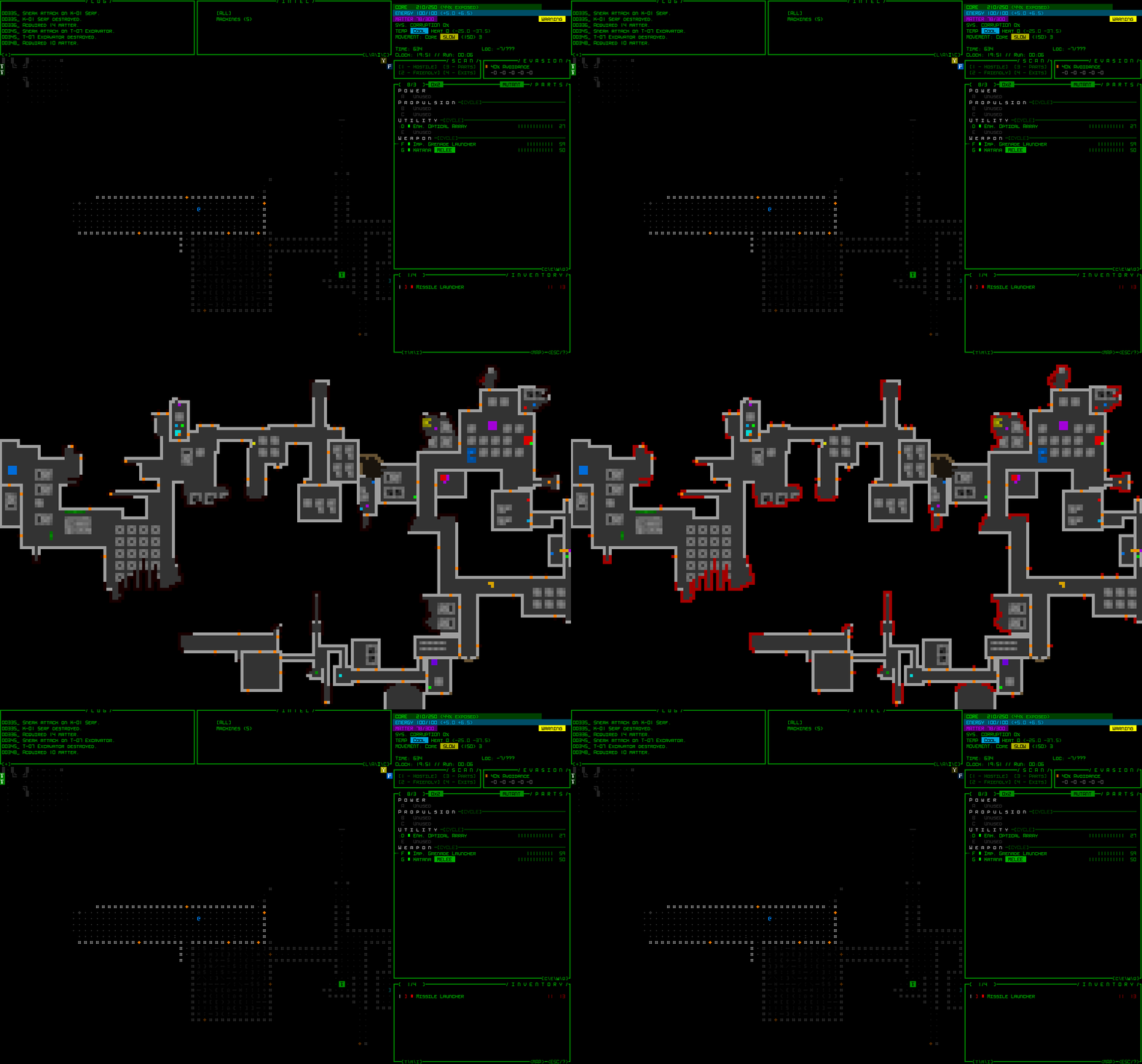
cogmind_overmap_wip1_highlighted_explorable_edges

A partially-explored Factory map with edge highlighting.

Another common request related to this sort of feature would be the ability to add annotations. I’m not really sure what people would use it for, but I’ve added some random samples here as an example of what that might look like :)

overmap_development_annotation_sample

Sample optional map notes superimposed on the overmap to describe certain locations.

Aside from gameplay use, I imagine some players might also be interested in using this feature to annotate how certain battles/adventures across a map progressed in order to share with others (or just for their own records). Some players do this already, but using either screenshots or Cogmind’s full map export-to-PNG feature:

cogmind_map_export_pimski_garrison_clear

Sample map export image from a run shared by Pimski. Exporting a map to an image creates a large PNG showing all areas that have been explored so far.

It’s also possible that we’ll one day get on-map annotations regardless of the overmap, and those could transfer between the two automatically.

Despite my reservations regarding the overmap feature, I did add it to the feature voting list for patrons where it’s been garnering a surprising number of votes, at one point in the lead though more recently falling to second place as item searching and filtering somewhat overtook it.

Posted in GUI | Tagged , , | 2 Responses

Audio Accessibility Features for Roguelikes

Anyone who’s followed my development work over the years will know that I’m big on providing all sorts of quality of life features, optional functionality, configurable settings, and so on. This is also why even from the earliest stages (pre-7DRL!), and ever since, I’ve given the utmost priority to Cogmind’s interface.

How players interact with a game, both in terms of input and feedback, is vital to the experience, so even the greatest mechanics and content can be held back by insufficient attention to UX. Although it’s a lot of work to always be putting the interface first (while still trying to maintain progress and design within the necessary constraints), and I sometimes have to pick and choose what I can implement as a result, I think it’s been worth it in the long term. Not everything I’d like to do is really possible, but I try my best.

Having recently covered the new ambient audio system, today I’ll be introducing Cogmind’s audio-related accessibility features, features that other roguelike developers could potentially learn from and apply to help their players as well.

In particular I’ll be talking about Cogmind’s “visible SFX” system, allowing you to see the sources of sound effects, and the audio log for listing in text form both ambient and non-ambient sounds currently heard from Cogmind’s position. As we’ll see, the cool thing about both of these features is that they’re not just for people who must have them by necessity for accessibility reasons, but can also help other players in certain situations! Like anyone playing with the volume low, or even muted, or in an otherwise loud environment--everyone can benefit :D

Visible SFX

Originally a “what if” kinda feature that was mostly intended as a fun experiment, I immediately started liking the implications of being able to see the origin of sound effects outside your field of vision. This means being more aware of battles happening nearby, pinpointing enemies attacking from outside your visual range, locating undiscovered doors currently in use, knowing exactly where nearby garrison reinforcements are coming from… all kinds of useful applications. It’s essentially a free type of sensor, but one that only works when the surroundings are changing and therefore often lends itself more to reactive than proactive tactics.

cogmind_visible_sfx_combat

Visible SFX demo, “seeing” a battle playing out around the corner.


cogmind_visible_sfx_combat_dark_version

More or less the same situation as above, but playing out on a black background so it’s a bit clearer.

The animation is generally just a single flashed dot at the origin and a quickly fading box around it, although for sounds with especially longer ranges (usually explosions) and therefore presumably louder, the animation is both brighter and has a larger fade radius.

Visible SFX animations are also color-coded by sound type to make the indicators more useful, even more so when lots of things are happening at once:

  • Red: Combat-related
  • Orange: Door open/close
  • Yellow: Trap trigger, carrier deployment, or garrison dispatch
  • Blue: Emergency door open/close or phase wall destroyed
  • Green: Machine destroyed
  • Brown: Walls destroyed or cave-in

Successive red flashes mean there’s fighting going on, naturally one of the more common situations, and if you didn’t instigate it, then depending on your build and condition it might be wise to either avoid the area or hurry over to lend your firepower to whichever side is on good terms with you (hopefully one of them is? :P). Either way, the system offers more options for informed decision-making rather than flying blind.

Together with the extra positional information you otherwise wouldn’t have simply by listening to the sounds, this feature also has the added advantage of better accessibility for hearing-impaired players, or anyone else playing without sound.

Although visible SFX are active by default, it’s possible to turn off in the advanced configuration file in case the extra visual flair bothers someone.

(Visible SFX were added to Cogmind three years ago back in Beta 1, though I haven’t mentioned them on the blog before.)

Audio Log

Something I was excited to finally add to Cogmind, since I’ve wanted to do it for a very long time now, is the audio log. The audio log is meant primarily as an accessibility feature akin to closed captions, allowing anyone who keeps their volume low or muted to be able to retain access to important audio knowledge (alongside the visual SFX feature, although that one is much more of a perk for everyone). This optional feature is disabled by default, but after testing it out I think this’ll be a pretty popular one even among those who don’t require it.

Features

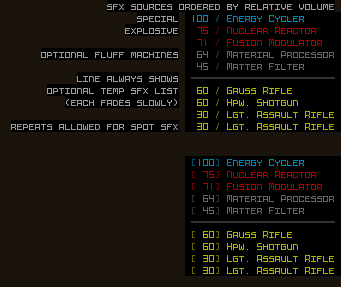
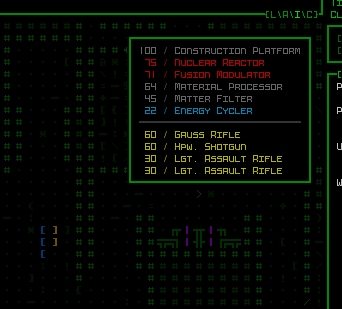
Now, I say “closed captions,” but it’s definitely not a list of “pew-pew” and “kaboom” or anything like that, instead listing the name of the effect’s source in a small window embedded in the top-right corner of the map view. Ambient sounds are listed first, followed by a separator, then any non-ambient sound effects (the latter category referring to one-time sounds like gunfire and explosions).

cogmind_audio_log_demo_ambient

Walking around a Materials map as the audio log updates to reflect machines that are being heard from each point.

The number to the left of each sound type indicates its current volume, which players can use as a proxy for distance.

Like visible SFX, the audio log also color-codes its contents to provide extra info where applicable:

  • Gray: Fluff machines, those serving to reflect the theme of the area and be destructible obstacles rather than serving an otherwise significant mechanical function.
  • Orange: Explosive machines. Beware.
  • Blue: Special-purpose machines with a unique function. Destroying these always has some effect.
cogmind_audio_log_demo_nonambient

Watching the audio log while passing turns and occasionally moving around as a war is playing out nearby. This demo also makes it clearer that sounds are ordered by near-to-far rather than the order in which they were heard.

Non-ambient sounds are color-coded by category as well:

  • Yellow: Attacks and gunfire.
  • Orange: Explosions.
  • Red: Robot destruction. Very specific compared to other categories, but also very important so it gets its own color.
  • Green: A wide variety of events including traps, drones, turrets, scans, phase doors, door hacking--basically everything that doesn’t fit in any of the other three categories.

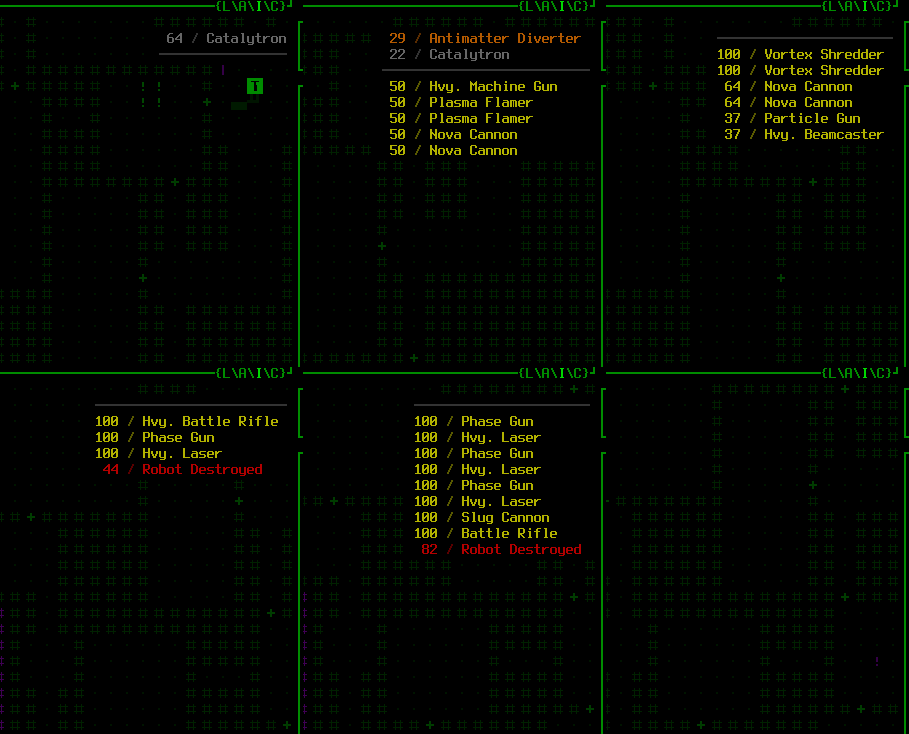
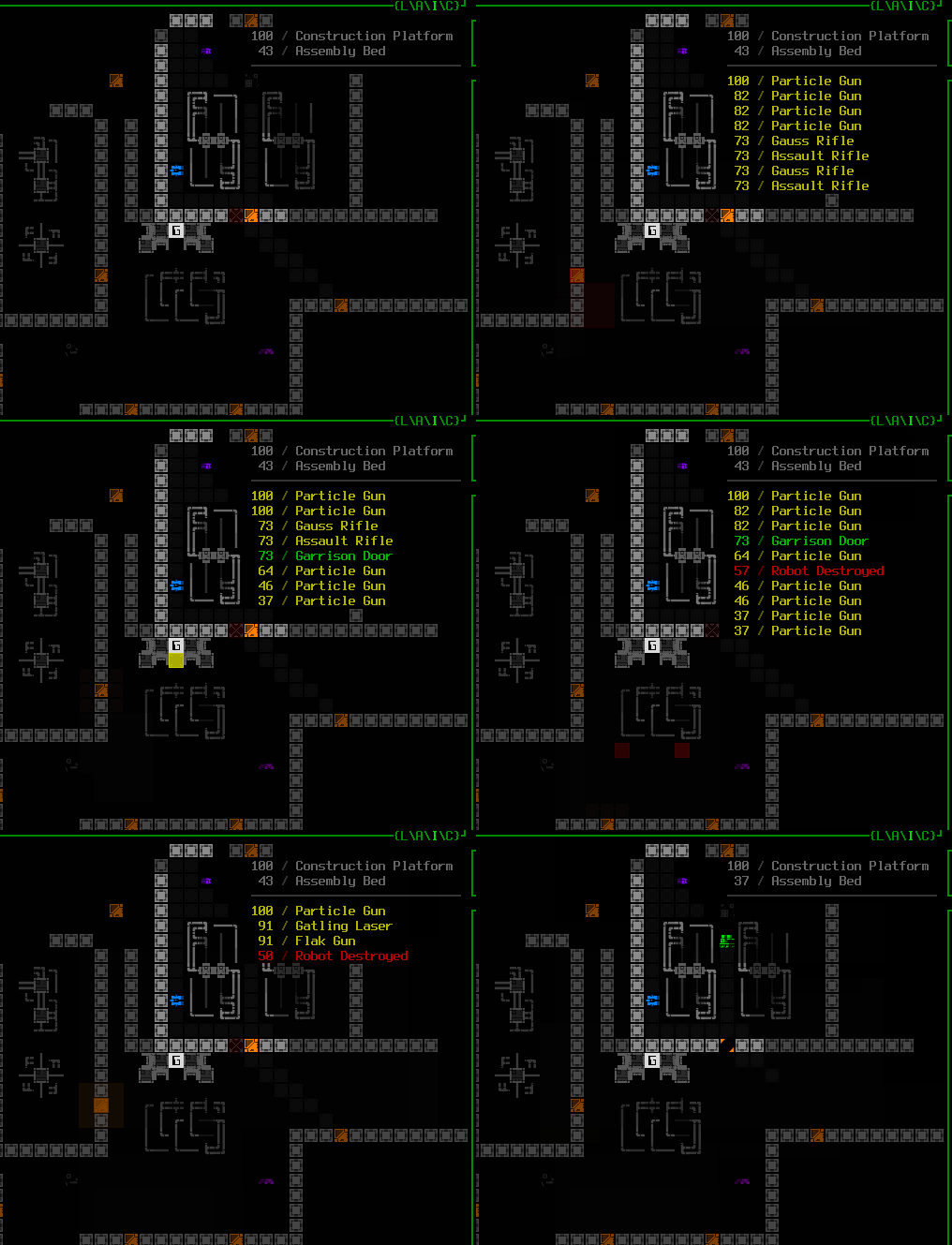
When combined with the visible SFX system the non-ambient data is even more powerful: “see” this great fight heard outside the room as it’s described by the audio log and blips on the map:

cogmind_audio_log_demo_nonambient_with_visiblesfx

Funny how it ends ;)

Not quite every sound appears in the log. In choosing what sounds to report in the audio log, in most cases it was geared towards information that is strategically helpful to know when out of view, rather than providing an exhaustive list. Limiting it to what really matters helps keep the log cleaner.

Although door interaction is fairly important, it is not reflected in the audio log since even if out of view they are clearly displayed via the visible SFX system, and their frequency is often rather high so it might threaten to drown out more meaningful sounds. An exception was made for phase wall interactions, since those are strategically important but do not reveal their precise location as a visible SFX source.

Other sounds that have clear visual alternatives are also generally excluded to avoid padding the audio log with unnecessary “noise.” Examples include dispatch alerts, and the EMP charging and discharging in Waste (which come with their own graphics and messages).

So while the audio log technically doesn’t paint a 100% complete picture of Cogmind’s soundscape, it provides one aimed at an optimized play experience, not unlike the optimizations found in many other parts of the interface.

Challenges

It was a surprising amount of work to finish the audio log, taking an entire week to complete as I discovered quite a few roadblocks along the way. Definitely worth it and I’m glad it’s now implemented, but I expected it to take just a day or two xD

There were lots of questions to answer about this feature…

Right from the initial mockup stage we of course needed to know what kind of information would be conveyed. At first I was thinking distance alongside the name of the sound’s origin (e.g. the machine--at this point I was only thinking about ambient loops), but then realized that precise distance is conveying more specific information than you get by simply hearing a machine. Overall I wanted to try to avoid making the audio log seem like a necessary feature for everyone to have active at all times, meaning the info provided should to be comparable to hearing a sound. So of course it should report the volume as a number (percentage), duh.

cogmind_audio_log_mockup

Excerpt from my original audio log mockups. You can see there were yet more changes made after these ideas.

Then I was considering how an ambient sound list would treat multiple sources of the same type, like a group of Nuclear Reactors. The answer is to just do like the actual ambient audio system and only list the type once at its loudest current volume, again maintaining parity between the audio log and what is heard, but I clearly kept getting sidetracked thinking about all the new info made possible by this new format! The point is that throughout the process one of the roadblocks was myself--I repeatedly had to reign in these wild design thoughts :P

Naming the ambient sounds for the audio log wasn’t hard since I already had a list of the sources and their respective names, and none of them are reused across different sources. Non-ambient sounds, however, were much more problematic since there was no precedent for this in the architecture (which of course hadn’t taken it into account from the start), but including them is quite important for accessibility. After all, once you’re familiar with the sounds certain weapons make, for example, the fact that you can hear them around the corner technically lets you guess what types of enemies (or allies) are fighting nearby, even without sensor data. This same information needs to be reflected in the audio log.

I experimented with a number of different approaches for the names of one-time sound effects, but after a complete survey of the parts involved (in particular weapons) determined that it made the most sense to use a single name associated with the audio sample and add no further differentiation. This means that weapon sounds do not necessarily list the specific weapon name, but instead the base name for the sound. For example there are a number of railgun variants that use the same sound, and the audio log will not differentiate between them, simply listing each as a “Railgun.” Any weapons with unique sounds are indicated by their specific name where applicable, though. This, too, seems obvious in hindsight, again maintaining parity with what is heard, but it wasn’t clear to me at first…

Other naming issues or ideas considered along the way:

  • I originally thought the audio log would have to take into account player knowledge, i.e. unknown parts or unidentified prototypes, but in the end it doesn’t really make sense to obscure that information since players who generally play with the sound on learn to quickly recognize different SFX and retain that metaknowledge regardless of what the game would list in the log anyway. So we can ignore this limitation (which would otherwise be a hugely complex possibility to account for). Bullet dodged.
  • At one point I also thought about using descriptive names that didn’t exactly match weapon names, e.g. “Weak Laser” for Small Lasers or Backup Lasers, since both use same sound effect, but this approach doesn’t scale well at all and would just end up being unnecessarily confusing, forcing players to learn a whole new set of words just for this feature.
  • Then I also thought about using a special type of marker, prefixing the sound name with a tilde (~) in certain cases to represent that the sound belongs to a category of multiple variants and it could be any of them, but that seemed like unnecessary extra info so I simply removed all of those from the data.

Under the final naming system explosion sounds were an issue since many of the same samples are shared across different types of sources such as launchers, machines, and traps, so for those I opted to go with a more generic “Explosion (XX)”, where the XX refers to the common abbreviation for the relevant damage type.

Multiprojectile weapons presented one of the biggest problems, one for which I sadly only found a partial solution. Each projectile actually plays its own sound because of how the projectile mechanics are tied to the particle system, and because the audio log is directly tied into the sound system, which doesn’t know about game mechanics or what’s really happening, thus a single weapon can cause more than one (or even numerous!) entries to appear at once.

The best solution I could come up with for limiting the extra entries involved adding a variable set manually for each sound effect that essentially blocks a predetermined number of subsequent matching audio log messages after the first. Hacky, yes, but it mostly works…

For example an EM Shotgun fires two projectiles, each playing the same sound*, but because the sound effect has a ‘1’ assigned to that variable, on playing the sound the first time the audio system records that it should simply block the next attempt from being logged. (*Note that even though it’s the same sound, weapons tend to randomly modify their pitch for each firing/projectile, and multiprojectile weapons in particular may also add a random but slight amount of staggering to their projectile firing times.)

Unfortunately it’s not a perfect solution because the value must be set at the SFX level, but in rare cases some weapons use the same sound effect but each fire a different number of projectiles, so there are a small handful weapons for which the log might desync on certain turns, though in most cases these are not weapons enemies use anyway (only Cogmind does), so it should rarely if ever come into play.

Technically I suppose we could just always report every single projectile as a separate audio entry, but for some weapons that could get excessive, and it also just makes the log harder to read by polluting it with extra lines, so maybe I could change it later, but for now we’ll stick with this method.

Aside: I did actually test the per-projectile approach, using the standard roguelike message log behavior for duplicate entries, but that didn’t pan out. The idea was to merge duplicate entries with a multiplier, like “50 / Flak Gun (x6)” and so on, simply allowing multiple projectiles to stack when they are of the same type and volume. One problem here is that weapon sound effects are often heard at maximum volume across a decent range, leading to lots of overlap in the log and making it difficult to discern just how many different weapons are being heard (or at least require the player to do some math when there are lots of things happening at once). The potential gains here (being precise and consistent in every case) didn’t outweigh the costs (confusing!), and considering how rare it is for enemies to have a weapon that might cause temporary audio log desyncing, I prefer that the log show weapons on a per-weapon basis rather than per-projectile. Obviously most games don’t have to worry about this kind of thing at all--it’s kind of a weird situation likely unique to the way Cogmind’s projectile, logic, and audio systems interact :P

Altogether it was a lot of work to go back through every sound and projectile, cross-referencing all their uses in order to assign names and other values for audio log purposes, but eventually that was done and… oh wait, there was still more to do xD

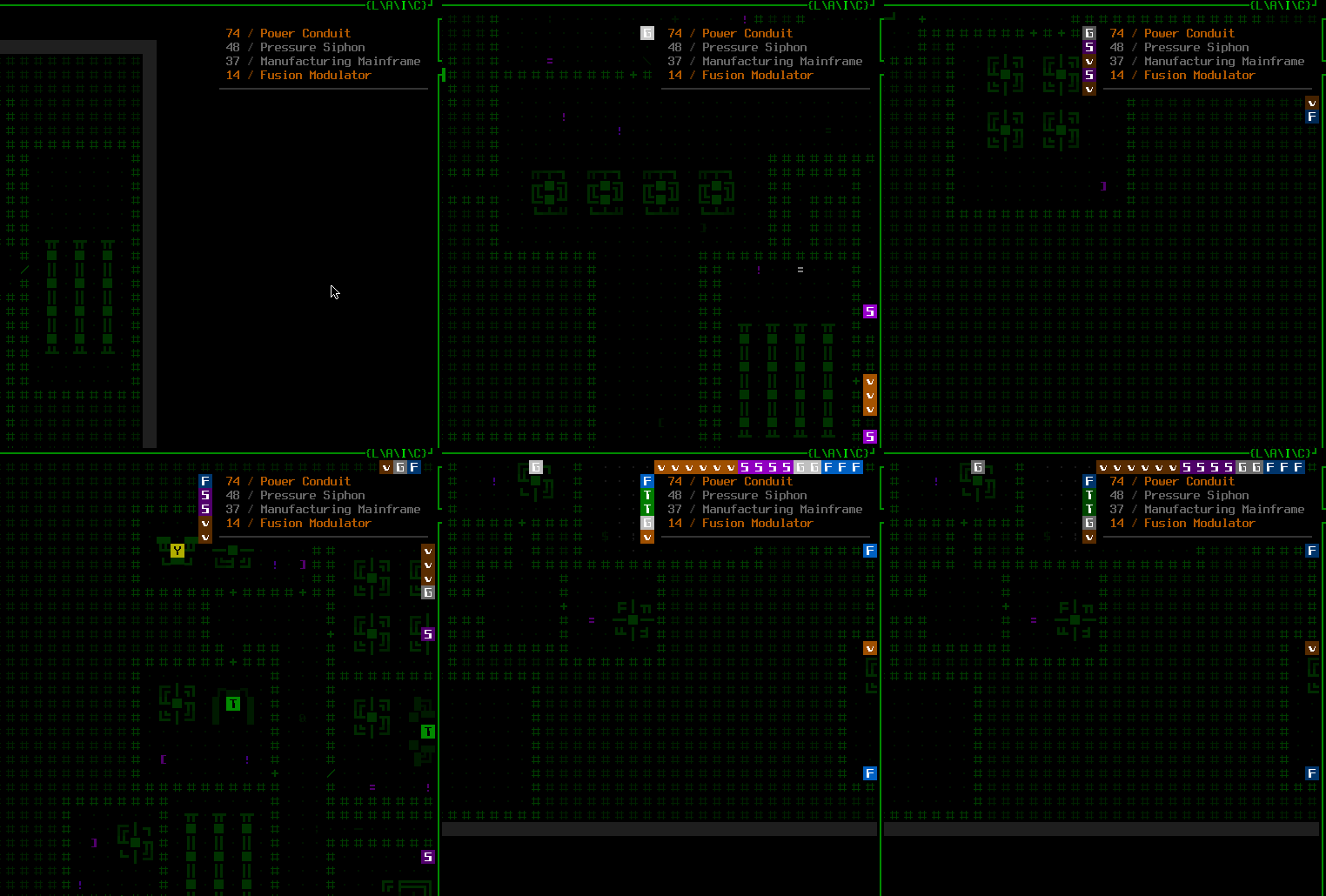
Aside from the content, the new audio log’s existence itself caused some issues. For one its design places it against the right edge of the map, which would obscure any intel markers appearing along that edge segment.

To resolve that I spent a while updating the intel marker placement system to get them to avoid the window itself:

cogmind_audio_log_intel_marker_displacement

The audio log displacing various intel markers that would appear along the right edge.

Labels for offscreen exits needed a similar treatment, although there are always far fewer of those, so I opted to instead just shift them downward rather than pushing them to the left of the audio log window:

cogmind_audio_log_exit_label_displacement

The audio log displacing various offscreen exit labels by pushing them downward if they would otherwise appear behind the window.

In hindsight maybe it’d be better to just treat the audio log like most other on-map windows that can appear and displace it from every edge by 1 column/row, although I felt like the right side should be snug against the edge since this particular window doesn’t have its own border. So maybe it needs its own border??? As a result of writing this article to here I had to mock it up :P

cogmind_audio_log_mockup_bordered

Mockup for an alternative audio log concept, with a border and increased padding.

This option occupies more space (and has to leave even more space for markers), but I guess the consistency could be worth it? It also serves to better separate the log from the map behind it so that it’s more clearly it’s own thing, which is kinda nice. Cogmind’s special mode UI windows that appear at the bottom-left of the map already do this, as do the achievement icons that appear in the bottom right when those are earned…

That said, I saw the audio log as more of a right-adjusted counterpart to the full combat log appearing at the top-left of the map, also without any border. Designwise that one is slightly different, however, because as left-adjusted lines (and potentially long ones at that) it felt fine to have them cover only as much of the map as they needed to on a per-line basis, whereas the audio log on the right works better when the width of the area covered is uniform.

Anyway, I’ll have to think about that one. (Edit: On discussing this with patrons, one good point brought up by Tone is that an explicitly bordered window that frequently changes its height could end up being more distracting, which makes a lot of sense and is good reason to leave it as is, without the border, like its similarly “shapeshifting” borderless counterpart, the full combat log.)

There you have it, just a sampling of the problems encountered in building the audio log--there were lots of other little ones, mostly specific to how Cogmind’s architecture works, its limitations, or trying to get information from one place to another, and, again, overall it took a full week to finish this “little” feature for which a lot of the foundation had already been established!

Options

The audio log itself is optional, off by default but accessible from the options menu. As usual, I’ve also made some of its behaviors tweakable where that may be desirable:

Normally ambient sounds are always listed, while non-ambient sounds are only shown when the origin is outside Cogmind’s FOV. Although this goes against the idea of a truly complete “closed captioning” system, this is actually a more reasonable approach to default to since you can clearly see visible attacks and other sources of audio anyway, and this behavior also keeps the audio log focused on sources currently out of view without letting it become too cluttered with duplicate information. But of course the option is always there to include every sound effect if someone wants/needs to expand the rules. Regardless of this setting, non-ambient sounds originating from Cogmind’s own position (mainly attacks) aren’t reported to the audio log, since those should be obvious and would just clog up the log with too much info.

Ambient sources ended up being listed regardless of whether they’re in view because even though it might’ve similarly made sense to only list those that are outside FOV, it turns out this was completely impossible without rewriting much of the ambient audio system xD. No matter, it’s fun (and sometimes convenient) to see those listed, anyway, and they’re definitely not excessive like non-ambient sounds can be!

Fluff machines (reminder: those that do not explode and have no special mechanical purpose) are normally included in the audio log, but there is also a setting to exclude them to avoid the extra noise. I imagine most players would want to leave them on for a number of reasons, though preferences could depend on what other settings are being used.

The maximum length of the log is adjustable, too (down to the bottom of the map view, which is actually the default), as is the length of time for which non-ambient sound effects remain visible before disappearing from the log.

General Audio Settings

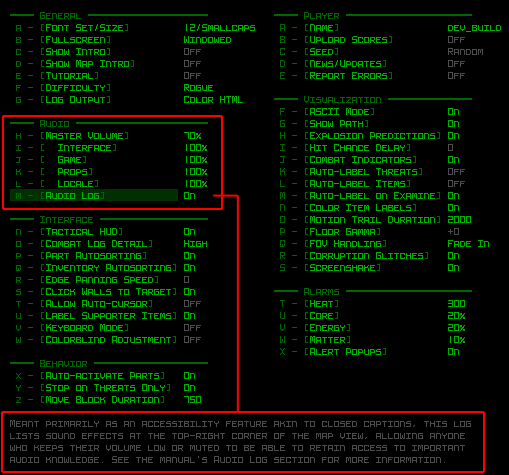
As a major accessibility feature the audio log toggle has been given a place in the Audio section of Cogmind’s primary options menu, alongside several other options some might find useful.

cogmind_audio_options

Cogmind’s latest options menu layout and contents.

Of course there’s a master volume control, but as part of that each of four separate channel categories can also be adjusted individually to change their relative volume. “Interface” includes all the UI feedback, the beeps and clicks and alerts, etc.; “Game”covers mechanics, combat, and other events; “Props” are all the environment objects like machines (basically any ambient loops that aren’t the mapwide audio); and “Locale” refers to the mapwide ambient audio track for the current map.

Over the years I’ve also added a couple other special audio options by request, though these only appear in the advanced configuration file:

  • muteTextSfx: Some players are sensitive to the text typing sound, which is pretty ubiquitous in Cogmind because there’s text being printed to the log all the time as things are happening, but it usually isn’t a vital part of the interface feedback, so I added a way to disable that particular effect.
  • muteGlobalAlertSfx: At least one player didn’t like hearing global alerts, generally referring to enemy squad dispatches as a result of your presence or actions, or otherwise potential danger coming your way, so I added a separate way to disable those. Alert situations are also accompanied by a more specific white log message and an additional flashing message at the top of the map view, anyway, so it’s usually not too hard to miss. Personally I tended to miss anything except an alarm playing, but the idea of options is that not everyone has the same observational habits or abilities so making things customizable is usually advantageous where possible.

As with many of Cogmind’s huge range of quality of life features, it took a while to reach the current state--naturally not every issue will be foreseen and implemented right away, and it can take years to properly add all this stuff to a game (especially as a solo dev), but in the long run listening to feedback from players and doing what I can to offer improvements to the experience has been an important part of the process.

SFX, Stereo, Action!

You can see both the visible SFX and audio log in action in my first Beta 10 prerelease stream in which I introduced the log alongside the new soundscape:

Posted in Dev Series: Sound Effects, GUI | Tagged , , , , , | Leave a comment

Building Cogmind’s Ambient Soundscape

I first introduced Cogmind’s ambient sound system back in 2014 during the pre-alpha days, as it was initially developed for Cogmind’s predecessor (X@COM) in the years before that, and sound would continue to play an important role going forward. It wasn’t an especially long post like the ones I tend to write these days, but it did touch on the basics of propagation, sound dampening, and falloff models.

Since then I’ve also written a number of articles about sound effects and audio in general, but now it’s finally time to address the relative lack of ambient audio in Cogmind! I’d been putting this feature off for a long while and it sat at the end of the pre-1.0 roadmap for years, at first because it made more sense to work on all that content after everything else was complete, but then later due to my concussion leading to hearing issues, which only after a couple years finally reached a point where they wouldn’t be a significant roadblock.

Here we go!

Technical Overview

For relevant background to help better understand this article, here’s a quick review of the ambient audio system’s features…

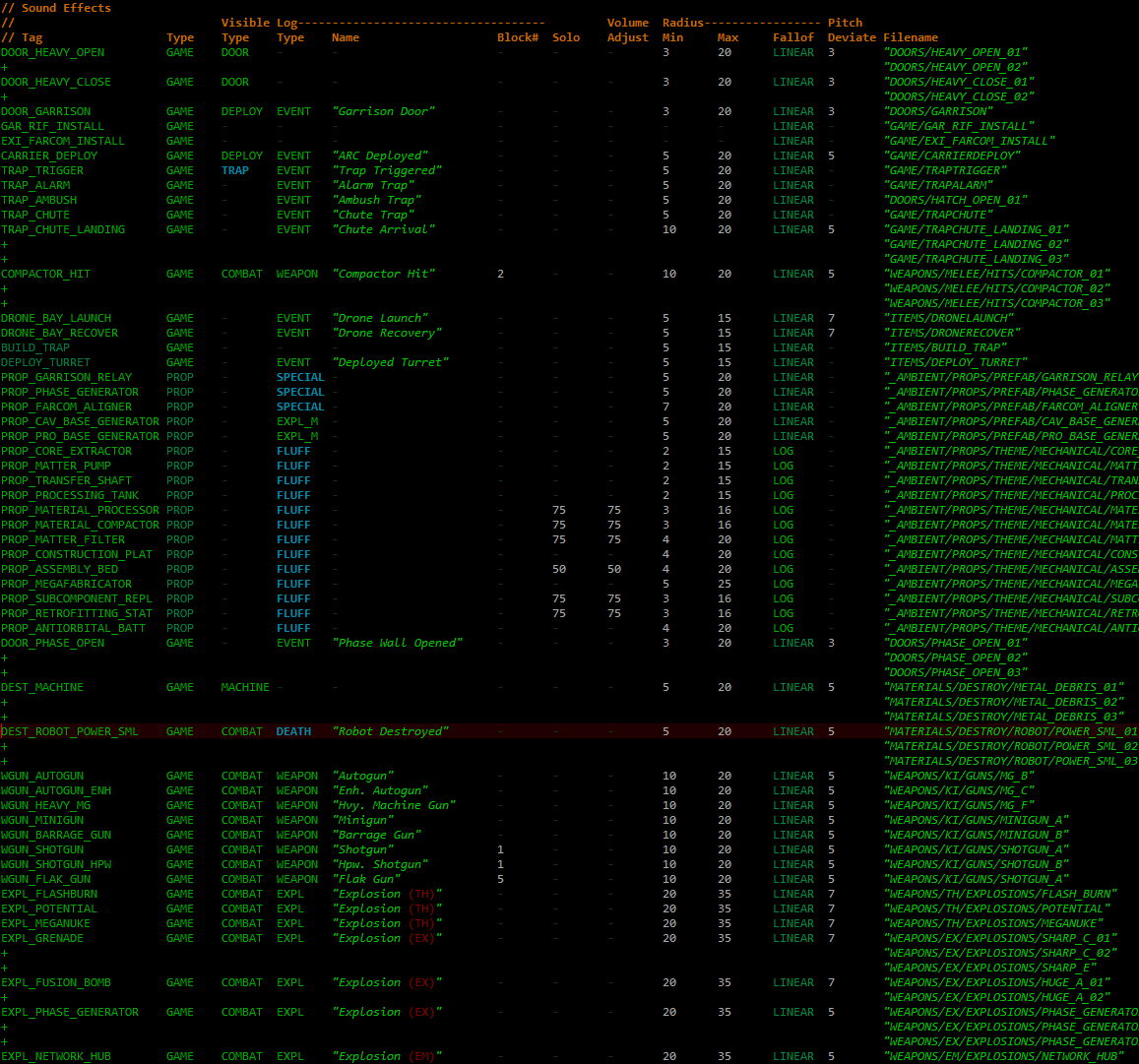
cogmind_sound_effect_data_excerpts

There’s a whole lot of sound-related values defined in Cogmind’s data files. Above is an excerpt combining various sections, both ambient and non-ambient from a range of categories, to give a sampling of the variety (the full file contains 1122 entries :P).

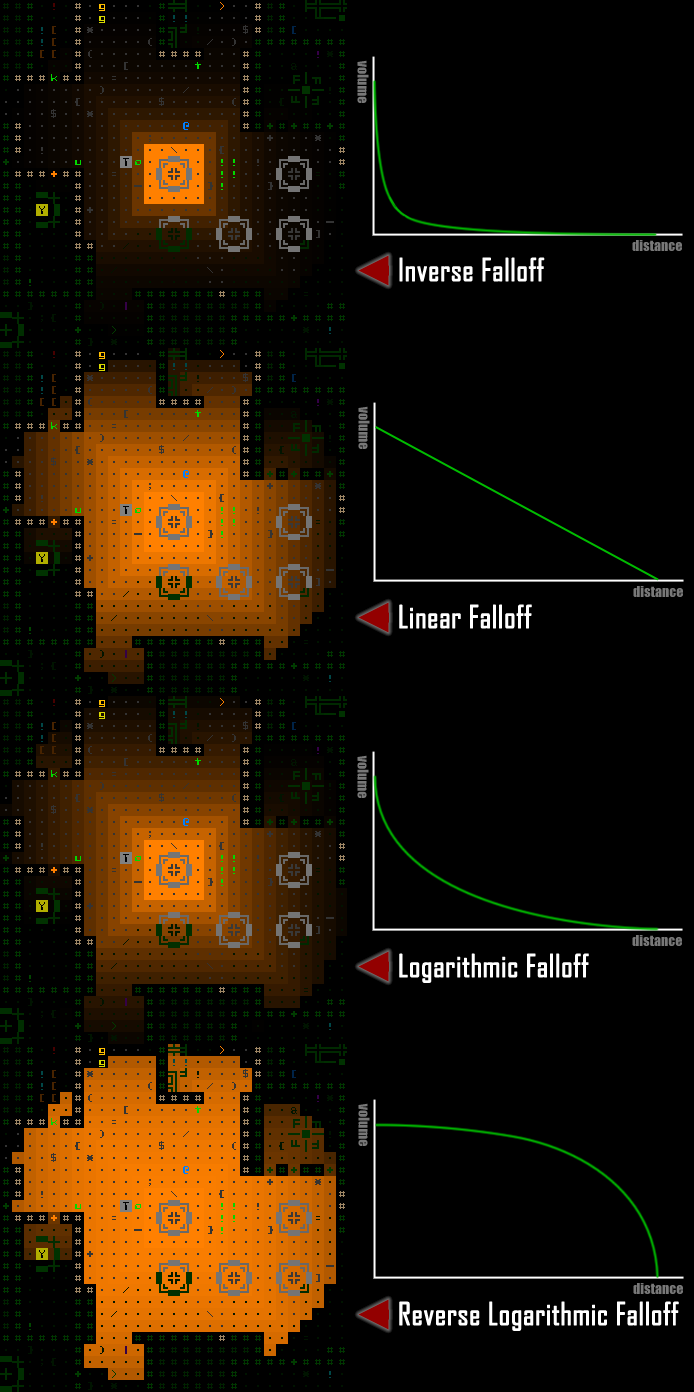
Each sound is defined along with a “minimum” radius representing the distance before its “falloff” begins (i.e. the volume begins decreasing due to distance), and a maximum radius indicating the furthest distance out to which the sound travels as it’s fading. A given sound can use one of four different falloff models depending on its needs, either linear, logarithmic, reverse logarithmic, or inverse.

cogmind_ambient_audio_system_falloff_demos_with_graphs

Demonstrating the relative volume of audio emitted from a given source (the machine at the center) using different falloff models, alongside rough approximations of the graph representing each.

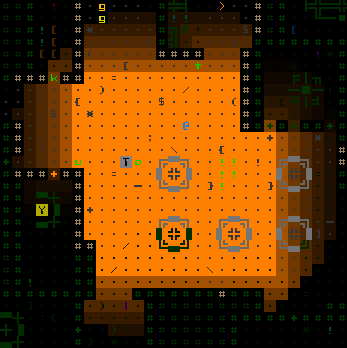
The above examples all have a minimum radius of 2 (and max of 15), so the different results come purely from changes to the falloff, but by adjusting the other values a huge range of options become possible. For comparison, here’s a logarithmic falloff with a longer plateau (radius 8~15):

cogmind_ambient_audio_system_falloff_demo_logarithmic_8-15

This falloff sample has a longer plateau than I generally use, but it can come in handy for some purposes.

On every player move, or with any action that might have affected the amount of sound reaching the player’s location (terrain destruction, machine toggling, etc), the audio sources potentially within earshot of the player pathfind to the player to determine how far away they are for volume determination purposes. The final new sound profile for the player’s current location is compared to the any sounds that were playing from the previous state, and the old state fades into the new state, which might involve simply slowly adjusting the volume of the same set of sounds, adding new sounds, or gradually removing those that are no longer in range.

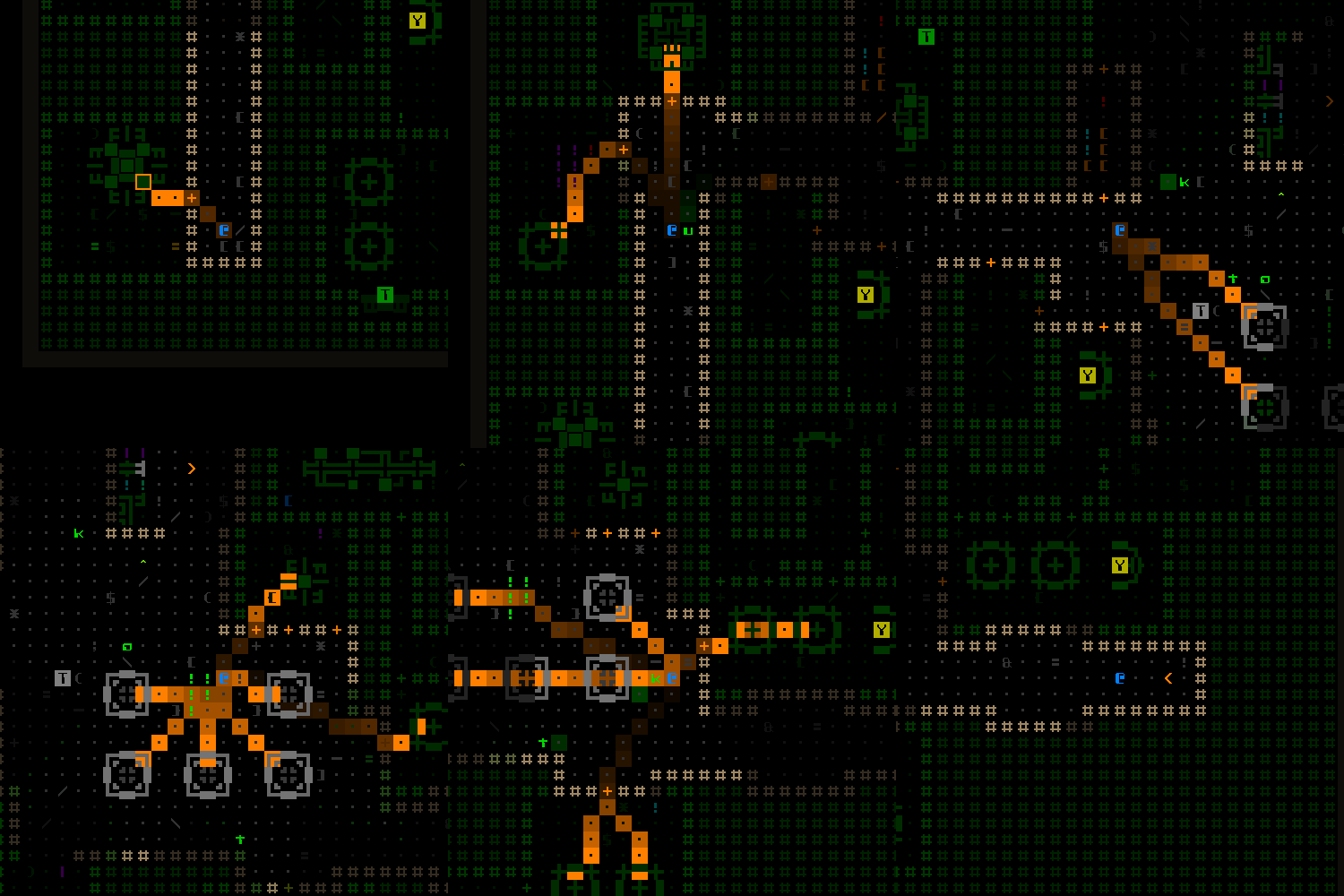
cogmind_ambient_audio_props_paths

Visualizing the sound paths from each nearby audible machine, paths which are used to determine the final volume at the player’s location.

Using a system like this is both quick and makes it pretty easy to account for dampening effects of the path successfully passing through materials, like the doors in Cogmind which block 50% of the volume. You can see the effect of doors in the falloff samples from earlier (it’s most noticeable in the reverse log demo), but here’s another still shot using the sound path visualizer in which you can see the volume dropping quickly when passing through doors.

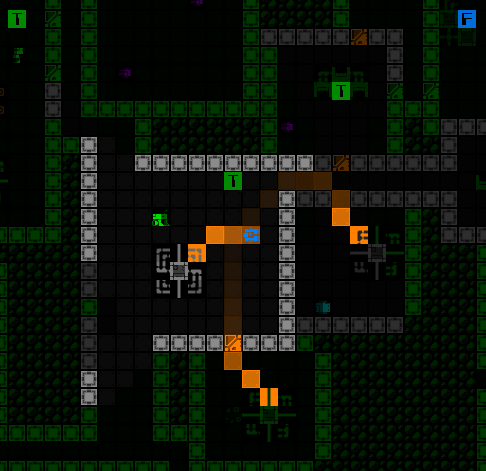
cogmind_ambient_audio_props_paths

Doors to two rooms lowering the volume of the machines heard within.

So that’s the underlying architecture we’re working with here, let’s move on to where the soundscape actually takes shape.

Audio Style

Naturally a lot of games tend to use music to fill the role of “continuous audio,” which when done well is instrumental in conveying the desired mood, and possibly atmosphere as well.

It can also be great to just enjoy out of game. I personally love VGM, having listened to it for the past 30 years (I guess since before listening to VGM was a thing many people really did :P), and in the early years recorded the music from console games on my TV to create OSTs and mix tapes. Later on importing OST and arrangement CDs from Japan became a thing, so I did a lot of that, too, and still listen to the original rips I made to this day…

So yeah getting a Cogmind OST by a proper composer would be pretty damn awesome, but at the same time developers need to choose for their game the type of audio that will best achieve the vision for its world.

The audio style discussion has played in some form or another, in some place or another, pretty much every year of Cogmind development so far as different players ask about it, or I bring it up myself when planning for the future. It was once even the topic of a post here on the blog, back in 2017. Over the years I’ve certainly been collecting a list of interested composers, or others that I’ve become interested in, and analyzing whether or not I think they’d be appropriate for this particular job if it came to that. Many have also approached me asking about Cogmind, including a number of players.

For now though, music is probably not right for Cogmind. With an emphasis on immersive atmosphere, and a semi-realistic dark sci-fi one at that, I think environment-driven ambient audio would better fit the role. Even if it doesn’t work out the way I envision it (spoiler: it does), considering that the architecture for an environment-based ambient audio system already exists and the only further need is to add the content, and doing so involves fewer challenges and commitments than working with a third party composer, it makes sense to start with this approach and experience the results to hear for ourselves. Let the machines and other objects of the world dynamically create the soundscape, and if that works then we’re all set.

Then there’s the additional benefit of this approach: it’s heavily focused on sound effects and loops, which I’m familiar with after working with them for many years, and is also something I can manage on my own, which in my book is always a plus over bringing in outside help. It means that iterating is faster, and I have more direct control over making sure each step along the way is successfully integrating with my vision. Also of course when I inevitably need more content I’m always available to add it :P

That’s what the rest of this article is about--the process behind pulling that soundscape together.

Machine Loops

The main focus of the ambient audio is Cogmind’s machines, of which there are over a hundred.

Technically before reaching this part of the development process, in previous years I’d already added loops for 17 special machines and other various sources especially meaningful to the plot or mechanics. At the time I didn’t want to wait on those since in some cases they’re quite important, so it made sense to emphasize their impact with audio as soon as possible. “Fluff” machines could wait, but not things like machines capable of significantly changing the entire run :P

Categorization

With such a large number of machines, providing sound for all of them is a rather daunting task, so we do what we do with all daunting tasks: break it down! I first roughly identified the different categories of machines in Cogmind from an audio perspective. (Technically Cogmind machines were already divided into themes for map placement purposes, but those categories do not always align perfectly with what kinds of audio you might get from them, hence the need for alternative audio-specific categories.)

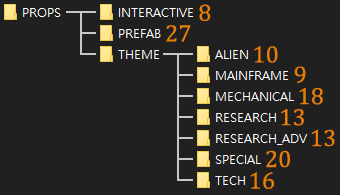
Here’s the breakdown as reflected in the ambient loop directory structure, including the number of loops in each as of this writing (there will no doubt be a few more added in the near term, but most everything has audio at this point):

cogmind_prop_audio_loops_directory_structure

The current tally of Cogmind’s ambient loop files. Ambient audio is sourced from “props,” which are anything in the environment that is not a cell, item, or entity (robot)--generally machines for the most part.

“Interactive” refers essentially to terminal types, all of which were originally using the same placeholder loop, but now every faction has one or more unique sounds for their terminals. They look and operate differently, so it only makes sense to differentiate their sounds, too :D

“Prefab” includes machines I draw directly into hardcoded map sections via REXPaint, those with a unique name and possibly function as well. (Read more about prefab development here.)

The “Theme” directory contains all the machines that are procedurally inserted into maps. A majority of these are fluff, though in particular the “Special” subcategory includes all the explosive machines and a few with unique functions. Among the Theme machines I did that group first to ensure they got first pick from the audio resources I was working with, since they’re more important.

Creation

In terms of actually creating the sounds, I’ve already covered that before in the sound design how-to article I wrote in the early years of the project. Reminder: I don’t do this from scratch, instead using existing samples and editing them as necessary.
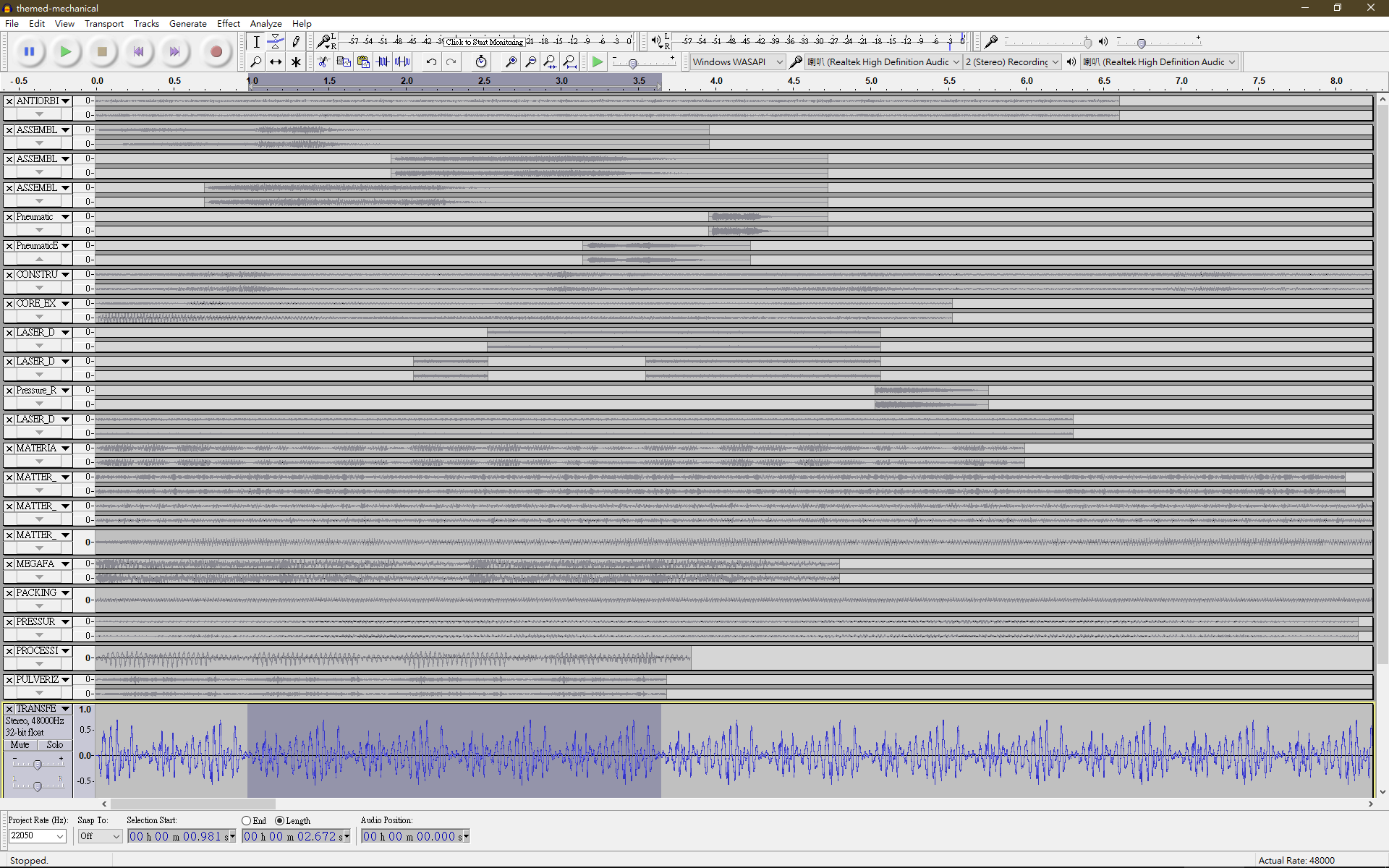
I spent a couple weeks going through lots of samples looking for what sounded like my vision for each machine in question. Obviously since it’s sci-fi there’s often a lot of leeway for interpretation, but still important to be consistent. Working with a single category/subcategory at once, I’d use Audacity for looping all the tracks, adjusting or mixing some of them for better effect.

cogmind_props_ambient_audio_audacity_work

Editing Cogmind’s machine loops in Audacity.
As each category’s loops were completed, I’d fire up Cogmind’s sandbox mode to hear them in game and adjust sound propagation values as appropriate. The sandbox contains one of every themed machine, making it more convenient to do this than actually finding them in game.

cogmind_sandbox_overview

Cogmind’s development sandbox, which has grown incredibly messy over the years since it has continued automatically expanding itself based on game content, but I don’t really use it much anymore--it was instrumental in early development but barely gets loaded up these days.

However, the machines in the sandbox are also quite close together, which would interfere with the task of making machine-specific adjustments (although the proximity does come in handy when testing out overlapping audio from different machines!). So right away I needed some new debug features to make this job easier.

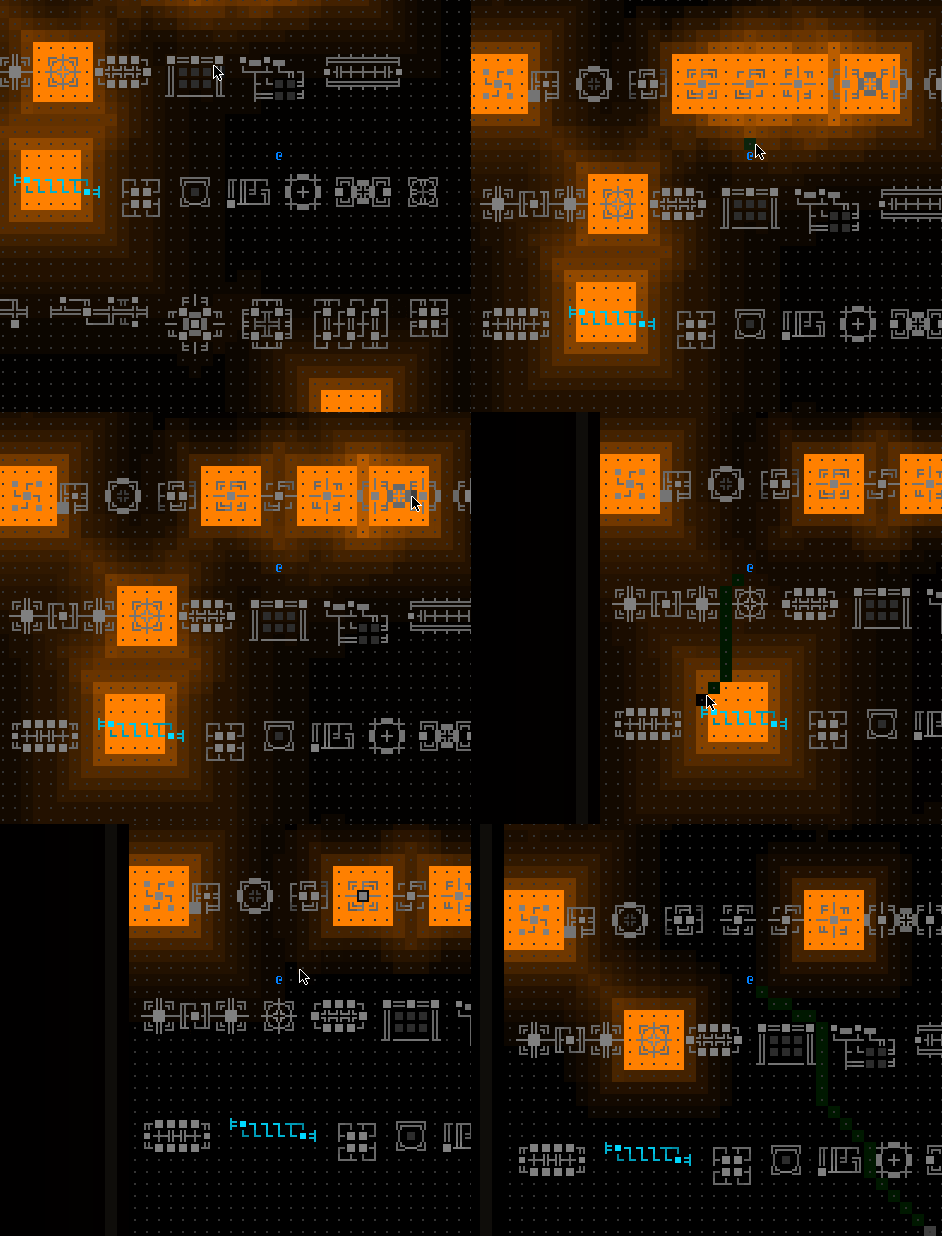
Enter audio toggling. It was suddenly important and very useful to be able to toggle all ambient sources across an entire map, as well as toggle them individually by source. This functionality would also be of help once we get to the stage of testing ambient audio in regular map environments.

cogmind_props_ambient_audio_debug_toggling

Toggling ambient audio sources in the sandbox.

Now I could more easily hear any given machine in isolation, and test how its audio propagation settings worked for its particular sound. I started everything with reasonable default propagation values, and adjusted from there. These values are set in the external data file shown earlier, a file which requires a game restart in order to load any changes. So while at first I was determining final values by listening to each machine and making educated guesses about what it should be changed to before restarting, this approach is slow and incompatible with the sheer amount of content being worked with here.

Time for another new debugging feature!

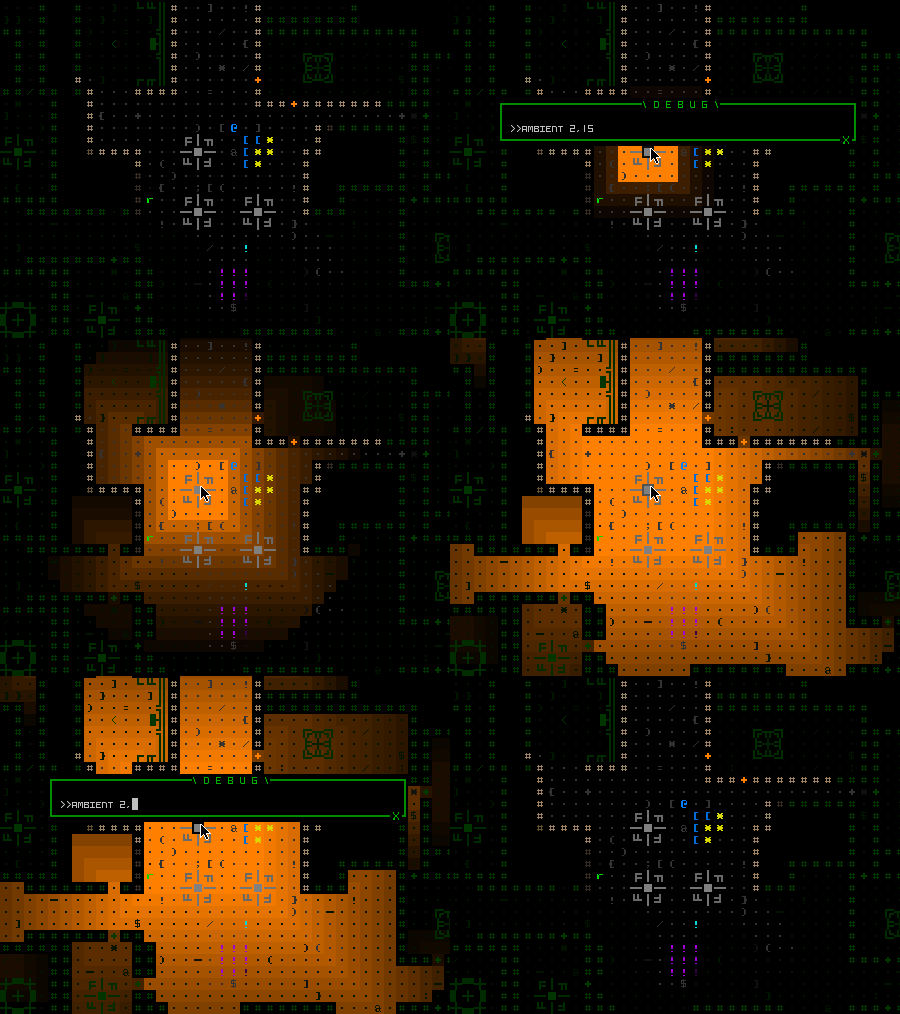
Rapid iteration is important, so I added a way to dynamically adjust a given audio source’s min/max radius and falloff using the debugging console, making it possible to immediately experience the results of any change and easily experiment with different possibilities.

cogmind_props_ambient_settings_tweaking

Adjusting machine audio propagation settings dynamically.

This continued for more than 100 machines until everything seemed to have suitable values…

Polishing

Of course with all this audio content going into the game at once, it’s about more than just editing loops for individual sources--we’d also need to take a look at the atmosphere as a whole and ensure it’s properly balanced, and I’d need new tools to facilitate that process as well.

First of all, as I walked around real maps it became apparent that the default linear falloff model I’d been using for most machines didn’t actually work that well when applied to all machines across the floor. I’d started with that type because it happens to be what was used all these years for the special prefab machines added before this new undertaking, and it works there because those tend to have longer audio ranges and I wanted them to be pretty clearly identifiable shortly after they come into earshot. Not so with all the generic machines scattered about. (When applied to them, a linear falloff makes the ambiance feel more confusing with a greater number and variety of sounds quickly fading in and out as you move around.)

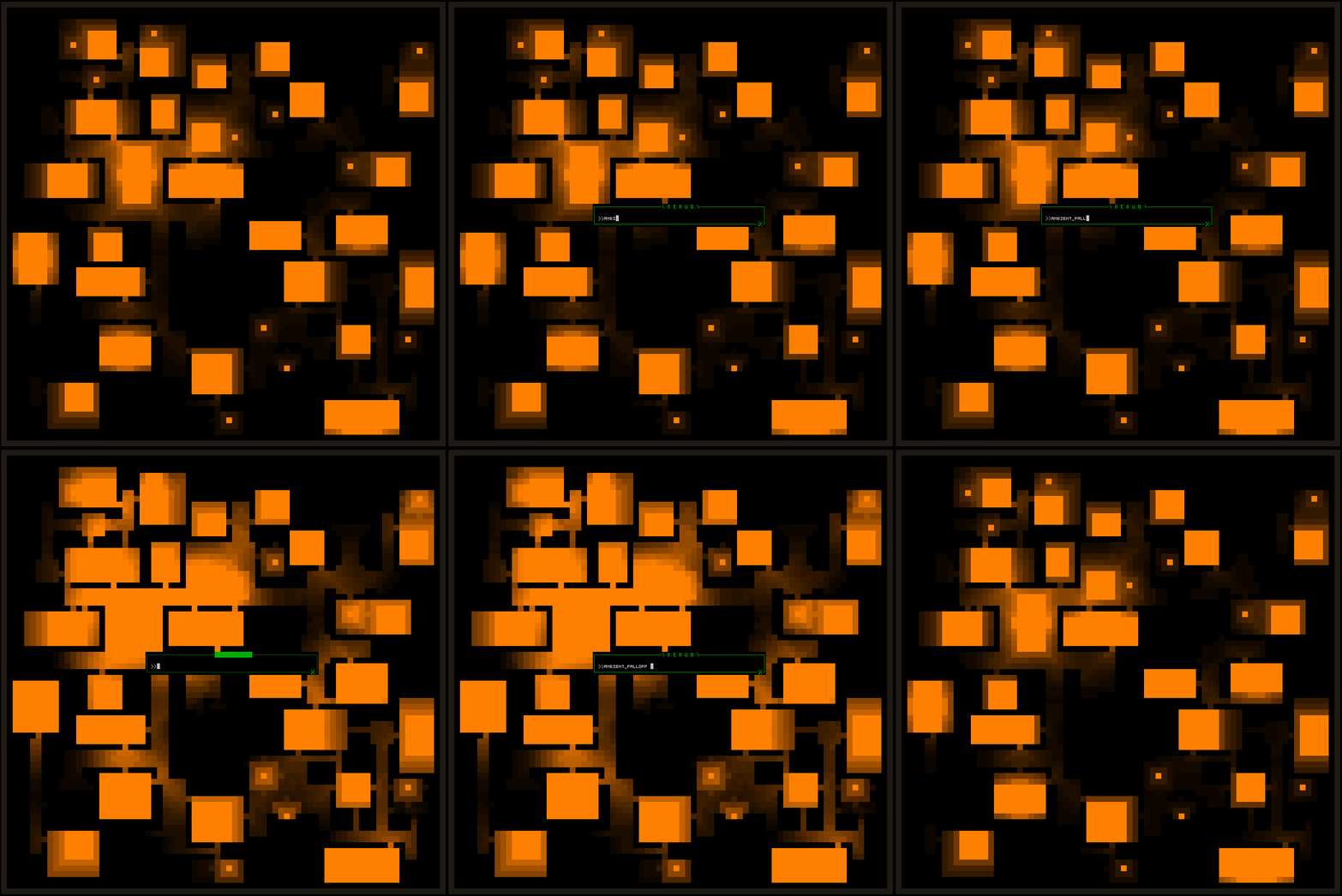
To experiment with a new default falloff model, I added a console command to simultaneously switch all machines to a different model, eventually settling on logarithmic as the default:

cogmind_props_ambient_audio_debug_mapwide_falloff

Testing a couple of different falloff models under the ambient audio visualizer.

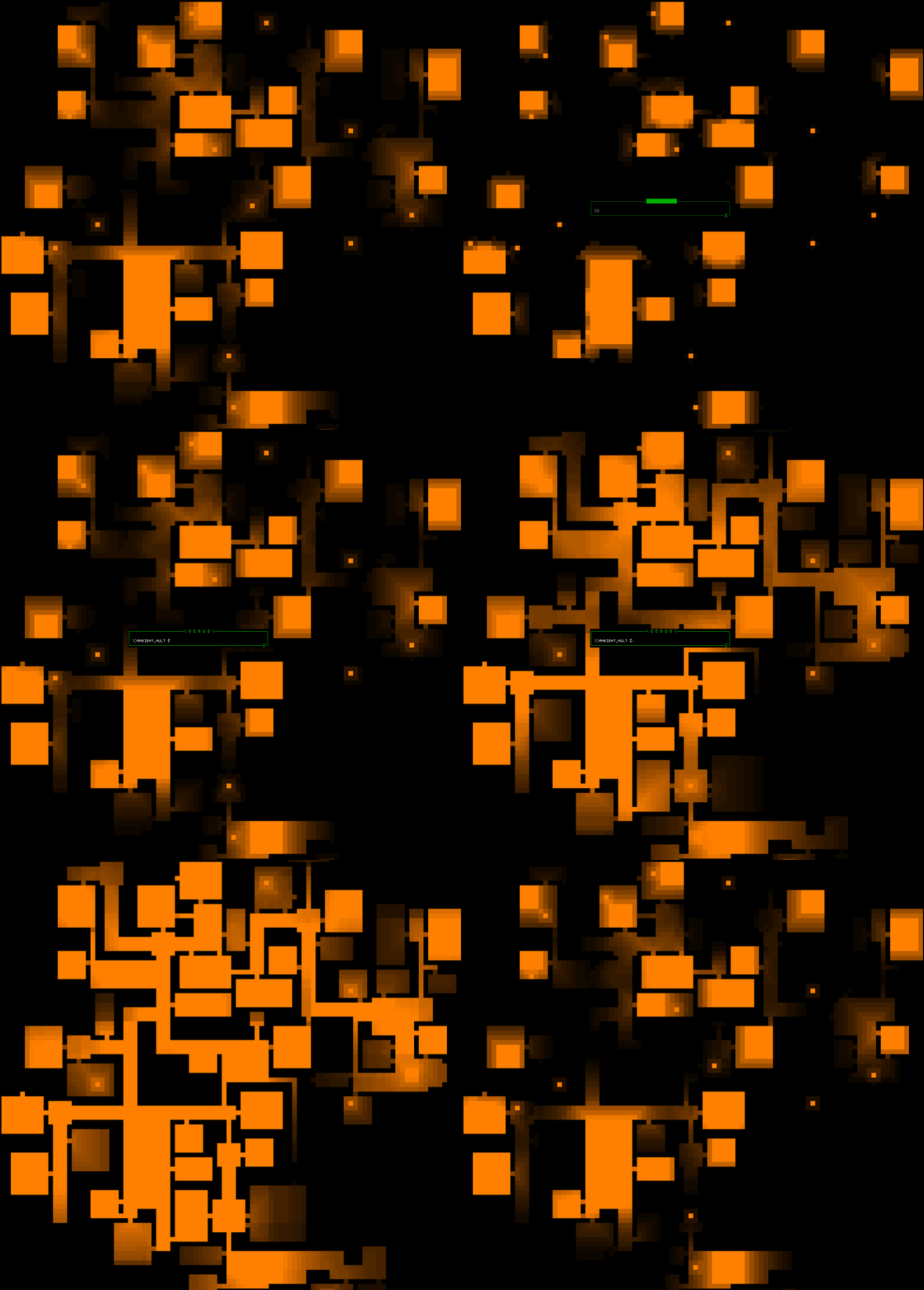
Another factor to explore was the extent of silent gaps between areas of machinery on various maps. Technically we could fill an entire map with machine audio if the ranges are long enough, although this would also mean more overlapping and general cacophony. Still, to test the size of gaps and see how changing average audio ranges might affect the experience, I also added the ability to simultaneously adjust the range of all sources:

cogmind_props_ambient_audio_debug_mapwide_multiplier

Adjusting machine ambient ranges across an entire map at once.

When the majority of machines had ambient audio, I did a dev stream to demo the intermediate results while talking about the process and exploring what maps sounded like at that stage. Still very WIP at that point, but it was exciting to finally hear the soundscape taking shape!

One thing clear from walking around was the lack of normalization--some machines are clearly too loud relative to others (some also seemed too quiet, but we’ll get to that later in the section on mapwide ambience). So the next thing I worked on after the stream was addressing that issue, starting with yet another console-based convenience feature: the ability to reduce the base volume of individual machines on the fly, in game. Commence rapid iteration!

(Normally I’d show you a gif of realtime volume adjustment here, but the ambient visualization system only reflects relative volume numbers rather than absolute volume, so it wouldn’t be much use since nothing appears to change when this setting is modified :P)

After confirming this would give satisfactory results, I made it a part of the architecture, i.e. machine audio samples could have their base volume reduced via settings in the game data. This means it would be possible to avoid resampling all the associated audio tracks, which would be pretty time-consuming by comparison. In all, I lowered about half of the machines’ volume by 50~75% through this method in the week after that stream.

Mapwide Ambience

A soundscape composed primarily of the humming, whirring, buzzing and clanking of machines is great, though there are always going to be some gaps, places where machine audio doesn’t reach. The idea is to fill those with a general ambient track, preferably a different one for each unique map type.

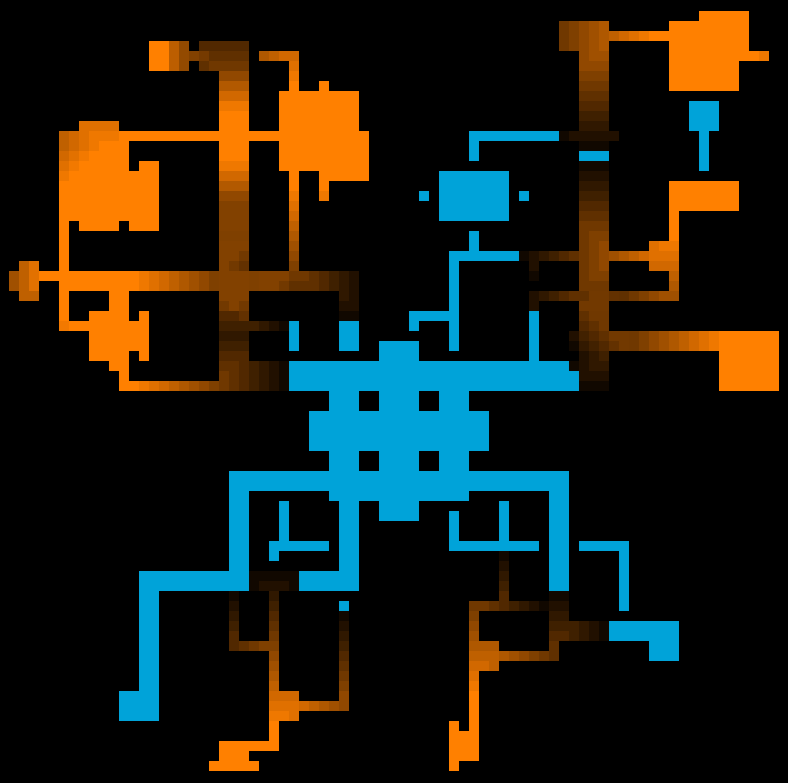
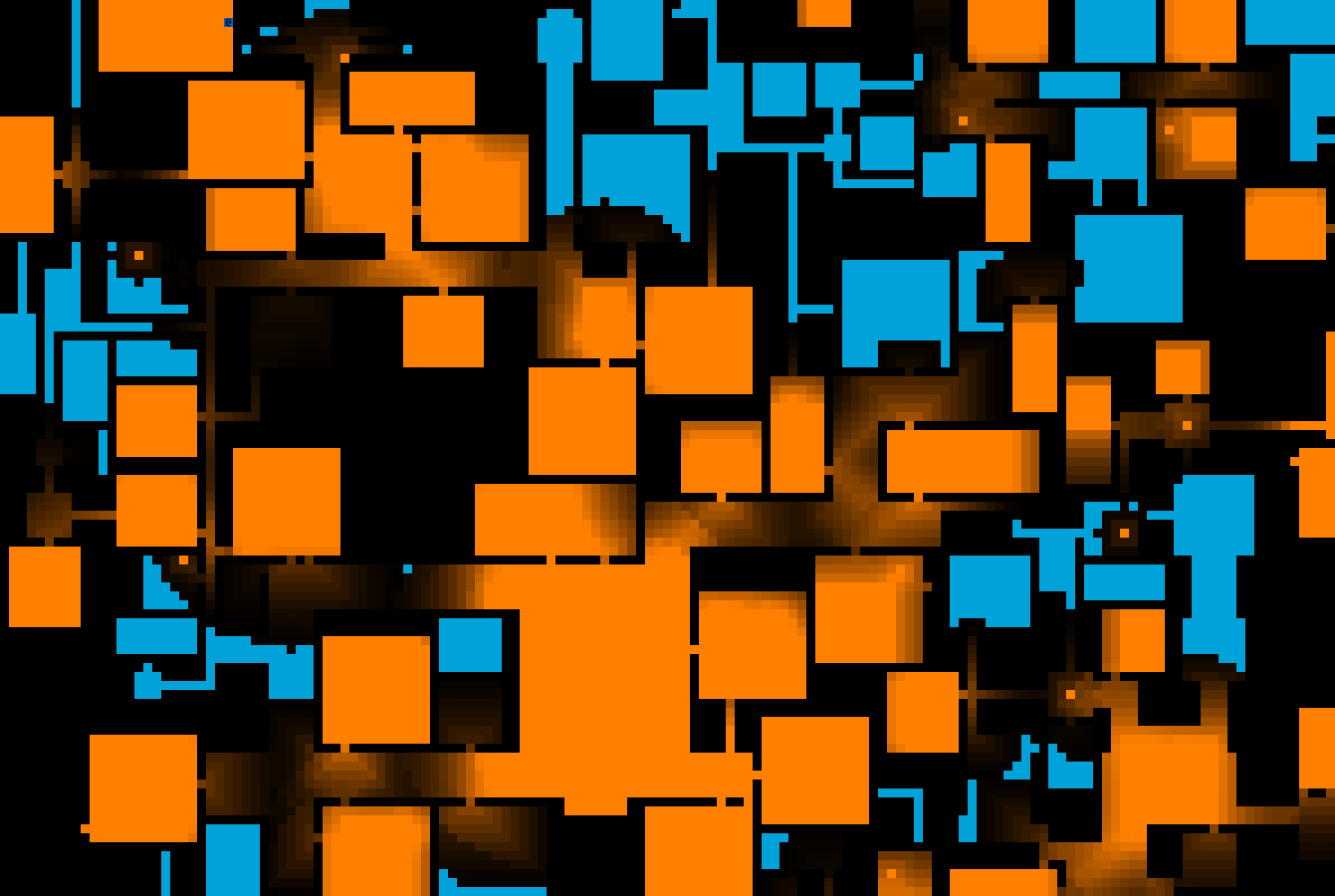
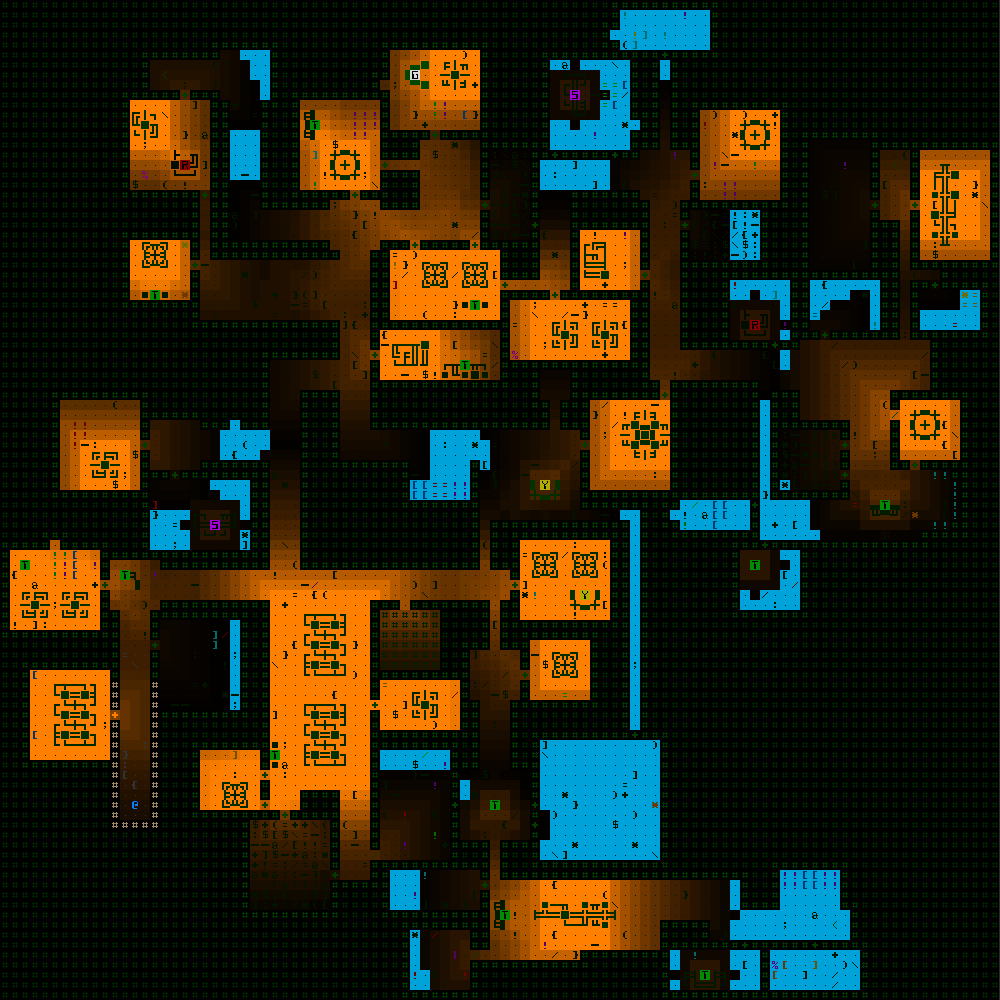
To demonstrate the gaps relative to the areas from which machines are heard, in these images I’ve used a separate color (blue) to highlight gaps, or any location reached by absolutely no sourced ambient audio:

cogmind_ambient_audio_props_silence_gaps_factory

Audio gaps (blue) compared to sounds emitted by machines (orange), in part of a Factory map.


cogmind_ambient_audio_props_silence_gaps_garrison

Audio gaps vs. machine audio in a sample Garrison map.


cogmind_ambient_audio_props_silence_gaps_materials

Audio gaps vs. machine audio in a sample small Materials map.

Although sometimes silence is a good thing (and put to use for that reason), it’s not great in areas that are otherwise brimming with machine activity, since repeatedly passing between louder and completely silent areas can be unnecessarily jarring and weird.

So we’ve gotta fill those gaps with something. Enter mapwide ambience.

We’ve actually had a couple of mapwide ambient tracks in the game for years now, originally labeled placeholders and essentially added to test out the system and also let players know this is a likely feature to be expanded upon. The one with which players will be most familiar is in the cave areas, a spooky organic drone that many commented on as being quite fitting for the area, and still others said they’d never even noticed xD (because technically I set the sample to quite a low base volume, and whether or not certain players could hear it might depend on their audio setup).

To fill gaps on other maps I wanted to expand on this idea, for the most part just using very low-key synth drones to act as a bridge between areas with sourced audio and set the overall tone with your average sci-fi background fare. Overall the tracks I’m using are relatively dark and mysterious, fitting with Cogmind’s general atmosphere.

Now instead of 2 mapwide tracks we have 26 :)

I might go on to add additional random faint sound effects as necessary to serve as “accents” for the generic loops to liven the audio up just a bit, although I haven’t done that at this phase yet, and even if it were to happen it probably wouldn’t be until after Beta 10 releases with all the new audio, in order to leave time for broader feedback.

One issue that popped up with the mapwide tracks is that their desired volume level in otherwise silent areas could easily drown out some fainter or deeper machine sound effects when applied at the same level across the entire map. The answer seemed pretty obvious: Just lower the mapwide ambient volume when around other machines. Cogmind dynamically reduces the ambient volume by 50% of the loudest foreground loop’s volume. For example if the player is passing near a machine they’re hearing at 80% of its max volume, then the mapwide ambient audio is set to 60% volume (100-(80/2)). This seems to work quite well!

cogmind_audio_mapwide_variable_volume

Visualizing only the volume level of the mapwide ambient track as it varies across a section of Factory map (as usual darker represents quieter).

Results

As of this writing and the latest prerelease build I released for patrons, Cogmind gained an additional 117 sourced ambient sounds over the previous release and the soundscape is really coming together. It adds to the atmosphere without generally being too overwhelming despite the number of possible sources. There’s usually no more than 2-3 different types within earshot of each other anyway, if that.

cogmind_ambient_audio_props_variety_factory_sample1

Visualizing the variety of machine audio across a Factory floor, where each unique sound is associated with a random color.

These plus the 24 new mapwide tracks did, of course, expand Cogmind’s disk size--a clean install now weighs in at 43.5 MB, a 45% increase over Beta 9.6. The audio samples went from comprising 46% of install size to 63%. Overall still pretty lightweight considering the massive number of samples included (by indie game standards), but Cogmind is certainly getting a bit hefty since its 3 MB 7DRL days :P

To see the latest WIP version of Cogmind’s soundscape in action, check out my first Beta 10 prerelease stream where we’ll explore the audio while fooling around and kicking butt:

In the next article we’re going to take this whole thing to the next level by adding a closed caption-like feature in the form of an audio log, so you can get the full tactical advantages of this audio system even with the sound off! (Actually you can already see it in action in the stream recording above, but I’m going to go into detail about its design and the challenges I encountered in building it.) We’ll also cover some other audio accessibility features for roguelikes…

Posted in Design, Dev Series: Sound Effects | Tagged , , , , | Leave a comment