Official development blog
[ Latest Cogmind Release Notes: Feb 2026, "Unchained More" ]

Infowar Expanded

Stealth plays a role in most Cogmind runs, with the degree varying all the way from “maybe I’ll dodge this one patrol until I’m in a better position to siege up” to “I am ninja.” To best support a variety of play styles in that regard, we need a range of systems and utilities built for information warfare, of which stealth is one aspect.

Many years ago prior to Cogmind’s Alpha 1 release I wrote about related topics like robot sensors, visual sensors, terrain scanners, structural scanners, hacking, intel and others. Now it’s time for even more!

I haven’t yet covered this here on the blog, but Cogmind’s next update (Beta 11) is taking years of play experience, feedback, and observations into consideration for a comprehensive review of the many items and their stats with an eye towards readjusting a variety of aspects to create an even more balanced and fun game full of interesting decisions and trade offs. A number of values need to be reevaluated in the light of all the changes and (especially) tons of additions that have been made in the years since 2012.

We’ll be getting to other related topics later (here now), but for now as a backdrop to this article I’ll just say that one side effect of a particularly significant change already confirmed is that player builds will on average have a greater number of utility slots to play with! This shift suggests we’re going to also want an even greater variety of useful and generally available utilities, otherwise there’s a decent risk that more builds will start to look alike. Plus of course it’s nice to simply have more options when coming up with builds, tactics, and strategies :)

New Structural Scanners… Trap Scanners… Machine Analyzers… Bring on the infowar!

Sensor Ranges

We begin this story like every good story, with a nerf.

The longest-range sensors, which have allowed you to detect robots up to 30 cells away, are being reduced to a range of 20. This is a sizeable reduction, establishing a trend we can trace back to the 7DRL in 2012.

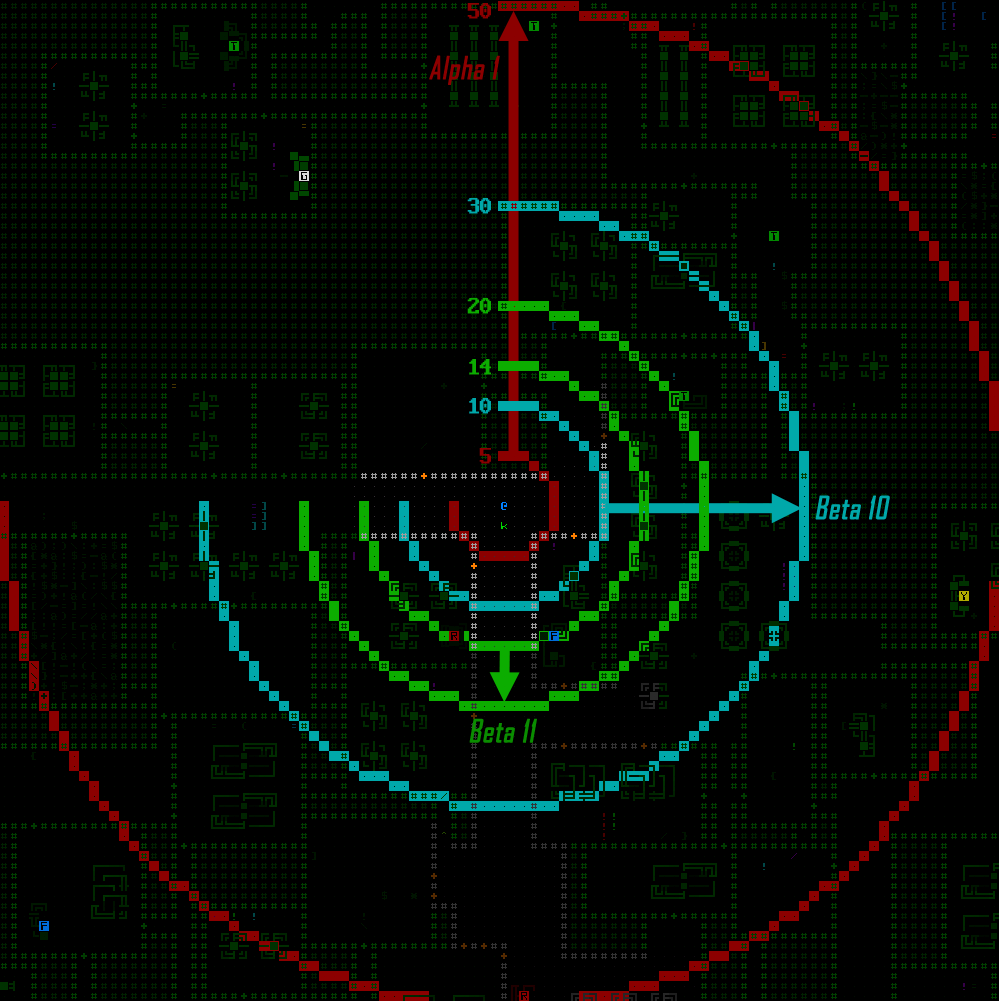
For the 7DRL utility stats I wanted meaningful steps you could really feel as you upgraded to new parts, and the original set of sensor array ranges stretched from the weakest one at only 5 (!) to the best at 50 (!).  Throughout Alpha and Beta the set of ranges has gradually tightened to make high-end sensors less OP and low-end sensors actually useful sometimes, landing us with a less extreme improvement of 14 to 20 range over the course of a run in Beta 11.

Cogmind Sensor Array Range Diagram (evolution during development)

Diagram comparing minimum and maximum sensor array ranges at points across Cogmind’s development (open for full size).

So technically we have a nerf at the high end and several buffs at the low end, though at the same time these changes also give Watchers a bit of extra range within which they can jam Cogmind’s sensors (which they do with their own array based on its range), therefore increasing the challenge when they’re nearby.

Particularly with sensors I think it’s important to shift away from the 7DRL design of noticeable steps and instead ensure that 1) all of them are at least helpful to some degree, and 2) losing a really good one does not feel quite so bad or seriously cripple a run (Watchers can be salvaged for their decent arrays, which are no longer much worse than the best option available). This is a better approach for what can be such an integral component of many builds and strategies.

20 range is still quite good, allowing one to know about robots in all the adjacent corridors and rooms (or even further depending on the layout), and setting the maximum benefit to that distance also does a good job of balancing sensor arrays against visual sensors to make the latter even more interesting in straightaways since the best of them can increase sight range to 24, so slightly further out (alongside their other unique properties).

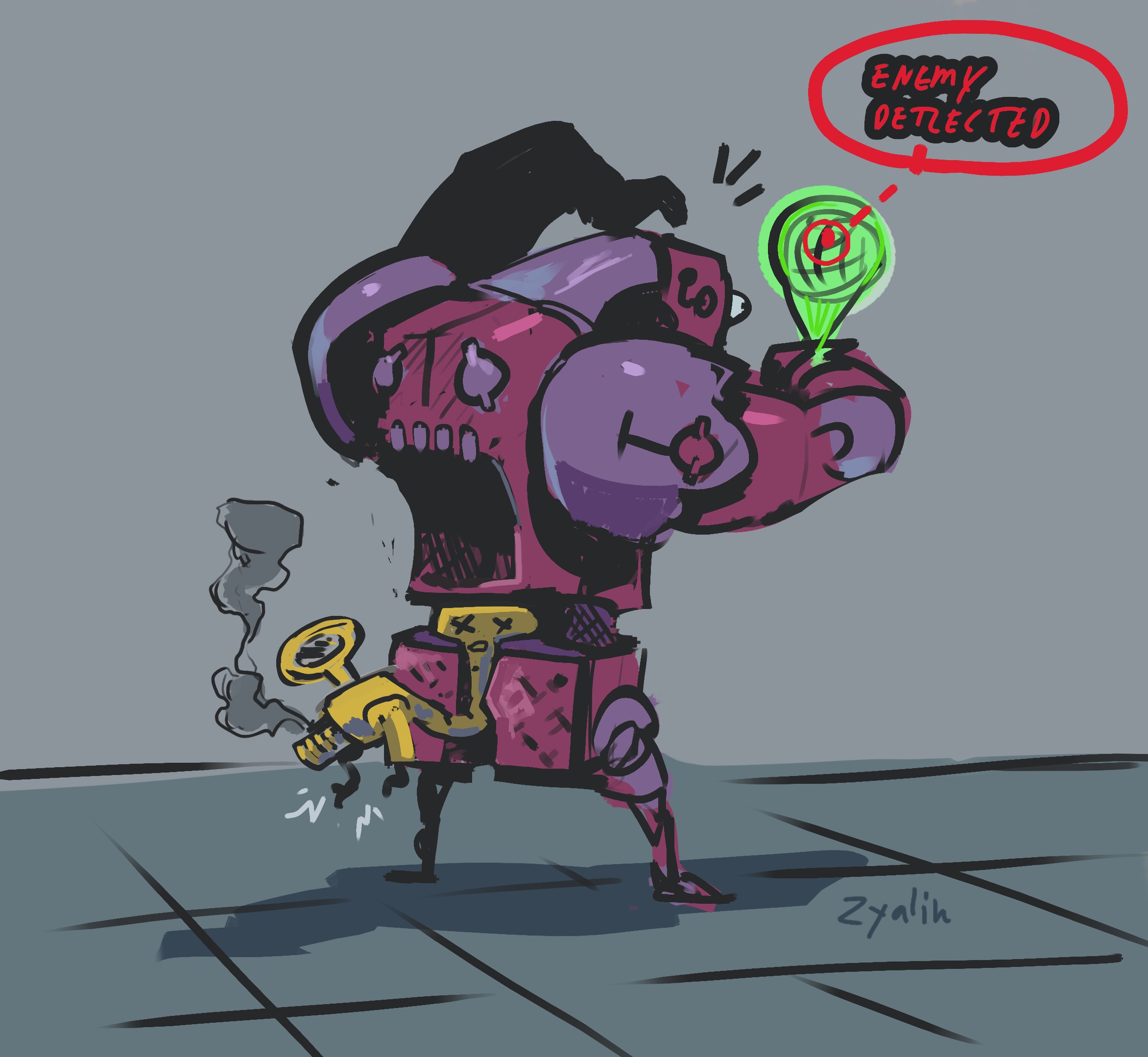
Bot using a Sensor Array, by Zyalin

Now where did that shot come from?! (art by the great roguelike concept artist Zyalin!)

Structural Scanner

The Structural Scanner is probably the most changed item across Cogmind’s development history, having been mentioned in the version changelogs 11 times already… but that isn’t even its final form!

The first iteration, available from Alpha 1, had one function and a simple description: “Scans all visible walls for signs of hidden doorways.” By Alpha 14 that became:

Scans all visible walls for signs of hidden doorways, determines whether an explosive machine has been destabilized and how long until detonation, and provides a 2% chance to detect each hidden trap within field of view (the latter is checked each turn on a per-trap basis, and stacks). Also highlights areas that will soon cave in due to instability even without further stimulation.

The reason for the evolution was that it was originally of questionable usefulness as far as taking up a utility slot goes (so few players would ever use it), that and I wanted to add a way to obtain other bits of info but didn’t have another suitable part to put those on (which themselves would be even less desirable).

Still some people even laughed at Structural Scanners as useless, but at the same time at least a portion of players reported they found them compatible with their build style. To me this is the best place for a part’s balance to reside, right in that sweet spot where players are divided over its usefulness. In that sense I was satisfied with the state of the Structural Scanner, but it’s changing yet again!

For one, reducing its variety of features would bring it closer to my original vision for Cogmind, that each part only has a single function, while a build is the composite of those functions, rather than complicating things by also giving multiple functions to individual parts. But more pertinent to current developments, an increase in free utility slots on many builds plus the desire to add more types of infowar utilities means we can attempt to focus the Structural Scanner on a smaller but still useful feature set while splitting off some of its functionality into other new parts.

As per the description above, over time the Structural Scanner gained abilities related to terrain, traps, and machines, and the goal here is to reduce that to terrain only. The new description (emphasis added):

Scans all visible walls to analyze the structure behind them and identify hidden doorways. Also highlights areas that will soon cave in due to instability even without further stimulation.

Basically this modifies the FOV algorithm to also identify any unseen cells adjacent to visible solid cells, so basically “seeing” one layer of terrain just behind all doors, walls, and earth.

Cogmind Structural Scanner Behavior Update: Scanning behind walls

New Structural Scanner behavior revealing terrain behind solid walls.

This is similar to Terrain Scanners, but without any additional depth and therefore entirely focused on finding adjacent rooms and hidden corridors, which is a fairly common use of Terrain Scanners (or poking/shooting walls :P), seeking out ways to make alternate paths through the map layout for more efficient exploration, to circumvent hostiles, or for some other purpose.

However, Structural Scanners operate instantly whenever FOV is updated, unlike Terrain Scanners which take time to gather their data, so the two types of parts each have their benefits and drawbacks. As such there will be builds and players who prefer one over the other depending on their strategy and other factors. Perfect :D

Trap Scanner

The first new utility to poach one of the Structural Scanner abilities is the Trap Scanner, which as designed so far does just what one might expect: detect traps--nothing more, nothing less.

As a part dedicated to a singular function it naturally needs to be more effective to make it worth the occupied utility slot, so the trap detection chance is increased to doubled to 4%, and unlike the Structural Scanner there are actually multiple tiers beyond the base model, including at best a 20% detection rate, which is almost guaranteed to pretty quickly reveal traps that remain in view, especially considering that a lot of traps are found in groups and therefore if you see one there are likely more nearby to be wary of. Note that the 20% variant is an outlier, and the more easily acquired ones provide a 4-8% chance, although even an 8% chance is fairly reliable.

Cogmind Trap Scanner Activation Animation

Activating a Trap Scanner. Of course utilities need to have their activation animated ;)

Machine Analyzer

The Trap Scanner didn’t take long to implement (aside from having to put together a new animation); not so with the Machine Analyzer which took ages…

Of course it was quick to transfer over the Structural Scanner’s ability to detect and report on machine destabilization:

Cogmind Machine Analyzer Detecting Machine Destabilization and Countdown

Now it’s the Machine Analyzer that can tell whether an explosive machine has been destabilized and when it will blow.

But that’s not new, nor is it sufficient to justify spending a slot on it…

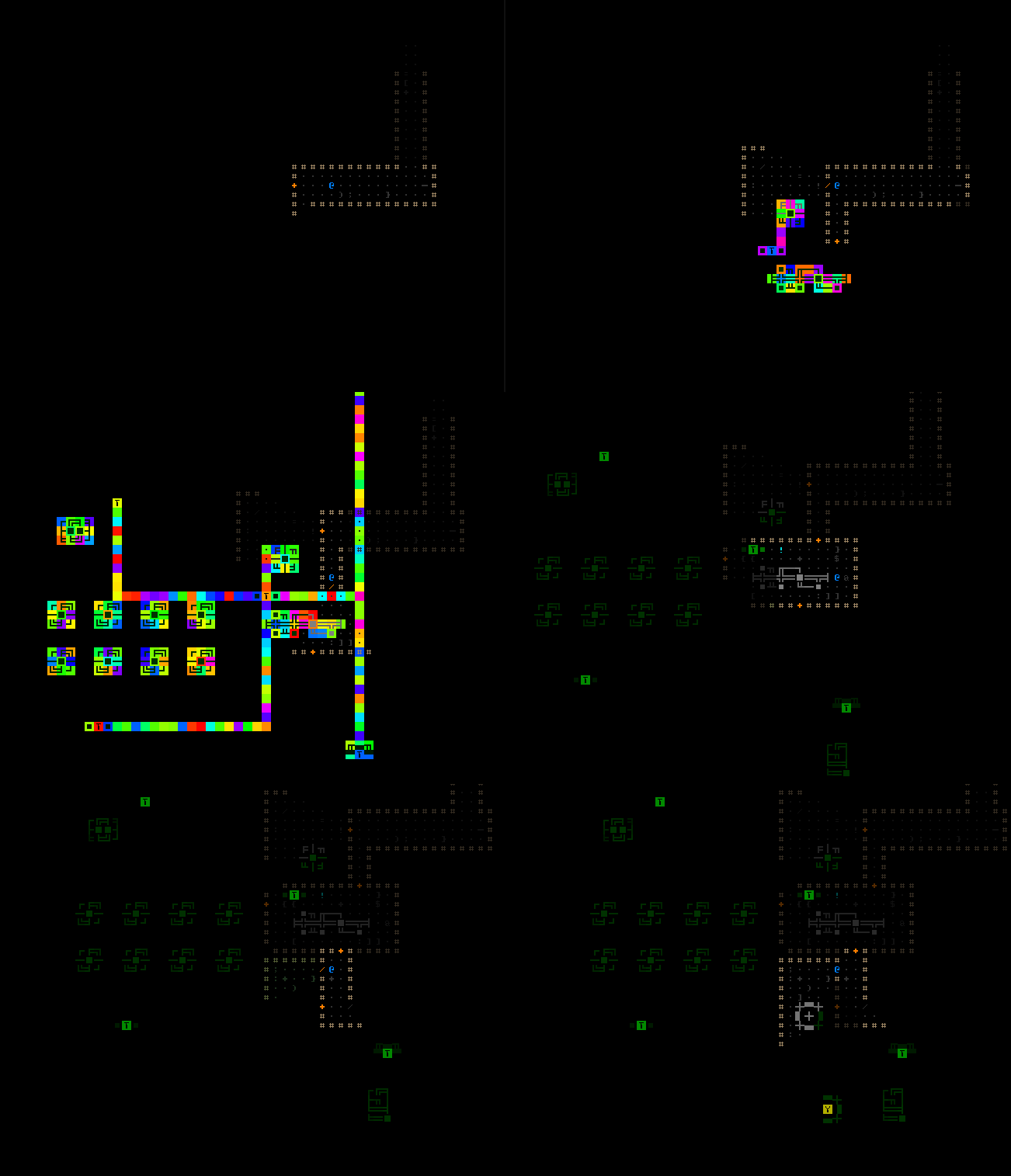
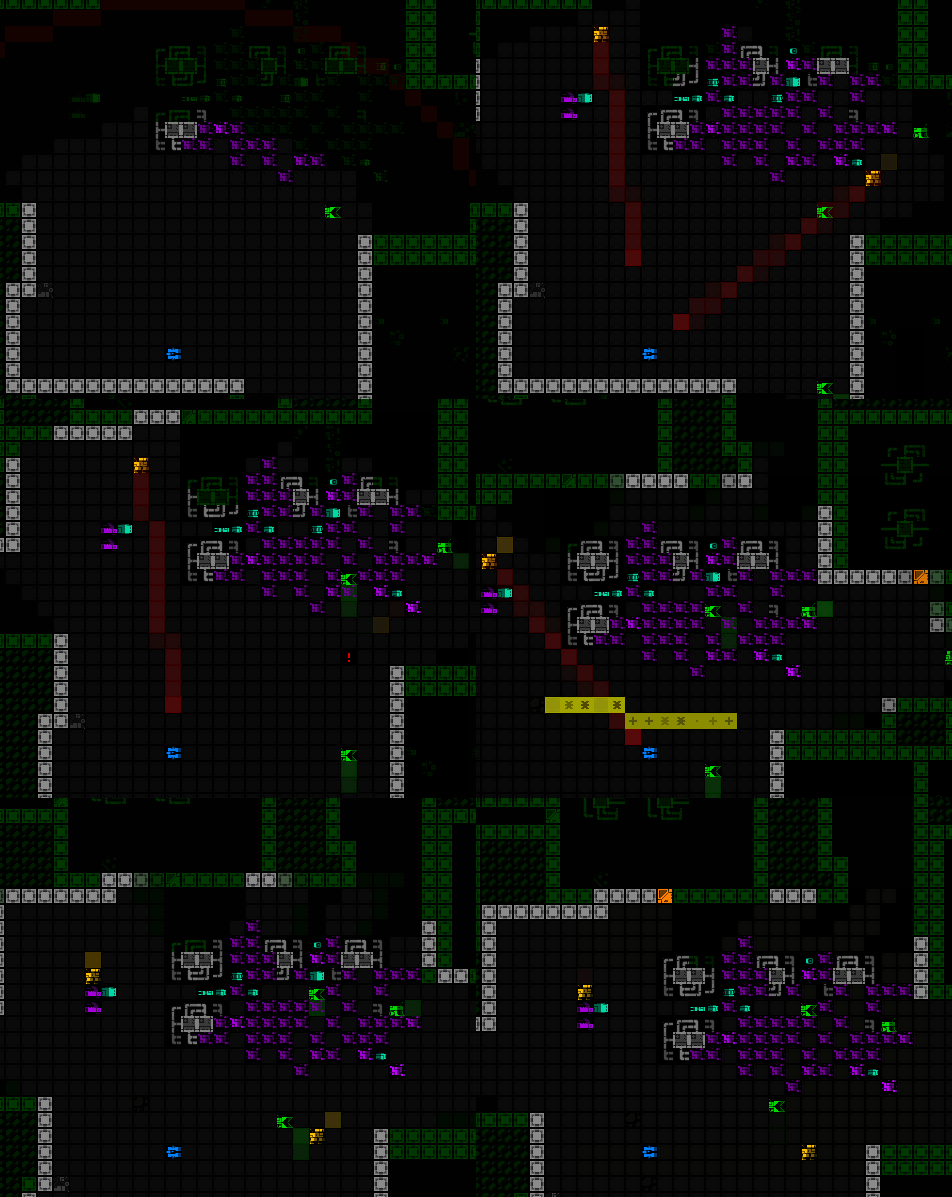
What is new is using a utility to discover nearby machines and those elsewhere on the map! A Machine Analyzer reveals the entirety of a machine as soon as you spot any piece of it, and more importantly, reveals others machine linked to that one--this means both machines in the local area as well as one or more other groups of machines elsewhere on the map, probably but not necessarily nearby.

In Cogmind, knowing machine locations provides a number of advantages:

  • Placement of machines suggests where rooms or open areas are located
  • Interactive machines generally come with useful features, and the machine group linking system specifically enables you to follow them like bread crumbs--locate one Terminal and another likely nearby Terminal is revealed, giving another near-term goal
  • Find nearby explosive machines that could be used for tactical purposes

Again similar information can also be obtained via terrain scanning, but:

  • Good terrain scanning requires two utility slots
  • Scanning takes time, whereas spotting a machine and analyzing it is instantaneous
  • Can also potentially learn about machines that are much further away than even scanning is likely to find

On the reverse side, some reasons to prefer actual terrain scanning over machine analysis:

  • Machine Analyzers aren’t as consistently reliable for info--they only work in the main complex, and won’t help in areas that happen to have few or no machines
  • They only dig up machine info rather than other terrain layout knowledge, which comes in handy in other ways

In the end some players are no doubt going to really like this utility.

Cogmind Machine Analyzer Revealing Machines

Exploring with an active Machine Analyzer.

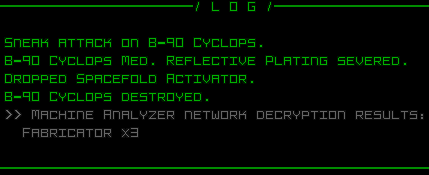
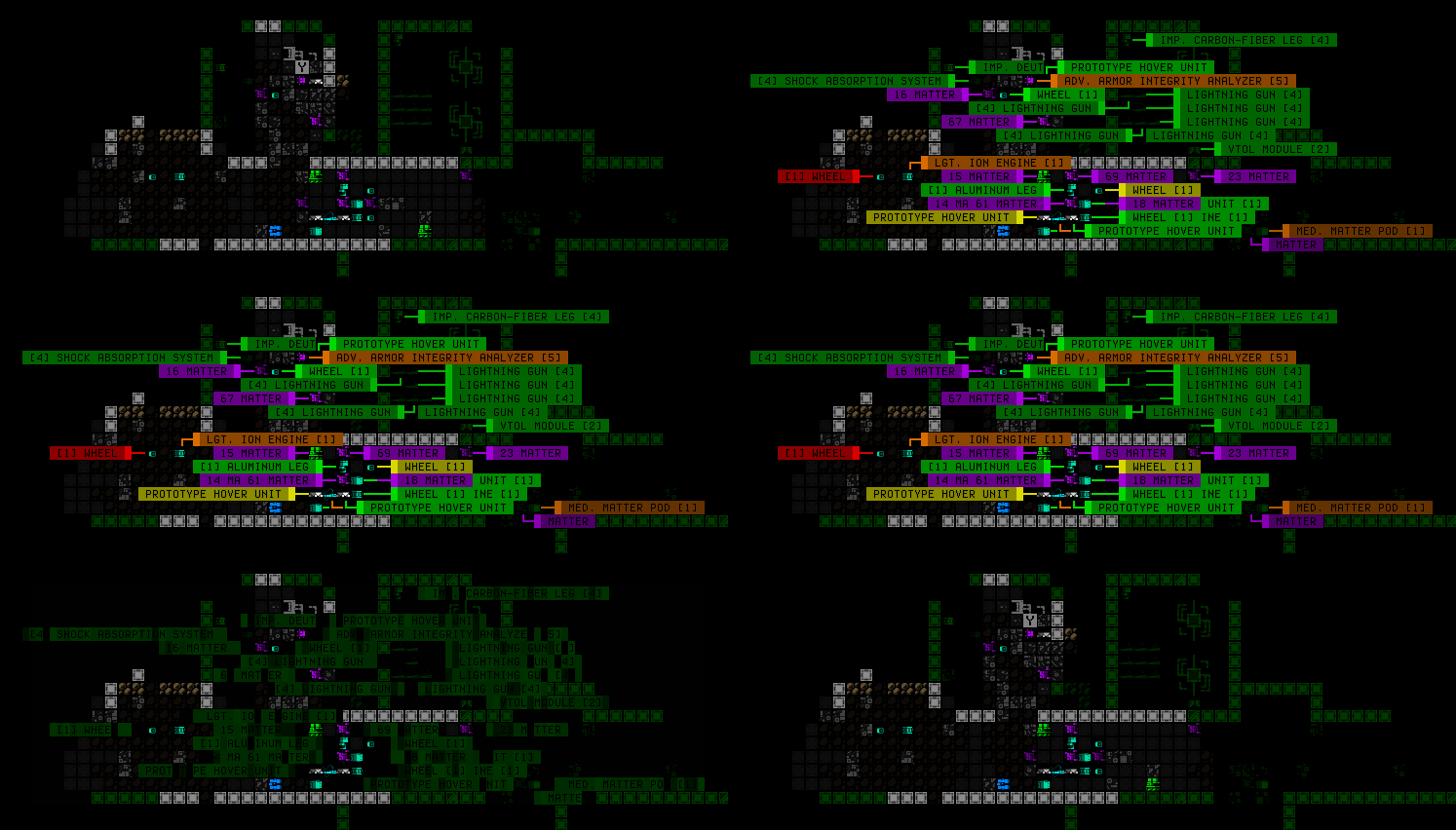
Cogmind Machine Analyzer Message Log Reporting

Machine discoveries are also reported to the log, by default only listing any new interactive machines because otherwise the list is simply too long and updating too frequent (but I did add an advanced config option to enable the full list of all machines if someone really wants it :P).

Machine Groups

Clearly crucial to the whole idea of analyzing machine networks is exactly how are these links formed?

Figuring out the best approach was quite challenging, since it would require an algorithm to derive the links from the existing map layout and machine positioning, and on the outside I wanted it to make some sense as well as be useful, but not outright too good. I wrote pages and pages of notes on the possibilities before finally coming up with a workable concept.

First of all, note that machine groups technically have no meaningful connection to one another for the purposes of other mechanics or systems--this is purely for intel purposes, simulating behind-the-scenes networks presumed to exist, but here only as a form of data.

The process to form and connect groups:

  1. All machines in a single room or hall belong to the same group, and any interactive machine in a corridor junction or embedded in a wall forms its own group. (For an understanding of concepts like “room” and “hall” as they relate machine placement, years ago I wrote about them in the context of procedural generation.) The group system (and therefore extent of the Machine Analyzer’s usefulness) does not extend to prefab machines or those local systems which by the lore are isolated from other machine systems (e.g. door terminals).
  2. Randomly order all machine groups.
  3. Go through each group establishing link(s) to others, where if it’s a group containing an interactive machine* it automatically links to the nearest interactive group of the same type that it’s not already linked to, and regardless of whether the group is already linked with another, each group also always links to the nearest other machine group it’s not already connected to. This guarantees at least some knowledge of nearby machines, maybe more. (*Based on the rules used to generate Cogmind maps, it’s impossible for a group formed using the Step 1 above to contain more than one interactive machine, if any.)

All links are bidirectional, meaning that seeing a group at either end of a given link reveals the corresponding group at the other end.

Partially destroyed groups are revealed as normal, unless a group’s “representative machine” is damaged. The so-called representative machine is always the group’s interactive machine if it has one (otherwise it’s chosen at random) and also serves as the machine used to visually link to other groups on the map.

Machine groups are seed dependent, so consistent in that regard.

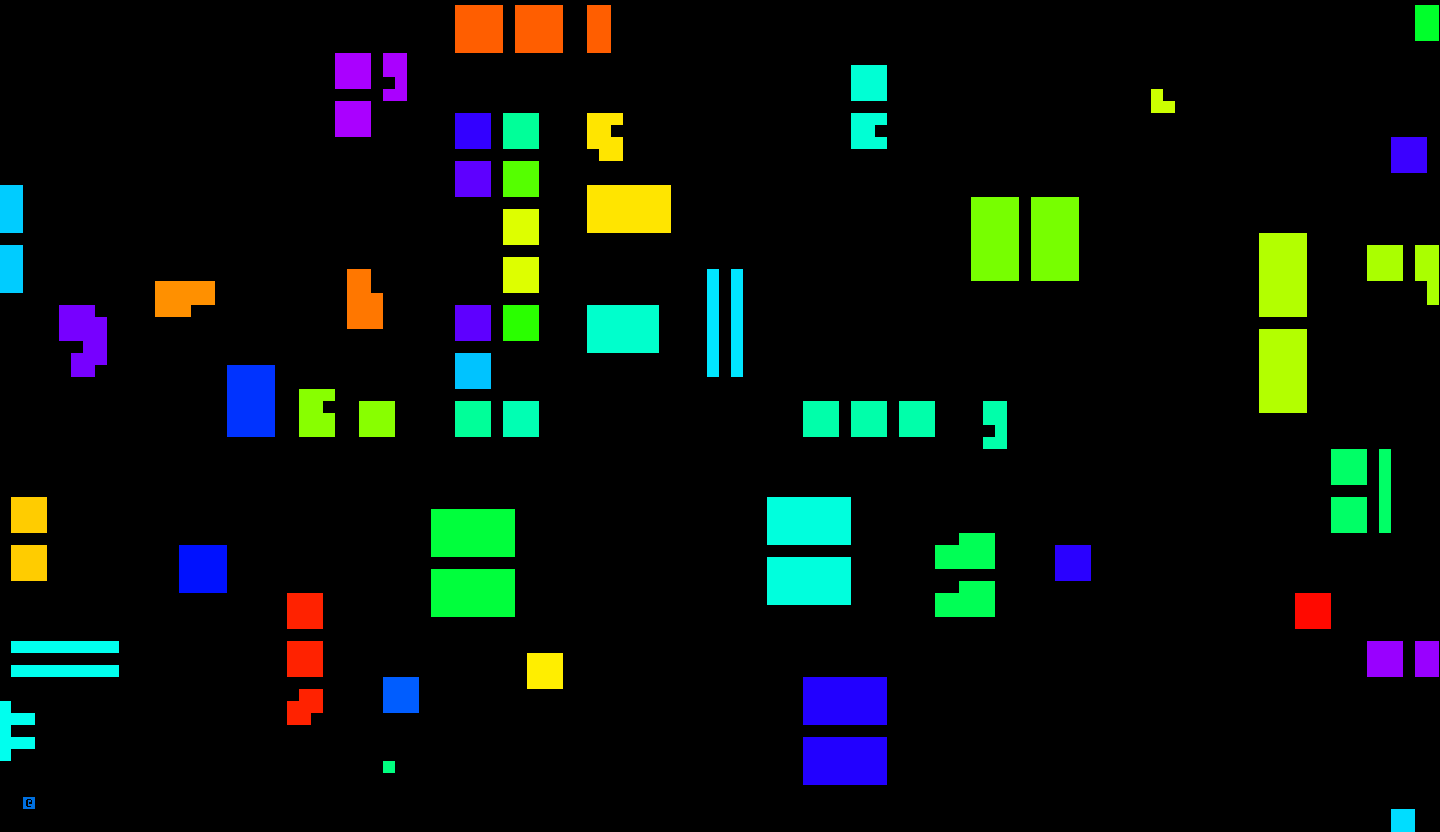
Before adding the real utility functionality, I first needed to build the groups and then a debugging visualizer to make sure they were actually working as intended. Visualizer was a good idea, because yeah there were bugs and it wasn’t always easy to figure out what was up xD

Cogmind Debugging Machine Groups

One of the early debug views for color coding different machine groups, which are clearly not working very well here for some reason…

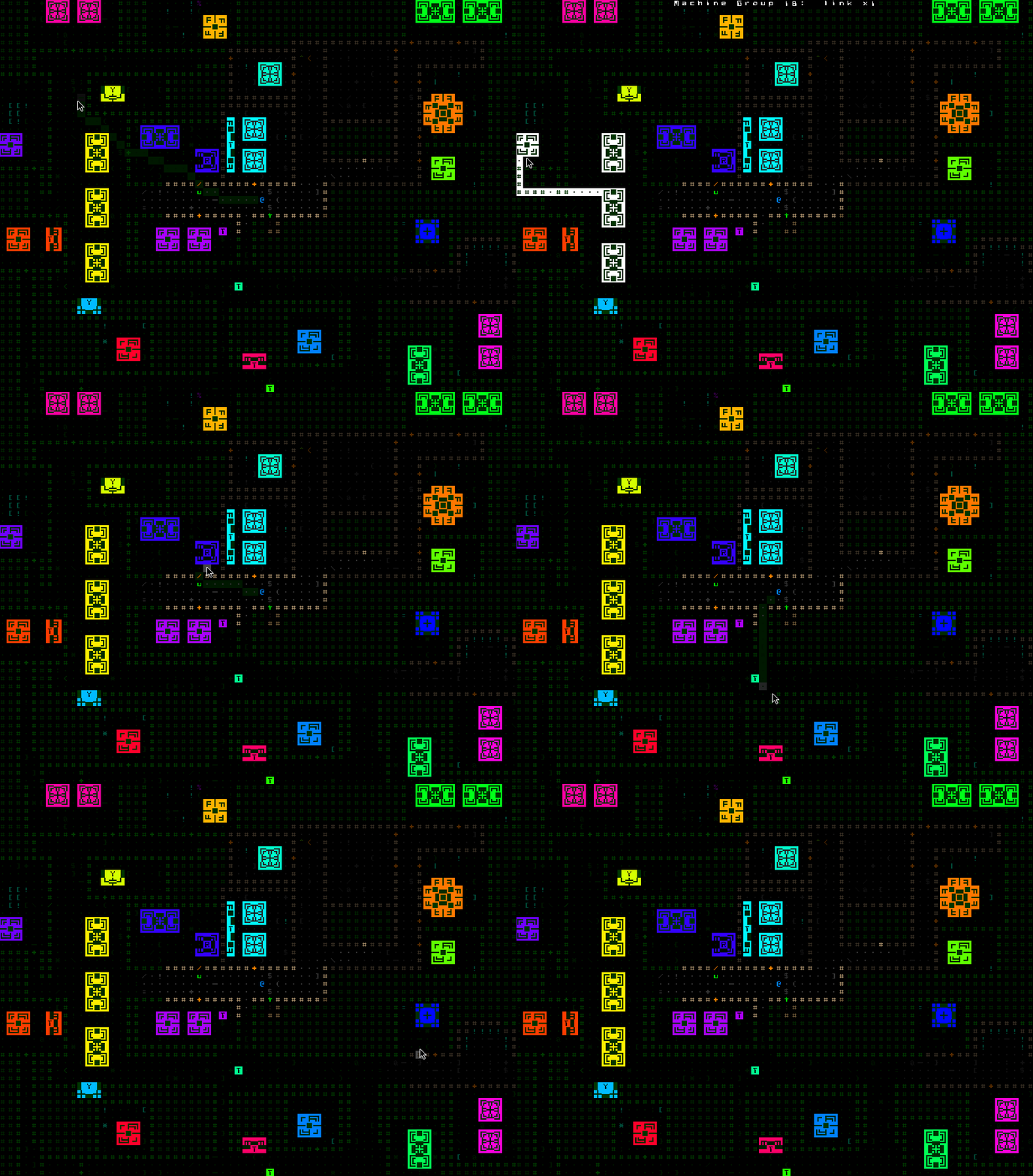
Eventually I got it working and the visualizer could also show the links themselves, which connect representative machines via direct lines if aligned along an axis, or by turning one corner.

Cogmind Machine Groups/Links Debug Visualization

Debug view of machine group links and group IDs which came in handy for tracking down elusive bugs.

Animation

Once that was working and the part itself was linked into this system, it was time to animate things.

You’ve already seen the machine-and-link reveal animation in the earlier demo above, but it’s kinda fun to see where it started out. The premise: I’ve never really done any super multicolored effects in Cogmind, and it seemed like a good opportunity to try that out here, especially since I think it can go well with the concept of “calculating” something (further emphasized by the accompanying sfx).

Shifting monochrome shades would work, too, but if subtle it could incorporate more colors and perhaps be more fun for it…

Cogmind Machine Group Reveal Animation - Early WIP Concepting

It did not start out subtle :P. The effect here is obviously way too over the top and distracting to be included in this form--at the time I was just making sure the HSV noise generation technique would work, and do the necessary tweaking later.

Later I changed the rate of the color shifting and darkened it appropriately so it wouldn’t be so obnoxious while moving around repeatedly revealing machines.

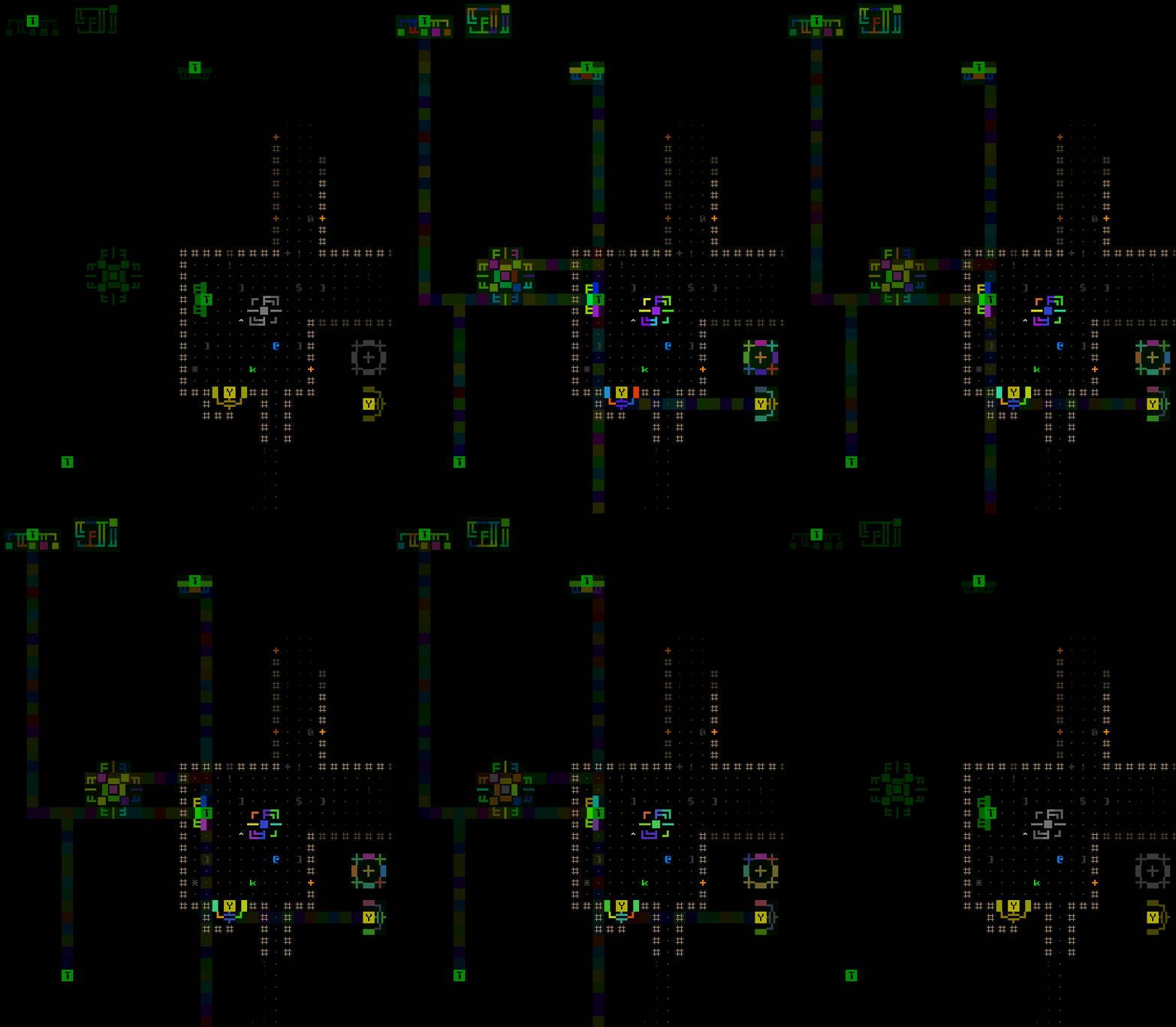
Cogmind Machine Analyzer Toggle Animation

The Machine Analyzer also has an animated toggle, which simply does the usual reveal animation for any and all groups connected to currently visible machines.

More cool Beta 11 features to come!

Update 210802: Well, apparently we weren’t quite done with the infowar in this build--meet the Active Sensor Suite, the gateway to desire path data visualization and more!

Posted in Mechanics | Tagged , | 2 Responses

The Map Ruler (and other overlay QoL)

As the player’s gateway to accessing the experience they’re after when they want to play a game, building a fluid and comprehensive interface is essential. Many high-priority player needs should be apparent in the earliest stages of development, and help shape the entire foundation for an interface’s design, but still other needs with lower priority may only gradually become more obvious over time.

If you find that players are spending extra time doing a certain task that could be facilitated by improvements to the UI, then hopefully those improvements are feasible and there’s time/resources to add them! Honestly doing everything possible is unlikely--in a sufficiently complex game the list of possibilities seems almost endless, plus of course it has to be balanced against investing in other features.

I enjoy UI/UX work and recognize its importance, so naturally every release of Cogmind comes with its fair share of QoL features, and the huge upcoming release (Beta 11) is no different. In particular a collection of map overlay ideas has been building up in my notes over the years, so recently my tendency to work on related features in batches kicked in and several new options were born: a map ruler for measuring distances, a more powerful volley data visualizer, and robot FOV overlays…

Ruler Overlay

Roguelikes traditionally take place on a grid, and it’s not uncommon to need to know the distance to a location for the purposes of movement, magic, guns, abilities, etc.

Given the discrete grid, this info is generally not that hard for experienced players to visually estimate, although in cases where knowing precise distances is important for optimal decision-making and one miscalculation could mean the difference between a tactic’s success or failure, it’s much more efficient and reassuring if the game can just calculate and display the desired details. Computers are good at calculation, after all.

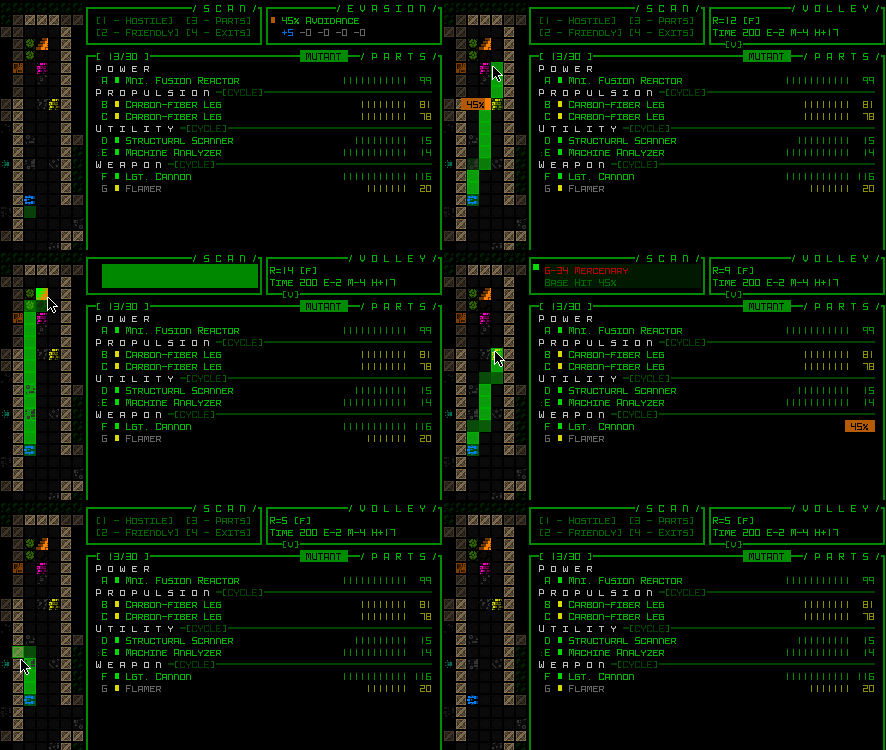
Previous versions of Cogmind have already contained some ways to use the UI to confirm distances in certain cases, like the Volley window active in targeting mode that constantly updates its range readout to indicate the distance between Cogmind and the cursor location on the map.

Cogmind Volley Window Rangefinder Demo

Showing the the volley window rangefinder distance readout (top right, “R=”).

However, since its introduction this has only ever actually worked with ranged volleys, so melee builds haven’t been able to take advantage of it for this purpose.

Attached weapons and utilities also display their range circle over the map if hovered over with the mouse, or in the latter case many utilities also animate their AOE during their toggle animation, meaning these other features can be used to at least indirectly measure distances, although this is fiddly at best. That said, in the past I’ve definitely relied on this design to help quickly calculate distances, another sign that we need some kind of dedicated “ruler” feature :P

Another argument for a dedicated ruler is that all the existing methods of using other UI features to measure distances assume you want the distance from Cogmind’s current position, when that may not be the case. In fact, many cases of wanting to count spaces arise from a desire to know the distance between two other arbitrary points. Like if I move to this particular coordinate will I be within range to shoot that other position? Or once I reach a certain location, how many more spaces is it (and therefore how long will it be) before I can cross over to another spot?

Enter the new ruler overlay:

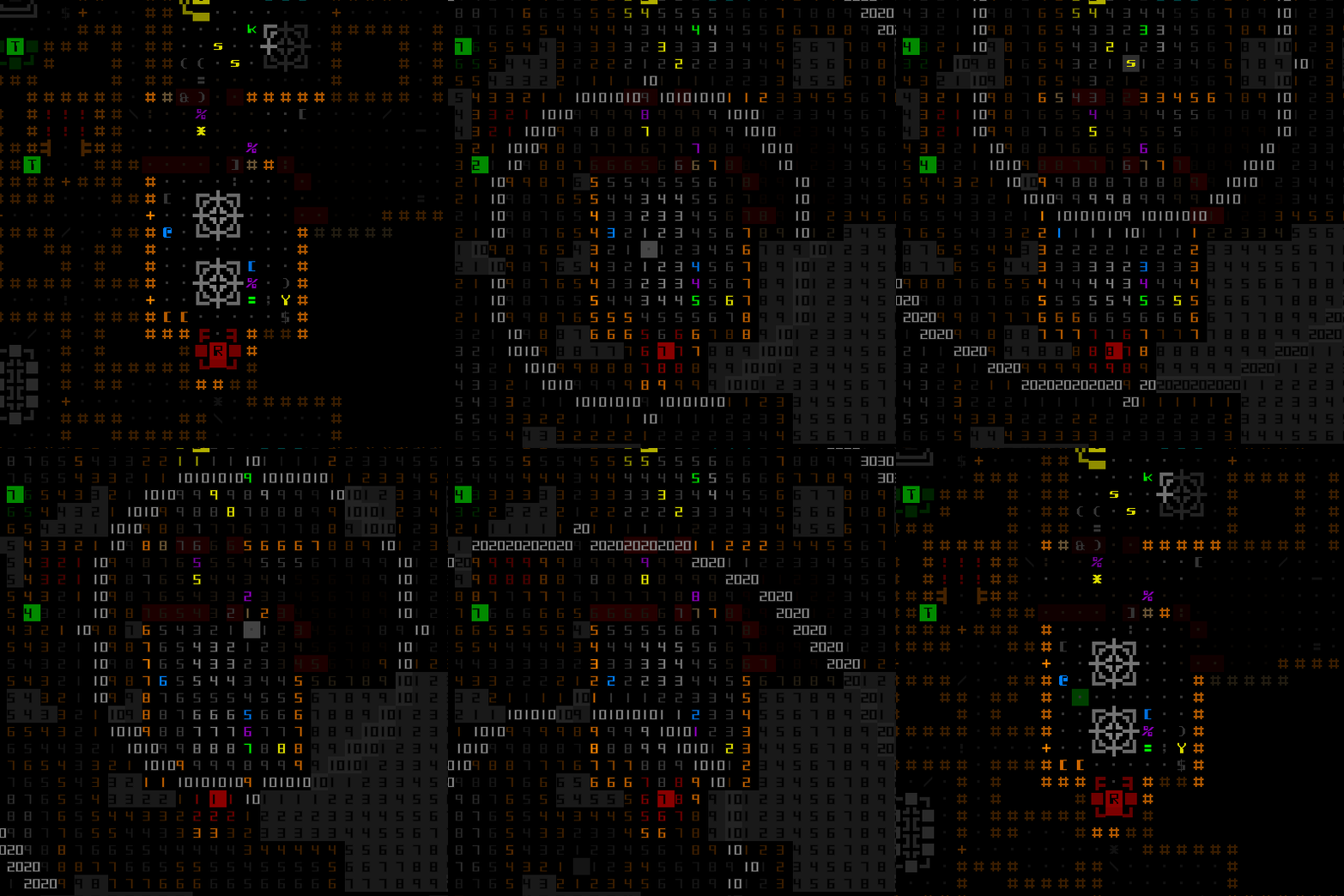
Cogmind Map Ruler Overlay Demo (Mouse)

No more guesstimating just how far it is between two cells!

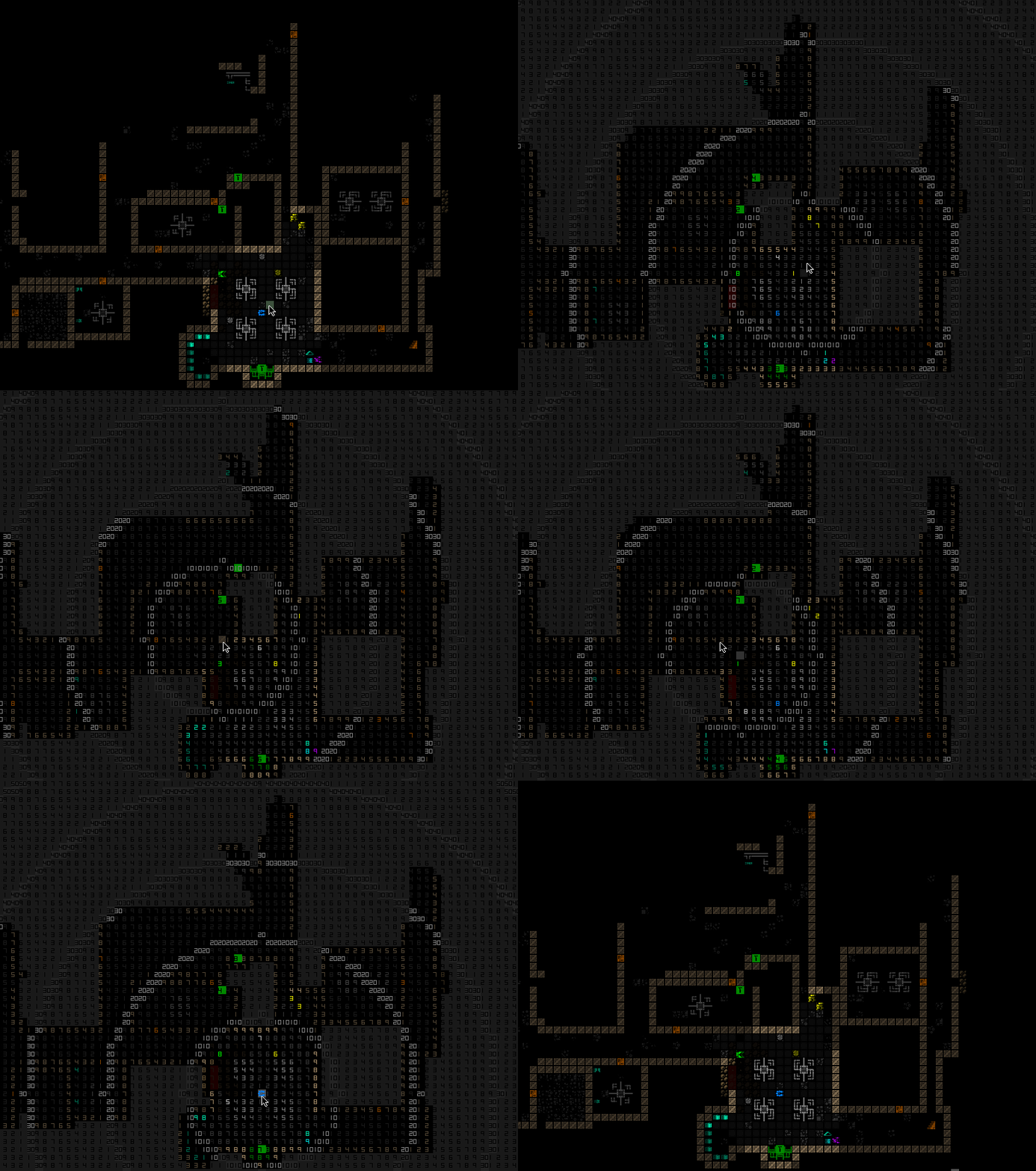
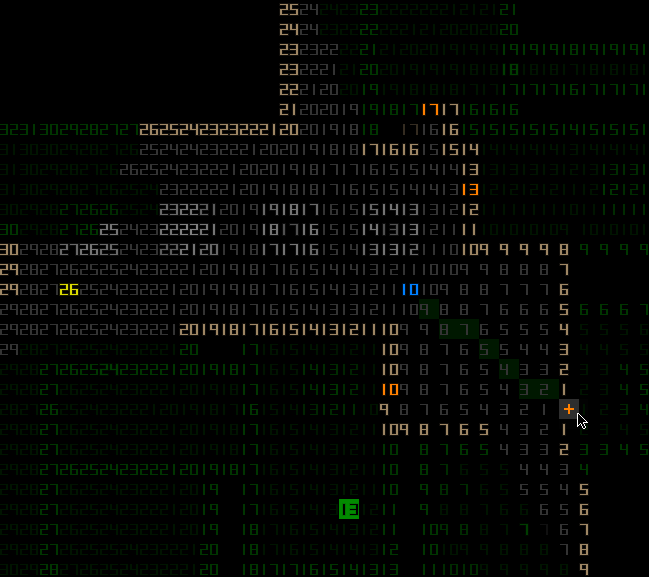
As you can see above, the new ruler overlay shows the distance to every other point from wherever the cursor is positioned, suitable for any general distance calculation need. It’s just an overlay, so of course equally compatible with keyboard mode:

Cogmind Map Ruler Overlay Demo (Keyboard)

Is that ASCII or a ruler? :)

It actually took a while to come up with the best way to visually represent this ruler from among the many options in terms of layout and colors. The underlying functionality itself is quite simple of course, just showing the distance to each cell from an origin, but many more hours were spent figuring out how to display the values in a readable and good-looking manner.

Double-digit ranges are too cramped to print out in full, resulting in a massive block of numbers, so I decided on the alternative of using double digits only for clear thresholds--multiples of ten, which makes the whole thing much easier to parse. I mean the final iteration is by necessity still a jumble of numbers, but at least pretty quick to read by comparison!

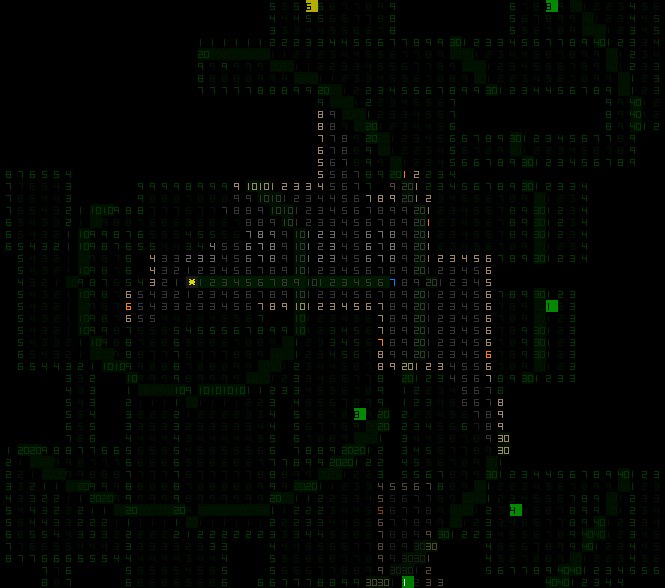
Cogmind Map Ruler (early WIP concept)

The earliest test version of the ruler overlay when it still retained full digit values. I also tried variations of coloring and checkering, but it only made things worse :P


Cogmind Map Ruler (early WIP concept)

Another early concept where I’d decided on the threshold approach, but still had yet to include unknown cells in the measurements. One player suggested that could come handy for the occasional need to measure across partially unexplored areas as well, so I added that as seen earlier.

Control-wise, the ruler overlay is toggled via Shift-Alt-x (mouse toggle still to come), and since it’s not modal or anything, just an overlay, technically you can continue playing while it’s active, although naturally it covers up a lot of important info!

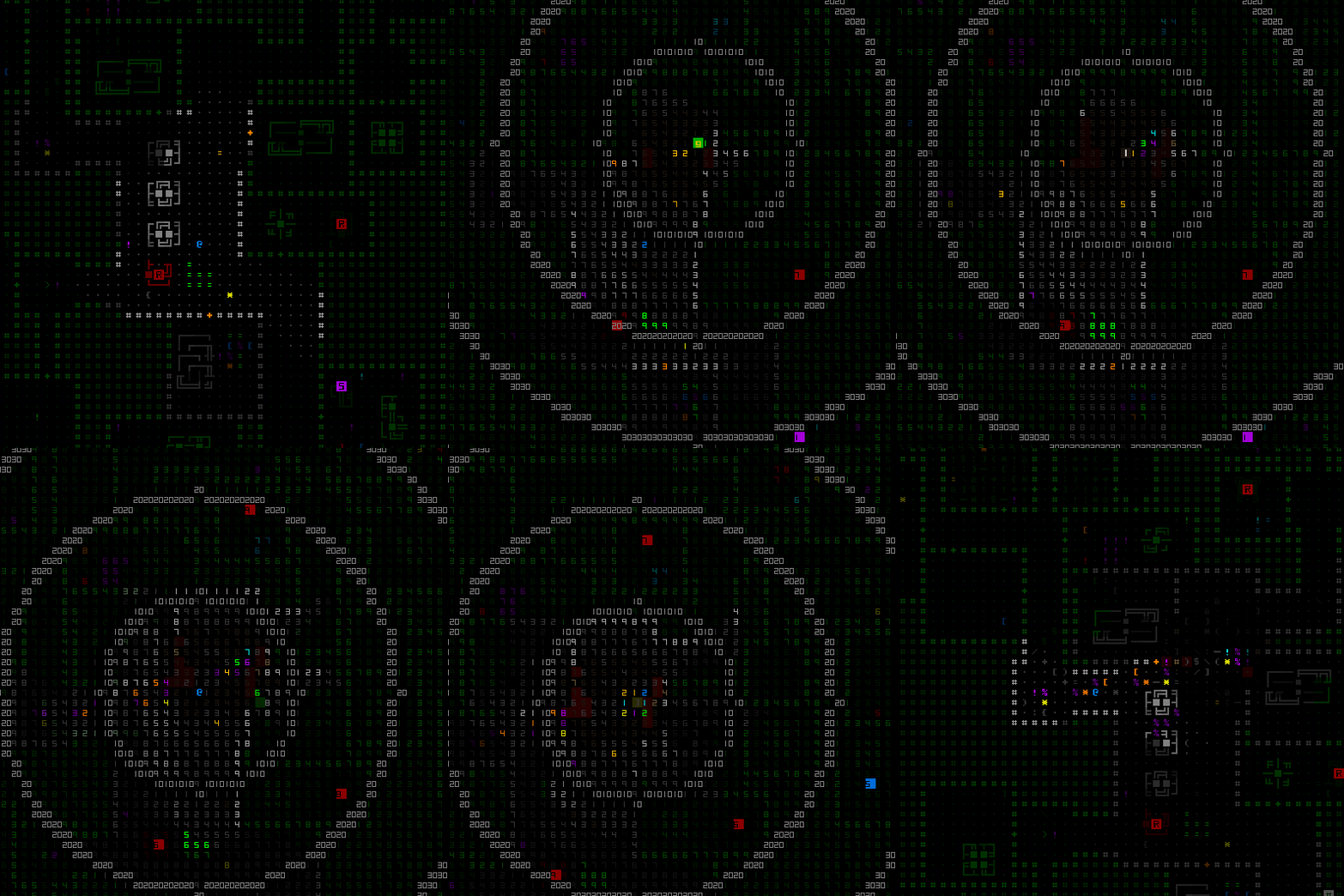
Playing Cogmind with the Map Ruler Active (fooling around)

The ruler is nice for planning, but playing while it’s active is not officially recommended :P

Do it for the cool (or crazy!) factor?

Terrain Destructibility Visualization

A common question while playing is “can I destroy that piece of terrain?”, be it a wall, machine, or some other prop. This usually involves checking the armor and resistances against your current (potentially modified) volley damage, and although it usually doesn’t take all that long to figure out the answer, crunching data is again what computers are good at, so now I’ve mostly automated that process with a single button :D

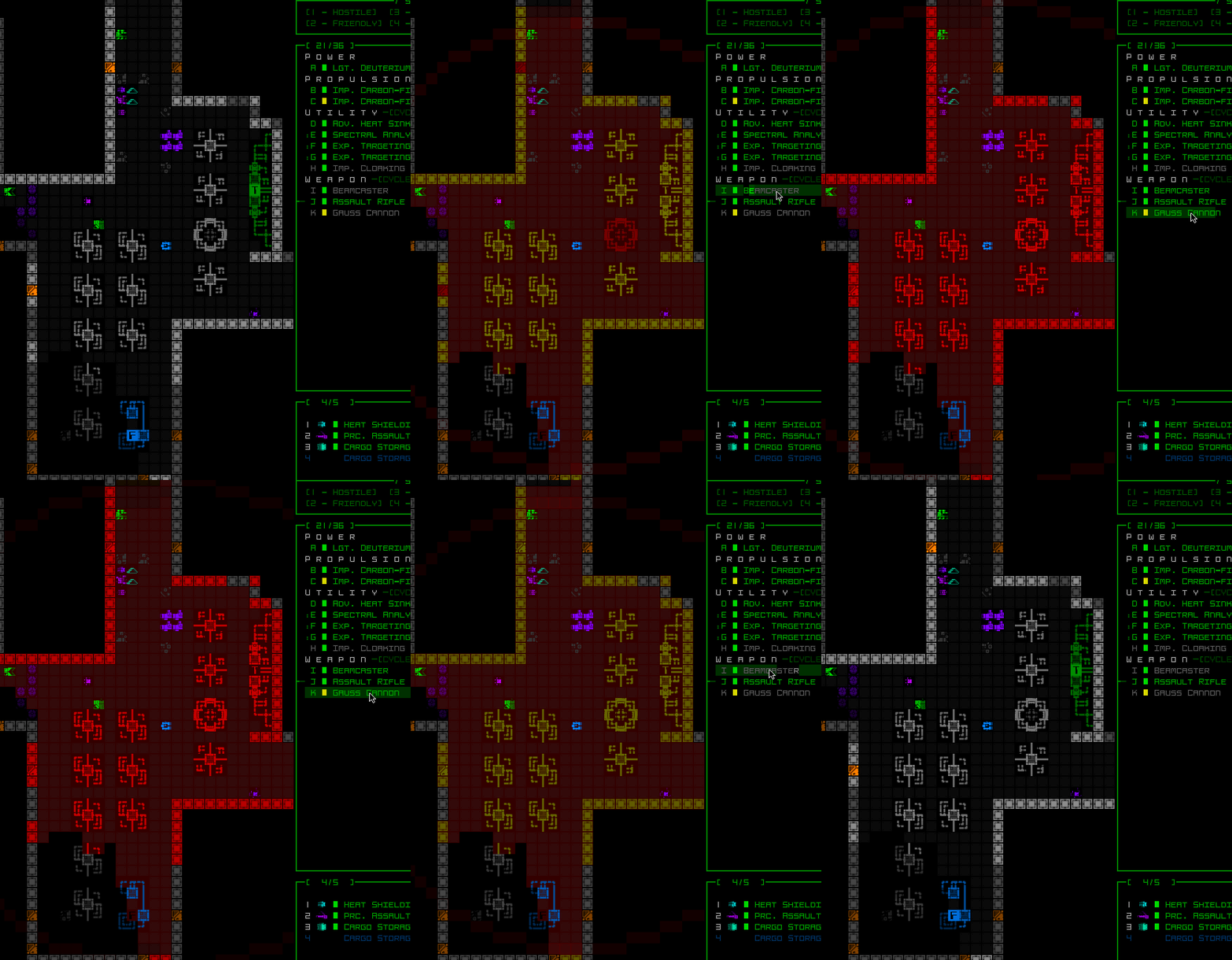
This feature is integrated into the volley range visualizer, which has always been useful for showing the relative range(s) of active weapons, but now also highlights in red the foreground of visible destructible terrain depending on whether or not the current volley is capable of destroying it.

Even better, it also checks the player’s inactive weapons and searches through their inventory for other weapons that might still be able to destroy terrain and in that case gives it a different color glow (yellow).

Here you can see it in action, where the Assault Rifle isn’t capable of taking any of the machines, the Beamcaster can only destroy one, and none can destroy the Fabricator (thus it always remains blue):

Cogmind Terrain Destructibility Visualization Demo

Terrain destructibility visualization demo.

The calculations generally take into account all applicable sources of damage modification, e.g. active utilities, current momentum, resistances, etc. The appearance of terrain the player doesn’t likely have the means to destroy at the moment remains unchanged. Note that even in such a case, it may sometimes still be possible to destroy the terrain using other means, since the system does not take into account inactive utilities or those in inventory, special weapons, the environment, or other means to creatively destroy terrain, but it is at least a useful way to quickly confirm that you already do have the capability.

FOV Overlay

Warning: Although I’ll be describing this feature here and even showing demos, it may not actually end up in the final public release of the game, or at least not quite in this form :P

Player-mob spotting is usually not perfectly reciprocal in roguelikes, as in enemies the player can see may not simultaneously be aware of the player, and vice versa. This provides room for additional relevant abilities and/or tactics (stealth/speed/sneak attacks/sniping/etc), as well as allowing for some level of risk taking (might I be able to slip by these enemies undetected?). However, very few roguelikes will actually display on the map those locations where actors can spot enemies (if doing so even makes sense given the mechanics and variable nature of being spotted).

In Cogmind there is an indicator for robots that spot the player, but before that pops up you can’t always be sure whether moving to a given location is close enough to be spotted in the first place, especially where obstacles like machines come into play since they can be used to partially obscure line of sight. The fact that robots can only fully spot you on their own turn further adds to the uncertainty, since quickly passing through their FOV might even go undetected.

Over the years there have been a few requests to allow players in Cogmind to see the FOV of enemies, but for a number of reasons I’ve always avoided adding this feature.

The earliest reason is the significant processing cost of calculating a proper FOV for what is potentially a lot of nearby robots, and it’s for that reason that when I converted X@COM to create the first version of Cogmind back in 2012 I decided to rewrite the entity sight handling to not actually use real FOVs and instead use a method that would scale better for the huge number of robots in Cogmind, specifically just calculating LOS between important points as necessary. This was far more efficient, and still is, for more or less the same results.

Nonetheless, for a temporary FOV overlay display used at most in short bursts and/or with lower robot counts it’d probably be doable these days, so I recently wanted to play around with the idea since it was still on my ever-growing List.

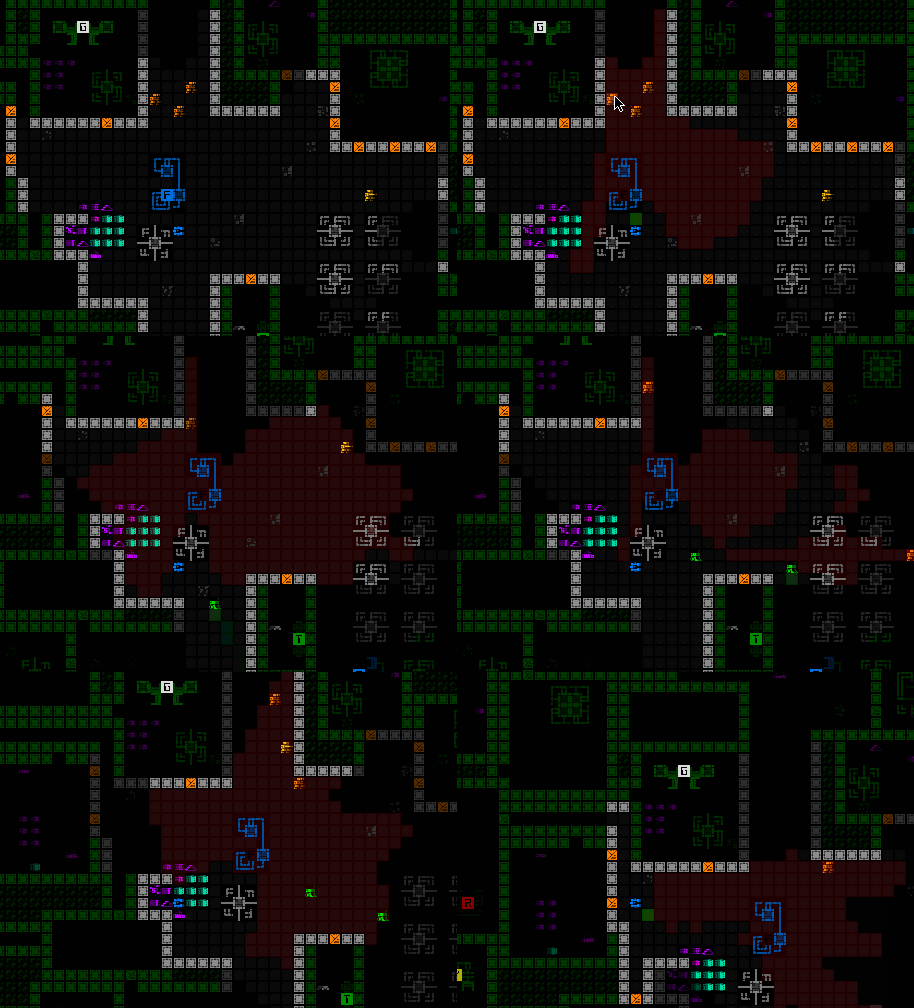
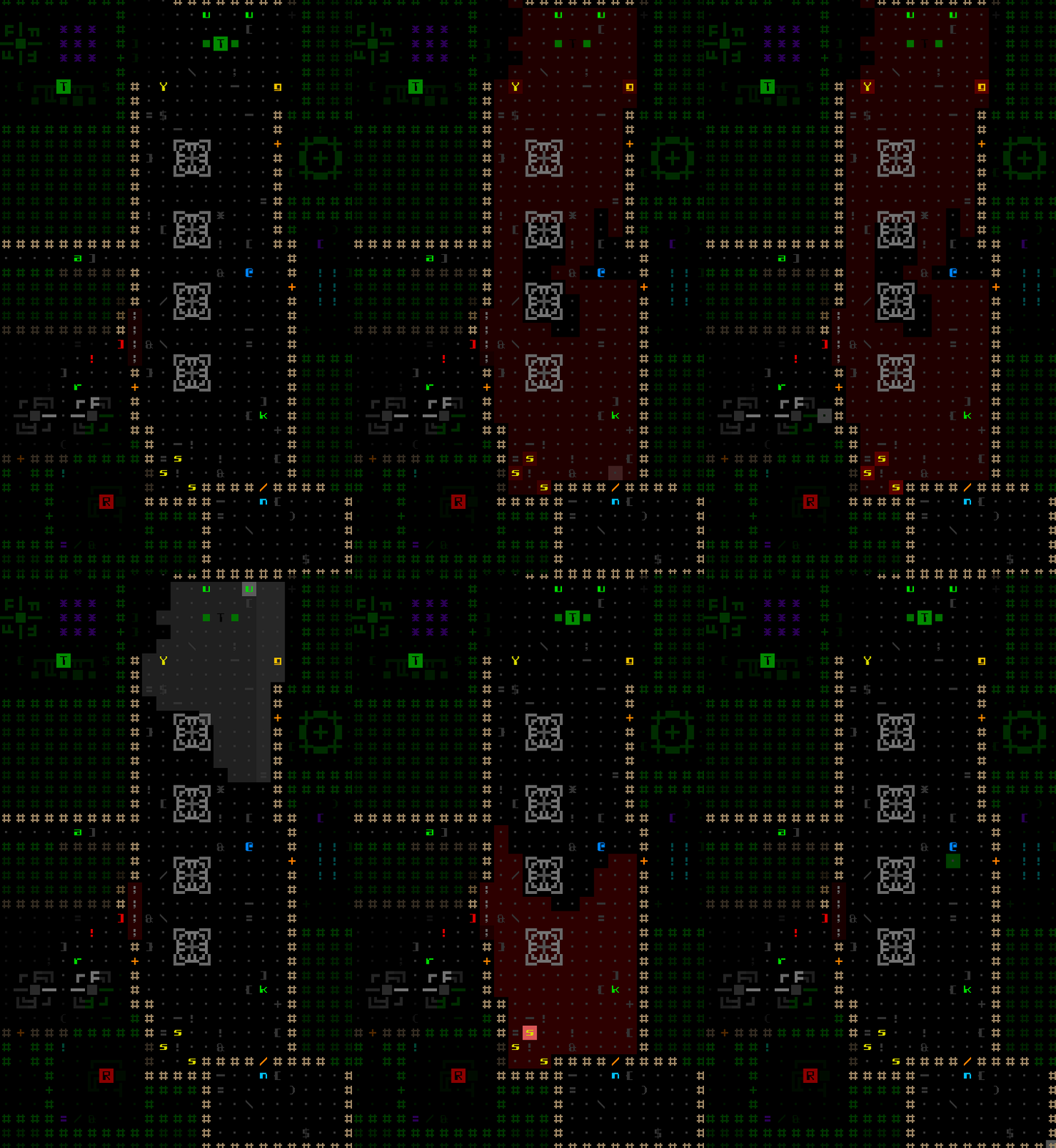
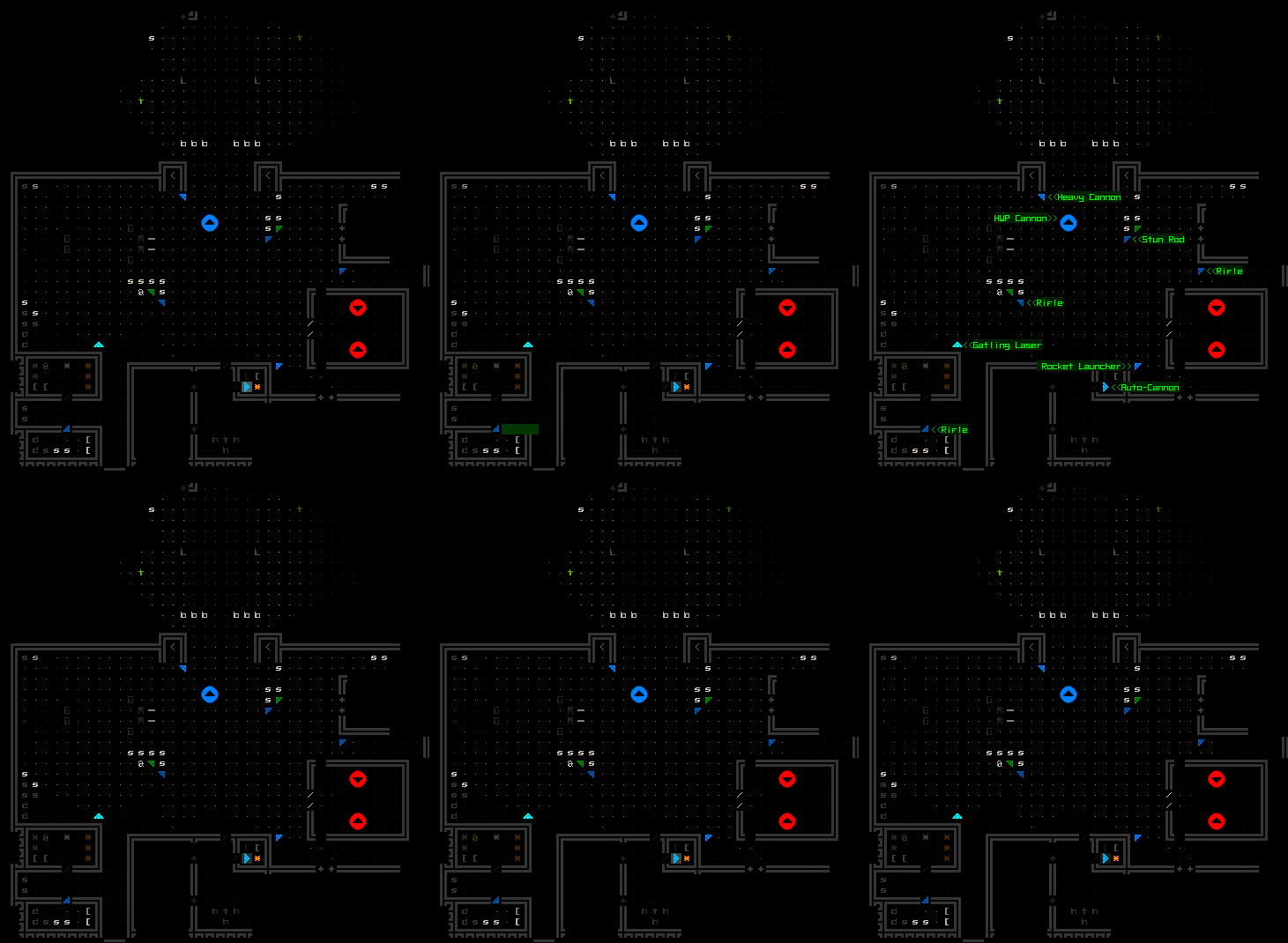
In short, Shift-Alt-v toggles robot FOV overlays, allowing you to identify every cell that each enemy can see. All the FOVs are combined unless examining a single robot, in which case it only highlights areas visible to that robot in particular:

Cogmind Robot FOV Overlay Demo

Keeping an eye on the FOV of several patrolling bots to avoid detection.

While we’re at it, there’s no reason to limit it to just enemies…

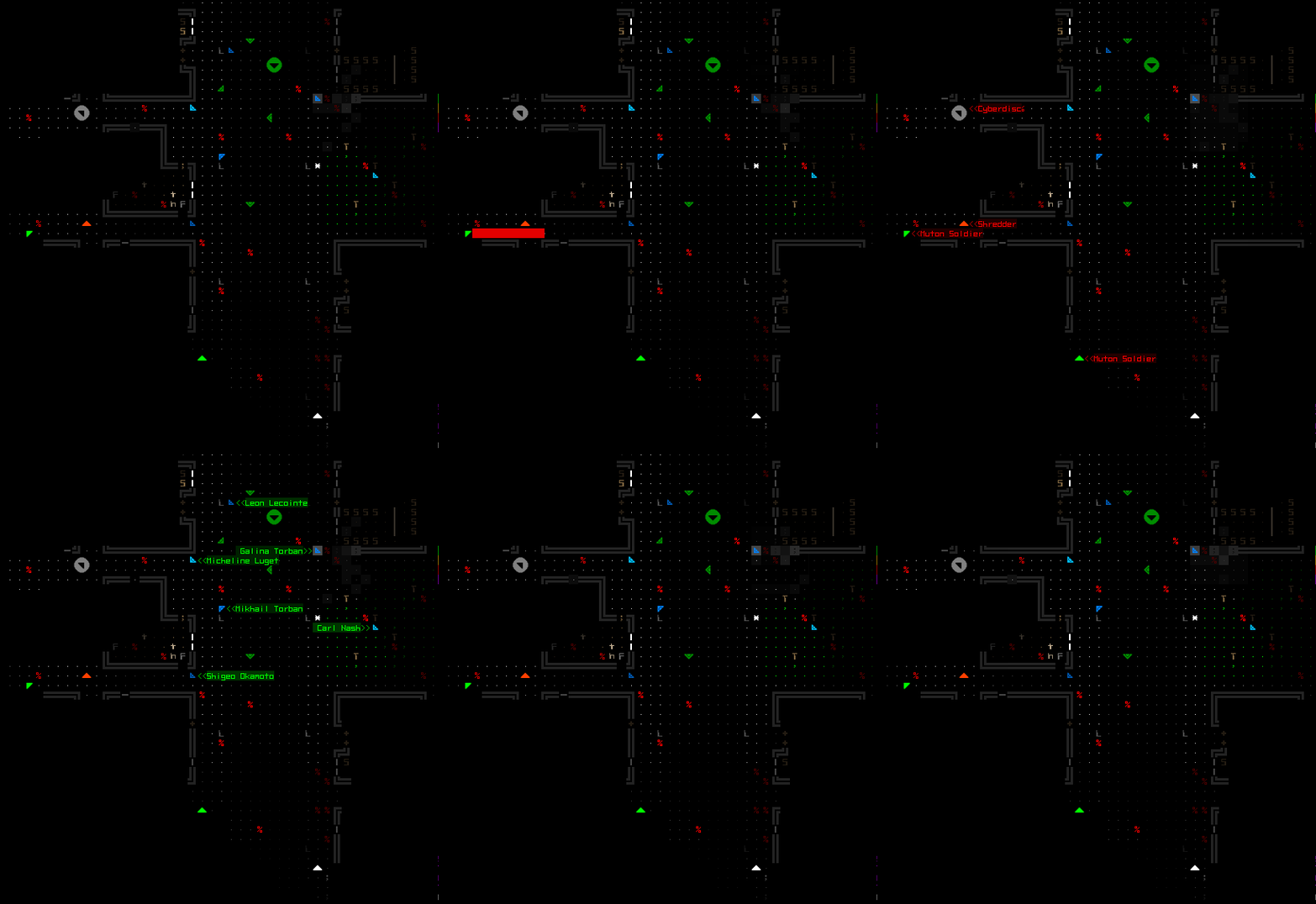
Cogmind Robot FOV Overlay Demo (keyboard, different factions)

Another FOV overlay demo in ASCII+keyboard mode, also tabbing around to different robots including even non-hostile bots (neutral FOVs appear gray, and ally FOVs appear blue).

Object popup labels are not active in this mode, since the main intent is to observe the area covered by FOV, and having labels pop up interferes with that goal.

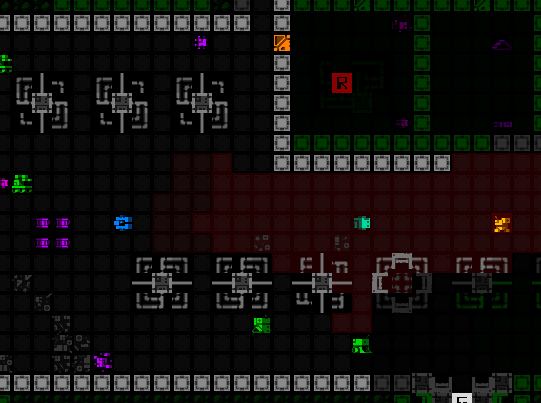
The visualizer also takes into account active Cloaking Devices, using darker shading to represent the FOV reduction effect.

Cogmind Robot FOV Overlay Demo with Cloak Shading

The overlay shows how much closer you can get to that Watcher due to the cloak effect.

So for the most part the implementation worked out okay. I did also have to put some time into optimizing to bring it within acceptable bounds because it could really tank the FPS, and while further optimizations would be possible, they’d also require a large amount of work compared to what was done already. In any case, the problems I have with this feature are actually now somewhat less technical and more on the design side…

My biggest concern is that as a freely usable overlay this has the potential to really change the feel of the game in a lot of situations. Where without this information you’re kinda guessing at the edges of enemy FOV (especially due to the effects of machine obstruction) and maybe have to deal with the consequences of a surprise spot, always knowing exactly what visible enemies can see takes some of the suspense out of those moments.

A smaller concern is that when people can see FOV for all bots, they might not understand or like some of the results and report them as bugs, when it’s simply nuances behind how the system is designed.

Then there are the logic issues. Unless I put a huge amount of time (and program memory) into building a secondary world data and FOV system around what the player remembers rather than the actual map layout, the current approach can sometimes indirectly reveal information you shouldn’t actually know (e.g. missing walls, open doors, and various other situations).

One way to circumvent the logic issues entirely, and also somewhat reduce access to this feature, would be to make the FOV overlay only available by attaching a dedicated part, or perhaps a new RIF ability, which would quite in-theme.

That said, I wonder how necessary that even is given that we already do have the Triangulator utility which… no one really likes xD (in fact, the community makes fun of it all the time!)

Cogmind Triangulator Enemy Spotting Demo

One of a Triangulator’s several functions: See how close enemies are to spotting Cogmind.

Granted, an overlay is much easier to use and less situational than requiring a part that vies with other utilities for a slot, and also more broadly useful since it allows for visualizing the greater FOV rather than just LOS with Cogmind, meaning the ability to see what bots can spot other bots, and also for example plan a possible route past enemies by seeing the limits of their vision in other directions.

Having complete FOV data might indeed make for some interesting precise stealth planning, but in my experience you can get a lot of those moments just fine without it, and I do feel something is lost by showing everything. Unlike the ruler and terrain destructibility, this is not pure QoL--it can actually have a significant effect on gameplay and the whole feel of the game.

We’ve done pretty well with Cogmind’s existing system of hidden FOV for years, so I think this feature might end up getting canned, but having implemented it for testing anyway, I did recently include it in experimental patron builds to try it out for fun and science.

Posted in GUI | Tagged , | Leave a comment

Cogmind Beta 9 Player Stats

For years now, with each new major Cogmind release I’ve analyzed the player stats reported for runs in the prior release (I covered this process in the latter half of this article before). Back when Cogmind came to Steam here on the blog I did take a close look at player metrics with a particular eye towards comparing any differences between Steam and non-Steam players, but other than that time the analyses have generally been posted to the forums in this thread, where they became increasingly detailed with each release, then later started looking more closely at the new features of each particular release. Previous stat analysis links are also archived at the bottom of the leaderboards.

Cogmind Beta 9 was special in that the scoresheet underwent a major rewrite to include not just thousands of data points per run, but up to tens of thousands, plus even more categories of run info. So with a variety of potential new topics to look at I decided to put this one on the blog since it’s longer than usual and relates back to some of the features I’ve covered here before. The fact that the architecture was changed did require rewriting all my supporting code for stat exporting, so this is somewhat late in coming, but it’s finally here :)

One segment that I’ve always included in the past is “meta stats” surrounding player devices, input, and preferences, but I’m not going to be compiling these for now since there really hasn’t been much shifting in these numbers over the years since Cogmind was added to Steam. If you’re interested in user stats like this you can refer back to earlier reports for an understanding of more or less where things stand (this might be even more interesting in the Steam vs. non-Steam comparison, though there has also been some shifting since then as it was over three years ago :P).
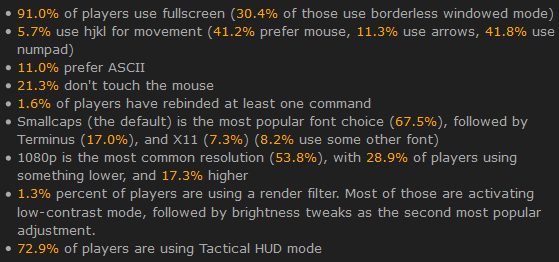
cogmind_stat_summary_beta8_meta

Collection of typical meta stats from Beta 8 players.
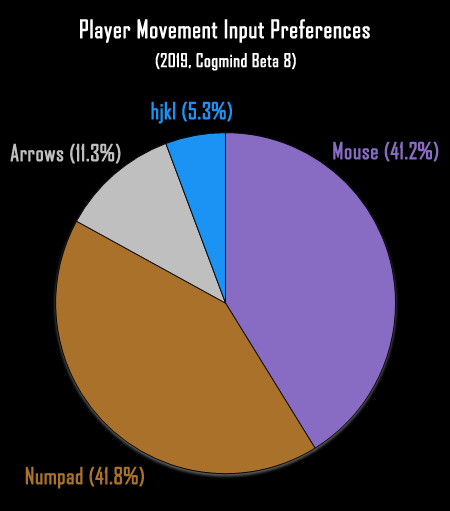
cogmind_player_movement_input_preferences_beta8

Graphing one of the more interesting general statistics, the number of players using each type of movement input. (hjkl has gradually shrunk over the years, I’m afraid, as more non-hardcore roguelikers discover Cogmind :P)

The Stats are Back!

With the crazy level of detail offered by our new scoresheets they’ve become an even more comprehensive and interesting way to examine exactly how each run progressed, though in most cases here we’ll be focusing on more meaningful aggregate stats rather than per-map data from individual runs. Even without including per-map data (which would multiply this by a huge factor), the run data we’re looking at below consists of 9,781,477 data points!

The full archived Beta 9 leaderboards can be found here, with scoresheets for all runs accessible at the bottom.

A total of 9,743 runs were submitted, though 375 have been excluded due to earning a score less than 500, and another 1,437 for being from special modes/events, leaving us with 7,931 runs to analyze for aggregate stats. (Special events will be looked at in a separate section--there were many during the Beta 9 cycle!) There were far fewer runs not even making it out of the first area than in previous releases, likely due to Beta 9 putting the difficulty menu front and center to raise awareness about that option and getting more people who would prefer easier modes to play one of those.

920 unique named players submitted at least one qualifying Beta 9 run, an average of 8.6 per player, lower than the last few betas, perhaps due to the fact that the Beta 9 series in particular was by far the longest ever with mostly special event releases rather than primary content updates (so people allocated more runs to those rather than the regular game). Beta 9 spanned a period of over eleven months and included a total of seven updates, half of which were special modes! Aside from those and the first flagship release, the others were mostly minor updates.

Difficulty

Beta 9 was the first release to make the difficulty selection menu the first thing new players see, and also forced all existing players to explicitly set their difficulty level rather than simply defaulting to the intended most difficult “Rogue” setting. As such we ended up with a huge shift in the number of players using other modes. (It clearly makes a big difference to put important options up front rather than just in the options menu!)

As you can see in the graph here, the number of players using a non-Rogue mode jumped from a mere one-tenth to over a third!
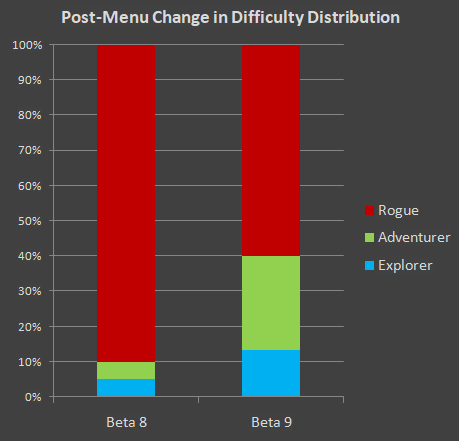
cogmind_difficulty_distribution_beta9_vs_beta8

Beta 8 defaulted to the hardest difficulty mode and only had a tutorial tip notifying players it could be changed in the options menu; Beta 9 forced players to choose a difficulty setting at the start. The effect is telling.

The majority still go for the primary permadeath-enforced roguelike mode, but it’s good to see that many others are now more able to enjoy the game as they prefer. Anecdotally, some people also use lower difficulty modes to practice and learn, gradually moving up as their skill improves. The stats show that overall Rogue mode players have more hours of experience with the game, although not by a large margin! The average number of hours among Rogue players (63.7) is double that of other difficulties, although this value is skewed upward by the core set of players who tend to have many hundreds of hours. By comparison the median number of hours ranges from about 10~12 across all difficulties.

Wins

The win rate among Beta 9 Rogue runs was 5.7%, compared to 1.2% in Adventurer and 3.5% in Explorer. Note that many runs on Adventurer/Explorer difficulties continued further than the submitted score, because permadeath is optional and players can load a previous game states, but data for runs loaded in such a way is not uploaded. Therefore more runs using those modes probably did go on to win, but it was after additional attempts. (It’s not unheard of for a player to load many hundreds of times during a single run! It’s really quick and there’s a hotkey, so… :P)

Not everyone is attempting to win all of their runs, however, or at least add extra challenge by going for more difficult win types, or challenging themselves in other ways that might more likely result in a loss. So a more accurate win rate probably looks at the percentage of players who had at least one win during the Beta 9 cycle. Looking at those results we see that 86 players had at least one win (out of 920), or 9.3%. The actual percentage would be higher for Adventurer/Explorer runs since those could go on to load and improve their run, though we don’t know how much higher. We can, however, calculate the real percentage of Rogue players who won: 12.5%. Not bad.

396 wins were submitted by alice_fexa (55), Alexbot (39), GJ (26), 3.14 (24), cptwinky (23), int Ascended=0; (17), Joshua (12), lsend (11), Pimski (11), aoemica (9), sideriver8 (9), Stryker (9), Dhoby_Ghaut (8), TBExtent (7), Vectis (7), Michael (6), MTF (6), PlasticHeart (6), Ben’n’Dan (5), Adraius (4), Ape (4), Fleshy Vegetable Bird (4), muxecoid (4), Trione (4), UlyssesB (4), Finestep (3), Kyzrati (3), Terminus (3), Zailor (3), Zyalin (3), bugsniper (2), Cipherpunk (2), Ctrl_Alt_X (2), Dusanh (2), Gobbopathe (2), kerapace (2), Magellan (2), NoNeedToExplain (2), octapi (2), Solar Sloth (2), Torako (2), zzxc (2), Airus, ApolliniaD, BillyNate, BinarySpace, BlackCaro, Chad, Cracklepappy, Decinym, derk, Dullahan, Exp. Geonium Core, GridBugBear, Horse, IceBox, inSANE, Jolley, Kenzurith, Khal42, Kiks, LordVenom1, Michael, MitchellFJN, ModulinMyGlobulin, Nalzok, Nori, Omewes, Phillammon, Plexion, RNGesus, Rumbl3, Sandwich, toad3k, Tone, Tough2Name, TravelDemon, viper, VoodooWoodoo, Wayward Satellite, whitenitro0, Xax, Xeram, Xii, YppY.

The average duration of a winning run was 4 hours and 44 minutes. (This wasn’t significantly different from median of 3h 57m.) The fastest win goes to Zyalin, for a 25m 55s run, and the longest win goes to Trione, clocking in at 23h 12m 33s!

Zyalin’s run was a 2,916-action pacifist speed run that took 1,179 turns, but turn-wise the fastest speed run win was by Alexbot (681 turns!!!) followed by… me :P (908 turns)

Trione’s epic journey traveled through 44 maps (tying for the maximum with several other players), destroying a lot of bots but keeping alert low while doing a fair bit of RIF hacking and going on to get an extended ++ ending. The next-longest run behind that was Tone’s 20-hour combat romp.

(Remember that Cogmind-recorded play time is not equivalent to Steam’s, since the latter includes idling whereas Cogmind does not, so we actually have accurate numbers here.)

By far the highest number of kills goes to Pimski’s 300,886-point Access farming run, destroying 2,212 bots (including 1,723 hostiles) in the top run of the cycle. Almost all of the kills were recorded in Access after triggering high security and eventually reaching a ridiculous peak influence of 44,607… As of Beta 10, farming 0b10 maps is no longer a thing due to new mechanics, but this was an impressive show of what was possible with the right build and tactics, using a fast but powerful build to kite everything at range and take minimal damage.

Deaths

So all those runs that didn’t win… that’s the 7,535 deaths :P. And for the first time we actually have detailed data on the cause!

I should preface this by saying that it’s mostly for fun, however, and not nearly as meaningful as in other roguelikes, since due to attrition the cause of death in Cogmind is just the final nail in a very big coffin built over a long period, simply what happens to finish off the player at the end of what is probably multiple mistakes/poor decisions or any number of things that could’ve caused the same result in the Very End as recorded. (With your average roguelike the underlying cause of death is most likely more immediately associated with whatever the player was doing at the time, since it’s not uncommon to be at or near full capabilities for many encounters.)

Of course there are some more special causes of death, and we’ll take a look at those, too.

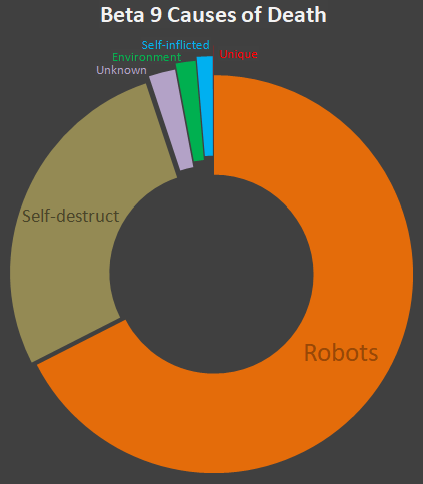
2.2% of deaths (163) were reported as simply “Core Destroyed,” a generic catch-all for when the actual cause was unable to be determined for some reason, or was a highly specific type of death that doesn’t fit into other categories but also lacks any corresponding unique text.

Naturally the majority of deaths can be attributed to hostile bots, especially the common 0b10 Unaware. Some special cases include Crushers, accounting for 48 deaths (0.6%), and Trackers with 12 kills (0.16%).

Assembled ended 314 runs (4.1%), 27 of those being of the G variety. As one might expect, most such runs (75.5%) ended in the Mines, with others generally deep in the caves, but still a decent amount (7.3%) in Exiles due to evil players turning on the friendly folk there and suffering the consequences. Interestingly one run in each Factory and Research was lost to Assembled due to events that might occur there.

While the majority of NPCs in Cogmind are friendly, a lot of players are not so friendly when it comes to meeting NPCs, where you of course have two outcomes: player wins and gets sweet loot, or player suffers a horrible death… (the following section uses common abbreviations in most cases to openly discuss the data without as much worry about spoilers)

23 Cogminds were killed by a Hero of Zion (NK-0LA’s the most deadly, followed by 99-TNT), 19 died to YI-UF0 (a tough early encounter since at the time you’re relatively weak and they’re both aggressive and nade-happy), and 8R-AWN trashed 50 Cogminds--not surprising since he’s quite an out-of-depth opponent when you meet, but some players just insist on trying to loot their gear :P (13 died to EX-BIN’s DAS Turret, and 4 to the Exiles themselves).

No one has a recorded death from Zh/S/P, likely because they’re not all that powerful and tend to run away themselves once damaged.

Also no deaths to GM, and somewhat surprisingly none to W, although in that case he almost always has a ton of escorts who could easily finish the job and steal the kill.

One powerful NPC without much in the way of escorts that tends to kill a lot of players is Z-Im, responsible for ending 32 runs.

No one died to FFF (easy to run--or limp--away from :P), and only 12 deaths to MC (also lots of allies to finish the job). Arch killed 5 players (not too hard to retreat from that fight if necessary, although few people visit or even know about that area to begin with).

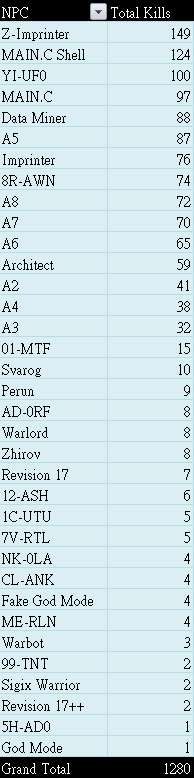
Of course lots of NPCs also died at the hands of players… Here’s the complete chart, hidden behind a link because this includes all major NPCs (plus a bunch but not all minor ones--very spoilery overall, so skip it if you like and I’ll just summarize here:

  • Z-Im/Im was killed the most, which makes sense because they’re at a mid-game gateway to a variety of content, and therefore both relatively easy to reach and tempting to take on.
  • The main boss was killed quite a lot, since most extended runs aim for that as one of their goals.
  • YI-UF0 also died quite a bit, mainly because they’re not always hostile (i.e. easier to ambush), and one of the earliest NPCs you can meet.
  • The longest extended runs tend to take out quite a few “A”-type NPCs, since that particular faction has many.
  • 8R-AWN killed lots of players, but players also killed lots of 8R-AWN :P (a bunch of EX nerds were killed as well, but there was an issue with the scoresheet reporting on them that was only discovered and fixed later in Beta 9, so I just removed all of them from the data--for these purposes the main NPC of importance in that area is 8R-AWN anyway)
  • Players also took out a fair number of heroes, a common hunting target among some veterans for their unique parts.

Valguris (spoilers!) apparently holds the record for killing the most NPCs in a single run: 15.

Back to causes of player death…

168 deaths (2.2%) were attributed to the environment, the most common being cave-ins (83 deaths), followed by exploding machines (57, regardless of what triggered the explosion in the first place), traps (19), and chain reactions (9), i.e. power source detonation as a side effect of electromagnetic damage.

107 deaths (1.4%) were self-inflicted (generally unintentional, although players definitely sometimes choose to go out with a bang), 68 with regular launchers, 31 via explosive machines, 5 with ST, 3 with the YOLO Cannon, and… drum roll, please… 1 with SST.

There were a couple unique deaths, once to a singularity, and once to system corruption. The latter is hard to get except intentionally, so I checked the scoresheet for more details and sure enough it looks like they were just sitting in Waste getting blasted by the EMP discharge until death.

27.4% of runs (2,063) ended in self-destruction.

The majority of deaths, 67.5% (5,087), were naturally caused by other bots.

In summary:
cogmind_beta9_death_causes

High-level breakdown of the causes of player death in Beta 9.

Builds

Beta 9 came with the new option for players to have their HUD display an analysis of what type of build they’re currently running, information initially added to help contextualize mid-run stat dumps (and later included as part of the Steam Rich Presence update). Related entries in scoresheets now let us see build type frequency and transitions throughout each run. (As a reminder, build classification specifies a base class representing the core focus of one’s build, and this may be further prefixed by a special class modifier that describes additional abilities. The system was explained in more detail in this blog post, and for convenience/general interest, at the end of this section is a reference describing how most classes are defined.)

There is a lot of build data, including everyone’s primary build for each map, and a list of all builds across the run and how much of the run they used it for, but for this first section here I’m only looking at their most used build across an entire run, and ignoring any runs that did not make it to at least a depth of -6 (since there isn’t quite as much variety in early maps while players are still accumulating slots and gear, and differentiating their builds).

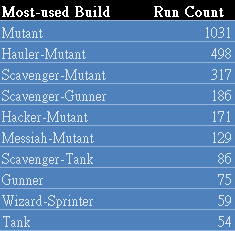
Within those restrictions, Beta 9 runs included 67 different build combinations out of a theoretical maximum of 208. The top 10 most common were as follows:
cogmind_beta9_top10_primary_builds_-6_and_above

Top 10 most-used builds from -6 and above.

Not unexpectedly, Mutants, Haulers, and Scavengers top the list. Respectively, these are the fairly random builds with no particular focus, builds with huge inventory capacity, and builds heavily dependent on salvage from other robots.

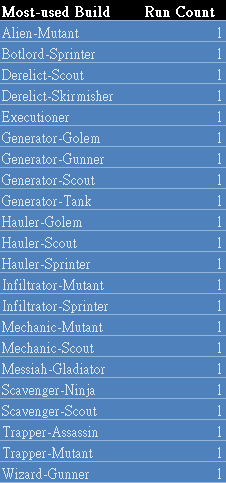
From the restricted pool it’s also interesting to see those builds that were only ever maintained as a primary build once:
cogmind_beta9_rarest_primary_builds_-6_and_above

Rarest primary builds, only ever earning that designation in a single run.

Some interesting combos in there :)

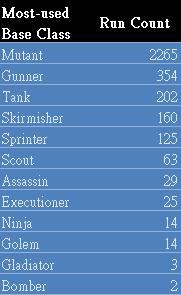
Examining purely base class prevalence, there aren’t really any surprises on this list (and all possible base classes are represented here except for one):
cogmind_beta9_most_used_base_class_-6_and_above

Complete list of each run’s most-used base class (-6 and above).

Also here’s the prevalence of each special class modifier (all but two are represented here, and a significant chunk (39%) have no modifier at all):
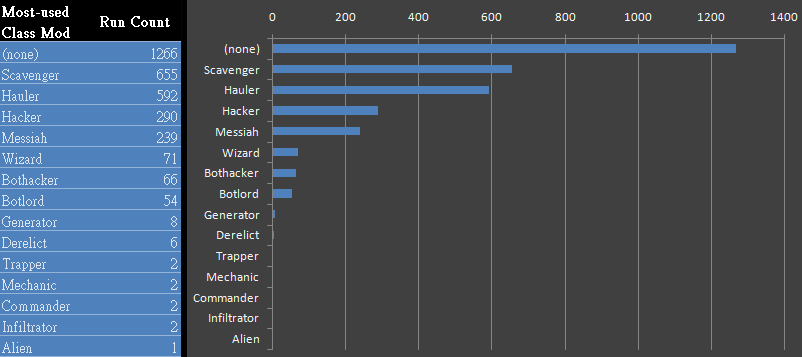
cogmind_beta9_most_used_class_mod_-6_and_above

Complete list of each run’s most-used class mod (-6 and above).

Haulers are quite common, but Scavengers still win out at least in part since the majority of runs don’t win, and as they gradually get worn down over time are probably replacing more and more parts with those from fallen enemies rather than holding onto as many parts originally sourced from caches. I think we’ll be seeing fewer “Hauler”-designated builds in future releases after expected changes to reduce inventory sizes (though the definition of a “Hauler” will also likely change as a result).

The above list is also a pretty good indicator of the portion of players who prefer a hacking style, which we haven’t previously had an easy way to determine. According to the list, 11.1% of players had a strong focus on machine hacking, while 3.7% focused on bothacking.

Again, all this is only looking at each run’s most common build, and only for runs that reached at least -6.

Examining the same set of charts for only the dominant class on the final map for winning runs highlights some interesting differences, of course. The number of different build combinations ends up about the same, however, at 66:
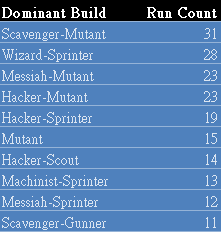
cogmind_beta9_final_map_dominant_build_wins

Top 10 dominant builds on the final map of winning runs.

Pure Mutant still makes it into the top 10, but is much lower, and various hacker/wizard builds make up a greater portion of the list. Also there are no Hauler builds in sight :P (by then players have generally transitioned into their final build and have a reduced need for inventory, or at least a heavier concentration into a single build type enough to override the possibility of being considered a primary hauler).

Again for fun, here’s the dominant builds that only appeared once:
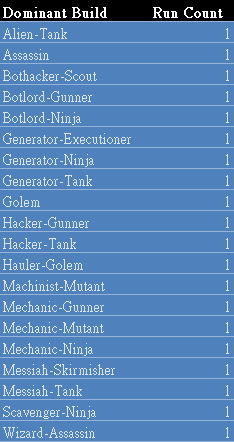
cogmind_beta9_final_map_rare_dominant_build_wins

Rarest dominant builds on the final map, only ever earning that designation in a single run.

Base class prevalence shows a much lower ratio of Mutants (37.1% vs 69.6% for the most-used base class across all runs), and a greater emphasis on builds with less of a combat focus, e.g. fast/stealthy/hacking Cogminds, which are favored for less risky wins:
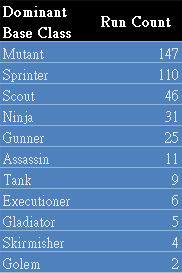
cogmind_beta9_final_map_dominant_base_class_wins

Complete list of each winning run’s dominant base class on the final map.

The dominant class mod on winners’ final map is overall similar to the earlier class mod chart, with a few specific noticeable differences:
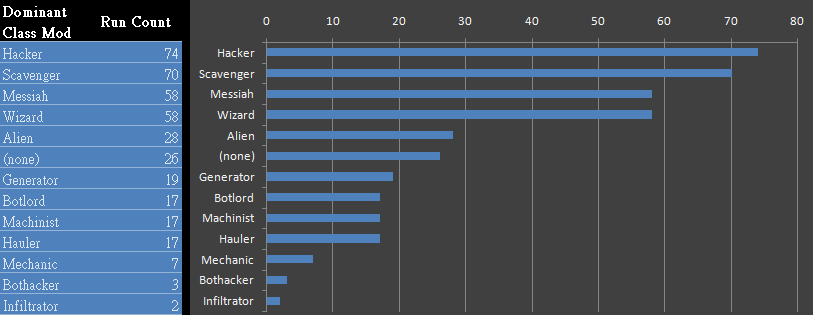
cogmind_beta9_final_map_dominant_class_mod_wins

Complete list of each winning run’s dominant class mod on the final map.

  • At this point in the run players have evolved many slots and likely focused on a particular build type, thus only 6.6% of runs had no special modifier
  • Haulers have only a minimal presence here
  • The Alien modifier plays a more obvious role, something that can only happen in the late game, and is likely among those players trying to increase their power enough to take on the extended game
  • Lots more Generators, for those players who were building up large stores of energy to power the best shields and/or experimental weapons
  • Machinist is here but didn’t even appear on the general list (earned by having fabricated a decent chunk of your own build, which is only likely to happen by the late game) (note that Mechanic and Machinist are actually the same thing--the class mod was renamed to the latter in the middle of Beta 9, and I forgot to take that into account and merge the two when compiling these stats… so those bits are a little off, but not a huge deal since it’s a less common class to begin with; such is the problem with waiting months to do the stat analysis after a very long beta xD)
  • Compared to earlier, a whopping 33.3% of builds primarily focused on machine hacking, and 5.1% on bothacking (hacking good)

Below are the current definitions of each class term, some redacted to avoid spoilers.

Base classes:

  • Sprinter: Very fast flying build with low infowar
  • Scout: A flying infowar build
  • Ninja: As Scout, but also using a melee weapon and at least one stealth-related utility
  • Assassin: Melee combatant supported by multiple infowar abilities
  • Gladiator: Multiple slots devoted to melee weapons and supporting utilities
  • Skirmisher: Low-weapon ranged combat build supported by multiple infowar abilities
  • Gunner: Three or more weapon slots plus utilities with a more offensive emphasis
  • Tank: Three or more weapon slots plus utilities with a more defensive emphasis
  • Executioner: Large number of mostly non-melee weapon slots
  • Bomber: Combat build that mostly uses launchers, and currently possesses at least one
  • Sniper: Combat build with minimal weapon slots but increased sight range, great accuracy, and a long-range weapon
  • Golem: [REDACTED]
  • Mutant: Doesn’t qualify for any of the other classes

Special Class Modifiers:

  • Hacker: Good at machine hacking, essentially via hackware
  • Wizard: More extreme version of Hacker
  • Bothacker: Installed RIF, have couplers attached, and own any Datajack (more likely with RIF upgrades)
  • Botlord: More extreme version of Bothacker, requires also having several RIF upgrades
  • Trapper: Own at least one trap-producing utility and a number of traps (get a bonus towards this with attached Structural Scanners)
  • Hauler: Large inventory capacity
  • Generator: At least three power slots generating a decent amount of energy
  • Pyromaniac: Volley capable of significant total heat transfer
  • Infiltrator: Multiple defensive infowar and other stealth-like utilities
  • Scavenger: Many parts salvaged from other robots
  • Machinist: Many parts built at a fabricator (originally called “Mechanic” early in Beta 9, and later renamed to avoid confusion)
  • Commander: Leading a number of directly controllable allies
  • Derelict: Many parts of derelict origin
  • Messiah: [REDACTED]
  • Alien: [REDACTED]

Obviously many of the above scenarios can apply to the same build, but the one chosen is that which most applies, since each uses a formula to measure its degree, which is then directly compared to all others.

RIF (Relay Interface Framework)

The ability to upgrade your robot hacking system with additional permanent abilities was one of the big new things in Beta 9, so naturally we want to look at some numbers associated with that.

For one, we might expect there to be a higher percentage of player deaths inside Garrisons, at least somewhat, given that repeated trips to Garrisons are necessary to continue leveling up. Of course, one factor working against this assumption is that for RIF users Garrisons actually become a safer place than other parts of the complex (easier to control alert, mostly predictable layout, and local access to coupler resources for more hacking). At the same time, greedy bothackers are also more likely to try to Garrison dive even when in a weakened state, adding to the risk of dying…

14.3% of runs (1,133) entered at least one Garrison, a notable increase over previous versions (9.5% did so in Beta 8). 5.0% of Cogminds (398) died in a Garrison, also more than in Beta 8 (2.7%) and Beta 7 (3.6%). Greedy indeed :)

10.1% of runs (798) used at least one RIF Installer, 74.9% of those (598) doing so at or below a depth of -8, even higher than the two-thirds when RIF was first introduced in Beta 7! This is likely due to both players getting better at finding the first Garrison, and also getting really eager to have their first RIF upgrade as early as possible to stack as many as possible in a single run (also later Garrisons can get more and more challenging). Even 8.1% of RIF runs used their first installer in a Garrison off -9/Storage, which itself is fairly dangerous. (33 runs didn’t install RIF until -5 or higher, in some cases due to gaining access to unique couplers only by then, or for some other strategic purpose.)

47.1% of RIF runs (376) gained a new ability at least once (i.e. used two or more RIF Installers). The average number of RIF abilities gained per depth on RIF runs was 0.62 (only counting from -8). The highest number of upgrades in a single run was a three-way tie between 3.14, Joshua, and Valguris, each of whom reached 11. 31 of the runs that did not gain any abilities at all went on to win (that’s 35.2% of winning RIF runs)--even just a basic RIF install comes with some very useful features, after all!

The average RIF run hacked 21 bots, far higher than Beta 7 and 8 where the average was 9 bots in both cases. RIF abilities really encouraged people to spec their builds and strategies into bothacking! A number of different players hacked hundreds of bots per run, with Joshua hacking the most in a single run: 393! (again blowing previous records--124 and 146--out of the water). Among those runs where any bots were hacked at all, the median count was 13 (naturally much lower since a lot of runs don’t make it as far, or aren’t entirely focused on the actual hacking part).

RIF users attached an average 8.4 couplers per run, with Tone attaching the most in a single run: 102. On the opposite end of the spectrum, 35.3% of runs (282) never used any Relay Couplers at all (either because they died, or were using pure RIF abilities).

New Mechanics

Treaded combat builds got a boost in Beta 9 with “siege mode,” the new mechanic both devised and voted on by patrons. This allows a bot with any type of heavy treads to spend some time entering an immobile state with better accuracy and a higher level of protection, as you can see below :)
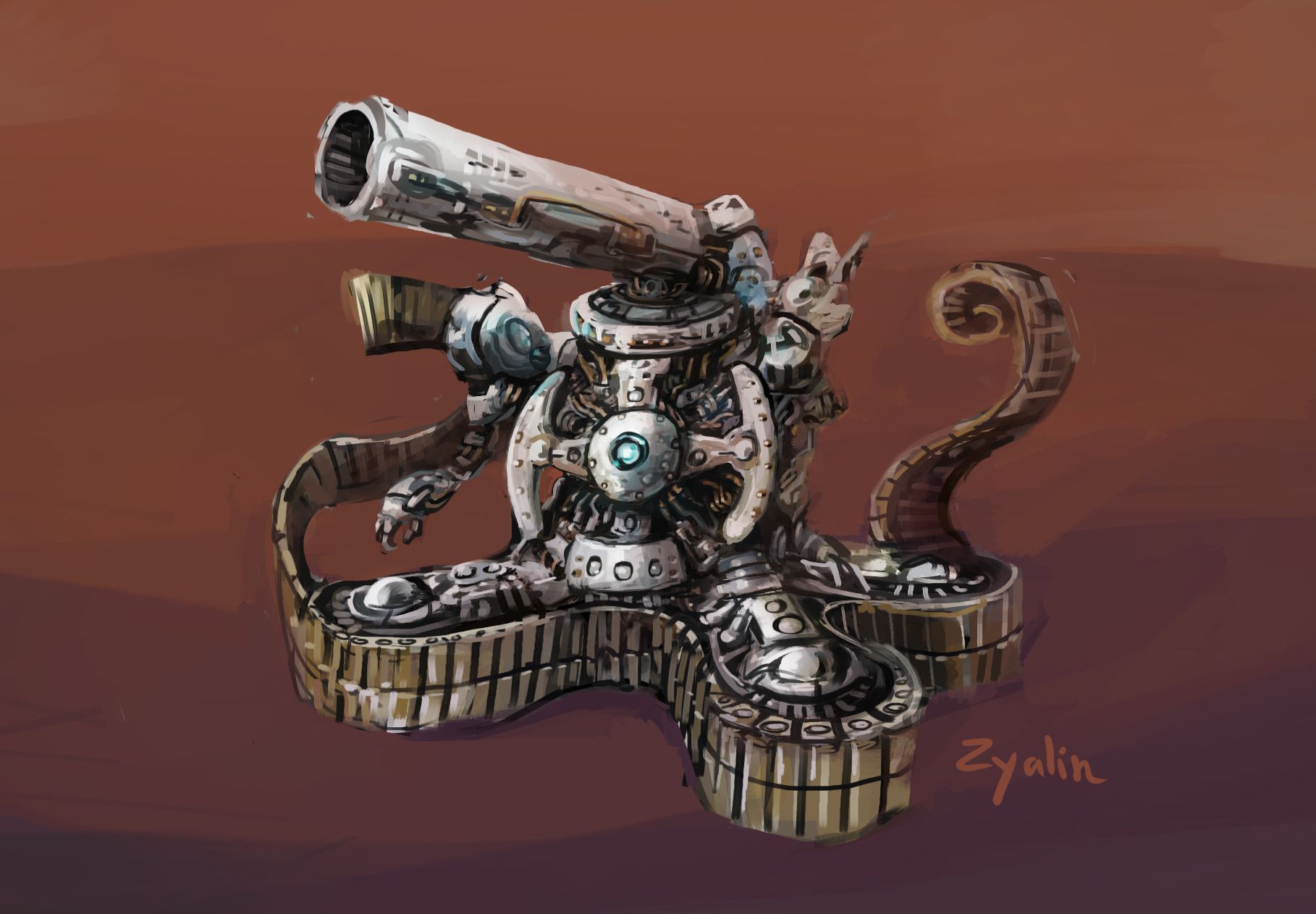
zyalin_siege_mode_cogmind

Zyalin’s impression of a Cogmind in siege mode.

Naturally we have some data on that mechanic in the scoresheets, though it only really makes sense to examine it from a depth of -6 and higher, since before that it’s relatively rare or difficult to even find treads large enough for siege mode. So that means we’re only going to look at 41% of runs.

Within that subset of runs, 15.7% of them entered siege mode at least once. Among those, the average number of siege mode uses was 15.3 (the median was 7). A single run by Vectis had the highest number of siege mode activations: 154.

The longest recorded siege lasted 21,282 turns, where Nikolayag wasn’t actually doing much of siege run, but only set up for it at the very end, simply finding a cozy place to sit in Access while firing a pair of Hypervelocity Railguns over 6,000 times at incoming high security assaults :P (this won’t work anymore due to the sterilization mechanic, but it used to be a good way to attempt a near-infinite score farm).

Excluding that exceptional run, the average duration of each run’s longest siege was 76 turns (median: 50 turns).

While a number of siege users might opt for fewer propulsion slots, or mix their treads with other forms of propulsion, one run in particular by roguelike master GJ shows the advantage of filling six slots with siege-capable treads (including treads designed to excel in siege mode), which is even better than the best shields since it’s free damage reduction. In that run siege mode reduced the total incoming damage by 6,121, two or more times that found in most other siege runs. In fact, GJ also took the second-highest spot in that category with another run using the same approach. These two runs and another by alice_fexa were the only ones in Beta 9 in which over 10% of all incoming damage across the entire run was ignored due to siege mode.

Beta 9 also made an important change to critical strikes by splitting robot immunity to them into two separate categories, one for core and another for parts, allowing many more uniques and otherwise dangerous robots to have their parts be crit off, even if a strike against their core would not instantly destroy them. The aim was to hopefully make crit-focused builds more viable again (in the early days when crit immunity was practically non-existent this strategy was far too effective, hence the later nerf, which was applied without attention to nuance :P).

Reportedly players did want to take advantage of this adjustment and add more crit capacity to their builds, or even build around it again, and the data does seem to show that playing out. (The following data only looks at runs that reached at least -3, since by then players have had plenty of time and slots to greatly differentiate their build, so it should offer a clearer picture.)

Between Beta 8 and 9, the percentage of critical hits as a total of shots that hit robots increased from 4.6% to 5.5%, and the percentage of kills attributed to critical hits increased from 5.3% to 6.9%, both of these suggesting more players were using more crit-capable builds. Even more pronounced is the average number of parts destroyed by critical hits per run, which rose from 20 to 31.

Crits are back.

Special Modes

Beta 9 happened to include more special events than any prior beta release, one for Winter/New Years (2019), another for April Fools (2020), then another for Halloween (2020). Aside from a minority of frequent players who want to try out something new, most stick to the regular mode, as you can see here:
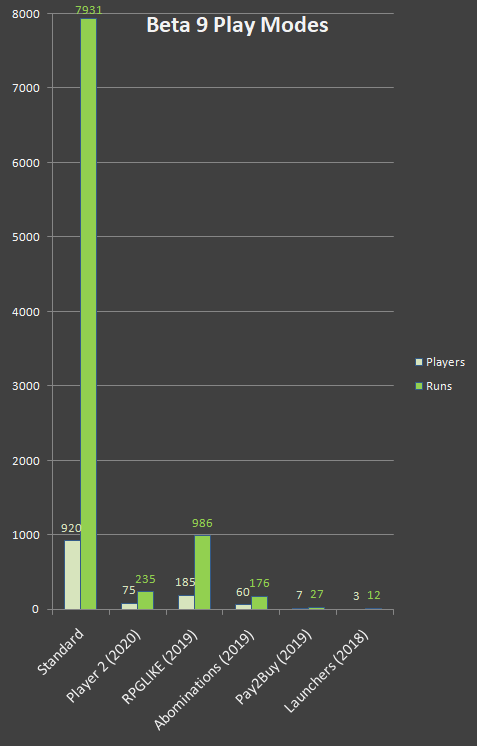
cogmind_beta9_play_modes_distribution

Pay2Buy and Launchers mode were not developed during Beta 9, but players can still go back and manually activate events after they’ve ended, including in most cases even those from previous years/versions.

The main exception is RPGLIKE, which some players use as designed, to be a permanent alternative way to play Cogmind with XP mechanics, leveling, and a common way to restore health to make it more like other roguelikes.

One piece of data I was particularly interested in with regard to RPGLIKE mode is how many people would chose to continue playing it after the relatively long automatic event period ended. Considering its nature, it probably wouldn’t drop off to practically nothing like the other modes, and indeed a small but non-insignificant number of players appear to have kept with it through the rest of Beta 9:
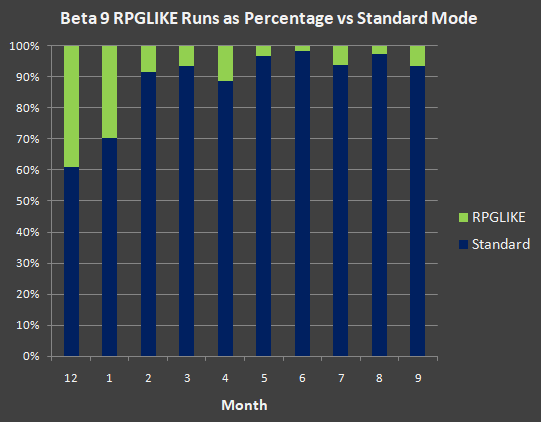
cogmind_beta9_rpglike_run_percentage_comparison

December/January are people playing during the event itself, when the mode was automatically activated for many players by default, and the spike in April was likely due to another mode released that month, reminding people that alternate modes exist and they can play earlier events they may have missed.

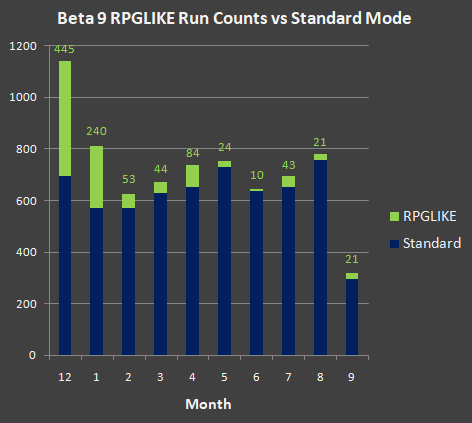
Here’s another comparison, showing instead the raw number of runs submitted each month:
cogmind_beta9_rpglike_run_count_comparison

Explanation similar to the previous graph, although here it’s worth noting that September is cut short overall because Beta 10 was released that month.

It’s quite likely that even more players would chose to play (and stick with) RPGLIKE mode if it were included as a more prominent option instead of being relegated to occasional reminders in announcements or elsewhere (also there’s a tutorial message suggesting players try it if they’re looking for something like that), but it was a special event developed relatively quickly, so I don’t feel the mode is very representative of Cogmind’s quality overall (the design is hamfisted and difficulty level quite low) and I don’t want to promote it in a more “official” capacity. Thus it kinda lives in limbo where I’m at least glad some people can find (or be directed to) it when relevant, but that’s where it’ll stay for now :P

Since I didn’t get to analyze any mode-specific stats during Beta 9, let’s check out some of these as well…

cogmind_beta9_special_modes_leaderboards_collage

Since the leaderboards were reactivated in 2020, I did put together separate boards for those who had played these Beta 9 special modes, each with access to scoresheets from individual runs as usual: Abominations, RPGLIKE, Player 2.

Abominations (2019)

Among those with score uploading active, 60 different players submitted 175 qualifying runs in Abominations mode, 14 of which went on to win.

That’s an 8% win rate, higher than the standard mode since many special mode players tend to be those with more experience and the goal for an short-term event would be to see as much as possible in as few runs as possible. Plus this mode only consists of ten (or fewer) floors, so generally shorter than a lot of normal complete runs.

Players destroyed an average of 17 Abominations per run, or 36 on winning runs, with Trione destroying the most in a single run (99) that ended in Research. sideriver81 won without destroying a single Abomination.

37% of hostile kills in winning runs were not Abominations, compared to 28% in non-winning runs, which might be somewhat meaningful strategically speaking in that killing 0b10 bots makes it overall less likely that the even deadlier Abominations will spawn, especially if using low-salvage atacks or the resulting free power sources are handled carefully. (For a look at how Abominations mechanics work and how the mode was designed, check out this article.)

Not many players destroyed Anomalies, although PhenomPhear took out 53 before escaping (the average number of Anomalies destroyed in runs that destroyed at least one was only 5--they can be very difficulty to hit, and also sometimes beneficial anyway depending on the type and circumstances).

14 runs visited the secret map, and 6 of those runs destroyed the boss there. Valguris destroyed the boss but was unable to escape afterward. 9 of the winning runs escaped through the surface instead.

RPGLIKE (2019)

185 unique players submitted 985 qualifying RPGLIKE runs throughout Beta 9, an average of 5.3 runs per player, and the median was only 2 runs (!), since many people just try a special event once or twice, while a handful of people will really enjoy it and play a lot, particularly in this case given the nature of the mode.

The top 10 most prolific RPGLIKE players alone accounted for 414 of the runs (42% of the total). badjay submitted the most runs, 69, playing 5~10 runs per week for a two-month period beginning when it was released, and Hermelin submitted 66 runs while playing off and on for an entire year. These didn’t include a lot of throwaway runs, either--many got quite far or scored highly as RPGLIKE is a somewhat easier mode with more ways to recover from mistakes and keep your build intact.

On the other end of the spectrum, of the 62% of players (115) who only played one or two runs, 16 won at least one run, a fairly high 13.9% win rate. (The win rate among all RPGLIKE runs was 8.8%.)

Because RPGLIKE mode goes against some core Cogmind design principles and makes it possible to essentially farm points indefinitely with a little bit of skill and familiarity with the mechanics, a significant 5.8% of runs (57) scored over 100,000, and even 8 runs scored over 200,000! By comparison these feats are extremely challenging to do in the regular game :P

One of the core features of RPGLIKE is gaining XP to raise levels, and the amount of XP gained diminishes the further ahead of the intended depth-based level curve the player reaches. (For this and many graphs and in-depth discussion of the RPGLIKE design, see my article on that.)

The max player level at the highest depth beyond which XP gains continue diminishing indefinitely is 31, though 14.8% of runs exceeded this level. The highest level ever reached was 39, an achievement shared by three different players: Phenom Phear, Valguris, and Terminus (who achieved this milestone on seven different runs xD). The lowest XP level win was by cptwinky, who escaped at only level 10 in a 906-turn speed run (and almost a pacifist win as well, if not for destroying an Excavator at the beginning and Sentry in Materials).

5.0% of runs didn’t even spend half of the XP earned, including many that went through several floors, and some even through a dozen or more! None of these runs went on to win, however. Winning runs spent an average of 94% of their XP. (One run by Solar Sloth did win despite spending only exactly 50% of their available XP.) The average percent of XP spent by all players was 84% (median 91%).

The highest number of upgrades in a single run was 134 by RezTeKK.

Slots are of course a popular upgrade since they’re versatile and the usual evolution process doesn’t occur, although they’re also more expensive in terms of XP, especially when stacking slots of the same type. An average RPGLIKE win had 21.2 slots (compared to a regular win in Cogmind, which always has at least 25 by the end). The greatest number of slots at win was 26 (the hard cap, achieved by several players), while the lowest number of slots was me, apparently the only player who submitted a run without upgrading any slots at all so I finished with only the 4 starting slots :P

With regard to other upgrades, they’re all useful, and every one was used to a large degree by at least someone--it’s mainly a choice of which each player would prefer for their build style and current condition, since the upgrades don’t generally offer brand new abilities, instead simply serving the same function as one or more other parts (only as abilities they are permanent and cannot be lost).

The average number of parts players actually lost in winning RPGLIKE runs is… a mere 3.8 xD. This is compared to 53 in regular wins (median: 42). Even non-winning RPGLIKE runs only lost an average of 2 parts. Clearly being able to repair your parts with Protomatter makes for more stable builds.

Among winning runs, an average 80% of Protomatter was used to repair core rather than parts (meaning any attached parts at the time were already at max integrity). Interestingly the average was 88% among non-winning runs, though it’s hard to draw specific conclusions from the disparity.

I’m sure we’ll still be seeing a number of RPGLIKE runs into Beta 10 and 2021; I’ll remain curious to see how that holds up :)

Player 2 (2020)

My personal favorite mode, Player 2 was also the most played among our short-term special events--75 players submitted 235 runs in all.

Player 2 (P2) runs have an extremely low 1.3% (!) win rate, however, with only 3 players making it to the surface, including cptwinky, GJ, and myself. Compared to other special modes it’s quite a unique challenge to win this one as it requires rather different strategies to increase the likelihood of success since you’re forced to work with a not-so-necessarily-cooperative partner for the entirety of the run.

They’re more likely to get themselves into trouble, although if you play to their strengths they are an incredibly powerful ally. Which is part of why the majority of runs had trouble controlling the resulting alert spiral as P2 obliterates everything and Cogmind either doesn’t contribute, or contributes and things get even crazier:
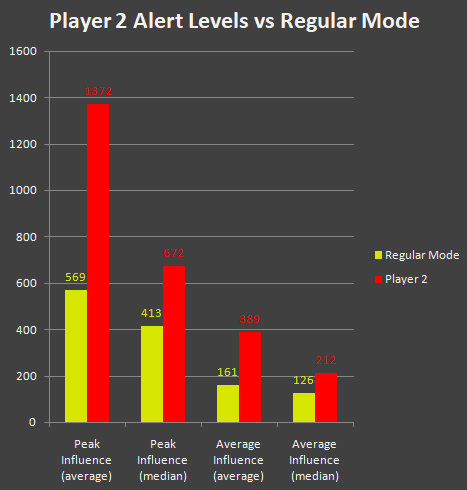
cogmind_beta9_player2_alert_level_comparison

Player 2 clearly has a preference for combat, whether Cogmind likes it or not!

53.2% of runs reached an alert level of at least 4, which is when things can start quickly going downhill for the unprepared. 19.1% of runs ended in high or max security. Both these numbers are way beyond what we normally see in Cogmind, where 11.0% of runs hit that alert level, and only 2.4% end in high or max security.

On average P2 was responsible for destroying 52% of the combat bot kill rate in each run, and took 59.8% of the damage (being less worried about the need for defensive action :P). P2 lost an average of 32% of the parts they attached, but only 21% in the three winning runs (where those runs were more effective at either protecting P2, helping kill enemies before they could do significant damage, or finding/supplying better replacement parts quickly enough).

I enjoyed this mode from both a play and coding aspect, since building an AI capable of creating its own loadout like Cogmind and taking advantage of its abilities was a unique challenge in itself. I didn’t go back and write a dedicated article on this event, but its AI was born from an earlier Battle Royale project which I did write a bit about (the P2 AI is even more advanced).

Miscellaneous

Beta 8 added the Exiles, so it’s time to take another look at whether/how players’ interaction with that map changed from the earlier version (discussed in the Beta 8 stat summary). There are definitely some notable trends.

The number of runs visiting the Exiles dropped from 31.6% in Beta 8 to 24.9%, as they’re no longer the Hot New Thing (for new players coming to Cogmind with Beta 9, all maps are new maps, whereas back in Beta 8 a lot of existing players had been waiting eagerly for that kind of content).

Still that’s quite a few runs heading to the Exiles, more than a few of them with the intention of murdering everyone, as mentioned before. That said, the death rate in Exiles is lower in Beta 9 (1.5%) than Beta 8 (2.7%) as players develop more reliable strategies for surviving that choice (or knowing when they have no chance and shying away).

The number of winning runs visiting the Exiles stayed about the same (62.5%), but the number of winning runs stealing from the Exiles increased a good bit, from 11.3% in Beta 8 to 20.0%. Just in time for nerfs in Beta 11! (Most Exiles prototypes were introduced on the OP side, or at least some are serving a lot more than their original purpose :P)

19.3% of visitors stole from the Exiles, while only 4.8% were good and left with only one part, leaving a rather large 75.9% of visitors who were just passing through or decided not to take anything (or died trying to attack).

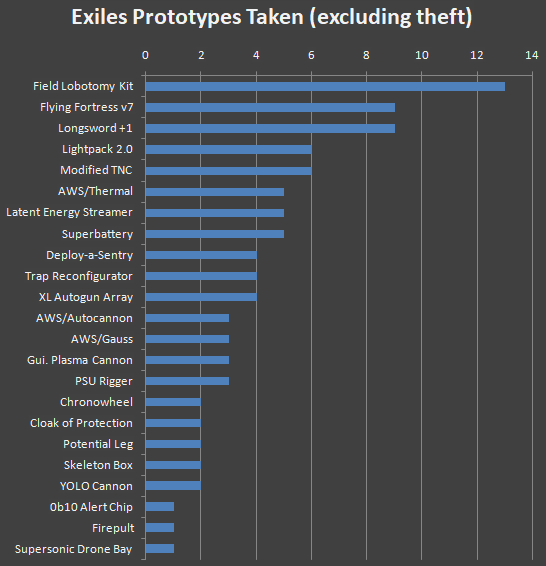
Looking at what players were choosing to take as their Exiles prototype (excluding theft, since those players just take anything and everything anyway), we have what is more or less a prioritization list of what’s best among their gear:
cogmind_beta9_exiles_prototypes_taken

FLK, FF7, Longsword+1, and Lightpack are always popular.

Moving beyond Exiles to look at artifact use, 1.5% of runs used at least one “IR” (using the abbreviation for spoilers). That percentage increases to 15.8% among runs that reached a depth of -1, and yet further to 20.5% of all wins. An average of 1.8 IR were collected per run that used at least one, though the median use was 1. Ape used the most (8!) in a single run to win as an Alien-Scout. (Note: IR stats include only those used to help with parts.)

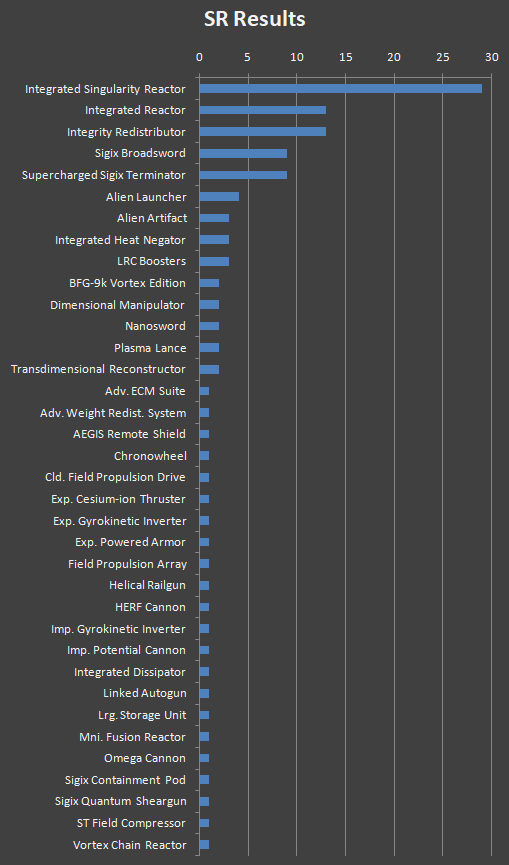
2.8% of runs acquired an “SR,” while 26% of runs that reached at least a depth of -1 acquired one. 47% of players never used theirs. So what did players use it on… (list is pretty SPOILERY if that matters to you):
cogmind_beta9_subatomic_replicator_results

The clear winners here are obvious and expected, although sometimes players do have another pressing need. There are a couple unidentified alien items on the list which players used an SR on already essentially aware of what they were via meta knowledge.

Wow. If you’ve made it all the way down here you’re either a quick browser or just really love stats. If you want more stats of a different sort, check out Cog-Minder by aoemica, which has tons of data about in-game bots and parts, and has even recently been expanded with a detailed combat simulator!
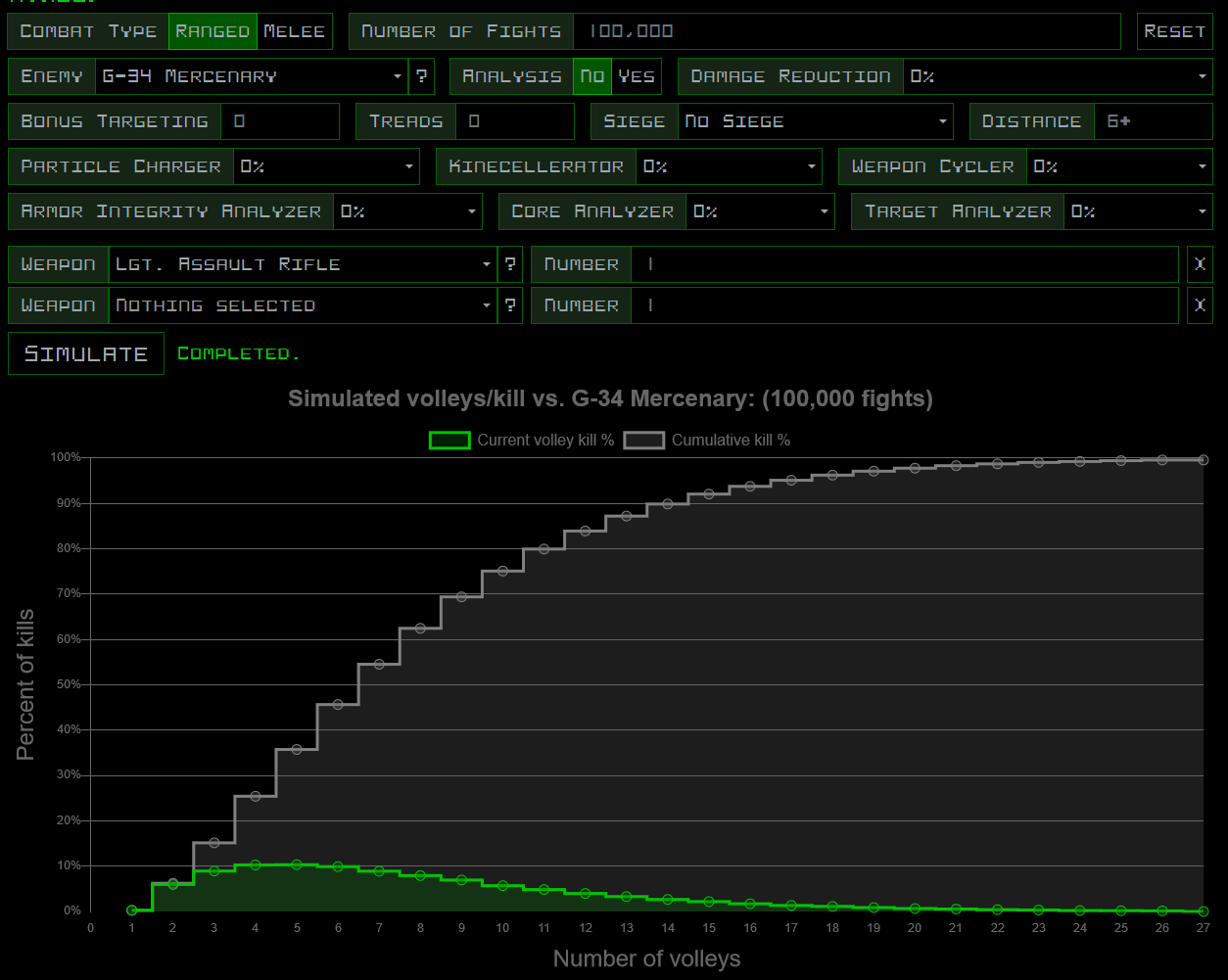
cogmind_aoemica_cog-minder_simulator_sample_2

Cog-Minder simulator at work. Lots and lots of options, and it takes into account all kinds of mechanics.
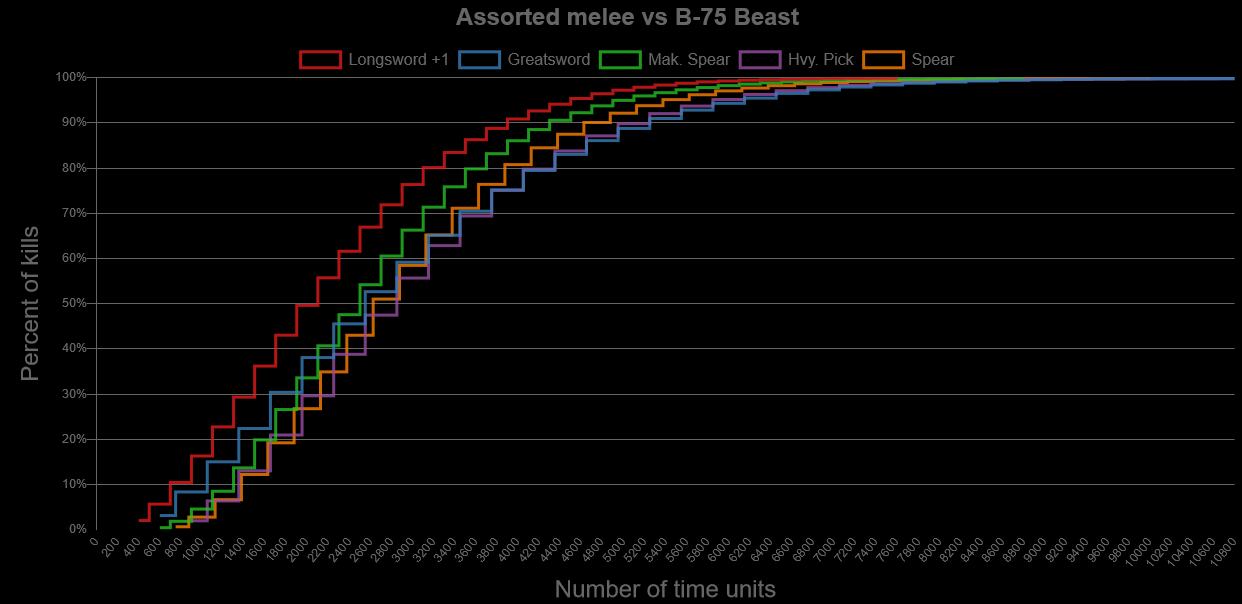
 

cogmind_aoemica_cog-minder_simulator_sample_1

Cog-Minder weapon comparisons for effectiveness against different targets.
Posted in Meta | Tagged , | 2 Responses

Item Searching and Filtering

Many years ago, Cogmind’s predecessor X@COM pioneered the idea of using a pop-up label system in an ASCII game to identify objects like items, beneficial both to help teach new players as well as a natural quality of life improvement. This allows players to more quickly know exactly what an item is, useful when there are otherwise few ways to depict differences beyond the typical character and color options. Labels can appear in various situations such as automatically when new items come into view, when a specific item needs to be pointed out for some reason, or when the player wants to label everything at once.

xcomrl_labels_demo_items

An early demo of X@COM’s item label system, where ground items appear in gray, and soldier-held items in green. Weapons can also use color coding to differentiate their amount of remaining ammo.

xcomrl_labels_demo_units

Using the same system to label soldiers and visible aliens. Soldier labels can be color-coded by remaining health.

As a descendant of X@COM, Cogmind also shares this important feature, but by necessity has since expanded it even further. Particularly in Cogmind it’s not uncommon to have a huge number of items visible at once across the map, or even within a small area, so what do we do in cases where there’s a ridiculous number of labels all over the place?

In X@COM one of the first things I did (because it was easy :P) is allow item labels to overlap one another but randomly shuffle their z-order over time so that labels on the bottom would at least have a chance to be completely visible at some point while observing them. Not ideal, but worked okay.

Cogmind doesn’t do that, but does color code labels to make it easier to focus on different item properties, or easier to find whatever the player might be searching for at the time. And even more useful for avoiding overlap, Cogmind allows labels to extend out from an object in any one of six different directions, ensuring that more of the labels are likely to be completely visible when multiple objects are near one another. Early on, labels also started to carry useful extra bits of info that don’t take up much room, like an item’s rating, and whether it’s of a type the player has never used before (in case they’d like to collect it for their gallery).

cogmind_item_label_concept_integrity_color_labels

The original 2017 demo for when Cogmind’s item label system was switched over to coloration by integrity (the new default).

Labels were later updated to include even an item’s current integrity if damaged.

None of this helps with the sheer number of labels, however, which can be significant, so we ideally need ways to manage that as well, ways I’ve gradually been adding over the years…

Automatic Item Filter Settings

To start tackling the excessive label issue, at least with a few simple tweaks as a start, back in 2018 with Beta 5 I added some adjustable filters to automatically exclude some items from being labeled.

So-called “mass labeling” of items (manually labeling all items at once) would become a two-stage process, where the first attempt would ignore all faulty items, broken items, heavily-damaged items, or those with low ratings relative to the current depth--basically those things which players are much less likely to be looking for at any given time. Attempting to label items again within a short duration would label everything, regardless of these filter settings. All such automatic filters can be tweaked in the options for players who want to adjust their behavior, or turn them off completely.

cogmind_item_label_filters

Demonstration of automatic filtering of item labels for those heavily-damaged by an explosion. Notice a quick subsequent call for labels will include them anyway, making it possible to have two levels of detail via the same command.

This doesn’t go nearly far enough in terms of mitigating all of the excessive label situations, but it’s a good start and definitely helpful.

Manual Item Category Filters

At the highest level there are five main categories of items, corresponding to the four types of slots items can be attached to, plus non-part items. And it’s a fairly frequent need to find an item of a particular category, for example propulsion when you’re literally on your “last legs” (or worse xD), or just any old power source when you’ve lost (or are about to lose) your last one and can foresee an impending energy crisis, or any number of other more nuanced situations.

As such, limiting the labels to only those items belonging to a particular category is an effective way to vastly reduce their number and make it easier to quickly see what nearby relevant options are available.

For this purpose I’ve more recently added the ability to cycle through the various categories while item labels are open, automatically reopening them and applying the new category.

cogmind_item_label_category_filtering

Filtering item labels by category.

The cycling sequence switches between all items -> power sources -> propulsion -> utilities -> weapons -> non-part items (there are three different sets of key options for this interaction, each of which can be reversed as well). Not opening any labels for ten seconds resets the system back to “all items ” again.

Automatic label filter settings are also applied in these modes, and can be overridden by calling labels a second time as usual (the demo above includes example of this, with the weapons and utilities).

Item Searching

Automated and/or simple solutions are nice, but sometimes we need to pull out… the big guns of the item-seeking world: full-featured search. For this I built a more powerful system capable of both filtering and searching through all known items across the entire map according to a range of customizable criteria.

Now this new dedicated interface is going to be overkill if just checking out a handful of items scattered around in the local area, but sometimes in Cogmind you might encounter a huge war, or maybe you’re just a deadly and determined Cogmind rampaging across a map where there’s no cleanup crew (or they simply can’t keep up with you :P), and the map becomes littered with a mess of salvageable items.

cogmind_pimski_access_farm_destruction

Looking through a mess like this could be challenging even with a robust labeling system :P

cogmind_zxc_access_destruction

Another example of wide-scale destruction from running battles in a late-game map, this one in ASCII.

There might be parts you want in there, but it can take a little while to sort through them. And although with experience the process gets faster, why not make it fast for everyone, and vastly increase the speed of doing so, by allowing the player to describe specifically what they want, or at least some aspect(s) of it.

Activating the new search feature opens a window over the right side of the HUD initially listing all known items:

cogmind_item_search_ui

Item search window showing a list of nearby items.

Items in the list are ordered by their current direct distance from your position, near to far, not taking into account walls or available paths (this is a more meaningful approach in Cogmind, since terrain destruction and making your own paths where helpful is common practice). Those items currently within Cogmind’s FOV display their distance in blue, whereas those outside FOV display it in a shade of gray depending on distance. To the right of each item is its last known integrity, if available.

Once in this mode, simply typing enters text into the Search bar, where the most basic filter is text which must be found in the item name. For example “Imp” will list all items with the Imp. prefix, but technically also include “Impulse Thruster” (unless a period is added, of course, to search for “Imp.”).

cogmind_item_search_ui_demo_text

Searching for items via text.

Combine separate strings (requiring all of them to be present, but not consecutive) by using a comma. For example searching for for “par,char” would return any Particle Chargers. (Searches are not case sensitive.)

As usual, standard text editing commands are available, such as the Delete key, Arrows to move the cursor, and Ctrl-Backspace to erase the current text. The Enter key also simply resets the current search.

This interface is an easy way to look for very specific items, or quickly find the precise location of an item you remember to be somewhere on the map, because the list items are also interactive! Clicking on an item name (or using Ctrl-a~z) both centers the map view on it and highlights the shortest known path to reach that position:

cogmind_item_search_ui_demo_centering

Centering on items via the search interface, also highlighting the path to reach them.

Double-clicking (or repeating the keyboard command) will then also automatically move to that item.

cogmind_item_search_ui_demo_pathfinding

Using the item search interface to path to a desired target.

But the item search feature is about more than just names--it’s made much more powerful with support for specifying other required properties.

Special filters are available using the period prefix. For example “.power” will list all items that count as parts equippable to a power slot, or “.treads” will list all tread items. Generally only the first few letters are actually required to specify a particular filter, as indicated in the reference list below, but the full word is fine as well.

cogmind_item_search_filters_manual

The current list of special filters for item searching, as found in the manual.

Multiple special filters can be combined with one another, as well as used alongside name filters if desired, again using a comma to delineate separate filters. For example “rifle,.th” would list any items with “rifle” in the name which are also capable of dealing thermal damage. Or “.hov,5,70%” would list all hover propulsion of at least rating 5 with a minimum of 70% current integrity.

cogmind_item_search_ui_demo_filters

Applying various filters to the item search list.

Under the search UI the extra space in the HUD is filled with a persistent list of helpful commands as a teaching tool and reminder:

cogmind_item_search_ui_help

Search UI help text.

For most cases I imagine the manual item category filters for mass labeling will generally be more useful since backtracking is not something a lot of builds want to do in Cogmind, and you’re generally trying to browse a low to medium amount of nearby parts anyway, but there are definitely some cases where a more powerful search feature will come in handy, so I decided to add both :)

Posted in GUI | Tagged , , | Leave a comment

Cogmind 2020 ARG Walkthrough

Last time I shared how Cogmind’s special ARG event for Halloween 2020 was conceptualized, built, played, and received. Now it’s time for a deep dive into the puzzles themselves!

That also means SPOILERS!

Basically here I’ll run through most of the steps to the ARG and add a bit of commentary on each where appropriate. Some readers might want to use this as a reference to skip past some part they’re having difficulty with, or it could be for you to satisfy your curiosity about the ARG content without actually playing :P


> > > SPOILERS BEYOND THIS POINT < < <


Level 1 Hint: The Exiles have pinned some new gossip.

The Exiles, an early-game faction found in their lab hidden in the Mines, have a message board where they’ve pinned some important messages in the regular game. For the ARG those messages were replaced with new content, specifically an exchange between two of the Exiles:

  • “I heard MAIN.C made an account on Patchboard just to dis Warlord! --DEC”
  • “Patchboard? — HEX”
  • “It’s like the Pastebin of Zion. You can see what he wrote for yourself at 8KSDbDjz. --DEC”

This was a pretty brutal way to start off the event, since although finding the clue is easy, figuring out what to do with it is definitely on the harder side. Eventually solving it does immediately put players in an ARG mentality, however, emphasizing that you’ll really need to move outside the game for the second part of each puzzle.

In this case it requires some familiarity with (or the ability to investigate and learn about) URL construction on the Pastebin website, which follows the pattern pastebin.com/X, where X is a generated alphanumeric string as seen above. Going to pastebin.com/8KSDbDjz reveals a message left by MAIN.C:

cogmind_arg2020_level_1_pastebin

The solution to the first ARG level, found on Pastebin.

The message is signed “0B10VERLORD”, which happens to be the password. Entering that brings players to their first new page, a lore entry for The Unchained.

cogmind_arg2020_level_1_lore

Cogmind ARG Level 1 lore: The Unchained.

I’ve mentioned The Unchained multiple times over the years, and they even have some references in game, but until this ARG I’d never given any real details as to what they are besides a hostile presence. They will actually be coming to the game if/once Patreon support maintains a certain level (that it’s now approaching!).

Level 2 Hint: You do not mine Data Miner.

Data Miner is a major NPC, and to “mine” a robot could be understood as parsing their mind for data, so this step involves hacking Data Miner to parse them for the clue.

Appropriately, “You do not mine Data Miner” is actually the normal response that you get when parsing this NPC in game, making the connection to this hint even more obvious to anyone who has done it before. That said, the response is also written in binary so only a subset of players have realized they could translate it and discover additional meaning behind the numbers.

In the ARG their normal response is replaced with a different binary message:

cogmind_arg2020_level_2_parse

Part of the solution to the second ARG level, found by parsing Data Miner.

The binary there literally translates to “1234”, which is the password for the next level.

cogmind_arg2020_level_2_lore

Cogmind ARG Level 2 lore: Heavy Class.

The Heavy Class is actually planned as part of the next major Cogmind release (Beta 11), though I haven’t yet mentioned it much except for during discussions with patrons.

Level 3 Hint: A new derelict is registered this cycle.

The idea of “registering” a derelict on a “cycle” basis comes from the Imprinter in Zion, and simply visiting her there (on friendly terms) triggers different dialogue from the usual greeting:

“During the Beta 10.1 cycle we recently had a new registration by a strangely named derelict, simply ‘3.14’, who claimed to have safely ascended to the surface via Access with the help of a something-SkeletonCharger. I can’t quite recall that component’s full name, but I’m guessing it’s in the online version-wise database of runs…”

This dialogue alludes to the public player run data for Beta 10.1 (the version prior to the ARG release), available online here. Doing a ctrl-f search for player “3.14” shows they played a bunch of runs in that version:

cogmind_arg2020_level_3_clue_run_data

Part of the solution to the third ARG level, found in the player run database.

Cogmind run seeds, which appear in every scoresheet, are “fake item names” composed of three words randomly chosen from the names of game items, which is what “something-SkeletonCharger” is referring to. Opening the first 3.14 scoresheet and searching for “SkeletonCharger” gives us the full seed, which is also the password:

cogmind_arg2020_level_3_seed_password

The solution to the third ARG level, found in 3.14’s scoresheet data.

This brings us to Level 3…

cogmind_arg2020_level_3_lore

Cogmind ARG Level 3 lore: Wild Caves.

A reference to the Wild Caves was added to Cogmind in Beta 10. This adds a little more info to that, while also linking them with a few other bits of existing Cogmind lore. These lore entries aren’t usually meant to be full of details, more on the level of a general concept that gets players thinking about the possibilities. Like a lot of Cogmind lore, the point is to be evocative :)

Also by now you might start to notice that each page has a new color theme, a trend that continues on to the end.

Level 4 Hint: Hackware. It’s good for you.

This is probably the most vague hint of the event, but simply requires attaching a lot of hackware in game, enough to get a combined 40% bonus. Since some players like to build a hackware stack anyway, they would even get the clue from this hint before actually reaching this level.

Unsurprisingly, some players passed this level without using the in-game clue, taking the concept of hacking at face value and simply immediately tried “hacking” the web page itself, starting with a good old right-click followed by “View source” :P

cogmind_arg2020_chat_zyalin_hacking_html

l33t

And there it is, the password right in the source:

cogmind_arg2020_level_3_html_source_password

The solution to the fourth ARG level, found in the source to the page itself.

For those who needed the clue, after attaching enough hackware the “FORBIDDEN NOTICE” message I mentioned earlier pops up on the map, like so:

cogmind_arg2020_level_4_clue_html_source

The clue for the fourth ARG level, indirectly suggesting to examine the HTML source.

I’ve been considering the Reformer idea for years, but as fun as it would be it’d be really complex to implement, so still hasn’t happened:

cogmind_arg2020_level_4_lore

Cogmind ARG Level 4 lore: Reformer.

Level 5 Hint: Someone’s being hacked in Extension. Or is it just really good music?

This level is one of my favorites. And only partially because it involves one of my favorite composers :P

The first regular derelict rescued from imprisonment in Extension (the normal thing to do on that map) has ARG-specific dialogue:

cogmind_arg2020_level_5_clue_derelict_music

The clue for the fifth ARG level.

First of all players needed to make the connection between “music” in the hint and “jammin'” in the text (multiple people seem to forget that second part of the hint by the time they’ve found the clue!) to realize that this definitely has something to do with music, and from there, likely with help from Google, eventually learn that Master Boot Record is a composer on Bandcamp.

Extracting the letters that were converted in the derelict dialogue above results in 486DXXXX… and looking at the MBR discography, there’s a release by the name “486DX.” The first track on that CD is “33MHz,” which happens to be the clock speed of a 486DX, and the password is the result of the question in the dialogue: “This clock speed! What is this?” So: 33Mhz. (And yes I was listening to that track while working on this part of the ARG. Damn MBR is awesome.)

Since this is based on actual hardware (hardware I’ve owned back in the day :P), someone familiar with the 486DX would likely not even need to look at the MBR site to guess the password directly from the original dialogue.

This one was pretty fun and memorable because it was one of the most lengthy and challenging among the levels I listened to on Discord, with a wide variety of creative approaches thrown out there as it required parsing and piecing together quite a few different bits of info.

This also happens to be the puzzle I was mentioning earlier which led players to a web page with its own separate hidden messages, which definitely distracted them from the intended path for a bit :P. MBR likes to encode info on their music pages, what a coincidence…

Entering the password gives players a peek at the lore behind the Merchants Guild, to be part of a guaranteed and very large post-1.0 free expansion:

cogmind_arg2020_level_5_lore

Cogmind ARG Level 5 lore: Merchants Guild.

The Guild already has some references in Cogmind, but no interactive content yet. For this I put together a mockup of what a “store-like” interface could look like, even though what actually gets implemented could end up being quite different from this since there’s a good bit of time between now and then.

Level 6 Hint: Working as intended…

Getting to Level 6 is both very easy and very hard. The hint here is not really much of a hint, enough so that most people end up just clicking on it at some point, and realize that the link is broken. Or so it seems…

cogmind_arg2020_level_6_hint_404_page

A 404 page?! Or is it…

Players might also use their knowledge from the earlier step to examine the HTML source and realize that the page is actually linking directly to another page that’s nominally supposed to represent Level 6, which is indeed at that location but is made to mimic a 404 page, but isn’t really a 404 page.

Anyway, it’s not easy to quickly make sense of this hint, but knowing that the link is “working as intended” but leads to a “404,” and without any additional info, players eventually come to the realization that it probably has something to do with 404, which is actually the name of an achievement in Cogmind.

Earning this achievement requires destroying all four Network Hubs in a certain map, and that’s the key to progressing here. Destroying all four is actually quite a challenge, however, so this is just a way to direct players towards where they can get the answer. After destroying only one they’ll immediately get a popup:

cogmind_arg2020_level_6_url

A direct path for the sixth ARG level.

This is a unique step in the ARG, because 1) there actually is no password, just a URL that takes you straight to the next level, and 2) this means players can technically skip all levels prior to the sixth and go straight to that part of the ARG as soon as they destroy a Network Hub!

So this design offers a shortcut of sorts, although a shortcut in this type of event where every level has its own reward is not incredibly meaningful, other than perhaps to allow the player to then have two hints to follow in parallel, and they can chose which is more convenient for them in the current run. Players are generally still going to want to go back and do previous levels.

It’s also not an incredibly likely shortcut to find, since reaching the required map is not common in regular runs, much less those done for the ARG where people are generally laser focused on their goal and trying to avoid other trouble (destroying a Network Hub creates a lot of trouble, hence the challenge/achievement). That said, I did hear of at least one case where it happened.

At Level 6 players learn about derelict Safehouses, one of the additions to the caves that I’ve been wanting to add for a while now.

cogmind_arg2020_level_6_lore

Cogmind ARG Level 6 lore: Safehouses.

Level 7 Hint: Proto-MAIN.C would know.

Understanding this hint requires having paid attention to one of the lore details in the mid-game, which reveals that Revision 17 (an NPC) is actually a precursor to the MAIN.C AI. So meeting R17 is the goal here, and the place to do that is in Cetus, only possible after destroying all of the Cetus Guard and approaching the northern exit. On doing that, as soon as R17 appears and spots you he’ll keep repeating the same phrase again and again: “Wake up, Neo…”

The password here is simply “Matrix”, the movie from which that quote originates, and to which Cogmind makes a number of references.

cogmind_arg2020_level_7_lore

Cogmind ARG Level 7 lore: Graveyard.

The Graveyard is a map that’s been part of the lore for a while, but isn’t actually in the game, and details are thin. In fact, details are still thin even after the ARG entry :P. But it does provide just a little more info about the possibilities, and also puts it at the forefront for players who might’ve missed the in-game references.

Level 8 Hint: Become a monster, slay the hero.

Like Level 6, this hint refers to an achievement name, “Monster,” earned by going hostile on the friendly robot city of Zion and killing at least 20 inhabitants. “Heroes” are associated with that city (they’re called the Heroes of Zion), and a random one comes to their rescue if you attack.
Slaying whichever hero comes results in a special dialogue on their death:

cogmind_arg2020_level_7_clue_hero_death

The clue for the seventh ARG level.

This level is also an example of one of a few encounters in which the ARG mode makes gameplay tweaks, or should have, in this case guaranteeing that a hero will show up during that event (it’s not normally guaranteed to happen). Unfortunately I forgot to actually modify the logic for this one, so it’s only a 50% chance they’ll be there :/

I did modify the logic in the other appropriate cases to make it easier to get a clue as long as you’ve solved the hint and reached the appropriate location and/or did the required actions, since the RNG shouldn’t really be a bottleneck here.

Searching around on the r/Cogmind subreddit, players could find a new section in the sidebar:

cogmind_arg2020_level_8_password_subreddit_sidebar

The solution to the eighth ARG level, as found in the r/Cogmind sidebar of both old (yay) and new (ugh) Reddit.

While this would’ve been a fun opportunity to put some other text there, I decided to use a random alphanumeric string to make it extra obvious it was the password.

cogmind_arg2020_level_8_lore

Cogmind ARG Level 8 lore: Chaos Squad.

One thing that might come to Cogmind some day is more corruption-based mechanics, specifically the ability to derive new abilities from it, so we would certainly welcome some faction associated with that feature… There they are!

Level 9 Hint: Zhirov’s lament.

The keyword here is Zhirov, so the assumption would be that you have to visit that major NPC to see what’s up. As soon as you see him, instead of his usual dialogue he says “TGGW is awesome. I wish I knew who made this game so long ago…”

TGGW is a traditional roguelike, The Ground Gives Way. It’s a great game, and fairly popular in the core community, but either way a quick search online will pull up the meaning of the acronym and its website. Looking there you can see the creator goes by the name “BtS”, and that’s it, the password.

cogmind_arg2020_level_9_lore

Cogmind ARG Level 9 lore: Warper Class.
This particular type of bot is just a rough concept, not necessarily something that will be added to the game, but something along these lines has been considered a few times.
Level 10 Hint: You don’t find them, they find you.

This hint is a little more cryptic, but most people who’ve been playing for a while didn’t seem to have much trouble with it. “Them” refers to Master Thieves, a group that cannot normally be found in game, but will track you down in the caves if you meet a certain condition, namely having stolen multiple advanced prototypes from the Exiles lab (or being suspected of it because you attacked the lab).

The first Master Thief to intercept you has a different dialogue from the usual, saying “You’d never guess it was the fourth one who sent me, heh.” The clue here actually points to Cogmind lore for the password, alluding to the fact that there was technically a fourth Exile, whose name can be found referenced in a couple different places. Their name is “EX-OCT.”

cogmind_arg2020_level_10_lore

Cogmind ARG Level 10 lore: The SPACEJUNK.

I would love to add the SPACEJUNK crew to the game.

Level 11 Hint: Z1$+NX3F=JRE3_ZNQR

Another hint riffing on an achievement! Achievements are perfect for an ARG since they generally have creative names that employ a bit of indirection, while also of course being related to certain actions or game content. (For those not aware of this achievement, simply searching online will find it, too.)

The “Z1$+NX3F=JRE3_ZNQR” achievement involves getting very corrupted, so the hint here basically implies “go get corrupted.” Although the achievement requires a high level of corruption, only reaching 6% corruption (fairly common) is enough to start injecting a special notice in the random corruption animation on the UI:

cogmind_arg2020_level_11_clue_corruption

The clue for the eleventh ARG level, which occasionally appears for a moment while corrupted.

The animation includes the website “rot13.com,” shown brighter for a slightly longer period to attract a bit more attention.

One oversight here is that it is technically possible to deactivate this animation in the advanced options, in case some people find it distracting, though to my knowledge very few people have done that (I added it for one player by request years ago so it’s buried in the advanced options, and not something most people would want to do since the animation isn’t that frequent and serves as a useful reminder that you’re corrupted, while also reflecting the amount of corruption in its frequency and extent).

Anyway, visiting rot13.com, there’s a link to Wikipedia regarding what it’s about so that players can learn if they hadn’t heard of this sort of thing before. In the past I’ve also used rot13.com to encode a few bits of text in Cogmind lore, so it’s a thing that some players were already familiar with.

The next step is to take the seeming random jumble of characters that make up the achievement name in the hint and drop them into the rot13 converter…

cogmind_arg2020_level_11_password_rot13

The solution to the eleventh ARG level, as converted by rot13.com.

The result is seemingly also jumbled, but enough is converted to make out its meaning :)

Copying that string and dropping it into the password field brings up Level 11.

cogmind_arg2020_level_11_lore

Cogmind ARG Level 11 lore: Scraptown.

This faction has been planned for a long time, and I’d like to say is pretty likely to be added one day? It’s actually the intended community reward for this ;)

Level 12 Hint: Caution: Assembled inside

There is one place in particular where players can choose to open a thing and trigger the release of a horde of Assembled--the Impregnable Gate in the Deep Caves. It’s dangerous and there are warning signs outside (caution!).

Doing so during the ARG results in another FORBIDDEN NOTICE, this one saying “If this were CDDA these wouldn’t be Assembled…” Another roguelike acronym!

“CDDA” is Cataclysm: Dark Days Ahead, a roguelike set in a post-apocalyptic environment where the typical enemy is its horde of zombies. The Assembled are similar in nature to zombies, mindless and weak individually but nasty in greater numbers, and generally scary due to how and where they tend to pop up.

So the password here is simply “zombies”, bringing players to Level 12.

cogmind_arg2020_level_12_lore

Cogmind ARG Level 12 lore: Latent Energy.

Latent Energy is a cool concept, but also underused since I originally added it specifically for a single prototype weapon available from the Exiles. There’s definitely more room to play with the mechanic, so I came up with a new faction that could be one gateway to doing just that.

Level 13 Hint: People would get more out of their welding torches if they’d just RTFM!

This level is actually quite easy, since all it requires is understanding (or looking up) the relatively common acronym RTFM, then getting a Welding Torch in Cogmind to examine its “manual” (description). Any Engineer has one.

cogmind_arg2020_level_13_password_welding_torch

The solution to the thirteenth ARG level, found in the Welding Torch description.

“…the answer is YES” indicates that the password (answer) is “YES”.

This ARG-specific description also reveals that Welding Torches have a mechanic unique to the event: They are actually capable of sealing closed doors shut!

In terms of architecture, this mechanic is piggy-backing on an unreleased feature I added to Cogmind back in pre-alpha, allowing Engineers to build “temporary walls,” so it wasn’t too complicated to build this since most of the hard work was already done.

Temporary walls had a special marker that allowed the AI to shoot at them in order to get at targets on the other side, so welded doors could be converted over to this system and not cause too many issues, although they are still very problematic for the AI and can easily be cheesed (which is why this feature was never released in the first place).

For a while I’ve been wondering if one day we could properly give Welding Torches the ability to do this, though I don’t think it would balance well, and this event was at least an opportunity to let players fool around with the idea.

cogmind_arg2020_level_13_welding_torch_sealing

Fool around with it, they did. (Doors that have been sealed turn red.)

Funny enough, this mechanic is of course available right from the start as long as the game is in ARG mode, but until they reach this particular hint, who’s going to look at the description for the much maligned Welding Torch? (and rightly so, since it currently has no special use and isn’t even a decent weapon)

Cue more lore for the Lifeworm!

cogmind_arg2020_level_13_lore

Cogmind ARG Level 13 lore: Lifeworm.

Okay so it’s a lot of questions, but the idea that it’s coming back is evocative, as is the image to go with it :P. Would be nice to see it arrive one day…

Level 14 Hint: Derelict historians would love nothing better than direct access to the Cetus Mainframe.

This is a pretty direct hint, basically just saying go to the Cetus Mainframe for the clue. Sure enough, hacking into that room reveals a derelict there with some relevant dialogue:

“Quiet, I’m researching here! I just discovered when they say ‘hack the planet,’ they don’t realize it refers to a very specific number of hacks that burst onto the scene September 4, 2018, back on Earth. Ancient history!”

“Hack the Planet” is the name of a previous major Cogmind release (Beta 7) from that day, and looking up the release announcement, the first line of the changelog says “65 new robot hacks.” Thus the password is 65.

Anyone with sensors equipped while doing earlier ARG levels in the Extension branch would likely have found this clue already since it’s on the path to get others and there normally would be no robots locked in the mainframe room, though you’d see this guy on your sensor readings in ARG mode and possibly get curious about it.

cogmind_arg2020_level_14_lore

Cogmind ARG Level 14 lore: Chronoplane.

[REDACTED]

Side Quests

I mentioned before that there are several “side quests,” other lore content to discover via the event but that isn’t necessary in order to progress. Three such details were added, two of which players were able to discover fairly quickly, but the third still hasn’t been uncovered. I’m not going to include any of these in the walkthrough, and have also been exercising maximum restraint by not giving any hints for the remaining undiscovered one :P

Posted in Design | Tagged , | Leave a comment