Official development blog
[ Latest Cogmind Release Notes: Feb 2026, "Unchained More" ]

Special Mode Design: Abominations

Earlier this year I wrote about the hows and whys of alternate modes of play for roguelikes, taking a look at conducts and challenges and other unique ways to enjoy various games, and today I’m back to expand on that with some of the design process behind Cogmind’s latest new mode for Halloween 2019: Abominations!

There actually wasn’t a lot of forethought that went into this mode, as in unlike some plans I didn’t start with some idea but then just take notes and let it continue to incubate for a while as I thought more about its content and balance. It wouldn’t have even happened at all if not for special circumstances. There happened to be a week of down time during which Beta 9 was all but complete and I was waiting on third-party support for the final stretch regarding stat uploading to the new server. Around this time Steam sent out an email like they normally do reminding devs about upcoming events…

steam_notice_halloween_event_2019

Excerpt from Steam’s notice about Halloween 2019.

I’ve done April Fools and Christmas/New Year’s events, but never really considered doing anything for Halloween. But hey here was a chunk of available time, and it happened to be the right time of year, so maybe I could come up with a suitably-themed event.

(This article won’t avoid Halloween mode spoilers at all, so if you want to explore it unspoiled, STOP NOW and come back later for the following in-depth talk about its design.)

My first thought jotted down in my notes was simply “maybe parts on the ground start putting themselves together to attack you :P” and I ran with it immediately. Thus began Abominations mode development, started suddenly and developed very much on the fly.

Now I wasn’t entirely sure how feasible this idea would really be, so at this point the mode was still relatively simple, focusing on the doing rather than the planning, mainly because my initial goal here was to first actually test and confirm that this new “core mechanic” was actually going to be interesting and fun, and work logistically. If not I was just going to scrap it (as I’ve done with one unreleased mode before, as discussed on Patreon if you’re a supporter).

Abominations

Build-wise, Abominations presented some interesting considerations.

Unlike standard bots which have a static loadout and I set their core exposure in reverse by assigning the desired percentage and having the game calculate the exposure value based on their loadout, Abominations using a dynamic loadout (even frequently updating their build) meant they needed an initial static core exposure value.

This means I have less control over how easy it is to destroy a particular Abomination, but this is going to be a pretty chaotic mode as is, given that these new enemies can be composed of almost any combination of parts.

In terms of balance the wide range of potential Abomination effectiveness is okay though, since they don’t strictly work in squads like most other enemies, and individually powerful ones can and should be engaged away from others (or not at all) if possible. In playtesting I met some pretty impressive builds :)

Although Abominations can collect/attach any form of propulsion and you might find them treading, rolling, or even *gasp* flying, because they generally carry a lot they won’t often be moving especially fast, and by default they do have their own form of semi-slow propulsion: Etherial Tendrils.
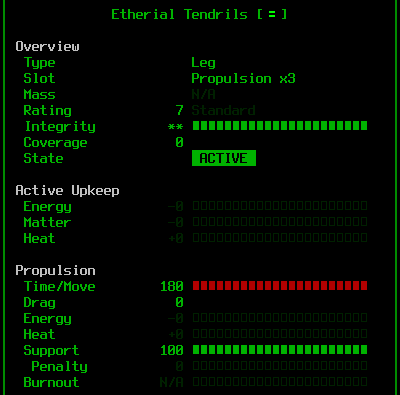
cogmind_etherial_tendrils_info

Etherial Tendril stats--they’re odd since they don’t actually provide any coverage or absorb damage, but are also indestructible.

I originally tried to avoid giving them explicit propulsion so that they’d be as dynamic as possible, just using whatever happened to be around, but as you can imagine this resulted in a lot of immobile Abominations xD. They either hadn’t been formed near any propulsion parts, or had theirs destroyed in combat and would end up stuck in a room all alone.
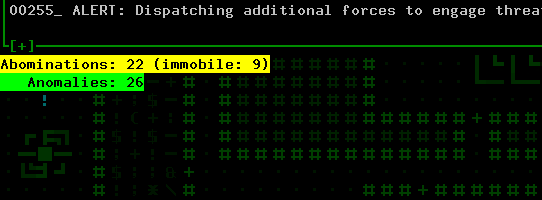
cogmind_halloween_abominations_debug_counts

At one point I added an “immobility counter” to my debugging info so I could keep tabs on how many of them were actually probably useless at any given point. The number tended to hover around half the total.

Being immobile was especially problematic if they didn’t have anything but their melee weapon. From the start I had given all Abominations a natural/built-in melee weapon, Etherial Claws, because otherwise they’d have trouble getting their build together by scrapping nearby bots and it would be fairly common to find an unarmed Abomination, which wouldn’t be very fun (at one point I did imagine them attacking you/targets by using non-weapon parts, but that would be rather complex and heading in a fairly different direction).

So each Abomination gets a free decent melee weapon (which is really just backup since they’ll prefer to attack from range with a projectile weapon(s) once they have one) and a semi-slow leg-type propulsion.

To be effective, though, builds really need to take into account how their various parts work together, and clearly a mostly-random compilation of parts is not going to achieve that. So to at least ensure Abomination builds aren’t completely broken and don’t too often rely on lucky synergies, they also automatically get a decent amount of innate power generation and heat dissipation. Hey, they’re etherial in nature, right? (we’ll get to that later)

Like a number of other powerful bots in Cogmind they also get pretty good innate EM resistance, because that damage type tends to just bypass most other defenses and considerations, and would be too reliable and valuable a way to fight Abominations in particular given their possibly low core exposure and other capabilities.
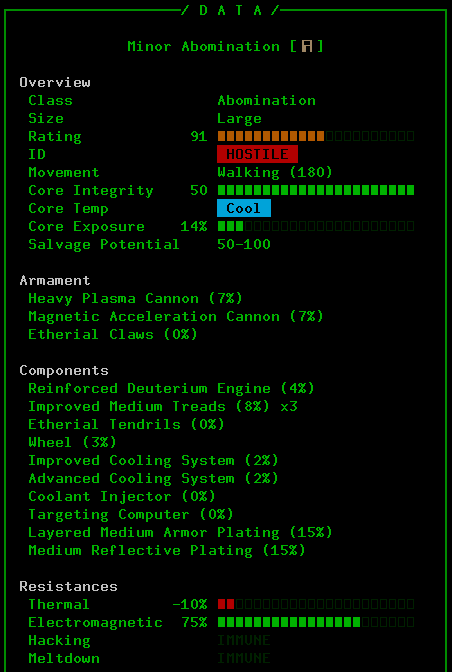
cogmind_halloween_abominations_loadout_sample1

Sample loadout from a random mid-game Abomination. This one’s pretty nasty with some decent synergies going on, and anything with a cannon or two is going to be dangerous, but at least it’s slow.

Abomination AI also has a couple of unique features that correspond to their abilities.

For one they can switch their mode of propulsion. This is something that hasn’t been needed before in Cogmind, since each bot uses a single form of propulsion, but clearly a random collection of parts is often going to include more than one type. So Abominations will check their movement speed assuming different modes, and choose whichever is fastest. Due to different build masses, overweight thresholds, penalties, and drag, “fastest” is not easy to determine! (They ended up using the propulsion cycling function I wrote for the player while working on the new siege tread mechanics, actually switching to different modes then querying their speed in each before comparing the final results and making a decision.)

Abominations are also capable of swapping out their existing parts for better ones! For simplicity this feature relies on the same QoL algorithm I wrote for the player for automatically managing inventory swapping and part replacement, so it means they won’t switch to fundamentally different parts, only better parts of the same general type they’re already using.
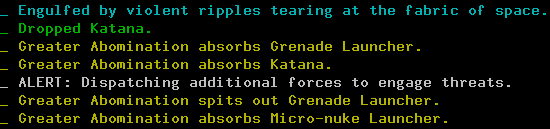
cogmind_halloween_abominations_part_swapping

Now here’s a swap I think I can do without!

Origins

But where exactly are these Abominations coming from?

The answer just sorta popped into my head and mechanically I really like how it turned out: power sources.

As far as the locals are concerned, this is some sort of virus sweeping through Complex 0b10. Shortly after Cogmind enters a new map, 30% of all combat bots are instantly converted to wandering Abominations (lots of fighting naturally ensues since many of these bots will have been members of a squad).

After the initial wave, though, any power source already in the open, and any power source that is later created or dropped as salvage, has a chance to be marked as a potential Abomination. And each of these power sources has a random chance each turn to become the center of a new Abomination, sucking parts in from around it.

To maintain some semblance of control and balance, there is a cap on the number of Abominations which can be active at once on the current map, based on the size of the map: cap = [(mapWidth * mapHeight / 1150) + 10]. Also the chance to mark a new power source ranges from 40~80%, depending on how close to the cap we are (closer to the cap it’s less likely that new Abominations will be formed, whereas if the number is falling more Abominations will spawn).

There are actually five tiers of Abominations, from “Lesser Abominations” formed lower in the complex and from the weak engines powering common unarmed bots, to the pretty scary “Ultimate Abominations” resulting from late-game quantum reactors. Essentially the higher rated the power source, the better the Abomination, with better integrity and capable of attracting more parts.

Anomalies

Before even doing any real playtesting, I felt the mode would need more than this. “Robots” collecting parts from their surroundings and using them against everyone else is certainly an interesting enough premise, but theme-wise the event should should get even more creative than just relying on mixing and matching existing parts players are already mostly familiar with.

So I considered giving each Abomination a random special ability, noting down various concepts such as leaving a trail of fire, spewing heat, freezing nearby robots, detonating nearby machines, and more crazy stuff. Basically, adding environmental/area effects would make situations a lot more dynamic and interesting, especially if more than one of these effects is active in the same area.

However, it seemed like encounters would be a lot more dynamic if these abilities were given to a non-combatant entity, rather than concentrating them in what are already potentially powerful enemies (Abominations). Let’s call them “Anomalies,” drone-like objects randomly flying around and which, like Abominations, could also be centered around power sources.

One of the advantages here is that these Anomalies would then take up power sources that might otherwise form new Abominations and cause the latter to propagate out of control (at the time I hadn’t actually yet decided to cap the abomination count), not to mention if wandering non-combat bots are the ones carrying these abilities, that opens the door to neutral or even beneficial effects. Separate from Abominations, their faster speed also allows Anomaly effects to have a greater influence on their surroundings without the design having to worry about a hostile entity that will stick around and keep attacking the player in addition to its ability.

Anomalies are actually created by Abominations: For each surplus power source they’re carrying, there’s a 5% chance per turn to use it to “shed an anomaly.” Anomalies consist purely of that power source plus “Etherial Propulsion,” a unique type of flight. They’re fairly robust, just so that they aren’t quite that easy to instantly pop on sight without a pretty good build, and each has a unique effect, after which they’re named:

  • Fire Anomaly: Significantly heats up nearby bots. These are essentially like the Furnace derelicts, only they move a lot faster and are a lot more common, considering few people ever see Furnaces :P. As far as 0b10 bots go, they might very well quickly meltdown when a Fire Anomaly passes by if they’re unlucky with the side effects of the initial heat.
  • Ice Anomaly: Freezes nearby bots, preventing them from acting for six full turns even if just by passing by them (or you!). Also a good way to cool down, though ;)
  • Corrupting Anomaly: Causes system corruption to build up in all nearby bots, like the Demented derelicts.
  • EM Anomaly: Zaps nearby bots with corrupting electromagnetic blasts, basically like a mobile overloaded Fabricator.
  • Matter Anomaly: Leave random amounts of matter behind as they travel.
  • Resonating Anomaly: Cause nearby explosive machines to explode.
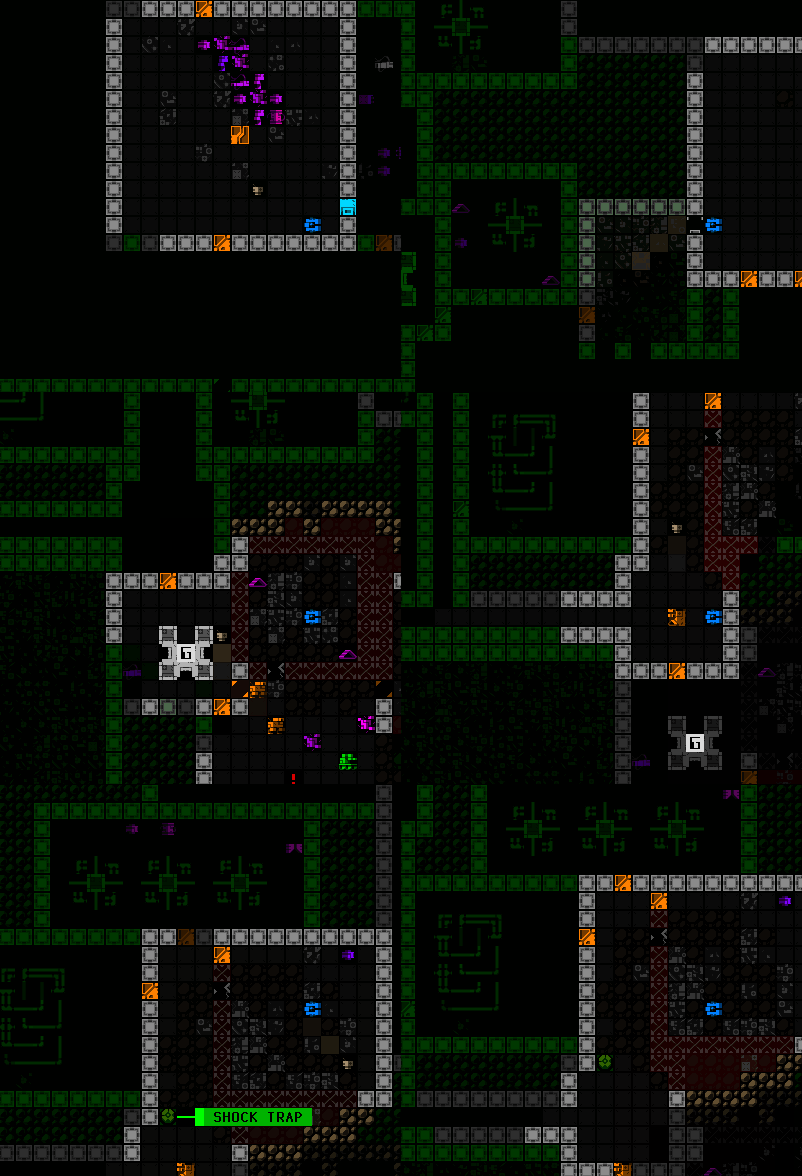
cogmind_halloween_abominations_resonating_anomaly

Following a Resonating Anomaly as it wanders around triggering some machines.

  • Unstable Anomaly: Randomly trigger entropic explosions centered on themselves.
  • Sundering Anomaly: Randomly shoot out waves of energy that rip parts off nearby bots.
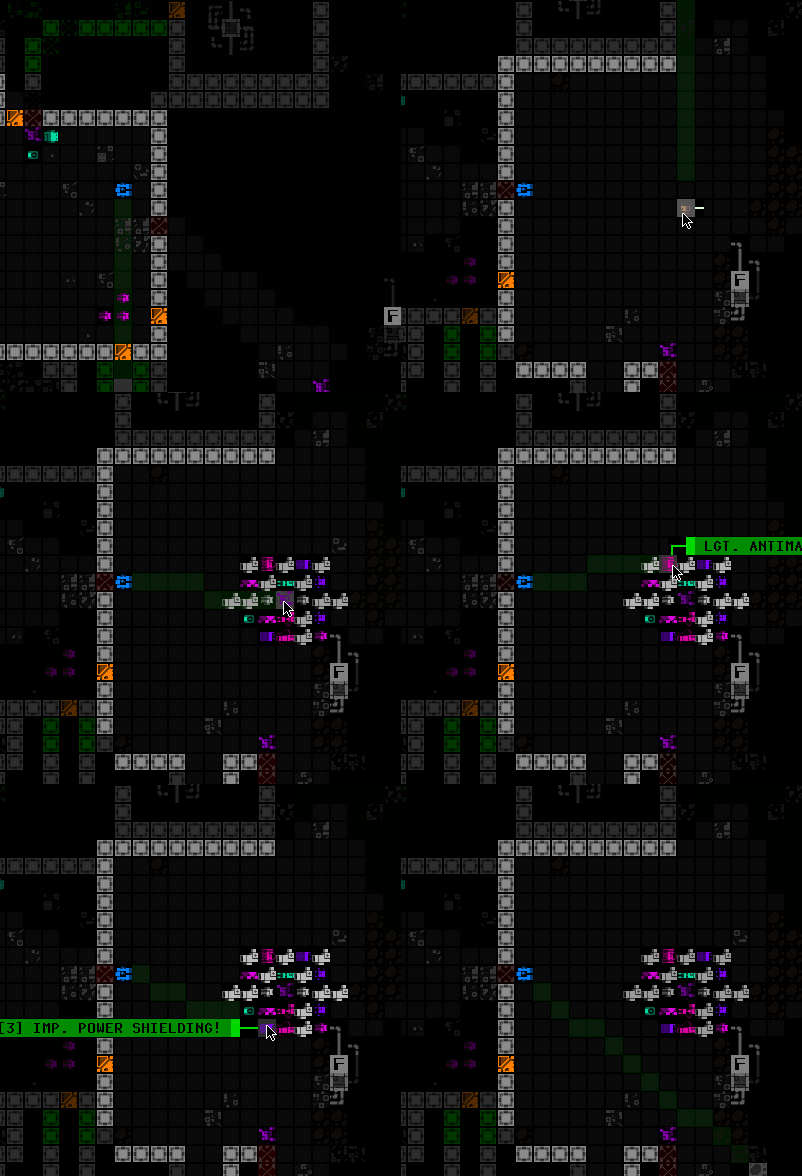
  • Hungry Anomaly: Suck in and collect loose parts from a large area. Abominations also might feed on them, taking parts they need! Design-wise this is a nice way to randomly redistribute and deliver parts to Abominations that otherwise haven’t found any/enough in their local area as they move around more slowly. They also make amazing loot piñatas for Cogmind ;)
cogmind_halloween_abominations_hungry_anomaly

Nom nom nom.

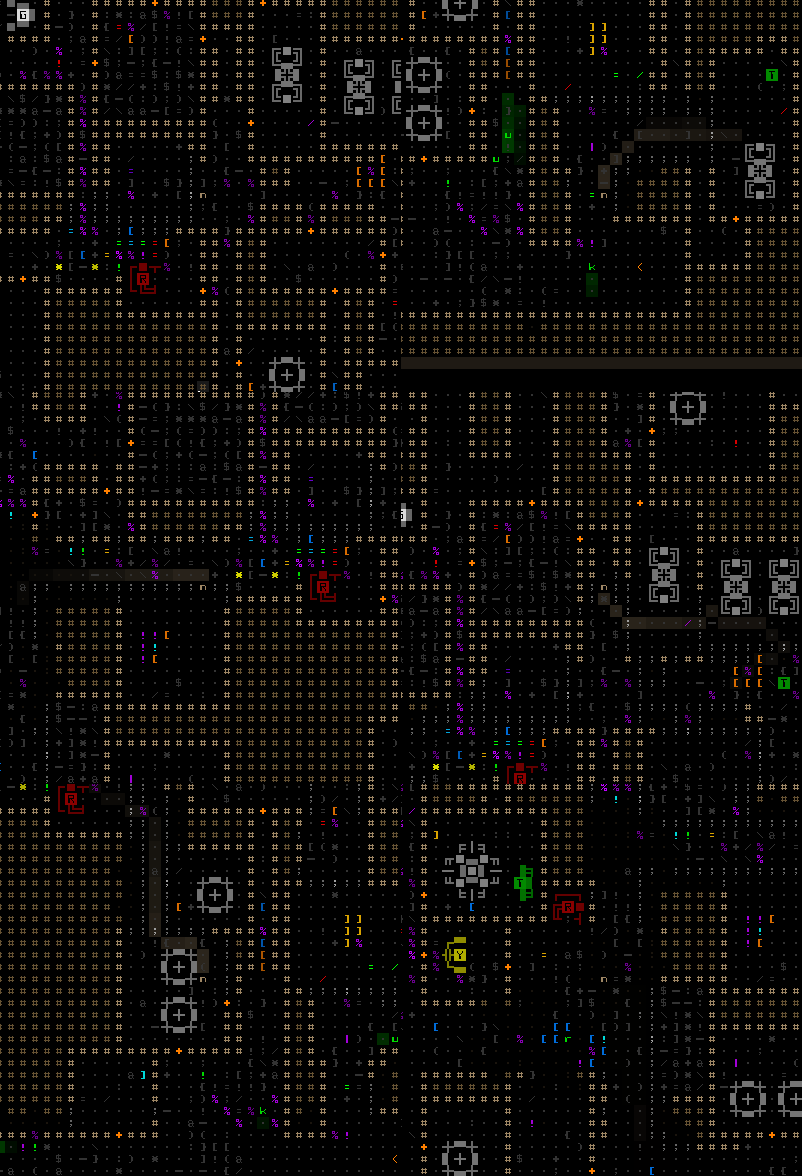
  • Disintegrating Anomaly: Disintegrate nearby terrain. Several of these can easily turn large areas of the map into Swiss cheese, which may be a good or bad thing depending on the circumstances :)
cogmind_halloween_abominations_disintegrating_anomaly

I removed enemies from this map to get a much quicker view of what’s happening, but when there are battles out there, corridors widening and walls coming down can have a significant impact on tactical situations.

  • Warp Anomaly: Cause loose parts and robots to randomly teleport. Also randomly teleport themselves via the same effect.
  • Chaotic Anomaly: Randomly open rifts and summon objects through them, anything from common parts to angry powerful robots. They can literally summon almost anything, making it possible that either you (or Abominations!) may find some really rare parts just lying around. Careful out there… However, unlike most other Anomalies, the Chaotic variety only apply their effect while under attack. If you feel safe, attacking one of these might give you something great, or end up being a terrible idea--care to take a gamble?
  • Polymorphing Anomaly: If they come under attack, they randomly morph into a different powerful (if not very powerful) combat robot. Once fairly damaged they’ll then return to Anomaly form.
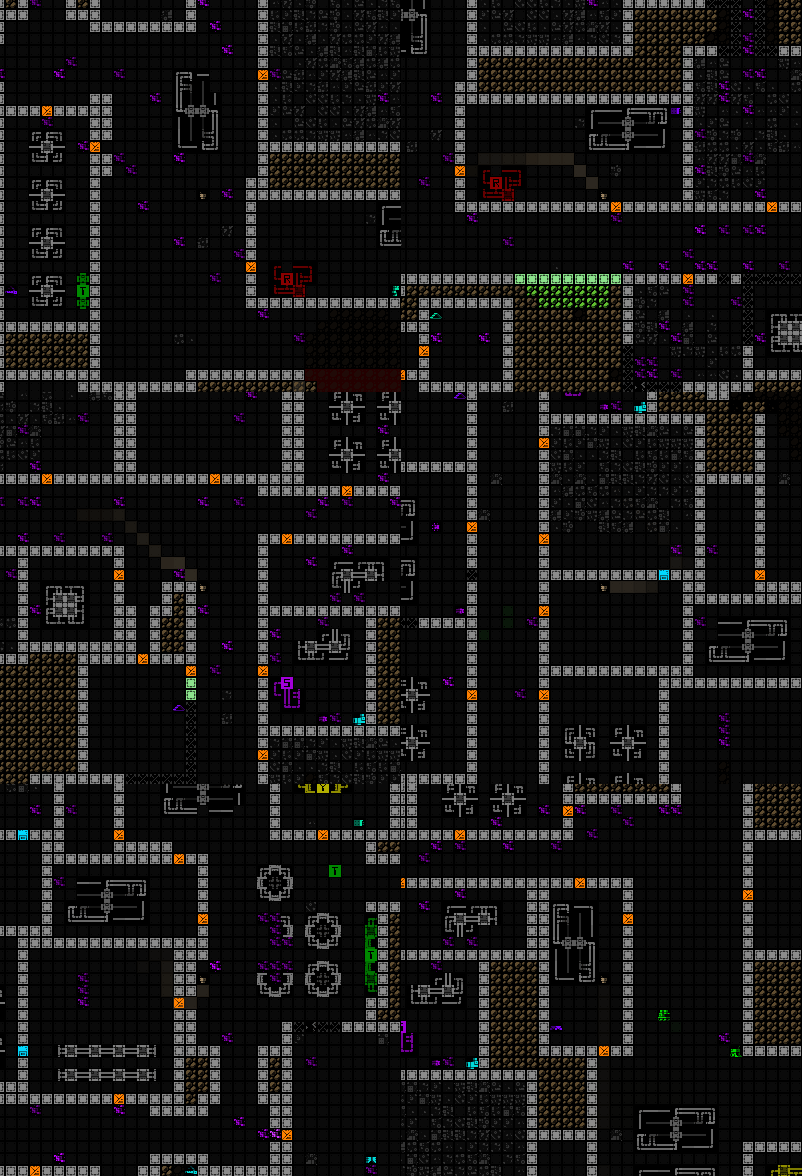
  • Paradox Anomaly: Fully repair terrain, loose parts, and the parts and core of all robots across a large area! This includes even your parts, but not your core.
cogmind_halloween_abominations_paradox_anomaly

Paradox Anomaly restoring terrain (again I removed enemies for a quicker demonstration).

That’s every single one from my original notes except for one (the Deflecting Anomaly, which would presumably be able to redirect projectiles mid-flight, but getting that mechanic into Cogmind would’ve been a huge amount of work, and probably fraught with bugs).

Note that the detrimental abilities do not affect other Anomalies or Abominations (which would make the mode pretty unbalanced and I think less interesting), though they’re still affected by warping and the paradox effect.

I originally planned to put a description of each Anomaly effect in their info window, but by the time they were all implemented decided it’d be more fun to just let players figure them out. They all have log messages corresponding to what they’re doing anyway, but there could be some added suspense on meeting a new one that hasn’t yet used its ability (plus some have multiple/special interactions to discover!).

Although Anomalies are chosen randomly, not all types have an equal chance of being formed--they’re weighted to allow for some control. Chaotic Anomalies are potentially too powerful, for example, and Matter Anomalies would fill an entire map with matter if there are many of them. Some Anomalies also can’t appear too early in the complex. For example meeting a Polymorphing Anomaly in the first floors could mean a swift death because of what they’re capable of turning into, which wouldn’t be very fair :P

Like Abominations, there’s also a mapwide cap on the number of Anomalies (generally around twice as many as Abominations).

Polish

With the main content complete, it was time to test it out and tweak the many variables involved, especially those affecting spawn rates and caps since they’d form the backbone of a consistent experience.

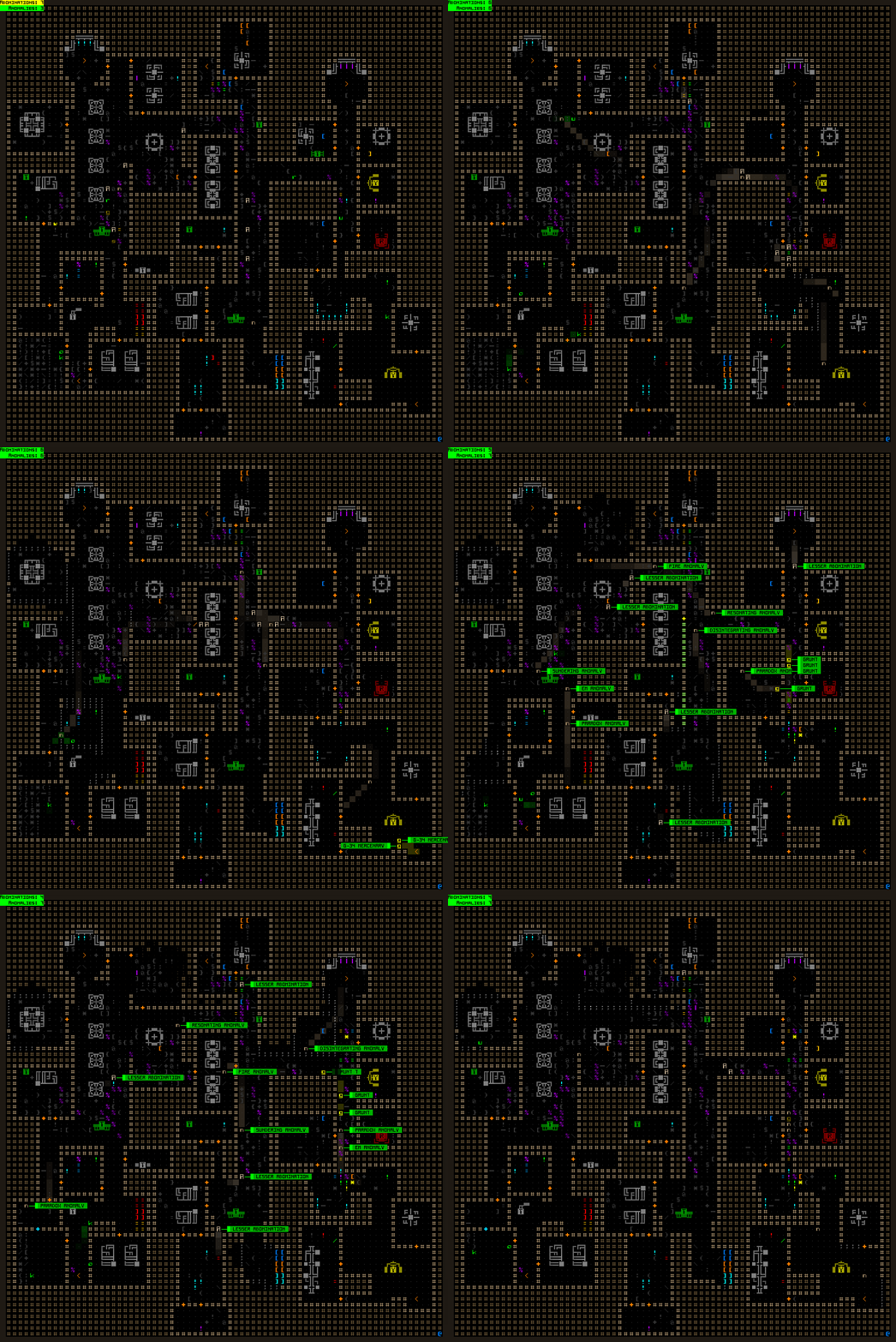
I didn’t play just yet, though, since 1) that would be quite slow and 2) the real important factor is what’s happening across the map as a whole, of which the player is a pretty small part. So I loaded up maps and would spend hundreds of turns watching each one to see how it played out on its own.
cogmind_halloween_abominations_watching_materials

Watching chaos spread back and forth across the map (open for full size). Different depths behaved differently based on their general layouts and resident robots/parts, and this particular sample is just the first and smallest map, which tends to be fairly cramped and dangerous in this mode. Later depths tend to be more chaotic with a greater number and variety of Anomalies, and stronger 0b10 forces so they’re not as easily overcome (including lots of reinforcements from Garrisons, which the above sample map is lacking).

This is when I ended up actually adding the cap on Abomination/Anomaly numbers, because they originally just grew like crazy as more bots entered the floor and were slaughtered :P. I also made an exception for this mode to reduce the number of non-combat bots that would continue coming into the map to replace those that had been destroyed, because otherwise they were an endless source of weak engines and therefore a lot of potentially weak Abominations.
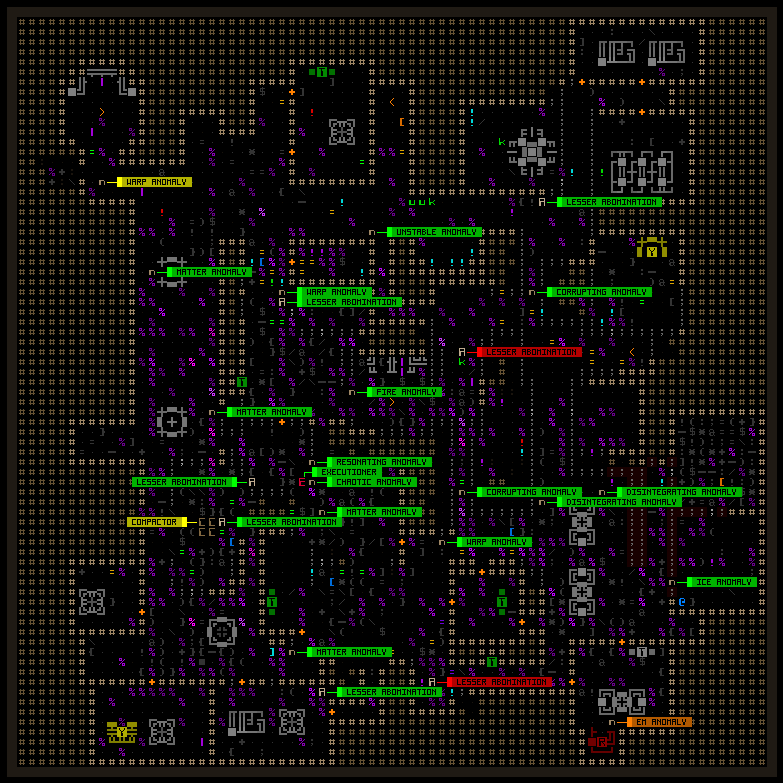
cogmind_halloween_abominations_post-carnage_materials

Another scene of post-Abomination carnage in -10/Materials, labeled. This shot was taken before I put more early-game restrictions on the types of things that can appear :P

I also ended up adding more 0b10 dispatches, one of the big reasons being to supply new power sources (better ones!), and so there’s a constant churn of conflict across the map and it doesn’t eventually die down with one side fully overcoming the other.
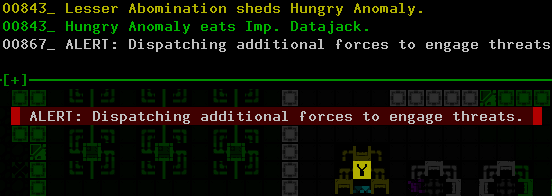
cogmind_halloween_abominations_0b10_dispatch

The extra dispatches are essentially roaming assault squads.

Halloween mode also required a bit of dedicated QoL for the interface: Since it’s pretty important to know the specific type of Abominations you’re facing off against, or the type of Anomalies just spotted or operating nearby, I modified map labels to show their full name. Normally map labels show only robot class names, which is better in regular Cogmind the way it’s designed, but in this mode having so many robots that appear the same but possess wildly different capabilities or effects means there needs to be a quick way to distinguish them rather than opening their info or even just using the Scan window. So while playing this mode I tend to frequently hit ‘1’ to call up the hostile robot labels to be sure of what types of Anomalies are flying nearby.
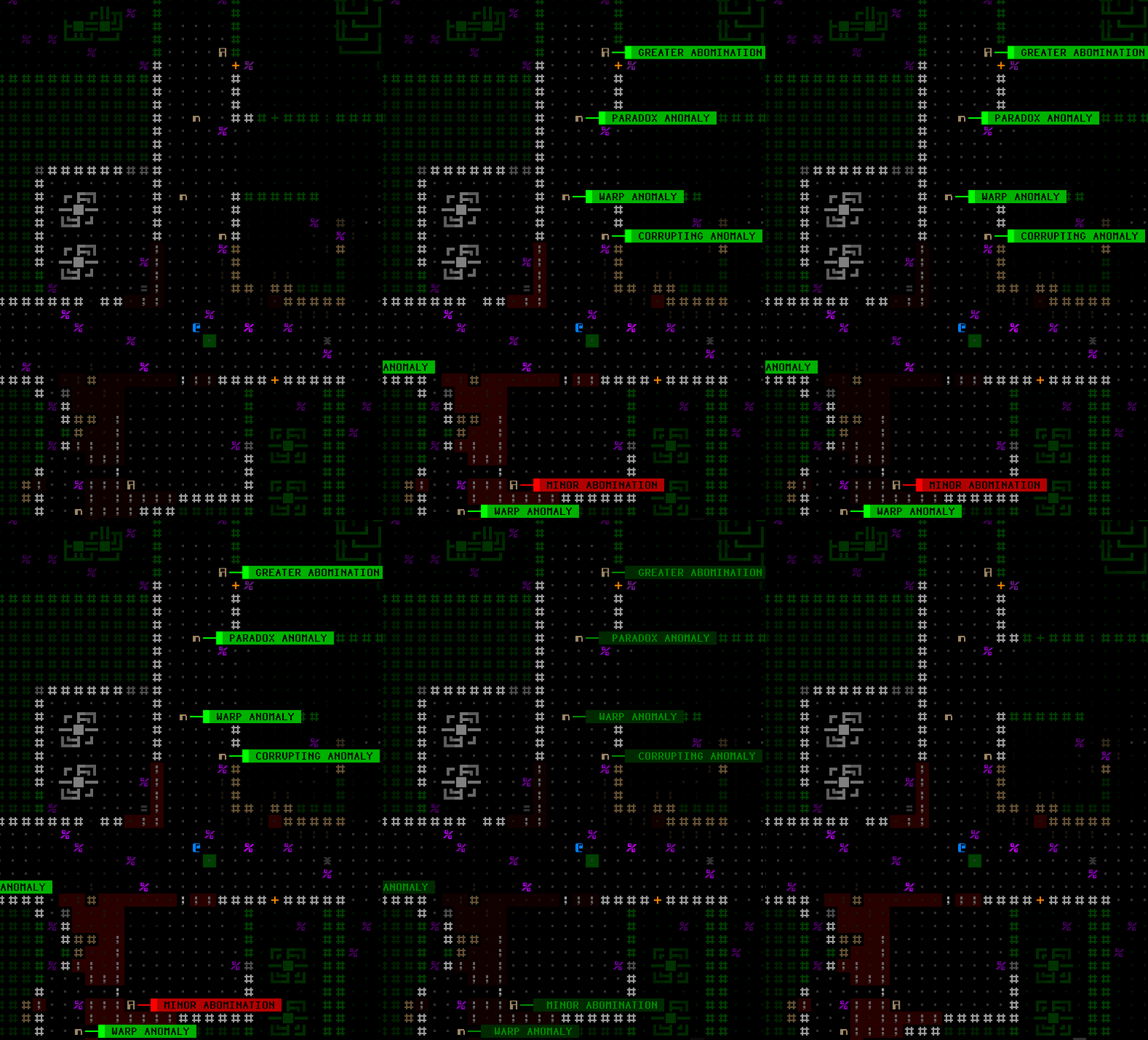
cogmind_halloween_abominations_anomaly_labels

I see an opportunity to get repaired coming from the north, and it could also restore walls to put obstacles between myself and pursuers. Not getting too close to the Corrupting Anomaly would be a good idea, though…

In this mode players can also experience what it’s like to play against numerous robots with non-static loadouts, and why such a situation was intentionally avoided in Cogmind’s core design. With static robot designs, players can build up knowledge about enemies and establish expectations and therefore strategies based on that knowledge. Then the dynamic challenges are more about managing tactics, and as familiarity with robot loadouts grows, less time is spent learning basic information like the capabilities of enemies currently faced--i.e. it’s easier to quickly grasp a situation at hand, even as it changes, because the fundamental units making up that situation are all/mostly known. Having to very frequently examine robot info to find out about their build is a time-consuming process and not something I’d want to be a part of the long-term core Cogmind experience, but it’s okay for a special mode that will probably only be played a few times :)

(Aside: For similar reasons Cogmind also doesn’t feature randomly generated parts.)

Path-wise, for Halloween mode I blocked all the branch exits, even to Waste and Garrisons, because things would get weird and complex if this new content could interact with the plot. In that sense it’s rather nice and convenient that Cogmind’s core linear route to the surface is free of plot considerations and special events (at least none that are triggered locally).

Final Abomination

After everything was working nicely, with more dev time left to spare I felt the one thing missing was some kind of goal other than just escaping to the surface. I brainstormed a variety of ideas, even going to so far as to come up with meta possibilities like hiding Steam keys or creating a kind of tie-in ARG with clues and content outside the game.

In the end I decided it’d be cool to add some kind of boss, which could even have its own new map. At first I wasn’t sure I could easily add a new map like that, or that I really wanted to, since this was just for a special mode, but I went ahead with the idea and thus the “Lair” was born :)

Halloween mode can be won simply by escaping to the surface normally, so accessing the Lair is intended as a secret. After killing enough Abominations (at least 50, sometimes a little more), a dimensional gate suddenly opens, complete with sound effects and warning message so it’s pretty obvious something is going on, and all the exits from the current map are redirected to a new destination marked Final Abomination’s Lair.

To facilitate discovery of the secret, I added a special counter to the HUD that records the number of Abominations killed, and more importantly it changes color as the number gets higher, going from green to yellow to orange to red, hinting that there’s something else to that number.
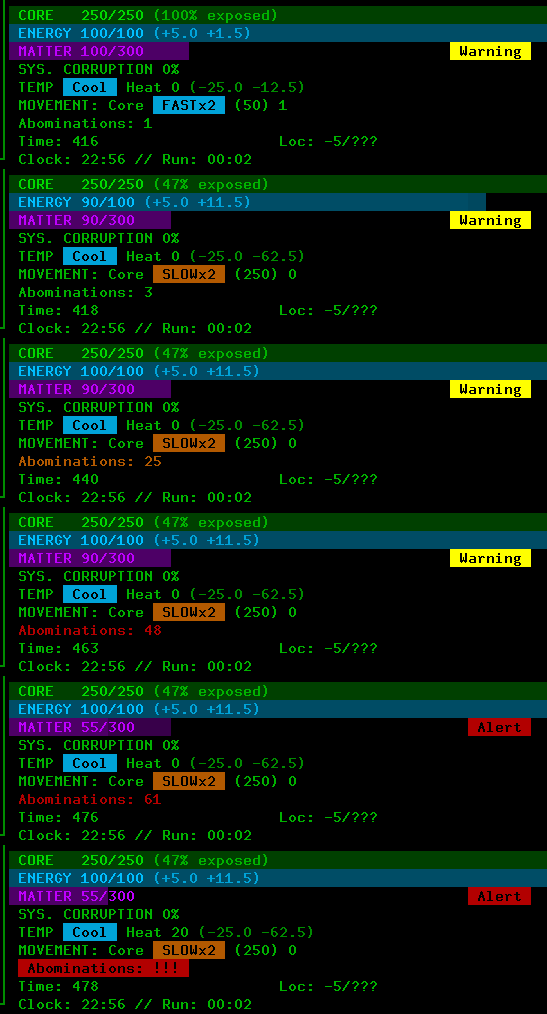
cogmind_halloween_abominations_kill_counter

Demonstrating the special mode’s kill counter on the HUD (via a debug option).

The key number was initially 80, but I lowered it after playtesting the mode myself a couple times, since I didn’t want it to be that cumbersome, and too high a number would also make accidentally discovering it quite unlikely.

Within the Lair is the huge “Final Abomination” with a few Abomination friends which can produce wandering Anomalies as usual. It’s a prefab cave, and not an especially large one, designed just large enough to provide enough space and cover for the final fight. Lots of random high-level parts are scattered throughout the cave, and mechanically speaking the Final Abomination itself is also simply an even bigger Abomination with the same ability, drawing in nearby parts for its own use. It has a decent amount of core integrity though, so combined with its potential loadout it can be rather tough to take down.
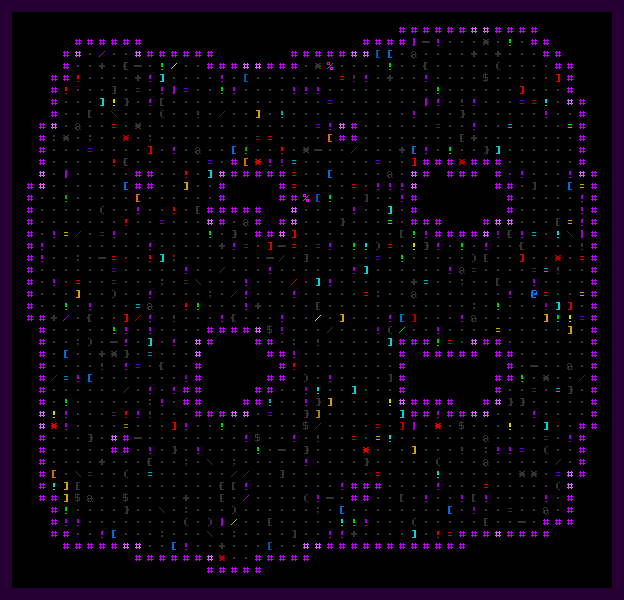
cogmind_halloween_abominations_lair

Final Abomination’s Lair. I’ll leave out the boss so you can maybe discover what they look like one day :)

Some of the cave walls also randomly break open to spill out new parts, which might help later on (or hinder, depending on who picks them up xD)

The only way to escape is to destroy the Final Abomination, which creates a door that leads to the surface.

Strategy

I like how special modes can easily take an otherwise familiar environment and turn it on its head to suddenly provide a range of entirely new strategic and tactical considerations to take into account. Yeah we’re still in Complex 0b10, and the usual combat and non-combat bots are around and also may need to be dealt with, plus we’ve got a lot of the usual tools to work with, but with Abominations and Anomalies running around, everything feels different.

I’ll admit it’s quite chaotic, actually, though Cogmind is right at home immersed in chaos since the name of the game has always been about adaptability. It’s true in the regular game some players weave their way around the unpredictable elements and minimize the chance of risk and need for adapting to the unexpected, though for me the game shines brightest when it’s repeatedly throwing unexpected tactical situations at the player, situations that can most likely be overcome, but it’s a question of how well the player performs, and whether the result weakens them too much to take on the next situation, and the next, and so on.

Anyway, while playing I made some observations about Abomination-specific survival as I was blasting my way through the chaos, making it most of the way through on my first run, and on my second facing off against the boss (which I managed to take down about half way, though I entered the area fairly weak):

  • Abominations are often pretty slow, so running away or at least repositioning is often a decent option. Checking their speed is pretty important.
  • Spare parts just lying around can be incredibly scary (hey, it’s Halloween!), since they can be used against you. Spotting a cache of good explosives, for example, I’m immediately imagining how much I’d rather not meet an Abomination that decided to pick up such firepower. Either make a beeline for it and pick them all up, or avoid it like the plague :P. Heck, maybe even consider destroying them! Sometimes you might also consider “feeding” an Abomination some weaker weapons so it doesn’t end up attaching something better!
  • Any power sources in particular needs to be handled carefully. Those already lying on the ground could suddenly become a new enemy (and take nearby parts!), and dropping one on the ground is often even more dangerous since it could create a new Abomination right next to you! (which also sucks up nearby parts and immediately attacks you xD)
  • The existence of Fire Anomalies makes it likely that almost any build will need heat disappation at some point, even if the build doesn’t normally require it. Probably a good idea to at least have one such part in inventory, preferably a Coolant Injector or something similarly effective :). If one of these Anomalies rushes over and parks next to you for a bit, without a way to get rid of the heat you are going to start melting and it’s going to get pretty nasty.
  • It’s important to be very aware of Anomalies flitting about in general, since they move so quickly and can greatly change circumstances for better or worse. Think of how to use them to your advantage! Frequent use of ‘1’ to label them all is a good idea, as is learning what their respective effects look like, since some of them you can easily spot coming a ways off and change your tactics accordingly. Adapt!
  • Use 0b10 forces and Abominations against each other. It’s a three-way battle for survival, after all, so try not the stand in the middle, or maybe even try to invite them to meet each other ;). I remember one case where I actually dropped an engine from my inventory specifically to take on an oncoming 0b10 squad--sure enough it spawned an Abomination, sucked up all the nearby weapons, and started trashing the other bots while I waltzed off to find the exit, haha.
  • It’s possible to reach the Final Abomination more quickly than the late-game, but in doing so you’ll have fewer slots (not as many evolutions!) so it could be pretty dangerous. Once in Access the exit always leads to the surface, though, so you have to open the dimensional gate before then. The ideal depth would theoretically be -2/Research.

Yet More Polish

So after writing this entire post and then going on to enjoy actually playing the mode quite a few times before release, although fun from the start I kept seeing areas where a little more work here and there would go a long way towards improving the experience.

A number of balance changes came first, since the early floors were clearly on the very hard side, plus I later also realized it would be nice to have better support for the separate difficulty settings. But then after the gameplay portion felt pretty smooth and on target to me, I turned my eye towards interface QoL aspects that were hard to ignore. It was certainly nice to be ahead of schedule on this side project, leaving time for so much extra polish before the official release :)

One modification was to filter out pop-up labels for Matter specifically in this mode, because Matter Anomalies eventually produce quite a lot of it, otherwise making it hard to mass-label other items on the map to parse them.
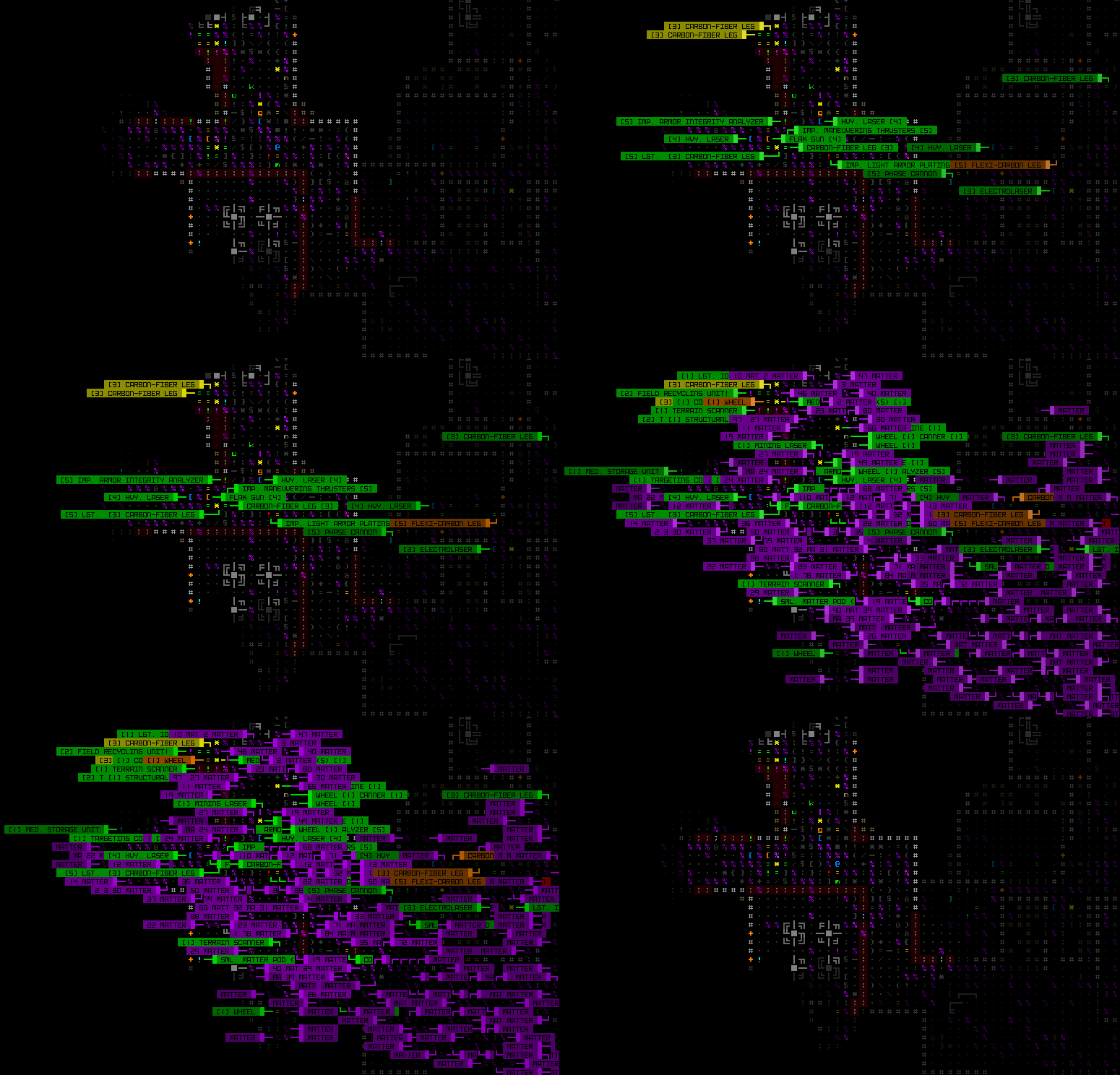
cogmind_halloween_abominations_matter_label_filter

Compare the difference between the filtered set and unfiltered. Yeah. As here, quickly labeling a second time does show all Matter, in case there maybe isn’t a lot of it around yet and you’d like to see the actual values (although the Matter tile’s/ASCII’s brightness reflecting the amount is also useful). This is the same type of filter behavior behind the adjustable relative rating feature in the advanced.cfg options for the regular game as well.

Another big improvement was adding different colors for each type of Anomaly. Labels are pretty easy to access, but still, Anomalies move fast, and frequently relying purely on manual labels to optimize tactics is pretty tedious. Tedium is bad. The Anomaly’s ‘n’ character (and corresponding Drone tile) is not all that often seen in the regular game anyway, and certainly even less in this mode aside from Anomalies, so giving them more freedom in terms of color won’t really lead to any confusion. They are one of the two stars of the show, after all!

So I started by just giving Anomalies different colored trails, where color is based on their type--Fire is red, Ice is white, Matter is purple, and so on.

cogmind_halloween_abominations_anomaly_color_trails

Watching only colored Anomaly trails in a debug view as they move around the map.

This is nice, but trails are intentionally kinda faint and only transient, whereas having a more persistent way to differentiate Anomalies would be even more useful.

I didn’t want to completely override their base color since that would remove the faction info it normally reflects, which might come into play at some point (if rarely), so I decided to instead have them blink in the color of their trail (but brighter).
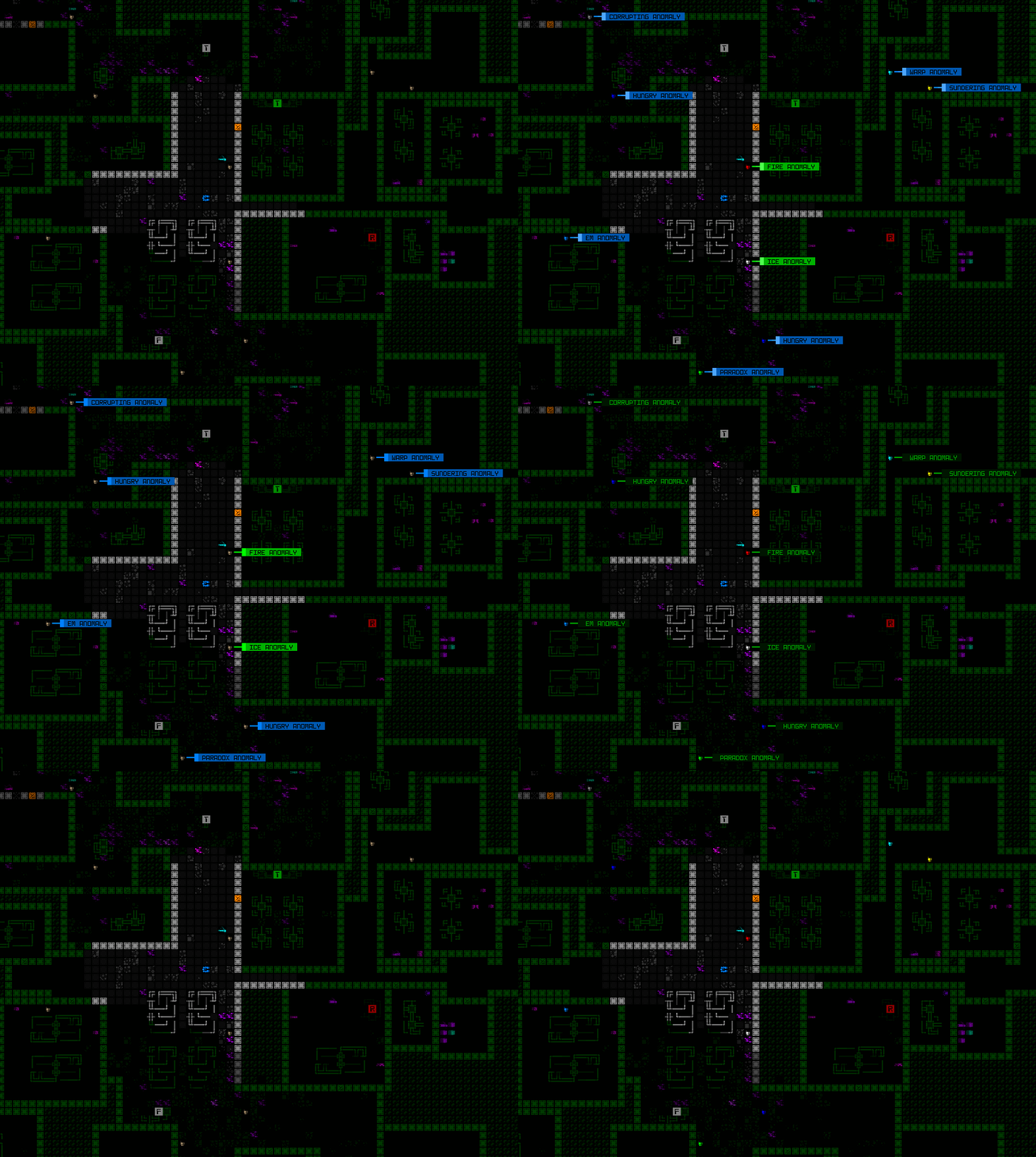
cogmind_halloween_abominations_anomaly_color_blinking

Sample Anomalies blinking their respective colors. The blinking also works for those not currently in view but within range of sensors (with an Advanced or better Signal Interpreter, of course).

Blinking also makes these “environmental hazards” stand out a lot more on the map.

Timing

I decided to make “Abominations mode” a permanent part of the game, so it’ll be available even in future versions.. So far now most special modes have retained their playability, but a similarly content-heavy one last year, Holiday Mode, was only available for that version in order to more freely wreak havoc on the data and code base just for that mode. This time around I had more time to work on this mode, so even though it makes major additions, there was time to ensure each piece was being added in an orderly and futureproof manner.

I think special modes are a good way to add even more longevity to an already highly replayable genre, or bridge gaps between regular releases, although in this case it’s sadly coming a mere week after the massive Beta 9 dropped xD
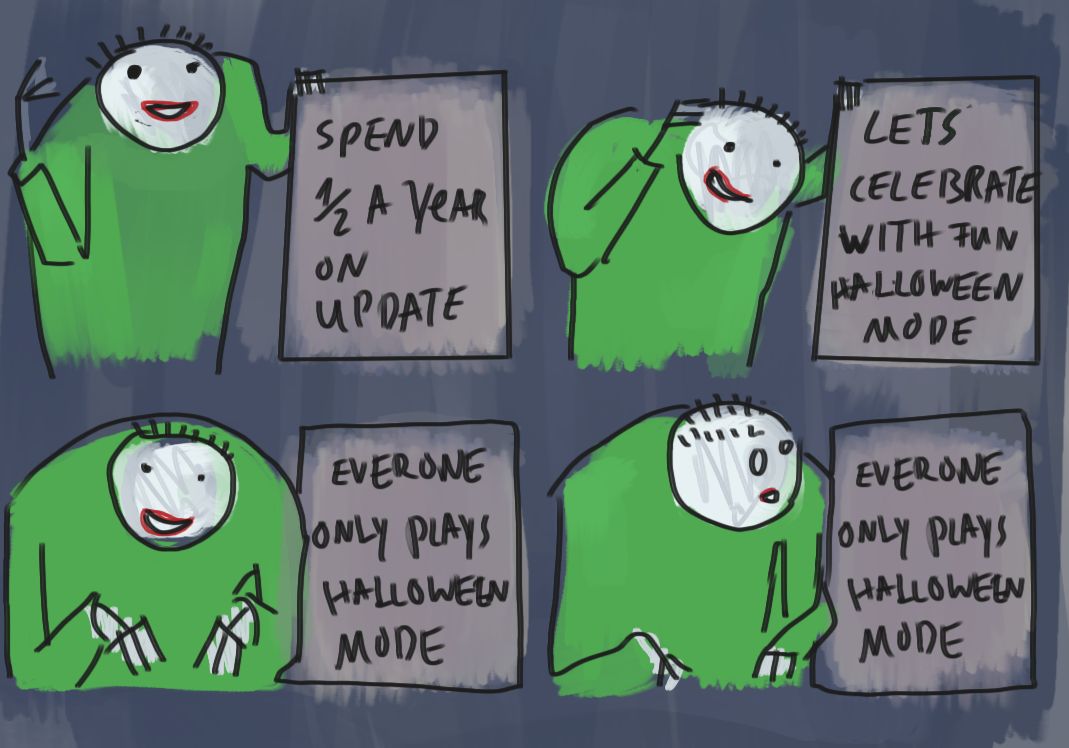
zyalin_cogmind_beta_9_and_halloween_proximity

Art by Zyalin.

Posted in Design | Tagged , , , | 2 Responses

Siege Tread Mechanics

Hot on the heels of upgradable RIF abilities for bothackers, Cogmind has gotten yet another relatively accessible new mechanic that will lead to a variety of new tactics: all multislot treads have the option to enter “siege mode.”

Patron Item/Mechanic

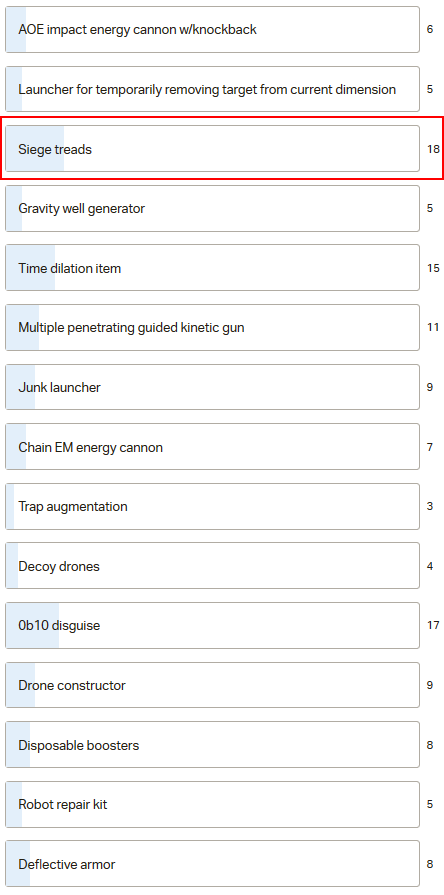
One of the goals I’d set on my Patreon was to allow players to submit ideas for special items and new mechanics, and we’d all vote on those which we most wanted to see in game. We reached that goal during Beta 9 development, so the idea submission and voting happened in recent months, and the winner of that vote was “siege treads.”

cogmind_patron_mechanic_voting_beta9_190825_final

Patron item/mechanic voting results.

At the time the idea wasn’t super fleshed out, indicated simply as “treads with a special mode that confers more combat bonuses but further reduces/prohibits mobility.”

Towards the end of the voting period I took the top four vote earners and posted a somewhat more detailed proposal about their respective mechanics to help people decide, and at the time for siege treads I wrote:

This would add a range of new parts (treads, clearly :P) that don’t need to be rare, so it would be the most generally accessible mechanics among these options.

They’d be toggleable like overloading currently works for other propulsion, with effects like preventing movement while offering accuracy and defensive bonuses, for example increasing the coverage of all treads and/or armor.

Unlike overloading, however, to balance it out the negative effects would last longer once toggled off--basically fully exiting the mode for movement purposes takes some time, which would be indicated on the HUD.

The actual work would start a few weeks later, and before that there was some more designing to do…

Expanded Siege Concept

With siege treads now confirmed, as I started spending more time thinking about this mechanic and the original assumption that it would only be enabled by a few new parts, I felt that limitation was unnecessary (especially for the amount of work this would involve xD).

Why not expand siege mechanics into something that any treads can do? Three other forms of propulsion already have a use for toggling their active state once already active (overloadable flight/hover/legs), but treads didn’t yet have any corresponding ability--maybe that ability could be siege mode!

This would make the patron mechanic more widely accessible, rather than being some rare effect only a handful of people would ever see much less use.

Even more importantly, generalizing this capability would make it easier to teach players new to the mechanic. Tread info pages are already full, with no room left to add more rules info, especially those as relatively complex as siege effects, so by granting the siege ability to numerous treads while indicating that others cannot do it, or some are even better at it than others, we need a new stat, and that stat in turns gives us access to stat context help (i.e. selecting a stat to learn more about the relevant mechanics).

I actually couldn’t see any other way to do it, essentially requiring that this become a bigger mechanic to justify the stat, and here it was clearly the UI which guided gameplay design, which happens a lot.

However, allowing absolutely all treads to do this seemed excessive, and would also be a missed opportunity to make a subset of treads more unique, so I decided to limit it to heavy (multislot) treads. This makes sense on a number of levels, plus by allowing only heavy treads to use siege mode it indirectly restricts this feature to the mid-game and onward, to avoid adding siege mode mechanical and tactical complexity too early for new players.

Interface Work

By far the most troublesome part of this whole process would be how the player controls the mechanic, so I worked on that first. In fact, I even started before nailing down precisely what all the effects would be :P

On the outside it’s not too complicated (good! also important!)--just click/activate to head into siege mode, click again to exit. While transitioning or in the mode, the usual UI features would reflect the current state. The architecture behind overloading non-tread propulsion is quite simple since there is no delay on the effect, and part states can be toggled as a free action at any time. But internally we’d never had anything like the idea of a delayed toggle effect, so there are actually numerous states to handle here: the treads might be inactive, active, or “overloaded,” and while overloaded might be transitioning into siege mode, fully in the mode, or transitioning out. Plus we’ll have to deal with special conditions during some of these states!

cogmind_siege_treads_mockup_preactive

A GUI mockup in REXPaint including an early concept for the siege mode interface components. Specifically that Movement line  info and SIEGE tags (this was before the need for separate tags during transition became apparent).

Since I hadn’t dealt with anything like this before in Cogmind, my first instinct was to have the architecture centered around the robot itself (rather than entirely based on the parts), i.e. treads would be toggled into different modes, but the parent robot separately stores what mode it’s in.

I actually spent four hours implementing this system, and had it working, but the problems were about to begin when I starting getting ready to tackle all the edge cases and special rules a system like this would need. As it turns out, Cogmind has naturally always had a very part-based architecture, and trying to split this behavior between the involved parts and the robot was going to be a crazy amount of error-prone edge case work.

In hindsight: Duh.

Another hour later and I’d reworked it to instead be a part-based attribute, so that treads could be toggled individually (the first iteration also tried to toggle multiple treads at once), and instead of the robot storing any data at all, it could determine its current mode whenever necessary by querying all of its active treads.

This way the edge cases became much more manageable, so in addition to the delayed effect toggling I applied the other special rules one by one…

  • The transition timer could be reversed in either direction before toggle completion
  • Treads in siege mode or transitioning cannot be affected by EM disruption, corruption, overheating, or any other effect that could break or temporarily disable them
  • Treads in siege mode or transitioning cannot be removed, swapped, or dropped
  • Cogmind can still remove treads in siege mode by purging all parts (“going naked”)
  • While a robot is in siege mode, other propulsion cannot be turned on (or autoactivated when attached), a restriction that would also have to be applied to the propulsion cycling feature

Some of these had to be checked in a fair number of places, but not having to also worry about maintaining a separate robot state at the same time meant it wasn’t too much trouble.

With that up and running, it was time for the “Siege” stat to appear on the item info. Like the weapon stat line which displays either EM Spectrum or Heat Transfer, whichever is applicable for the current weapon, I could simply replace the propulsion Burnout stat with Siege when necessary. That data was wasted on Tread info anyway since none of them can use it anyway (but Cogmind lists inapplicable stats for items so that side-by-side comparisons are easier to make).

Note that although in this case I also did it first because it was going to be a harder part of the feature and possibly introduce limiting factors, I like to work on as many of the interface aspects of a feature as possible before doing the mechanical or logical aspects, since the former is required to better develop, observe, and debug the latter anyway ;)

Siege Treads

Now it was time to lock down the actual effects of siege mode and implement them one by one. As per the original suggestion this mechanic can be summarized as sacrificing mobility for increased combat abilities:

  • +20% accuracy bonus to non-melee attacks
  • Recoil has no effect on accuracy
  • 25% damage resistance to treads in siege mode
  • All armor and heavy treads have double coverage
  • Immune to part destruction from critical hits
  • Cannot move
  • As per standard hit chance modifiers, being immobile gives +10% accuracy to all attackers
  • Entering siege mode requires 5 turns, as does exiting it, and during each transition there are no benefits (only the inherent drawbacks of immobility and being an easier target)
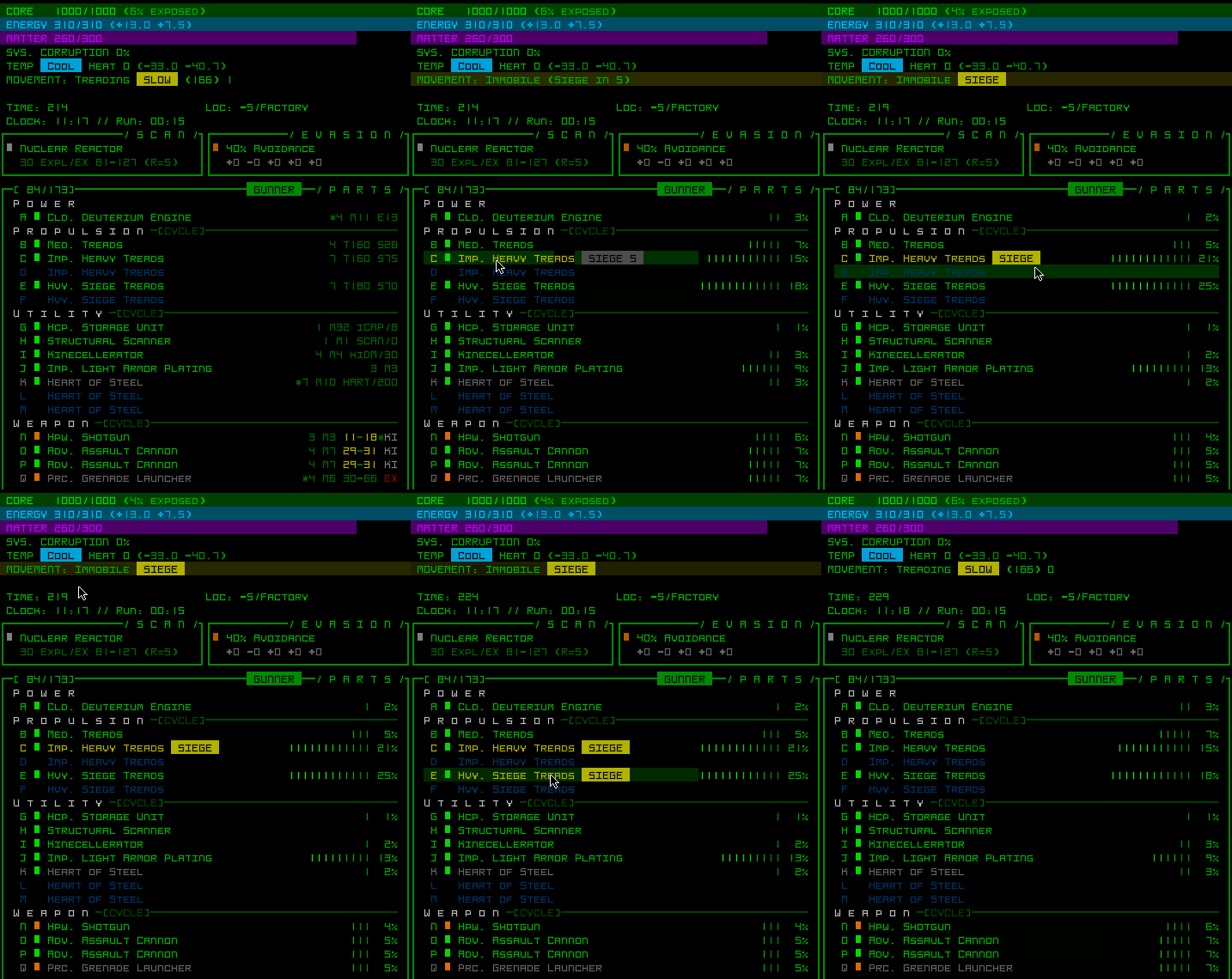
cogmind_siege_tread_activation_immobility_and_coverage

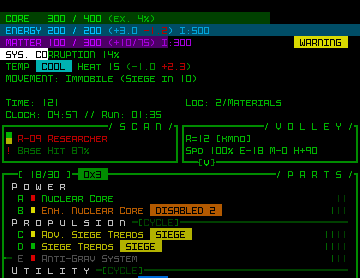
Siege mode UI demo, also showing the relative coverage display.

There are three possible values for a tread’s Siege stat:

  • N/A: Not capable of entering siege mode (applies to all single-slot treads)
  • Standard: Capable of siege mode, as described above (most multislot treads)
  • High: As Standard, but with a +30% accuracy bonus and 50% damage reduction (a select few treads)

Once the effects were known, a new set of specialized “Siege Treads” could be added (but not earlier, in order to know how to balance their various stats against other tread options). Dedicated Siege Treads have average integrity since their incredible damage resistance artificially pumps that up by a lot when put to their greatest use (not to mention their above-normal accuracy bonus for all weapons, which all but guarantees hitting every target)

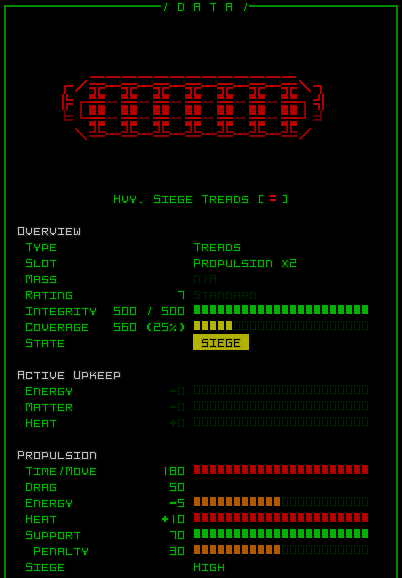
cogmind_heavy_siege_treads_info

Sample info page for Hvy. Siege Treads.

In addition to the new set, one of the rare unique tread types (spoiler) in the game is also capable of High Siege, making it even more desirable and interesting despite its own drawbacks.

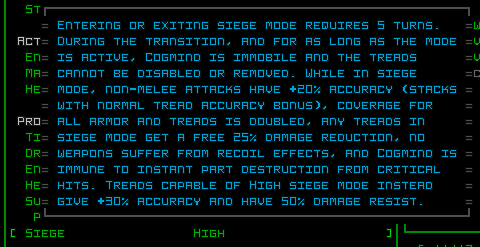
With the mechanics decided, I could also get back to the info page and write the all-important context help, which in this case barely wins out as the longest context help for any stat…

cogmind_siege_stat_help

“Siege” mode context help.

Details and Polish

There was also the usual stuff to take care of as with any stat, like adding it to the gallery item data export formats (TXT/CSV/HTM) as well as some relevant stats for the scoresheet!

cogmind_siege_mode_scoresheet_stats

Sample siege-related scoresheet stats.

It’ll be interesting to see how many times people use this mode, and for how long. There’s also a separate entry for the total amount of incoming damage absorbed by treads in siege mode, though that’s listed under the damage section rather than the section sampled above.

There was no doubt in my mind that siege mode would require sound effect feedback for the activation, so I put together some cool mechanical transformation sfx one for that, too. (And another less exciting one for fully exiting the mode, for completeness and, again, state feedback purposes.)

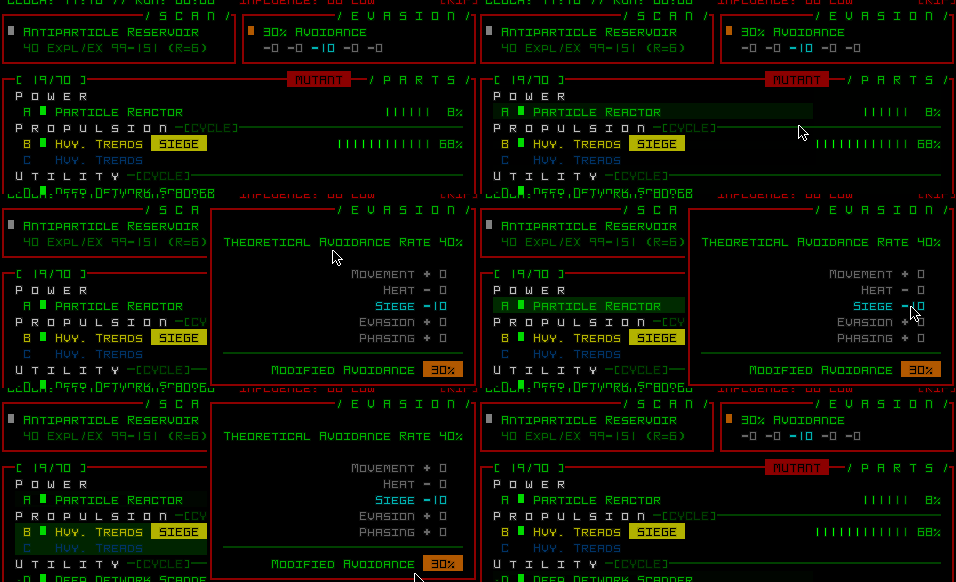
The Evasion window is also supposed to show the effect of any defensive factors that affect enemy hit chance, so that needed a little addition as well.

cogmind_siege_mode_evasion_window

Evasion’s Speed category can now show a negative value while under the effects of siege mode.

AI Siege

Throughout work on siege mechanics, I intended for it to essentially be a player-only feature, as in the AI would never use it even if they technically had that capability. I was mainly worried about spending forever trying to get the AI to use it properly, and that in turn interfering with other behaviors.

But 1) obviously having them use it would be very FUN, adding more dynamic possibilities to certain situations, and 2) I also remembered that I recently already added turrets (in Beta 8) which are stationary combatants and that ended up okay. (Also having a few hours left to actually work on this played a part!)

So yeah, that’s a thing.

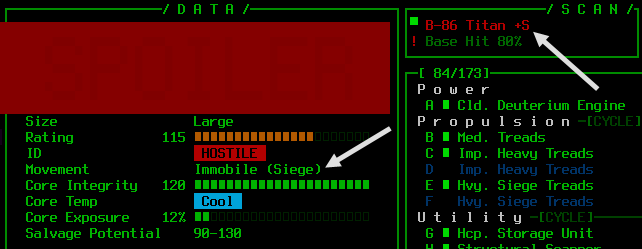
Though once the AI can do this, too, suddenly we need yet more indicators to reflect their state! For that I added a “+S” next to their name in the scan window, and an additional “(Siege)” text to their info window when that’s the reason for their immobility.

cogmind_siege_mode_entity_status

Robot siege mode indicators in the scan window and info window.

There’s also an on-map indicator: a blinking yellow ‘X’ temporarily appears over robots that have just entered siege mode.

This also reminded me I should probably add log messages for siege activation and deactivation, both for the player and others.

Plus of course you’ll hear when other robots enter siege mode (they get the cool sfx, too, although you might not be so happy to hear it when they do it!), so there are numerous avenues of feedback for this situation.

Tactical Implications

I’m eager to see how players make use of this new mechanic, especially given that it’s fairly accessible and comes at a time when other changes are also shaking up the combat meta. Using siege mode is entirely optional, but it does offer some new opportunities to consider alongside its potential drawbacks.

For one, in a tactical game like Cogmind where you’re often engaging numerous enemies, mobility is quite important. You always want to be in the optimal position, but with siege mode you’d have to make that determination further in advance, and be less flexible when things change for the worse.

Repositioning is often important even in the middle of a fight, and especially in dynamic fights where unexpected events lead to more dangerous situations, like a wall suddenly being removed and revealing new enemies, or being flanked, or being in a fight where additional nearby patrols are alerted alerted and start to overwhelm your position, or… much worse? :P

There are quite a few cases where even on treads, as slow as they are, you’ll want to get to a better spot to continue the fight, but if already in siege mode that won’t be such an easy option anymore, so whether or not to use it isn’t always a clear decision.

Due to the transition delays, overall one can’t use siege mode as effectively without prior knowledge of nearby enemy locations*, but the best siege loadouts will be specifically built for it, so whether or not it’s possible to capitalize on that capability requires a certain kind of situational analysis. (*For that reason I think it will be quite an effective combo with FarCom, if not sensors or other forms of tracking/detection.)

The transition requirements also mean you’ll always spend at least 10 turns not moving, plus any time spent in the mode, which might be time wasted. Some of this effect might be mitigated by turns spent doing actions where you’d be stationary anyway, like inventory management, but we’ll see how people react to it. There are certainly more ways to tweak it if necessary--like the transition duration can be modified (although I think 5 turns is a good spot to balance against the effects), or, more likely, certainly actions like firing would not be possible during the transition.

Although the defensive potential in terms of free damage resistance and extra coverage is nice for protecting your other parts regardless of situation, personally I think it’s most effective at range, where you can take advantage of the accuracy bonus better than enemies who would almost certainly hit you if they were close by (given their additional accuracy bonus from your immobility). Of course engaging enemies at range is overall more difficulty to do when slow.

Shortly after implementation, I started streaming a new heavy combat run aiming to use and talk about siege tread mechanics (among other new Beta 9 stuff). Part 1 is here:

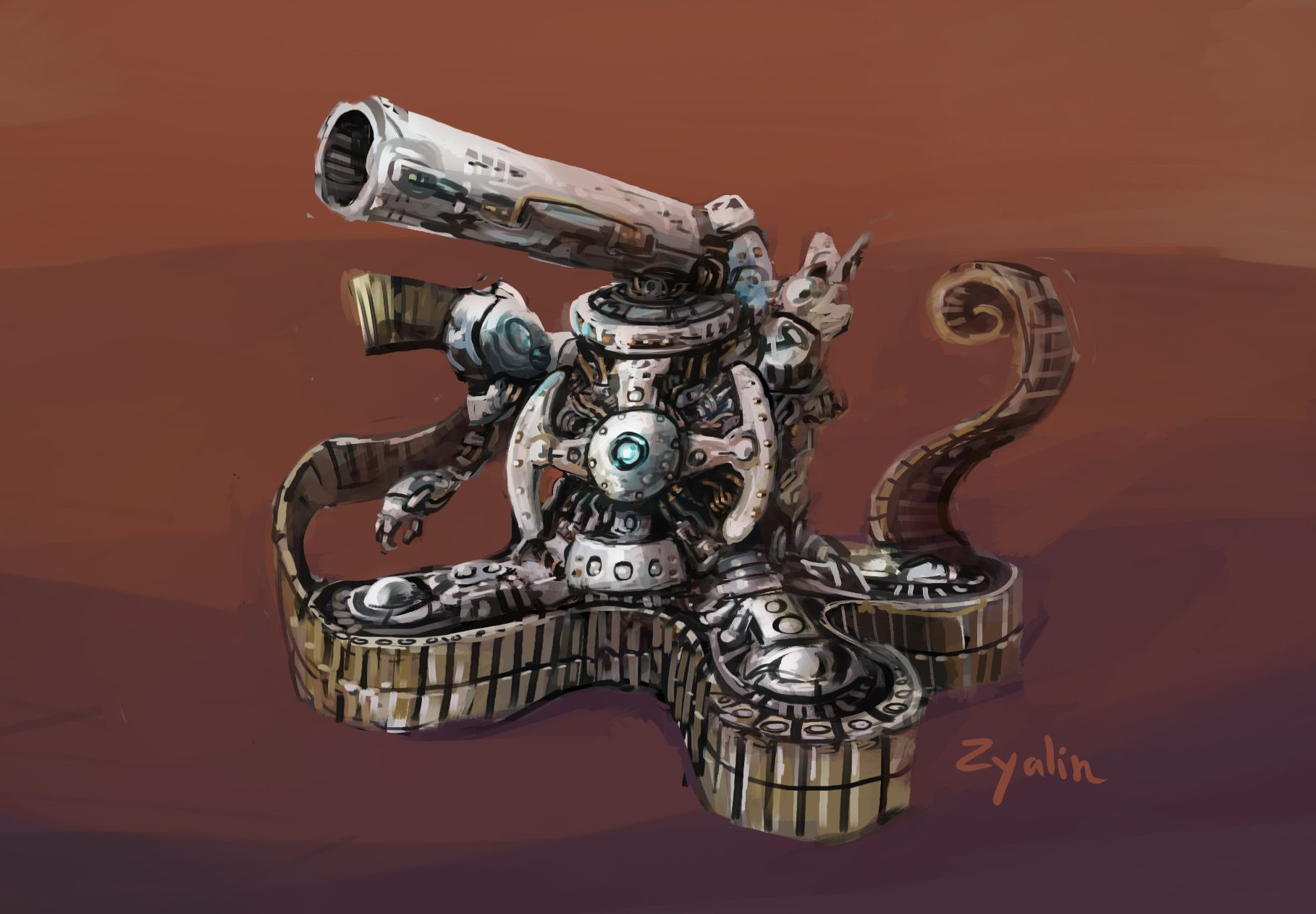
After the stream Zyalin shared his impression of a Cogmind in siege mode:

cogmind_siege_treads_fan_art_zyalin

Siege treads concept by Zyalin.

What are treads doing when they’re in siege mode, after all? ;)

Posted in Mechanics | Tagged , | Leave a comment

Sorry macOS users, but Apple has gone too far for some of us devs

Years ago when Cogmind was first released, I kept an open mind about the future prospect of releasing an official Mac version. Cogmind is my first commercial game, after all, and having only previously released hobby projects as freeware, and only on Windows, I couldn’t be too sure what supporting additional platforms would entail. So I took a wait-and-see approach about whether to provide some form of official support for Macs.

In the meantime I’ve just ensured that Cogmind (and my other software) works perfectly via Wine and similar third-party solutions, but on Steam of course I could never mark it as having Mac support since it’s not a separate download that runs on its own, and whether or not to put together something that would fit that requirement stayed on the backburner as I worked towards 1.0.

Well, by now I’ve definitely waited long enough, and seen enough, to come to a reasonable decision: Officially supporting macOS is simply not feasible for me.

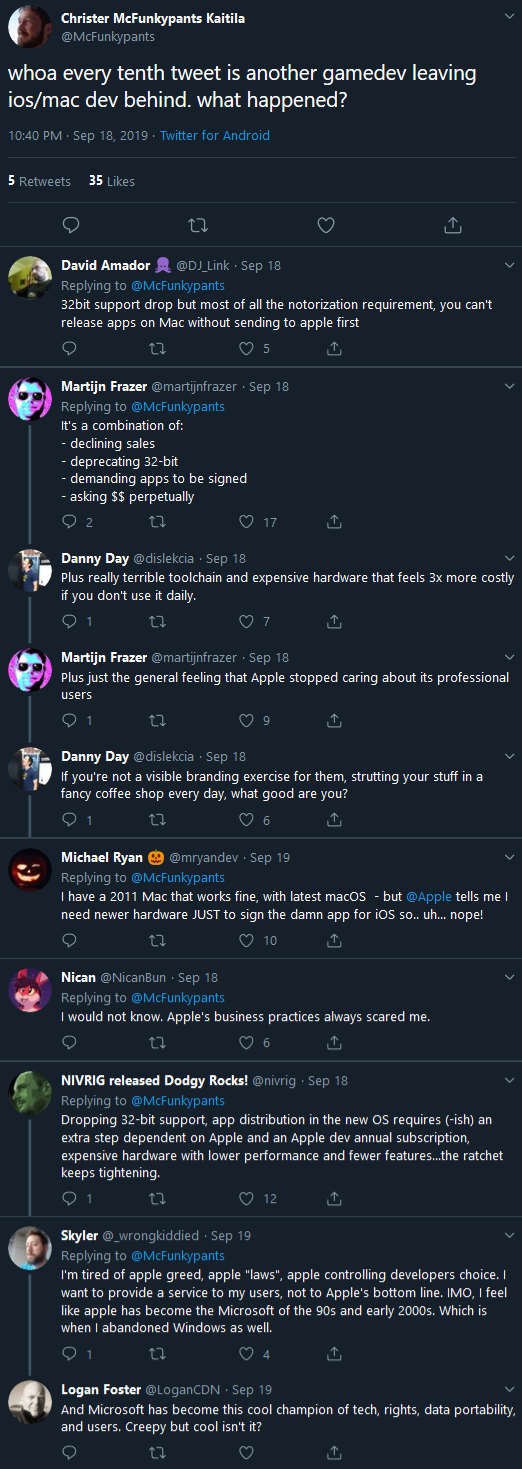
Regarding the timing of this decision, if you follow indie game developers, communities, or news, you might’ve heard a lot of noise lately about Apple, and sadly I’m here to add another voice to that chorus.

twitter_christer_kaitila_macOS_thread

Dev Twitter talking about Apple’s latest moves

Clearly I was already on the fence about the whole Mac thing before, otherwise it might’ve happened earlier (I did spend a while researching and testing the potential for a solution on Macs, in preparation for a potential future public release), but Apple has time and again taken actions which are clearly hostile to developers as they continue the trend of building and reinforcing their own walled garden.

Among their latest moves, Apple’s newest OS drops support for 32-bit applications, which will unnecessarily render a huge library of software and games unusable on Macs, compared to Microsoft which does a great job of maintaining Windows backwards compatibility in that area even as most modern software tends to be 64-bit. This makes it far easier to hold together Cogmind’s existing tech so I can focus on things players actually care about, like more features.

More importantly, Apple will require developers to register, pay an annual fee, and notarize every build they want to distribute, altogether drawing devs yet closer into the tightly controlled black box of Apple’s world.

So not only would I have to buy, learn, and update their ridiculously expensive hardware, I’d also have keep paying them money, and force both myself and players to suffer a slower build turnaround time and other issues all so Apple can tighten their grip on their users and developers. Nope.

Unreasonable Burden

Making games is already challenging enough without platform holders adding to that burden without anything to offer for it.

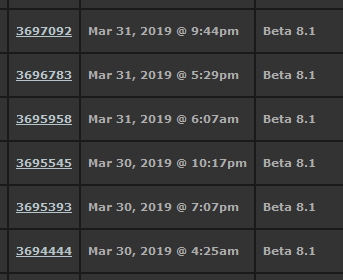
The notarization requirement is especially terrible for games that get lots of updates (roguelikes! Early Access!), when I might even want to put out several builds in a single day. My normal release process? Simply compile a build here, copy the files into the Steam backend and *bam*, everyone has access just like that--I don’t need to insert a third-party black box into that arrangement.

cogmind_uploaded_steam_builds_beta_8.1

The Steam backend showing Cogmind builds uploaded with modifications and fixes in short order for one of this year’s releases. This is pretty common!

(Note: My DRM-free release process is more or less the same: Simply zip up a new build and upload it to the release site.)

So yeah there are more hoops to jump through, but beyond the burden is something more worrisome: Basically I don’t trust Apple to care about my interests as a developer.

They have a history of dev-hostile actions that are pushing developers away from their ecosystem, which I guess is an inevitable side effect of having built a successful business around walled gardens and trying to lock everyone inside--some will stay, but those with good options elsewhere won’t.

Uncertainty is already a huge risk factor in game development, from design issues and technical hurdles to market forces and life in general, we don’t need more uncertainty coming from high places that we don’t have any hope of influencing, much less companies with a poor record in the first place.

Non-Apple Roadblocks

Apple aside, I should also cover the reasons that originally had me on the fence to begin with, one of which I’m sure the average Mac user will also be quite familiar with: economics.

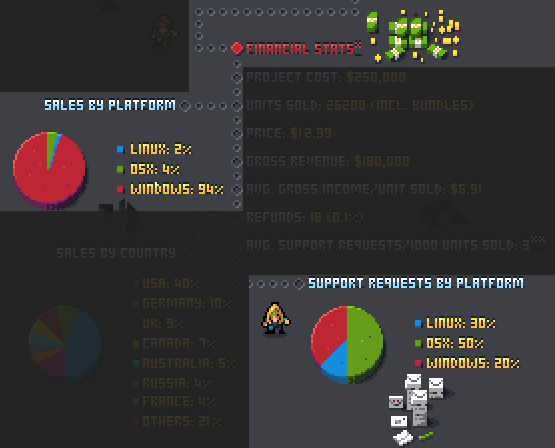
Naturally there’s a non-negligible additional cost to developing and supporting an additional platform, one that varies depending on tech and know-how. Assuming time isn’t a factor, sufficient sales volume might make it worth the investment to support other platforms, although this is harder to do without a more mainstream game (that also sells well!) where the inevitably tiny ratio* of players using Macs is still a respectable number, as opposed to working on niche games like I do :P

(*Approximately 5% for your average roguelike, based on the data I have.)

To me, even more important are the non-financial calculations, since Mac players also tend to require a greater amount of post-release customer support, and I’m just one guy…

halfway_support_stats

Mac players account for 4% of sales but 50% of support requests, one of many such examples I’ve seen from dev data over the years, including from other roguelike devs.

Of course Mac support request ratios will vary by game due to architecture and player base, but there’s little question that they’re higher in general, which for me is a problem because I’m only really familiar with Windows. Being able to remotely troubleshoot issues is already challenging enough on a system I’m quite familiar with, but at least the years of learning are behind me, that and I can manage a reasonable number of requests. I wouldn’t be able to offer the same level of help to those using other systems, in which case it’s better to not put myself in that position in the first place.

It’s somewhat easier for a team to handle multiplatform support, whereas I’m mostly on my own here doing all the design and programming (in my custom engine--this isn’t “push button to release to platform B” xD) and marketing and all sorts of other things.

What now?

What does this mean for the future? Unfortunately given Apple’s trajectory here, I can’t see doing anything official for macOS. I’m all for accessibility and making it possible for more people to enjoy the results of my work, but this one’s beyond me. Gotta stay sane, and Apple sure doesn’t make is easy!

I will continue to make sure Cogmind (etc.) is compatible with Wine itself, especially since it also works nicely on Linux (and Proton under Steam), so for as long as it’s possible to run it through Wine on a Mac that will still be an option.

Of course, you can also try to stay on an older macOS, though I guess that will only get you so far. It will, however, enable you to use all the other software that’s about to be deprecated as well xD

In any case, hopefully everyone can understand my choices here. Not easy choices to make, but it’s important to stay realistic…

Addendum: I originally wrote this post just as a collection of thoughts and data that I could refer to when asked about Mac support, but in sharing it on Twitter it ended up stirring up a fair amount of discussion!

Posted in Gamedev | Tagged , , | 34 Responses

Quicksaving and Restore Points

For me, permadeath is a huge part of the roguelike experience. When you make enough mistakes that you lose--that’s it, it’s over. No immediately starting from a safe checkpoint not long before in order to try again, no in-game benefits carrying over to future attempts. Each run is an isolated attempt in which you’re armed only with your knowledge and experience, where the lack of second chances clearly raises the stakes, and the consequences of each and every action feel that much more meaningful compared to games where you can simply say “oh well whatever I’ll just load my last save.” Taking on added risks has an all new meaning that fundamentally changes one’s approach to decision-making.

In that vein Cogmind has been strict on permadeath for its seven years of history to date, but things are [sorta] changing…

Cogmind today is a much longer game than it used to be (or at least it can be depending on play style and goals), and some people don’t have the time or desire to be punished by losing a lot of progress/time to their mistakes, or maybe they simply don’t have the time to spare but are still eager to enjoy more of the game. These are the same people for whom multiple difficulty settings were added a couple years ago. It’s an important form of accessibility, and while it isn’t for me, features like difficulty levels have added a lot of value for a decent chunk of players (no doubt after even more people discover them following the latest visibility improvements).

The same can be said about the ability to save and load progress. If an additional subset of players can better enjoy a roguelike once they have the ability to easily load a save slot, then adding such a feature seems like a good idea already.

People more inclined to want or need this feature are already more likely to do their own save scumming anyway, so why not make it easier? Well, technically there are arguments on both sides of this issue, both sides with merit, so for Cogmind I’ve ended up opting for a middle ground on this particular feature.

So yes, Cogmind is getting it’s very own save/load feature.

But it’s “middle ground” because this feature is not included in the highest difficulty setting, Rogue mode. I decided I want to preserve that mode as the “intended/designed way to play,” and a significant chunk of people who will enjoy the Rogue setting in the first place are going to be into the challenge of traditional roguelikes and permadeath anyway.

The two other difficulty modes, on the other hand, both support the designation of an arbitrary save point which can be restored at any time.

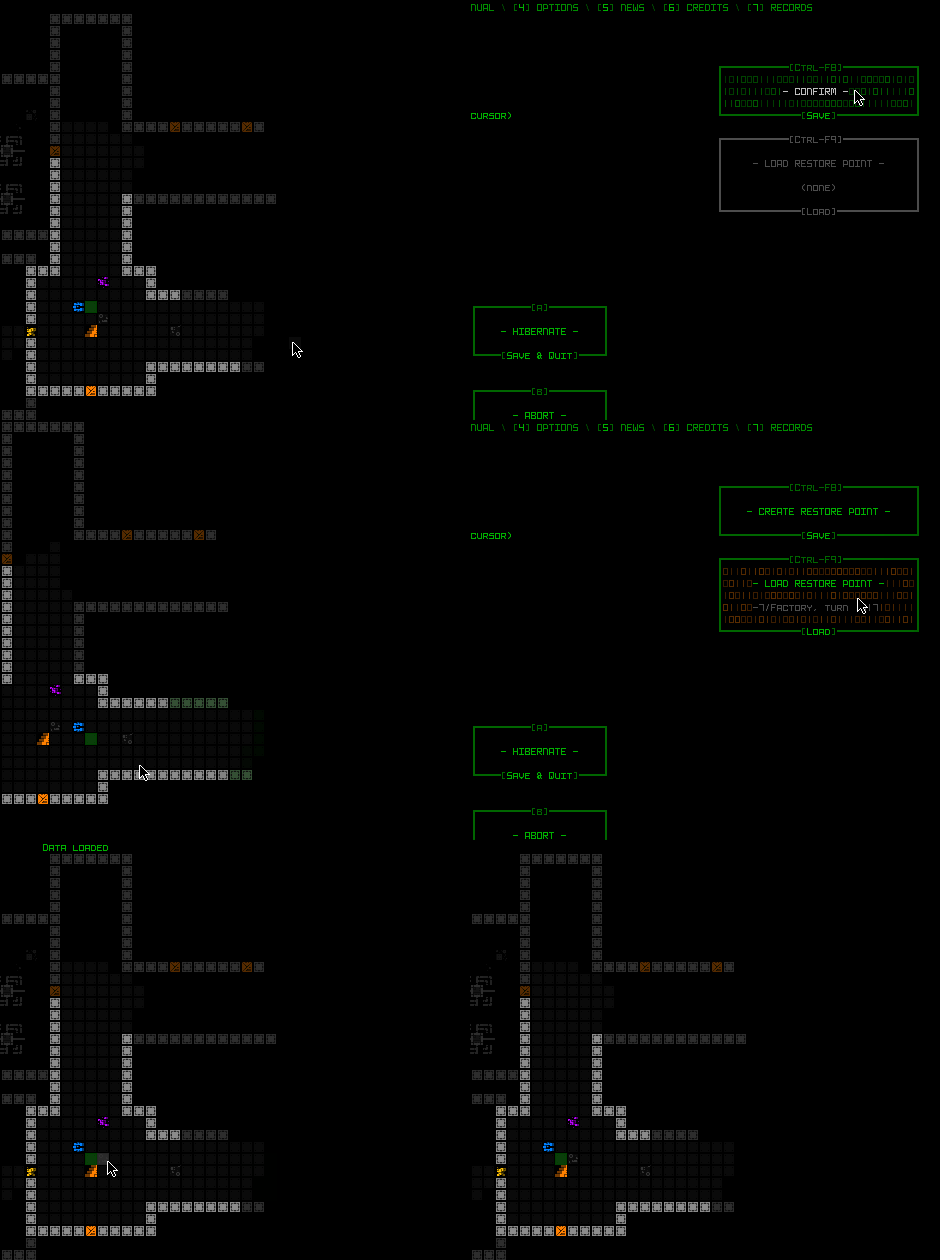
When in either Adventurer or Explorer mode, the game menu displays two new buttons for controlling the “restore point.”  As you can see below, if there is a previously saved point to load, the load button becomes available and shows both the location and turn number to be restored.

cogmind_saveload_game_menu

Accessing the save and load feature from the game menu.

The feature is also accessible via keyboard without the menu, simply by using Ctrl-F8/F9 as quicksave/load buttons while in the main UI.

In terms of architecture, Cogmind was of course already capable of saving runs to be continued later, and even arbitrary input-based saving and loading because I rely on it heavily for testing and debugging. From there it eventually became a Wizard Mode feature available to some patrons starting earlier this year. But the next step was a big one--debugging and wizardry are fine with some limitations or quirkiness, whereas a public feature needs to be accessible and robust!

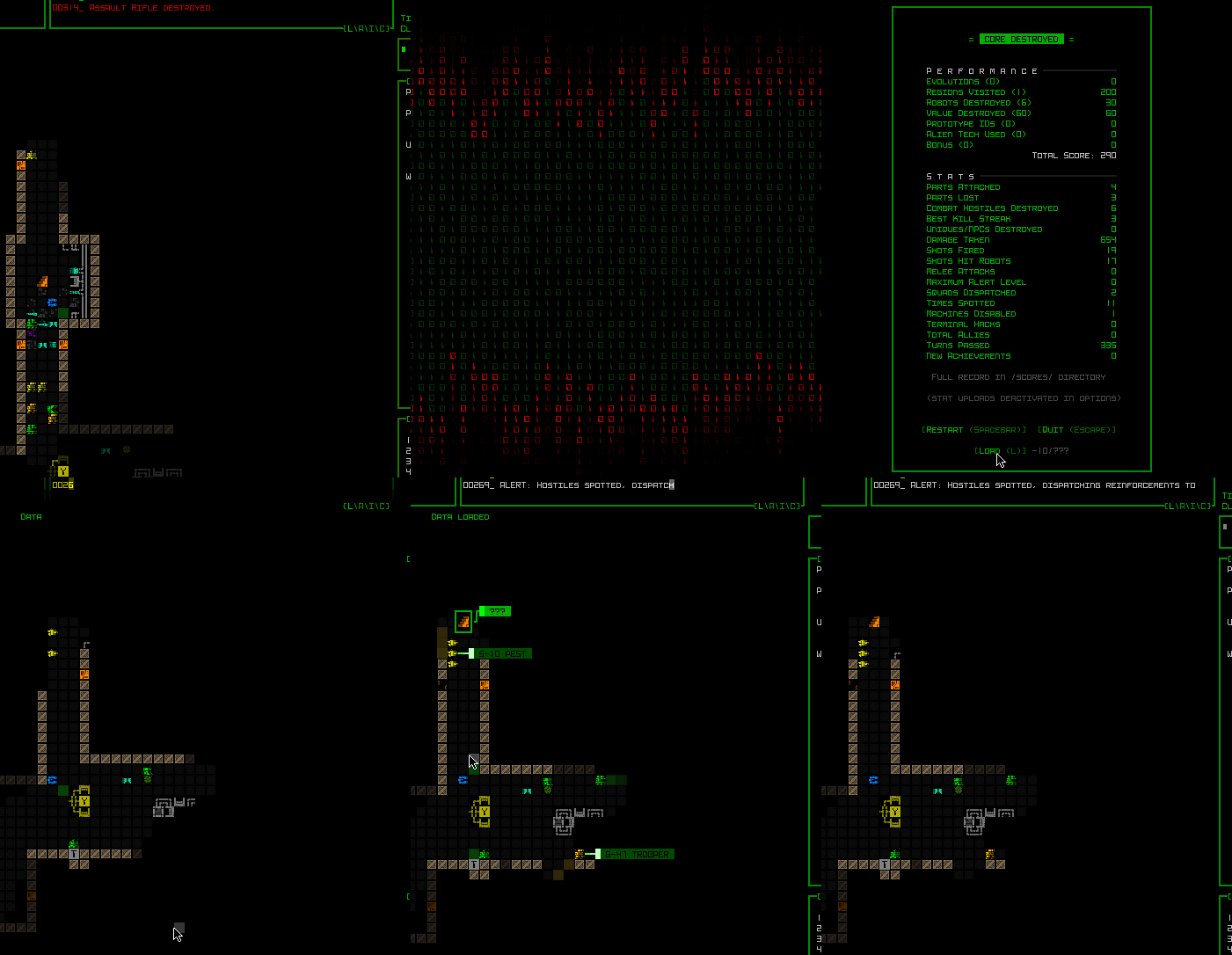
For one, saving and loading need to also be available from the game over screen, in case the run ended prematurely but the player wants to go back and try again from their save point. So that was yet another expansion to that screen, adding a new row to the bottom if and when that option is available.

cogmind_saveload_gameover_menu

Restoring a save point from the game over screen.

For convenience that also displays the save point’s depth and map (if the latter is known to the player).

Overall there were a surprising number of technical considerations behind building a quicksave system that would be compatible with the rest of the game design. It ended up taking a couple days to work through all the possibilities.

Like the game already maintains a save file for the current run, the one that is restored if you exit the game and come back later--should this manual save override that? No, that would conflict with one of the goals of having a manual save in the first place: to be able to go back to an earlier point than the most recent progress. Clearly this needs to be a separate file, meaning this system exists outside the normal save system.

So if you die and never explicitly made a save point to recover, this approach would imply that’s the end of the run there’s no option to go back. To prevent that situation, I implemented “automatic manual save” behavior, whereby if the player has made no save point of their own, at the beginning of each new map the game fills their optional save slot with one automatically. That way if they lose, the game over screen will still present them with the option to load back to that point despite having set no recover point of their own. (Also rather than blindly saving on each new map the game is somewhat smart about it and will skip the save if the player is in very bad shape :P) Anyway, allowing players an opportunity to “try that last map again” is possibly a good way to learn without having to go all the way back to the beginning.

On top of that file we also have the previously implemented periodic autosaves--backups in case a save file somehow gets corrupted (but more often for debugging purposes), and the save file used for time travel (yes that’s how that feature is implemented :P), so together with this new type, there are now four different possible types of save files for the current run!One of the other quirks of the new quicksaves is that they’re only valid in the current run. In other words, once you start a new run the save point from a previous run is no longer accessible--that would get rather confusing, suddenly switching back to a different run, and it would cause a number of other problems too, so I had to put that restriction in place.Altogether the save system is a little different than what’s found in non-roguelike games, since it was designed to work alongside the original “run-based system with automatic resuming on return” more common in traditional roguelikes, while combining the benefits of each.

I’m pretty sure that even though it’s now an “official feature” of two of the three difficulty modes, runs that have been quickloaded will be excluded from the leaderboards.

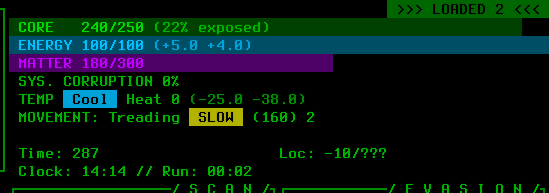
The HUD also got a new indicator that pops up in the top-right corner when applicable, showing the number of times the current run has been manually loaded so far.

cogmind_saveload_HUD_loaded_count

The load counter as it appears in the HUD, here having manually restored to an earlier point twice before on this run.

And for those who want to play Adventurer/Explorer modes but don’t want to even have the quicksave option available to them (to avoid the temptation to use it), I added a new advanced config option to disable that feature entirely, in which case the hotkeys won’t work and none of the relevant buttons will appear.

Posted in Design | Tagged , , , | 6 Responses

Rebranding Difficulty Modes

A couple years back I introduced difficulty settings to Cogmind. At the time I wrote about the benefits and drawbacks of difficulty modes in roguelikes, along with an introduction to Cogmind’s difficulty-related features, and overall I’ve been pleased with the results, but with experience I’ve discovered there is definitely room for improvement in a few areas, so here we go again :)

The Accessibility of Accessibility

Players have had a number of ways to discover that Cogmind even has difficulty settings in the first place. Aside from being described in the lengthy manual (which isn’t suggested reading for new players), it’s also buried in the packed Options menu (which many players won’t open, or if they do still won’t thoroughly explore) and mentioned in a tutorial message (which in Cogmind are fairly easy to miss depending on the circumstances since they’re not very in-your-face and just appear in the message log).

These haven’t done a very good job of advertising difficulty modes, meaning lots of players still don’t even know they exist!

Well there are also my blog and relevant announcements about these settings, but those are both time-sensitive and can only reach a subset of players--we need a good in-game method of teaching players that they have this rather important option available, something that also serves the long-term in that new players also have that opportunity. (Having separate leaderboards for each setting is yet another avenue of discovery, but again, only a subset of players actually check those.)

One of the usual ways games introduce a difficulty setting is having it be one of the first things players select when starting a new game from the main menu/title screen (maybe even the only thing between pressing New Game and starting!).

Cogmind does not have a main menu xD

For immersion reasons I always wanted to go straight into the game after the startup animations. Before release I eventually gave in and added a short title animation as well, which itself disappears automatically after animating so it’s not really a menu, but that was it. I didn’t want a main menu, which means forgoing the functionality that might normally appear there.

But over the years I’ve noticed a fair number of people were unaware difficulty settings are available, have to repeatedly inform players on forums and such. Even recently when I announced in various places that I’d be “rebranding” Cogmind’s difficulty modes (another topic we’ll get to below), despite the fact that rebranding implies I’m making changes to an existing system, some thought I was just now adding them even though they’ve been in place since 2017 xD

In light of my findings, I started to come around to the idea that it would probably be a net benefit if this important option was somehow placed front and center.

Considering my desire to maintain the flow of starting up the game (and lack of a main menu), along with Cogmind’s overall goal of avoiding breaking immersion where possible, there’s really only one option: add a new menu before even the title screen. There it wouldn’t interrupt flow, since once that’s chosen there at least won’t be any more need to stop the usual animation sequences and wait for input. And although I really like the idea of players starting up the game and having it automatically proceed through the opening into the gameplay, I’ve decided it’s worth making this exception for new players.

Cogmind has always defaulted to the hardest difficulty setting and expected players to lower it on their own if necessary (again, if they even know they can!) but this approach clearly has a number of drawbacks. Some of them I’ll get into later, but at this point let’s say difficulty setting obviously has a broad effect on the player experience, and players should start better informed about that choice, and take an active role in making it. Cogmind may have been designed for its hardest difficulty mode, but on that setting it’s also too punishing for a fair number of people who would better enjoy the game with some survival aids :)

Dedicated Difficulty Menu

Enter the dedicated difficulty menu. This menu only appears the first time the game starts up, so it’s not like it’s becoming a permanent fixture before every run, but it’s nice being 100% sure that players know this is thing, and can start where they feel most comfortable.

cogmind_difficulty_selection_demo

Interacting with Cogmind’s new difficulty settings before the first run.

Selecting an option brightens it, and like most important decisions in Cogmind requires confirmation to continue.

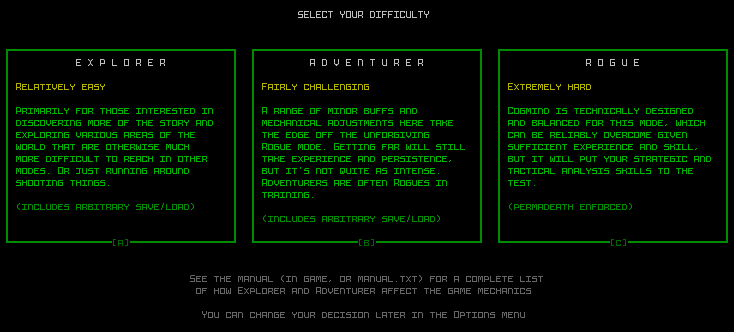
Designwise my first instinct was to align the options horizontally, which overall works better when a user has to select from two or three options, so I was experimenting with some styles in REXPaint:

cogmind_difficulty_selection_unused_mockup

Early mockup of horizontal-style difficulty selection.

But the options were too verbose for that kind of treatment, at least with the content I wanted in there, resulting a lot of short lines which are annoying to read. A horizontal alignment that also looks decent would require fewer words and instead rely more on images or icons, a route I didn’t think was appropriate here.

One of the advantages of having a dedicated menu is that it has plenty of space for more words with which to describe each mode and set expectations, compared to the limited space available in the Options menu.

So the final version of my mockup was instead a vertical design:

cogmind_difficulty_selection_mockup

Vertical difficulty selection mockup.

I then used REXPaint to also draw out the subconsole breakdown for implementation:

cogmind_difficulty_selection_mockup_subwindow_breakdown

Mockup showing how each difficulty option is broken down into areas in the underlying architecture for rendering and input processing.

Expectations and Rebranding

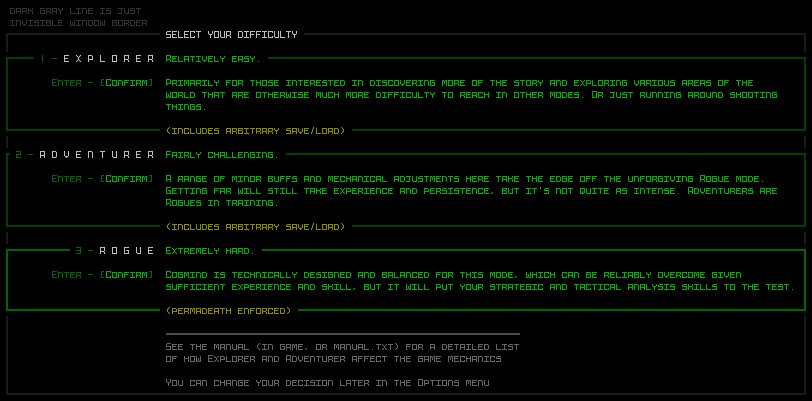
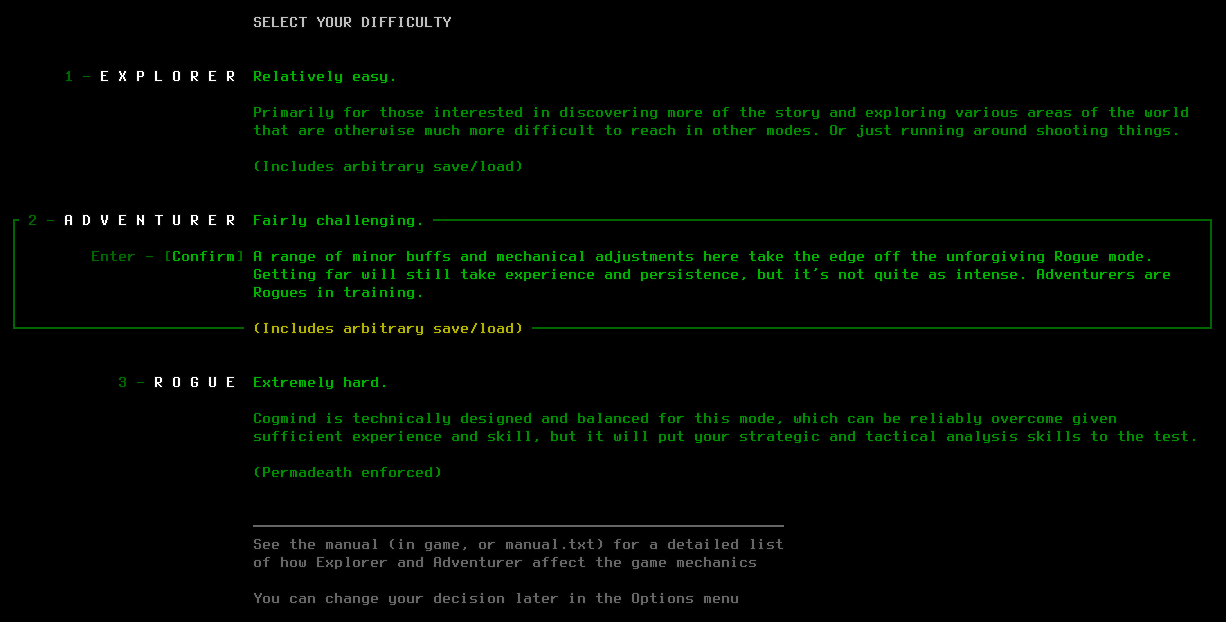
Taking a closer look at the menu’s content, each mode has a name, a short two-word definition, and a longer description, along with an indicator of whether the mode includes quicksaves (which also introduces players to the fact that this is a feature).

cogmind_difficulty_selection_18

A screenshot of the difficulty settings menu, for reference.

The short definition exists to enable an at-a-glance understanding of the approximate level each setting represents, while the the longer description sets expectations more clearly. One could say that rather than naming the modes at all it’d be even simpler just label them by their definition, or even go with easy/normal/hard, and although that could technically work, the idea of “normal” being in the middle there would imply it’s the standard/intended way to play, when it really isn’t. Besides, the unique names are both thematic and more evocative.

The reason I’ve been calling this effort a “rebranding” of the difficulty modes is that besides the new menu, one of the biggest changes happening to the difficulty modes is that the naming scheme has changed. The substance of each mode is largely unchanged from its initial implementation, but how players respond to the new options as they’re presented will definitely be quite different.

Since difficulty settings were introduced, Cogmind has silently defaulted to the hardest/intended way to play, and the two other choices were available in the Options menu as “Easy Mode > Yes” and “Easy Mode > Very,” or so-called “Easier” and “Easiest” mode.

This original scheme was me being way too conservative, emphasizing the “proper” way to play, and everything else is below that. This introduced bias and people didn’t really want to proactively select lower modes due to how they’re named. For some the nomenclature didn’t matter much, but for others it could affect their decision to switch modes or not, even if subconsciously. Would you rather lower the difficulty setting from the default to “easier,” or switch from Rogue to Adventurer? Even if the end result is the same, for some people the answer is different for each question, regardless of ability or need!

Psychologically, having the default difficulty set high and later asking that players lower it in order to better enjoy the game can be harder for them to stomach. Basically, by letting players start out with their own informed choice, and using less loaded names (Explorer, Adventurer, and Rogue are all cool :D), we can side-step multiple issues.

Beta 9

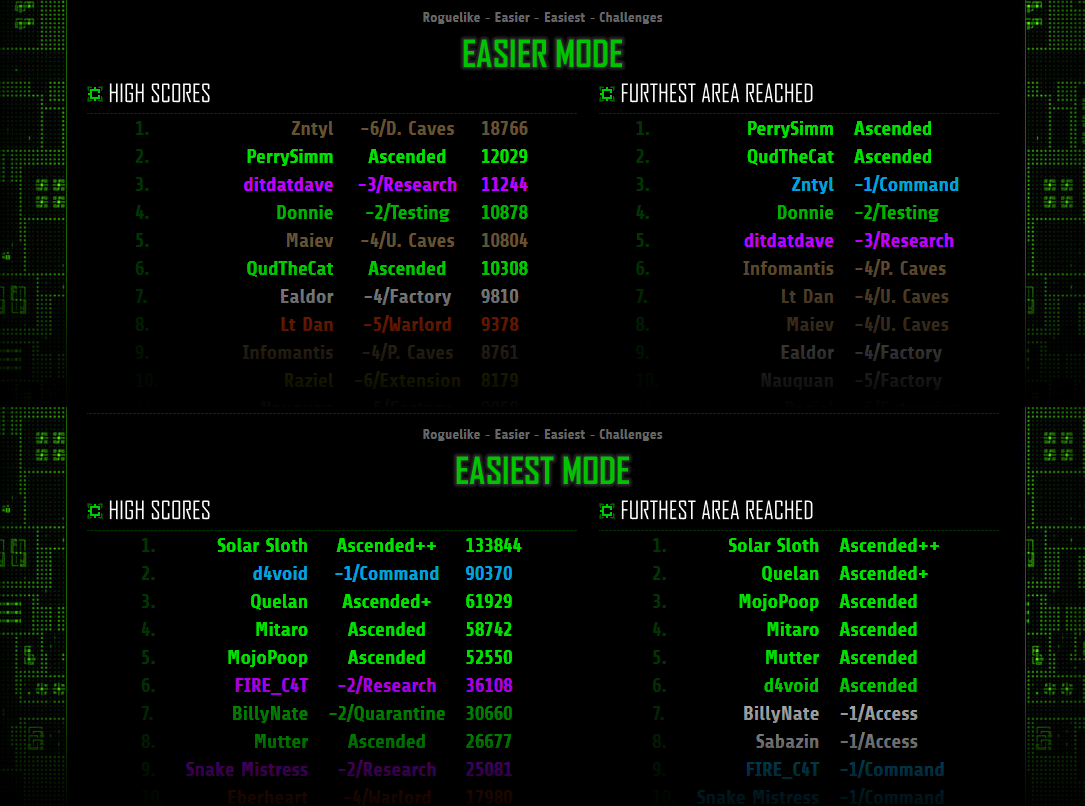
When this feature goes live in the next release and everyone’s difficulty is reset so they have to see this menu for the first time, it’ll be interesting to compare the percentage of players using “non-default” modes (excuse me, Adventurer and Explorer! :P) vs. past data. Currently only about 9.5% of players are using those modes, but I’d be willing to bet that the ratio is going to grow by a decent amount in the future.

cogmind_leaderboard_excerpts_easier_easiest_beta_8

Sample “Easier/Easiest” mode leaderboards as of September 13, 2019, representing only a small minority of players. Still Beta 8, as you can see, pre-rebranding!

In any case, it was important to get this rebranding into the game before 1.0, when even more people will be starting it up for the first time. The goal is to focus on making the game fun for new players, and many who might otherwise enjoy it could be turned off by automatically experiencing the hardest mode as the default. Defaulting to the hardest mode might make sense for a traditional roguelike, but less so in the context of modern games. It is not uncommon for games to not default to their most challenging level, though I think in this case it’s better to not have a default at all, in the end possibly saving the player time.

Besides, the option to go all-out roguelike masochist is still sitting right there for those who want it, and at least they’ll know what they’re getting into ;)

For patrons, there were more comments and discussion of this article over on Patreon here.

Read the followup to this article, about the other big change coming to difficulty modes.

Posted in Design | Tagged , , | Leave a comment